

A vector database is a database built to store, index, and search high-dimensional vectors (embeddings) together with their IDs and metadata. Instead of matching exact values, it answers the question “which stored items are most similar to this one?” by running nearest-neighbor search over the vectors, usually with an approximate index so the answer comes back in milliseconds even across millions or billions of records. Around that search it adds what any database provides: inserts, updates, deletes, filtering, durability, access control, and the ability to serve many concurrent queries.
That combination is why vector databases sit underneath semantic search, recommendation systems, image and multimodal retrieval, retrieval-augmented generation (RAG), and long-term memory for AI agents. An embedding model turns content into vectors; the vector database makes those vectors searchable, filterable, and maintainable in production.
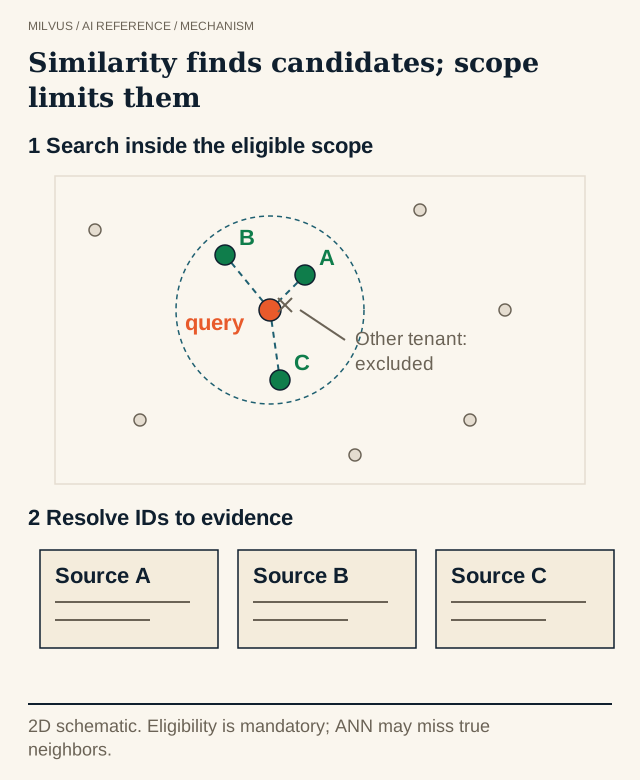 From question to verifiable evidence
How does a vector database work?
Every vector database follows the same basic loop, whatever the product:
- Represent the data. Text passages, images, audio clips, products, or user profiles are passed through an embedding model. Each item becomes a fixed-length array of numbers, often 384 to 3,072 dimensions for dense text models, in which similar items land near each other. Read more in What are embeddings in vector search?
- Store vectors with context. Each vector is written alongside a primary key and scalar fields such as tenant, language, product category, timestamp, or a pointer back to the source document. The metadata is what lets you filter results and trace an answer to its evidence.
- Build an index. Comparing a query with every stored vector is exact but scales linearly. A vector index (graph, cluster, or quantization based) organizes the data so a search only touches a small fraction of it.
- Query by similarity. The user’s query is embedded with the same (or a paired) model, and the database returns the top-k nearest vectors under a similarity metric such as cosine, inner product, or Euclidean (L2) distance, optionally restricted by a metadata filter.
- Return and use the results. The application fetches the matched records, may rerank them, and shows them to a user or passes them to a language model as context.
The key insight is that similarity in vector space stands in for similarity in meaning. A query for “my parcel arrived smashed” can retrieve a help article titled “Reporting a damaged delivery” even though the two share no keywords.
Vector database vs. traditional database
| Relational / document database | Vector database | |
|---|---|---|
| Primary data | Rows, columns, JSON documents | Embedding vectors plus scalar metadata |
| Typical query | Exact match, range, join, aggregation (WHERE price < 50) | "Find the k most similar items to this vector", often with a filter |
| Result | Every row that satisfies the predicate | A ranked list ordered by similarity score |
| Index structures | B-trees, hash indexes, inverted indexes | ANN indexes such as HNSW, IVF, DiskANN, plus scalar indexes for filters |
| Correctness model | Results are exact | Results are usually approximate; quality is measured as recall |
| Good at | Transactions, reporting, structured lookups | Semantic search, recommendations, RAG, deduplication, unstructured data |
The two are complementary. Most applications keep the system of record in a relational database or object store and use a vector database as the retrieval layer, joined by a stable ID.
Vector database vs. vector index library vs. vector extension
People often ask whether they need a dedicated database at all. There are three common options:
- A vector index library such as FAISS or hnswlib runs inside your process. It is fast and simple for a static dataset, but you build persistence, updates, filtering, replication, and serving yourself. See What is FAISS?
- A vector extension to a general-purpose database adds a vector column and index to an existing engine. It is convenient when vectors are a side feature and the data is modest, but vector search competes for the same resources as transactional work, and the index choices and scale ceiling are usually narrower.
- A purpose-built vector database such as Milvus treats vector search as the core workload: many index types, horizontal scaling, separation of compute and storage, hybrid dense + sparse retrieval, and tenant isolation.
A good rule: start with the smallest thing that meets the requirements, and move to a vector database once you need durable collections that change frequently, metadata filtering, multiple applications or tenants, or operational guarantees around scale and availability. Dataset size alone is a poor guide; a few million vectors that are updated every minute and filtered by tenant are a database problem, while a frozen research corpus might be fine in a library.
Which indexing algorithms do vector databases use?
Exact nearest-neighbor search becomes expensive as dimensionality grows, a problem known as the curse of dimensionality, so vector databases rely on approximate nearest-neighbor (ANN) indexes that trade a small amount of recall for large gains in speed:
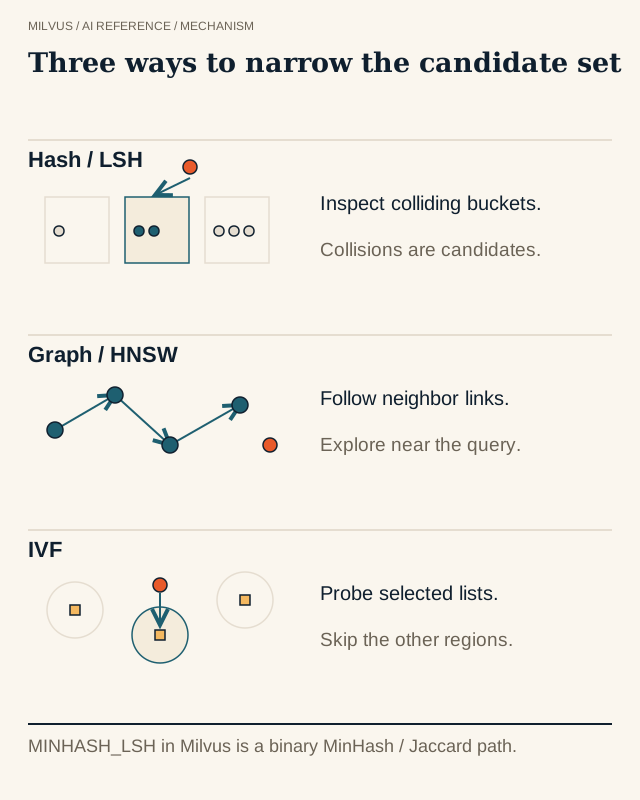 Families of approximate nearest-neighbor indexes
- Graph indexes (HNSW). Vectors become nodes in a layered proximity graph; search greedily walks toward the query. Excellent latency and recall, at the cost of memory. See What is HNSW?
- Cluster indexes (IVF). Vectors are grouped around k-means centroids, and a query scans only the closest clusters (
nprobe). Good for large top-k and lower memory. See How do IVF indexes work? - Quantization (SQ, PQ, RaBitQ). Vectors are compressed to fewer bits, shrinking memory and speeding up distance computations, often followed by a refinement step on full-precision vectors. See What is vector quantization?
- Disk-based indexes (DiskANN). The graph lives on SSD with a compressed copy in memory, for datasets too large to hold in RAM. See When should you use DISKANN?
- Sparse inverted indexes. For sparse vectors produced by BM25 or learned sparse models, an inverted index over non-zero dimensions plays the role that HNSW plays for dense vectors.
No index wins everywhere; the right choice depends on memory budget, recall target, filter selectivity, and update rate. How do you choose a vector index for your workload? walks through the decision.
What features matter beyond search?
The features that separate a production vector database from an index are the ones you notice on day 30, not day 1:
- Metadata filtering that is evaluated together with the vector search, so a tenant or permission filter cannot leak excluded records and still returns k results. See How do metadata filters interact with vector search?
- Hybrid search that combines dense vectors with sparse or BM25 keyword vectors and fuses the rankings, which helps with exact terms, product codes, and names. See What is hybrid search?
- Real-time writes, updates, and deletes, so corrections and removals show up in search without a full rebuild.
- Scalability through sharding, replicas, and independent scaling of ingestion, indexing, and query capacity. See What determines vector-database scalability?
- Tunable consistency, letting you trade read-after-write freshness for latency.
- Multi-tenancy and security: authentication, role-based access control, and isolation between customers.
- Durability and recovery: persistence to object storage, backup, and replication.
What are vector databases used for?
- Semantic search over documents, support tickets, or code, where users describe what they mean rather than the exact words.
- Retrieval-augmented generation (RAG). Documents are chunked and embedded; at question time the database retrieves the most relevant passages, and a language model answers from them with citations. The database retrieves evidence; the model generates the answer, so both retrieval quality and answer grounding should be evaluated. See What is RAG?
- Agent memory. Agents store confirmed facts, user preferences, and past task outcomes, then recall the relevant ones for a new task. Scope memory by user or tenant and keep provenance and timestamps so it can be corrected or expired. See How should you structure agent memory in Milvus?
- Recommendations, by retrieving items whose embeddings are close to a user or session embedding. See How do vector databases support recommendation candidate retrieval?
- Image, video, and multimodal search, such as text-to-image retrieval with a shared embedding space.
- Deduplication and anomaly detection, by finding near-identical items or points that sit far from any neighbor.
What are the limitations?
A vector database finds what is close, not what is correct. If the embedding model does not understand your domain, if documents are stale, or if chunks are too large or too small, a fast index will return fast but unhelpful results. ANN indexes can also miss true neighbors, so measure recall against an exact FLAT baseline before tuning. Vectors cost memory (one million 768-dimensional float32 vectors is about 3 GB before index overhead), and changing the embedding model means re-embedding the whole corpus. Finally, a vector index should not be the only copy of your evidence: keep an authoritative source with stable IDs so deletions, corrections, and re-embedding remain manageable.
How does Milvus implement a vector database?
Milvus is an open-source vector database designed for this workload from the ground up:
- Data model. A collection has a schema with a primary key, one or more vector fields (
FLOAT_VECTOR,FLOAT16_VECTOR,BFLOAT16_VECTOR,INT8_VECTOR,BINARY_VECTOR,SPARSE_FLOAT_VECTOR), and scalar fields such asVARCHAR,INT64,BOOL,JSON, andARRAY. See Design a collection schema. - Indexes and metrics. FLAT, IVF_FLAT, IVF_SQ8, IVF_PQ, IVF_RABITQ, HNSW (and its SQ/PQ/PRQ variants), DISKANN, SCANN, GPU indexes such as GPU_CAGRA, and SPARSE_INVERTED_INDEX for sparse vectors; metrics
COSINE,IP, andL2for float vectors,HAMMINGandJACCARDfor binary vectors. - Search features. Top-k ANN search, filtered search with boolean expressions, range search, multi-vector hybrid search with RRF or weighted reranking, and built-in BM25 full-text search that turns raw text into sparse vectors.
- Architecture. Stateless proxies, a coordinator, and separate streaming, query, and data nodes over object storage and a write-ahead log, so ingestion, indexing, and queries scale independently. See How does the Milvus architecture separate ingestion, storage, and search?
- Deployment. Milvus Lite runs as a Python library for notebooks and prototypes, Standalone runs on a single machine, and Distributed runs on Kubernetes. Zilliz Cloud offers fully managed Milvus, including a BYOC option.
A minimal round trip with Milvus Lite looks like this:
from pymilvus import MilvusClient

client = MilvusClient("milvus_demo.db")          # local Milvus Lite file
client.create_collection(collection_name="docs", dimension=768)

client.insert(collection_name="docs", data=[
    {"id": 1, "vector": doc_embedding, "text": "Reporting a damaged delivery", "subject": "support"},
])

hits = client.search(
    collection_name="docs",
    data=[query_embedding],                      # embed the query with the same model
    filter="subject == 'support'",
    limit=3,
    output_fields=["text", "subject"],
)
The same client code points at a Standalone, Distributed, or Zilliz Cloud endpoint by changing the URI.
Try it
Follow the Milvus Quickstart to create a collection and run a first filtered search, then build a complete pipeline from the RAG with Milvus tutorial or the projects in the Milvus Bootcamp. Before you tune anything, write down a handful of queries with known good answers and check that the right source IDs come back; that small test tells you more than any benchmark.
Related reading
- What is vector search?
- What is approximate nearest-neighbor search?
- How do cosine similarity, inner product, and L2 differ?
- How should you compare managed vector databases, BYOC, and self-hosted Milvus?


