

An embedding is a list of numbers that a model produces to represent a piece of data, such as a sentence, an image, a product, or an audio clip, so that items with related meaning end up close together in a shared vector space. In vector search, you embed every document once, embed each query with a compatible encoder at search time, and return the stored items whose vectors score closest to the query. The embedding carries the meaning; the vector database makes comparing it against millions of stored vectors fast.
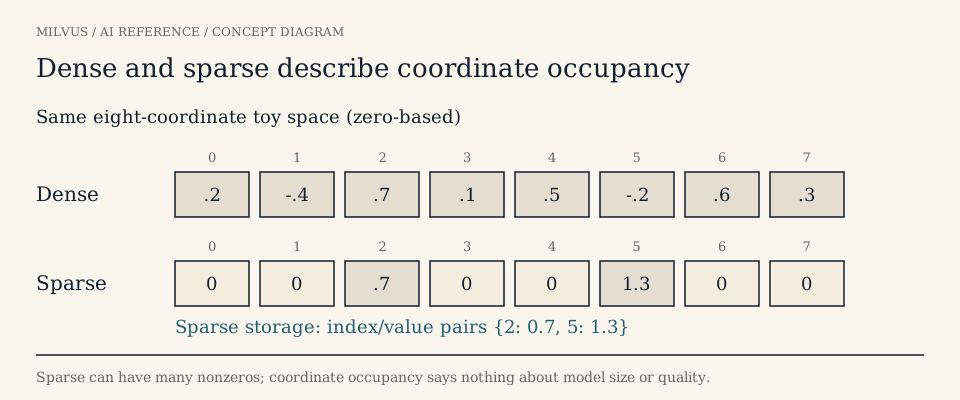 Dense and sparse describe coordinate occupancy, not model size
How does an embedding capture meaning?
Computers cannot compare “my laptop won’t power on” with “notebook fails to boot” by reading them. An embedding model turns each text into a vector, for example 768 or 1,024 floating-point values, and is trained so that inputs used in similar ways land near each other. The idea goes back to the distributional hypothesis: words that appear in similar contexts tend to mean similar things. Word2vec (Mikolov et al., 2013) made it practical at scale, and the famous result that vector("king") − vector("man") + vector("woman") lands near vector("queen") showed that directions in the space can encode relationships, not just topics.
Modern retrieval models extend the same idea from single words to whole passages. Sentence-BERT (Reimers and Gurevych, 2019) showed why this matters for search: comparing every pair of 10,000 sentences with a full BERT cross-encoder takes roughly 65 hours, while encoding each sentence once and comparing vectors takes seconds. That “encode once, compare cheaply” property is what makes embedding-based retrieval scale.
Two consequences follow. First, individual coordinates in a learned dense vector usually have no human-readable label; meaning lives in the geometry as a whole. Second, closeness is only as good as the training: a model that never saw your product codes or medical terms may place them poorly. That is why choosing an embedding model is a retrieval-quality decision, not just an engineering one.
How are embeddings used in vector search?
Every embedding-based retrieval system follows the same two-phase loop:
- Indexing. Split source content into retrievable units (passages, images, product records), encode each unit, and store the vector together with an ID and metadata such as source, language, tenant, and timestamp.
- Querying. Encode the user’s query with the matching query encoder, ask the index for the top-k nearest stored vectors under the agreed similarity metric, apply any metadata filters, and return the source records.
Because exact comparison against every stored vector becomes expensive at millions or billions of items, databases use approximate nearest-neighbor (ANN) indexes such as HNSW or IVF to find most of the true neighbors while scanning a small fraction of the data. The full mechanics are covered in What is vector search?. The similarity score itself, whether cosine, inner product, or L2, must match how the model was trained; see how cosine, inner product, and L2 differ.
What kinds of embeddings are there?
“Embedding” covers several representation families. They differ in how they are produced and in what each coordinate means.
| Family | Typical shape | Where it comes from | Strength |
|---|---|---|---|
| Dense embedding | Fixed length, e.g. [0.12, -0.40, 0.73, …], most values nonzero | Neural encoders (sentence, image, audio, multimodal models) | Paraphrase and concept matching |
| Learned sparse embedding | Mostly zeros over a vocabulary-sized space, e.g. {2: 0.7, 1053: 1.3} | Models such as SPLADE that weight and expand terms | Keyword precision with some expansion |
| Statistical lexical vector | Sparse term weights | TF-IDF or BM25 over an analyzer and corpus statistics | Exact terms, IDs, error codes |
| Binary embedding | Packed bits | Binarized or hashed vectors | Very small storage, fast Hamming comparison |
| Multi-vector embedding | A set of vectors per item | Token- or patch-level late-interaction models | Fine-grained matching |
Sparse does not mean one-hot or small; it means few nonzero coordinates in a large space. BM25 is a lexical scoring function rather than a neural model, but systems can represent it as sparse term vectors, which is why it fits naturally beside dense search. A generative LLM is neither required to produce embeddings nor automatically a good embedding model. For a deeper comparison, read dense versus sparse embeddings, multi-vector retrieval, and multimodal embeddings, where images and text share one space.
How many dimensions does an embedding have?
Classic word vectors used about 50 to 300 dimensions. Current text retrieval models commonly output 384, 768, 1,024, or more. More dimensions can hold more nuance but cost proportionally more memory and compute: one million 1,024-dimensional float32 vectors take about 4 GB before any index overhead, versus about 1.5 GB at 384 dimensions. Dimension count describes capacity, not quality; a well-trained smaller model can beat a larger one on your data.
Some newer models are trained with Matryoshka Representation Learning, which packs the most important information into the leading coordinates so you can truncate a vector (say, from 1,024 to 256) and keep most of its retrieval quality. Quantization offers another lever by storing each coordinate with fewer bits; see vector quantization.
What makes two embeddings comparable?
Two arrays of the same length are not automatically comparable. Query and document vectors must come from the same model revision (or a pair explicitly trained to work together), with the same preprocessing, any required query or document instruction prefixes, and the same normalization. For lexical sparse vectors, the analyzer, vocabulary, and corpus statistics must also match. If you change the model, plan to re-encode the stored corpus; mixing old document vectors with a new query encoder silently degrades results.
Record the model name and revision, preprocessing steps, normalization, and chunking rules alongside the data so you can reproduce or migrate the collection later.
Where are embeddings used?
- Semantic search and RAG: retrieve passages by meaning to ground an LLM answer. See semantic versus keyword search.
- Recommendations: represent users and items in one space and retrieve nearby items as candidates.
- Image, video, and audio retrieval: search media by example or by text description.
- Clustering and deduplication: group or collapse items whose vectors sit close together; see embeddings for document clustering.
- Anomaly detection: flag records far from every known neighborhood.
What are the limits of embeddings?
Embeddings blur exact details. A dense model may treat “error 0x80070005” and “error 0x80070057” as near-identical, and it can struggle with negation, rare names, and numbers. Pairing dense vectors with BM25 or learned sparse vectors in hybrid search covers those cases. Embeddings also inherit their training data’s domain and language coverage, and they encode nothing about permissions or freshness, so keep metadata filters and an authoritative source of truth beside them.
How do you store and search embeddings in Milvus?
Milvus gives each representation family its own field type:
FLOAT_VECTOR,FLOAT16_VECTOR,BFLOAT16_VECTOR, andINT8_VECTORfor dense embeddings, with a declareddim(up to 32,768).SPARSE_FLOAT_VECTORfor sparse embeddings, which needs no fixed dimension and accepts dict input such as{2: 0.33, 98: 0.72}.BINARY_VECTORfor packed bit vectors, wheredimmust be a multiple of 8 and metrics are Hamming or Jaccard.
Dense fields support L2, IP, and COSINE; sparse fields use IP, or BM25 when the vectors come from Milvus’s built-in BM25 Function, which turns a VARCHAR field with an analyzer into sparse vectors and accepts raw query text at search time. You can generate dense embeddings in your application, through the pymilvus[model] library (OpenAI, Sentence Transformers, BGE-M3, SPLADE, and others), or, from Milvus 2.6, through server-side embedding Functions that call a provider during insert and search. The options are compared in generating embeddings alongside Milvus.
A minimal end-to-end loop with Milvus Lite:
from pymilvus import MilvusClient, model

ef = model.DefaultEmbeddingFunction()          # small local sentence encoder
client = MilvusClient("milvus_demo.db")
client.create_collection("docs", dimension=ef.dim)

texts = ["Laptop does not power on", "How to reset a router password"]
vecs = ef.encode_documents(texts)
client.insert("docs", [{"id": i, "vector": vecs[i], "text": t} for i, t in enumerate(texts)])

hits = client.search("docs", data=ef.encode_queries(["notebook fails to boot"]),
                     limit=1, output_fields=["text"])
The query shares no keywords with the first document, yet it should rank first because their embeddings are close. Try a paraphrase, an exact error code, and an unrelated query to see where dense embeddings shine and where a lexical path would help.
Next steps
Run the Milvus Quickstart to store and search your first embeddings, then explore the Milvus Bootcamp for RAG, image search, and recommendation projects. To skip operating infrastructure, the same collections run on Zilliz Cloud. Related reading: What is a vector database?
Sources and further reading
- Milvus: dense vector fields
- Milvus: sparse vector fields
- Milvus: binary vector fields
- Milvus: similarity metrics
- Milvus: built-in BM25 full-text search
- Milvus: embedding functions in PyMilvus
- Milvus: embedding Function overview
- Milvus: limits
- Mikolov et al., Efficient Estimation of Word Representations in Vector Space (2013)
- Reimers and Gurevych, Sentence-BERT (2019)
- Formal et al., SPLADE v2 learned sparse representations
- Kusupati et al., Matryoshka Representation Learning
- Embedding (machine learning), Wikipedia



