

Retrieval-augmented generation (RAG) is a technique in which a large language model answers a question using passages fetched from an external knowledge source at request time, instead of relying only on what it memorized during training. A retriever finds the most relevant chunks of your documents, the application places them in the prompt, and the generator writes an answer grounded in that evidence, ideally with citations. RAG lets a model use private, recent, or domain-specific information without retraining it.
 From question to verifiable evidence
The term comes from the 2020 paper by Lewis et al. at Facebook AI Research, which paired a sequence-to-sequence generator (the “parametric” memory held in model weights) with a dense vector index of Wikipedia (the “non-parametric” memory that can be searched and swapped). The modern pattern keeps that split: the model supplies language and reasoning, and a searchable store supplies facts.
Why do language models need retrieval?
A model’s knowledge is frozen at its training cutoff, it has never seen your internal documents, and when it lacks a fact it can still produce a fluent, confident guess. Retrieval addresses all three. New or corrected documents become available as soon as they are indexed, access to private content is controlled by the application rather than baked into weights, and every answer can point back to the passages it used, so a reader or an automated checker can verify it.
RAG also changes the economics. Updating a knowledge base means re-embedding the changed documents, which costs seconds to minutes; updating a model means a training run.
How does a RAG pipeline work, step by step?
A production pipeline has an offline indexing side and an online query side.
Indexing (offline or continuous)
- Load and parse. Extract text, tables, and structure from PDFs, HTML, wikis, tickets, or code. Parsing quality caps everything downstream: a table flattened into a word salad cannot be retrieved correctly later.
- Chunk. Split documents into retrievable units, commonly a few hundred tokens with a small overlap, preferably along headings and paragraphs. See how to choose chunk size for RAG.
- Embed. Convert each chunk into a vector with an embedding model; optionally also produce a sparse lexical representation for keyword matching.
- Store and index. Write vectors plus metadata (document ID, version, section, URL, tenant, permissions) into a vector database such as Milvus, and build an ANN index so search stays fast at millions or billions of chunks.
Query time (online)
- Understand the query. Optionally rewrite, expand, or decompose it, and derive filters such as tenant, product, or date from trusted application context.
- Retrieve. Run a vector search (and often a keyword/BM25 search in parallel) restricted by those filters, returning the top 20-100 candidates.
- Rerank. Use a cross-encoder or other reranker to reorder candidates and keep the best 3-10.
- Assemble the prompt. Insert the selected chunks with their source labels, plus instructions to answer only from the evidence and to say so when the evidence is missing.
- Generate and cite. The LLM writes the answer, referencing the source IDs it used.
- Log and evaluate. Record the query, retrieved IDs, and answer so failures can be traced to the stage that caused them.
RAG vs fine-tuning vs long context
These are complementary tools, not competitors. The question is which problem you are solving.
| RAG | Fine-tuning | Long-context prompting | |
|---|---|---|---|
| Best for | Facts that change, private corpora, cited answers | Style, format, task behavior, domain vocabulary | A handful of documents per request |
| Updating knowledge | Re-index the changed documents | Retrain or re-tune | Resend the documents every call |
| Source attribution | Natural: each chunk has an ID | Hard: knowledge is in weights | Possible, but the model must locate it |
| Cost per query | Retrieval plus a short prompt | Cheap inference after training | Grows with every token sent |
| Scales to | Millions to billions of chunks | Whatever was in the training set | The model’s context window |
| Access control | Filter at retrieval time | Not enforceable per user | Application must choose what to send |
Many production systems combine them: a fine-tuned or instruction-following model that is good at citing, fed by a retriever that narrows a large corpus to the passages that matter. Even with million-token context windows, retrieval keeps cost and latency proportional to the evidence needed rather than to the size of the corpus.
What kinds of RAG are there?
The survey by Gao et al. groups systems into naive, advanced, and modular RAG. In practice you will meet these variants:
- Naive RAG: embed the question, take the top-k chunks, generate. A useful baseline.
- Advanced RAG: adds query rewriting, hybrid search that combines dense vectors with BM25, reranking, and better chunking.
- Graph RAG: extracts entities and relations so the system can follow multi-hop connections or summarize a whole corpus. See what is Graph RAG.
- Agentic RAG: an agent decides whether to search, which tool to use, and whether the evidence is good enough, looping until it can answer. See what is agentic search.
Where does RAG fail, and how do you diagnose it?
Most bad answers trace back to one stage. Save the retrieved evidence alongside every answer so you can tell which one.
| Symptom | Likely stage | Typical fix |
|---|---|---|
| The right source is not in the corpus | Ingestion | Fix parsing, add the source, refresh stale content |
| Source exists but is never retrieved | Chunking, embedding, retrieval | Better chunk boundaries, hybrid search, a stronger or domain-tuned embedding model |
| Retrieved, then dropped | Reranking, context assembly | Raise candidate count, tune the reranker, deduplicate |
| Evidence present but the answer is wrong | Generation | Tighter prompt, require citations, allow “I don’t know” |
| Correct answer, wrong document version | Provenance | Store version and effective date; filter on them |
| User sees content they should not | Access control | Apply permission filters inside the retrieval query |
Retrieval reduces hallucination but does not eliminate it: a model can cite a real passage while claiming something the passage does not say. Measure retrieval quality and answer faithfulness separately. Retrieval metrics such as recall@k, MRR, and nDCG are covered in how to evaluate retrieval quality; generation-side metrics such as faithfulness and answer relevancy can be computed with Ragas, for which Milvus has an integration guide.
Latency is also end to end. A 10 ms vector search sits inside a request that also pays for query embedding, reranking, and generation, so profile the whole path before tuning any single stage.
What does the vector database do in RAG?
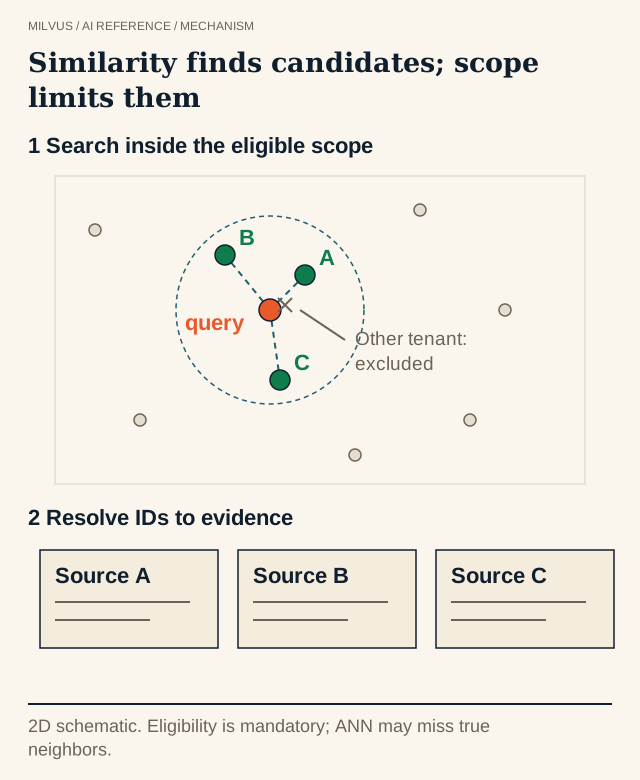
The vector database is the retrieval layer: it stores chunk embeddings and their metadata, finds nearest neighbors quickly, and applies filters so only eligible chunks come back. Milvus covers the pieces a RAG retriever usually needs:
- Dense vector search with indexes such as HNSW, IVF, and DiskANN for large corpora.
- Full-text search (Milvus 2.5 and later): a built-in BM25 function turns a text field into a sparse vector, so exact terms, error codes, and names are matched lexically.
- Hybrid search that runs dense and sparse requests together and fuses them with RRF or weighted ranking.
- Scalar and JSON filtering for tenant, product, language, date, and permission constraints in the same query.
- Partition keys for many-tenant RAG on a single collection.
Parsing, prompt construction, permission policy, and answer checking remain application responsibilities, often handled by a framework such as LangChain or LlamaIndex.
A minimal RAG retriever with Milvus
The snippet below uses Milvus Lite (a local file) so it runs without a server. embed() stands in for your embedding model and chunks for your split documents.
from pymilvus import MilvusClient

client = MilvusClient("rag_demo.db")
client.create_collection(
    collection_name="docs",
    dimension=1536,          # must match the embedding model
    metric_type="IP",
)

client.insert(collection_name="docs", data=[
    {"id": i, "vector": embed(c["text"]), "text": c["text"],
     "source": c["url"], "product": c["product"]}
    for i, c in enumerate(chunks)
])

question = "How do I rotate an API key?"
hits = client.search(
    collection_name="docs",
    data=[embed(question)],
    filter="product == 'console'",
    limit=5,
    output_fields=["text", "source"],
)[0]

context = "\n\n".join(f"[{h['entity']['source']}]\n{h['entity']['text']}" for h in hits)
prompt = (
    "Answer using only the sources below and cite them. "
    "If they do not contain the answer, say so.\n\n"
    f"{context}\n\nQuestion: {question}"
)
# send `prompt` to the LLM of your choice
From here, the usual upgrades are adding a BM25 field for hybrid search, a reranker, and an evaluation set. The Build RAG with Milvus tutorial walks through a complete version with an LLM call, and the Milvus Quickstart covers installing and connecting. When the corpus outgrows a laptop, the same client code runs against a Milvus cluster or Zilliz Cloud.
Related reading
- How do you choose chunk size for RAG?
- How do you evaluate retrieval quality?
- What is hybrid search, and when should you use it?
- What is Graph RAG, and where does Milvus fit?
- What is agentic search, and where does a vector database fit?
- When is a semantic cache useful, and how do you prevent stale answers?
- How do you choose an AI framework for a Milvus application?
Sources and further reading
- Lewis et al., Retrieval-Augmented Generation for Knowledge-Intensive NLP Tasks (2020)
- Gao et al., Retrieval-Augmented Generation for Large Language Models: A Survey
- Build RAG with Milvus
- RAG pipeline implementation guidance
- Full-text search (BM25) in Milvus
- Hybrid search in Milvus
- Evaluate RAG with Ragas and Milvus
- Milvus Bootcamp: runnable RAG applications



