How to Safely Upgrade from Milvus 2.5.x to Milvus 2.6.x
Milvus 2.6 has been live for a while, and it’s proving to be a solid step forward for the project. The release brings a refined architecture, stronger real-time performance, lower resource consumption, and smarter scaling behavior in production environments. Many of these improvements were shaped directly by user feedback, and early adopters of 2.6.x have already reported noticeably faster search and more predictable system performance under heavy or dynamic workloads.
For teams running Milvus 2.5.x and evaluating a move to 2.6.x, this guide is your starting point. It breaks down the architectural differences, highlights the key capabilities introduced in Milvus 2.6, and provides a practical, step-by-step upgrade path designed to minimize operational disruption.
If your workloads involve real-time pipelines, multimodal or hybrid search, or large-scale vector operations, this blog will help you assess whether 2.6 aligns with your needs—and, if you decide to proceed, upgrade with confidence while maintaining data integrity and service availability.
Architecture Changes from Milvus 2.5 to Milvus 2.6
Before diving into the upgrade workflow itself, let’s first understand how the Milvus architecture changes in Milvus 2.6.
Milvus 2.5 Architecture
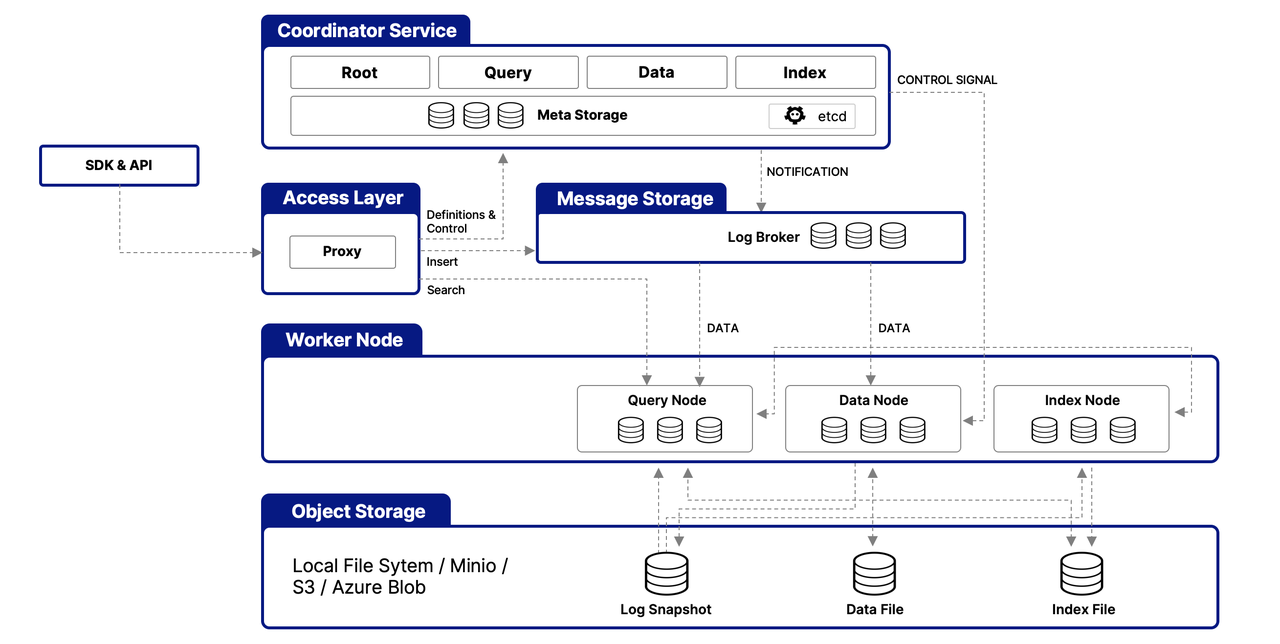 Milvus 2.5 Architecture
In Milvus 2.5, streaming and batch workflows were intertwined across multiple worker nodes:
QueryNode handled both historical queries and incremental (streaming) queries.
DataNode handled both ingest-time flushing and background compaction on historical data.
This mixing of batch and real-time logic made it difficult to scale batch workloads independently. It also meant the streaming state was scattered across several components, introducing synchronization delays, complicating failure recovery, and increasing operational complexity.
Milvus 2.6 Architecture
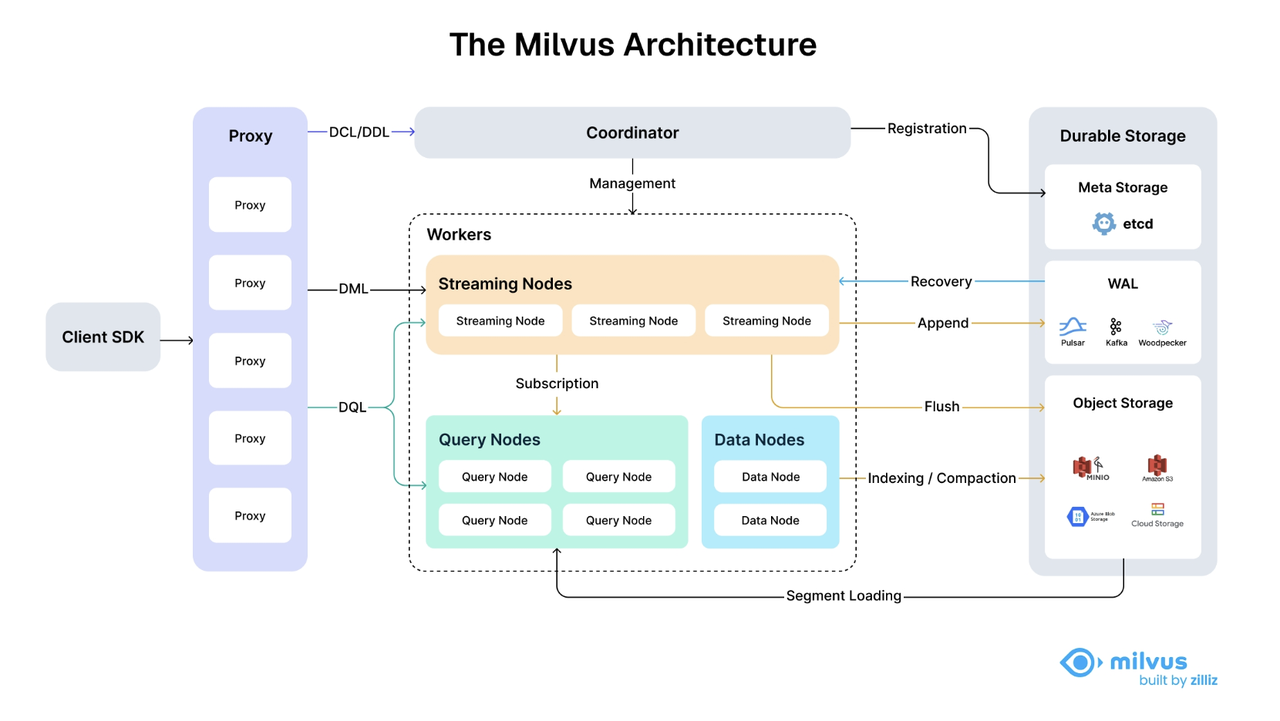 Milvus 2.6 Architecture
Milvus 2.6 introduces a dedicated StreamingNode that handles all real-time data responsibilities: consuming the message queue, writing incremental segments, serving incremental queries, and managing WAL-based recovery. With streaming isolated, the remaining components take on cleaner, more focused roles:
QueryNode now handles only batch queries on historical segments.
DataNode now handles only historical data tasks such as compaction and index building.
The StreamingNode absorbs all streaming-related tasks that were split among DataNode, QueryNode, and even the Proxy in Milvus 2.5, bringing clarity and reducing cross-role state sharing.
Milvus 2.5.x vs Milvus 2.6.x: Component-by-Component Comparison
| Milvus 2.5.x | Milvus 2.6.x | What Changed | |
|---|---|---|---|
| Coordinator Services | RootCoord / QueryCoord / DataCoord (or MixCoord) | MixCoord | Metadata management and task scheduling are consolidated into a single MixCoord, simplifying coordination logic and reducing distributed complexity. |
| Access Layer | Proxy | Proxy | Write requests are routed only through the Streaming Node for data ingestion. |
| Worker Nodes | — | Streaming Node | Dedicated streaming processing node responsible for all incremental (growing segments) logic, including:• Incremental data ingestion• Incremental data querying• Persisting incremental data to object storage• Stream-based writes• Failure recovery based on WAL |
| Query Node | Query Node | Batch-processing node that handles queries over historical data only. | |
| Data Node | Data Node | Batch-processing node responsible for historical data only, including compaction and index building. | |
| Index Node | — | Index Node is merged into Data Node, simplifying role definitions and deployment topology. |
In short, Milvus 2.6 draws a clear line between streaming and batch workloads, eliminating the cross-component entanglement seen in 2.5 and creating a more scalable, maintainable architecture.
Milvus 2.6 Feature Highlights
Before getting into the upgrade workflow, here’s a quick look at what Milvus 2.6 brings to the table. This release focuses on lowering infrastructure cost, improving search performance, and making large, dynamic AI workloads easier to scale.
Cost & Efficiency Improvements
RaBitQ Quantization for Primary Indexes – A new 1-bit quantization method that compresses vector indexes to 1/32 of their original size. Combined with SQ8 reranking, it reduces memory usage to ~28%, boosts QPS by 4×, and maintains ~95% recall, significantly lowering hardware costs.
BM25-Optimized Full-Text Search – Native BM25 scoring powered by sparse term–weight vectors. Keyword search runs 3–4× faster (up to 7× on some datasets) compared to Elasticsearch, while keeping index size to around a third of the original text data.
JSON Path Indexing with JSON Shredding – Structured filtering on nested JSON is now dramatically faster and much more predictable. Pre-indexed JSON paths cut filter latency from 140 ms → 1.5 ms (P99: 480 ms → 10 ms), making hybrid vector search + metadata filtering significantly more responsive.
Expanded Data Type Support – Adds Int8 vector types, Geometry fields (POINT / LINESTRING / POLYGON), and Array-of-Structs. These extensions support geospatial workloads, richer metadata modeling, and cleaner schemas.
Upsert for Partial Updates – You can now insert or update entities using a single primary-key call. Partial updates modify only the fields provided, reducing write amplification and simplifying pipelines that frequently refresh metadata or embeddings.
Search and Retrieval Enhancements
Improved Text Processing & Multilingual Support: New Lindera and ICU tokenizers improve Japanese, Korean, and multi-language text handling. Jieba now supports custom dictionaries.
run_analyzerhelps debug tokenization behavior, and multi-language analyzers ensure consistent cross-language search.High-Precision Text Matching: Phrase Match enforces ordered phrase queries with configurable slop. The new NGRAM index accelerates substring and
LIKEqueries on both VARCHAR fields and JSON paths, enabling fast partial-text and fuzzy matching.Time-Aware and Metadata-Aware Reranking: Decay Rankers (exponential, linear, Gaussian) adjust scores using timestamps; Boost Rankers apply metadata-driven rules to promote or demote results. Both help fine-tune retrieval behavior without changing your underlying data.
Simplified Model Integration & Auto-Vectorization: Built-in integrations with OpenAI, Hugging Face, and other embedding providers let Milvus automatically vectorize text during insert and query operations. No more manual embedding pipelines for common use cases.
Online Schema Updates for Scalar Fields: Add new scalar fields to existing collections without downtime or reloads, simplifying schema evolution as metadata requirements grow.
Near-Duplicate Detection with MinHash: MinHash + LSH enables efficient near-duplicate detection across large datasets without expensive exact comparisons.
Architecture and Scalability Upgrades
Tiered Storage for Hot–Cold Data Management: Separates hot and cold data across SSD and object storage; supports lazy and partial loading; eliminates the need to fully load collections locally; reduces resource usage by up to 50% and speeds up load times for large datasets.
Real-Time Streaming Service: Adds dedicated Streaming Nodes integrated with Kafka/Pulsar for continuous ingestion; enables immediate indexing and query availability; improves write throughput and accelerates failure recovery for real-time, fast-changing workloads.
Enhanced Scalability & Stability: Milvus now supports 100,000+ collections for large multi-tenant environments. Infrastructure upgrades — Woodpecker (zero-disk WAL), Storage v2 (reduced IOPS/memory), and the Coordinator Merge — improve cluster stability and enable predictable scaling under heavy workloads.
For a complete list of Milvus 2.6 features, check out the Milvus release notes.
How to Upgrade from Milvus 2.5.x to Milvus 2.6.x
To keep the system as available as possible during the upgrade, Milvus 2.5 clusters should be upgraded to Milvus 2.6 in the following order.
1. Start the Streaming Node first
Start the Streaming Node in advance. The new Delegator (the component in the Query Node responsible for streaming data handling) must be moved to the Milvus 2.6 Streaming Node.
2. Upgrade MixCoord
Upgrade the coordinator components to MixCoord. During this step, MixCoord needs to detect the versions of Worker Nodes in order to handle cross-version compatibility within the distributed system.
3. Upgrade the Query Node
Query Node upgrades typically take longer. During this phase, Milvus 2.5 Data Nodes and Index Nodes can continue handling operations such as Flush and Index building, helping reduce query-side pressure while Query Nodes are being upgraded.
4. Upgrade the Data Node
Once Milvus 2.5 DataNodes are taken offline, Flush operations become unavailable, and data in Growing Segments may continue to accumulate until all nodes are fully upgraded to Milvus 2.6.
5. Upgrade the Proxy
After upgrading a Proxy to Milvus 2.6, write operations on that Proxy will remain unavailable until all cluster components are upgraded to 2.6.
6. Remove the Index Node
Once all other components are upgraded, the standalone Index Node can be safely removed.
Notes:
From the completion of the DataNode upgrade until the completion of the Proxy upgrade, Flush operations are unavailable.
From the time the first Proxy is upgraded until all Proxy nodes are upgraded, some write operations are unavailable.
When upgrading directly from Milvus 2.5.x to 2.6.6, DDL (Data Definition Language) operations are unavailable during the upgrade process due to changes in the DDL framework.
How to Upgrade to Milvus 2.6 with Milvus Operator
Milvus Operator is an open-source Kubernetes operator that provides a scalable, highly available way to deploy, manage, and upgrade the entire Milvus service stack on a target Kubernetes cluster. The Milvus service stack managed by the operator includes:
Core Milvus components
Required dependencies such as etcd, Pulsar, and MinIO
Milvus Operator follows the standard Kubernetes Operator pattern. It introduces a Milvus Custom Resource (CR) that describes the desired state of a Milvus cluster, such as its version, topology, and configuration.
A controller continuously monitors the cluster and reconciles the actual state with the desired state defined in the CR. When changes are made—such as upgrading the Milvus version—the operator automatically applies them in a controlled and repeatable way, enabling automated upgrades and ongoing lifecycle management.
Milvus Custom Resource (CR) Example
apiVersion: milvus.io/v1beta1
kind: Milvus
metadata:
  name: my-milvus-mansion
  namespace: dev
spec:
  mode: cluster                  # cluster or standalone
  # Milvus Components
  components:
    image: milvusdb/milvus:v2.6.5
    imageUpdateMode: rollingUpgrade
    proxy:
      replicas: 1
    mixCoord:
      replicas: 1
    dataNode:
      replicas: 1
    queryNode:
      replicas: 2
      resources:
        requests:
          cpu: "2"
          memory: "8Gi"
  # Dependencies, including etcd, storage and message stream
  dependencies:
    etcd:
      inCluster:
        values:
          replicaCount: 3
    storage:
      type: MinIO
      inCluster:
        values:
          mode: distributed
    msgStreamType: pulsar
    pulsar:
      inCluster:
        values:
          bookkeeper:
            replicas: 3
  # Milvus configs
  config:
    dataCoord:
      enableActiveStandby: true
Rolling Upgrades from Milvus 2.5 to 2.6 with Milvus Operator
Milvus Operator provides built-in support for rolling upgrades from Milvus 2.5 to 2.6 in cluster mode, adapting its behavior to account for architectural changes introduced in 2.6.
1. Upgrade Scenario Detection
During an upgrade, Milvus Operator determines the target Milvus version from the cluster specification. This is done by either:
Inspecting the image tag defined in
spec.components.image, orReading the explicit version specified in
spec.components.version
The operator then compares this desired version with the currently running version, which is recorded in status.currentImage or status.currentVersion. If the current version is 2.5 and the desired version is 2.6, the operator identifies the upgrade as a 2.5 → 2.6 upgrade scenario.
2. Rolling Upgrade Execution Order
When a 2.5 → 2.6 upgrade is detected and the upgrade mode is set to rolling upgrade (spec.components.imageUpdateMode: rollingUpgrade, which is the default), Milvus Operator automatically performs the upgrade in a predefined order aligned with the Milvus 2.6 architecture:
Start the Streaming Node → Upgrade MixCoord → Upgrade the Query Node → Upgrade the Data Node → Upgrade the Proxy → Remove the Index Node
3. Automatic Coordinator Consolidation
Milvus 2.6 replaces multiple coordinator components with a single MixCoord. Milvus Operator handles this architectural transition automatically.
When spec.components.mixCoord is configured, the operator brings up MixCoord and waits until it becomes ready. Once MixCoord is fully operational, the operator gracefully shuts down the legacy coordinator components—RootCoord, QueryCoord, and DataCoord—completing the migration without requiring any manual intervention.
Upgrade Steps from Milvus 2.5 to 2.6
1.Upgrade Milvus Operator to the latest version (In this guide, we use version 1.3.3, which was the latest release at the time of writing.)
# Option 1: Using Helm
helm upgrade --install milvus-operator \
  -n milvus-operator --create-namespace \
  https://github.com/zilliztech/milvus-operator/releases/download/v1.3.3/milvus-operator-1.3.3.tgz
 # Option 2: Using kubectl & raw manifests
 kubectl apply -f https://raw.githubusercontent.com/zilliztech/milvus-operator/v1.3.3/deploy/manifests/deployment.yaml
2.Merge coordinator components
kubectl patch milvus my-release -n demo-operator --type=merge -p '
{
  "spec": {
    "components": {
      "mixCoord": {
        "replicas": 1
      }
    }
  }
}'
3.Ensure the cluster is running Milvus 2.5.16 or later
kubectl patch milvus my-release -n demo-operator --type=merge -p '
{
  "spec": {
    "components": {
      "image": "milvusdb/milvus:v2.5.22"
    }
  }
}'
# wait till updated
kubectl wait milvus my-release -n demo-operator --for=condition=milvusupdated --timeout=1h
4.Upgrade Milvus to version 2.6
kubectl patch milvus my-release -n demo-operator --type=merge -p '
{
  "spec": {
    "components": {
      "image": "milvusdb/milvus:v2.6.5"
    }
  }
}'
# wait till updated
kubectl wait milvus my-release -n demo-operator --for=condition=milvusupdated --timeout=1h
How to Upgrade to Milvus 2.6 with Helm
When deploying Milvus using Helm, all Kubernetes Deployment resources are updated in parallel, without a guaranteed execution order. As a result, Helm does not provide strict control over rolling upgrade sequences across components. For production environments, using Milvus Operator is therefore strongly recommended.
Milvus can still be upgraded from 2.5 to 2.6 using Helm by following the steps below.
System Requirements
Helm version: ≥ 3.14.0
Kubernetes version: ≥ 1.20.0
1.Upgrade the Milvus Helm chart to the latest version. In this guide, we use chart version 5.0.7, which was the latest at the time of writing.
helm repo add zilliztech https://zilliztech.github.io/milvus-helm
helm repo update
2.If the cluster is deployed with multiple coordinator components, first upgrade Milvus to version 2.5.16 or later and enable MixCoord.
mixCoordinator
。
helm upgrade -i my-release zilliztech/milvus \
  --namespace=helm-demo \
  --set image.all.tag="v2.5.22" \
  --set mixCoordinator.enabled=true \
  --set rootCoordinator.enabled=false \
  --set indexCoordinator.enabled=false \
  --set queryCoordinator.enabled=false \
  --set dataCoordinator.enabled=false \
  --set streaming.enabled=false \
  --set indexNode.enabled=true \
  --reset-then-reuse-values \
  --version=5.0.7 \
  --wait --timeout 1h
3.Upgrade Milvus to version 2.6
helm upgrade my-release zilliztech/milvus \
  --namespace=helm-demo \
  --set image.all.tag="v2.6.5" \
  --set streaming.enabled=true \
  --set indexNode.enabled=false \
  --reset-then-reuse-values \
  --version=5.0.7 \
  --wait --timeout 1h
FAQ on Milvus 2.6 Upgrade and Operations
Q1: Milvus Helm vs. Milvus Operator — which one should I use?
For production environments, Milvus Operator is strongly recommended.
Refer to the official guide for details: https://github.com/zilliztech/milvus-operator?tab=readme-ov-file#milvus-operator-vs-helm
Q2: How should I choose a Message Queue (MQ)?
The recommended MQ depends on the deployment mode and operational requirements:
1. Standalone mode: For cost-sensitive deployments, RocksMQ is recommended.
2. Cluster mode
Pulsar supports multi-tenancy, allows large clusters to share infrastructure, and offers strong horizontal scalability.
Kafka has a more mature ecosystem, with managed SaaS offerings available on most major cloud platforms.
3. Woodpecker (introduced in Milvus 2.6): Woodpecker removes the need for an external message queue, reducing cost and operational complexity.
Currently, only the embedded Woodpecker mode is supported, which is lightweight and easy to operate.
For Milvus 2.6 standalone deployments, Woodpecker is recommended.
For production cluster deployments, it is recommended to use the upcoming Woodpecker cluster mode once it becomes available.
Q3: Can the Message Queue be switched during an upgrade?
No. Switching the Message Queue during an upgrade is not currently supported. Future releases will introduce management APIs to support switching between Pulsar, Kafka, Woodpecker, and RocksMQ.
Q4: Do rate-limiting configurations need to be updated for Milvus 2.6?
No. Existing rate-limiting configurations remain effective and also apply to the new Streaming Node. No changes are required.
Q5: After the coordinator merge, do monitoring roles or configurations change?
Monitoring roles remain unchanged (
RootCoord,QueryCoord,DataCoord).Existing configuration options continue to work as before.
A new configuration option,
mixCoord.enableActiveStandby, is introduced and will fall back torootcoord.enableActiveStandbyif not explicitly set.
Q6: What are the recommended resource settings for StreamingNode?
For light real-time ingestion or occasional write-and-query workloads, a smaller configuration, such as 2 CPU cores and 8 GB of memory, is sufficient.
For heavy real-time ingestion or continuous write-and-query workloads, it is recommended to allocate resources comparable to those of the Query Node.
Q7: How do I upgrade a standalone deployment using Docker Compose?
For Docker Compose–based standalone deployments, simply update the Milvus image tag in docker-compose.yaml.
Refer to the official guide for details: https://milvus.io/docs/upgrade_milvus_standalone-docker.md
Conclusion
Milvus 2.6 marks a major improvement in both architecture and operations. By separating streaming and batch processing with the introduction of StreamingNode, consolidating coordinators into MixCoord, and simplifying worker roles, Milvus 2.6 provides a more stable, scalable, and easier-to-operate foundation for large-scale vector workloads.
These architectural changes make upgrades—especially from Milvus 2.5—more order-sensitive. A successful upgrade depends on respecting component dependencies and temporary availability constraints. For production environments, Milvus Operator is the recommended approach, as it automates upgrade sequencing and reduces operational risk, while Helm-based upgrades are better suited for non-production use cases.
With enhanced search capabilities, richer data types, tiered storage, and improved message queue options, Milvus 2.6 is well-positioned to support modern AI applications that require real-time ingestion, high query performance, and efficient operations at scale.
Have questions or want a deep dive on any feature of the latest Milvus? Join our Discord channel or file issues on GitHub. You can also book a 20-minute one-on-one session to get insights, guidance, and answers to your questions through Milvus Office Hours.
More Resources about Milvus 2.6
Milvus 2.6 Webinar Recording: Faster Search, Lower Cost, and Smarter Scaling
Milvus 2.6 Feature Blogs
Introducing the Embedding Function: How Milvus 2.6 Streamlines Vectorization and Semantic Search
JSON Shredding in Milvus: 88.9x Faster JSON Filtering with Flexibility
Unlocking True Entity-Level Retrieval: New Array-of-Structs and MAX_SIM Capabilities in Milvus
Introducing AISAQ in Milvus: Billion-Scale Vector Search Just Got 3,200× Cheaper on Memory
Optimizing NVIDIA CAGRA in Milvus: A Hybrid GPU–CPU Approach to Faster Indexing and Cheaper Queries
Introducing the Milvus Ngram Index: Faster Keyword Matching and LIKE Queries for Agent Workloads
Vector Search in the Real World: How to Filter Efficiently Without Killing Recall
Bring Vector Compression to the Extreme: How Milvus Serves 3× More Queries with RaBitQ
We Replaced Kafka/Pulsar with a Woodpecker for Milvus—Here’s What Happened
MinHash LSH in Milvus: The Secret Weapon for Fighting Duplicates in LLM Training Data
- Architecture Changes from Milvus 2.5 to Milvus 2.6
- Milvus 2.5 Architecture
- Milvus 2.6 Architecture
- Milvus 2.5.x vs Milvus 2.6.x: Component-by-Component Comparison
- Milvus 2.6 Feature Highlights
- Cost & Efficiency Improvements
- Search and Retrieval Enhancements
- Architecture and Scalability Upgrades
- How to Upgrade from Milvus 2.5.x to Milvus 2.6.x
- How to Upgrade to Milvus 2.6 with Milvus Operator
- Milvus Custom Resource (CR) Example
- Rolling Upgrades from Milvus 2.5 to 2.6 with Milvus Operator
- Upgrade Steps from Milvus 2.5 to 2.6
- How to Upgrade to Milvus 2.6 with Helm
- FAQ on Milvus 2.6 Upgrade and Operations
- Q1: Milvus Helm vs. Milvus Operator — which one should I use?
- Q2: How should I choose a Message Queue (MQ)?
- Q3: Can the Message Queue be switched during an upgrade?
- Q4: Do rate-limiting configurations need to be updated for Milvus 2.6?
- Q5: After the coordinator merge, do monitoring roles or configurations change?
- Q6: What are the recommended resource settings for StreamingNode?
- Q7: How do I upgrade a standalone deployment using Docker Compose?
- Conclusion
- More Resources about Milvus 2.6
On This Page
Try Managed Milvus for Free
Zilliz Cloud is hassle-free, powered by Milvus and 10x faster.
Get StartedLike the article? Spread the word