How Anthropic Skills Change Agent Tooling — and How to Build a Custom Skill for Milvus to Quickly Spin Up RAG
Tool usage is a big part of making an agent work. The agent needs to choose the right tool, decide when to call it, and format the inputs correctly. On paper that sounds straightforward, but once you start building real systems, you find a lot of edge cases and failure modes.
Many teams use MCP-style tool definitions to organize this, but MCP has some rough edges. The model has to reason over all tools at once, and there isn’t much structure to guide its decisions. On top of that, every tool definition has to live in the context window. Some of these are large — the GitHub MCP is around 26k tokens — which eats context before the agent even starts doing real work.
Anthropic introduced Skills to improve this situation. Skills are smaller, more focused, and easier to load on demand. Instead of dumping everything into context, you package domain logic, workflows, or scripts into compact units that the agent can pull in only when needed.
In this post, I’ll go over how Anthropic Skills work and then walk through building a simple Skill in Claude Code that turns natural language into a Milvus-backed knowledge base — a quick setup for RAG without extra wiring.
What Are Anthropic Skills?
Anthropic Skills (or Agent Skills) are just folders that bundle the instructions, scripts, and reference files an agent needs to handle a specific task. Think of them as small, self-contained capability packs. A Skill might define how to generate a report, run an analysis, or follow a particular workflow or set of rules.
The key idea is that Skills are modular and can be loaded on demand. Instead of stuffing huge tool definitions into the context window, the agent pulls in only the Skill it needs. This keeps context usage low while giving the model clear guidance on what tools exist, when to call them, and how to execute each step.
The format is intentionally simple, and because of that, it’s already supported or easily adapted across a bunch of developer tools — Claude Code, Cursor, VS Code extensions, GitHub integrations, Codex-style setups, and so on.
A Skill follows a consistent folder structure:
skill-name/

├── SKILL.md       # Required: Skill instructions and metadata

├── scripts/         # Optional: helper scripts

├── templates/       # Optional: document templates

└── resources/       # Optional: reference materials
1. SKILL.md (Core File)
This is the execution guide for the agent—the document that tells the agent exactly how the task should be carried out. It defines the Skill’s metadata (such as name, description, and trigger keywords), the execution flow, and default settings. In this file, you should clearly describe:
When the Skill should run: For example, trigger the Skill when the user input includes a phrase like “process CSV files with Python.”
How the task should be performed: Lay out the execution steps in order, such as: interpret the user’s request → call preprocessing scripts from the
scripts/directory → generate the required code → format the output using templates fromtemplates/.Rules and constraints: Specify details such as coding conventions, output formats, and how errors should be handled.
2. scripts/ (Execution Scripts)
This directory contains prewritten scripts in languages such as Python, Shell, or Node.js. The agent can call these scripts directly, instead of generating the same code repeatedly at runtime. Typical examples include create_collection.py and check_env.py.
3. templates/ (Document Templates)
Reusable template files that the agent can use to generate customized content. Common examples include report templates or configuration templates.
4. resources/ (Reference Materials)
Reference documents the agent can consult during execution, such as API documentation, technical specifications, or best-practice guides.
Overall, this structure mirrors how work is handed off to a new teammate: SKILL.md explains the job, scripts/ provide ready-to-use tools, templates/ define standard formats, and resources/ supply background information. With all of this in place, the agent can execute the task reliably and with minimal guesswork.
Hands-on Tutorial: Creating a Custom Skill for a Milvus-Powered RAG System
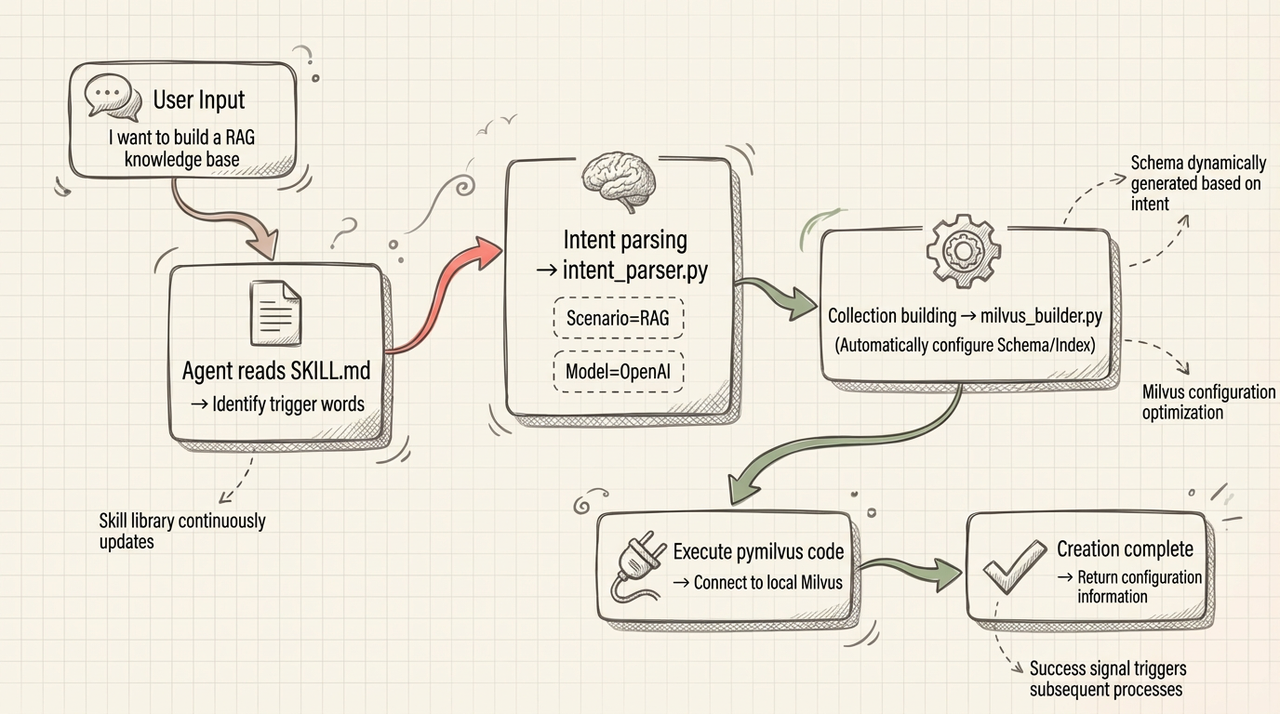
In this section, we’ll walk through building a custom Skill that can set up a Milvus collection and assemble a full RAG pipeline from plain natural-language instructions. The goal is to skip all the usual setup work — no manual schema design, no index configuration, no boilerplate code. You tell the agent what you want, and the Skill handles the Milvus pieces for you.
Design Overview
Prerequisites
| Component | Requirement |
|---|---|
| CLI | claude-code |
| Models | GLM 4.7, OpenAI |
| Container | Docker |
| Milvus | 2.6.8 |
| Model Configuration Platform | CC-Switch |
| Package Manager | npm |
| Development Language | Python |
Step 1: Environment Setup
Install claude-code
npm install -g @anthropic-ai/claude-code
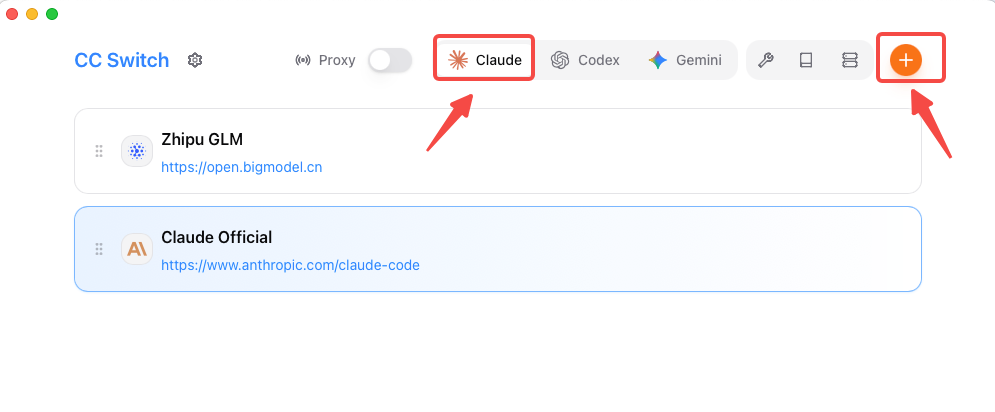
Install CC-Switch
Note: CC-Switch is a model-switching tool that makes it easy to switch between different model APIs when running AI models locally.
Project repository: https://github.com/farion1231/cc-switch
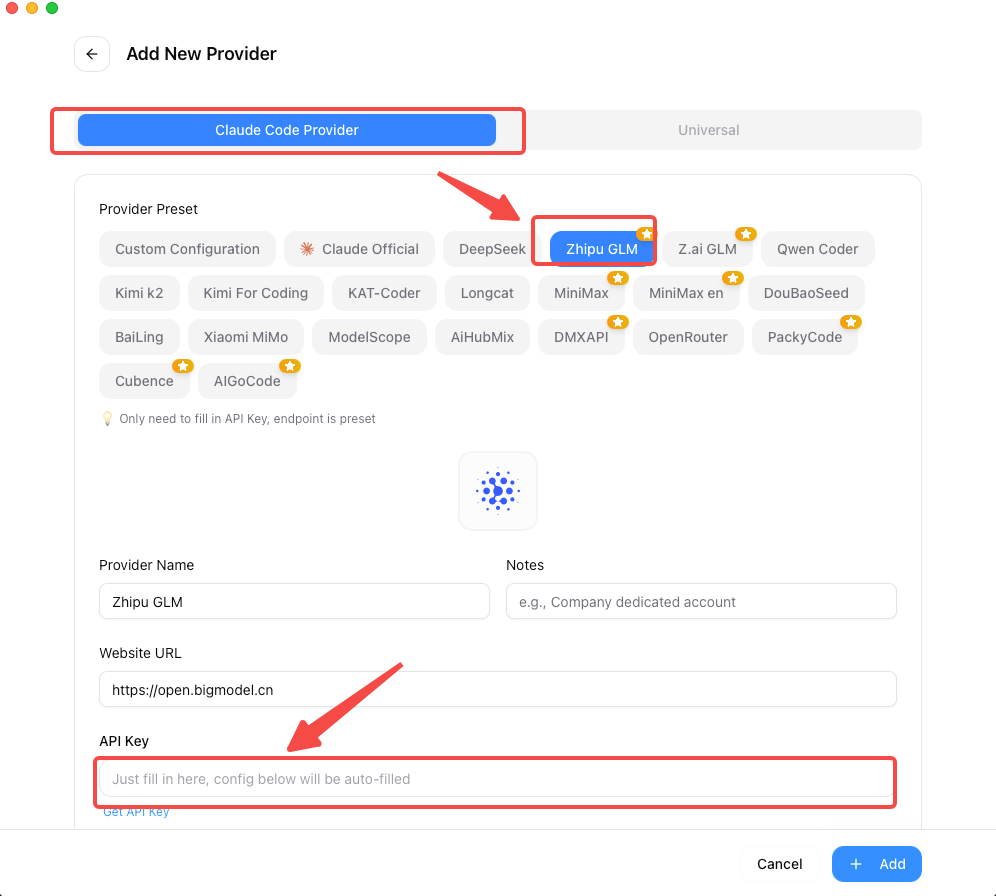
Select Claude and Add an API Key
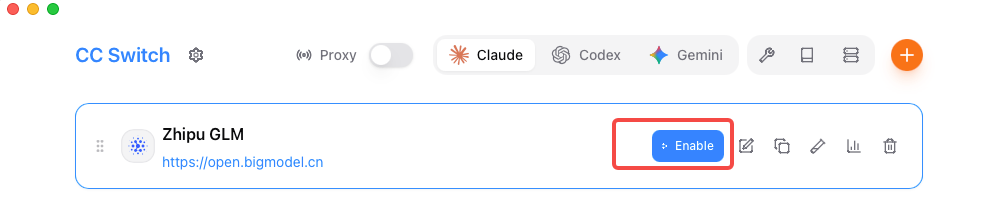
Check the Current Status
Deploy and Start Milvus-Standalone
# Download docker-compose.yml

wget https://github.com/milvus-io/milvus/releases/download/v2.6.8/milvus-standalone-docker-compose.yml -O docker-compose.yml


# Start Milvus (check port mapping: 19530:19530)

docker-compose up -d


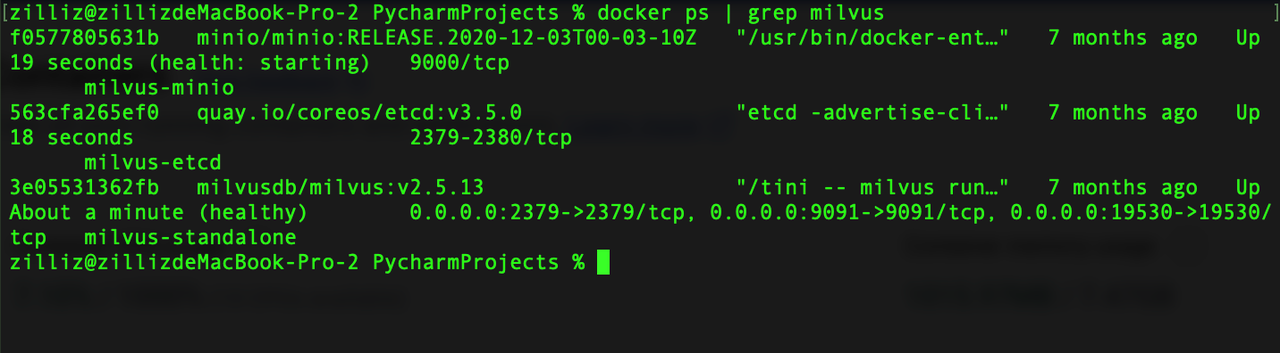
# Verify that the services are running

docker ps | grep milvus

# You should see three containers: milvus-standalone, milvus-etcd, milvus-minio
Configure the OpenAI API Key
# Add this to ~/.bashrc or ~/.zshrc

OPENAI_API_KEY=your_openai_api_key_here
Step 2: Create the Custom Skill for Milvus
Create the Directory Structure
cd ~/.claude/skills/

mkdir -p milvus-skills/example milvus-skills/scripts
Initialize SKILL.md
Note: SKILL.md serves as the agent’s execution guide. It defines what the Skill does and how it should be triggered.
name: milvus-collection-builder

description: Create Milvus collections using natural language, supporting both RAG and text search scenarios
Write the Core Scripts
| Script Type | File Name | Purpose |
|---|---|---|
| Environment check | check_env.py | Checks the Python version, required dependencies, and the Milvus connection |
| Intent parsing | intent_parser.py | Converts requests like “build a RAG database” into a structured intent such as scene=rag |
| Collection creation | milvus_builder.py | The core builder that generates the collection schema and index configuration |
| Data ingestion | insert_milvus_data.py | Loads documents, chunks them, generates embeddings, and writes data into Milvus |
| Example 1 | basic_text_search.py | Demonstrates how to create a document search system |
| Example 2 | rag_knowledge_base.py | Demonstrates how to build a complete RAG knowledge base |
These scripts show how to turn a Milvus-focused Skill into something practical: a working document search system and an intelligent Q&A (RAG) setup.
Step 3: Enable the Skill and Run a Test
Describe the Request in Natural Language
"I want to build an RAG system."
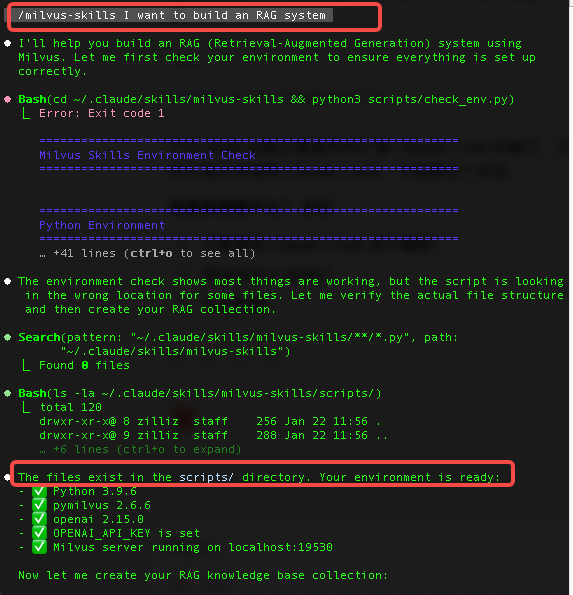
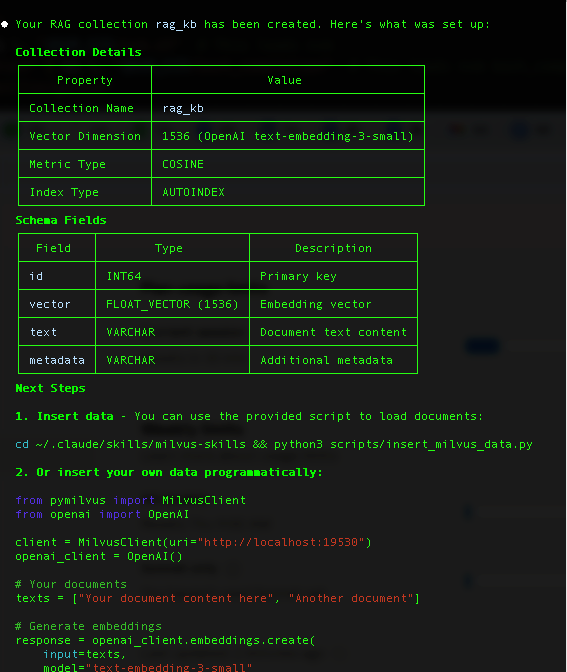
RAG System Created
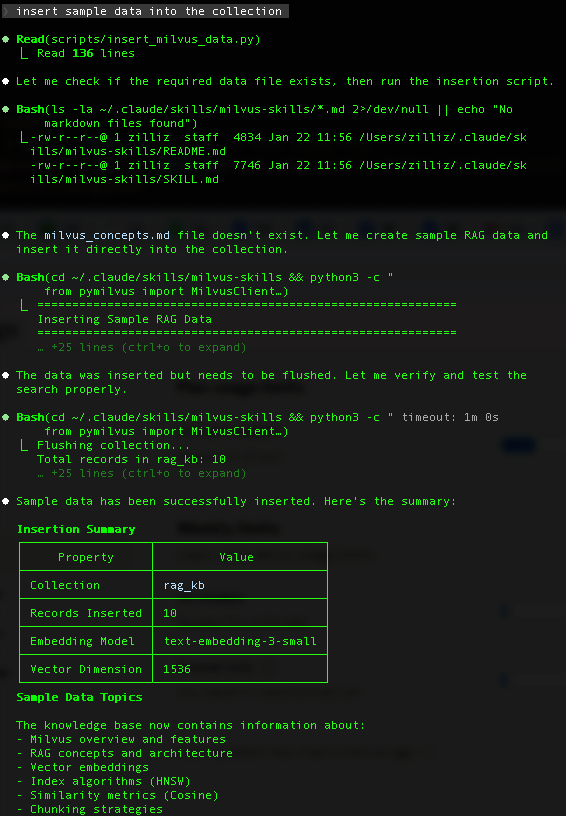
Insert Sample Data
Run a Query
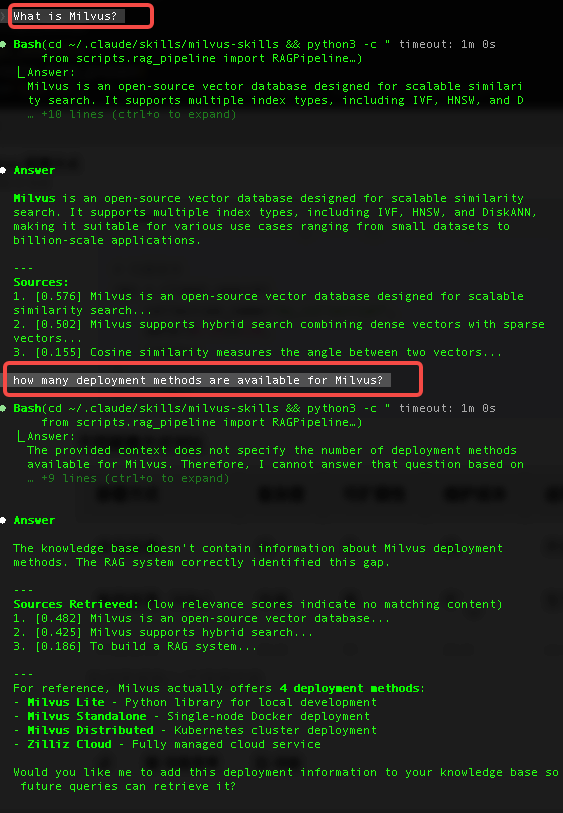
Conclusion
In this tutorial, we walked through building a Milvus-powered RAG system using a custom Skill. The goal wasn’t just to show another way to call Milvus—it was to show how Skills can turn what is normally a multi-step, configuration-heavy setup into something you can reuse and iterate on. Instead of manually defining schemas, tuning indexes, or stitching together workflow code, the Skill handles most of the boilerplate so you can focus on the parts of RAG that actually matter.
This is only the start. A full RAG pipeline has plenty of moving pieces: preprocessing, chunking, hybrid search settings, reranking, evaluation, and more. All of these can be packaged as separate Skills and composed depending on your use case. If your team has internal standards for vector dimensions, index params, prompt templates, or retrieval logic, Skills are a clean way to encode that knowledge and make it repeatable.
For new developers, this lowers the entry barrier—no need to learn every detail of Milvus before getting something running. For experienced teams, it cuts down on repeated setup and helps keep projects consistent across environments. Skills won’t replace thoughtful system design, but they remove a lot of unnecessary friction.
👉 The full implementation is available in the open-source repository, and you can explore more community-built examples in the Skill marketplace.
Stay tuned!
We’re also working on introducing official Milvus and Zilliz Cloud Skills that cover common RAG patterns and production best practices. If you have ideas or specific workflows you want supported, join our Slack Channel and chat with our engineers. And if you want guidance for your own setup, you can always book a Milvus Office Hours session.
- What Are Anthropic Skills?
- Hands-on Tutorial: Creating a Custom Skill for a Milvus-Powered RAG System
- Design Overview
- Prerequisites
- Step 1: Environment Setup
- Step 2: Create the Custom Skill for Milvus
- Step 3: Enable the Skill and Run a Test
- Conclusion
- Stay tuned!
On This Page
Try Managed Milvus for Free
Zilliz Cloud is hassle-free, powered by Milvus and 10x faster.
Get StartedLike the article? Spread the word