MinIO Stops Accepting Community Changes: Evaluating RustFS as a Viable S3-Compatible Object Storage Backend for Milvus
This post is written by Min Yin, one of the most active community contributors of Milvus, and is published here with permission.
MinIO is an open-source, high-performance, and S3-compatible object storage system widely used in AI/ML, analytics, and other data-intensive workloads. For many Milvus deployments, it has also been the default choice for object storage. Recently, however, the MinIO team updated its GitHub README to state that this project is no longer accepting new changes.
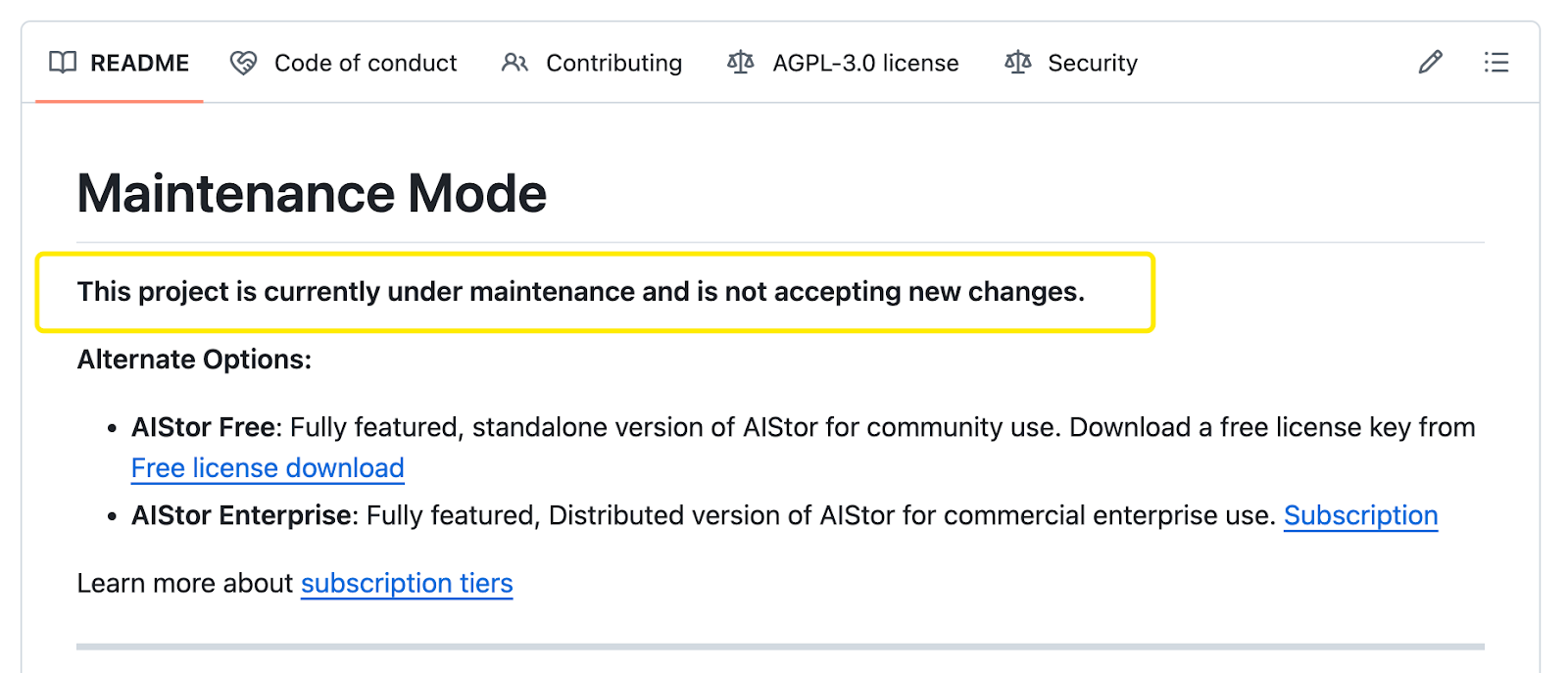
Actually, over the past few years, MinIO has gradually shifted its attention toward commercial offerings, tightened its licensing and distribution model, and scaled back active development in the community repository. Moving the open-source project into maintenance mode is the natural outcome of that broader transition.
For Milvus users who rely on MinIO by default, this change is hard to ignore. Object storage sits at the heart of Milvus’s persistence layer, and its reliability over time depends not just on what works today but on whether the system continues to evolve alongside the workloads it supports.
Against this backdrop, this article explores RustFS as a potential alternative. RustFS is a Rust-based, S3-compatible object storage system that emphasizes memory safety and modern systems design. It is still experimental, and this discussion is not a production recommendation.
The Milvus Architecture and Where the Object Storage Component Sits
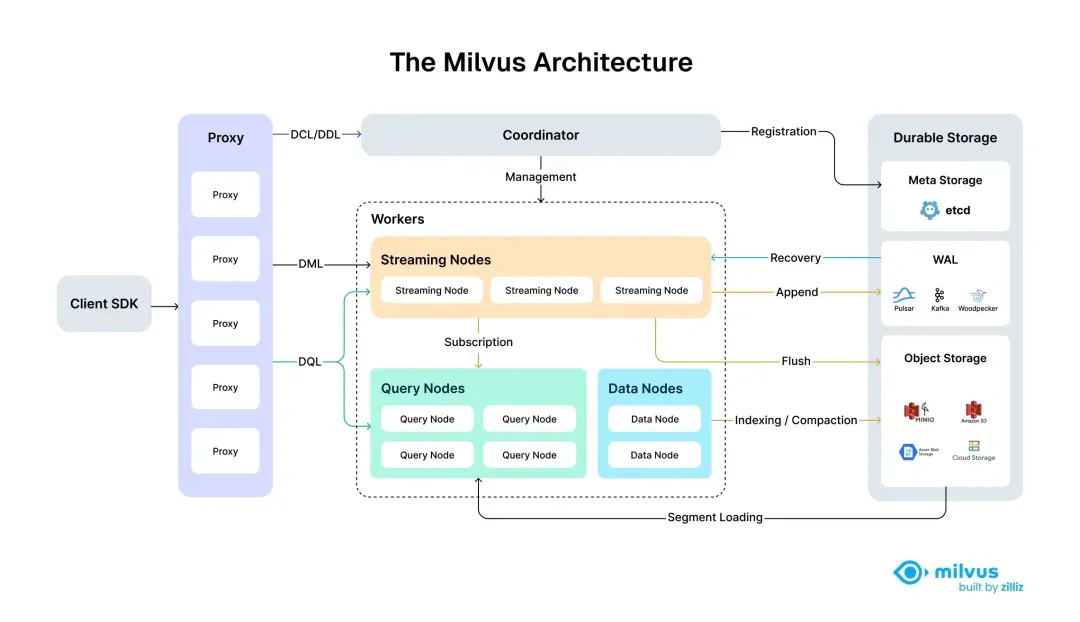
Milvus 2.6 adopts a fully decoupled storage–compute architecture. In this model, the storage layer is composed of three independent components, each serving a distinct role.
Etcd stores metadata, Pulsar or Kafka handles streaming logs, and object storage—typically MinIO or an S3-compatible service—provides durable persistence for vector data and index files. Because storage and compute are separated, Milvus can scale compute nodes independently while relying on a shared, reliable storage backend.
The Role of Object Storage in Milvus
Object storage is the durable storage layer in Milvus. Raw vector data is persisted as binlogs, and index structures such as HNSW and IVF_FLAT are stored there as well.
This design makes compute nodes stateless. Query Nodes do not store data locally; instead, they load segments and indexes from object storage on demand. As a result, nodes can scale up or down freely, recover quickly from failures, and support dynamic load balancing across the cluster without data rebalancing at the storage layer.
my-milvus-bucket/
├── files/                          # rootPath (default)
│   ├── insert_log/                 # insert binlogs
│   │   └── {Collection_ID}/
│   │       └── {Partition_ID}/
│   │           └── {Segment_ID}/
│   │               └── {Field_ID}/
│   │                   └── {Log_ID}     # Per-field binlog files
│   │
│   ├── delta_log/                  # Delete binlogs
│   │   └── {Collection_ID}/
│   │       └── {Partition_ID}/
│   │           └── {Segment_ID}/
│   │               └── {Log_ID}
│   │
│   ├── stats_log/                  # Statistical data (e.g., Bloom filters)
│   │   └── {Collection_ID}/
│   │       └── {Partition_ID}/
│   │           └── {Segment_ID}/
│   │               └── {Field_ID}/
│   │                   └── {Log_ID}
│   │
│   └── index_files/                # Index files
│       └── {Build_ID}_{Index_Version}_{Segment_ID}_{Field_ID}/
│           ├── index_file_0
│           ├── index_file_1
│           └── ...
Why Milvus Uses the S3 API
Rather than defining a custom storage protocol, Milvus uses the S3 API as its object storage interface. S3 has become the de facto standard for object storage: major cloud providers such as AWS S3, Alibaba Cloud OSS, and Tencent Cloud COS support it natively, while open-source systems like MinIO, Ceph RGW, SeaweedFS, and RustFS are fully compatible.
By standardizing on the S3 API, Milvus can rely on mature, well-tested Go SDKs instead of maintaining separate integrations for each storage backend. This abstraction also gives users deployment flexibility: MinIO for local development, cloud object storage in production, or Ceph and RustFS for private environments. As long as an S3-compatible endpoint is available, Milvus does not need to know—or care—what storage system is used underneath.
# Milvus configuration file milvus.yaml
minio:
 address: localhost
 port: 9000
 accessKeyID: minioadmin
 secretAccessKey: minioadmin
 useSSL: false
 bucketName: milvus-bucket
Evaluating RustFS as an S3-Compatible Object Storage Backend for Milvus
Project Overview
RustFS is a distributed object storage system written in Rust. It is currently in the alpha stage (version 1.0.0-alpha.68) and aims to combine the operational simplicity of MinIO with Rust’s strengths in memory safety and performance. More details are available on GitHub.
RustFS is still under active development, and its distributed mode has not yet been officially released. As a result, RustFS is not recommended for production or mission-critical workloads at this stage.
Architecture Design
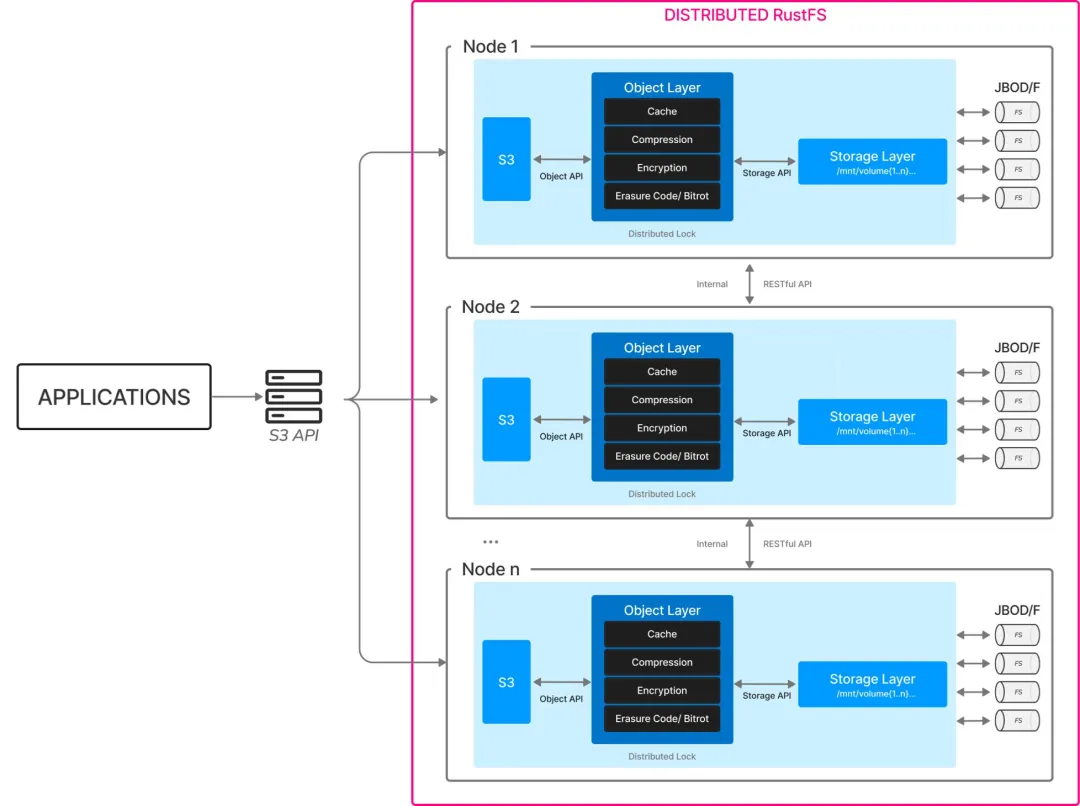
RustFS follows a design that is conceptually similar to MinIO. An HTTP server exposes an S3-compatible API, while an Object Manager handles object metadata, and a Storage Engine is responsible for data block management. At the storage layer, RustFS relies on standard file systems such as XFS or ext4.
For its planned distributed mode, RustFS intends to use etcd for metadata coordination, with multiple RustFS nodes forming a cluster. This design aligns closely with common object storage architectures, making RustFS familiar to users with MinIO experience.
Compatibility with Milvus
Before considering RustFS as an alternative object storage backend, it is necessary to evaluate whether it meets Milvus’s core storage requirements.
| Milvus Requirement | S3 API | RustFS Support |
|---|---|---|
| Vector data persistence | PutObject, GetObject | ✅ Fully supported |
| Index file management | ListObjects, DeleteObject | ✅ Fully supported |
| Segment merge operations | Multipart Upload | ✅ Fully supported |
| Consistency guarantees | Strong read-after-write | ✅ Strong consistency (single-node) |
Based on this evaluation, RustFS’s current S3 API implementation satisfies Milvus’s baseline functional requirements. This makes it suitable for practical testing in non-production environments.
Hands-On: Replacing MinIO with RustFS in Milvus
The goal of this exercise is to replace the default MinIO object storage service and deploy Milvus 2.6.7 using RustFS as the object storage backend.
Prerequisites
Docker and Docker Compose are installed (version ≥ 20.10), and the system can pull images and run containers normally.
A local directory is available for object data storage, such as
/volume/data/(or a custom path).The host port 9000 is open for external access, or an alternative port is configured accordingly.
The RustFS container runs as a non-root user (
rustfs). Ensure the host data directory is owned by UID 10001.
Step 1: Create the Data Directory and Set Permissions
# Create the project directory
mkdir -p milvus-rustfs && cd milvus-rustfs
# Create the data directory
mkdir -p volumes/{rustfs, etcd, milvus}
# Update permissions for the RustFS directory
sudo chown -R 10001:10001 volumes/rustfs
Download the Official Docker Compose File
wget https://github.com/milvus-io/milvus/releases/download/v2.6.7/milvus-standalone-docker-compose.yml -O docker-compose.yml
Step 2: Modify the Object Storage Service
Define the RustFS Service
Note: Make sure the access key and secret key match the credentials configured in the Milvus service.
rustfs:
 container_name: milvus-rustfs
 image: registry.cn-hangzhou.aliyuncs.com/rustfs/rustfs: latest
 environment:
 RUSTFS_ACCESS_KEY: minioadmin
 RUSTFS_SECRET_KEY: minioadmin
 RUSTFS_CONSOLE_ENABLE: “true”
 RUSTFS_REGION: us-east-1
 # RUSTFS_SERVER_DOMAINS: localhost# Optional; not required for local deployments
 ports:
 - “9001:9001”
 - “9000:9000”
 volumes:
 - ${DOCKER_VOLUME_DIRECTORY:-.}/volumes/rustfs:/data
 command: >
 --address :9000
 --console-enable
 /data
 healthcheck:
 test: [“CMD”, “curl”, “-f”, “http://localhost:9000/health"]
 interval: 30s
 timeout: 20s
 retries: 3
Complete Configuration
Note: Milvus’s storage configuration currently assumes MinIO-style defaults and does not yet allow custom access key or secret key values. When using RustFS as a replacement, it must use the same default credentials expected by Milvus.
version: ‘3.5’
services:
 etcd:
 container_name: milvus-etcd
 image: registry.cn-hangzhou.aliyuncs.com/etcd/etcd: v3.5.25
 environment:
 - ETCD_AUTO_COMPACTION_MODE=revision
 - ETCD_AUTO_COMPACTION_RETENTION=1000
 - ETCD_QUOTA_BACKEND_BYTES=4294967296
 - ETCD_SNAPSHOT_COUNT=50000
 volumes:
 - ${DOCKER_VOLUME_DIRECTORY:-.}/volumes/etcd:/etcd
 command: etcd -advertise-client-urls=http://etcd:2379 -listen-client-urls http://0.0.0.0:2379 --data-dir /etcd
 healthcheck:
 test: [“CMD”, “etcdctl”, “endpoint”, “health”]
 interval: 30s
 timeout: 20s
 retries: 3
 rustfs:
 container_name: milvus-rustfs
 image: registry.cn-hangzhou.aliyuncs.com/rustfs/rustfs: latest
 environment:
 RUSTFS_ACCESS_KEY: minioadmin
 RUSTFS_SECRET_KEY: minioadmin
 RUSTFS_CONSOLE_ENABLE: “true”
 RUSTFS_REGION: us-east-1
 # RUSTFS_SERVER_DOMAINS: localhost# Optional; not required for local deployments
 ports:
 - “9001:9001”
 - “9000:9000”
 volumes:
 - ${DOCKER_VOLUME_DIRECTORY:-.}/volumes/rustfs:/data
 command: >
 --address :9000
 --console-enable
 /data
 healthcheck:
 test: [“CMD”, “curl”, “-f”, “http://localhost:9000/health"]
 interval: 30s
 timeout: 20s
 retries: 3
 standalone:
 container_name: milvus-standalone
 image: registry.cn-hangzhou.aliyuncs.com/milvus/milvus: v2.6.7
 command: [”milvus“, ”run“, ”standalone“]
 security_opt:
 - seccomp: unconfined
 environment:
 MINIO_REGION: us-east-1
 ETCD_ENDPOINTS: etcd:2379
 MINIO_ADDRESS: rustfs:9000
 MINIO_ACCESS_KEY: minioadmin
 MINIO_SECRET_KEY: minioadmin
 MINIO_USE_SSL: ”false“
 MQ_TYPE: rocksmq
 volumes:
 - ${DOCKER_VOLUME_DIRECTORY:-.}/volumes/milvus:/var/lib/milvus
 healthcheck:
 test: [”CMD“, ”curl“, ”-f“, ”http://localhost:9091/healthz"]
 interval: 30s
 start_period: 90s
 timeout: 20s
 retries: 3
 ports:
 - “19530:19530”
 - “9091:9091”
 depends_on:
 - “etcd”
 - “rustfs”
networks:
 default:
 name: milvus
Start the Services
docker-compose -f docker-compose.yaml up -d
Check Service Status
docker-compose ps -a

Access the RustFS Web UI
Open the RustFS web interface in your browser: http://localhost:9001
Log in using the default credentials: username and password are both minioadmin.
Test the Milvus Service
from pymilvus import connections, Collection, FieldSchema, CollectionSchema, DataType
# connect to Milvus
connections.connect(
 alias="default",
 host='localhost',
 port='19530'
)
print("✓ Successfully connected to Milvus!")
# create test collection
fields = [
 FieldSchema(name="id", dtype=DataType.INT64, is_primary=True, auto_id=True),
 FieldSchema(name="embedding", dtype=DataType.FLOAT_VECTOR, dim=128)
]
schema = CollectionSchema(fields=fields, description="test collection")
collection = Collection(name="test_collection", schema=schema)
print("✓ Test collection created!")
print("✓ RustFS verified as the S3 storage backend!")

### Step 3: Storage Performance Testing (Experimental)

**Test Design**

Two Milvus deployments were set up on identical hardware (16 cores / 32 GB memory / NVMe SSD), using RustFS and MinIO respectively as the object storage backend. The test dataset consisted of 1,000,000 vectors with 768 dimensions, using an HNSW index with parameters _M = 16_ and _efConstruction = 200_. Data was inserted in batches of 5,000.

The following metrics were evaluated: Insert throughput, Index build time, Cold and warm load time, Search latency, Storage footprint.

**Test Code**

Note: Only the core parts of the test code are shown below.
def milvus_load_bench(dim=768, rows=1_000_000, batch=5000): collection = Collection(…) # Insert test t0 = time.perf_counter() for i in range(0, rows, batch): collection.insert([rng.random((batch, dim), dtype=np.float32).tolist()]) insert_time = time.perf_counter() - t0 # Index build collection.flush() collection.create_index(field_name="embedding", index_params={"index_type": "HNSW", …}) # Load test (cold start + two warm starts) collection.release() load_times = [] for i in range(3): if i > 0: collection.release(); time.sleep(2) collection.load() load_times.append(…) # Query test search_times = [] for _ in range(3): collection.search(queries, limit=10, …)
**Test Command**
python bench.py milvus-load-bench --dim 768 --rows 1000000 --batch 5000
–index-type HNSW --repeat-load 3 --release-before-load --do-search --drop-after
**Performance Results**

- **RustFS**

Faster writes (+57%), lower storage usage (–57%), and faster warm loads (+67%), making it suitable for write-heavy, cost-sensitive workloads.

Much slower queries (7.96 ms vs. 1.85 ms, ~+330% latency) with noticeable variance (up to 17.14 ms), and 43% slower index builds. Not suitable for query-intensive applications.

- **MinIO**

Excellent query performance (**1.85 ms** average latency), mature small-file and random I/O optimizations, and a well-established ecosystem.


|     **Metric**    |  **RustFS**  |   **MinIO**  | **Difference** |
| :---------------: | :----------: | :----------: | :------------: |
| Insert Throughput | 4,472 rows/s | 2,845 rows/s |      0.57      |
|  Index Build Time |     803 s    |     562 s    |      -43%      |
| Load (Cold Start) |    22.7 s    |    18.3 s    |      -24%      |
| Load (Warm Start) |    0.009 s   |    0.027 s   |      0.67      |
|   Search Latency  |    7.96 ms   |    1.85 ms   |    **-330%**   |
|   Storage Usage   |    7.8 GB    |    18.0 GB   |      0.57      |

RustFS significantly outperforms MinIO in write performance and storage efficiency, with both showing roughly 57% improvement. This demonstrates the system-level advantages of the Rust ecosystem. However, the 330% gap in query latency limits RustFS’s suitability for query-intensive workloads.

For **production environments**, cloud-managed object storage services like **AWS S3** are recommended first, as they are mature, stable, and require no operational effort. Self-hosted solutions are better suited to specific scenarios: RustFS for cost-sensitive or write-intensive workloads, MinIO for query-intensive use cases, and Ceph for data sovereignty. With further optimization in random read performance, RustFS has the potential to become a strong self-hosted option.


## Conclusion

MinIO’s decision to stop accepting new community contributions is disappointing for many developers, but it won’t disrupt Milvus users. Milvus depends on the S3 API—not any specific vendor implementation—so swapping storage backends is straightforward. This S3-compatibility layer is intentional: it ensures Milvus stays flexible, portable, and decoupled from vendor lock-in.

For production deployments, cloud-managed services such as AWS S3 and Alibaba Cloud OSS remain the most reliable options. They’re mature, highly available, and drastically reduce the operational load compared to running your own object storage. Self-hosted systems like MinIO or Ceph still make sense in cost-sensitive environments or where data sovereignty is non-negotiable, but they require significantly more engineering overhead to operate safely at scale.

RustFS is interesting—Apache 2.0-licensed, Rust-based, and community-driven—but it's still early. The performance gap is noticeable, and the distributed mode hasn’t shipped yet. It’s not production-ready today, but it’s a project worth watching as it matures.

If you’re comparing object storage options for Milvus, evaluating MinIO replacements, or weighing the operational trade-offs of different backends, we’d love to hear from you.

Join our[ Discord channel](https://discord.com/invite/8uyFbECzPX) and share your thoughts. You can also book a 20-minute one-on-one session to get insights, guidance, and answers to your questions through[ Milvus Office Hours](https://milvus.io/blog/join-milvus-office-hours-to-get-support-from-vectordb-experts.md).
- The Milvus Architecture and Where the Object Storage Component Sits
- The Role of Object Storage in Milvus
- Why Milvus Uses the S3 API
- Evaluating RustFS as an S3-Compatible Object Storage Backend for Milvus
- Project Overview
- Architecture Design
- Compatibility with Milvus
- Hands-On: Replacing MinIO with RustFS in Milvus
- Prerequisites
- Step 1: Create the Data Directory and Set Permissions
- Step 2: Modify the Object Storage Service
On This Page
Try Managed Milvus for Free
Zilliz Cloud is hassle-free, powered by Milvus and 10x faster.
Get StartedLike the article? Spread the word