

Integrating Milvus Text Embedding Function with LangChain


This guide demonstrates how to use Milvus 2.6’s Text Embedding Function (also known as Data In Data Out) with LangChain. This feature allows the Milvus server to automatically convert raw text into vector embeddings, simplifying client-side code and centralizing API key management.
Milvus is the world’s most advanced open-source vector database, built specifically to support embedding similarity search and AI applications. LangChain is a framework for developing applications powered by large language models (LLMs). By integrating Milvus’s Text Embedding Function, you can achieve a simpler and more efficient vector search solution in your LangChain applications.
Prerequisites
Before running this tutorial, ensure you have installed the following dependencies:
! pip install --upgrade langchain-milvus langchain-core langchain-openai
If you are using Google Colab, to enable dependencies just installed, you may need to restart the runtime (click on the “Runtime” menu at the top of the screen, and select “Restart session” from the dropdown menu).
Configuring the Milvus Server
Important: The Text Embedding Function (Data In Data Out) feature is only available in Milvus Server. Milvus Lite does not support this feature. You need to use a Milvus server deployed with Docker/Kubernetes.
Before using the Text Embedding Function, you need to configure credentials for embedding service providers on the Milvus server.
Declare your keys under credential:
You may list one or many API keys—give each a label you invent and will reference later.
# milvus.yaml

credential:
  apikey_dev:
    apikey: <YOUR_OPENAI_API_KEY>
Tell Milvus which key to use for OpenAI calls
In the same file, point the OpenAI provider at the label you want it to use.
function:
  textEmbedding:
    providers:
      openai:
        credential: apikey_dev
        # url: https://api.openai.com/v1/embeddings   # (optional) custom url
For more configuration methods, please refer to the Milvus Embedding Function documentation.
Starting the Milvus Service
Ensure that Milvus Server is running and the embedding feature is enabled. You can deploy Milvus server using Docker or Kubernetes. Note: Milvus Lite does not support Text Embedding Function.
Understanding Embedding: Client-side vs Server-side
Before diving into usage, let’s first understand the differences between the two embedding approaches.
Embedding using LangChain’s Embeddings class (Client-side)
In the traditional LangChain approach, embedding generation happens on the client side by using the Embeddings class. Your application needs to use the embed_query method of the class to call the embedding API, then store the generated vectors in Milvus.
from langchain_openai import OpenAIEmbeddings
from langchain_milvus import Milvus

# Generate embedding on client side
embeddings = OpenAIEmbeddings()
vector = embeddings.embed_query("Hello, world!")
# [0.123, -0.456, ...] A vector of floats

vector_store = Milvus(
    embedding_function=embeddings,
    connection_args={"uri": "http://localhost:19530"},
    collection_name="traditional_approach_collection",
)
Sequence Diagram:
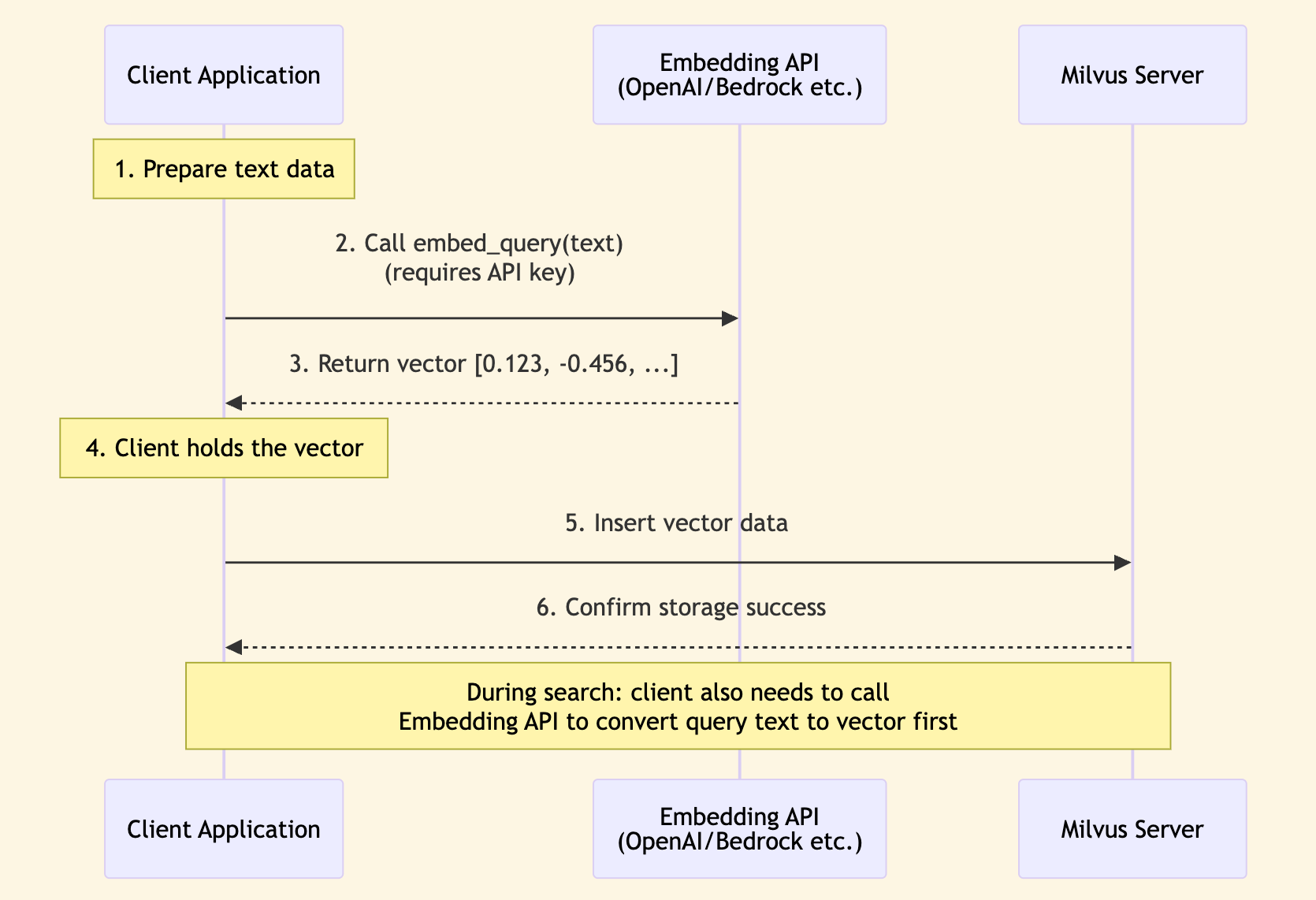
Characteristics:
- Client directly calls embedding API
- Need to manage API keys on the client side
- Data flow: Text → Client → Embedding API → Vector → Milvus
Milvus Text Embedding Function (Server-side Data In Data Out)
Milvus 2.6’s Text Embedding Function (Data In Data Out) allows the Milvus server to automatically convert raw text into vector embeddings. The client only needs to provide text, and Milvus will automatically handle embedding generation.
Sequence Diagram:
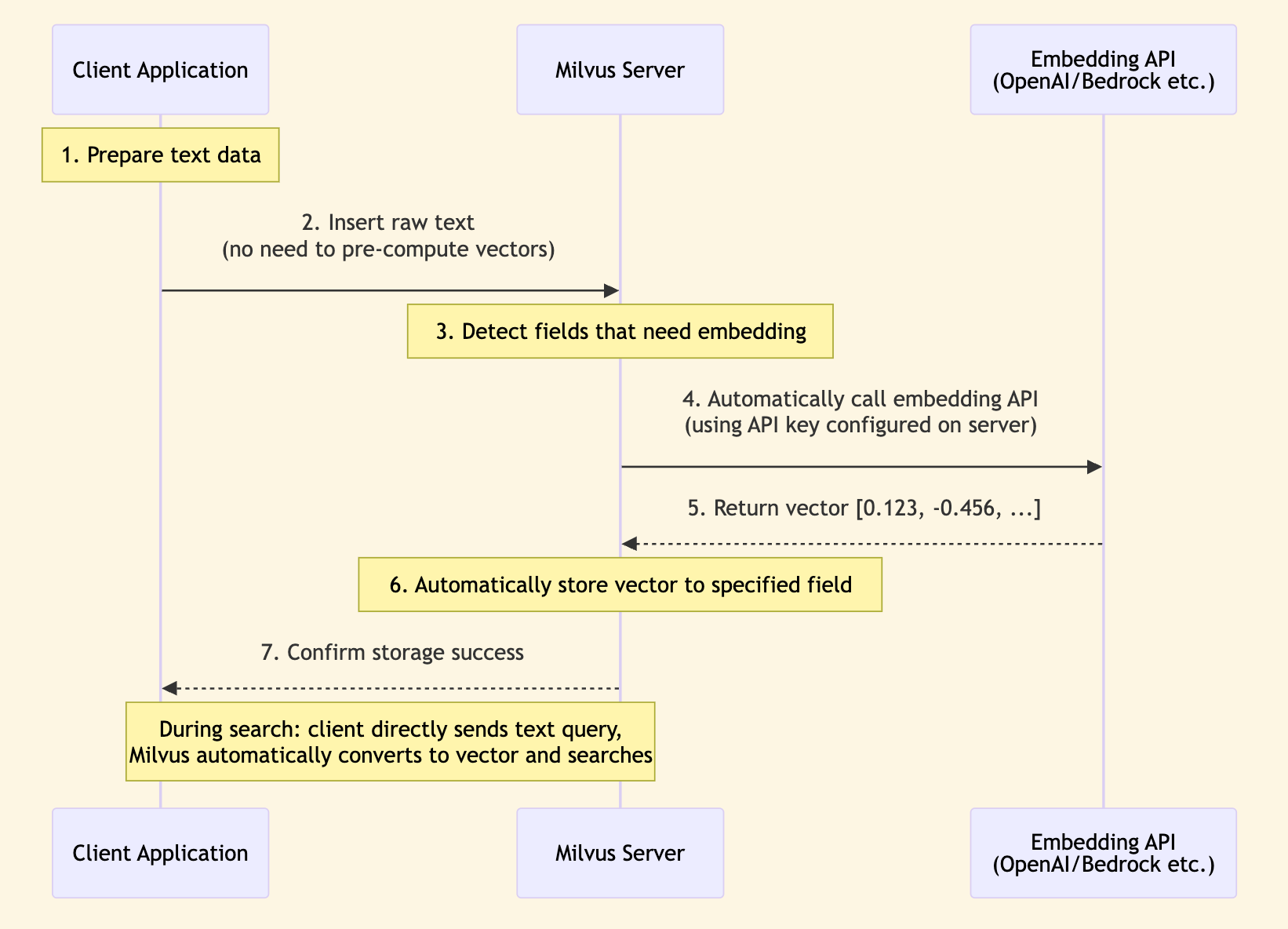
Characteristics:
- Milvus server calls embedding API
- API keys are centrally managed on the server side
- Data flow: Text → Milvus → Embedding API → Vector (stored in Milvus)
Comparison of the Two Methods
| Feature | LangChain Embedding (Client-side) | Milvus Text Embedding Function (Server-side) |
|---|---|---|
| Processing Location | Client application | Milvus server |
| API Calls | Client directly calls embedding API | Milvus server calls embedding API |
| API Key Management | Need to manage on client side | Centrally managed on server side, more secure |
| Code Complexity | Need to manage API keys and calls on client side | Only need to configure once in Milvus configuration |
| Use Cases | • Need client-side control over embedding process • Need to cache embedding results on client side • Need to support multiple embedding model switching | • Simplify client-side code • Centrally manage API keys on server side • Need to batch process large volumes of documents • Want to reduce client-side interactions with external APIs • Need to combine with Milvus built-in features like BM25 |
| Milvus Version Requirements | All versions (including Milvus Lite) | Milvus Lite not supported |
This tutorial primarily introduces the Milvus server-side Text Embedding Function (Data In Data Out) method, which is a new feature introduced in Milvus 2.6 that can significantly simplify client-side code and improve security.
Using Text Embedding Function
Example 1: Server-side Embedding Only
This is the simplest use case, completely relying on the Milvus server to generate embeddings. The client does not need any embedding function.
from langchain_milvus import Milvus
from langchain_milvus.function import TextEmbeddingBuiltInFunction
from langchain_core.documents import Document

# Create Text Embedding Function
text_embedding_func = TextEmbeddingBuiltInFunction(
    input_field_names="text",  # Input field name (field containing text)
    output_field_names="vector",  # Output field name (field storing vectors)
    dim=1536,  # Vector dimension (must specify)
    params={
        "provider": "openai",  # Service provider
        "model_name": "text-embedding-3-small",  # Model name
        "credential": "apikey_dev",    # Optional: use credential label configured in milvus.yaml
    },
)

# Create Milvus vector store
# Note: embedding_function=None, because embedding is done on server side
vector_store = Milvus(
    embedding_function=None,  # Do not use client-side embedding
    builtin_function=text_embedding_func,
    connection_args={"uri": "http://localhost:19530"},
    collection_name="my_collection",
    # consistency_level="Strong",    # Strong consistency level, default is "Session"
    auto_id=True,
    # drop_old=True,  # If you want to drop old collection and create a new one
)
For connection_args:
- Must use Milvus Server: The Text Embedding Function feature is only available in Milvus Server, Milvus Lite is not supported.
- Use server uri, such as
http://localhost:19530(local Docker deployment) orhttp://your-server:19530(remote server). - If using Zilliz Cloud, use the Public Endpoint as
uriand set thetokenparameter.
When adding documents, you only need to provide text, no need to pre-compute vectors. Milvus will automatically call the OpenAI API to generate embeddings.
# Add documents (only need to provide text, no need to pre-compute vectors)
documents = [
    Document(page_content="Milvus simplifies semantic search through embeddings."),
    Document(
        page_content="Vector embeddings convert text into searchable numeric data."
    ),
    Document(
        page_content="Semantic search helps users find relevant information quickly."
    ),
]

vector_store.add_documents(documents)
[462726375729313252, 462726375729313253, 462726375729313254]
During search, directly use text queries, and Milvus will automatically convert the query text to vectors for search.
# Search (directly use text query)
results = vector_store.similarity_search(
    query="How does Milvus handle semantic search?", k=2
)

for doc in results:
    print(f"Content: {doc.page_content}")
    print(f"Metadata: {doc.metadata}\n")
WARNING: All log messages before absl::InitializeLog() is called are written to STDERR
I0000 00:00:1765186679.227345 12227536 fork_posix.cc:71] Other threads are currently calling into gRPC, skipping fork() handlers


Content: Milvus simplifies semantic search through embeddings.
Metadata: {'pk': 462726375729313252}

Content: Semantic search helps users find relevant information quickly.
Metadata: {'pk': 462726375729313254}
Example 2: Combining Text Embedding and BM25 (Hybrid Search)
Combining semantic search (Text Embedding) and keyword search (BM25) enables more powerful hybrid search capabilities. Semantic search excels at understanding query intent, while keyword search excels at exact matching.
from langchain_milvus import Milvus
from langchain_milvus.function import TextEmbeddingBuiltInFunction, BM25BuiltInFunction

# Text Embedding Function (semantic search)
text_embedding_func = TextEmbeddingBuiltInFunction(
    input_field_names="text",
    output_field_names="vector_dense",
    dim=1536,
    params={
        "provider": "openai",
        "model_name": "text-embedding-3-small",
    },
)

# BM25 Function (keyword search)
bm25_func = BM25BuiltInFunction(
    input_field_names="text",
    output_field_names="vector_sparse",
)

# Create Milvus vector store
vector_store = Milvus(
    embedding_function=None,
    builtin_function=[text_embedding_func, bm25_func],
    connection_args={"uri": "http://localhost:19530"},
    vector_field=["vector_dense", "vector_sparse"],
    collection_name="hybrid_search_collection",
    # consistency_level="Strong",    # Strong consistency level, default is "Session"
    auto_id=True,
    # drop_old=True,  # If you want to drop old collection and create a new one
)

# Add documents
documents = [
    Document(page_content="Machine learning and artificial intelligence"),
    Document(page_content="The cat sat on the mat"),
]

vector_store.add_documents(documents)
[462726375729313255, 462726375729313256]
Use WeightedRanker to control the weights of semantic search and keyword search. When dense weight is higher, results are more biased towards semantic similarity; when sparse weight is higher, results are more biased towards keyword matching.
# Hybrid search, use WeightedRanker to control weights
# 70% semantic search, 30% keyword search
results = vector_store.similarity_search(
    query="AI technology",
    k=2,
    ranker_type="weighted",
    ranker_params={"weights": [0.7, 0.3]},
)

# If you want to be more biased towards keyword matching, you can adjust weights
# 30% semantic search, 70% keyword search
results_keyword_focused = vector_store.similarity_search(
    query="cat mat",
    k=2,
    ranker_type="weighted",
    ranker_params={"weights": [0.3, 0.7]},
)
results
[Document(metadata={'pk': 462726375729313255}, page_content='Machine learning and artificial intelligence'),
 Document(metadata={'pk': 462726375729313256}, page_content='The cat sat on the mat')]
results_keyword_focused
[Document(metadata={'pk': 462726375729313256}, page_content='The cat sat on the mat'),
 Document(metadata={'pk': 462726375729313255}, page_content='Machine learning and artificial intelligence')]
Summary
Congratulations! You have learned how to use Milvus’s Text Embedding Function (Data In Data Out) feature with LangChain. By moving embedding generation to the server side, you can simplify client-side code, centrally manage API keys, and easily implement hybrid search. Combined with Text Embedding Function and BM25, Milvus provides you with powerful vector search capabilities.