

Sentence Transformers (SBERT) is the Python library most teams use to run and fine-tune open embedding and reranking models from Hugging Face. In a retrieval pipeline it does the inference: it turns documents and queries into vectors, and it can rerank candidates with a cross-encoder. Milvus does the storage and search: it holds those vectors with their text and metadata, indexes them, and returns the nearest neighbors under your filters. The two meet at a simple contract. The model’s output dimension and similarity function must match the Milvus vector field and metric.
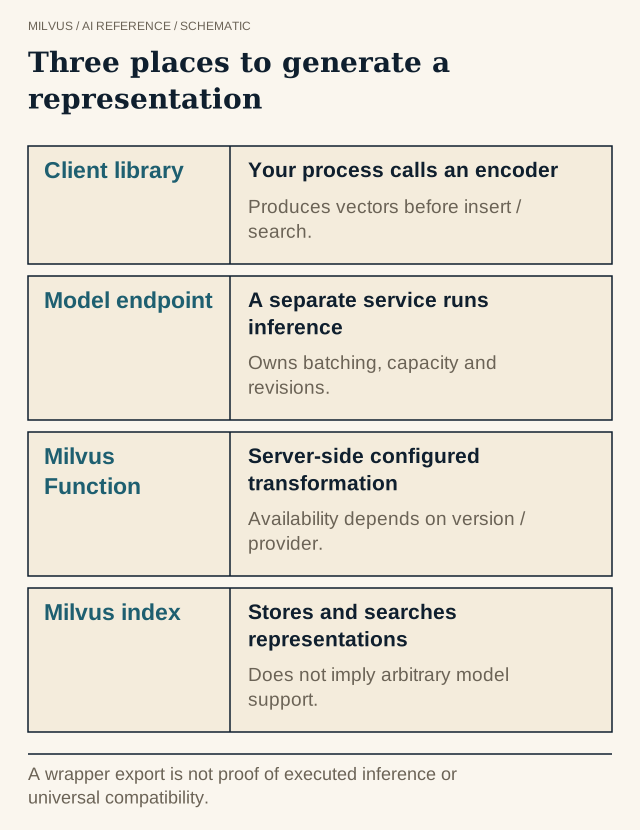 Three places to generate a representation. A wrapper export is not proof of executed inference or universal compatibility.
What can Sentence Transformers produce?
The library has four model types, and each maps to a different kind of Milvus field:
| Model type | Output | Milvus field | Added in |
|---|---|---|---|
SentenceTransformer (bi-encoder) | One dense vector per text | FLOAT_VECTOR | original API |
SparseEncoder (e.g. SPLADE) | One sparse vector per text | SPARSE_FLOAT_VECTOR | v5.0 |
MultiVectorEncoder (ColBERT-style) | One vector per token | Embedding list with MaxSim | v6.0 |
CrossEncoder (reranker) | A relevance score per (query, document) pair | none, it runs after search | original API |
Most pipelines start with a dense bi-encoder for first-stage retrieval and optionally add a cross-encoder to rerank the top results. Sparse and multi-vector models are worth evaluating when exact terms or fine-grained matching matter. See dense vs. sparse embeddings and late-interaction retrieval.
Sentence Transformers + Milvus: a complete example
pip install -U sentence-transformers pymilvus
from pymilvus import MilvusClient
from sentence_transformers import SentenceTransformer

model = SentenceTransformer("sentence-transformers/all-MiniLM-L6-v2")
dim = model.get_embedding_dimension()          # 384 for this model

client = MilvusClient("./milvus_demo.db")      # Milvus Lite; use http://localhost:19530 for a server
client.create_collection(collection_name="articles", dimension=dim, metric_type="COSINE")

docs = [
    {"id": 1, "text": "Milvus is an open-source vector database.", "lang": "en"},
    {"id": 2, "text": "HNSW builds a layered proximity graph.",     "lang": "en"},
    {"id": 3, "text": "Cross-encoders score a query and passage together.", "lang": "en"},
]
vectors = model.encode_document([d["text"] for d in docs], normalize_embeddings=True)
client.insert("articles", [{**d, "vector": v.tolist()} for d, v in zip(docs, vectors)])

query_vec = model.encode_query("what is a vector database?", normalize_embeddings=True)
hits = client.search(
    collection_name="articles",
    data=[query_vec.tolist()],
    limit=3,
    filter='lang == "en"',
    output_fields=["text"],
)
for h in hits[0]:
    print(h["id"], round(h["distance"], 3), h["entity"]["text"])
create_collection with only a dimension uses Milvus’s quick-setup schema: an id primary key, a vector field, and a dynamic field that stores extra keys such as text and lang. That is enough to get started. For production, define an explicit schema and index, as described in how to choose a vector index.
Why encode_query and encode_document matter
Many retrieval models are asymmetric. They expect a different prefix or prompt for a short query than for a long passage. Examples are E5’s query:/passage: prefixes and instruction-tuned models with task prompts. Since v5.0, encode_query and encode_document apply whatever prompts the model card defines, so you no longer have to remember them by hand. For a symmetric model like all-MiniLM-L6-v2 they behave like encode. Use them anyway so swapping in an asymmetric model later does not silently degrade results.
Keep these three things consistent between indexing and querying:
- The same model and revision. Pin the Hugging Face revision. Two models with the same dimension do not share an embedding space, so mixing them in one collection produces nonsense rankings.
- The same normalization. With
normalize_embeddings=True, the vectors are unit length andCOSINEandIPgive the same ranking. Choose the metric the model card recommends. See how cosine, IP, and L2 differ. - The same truncation. Models have a maximum sequence length, and longer text is cut off. Chunk documents to fit rather than embedding whole files.
Changing models means a new vector field or collection and a full re-embedding. Plan that migration explicitly rather than mixing models in one field.
Add a cross-encoder reranker
A bi-encoder compresses each text independently, so it is fast but approximate. A cross-encoder reads the query and a candidate together and scores relevance more precisely, but it is far too slow to run over a whole corpus. The standard pattern is to retrieve a candidate set from Milvus and rerank only that set:
from sentence_transformers import CrossEncoder

reranker = CrossEncoder("cross-encoder/ms-marco-MiniLM-L6-v2")

question = "what is a vector database?"
candidates = client.search("articles", data=[model.encode_query(question, normalize_embeddings=True).tolist()],
                           limit=50, output_fields=["text"])[0]
passages = [c["entity"]["text"] for c in candidates]

for r in reranker.rank(question, passages, top_k=5):
    print(round(r["score"], 3), passages[r["corpus_id"]])
The SBERT documentation suggests reranking on the order of 100 candidates. Tune that number against your latency budget, because reranking cost grows linearly with it. Compare rerankers on the same candidate pool, otherwise you are measuring the first stage too. See what reranking is and which reranking models fit a Milvus pipeline.
Scaling the encoding side
Encoding is usually the slowest step of ingestion. Batch with encode_document(..., batch_size=...), run on GPU when available, and use the library’s multi-process encoding for large CPU jobs. Store the model name and revision as a collection property or metadata field so future readers know what produced the vectors. For millions of documents, move embedding into a distributed job and bulk-load the results into Milvus. How to design a scalable embedding pipeline covers that path, and how to serve and version embedding models covers the query side.
If you prefer to call models through PyMilvus, pymilvus[model] includes a SentenceTransformerEmbeddingFunction wrapper with encode_documents and encode_queries methods and a dim property. Check what the released wrapper supports before relying on newer model types. See what the Milvus Model library supports.
Choosing a model
Use MTEB retrieval scores to build a shortlist, then test the shortlist on your own corpus and queries, in your languages, with Recall@k. Small models like MiniLM are fast and good for prototypes. Larger multilingual or instruction-tuned models usually win on real data at higher encoding cost and a larger vector dimension, which in turn raises Milvus memory per vector. See how to choose an embedding model for retrieval.
Next steps
Run the example against a real server from the Milvus Quickstart, or use Zilliz Cloud. For a ready-made wrapper, see Sentence Transformers embeddings in Milvus. More end-to-end projects are in the Milvus Bootcamp.
Related reading
- Which current embedding models should you evaluate for Milvus?
- How can embeddings help with data deduplication?
- How do you choose an AI framework for a Milvus application?



