

There is no single best embedding model; there is a best model for your data, languages, modality, budget, and license. A good shortlist has three to five candidates: a strong hosted model, a strong open-weight model you can run yourself, a multilingual or multimodal option if you need one, and a cheap baseline. Encode the same documents with each into separate Milvus collections, evaluate on your own queries, and pick the cheapest model that meets your quality bar.
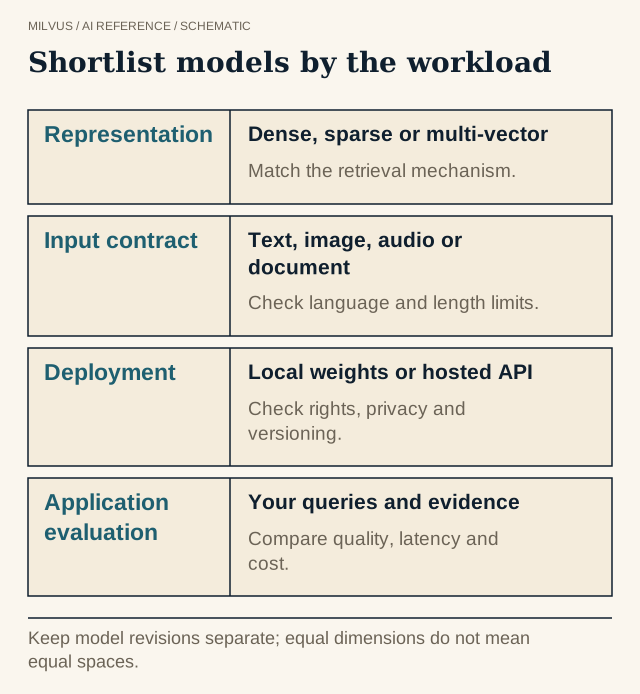 Shortlist models by the workload. Keep model revisions separate; equal dimensions do not mean equal spaces.
Embedding models and rerankers do different jobs
An embedding model turns each document and each query into a vector independently, so documents can be indexed once and searched in milliseconds. A reranker reads a query and a candidate together and reorders a short list the embedding search already found. The embedding model decides what can be found at all; the reranker decides what comes first. This page covers embedding models; the reranking model catalog covers the second stage.
What should decide your shortlist?
| Criterion | Questions to ask | Why it matters |
|---|---|---|
| Language | Which languages do queries and documents use? Do users ask in one language about documents in another? | English-tuned models degrade sharply on other languages and cross-language search |
| Modality | Text only, code, images, page screenshots, video, audio? | A text model cannot embed images; a multimodal score does not prove video or audio support |
| Domain | Legal, medical, financial, source code, product catalogs? | General models miss domain vocabulary; code needs identifier-heavy evaluation |
| Input length | How long are your chunks? | Inputs beyond the limit are truncated, often silently |
| Dimension | How many vectors, at what precision? | Storage and memory scale linearly with dimension |
| Hosting | API or self-hosted? Data residency rules? | Decides cost model, latency, and whether data leaves your environment |
| License | Commercial use allowed? | Several strong open checkpoints are non-commercial |
| Cost and throughput | How many documents to embed, how often re-embedded, query volume? | Large models can dominate pipeline cost at ingestion time |
Dimension deserves a quick calculation. One million 1,024-dimensional float32 vectors take about 4 GB before indexing; at 3,072 dimensions that becomes about 12 GB. Models trained with Matryoshka representation learning let you keep only the first part of each vector (for example 256 or 512 dimensions) with a modest quality loss, and Milvus can also store FLOAT16, BFLOAT16, or INT8 vectors or use quantized indexes. Check how much quality you lose on your own queries before cutting.
For a fuller treatment of these criteria, see how to choose an embedding model for retrieval.
Model families worth evaluating
The families below are well documented and cover the main deployment choices. This is a use-case shortlist, not a ranking. Providers revise exact version identifiers often, so treat the family and capabilities as the durable part and check the provider’s model page for the current name before integrating. For current scores, use the live MTEB leaderboard for text and MMEB for multimodal models; very new hosted models may not be listed there yet.
Hosted text and multimodal APIs
- Voyage text embeddings: a multilingual family with larger and lighter tiers. Within a generation the tiers can share a compatible space; Voyage’s documentation says which, and that guarantee is specific to the family. Voyage also offers a code-specialized model: keep file path, symbol, revision, and language as metadata, and test identifier-heavy queries.
- Cohere Embed: text and image embeddings, including mixed document inputs, with quality and fast tiers. Long-context support is an input capability; it does not mean embedding a whole document beats sensible chunks.
- Gemini embeddings: maps text, images, audio, video, and documents into one space. Gemini generations have shipped mutually incompatible spaces, so re-embed the corpus when you migrate rather than mixing vectors.
Open-weight text models
- nvidia/Nemotron-3-Embed-1B-BF16: a 2,048-dimensional text encoder with documented shorter-output options for a self-hosted pipeline. Benchmark throughput on your hardware rather than inferring it from parameter count.
- KaLM-Embedding family: spans a compact multilingual-instruct checkpoint and a larger Gemma3-derived model. Each size has its own pooling, instructions, and dimension; re-embed when switching.
- BAAI/bge-m3: an established multilingual baseline with dense, sparse, and multi-vector outputs from one model. Each output needs its own field. More dense, sparse, and compact options are compared in dense, sparse, and compact model families.
Multimodal and visual-document models
- Qwen/Qwen3-VL-Embedding-8B: one space for text, images, screenshots, and video. Keep page or frame/clip IDs so results point back to evidence, and evaluate each target modality separately.
- nvidia/nemotron-colembed-vl-8b-v2: a late-interaction page encoder that returns token-level vectors, which need an embedding-list design rather than a single dense field. The current model card marks the weights CC-BY-NC. See how page encoders use Milvus embedding lists and multimodal model families.
How do these models connect to Milvus?
There are three ways to get vectors into Milvus, and you can mix them:
- Encode in your application with the model’s own SDK or library, then insert vectors. This works for every model above, including multimodal and multi-vector ones.
- Use PyMilvus Model (
pip install "pymilvus[model]"), which wraps common providers and open models behind oneencode_documents/encode_queriesinterface, for exampleOpenAIEmbeddingFunction,VoyageEmbeddingFunction,CohereEmbeddingFunction,GeminiEmbeddingFunction,SentenceTransformerEmbeddingFunction,BGEM3EmbeddingFunction, andTEIEmbeddingFunction. The Milvus Model support matrix lists exactly what each wrapper handles. - Let Milvus call the provider with a server-side
TEXTEMBEDDINGFunction (Milvus 2.6 and later). You insert raw text, and Milvus sends it to a configured provider such as OpenAI, Voyage AI, Cohere, Vertex AI, Bedrock, or a self-hosted TEI endpoint, at both insert and search time.
Option 3 is the simplest for text; options 1 and 2 give full control over batching, prompts, and non-text inputs. Serving and versioning trade-offs are covered in how to serve embedding and reranking models.
Build the Milvus data contract
Whichever model wins, store enough to reproduce and trust the vectors: source ID, text or object reference, tenant, model ID, model revision, preprocessing revision, and the vector field definition. Inspect each model’s output dimension and normalization before choosing the field type and metric; normalized vectors are usually searched with COSINE or IP. Keep different models in separate fields or collections unless the provider explicitly guarantees a shared space. Equal dimensions do not make two models compatible.
For images, video, and PDFs, also keep page number, frame or timestamp, and object location. A visually similar result without its source location is hard to use in an agent workflow or an audit.
Run a bounded pilot before embedding everything
- Take a representative sample of a few thousand to tens of thousands of documents, chunked the way production will chunk them.
- Write 50 to 100 real queries with relevance judgments, including rare identifiers, paraphrases, cross-language questions, and queries with no answer.
- Encode the sample with each candidate into its own collection, using the prompts and normalization from the model card.
- Search with a
FLATindex first so you compare models, not index recall; then add the production index. - Compare Recall@k and nDCG, plus encoding time and cost, storage, and query latency. Then add a reranker over a fixed candidate pool and measure again.
- Pin the chosen model revision and configuration so a provider update cannot silently change what stored vectors mean.
Include the re-embedding cost of the full corpus in the decision. Switching models later means re-encoding everything, so a slightly better model that is three times as expensive to run may not be worth it.
Related reading
- What are embeddings in vector search?
- What are multimodal embeddings?
- What is late-interaction retrieval, and how can embedding lists help?
- What does LangChain do, and how does it use Milvus?
Next step: load your first candidate into a local instance with the Milvus Quickstart, or skip cluster operations entirely with Zilliz Cloud.
Sources and further reading
- Milvus: embedding overview
- Milvus: embedding Function overview
- Matryoshka Representation Learning (arXiv)
- Voyage embeddings documentation
- Cohere Embed documentation
- Gemini embeddings documentation
- nvidia/Nemotron-3-Embed-1B-BF16 model card
- Qwen/Qwen3-VL-Embedding-8B model card
- nvidia/nemotron-colembed-vl-8b-v2 model card
- BAAI/bge-m3 model card
- KaLM-Embedding model cards



