

Choose an embedding model by testing a short list of candidates on your own documents and queries, not by picking the top name on a leaderboard. Start from what you retrieve (text passages, code, PDF pages, images), the languages and domain vocabulary involved, and your deployment and cost limits; shortlist three to five models that fit; then measure retrieval quality with exact search on a labeled query set before tuning any index. The model you pick defines what information survives into the vectors Milvus indexes, so it caps the quality every later stage can reach.
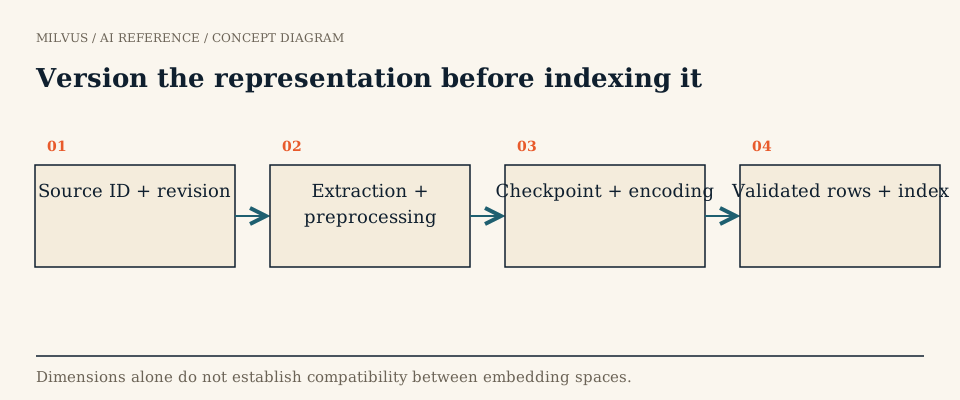 Version the representation before indexing it
Why does the embedding model matter so much?
In a RAG pipeline the LLM can only answer from what retrieval hands it, and retrieval can only find what the embeddings make findable. A faster index, a better prompt, or a reranker cannot recover a relevant passage the first stage never returned. Model choice also has a long tail: every stored vector depends on it, so switching later means re-encoding the whole corpus. That makes a few days of structured evaluation up front cheap insurance.
What should you decide before comparing models?
Write down the workload in concrete terms; these answers eliminate most candidates immediately.
| Question | Why it narrows the field |
|---|---|
| What is one retrievable unit? | A 300-token passage, a code function, a scanned page, and a product image need different encoders and preprocessing. |
| Which languages appear in queries and documents? | Cross-lingual search (query in Japanese, docs in English) needs a multilingual model trained for it. |
| How specialized is the vocabulary? | Legal citations, drug names, part numbers, and internal jargon can be split into meaningless subword pieces by a general model. |
| How long are the inputs? | Text beyond the model’s maximum input length is truncated; check the limit against your chunk size. |
| Hosted API or self-hosted? | Drives latency, per-token cost, data residency, and whether you can fine-tune or pin a version. |
| What scale and latency budget? | Dimension and model size set storage, memory, and encoding throughput. |
| Licence and terms? | Some open weights restrict commercial use; some APIs restrict storing outputs. |
A quick domain test: if most of your key entities and terms can be found easily on the public web, a strong general model will probably know them. If they cannot, plan to evaluate domain-specific models or fine-tuning.
How do you build a shortlist?
Use the MTEB leaderboard as a starting filter, but read it carefully. MTEB spans many task types (retrieval, classification, clustering, reranking, semantic similarity, and more) across many languages, and its original paper found that no single method wins every task. For search and RAG, sort by the retrieval scores for your languages rather than the overall average, and treat small gaps between neighbours as noise. Our guide to reading MTEB covers the traps, and the current model catalog lists models worth evaluating today.
For each candidate, record:
- Output dimension and whether it supports shortening (Matryoshka-trained models keep most quality when truncated).
- Max input length in tokens.
- Query and document conventions: many retrieval models expect instruction prefixes such as a query prompt; forgetting them can cost a lot of quality.
- Normalization and intended metric: cosine, inner product, or L2.
- Representation type: dense only, or also sparse or multi-vector output (BGE-M3, for example, emits dense and sparse vectors from one pass).
- Exact model revision, so results stay reproducible.
Include one strong small model in every shortlist. The gap to a large model is often smaller on your data than on the leaderboard, and it is much cheaper to serve.
How should you evaluate candidates on your own data?
- Build a labeled query set. Collect 50 to 200 real or realistic queries and mark the relevant documents for each. Include paraphrases, exact identifiers and error codes, negation (“plans without a setup fee”), rare names, and hard negatives that look relevant but are not.
- Encode the corpus separately per model, applying each model’s own prefixes and normalization. Never mix vectors from two models in one field.
- Search exactly first. Use a FLAT index (brute force) so the results reflect the embeddings rather than ANN approximation; see why a FLAT baseline matters.
- Score retrieval. Recall@k tells you whether the evidence made it into the candidate set the LLM or reranker will see; nDCG@k and MRR tell you whether it ranked near the top. Details are in evaluating retrieval quality.
- Inspect failures by category. A model that wins on paraphrases but misses every part number may still be the right dense choice, as long as you add a lexical path.
- Then tune ANN. Once the model is chosen, pick index parameters that hit a recall target against the FLAT results.
How do dimension and cost trade off?
Storage and memory scale linearly with dimension. One million float32 vectors take about 1.5 GB at 384 dimensions, 3 GB at 768, and 4 GB at 1,024, before index overhead and replicas. At 100 million documents those differences become a hardware decision. Levers that reduce cost without switching model:
- Truncate Matryoshka embeddings to a smaller prefix and re-measure recall.
- Use lower-precision storage: Milvus supports
FLOAT16_VECTOR,BFLOAT16_VECTOR, andINT8_VECTORfields, plus quantized indexes; see vector quantization and estimating memory. - Add a reranker to a cheaper first-stage model instead of buying a bigger embedder; see reranking.
Also budget encoding: the initial backfill, ongoing document updates, and per-query latency. A hosted API can be the simplest start, while a self-hosted model can win at high query volume or under strict data-residency rules.
Should you use a domain-specific model or fine-tune?
Follow a simple decision path. If your content is general, test top-ranked general models. If it is specialized and a credible domain model exists (biomedical, legal, code, finance), add it to the shortlist and test it head to head; domain models are not automatically better on your queries. If neither performs well enough, fine-tune a general model on query-passage pairs from your domain, mining hard negatives so the model learns the distinctions that matter (see hard negatives). Fine-tuning can also hurt if training pairs are noisy, so keep the same evaluation set as the referee.
Is one dense model enough?
Often not. Dense embeddings excel at meaning but blur exact tokens such as SKUs, version numbers, and error codes. Combining a dense model with BM25 or a learned sparse model in hybrid search usually covers more failure categories than upgrading the dense model alone. For PDFs with tables and figures, or for image and video search, compare multimodal model families instead of forcing everything through a text encoder.
How do you run the comparison in Milvus?
Milvus gives you several ways to produce vectors, so you can compare models without rewriting the application:
- Client-side wrappers in
pymilvus[model]cover OpenAI, Sentence Transformers, BGE-M3, SPLADE, Voyage AI, Jina, Cohere, Mistral AI, Nomic, Instructor, mGTE, and others behind oneencode_documents/encode_queriesinterface, which makes A/B encoding straightforward. - Server-side embedding Functions (Milvus 2.6 and later) call a provider such as OpenAI, Azure OpenAI, Bedrock, Vertex AI, Voyage AI, Cohere, or Hugging Face TEI during insert and search, writing
FLOAT_VECTORorINT8_VECTORoutput from aVARCHARinput field. - Built-in BM25 produces the lexical sparse side of a hybrid setup from raw text.
The trade-offs among these are explained in options for generating embeddings alongside Milvus and, for local models, Sentence Transformers with Milvus.
For the evaluation itself, load each candidate into its own collection (or its own vector field) with a FLAT index and identical metadata, run the labeled queries, and compare. When you migrate production to a new model, build the new collection alongside the old one, re-encode from a replayable source corpus, verify it against the same query set, then switch traffic by moving a collection alias with alter_alias. The old collection stays intact as the rollback path. Store the model name, revision, prefixes, and normalization with the data so future upgrades are a controlled change rather than an unexplained shift in results.
Next steps
Encode a sample of your corpus with two or three candidates and run them through the Milvus Quickstart flow, then use the Milvus Bootcamp RAG projects as an evaluation harness. If you want hosted infrastructure while you experiment, Zilliz Cloud runs the same collections. For the families to put on your shortlist, see dense, sparse, and compact embedding families.
Sources and further reading
- Muennighoff et al., MTEB: Massive Text Embedding Benchmark
- MTEB leaderboard
- Kusupati et al., Matryoshka Representation Learning
- Sentence Transformers documentation
- Milvus: embedding functions in PyMilvus
- Milvus: embedding Function overview
- Milvus: dense vector fields
- Milvus: similarity metrics
- Milvus: manage collection aliases



