

Agno is an open-source Python framework for building agents. You wire a model, tools, memory, and knowledge into an Agent. Knowledge is Agno’s retrieval layer. A Knowledge object reads files, URLs, or text, chunks and embeds them, and stores them in a vector database. Milvus is one of the supported backends, through agno.vectordb.milvus.Milvus. When the agent runs with knowledge search enabled, it gets a search tool, decides when to call it, and Milvus returns the most similar chunks, filtered by metadata if you ask.
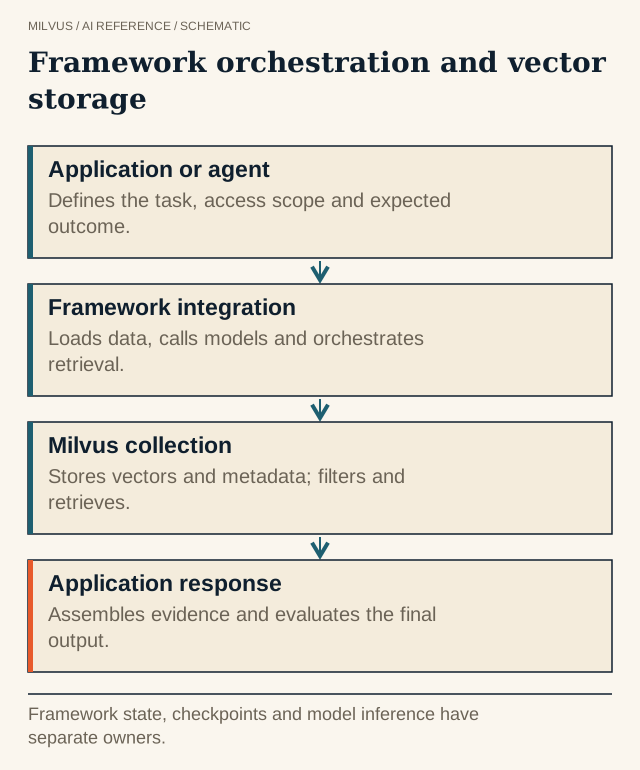 Framework orchestration and vector storage. Framework state, checkpoints and model inference have separate owners.
Install and connect
pip install -U agno openai "pymilvus[milvus-lite]" pypdf
The uri controls where data lives. A local path such as ./milvus.db runs Milvus Lite inside your process, which suits prototypes. http://localhost:19530 connects to a Milvus server, with token="user:password" if authentication is on. A Zilliz Cloud public endpoint plus API key as token gives you a managed cluster.
A minimal Agno + Milvus agent
from agno.agent import Agent
from agno.knowledge.embedder.openai import OpenAIEmbedder
from agno.knowledge.knowledge import Knowledge
from agno.models.openai import OpenAIChat
from agno.vectordb.milvus import Milvus

vector_db = Milvus(
    collection="product_docs",
    uri="http://localhost:19530",
    token="root:Milvus",
    embedder=OpenAIEmbedder(id="text-embedding-3-small"),  # 1536 dims
)

knowledge = Knowledge(vector_db=vector_db)
knowledge.insert(
    path="docs/billing_guide.pdf",
    metadata={"product": "billing", "tenant": "acme"},
)

agent = Agent(
    model=OpenAIChat(id="gpt-4o-mini"),
    knowledge=knowledge,
    search_knowledge=True,          # give the agent a knowledge-search tool (the default)
    knowledge_filters={"tenant": "acme"},
    markdown=True,
)
agent.print_response("When are invoices finalized each month?")
Knowledge.insert accepts path, url, or text_content, plus a metadata dict that is stored with every chunk. It upserts by default, so re-inserting the same source replaces its chunks instead of duplicating them. For services built on asyncio, use await knowledge.ainsert(...) and await agent.aprint_response(...). If you followed an older tutorial, note that the ingestion method is now insert/ainsert.
The Milvus constructor’s main options:
| Parameter | Default | Notes |
|---|---|---|
collection | required | One collection per knowledge base keeps lifecycle and permissions simple. |
uri | http://localhost:19530 | A file path for Milvus Lite, a server URL, or a Zilliz Cloud endpoint. |
token | None | user:password or a Zilliz Cloud API key. |
embedder | OpenAIEmbedder() | Must stay the same for the life of the collection. Changing models means re-embedding. |
distance | Distance.cosine | Match the metric your embedding model expects. See how the metrics differ. |
search_type | SearchType.vector | vector, keyword, or hybrid, from agno.vectordb.search. |
How do knowledge filters work with Milvus?
Agno stores each chunk’s metadata in a JSON field. A filter dictionary such as {"tenant": "acme"} becomes a Milvus expression on that field, roughly meta_data["tenant"] == "acme", and list values become json_contains_any. Milvus applies it during the vector search. You can set filters on the Agent with knowledge_filters (always applied), pass them per run, or set enable_agentic_knowledge_filters=True so the model chooses filter values from the user’s question.
The agentic option is convenient for relevance hints like product or year. It is the wrong tool for access control. Tenant and permission filters should be fixed by your application from the authenticated user, so a prompt cannot widen them. Agno’s Milvus adapter takes dictionary filters only. The newer FilterExpr list syntax is ignored for Milvus with a warning, so stick to dictionaries. For larger multi-tenant deployments, see how to design multi-tenancy for vector search.
Should you use Agno’s hybrid search mode with Milvus?
search_type=SearchType.hybrid adds a sparse vector field and fuses dense and sparse results with reciprocal rank fusion (k=60). Know how the sparse side works first. Agno computes it in Python with a lowercase whitespace split and a hashed term-frequency score. It is not Milvus’s built-in BM25 full-text search. Term IDs come from Python’s built-in hash(), which is randomized per process unless PYTHONHASHSEED is fixed, so an ingestion job and a query service can disagree about which ID a word maps to. Evaluate keyword-heavy queries before you rely on it. If exact-term matching (error codes, SKUs, names) matters, Milvus’s native BM25, available from Milvus 2.5, is the more robust route. See what hybrid search is and what full-text search and BM25 are.
Knowledge vs. memory vs. session state
Agno keeps three kinds of agent data apart, and it pays to keep them apart in storage too:
- Knowledge holds documents the agent searches, such as manuals, policies, and tickets. It lives in Milvus.
- Memory holds facts the agent learns about a user over time. Agno manages it through its own memory and database settings.
- Session state holds the running conversation and tool calls for one session.
All three can reference the same source IDs, but they have different lifetimes and deletion rules. A user’s “forget me” request has to reach memory, and it may also need to reach knowledge if the user uploaded documents. See how to structure agent memory in Milvus.
Testing an Agno knowledge base
Evaluate the retriever and the agent separately. First call knowledge.search(query, max_results=5, filters={...}) directly on a fixed set of questions and check that the expected source documents come back, including under each tenant filter. Then run the agent on the same questions with tool-call traces turned on, and confirm that it actually calls the search tool and cites what it retrieved. Add one question whose answer is not in the corpus and confirm the agent says so instead of guessing. If the direct search fails, no prompt change will fix it. Fix chunking, the embedder, or filters first. How to evaluate retrieval quality covers the metrics.
Next steps
Start a Milvus server with the Milvus Quickstart, or create a cluster on Zilliz Cloud and use its endpoint and API key as uri and token. Then follow Agno’s Milvus vector database guide for the async example.
Related reading
- How do you choose an AI framework for a Milvus application?
- What is agentic search, and where does a vector database fit?
- How do metadata filters interact with vector search?
- What does a Milvus MCP server expose to an AI agent?



