

Hybrid and multimodal search improve product discovery by letting each kind of shopper intent reach the catalog through the signal that understands it best. Keyword (BM25) retrieval nails model numbers, brands, and exact attributes; dense text embeddings catch paraphrases like “rain shell” for "waterproof jacket"; image embeddings match a photo or a visual style. Running these in parallel, fusing the candidate lists, and applying stock, price, and category rules as hard filters before ranking turns “zero results” and “close but wrong” queries into relevant, buyable products.
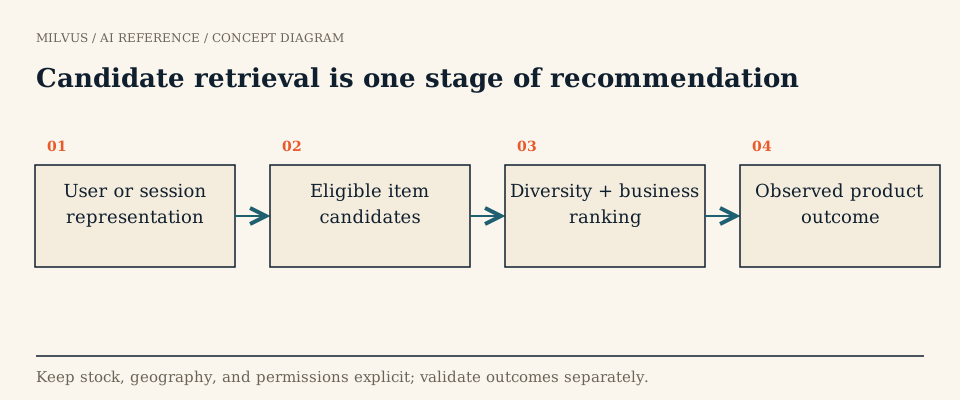 Candidate retrieval is one stage of recommendation
Why does keyword-only product search miss so much?
Classic product search matches query tokens against titles and attributes. It is precise when the shopper speaks the catalog’s language and brittle when they do not. A large share of e-commerce queries are long-tail and descriptive ("something warm for hiking in the rain", “mid-century lamp like this”), and lexical matching either returns nothing or, after aggressive query relaxation, returns noise.
Pure vector search fails in the opposite direction. An embedding model happily treats “iPhone 15 case” and “iPhone 14 case” as near neighbors, and it has no special respect for a SKU, a part number, or a size. That is why serious retail systems keep both. Target’s engineering team, for example, describes a two-channel design in which a Solr lexical index and a fine-tuned 384-dimensional dual encoder retrieve in parallel, attribute classifiers (item type, brand, category, gender, size group) remove off-topic dense candidates, and a heavier ranker orders the merged list. Online, they reported roughly half as many zero-result searches and small but significant lifts in click-through and conversion over the lexical baseline (Target, 2026).
Which signal handles which query?
| Shopper input | Best first signal | Milvus building block |
|---|---|---|
| Model number, brand, exact attribute (“Sony WH-1000XM5”) | Lexical / BM25 | Full-text search on a VARCHAR field with an analyzer |
| Descriptive or paraphrased text (“quiet headphones for flights”) | Dense text embedding | FLOAT_VECTOR field with HNSW or another ANN index |
| Uploaded photo, “more like this” | Image embedding | Second FLOAT_VECTOR field from an image encoder |
| Text describing a look (“boho floral midi dress”) | Text-to-image embedding (CLIP-style) | Same image field, queried with the text tower |
| Size, stock, price, region, category | Structured constraint | Scalar fields + boolean filter expression |
| Promotions, margin, freshness | Business preference | Boost and decay rankers, or your own ranking layer |
The key design decision is which inputs are constraints and which are preferences. Out-of-stock items, the wrong market, or the wrong size are constraints: they belong in the filter. “Prefer newer listings” or “nudge house brands” are preferences: they belong in ranking, where they can be tuned and audited.
What does the end-to-end architecture look like?
1. Model the catalog at the right grain
Decide whether one entity is a product, a variant (color/size), or an offer (seller + variant). Variants usually make the best search unit because size and stock live there, but then you need a parent_sku so results can be collapsed per product. Store stable IDs, title, description, category path, brand, price, in_stock, region, and image URL next to the vectors.
2. Embed text and images
A product collection in Milvus can hold several vector fields side by side: a sparse BM25 field generated from the title, a dense field for the description text, and a dense field for the main image. With full-text search, you mark a text field with enable_analyzer=True and attach a FunctionType.BM25 function that writes into a SPARSE_FLOAT_VECTOR field, indexed with SPARSE_INVERTED_INDEX and metric BM25, so Milvus builds the sparse vectors for you from raw text. For images, a contrastive model in the CLIP family maps photos and captions into one space (Radford et al., 2021), which is what makes “search images with words” possible. Make sure the model was evaluated for the direction you need: an image-to-image demo says little about text-to-image quality. Record the model and preprocessing version so a catalog re-embedding can be rolled out and compared deliberately.
3. Retrieve in parallel and fuse
Milvus multi-vector hybrid search issues one AnnSearchRequest per vector field, each with its own query, limit, and optional filter expr, then merges the lists with a ranker. RRFRanker (Reciprocal Rank Fusion, k defaults to 60) needs no score calibration; WeightedRanker lets you lean on, say, lexical results for queries that look like part numbers.
from pymilvus import MilvusClient, AnnSearchRequest, RRFRanker

client = MilvusClient("http://localhost:19530")
flt = 'in_stock == true and region == "US" and size == "M"'

reqs = [
    AnnSearchRequest(data=["waterproof red jacket"], anns_field="title_sparse",
                     param={}, limit=100, expr=flt),          # BM25 on raw text
    AnnSearchRequest(data=[text_vec], anns_field="desc_dense",
                     param={}, limit=100, expr=flt),          # semantic text
    AnnSearchRequest(data=[clip_text_vec], anns_field="image_dense",
                     param={}, limit=100, expr=flt),          # text-to-image
]

hits = client.hybrid_search(
    collection_name="products",
    reqs=reqs,
    ranker=RRFRanker(),
    limit=20,
    output_fields=["sku", "parent_sku", "title", "price"],
)
By default a collection can hold up to four vector fields; proxy.maxVectorFieldNum raises that to ten.
4. Enforce eligibility as filters, not afterthoughts
Put the same filter on every request. Filtering after ranking is the classic bug: the top 100 semantic matches can be entirely out of stock, leaving a nearly empty page. Index frequently filtered scalar fields and see how metadata filters interact with vector search for the performance side.
5. Collapse variants and apply business rules
Shoppers want five different jackets, not one jacket in five colors. Milvus grouping search (group_by_field="parent_sku", with group_size controlling how many variants per product) returns distinct products from a single-vector search; for a fused hybrid list you can also deduplicate by parent_sku in the application layer. From Milvus 2.6.2, a Boost Ranker multiplies scores of entities that match a filter (for example, featured or premium items) by a weight, and the Decay Ranker (gauss, exp, or linear) blends similarity with a numeric field such as listing time or price distance, which is a clean way to express freshness without rebuilding indexes.
6. Rerank the short list
A cross-encoder or learning-to-rank model over the top 50-200 candidates can use features no vector index sees: click and conversion history, margin, seller quality, personalization. Keep this stage separate from retrieval so you can tell which layer caused a bad result. See what reranking is and when to apply it.
7. Keep the index fresh
Prices and stock change constantly. Update scalar fields like in_stock and price as inventory events arrive rather than waiting for a nightly rebuild. On Milvus 2.6.2 and later, upsert(..., partial_update=True) changes just those fields; on older releases, or without that flag, an upsert replaces the whole entity, so the event must carry the full record including its vectors. Re-embed only when titles, images, or the model change.
A worked example
A shopper searches “waterproof red jacket, size M” against a catalog of 40,000 apparel SKUs. A text encoder turns the query into a dense vector; an ANN search against the product-description field returns 200 candidates ranked by cosine similarity, top result 0.86. Run that result through a hard filter on size: M and in_stock: true first, and the list drops to 31 candidates: several of the top-scoring 0.8+ matches were red jackets in size XL with no inventory, which is why eligibility has to run before, not after, ranking. Among the remaining 31, three are near-duplicate listings of the same jacket from different sellers (similarity 0.95+ to each other); grouping by a parent_sku field before display collapses them into one representative result instead of burning three of the top five slots on the same product. Adding the BM25 channel pulls in a jacket whose title says “rain shell” but whose spec sheet says "waterproof, 20K mm", and the image channel surfaces a red parka with a sparse description. The final list shows 5 genuinely distinct, in-stock, correctly sized jackets, a result a pure semantic top-k without filtering or grouping would not have produced, even with a stronger embedding model.
How do you know it is working?
Build an evaluation set that mirrors real traffic, not a demo: exact SKU lookups, broad categories (“rugs”), fine-grained attributes (“linen shirt, relaxed fit, navy”), uploaded photos, misspellings, and queries for items you do not carry. Include hard negatives that look right but violate a constraint (right style, wrong size). Offline, track NDCG@10 and recall@k per query class, the zero-result rate, and the invalid-result rate (anything out of stock or ineligible on the page). Online, compare click-through, add-to-cart, and conversion in a controlled A/B test, and log query and catalog state so you can separate a retrieval change from a price or inventory change that happened the same week. How to build search evaluation sets and how to evaluate retrieval quality go deeper.
Who runs this in production?
Tokopedia, one of Indonesia’s largest marketplaces, uses Milvus for semantic product search; the Tokopedia customer story explains how it moved beyond keyword matching. The same pattern of vector candidates, structured filters, and a ranking layer also powers “similar items” and recommendation shelves, covered in how vector databases support recommendation candidate retrieval.
Next steps
Start with the Milvus Quickstart, add a BM25 field and a dense field to one collection, and run a two-request hybrid search against a slice of your catalog. Then add an image field using the text-to-image tutorial below and compare results per query class. For background, read what hybrid search is and what multimodal embeddings are. If you would rather not operate the cluster, the same APIs run on Zilliz Cloud.
Sources and further reading
- Milvus: multi-vector hybrid search
- Milvus: full-text search with BM25
- Milvus: filtered search
- Milvus: grouping search
- Milvus: Boost Ranker
- Milvus: Decay Ranker overview
- Milvus: text-to-image search with CLIP
- Milvus: recommendation system tutorial
- Retail Product Search: A Practical Approach at Target (arXiv)
- Radford et al., Learning Transferable Visual Models From Natural Language Supervision (CLIP)



