

Multimodal embeddings are vectors that place different kinds of data, such as text, images, audio, or video, in one shared space, so that a photo of a red sneaker and the phrase “red running shoe” end up close together. They are produced by models trained on paired data (for example, images with their captions) to make matching pairs similar and mismatched pairs dissimilar. Once content from every modality lives in the same space, a text query can retrieve images, an image can retrieve similar products or captions, and a vector database can serve all of it with one similarity search.
The important qualifier is "trained to be shared". Two vectors with the same dimension are not comparable just because their shapes match; alignment comes from how the model was trained. The rest of this page covers how that alignment is learned, which model families exist, the main design choices, known weak spots, and how to build multimodal search in Milvus.
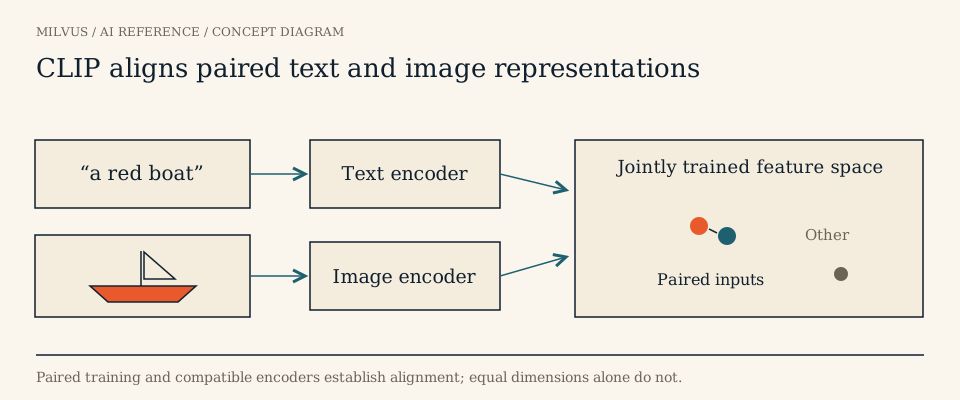 Paired text and image encoders learn compatible representations
How do multimodal embedding models learn a shared space?
Most retrieval-oriented multimodal models use a dual-encoder (or “two-tower”) design: one encoder per modality, each ending in a projection to the same output dimension. CLIP is the reference example. It pairs a vision transformer or ResNet image encoder with a transformer text encoder and was trained on about 400 million image-text pairs collected from the web.
Training is contrastive. In each batch of N image-caption pairs, the model computes an N × N similarity matrix between all image vectors and all text vectors. The loss rewards high scores on the diagonal (the true pairs) and low scores everywhere else, using a softmax with a learned temperature in both directions. Over hundreds of millions of examples, the encoders learn that the visual pattern of a dog and the word “dog” should point the same way. That alone was enough for CLIP to match the original ResNet-50’s ImageNet accuracy zero-shot, without training on any of ImageNet’s labeled examples.
Later work refined the recipe rather than replacing it. SigLIP swaps the batch-wide softmax for an independent sigmoid on each pair, which removes the need for a global normalization and works well at both small and very large batch sizes. ImageBind extended the idea to six modalities (images, text, audio, depth, thermal, and IMU data) by pairing each one with images only; because everything is aligned to images, audio and text become comparable without ever being paired directly.
A key property of the dual-encoder design is that each side runs independently. You can embed a million product photos once at indexing time and only encode the short text query at search time, which is what makes these models practical for large-scale retrieval.
What can you do with multimodal embeddings?
- Text-to-image and image-to-text search. Describe what you want in words and retrieve matching photos, or upload a picture and find captions, listings, or articles about it.
- Image-to-image similarity. Find visually similar products, near-duplicate photos, or related frames, a common building block for product discovery.
- Multimodal RAG. Retrieve figures, slides, scanned pages, or screenshots as evidence for a language model, instead of only extracted text.
- Zero-shot classification and tagging. Embed candidate labels as text ("a photo of a forklift", “a photo of a pallet”) and assign each image to the closest label.
- Dataset curation. Cluster, deduplicate, and search large image or video collections by description, as covered in curating image and video data.
- Video and audio retrieval. Embed clips or frames and search them with text, using models trained for those modalities.
Which model families produce multimodal embeddings?
| Family | Examples | Output | Good fit |
|---|---|---|---|
| Contrastive dual encoders | CLIP, OpenCLIP, SigLIP | One vector per image and per text | Text-image search, tagging, image similarity |
| Many-modality binding | ImageBind | One vector per input across six modalities | Audio, depth, or sensor data searched alongside images and text |
| Composed or instruction-aware encoders | Visualized BGE and similar models | One vector for an image plus text instruction | “This dress, but in blue”-style queries, mixed image and text items |
| Visual document retrievers | ColPali, ColQwen | Many patch vectors per page | PDF pages, slides, charts, and scanned documents |
Model choice should come from your task and an evaluation on your own data. Public benchmarks such as MMEB help shortlist candidates; see how MMEB evaluates multimodal embeddings and which multimodal families fit image, video, and audio.
Note that a multimodal chat model that accepts images is a generator, not an embedding model. Unless it explicitly exposes an embedding output with documented preprocessing and query and document modes, pulling hidden states out of it does not give you a retrieval space.
Single vector, fused vector, or many vectors?
Four representation designs are easy to confuse, and each needs a different search setup.
| Design | Example | How to search it |
|---|---|---|
| Aligned single vectors | One CLIP image vector and one CLIP text vector | Compare directly in the shared space |
| Fused item vector | Product photo and description combined into one vector by the model | Use that model’s encoding for both query and item |
| Separate per-modality fields | An image vector and a text vector stored side by side | Search each field, then merge with rank fusion |
| Token or patch lists | A page represented by hundreds of patch vectors | Use a multi-vector score such as MaxSim |
Fusion is sometimes described as early versus late. Early fusion combines modalities inside the model before producing one vector; late fusion keeps per-modality vectors and combines their scores at query time. Late fusion is easier to tune and debug, since you can reweight image versus text without re-embedding anything; early fusion can capture interactions such as “the text on this image” that separate vectors miss.
Multimodal and multi-vector are independent ideas. A text-only ColBERT model is multi-vector but not multimodal; CLIP is multimodal with one vector per input. See multi-vector retrieval and late interaction for the list-based designs.
What are the limits of multimodal embeddings?
Alignment is learned correspondence, and it has a scope. CLIP-style models are strong at “what objects and scenes are here” and noticeably weaker at counting, spatial relations (“the cup left of the laptop”), negation, fine-grained attributes, and reading small text inside images. Domain shift matters too: a model trained on web photos may cluster medical scans, satellite imagery, or industrial parts poorly.
There is also a geometric quirk known as the modality gap. Research on CLIP-like models found that image vectors and text vectors occupy separate regions of the shared space, a side effect of initialization and contrastive training. Cross-modal similarities are therefore systematically lower than same-modality ones, so an image-to-image score of 0.8 and a text-to-image score of 0.3 are not on the same scale. If you mix query types or set similarity thresholds, calibrate them per direction rather than reusing one cutoff.
Finally, the space captures shared content, not individual preference. It can tell you which images match "minimalist living room", but personalized recommendation needs its own signals and objective on top of that.
How do you build multimodal search in Milvus?
The model defines which comparisons are meaningful; Milvus stores the vectors with their metadata and serves fast, filtered similarity search over them. A typical text-to-image setup looks like this:
- Pick an encoder and freeze its version. The Milvus text-to-image tutorial uses CLIP ViT-B/32, which outputs 512-dimensional vectors.
- Embed the collection with the image encoder and its preprocessing, and L2-normalize the vectors as the checkpoint expects.
- Store them in a dense vector field with the matching dimension and a
COSINEorIPmetric, plus scalar fields for the file path, media ID, source, and access scope. - Embed the query with the matching text encoder, normalize it the same way, and search the image field, optionally with a metadata filter.
- Resolve returned IDs to the source media and evaluate results against labeled examples.
client.create_collection(collection_name="images", dimension=512, metric_type="COSINE")
client.insert(collection_name="images", data=[{"id": i, "vector": v, "filepath": p} for i, (v, p) in enumerate(rows)])

hits = client.search(
    collection_name="images",
    data=[text_query_vector],
    limit=10,
    output_fields=["filepath"],
)
Other designs map onto Milvus just as directly. For items with both a photo and a description, store an image vector and a text vector as separate fields in one collection and query them together with hybrid_search(), merging the two result lists with RRFRanker or WeightedRanker (see hybrid search). For page-level models like ColPali, store each page’s patch vectors in a StructArray field and search with an EmbeddingList and a MAX_SIM-family metric, as described in visual document models. The Milvus multimodal RAG tutorial goes a step further: it uses Visualized BGE to embed composed image-plus-text queries, then lets a vision-capable language model rerank and explain the candidates.
Whatever the design, keep the model and preprocessing revision with every record. Mixing vectors from two checkpoints in one field silently breaks similarity, and re-embedding is far easier when you know exactly which records came from which model.
How should you evaluate it?
Build a small labeled set before tuning anything. Include text queries that describe an object, then variants that change only one attribute, relation, or count while keeping the category constant, and add visually similar wrong answers. Measure recall@k and nDCG separately for each direction you support (text-to-image, image-to-text, image-to-image), and run the same queries against a FLAT baseline so you can tell model errors from index approximation.
Related reading
- Which multimodal embedding families fit image, video, and audio retrieval?
- How do ColPali, ColQwen, and other page encoders use Milvus embedding lists?
- What is multi-vector retrieval, and how do MaxSim and MUVERA work?
- What are embeddings in vector search?
- How do cosine similarity, inner product, and L2 differ?
Next step: build a working image search with the Milvus text-to-image tutorial, or browse more multimodal projects in the Milvus Bootcamp.
Sources and further reading
- CLIP: learning transferable visual models from natural language supervision
- OpenAI CLIP code, encoders, and preprocessing
- SigLIP: sigmoid loss for language-image pre-training
- ImageBind: one embedding space to bind them all
- Mind the Gap: the modality gap in multimodal contrastive learning
- Milvus text-to-image search tutorial
- Milvus multimodal RAG tutorial
- Milvus multi-vector hybrid search


