

A deletion should flow from the system of record outward: delete the row in the lake table first, then make every derived copy — vector indexes, chunk tables, caches, exports, and snapshots — catch up within a defined deadline, and verify that the record no longer comes back from any of them. In practice that means a written deletion contract, stable IDs that link source records to every derived record, and a pipeline that turns one source delete into many downstream actions. Removing a vector from one index is only one step of that pipeline.
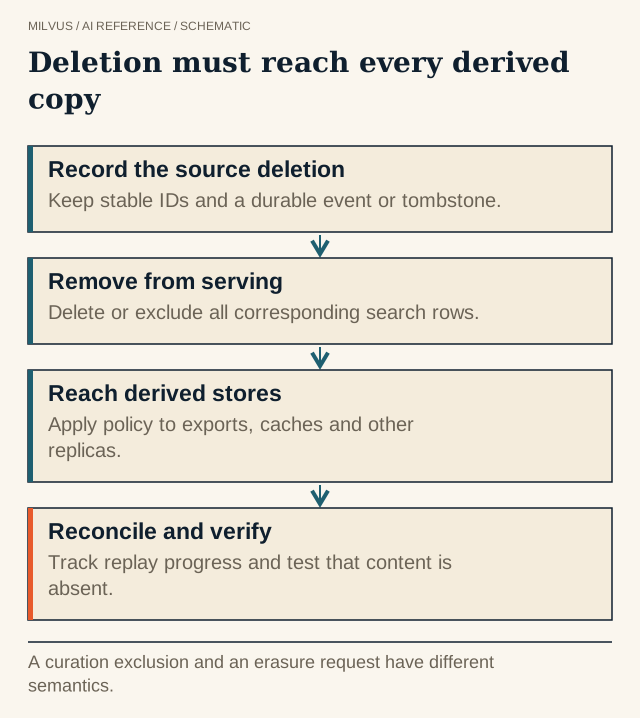 Deletion must reach every derived copy. A curation exclusion and an erasure request have different semantics.
Why is deletion harder in a vector lake than in one database?
A single customer document can turn into dozens of representations: chunks, chunk embeddings, a summary and its embedding, entries in a semantic cache, rows in a training set, and copies preserved by snapshots. Each lives in a different system with its own delete mechanism. Lake table formats add their own subtlety: a delete in Iceberg or Delta usually writes a delete file or deletion vector that hides the row, while the original bytes remain in the data file until compaction rewrites it and old snapshots are expired.
Embeddings are not anonymous either. Research on embedding inversion has shown that a meaningful share of the original text can be reconstructed from sentence embeddings, so for privacy requests such as GDPR Article 17 erasure, a stale vector should be treated as personal data.
Map every representation first
Before writing any pipeline, list what a single source record becomes:
| Representation | Where it lives | How it is removed |
|---|---|---|
| Source row | Lake table (Iceberg, Lance, Parquet) | Table DELETE, then compaction and snapshot expiration |
| Chunks and chunk embeddings | Milvus collection | Managed: delete by ID or filter. External: removed at the next refresh |
| Cached answers | Semantic cache, application cache | Invalidate by source ID |
| Training and evaluation sets | Lake tables, exported files | Rebuild or filter the next version |
| Point-in-time copies | Milvus snapshots, lake snapshots, backups | Expire or drop according to retention policy |
The table only works if every row carries the source ID. That is why stable identities between lake data and vector search is a prerequisite for reliable deletion.
How do deletes reach Milvus?
The path depends on which kind of collection serves the data.
Managed collections. Milvus owns the data, so you delete directly. The delete API accepts primary keys or a filter expression, optionally scoped to a partition:
client.delete(collection_name="doc_chunks", filter='source_id == "contract-8812"')
Filtering by source_id removes every chunk derived from one document in a single call, which is another reason to store that field on each chunk. A CDC consumer reading the lake’s change feed can issue these calls as source deletes arrive.
External collections. Milvus never writes to an external source, so you delete in the lake and then refresh the collection. After a successful refresh, rows that are no longer part of the source state drop out of Milvus’s view. See how to refresh an external collection safely for the procedure.
Iceberg position deletes vs equality deletes
Iceberg v2 tables can record row-level deletes in two ways:
- Position deletes name a data file and a row position. Batch engines such as Spark write them for
DELETEandMERGEstatements. Readers can skip those rows cheaply. - Equality deletes name column values, for example “every row where
user_id = 42.” Streaming CDC writers favor them because the writer does not need to know where the row lives, but readers pay for them by checking rows against the predicates.
The Milvus Storage V3 guide states that Iceberg external sources preserve position-delete metadata, but equality deletes are not supported and must be converted to position deletes before the external collection is refreshed. If your table is fed by a Flink or other upsert-style CDC pipeline, add a delete-file rewrite or compaction step before each Milvus refresh. That step also makes the table faster for every other reader.
Physical deletion and retention
A logical delete hides a row; it does not erase bytes. For strict erasure requirements, follow the bytes:
- In the lake, compaction rewrites data files without the deleted rows, and snapshot expiration plus orphan-file removal eventually deletes the old files. Until then, time travel to an earlier snapshot can still read the record.
- In Milvus, the snapshot guide notes that once a segment or index file is referenced by a snapshot, Milvus does not garbage-collect it until you drop the snapshot. A deletion policy has to say how long snapshots are kept, or explicitly drop them when an erasure request arrives.
- In derived datasets, training sets and exports must be regenerated or filtered; they will not notice a source delete on their own.
Set retention so that rollback and reproducibility needs are covered without silently keeping erased data forever. These are competing goals, and the trade-off should be a documented decision rather than an accident.
How do you prove a deletion is complete?
Run the same checks every time, ideally automated:
- Direct lookup by ID in each collection returns nothing.
- A semantic search with the deleted document’s own text no longer returns any of its chunks.
- Keyword or full-text search for a unique phrase returns nothing.
- Cached answers that cited the document are invalidated.
- The next training-data version excludes it.
Track two metrics: the age of the oldest unprocessed deletion request, and the time from source delete to the last check passing. Watch for retries and delayed backfill jobs that can quietly re-insert data you already removed; keying writes by stable IDs and checking a tombstone table before re-inserting prevents that.
Related reading
- How do you handle incremental updates in a vector database?
- How should an agent memory system handle corrections, expiry, and deletion?
- How can Milvus search an Apache Iceberg table?
- How do bulk migration, backup, and Milvus CDC differ?



