

Separate hot and cold vector data by access pattern, not by age: keep the index structures and fields that every query touches in memory or on local SSD, and leave rarely read fields, old partitions, and raw payloads on object storage, fetched into a cache only when a query needs them. In Milvus, tiered storage does this automatically at chunk granularity, warm-up controls decide what is preloaded, and external collections let the coldest data stay in the lake entirely. The design is right when tail latency still meets your target after a restart or a traffic shift, not just when the cache is warm.
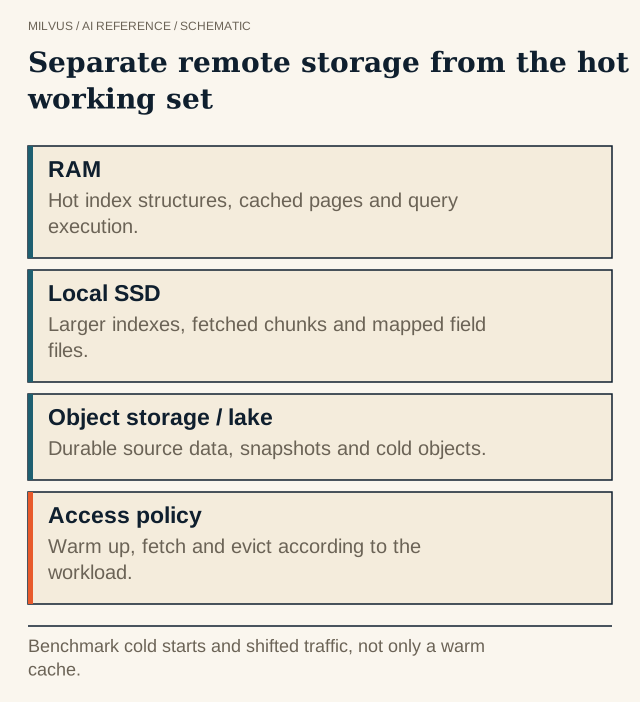 Separate remote storage from the hot working set. Benchmark cold starts and shifted traffic, not only a warm cache.
What counts as hot, warm, and cold?
| Tier | Typical medium | What belongs there | Rough latency of a miss |
|---|---|---|---|
| Hot | RAM | Vector index graphs or centroids, filter indexes, small scalar fields | None — already resident |
| Warm | Local NVMe SSD | Larger index files, recently used field chunks, DiskANN-style indexes | Sub-millisecond to a few milliseconds per read |
| Cold | Object storage (S3, GCS, Azure, OSS) | Full field data, raw payloads, historical partitions, lake tables | Tens to hundreds of milliseconds per request |
Two observations drive the design. First, a search has distinct phases — find candidates with the index, refine scores, fetch the payload — and each touches different bytes. A query that returns 10 IDs has a much smaller working set than one returning full documents. Second, access is usually skewed: recent data, popular products, and active tenants account for most queries. The more skewed the workload, the more tiering saves.
How does Milvus tiered storage work?
Since Milvus 2.6.4, tiered storage lets a QueryNode serve more data than it can hold locally:
- Lazy load. When a segment loads, the QueryNode caches only metadata: schema, index definitions, chunk maps, and row counts. Metadata is never evicted.
- Partial load. At query time, only the field chunks and indexes the query needs are fetched from object storage. Fields load at chunk granularity; indexes load per segment.
- Eviction. When memory or disk use crosses a high watermark, least-recently-used data is evicted until usage drops to the low watermark.
The main knobs live under queryNode.segcore.tieredStorage: evictionEnabled, backgroundEvictionEnabled, memoryLowWatermarkRatio and memoryHighWatermarkRatio, diskLowWatermarkRatio and diskHighWatermarkRatio (defaults 0.75 and 0.80), and cacheTtl.
Use warm-up to control cold starts
Lazy loading makes startup fast but can make the first queries slow. Warm-up preloads chosen data before a segment becomes queryable. Each of scalarField, scalarIndex, vectorField, and vectorIndex can be set to sync (preload) or disable (load on demand). Cluster defaults preload scalar fields, scalar indexes, and vector indexes, but not raw vector fields. From Milvus 2.6.11 you can override this per collection, per field, or per index, so a large rarely filtered text field can stay cold while the vector index stays hot.
The tiered storage best practices suggest two starting profiles:
| Workload | Warm-up | cacheTtl | Watermarks |
|---|---|---|---|
| Real-time search (recommendations, search ranking) | sync for scalar and vector indexes | 0 (disabled) | Around 75%/80% |
| Offline or batch analysis over many segments | disable everywhere | About 1 day (86400 s) | Wider, e.g. 70%/85% |
The same guide warns that QueryNodes need dedicated local resources; sharing disks or memory with other processes distorts the cache’s view and causes bad eviction decisions.
Where do external collections fit?
Some data never needs a serving copy at all. A multi-year video archive or a full agent-trace history might be searched a few times a day by analysts while a small recent slice powers the product. Milvus 3.0 external collections let that archive stay in Parquet, Lance, or Iceberg on object storage while Milvus builds indexes over it. A common layout is:
- Hot path: a managed collection holding recent or popular data, with indexes warmed and tight latency targets.
- Cold path: an external collection over the full lake dataset, with looser targets, used for discovery, curation, and long-tail queries.
Route queries by tenant, time range, or use case, and keep the two in separate resource groups so a heavy cold scan cannot starve the hot path. See when to use an external collection.
How should you benchmark a tiered design?
Measure at least three situations, because a warm-cache benchmark alone hides the worst cases:
- Cold start — right after load or a node restart. Record time to first query and the latency of the first few hundred queries.
- Steady state — a representative query mix with a warm cache. Record p50/p95/p99 latency and QPS.
- Working-set shift — move traffic to previously cold tenants or time ranges. Record how long tail latency takes to recover.
Alongside latency, track object-storage request counts, cache hit rate, local disk throughput, and eviction rate. Rising object-store requests at steady state mean the cache is too small for the working set; a cache that is always nearly empty means you are paying for capacity you do not use.
Common mistakes
- Preloading everything. Setting all warm-up options to
syncremoves the capacity benefit of tiering. - Returning heavy payloads from cold storage. Fetch large text or media only for the final top results, not for every candidate.
- Ignoring failover. After a node failure, the replacement starts cold. Make sure your latency budget survives that.
- Mixing batch and serving on the same nodes. A curation scan can evict the hot working set. Isolate it or schedule it off-peak.
Related reading
- How does mmap differ from a disk-oriented ANN index?
- When should you use DISKANN in Milvus?
- How do you estimate memory for vector search?
- How do you turn a Milvus workload into a capacity and cost estimate?
Sources
- Milvus tiered storage overview
- Warm-up configuration
- Best practices for tiered storage
- External collections
- Prefer not to tune caches yourself? Compare options on Zilliz Cloud pricing.



