

Refresh a Milvus external collection only after the source system has committed a complete, consistent version of the data, then call refresh_external_collection, poll the returned job until it reports RefreshCompleted, and verify a set of known records before telling users the new data is live. Refresh is the moment a lake version becomes searchable, so treat it like a small release: one trigger per dataset at a time, a recorded source version, and a check that proves the result.
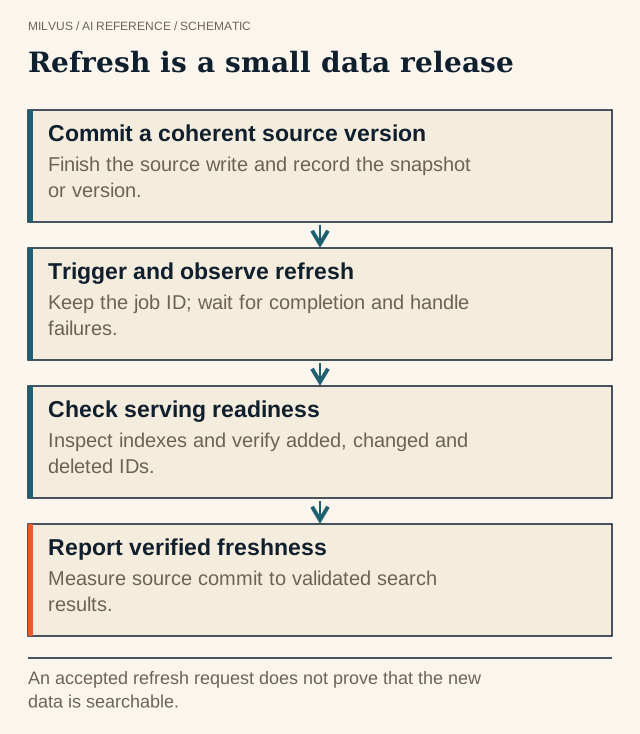 Refresh is a small data release. An accepted refresh request does not prove that the new data is searchable.
What does a refresh actually do?
An external collection never copies or modifies source data. When you refresh, Milvus scans the external source’s metadata — Parquet footers and row groups, a Lance dataset’s fragments, or the files planned for a given Iceberg snapshot — and writes manifest files recording which external rows belong to its view. Data added since the last refresh becomes part of that view; data no longer present drops out.
The external collection guide notes that this metadata step usually takes 150–250 ms. That number describes the manifest update, not your end-to-end freshness. Indexing newly added data and fetching it into query caches can take far longer on a large append, so measure the whole path.
Step-by-step: a safe refresh
1. Publish a coherent source version. Let the producer finish writing every data file and commit the table first. With Iceberg, that means a committed snapshot you can name by ID. With Lance, a committed dataset version. With plain Parquet or Vortex directories, write new files under a temporary prefix and move or register them only when the batch is complete — otherwise a refresh in the middle of a job can pick up half a batch.
2. Record what you are about to publish. Store the source version (snapshot ID, dataset version, or file list), the target collection, the schema revision, and the embedding model revision. These are what you will need to explain a strange result later.
3. Trigger the refresh and poll it.
import time

job_id = client.refresh_external_collection(
    db_name="default",
    collection_name="clips_lake",
)

while True:
    progress = client.get_refresh_external_collection_progress(job_id=job_id)
    if progress.state == "RefreshCompleted":
        print("done in", progress.end_time - progress.start_time, "ms")
        break
    if progress.state == "RefreshFailed":
        raise RuntimeError(progress.reason)
    time.sleep(2)
The call returns immediately with a job_id; an accepted request is not a finished one. Alert on RefreshFailed and keep progress.reason in your logs.
4. Verify with canaries. Keep a small set of IDs that cover a newly added record, an unchanged record, a corrected record, and a deleted record. After the job completes, look each one up directly and run a few representative filtered searches. Checking an approximate row count is not enough; a replaced record and its predecessor produce the same count.
5. Announce freshness. Report the time from source commit to verified search, not the duration of the refresh call. That is the number your users experience.
Which edge cases break refreshes?
- Concurrent triggers. Two schedulers refreshing the same collection, or a delayed retry firing after a newer refresh, can publish an older state. Serialize refreshes per collection with a lock or a single orchestrator task.
- Emptying the source. The guide documents that a refresh which would remove all active metadata without any insertions is denied. If you really need to replace a dataset wholesale, test that transition on a staging collection instead of assuming it works.
- Unsupported deletes. For Iceberg sources, Milvus honors position deletes but not equality deletes; rewrite equality deletes to position deletes before refreshing. Details are in propagating lake deletions to vector search.
- Source files expiring too early. Table maintenance such as Iceberg snapshot expiration and orphan-file removal can delete files that Milvus’s current manifest still references. Keep source retention longer than the interval between successful refreshes, plus a buffer for a rollback.
How do schema changes interact with refresh?
External collections support adding fields after creation, as long as the column already exists in the source. Use add_collection_field() and then refresh; the schema alteration guide states the new field becomes effective in query, search, and filter results only after that refresh. Dropping, renaming, or retyping fields, changing vector dimensions, and remapping external_field are not supported, and sparse-vector and StructArray fields cannot be added later. A new embedding model with a different dimension therefore means a new vector field (if you can add the column to the source) or a new collection.
A refresh runbook template
| Stage | Owner | Record | Pass condition |
|---|---|---|---|
| Source commit | Lake pipeline | Snapshot or version ID | Commit succeeded, files complete |
| Refresh | Orchestrator | job_id, start and end time | RefreshCompleted |
| Index and load | Milvus operator | Index status | Indexes ready for the new data |
| Verification | Application team | Canary results | All canaries match the source |
| Release | Application team | Freshness metric | Users see the new state |
Keeping these stages separate means a stale search result can be traced to the exact boundary where it went wrong.
Related reading
- When should you use a Milvus external collection?
- How can Milvus search an Apache Iceberg table?
- How do you keep stable identities between lake data and vector search?
- What does eventual consistency mean for vector search?



