

Milvus 3.0 can search an Apache Iceberg table in place by creating an external collection whose source is the table’s metadata JSON file and a chosen snapshot ID. Milvus resolves that snapshot, plans its data files, applies position deletes, and builds vector and scalar indexes over the result, while the table itself stays owned by Spark, Flink, Trino, or whatever engine writes it. You get millisecond similarity search over lake data without a separate copy pipeline.
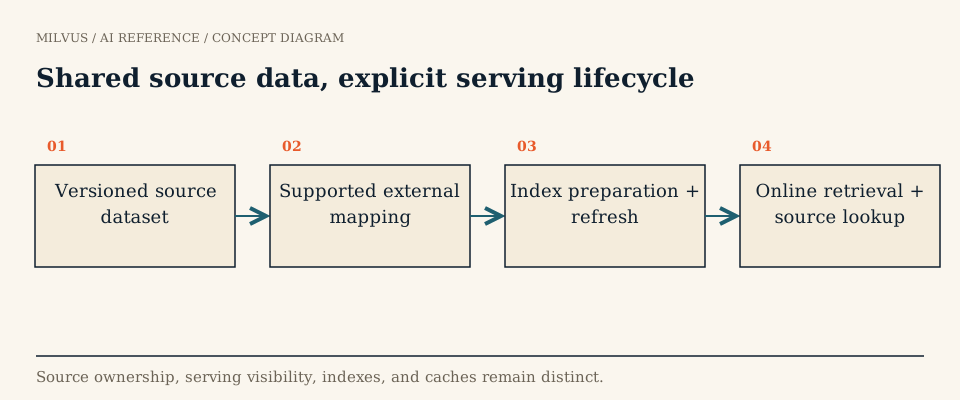 Shared source data, explicit serving lifecycle
Why search Iceberg directly?
Iceberg has become the default table format for analytics lakes. Many teams already store embeddings there: a Spark job computes vectors for documents or product images and writes them as an array column next to IDs and metadata. Until recently, serving those vectors meant exporting them into a vector database and keeping the two in sync. Every export added a copy, a lag, and another place a deleted record could survive.
Pointing Milvus at the table itself removes the export step. The table stays the system of record, and Milvus becomes an index over a specific, named version of it.
A quick refresher: how Iceberg tracks a table
Iceberg is a table format, not a file format. Its data usually lives in Parquet files, but what defines the table is a tree of metadata:
- A metadata JSON file holds the schema, partition spec, and the list of snapshots.
- Each snapshot points to a manifest list, which points to manifests, which list the data files and delete files that make up the table at that moment.
- Schema changes are metadata-only and tracked by unique column IDs, so renaming a column does not rewrite data.
This is why you should never point a reader at an Iceberg table’s directory and read every Parquet file it finds. The directory contains files from older snapshots, files waiting for cleanup, and delete files that must be applied. Only the metadata tells you which rows are live, which is exactly what the Milvus integration reads.
How to connect Milvus to an Iceberg table
1. Enable Storage V3. External collections require Milvus 3.0.x with Storage V3, which is disabled by default. Set common.storage.useLoonFFI: true and note that downgrading afterwards is not supported (Storage V3 guide).
2. Check your storage backend. Iceberg sources are supported on Amazon S3, Google Cloud Storage, ADLS Gen2, and Alibaba Cloud OSS. Azure Blob Storage supports the other external formats but not Iceberg.
3. Pick a committed snapshot. Find the snapshot that contains the IDs, embedding column, and filter fields you need. In Spark you can list snapshots from the table’s snapshots metadata table; note both the snapshot ID and the current metadata JSON path.
4. Create the external collection. In the external collection guide, the schema’s external_spec sets format to iceberg_table and supplies a snapshot_id; the same extfs block used for Parquet sources carries credentials. Map each Milvus field to its Iceberg column with external_field:
schema = MilvusClient.create_schema(
    external_source="s3://s3.us-east-1.amazonaws.com/lake/warehouse/docs/metadata/00042-....metadata.json",
    external_spec='{"format": "iceberg_table", "snapshot_id": 5937117119577207000, "extfs": {"storage_type": "remote"}}',
)
schema.add_field(field_name="doc_id", datatype=DataType.VARCHAR, max_length=128, external_field="doc_id")
schema.add_field(field_name="lang", datatype=DataType.VARCHAR, max_length=8, external_field="lang")
schema.add_field(field_name="embedding", datatype=DataType.FLOAT_VECTOR, dim=1024, external_field="embedding")
Treat the exact JSON layout as illustrative and copy it from the current guide for your release; the documented pieces are the iceberg_table format, the snapshot_id key, and the credential options in extfs.
5. Index, refresh, and verify. Create an index on the vector field, call refresh_external_collection, and poll the job until RefreshCompleted. Then look up a few known IDs and run filtered searches to confirm the view matches the snapshot. When the table gets a new snapshot you want to serve, follow the safe refresh procedure.
What about deletes?
Iceberg v2 supports two kinds of row-level delete files in merge-on-read tables:
| Delete type | How it identifies rows | Typical writer | Milvus external collection |
|---|---|---|---|
| Position delete | File path + row position | Batch DELETE/MERGE in Spark | Supported: Milvus preserves position-delete metadata |
| Equality delete | Column values, e.g. id = 42 | Streaming CDC writers such as Flink upserts | Not supported: convert first |
Equality deletes are popular with CDC pipelines because the writer does not need to know where a row lives, but they are expensive for every reader, since each data file must be checked against the delete predicates. Milvus requires them to be rewritten as position deletes before refresh. In practice, schedule your table service’s delete-file rewrite or compaction before each refresh; this also speeds up every other engine reading the table. More on the end-to-end deletion path is in how deletions propagate from a data lake to vector search.
Common pitfalls
- Expiring the snapshot Milvus serves. Iceberg’s
expire_snapshotsand orphan-file cleanup can delete data files the current Milvus view still references. Keep retention longer than your refresh interval. - Schema drift. External collections only support adding fields that already exist in the source. If the table renames or retypes a mapped column, plan a new collection.
- Mixing embedding models. If the table holds vectors from two encoder versions, filter to one or split them into separate columns; similarity across different models is meaningless.
- Reading the payload from the lake on every query. Returning large text or JSON columns from object storage adds latency. Return IDs and small fields, and fetch heavy payloads only for the final results.
When is a managed collection better?
If your application needs to upsert single records in real time, or the serving subset is small and changes independently of the lake, import that subset into a managed collection instead. External collections are read-only and refresh-driven; they shine when the lake is already the authority and many consumers share it.
Related reading
- When should you use a Milvus external collection?
- How do Lance, Iceberg, and Parquet play different roles in a vector lake?
- How does the Spark-Milvus connector fit into an AI data pipeline?
- How do you make vector-search and training experiments reproducible?



