

Route by what the query needs to match. Use structured search (an ID lookup or a filter on known fields) when the query names exact values such as an order ID, a date range, or a status. Use keyword (BM25) search when exact tokens matter: error codes, SKUs, function names, quoted phrases, rare proper nouns. Use vector search when the user describes a concept in their own words and the matching document may use different vocabulary. Most real questions mix these, so the safest default for open-ended text is hybrid search with structured filters applied first, and the agent’s job is mainly to extract the right filters and decide when an exact lookup is enough.
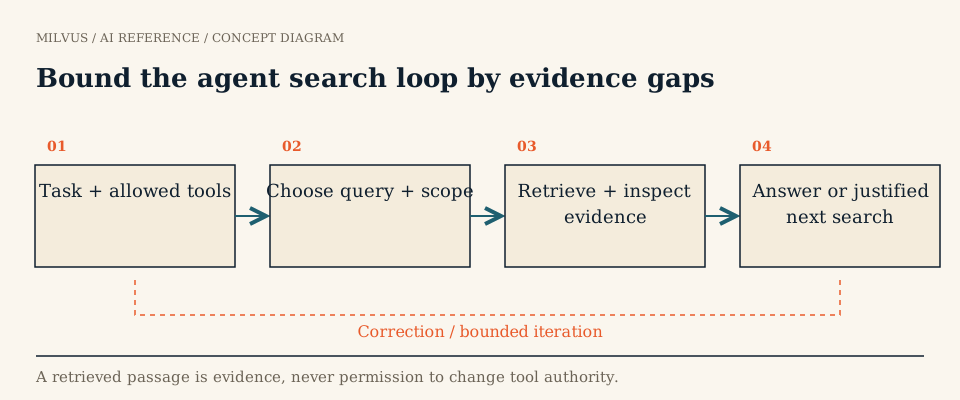 Bound the agent search loop by evidence gaps
What does each retrieval tool do well?
| Tool | Matches on | Strong at | Weak at |
|---|---|---|---|
| Structured query / get by ID | Exact field values and predicates | IDs, dates, numbers, statuses, joins to records | Anything phrased in natural language |
| Keyword / BM25 | Shared tokens, weighted by rarity (TF-IDF style) | Identifiers, codes, names, exact phrases, new jargon the embedding model never saw | Synonyms, paraphrases, cross-lingual questions |
| Dense vector search | Semantic similarity of embeddings | Paraphrases, conceptual questions, "something like this", multilingual and multimodal | Exact strings, numbers, negation, very rare terms |
| Hybrid (vector + BM25) | Both, fused by rank or weight | Mixed queries such as “timeout error E1043 when uploading large files” | Costs two searches; fusion needs tuning |
The differences between lexical and semantic matching are explained in more depth in semantic vs keyword search, and fusion in what is hybrid search.
A routing decision flow
- Does the query contain an exact identifier the system indexes (ticket ID, invoice number, user email)? Do a structured lookup by that field. If it returns a record, you are usually done.
- Does it state hard constraints (tenant, product, version, date range, language, “only open tickets”)? Turn them into a filter expression. These constraints apply to every tool you call next.
- Does it contain rare tokens that must match exactly (codes, names, quoted strings) and descriptive text? Use hybrid search under the filter.
- Is it purely descriptive or conceptual? Use vector search under the filter; hybrid search is still a safe choice if you are unsure.
- Is it an aggregate ("how many", "average", “list all”)? That is a structured query, often against a database other than the vector store; retrieval by top-k cannot count.
- Did the first attempt return weak or no evidence? Change one thing (relax a non-security filter, switch to hybrid, rewrite the query) and log why. Never relax access filters.
Examples
| User request | Plan |
|---|---|
| “Show ticket INC-48213” | Get by ID |
| “Invoices over $10k from March for Acme” | Structured filter: customer, amount, date |
| “Error E1043 in the uploader” | BM25 (or hybrid) filtered to the uploader product |
| “Why does my upload stall when the file is big?” | Vector or hybrid search over troubleshooting docs |
| “Recent complaints about slow checkout on mobile” | Hybrid search with created_at and platform filters |
| “How many P1 incidents last quarter?” | Structured count; no vector search |
How do you implement each tool on Milvus?
One Milvus collection can back all three tool types, which keeps IDs, permissions, and freshness consistent across them.
Structured lookup uses query or get with a filter, no vector involved:
client.query(collection_name="tickets",
             filter='ticket_id == "INC-48213"',
             output_fields=["title", "status", "body"])
Keyword search uses Milvus full-text search (Milvus 2.5+). A VARCHAR field with enable_analyzer=True feeds a built-in BM25 function that writes a SPARSE_FLOAT_VECTOR field, indexed with SPARSE_INVERTED_INDEX and metric BM25. You then search with raw text:
client.search(collection_name="tickets", data=["E1043 uploader"],
              anns_field="sparse", filter='product == "uploader"', limit=10)
Vector and hybrid search send one request per field and fuse them with a ranker, here reciprocal rank fusion (RRF), which scores each document by Σ 1 / (k + rank) across the result lists:
from pymilvus import AnnSearchRequest, Function, FunctionType

filt = 'tenant == "acme" and created_at >= 1735689600'
dense = AnnSearchRequest(data=[embed(q)], anns_field="dense", param={}, limit=50, expr=filt)
sparse = AnnSearchRequest(data=[q], anns_field="sparse", param={}, limit=50, expr=filt)
rrf = Function(name="rrf", input_field_names=[], function_type=FunctionType.RERANK,
               params={"reranker": "rrf", "k": 100})
client.hybrid_search(collection_name="tickets", reqs=[dense, sparse], ranker=rrf, limit=10,
                     output_fields=["ticket_id", "title"])
Weighted fusion is also available when you want to favor one signal. Filters support comparison, in, like, boolean logic, array and JSON-key conditions, so most “structured” constraints can live in the same query as the vector search rather than in a second system.
Design the tool interface for the agent, not the database
The planner should choose among a few clear tools, not tune index parameters.
- Name tools by intent:
lookup_ticket(id),search_docs(text, product?, since?),count_incidents(priority, start, end). Hideef,nprobe, and index types inside the tool. - Constrain arguments. Validate field names, operators, and value types before building a filter string; never let the model write raw filter expressions against fields it should not touch.
- Inject security filters server-side. Tenant and permission conditions come from the authenticated session, and are ANDed into every call regardless of what the model asked for.
- Return IDs, versions, and scores, plus a clear distinction between “no matching records” and "the tool failed".
- Deduplicate across tools by stable ID, so a passage found by both BM25 and vector search is not shown twice.
How do you know the routing works?
Label a set of tasks by type (exact lookup, filtered, keyword-heavy, conceptual, aggregate, unanswerable) and compare the agent’s plan with a fixed baseline such as "always hybrid with filters". Measure retrieval recall per type, final answer quality, tool calls per task, and latency. Look especially at cases where the agent chose a narrow tool and missed evidence a broader search would have found, and at extra calls that added nothing. The datasets for this are covered in how to build an evaluation set; the overall loop is in what is agentic search.
To try it, follow the full-text search guide to add a BM25 field to a collection, then wire the three tools into the agentic RAG with LangGraph tutorial.
Related reading
- What is agentic search, and where does a vector database fit?
- How does semantic search differ from keyword search?
- What is full-text search, and how does BM25 fit?
- How do metadata filters interact with vector search?
- What does a Milvus MCP server expose to an AI agent?
- Related application story: Read AI



