Beyond Context Overload: How Parlant × Milvus Brings Control and Clarity to LLM Agent Behavior
Imagine being told to complete a task that involves 200 business rules, 50 tools, and 30 demos, and you only have an hour to do it. That’s simply impossible. Yet we often expect large language models to do exactly that when we turn them into “agents” and overload them with instructions.
In practice, this approach quickly breaks down. Traditional agent frameworks, such as LangChain or LlamaIndex, inject all rules and tools into the model’s context at once, which leads to rule conflicts, context overload, and unpredictable behavior in production.
To address this problem, an open-source agent framework called Parlant has recently been gaining traction on GitHub. It introduces a new approach called Alignment Modeling, along with a supervising mechanism and conditional transitions that make agent behavior far more controllable and explainable.
When paired with Milvus, an open-source vector database, Parlant becomes even more capable. Milvus adds semantic intelligence, allowing agents to dynamically retrieve the most relevant rules and context in real time—keeping them accurate, efficient, and production-ready.
In this post, we’ll explore how Parlant works under the hood—and how integrating it with Milvus enables production-grade.
Why Traditional Agent Frameworks Fall Apart
Traditional agent frameworks love to go big: hundreds of rules, dozens of tools, and a handful of demos—all crammed into a single, overstuffed prompt. It might look great in a demo or a small sandbox test, but once you push it into production, the cracks start showing fast.
Conflicting Rules Bring Chaos: When two or more rules apply at the same time, these frameworks have no built-in way to decide which one wins. Sometimes it picks one. Sometimes it blends both. Sometimes it does something totally unpredictable.
Edge Cases Expose the Gaps: You can’t possibly predict everything a user might say. And when your model runs into something outside its training data, it defaults to generic, noncommittal answers.
Debugging Is Painful and Expensive: When an agent misbehaves, it’s almost impossible to pinpoint which rule caused the issue. Since everything lives inside one giant system prompt, the only way to fix it is to rewrite the prompt and retest everything from scratch.
What is Parlant and How It Works
Parlant is an open-source Alignment Engine for LLM agents. You can precisely control how an agent behaves across different scenarios by modeling its decision-making process in a structured, rule-based way.
To address the problems found in traditional agent frameworks, Parlant introduces a new powerful approach: Alignment Modeling. Its core idea is to separate rule definition from rule execution, ensuring that only the most relevant rules are injected into the LLM’s context at any given time.
Granular Guidelines: The Core of Alignment Modeling
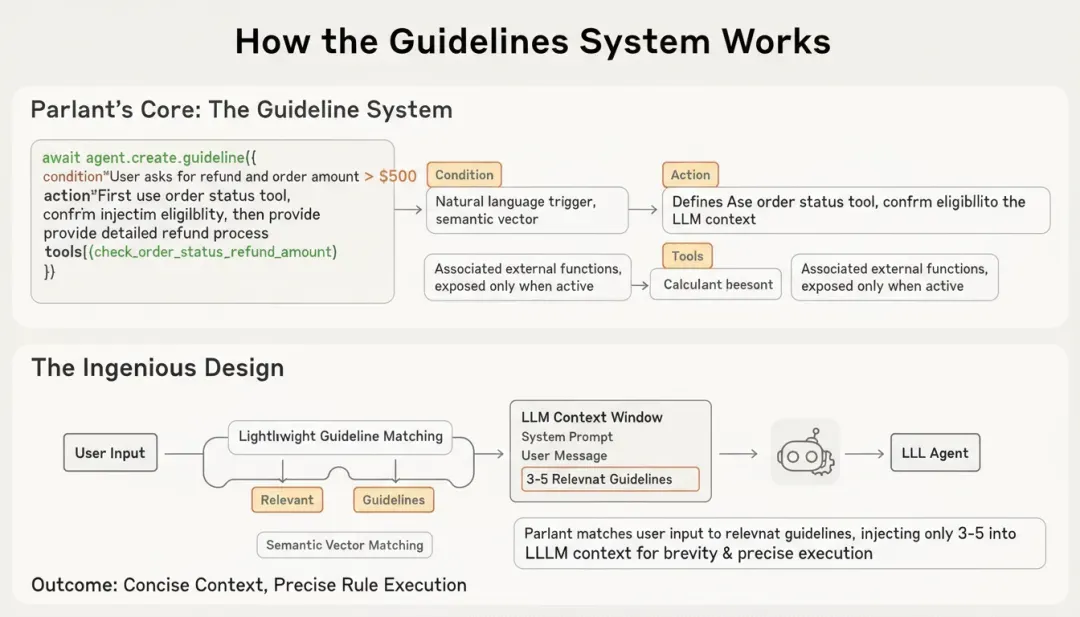
At the heart of Parlant’s alignment model is the concept of Granular Guidelines. Instead of writing one giant system prompt full of rules, you define small, modular guidelines—each describing how the agent should handle a specific type of situation.
Each guideline is made up of three parts:
Condition – A natural-language description of when the rule should apply. Parlant converts this condition into a semantic vector and matches it to the user’s input to figure out if it’s relevant.
Action – A clear instruction that defines how the agent should respond once the condition is met. This action is injected into the LLM’s context only when triggered.
Tools – Any external functions or APIs tied to that specific rule. These are exposed to the agent only when the guideline is active, keeping tool use controlled and context-aware.
await agent.create_guideline(
    condition="The user asks about a refund and the order amount exceeds 500 RMB",
    action="First call the order status check tool to confirm whether the refund conditions are met, then provide a detailed explanation of the refund process",
    tools=[check_order_status, calculate_refund_amount]
)
Every time a user interacts with the agent, Parlant runs a lightweight matching step to find the three to five most relevant guidelines. Only those rules are injected into the model’s context, keeping prompts concise and focused while ensuring that the agent consistently follows the right rules.
Supervising Mechanism for Accuracy and Consistency
To further maintain accuracy and consistency, Parlant introduces a supervising mechanism that acts as a second layer of quality control. The process unfolds in three steps:
1. Generate a candidate response – The agent creates an initial reply based on the matched guidelines and the current conversation context.
2. Check for compliance – The response is compared against the active guidelines to verify that every instruction has been followed correctly.
3. Revise or confirm – If any issues are found, the system corrects the output; if everything checks out, the reply is approved and sent to the user.
This supervising mechanism ensures that the agent not only understands the rules but actually adheres to them before replying—improving both reliability and control.
Conditional Transitions for Control and Safety
In traditional agent frameworks, every available tool is exposed to the LLM at all times. This “everything on the table” approach often leads to overloaded prompts and unintended tool calls. Parlant solves this through conditional transitions. Similar to how state machines work, an action or tool is triggered only when a specific condition is met. Each tool is tightly bound to its corresponding guideline, and it becomes available only when that guideline’s condition is activated.
# The balance inquiry tool is exposed only when the condition "the user wants to make a transfer" is met
await agent.create_guideline(
    condition="The user wants to make a transfer",
    action="First check the account balance. If the balance is below 500 RMB, remind the user that an overdraft fee may apply.",
    tools=[get_user_account_balance]
)
This mechanism turns tool invocation into a conditional transition—tools move from “inactive” to “active” only when their trigger conditions are satisfied. By structuring execution this way, Parlant ensures that every action happens deliberately and contextually, preventing misuse while improving both efficiency and system safety.
How Milvus Powers Parlant
When we look under the hood of Parlant’s guideline-matching process, one core technical challenge becomes clear: how can the system find the three to five most relevant rules out of hundreds—or even thousands—of options in just a few milliseconds? That’s exactly where a vector database comes in. Semantic retrieval is what makes this possible.
How Milvus Supports Parlant’s Guideline Matching Process
Guideline matching works through semantic similarity. Each guideline’s Condition field is converted into a vector embedding, capturing its meaning rather than just its literal text. When a user sends a message, Parlant compares the semantics of that message against all stored guideline embeddings to find the most relevant ones.
Here’s how the process works step by step:
1. Encode the query – The user’s message and recent conversation history are transformed into a query vector.
2. Search for similarity – The system performs a similarity search within the guideline vector store to find the closest matches.
3. Retrieve Top-K results – The top three to five most semantically relevant guidelines are returned.
4. Inject into context – These matched guidelines are then dynamically inserted into the LLM’s context so the model can act according to the correct rules.

To make this workflow possible, the vector database must deliver three critical capabilities: high-performance Approximate Nearest Neighbor (ANN) search, flexible metadata filtering, and real-time vector updates. Milvus, the open-source, cloud-native vector database, provides production-grade performance in all three areas.
To understand how Milvus works in real scenarios, let’s look at a financial services agent as an example.
Suppose the system defines 800 business guidelines covering tasks such as account inquiries, fund transfers, and wealth-management product consultations. In this setup, Milvus acts as the storage and retrieval layer for all guideline data.
from pymilvus import connections, Collection, FieldSchema, CollectionSchema, DataType
import parlant.sdk as p

# Connect to Milvus
connections.connect(host="localhost", port="19530")

# Define the schema for the guideline collection
fields = [
    FieldSchema(name="guideline_id", dtype=DataType.VARCHAR, max_length=100, is_primary=True),
    FieldSchema(name="condition_vector", dtype=DataType.FLOAT_VECTOR, dim=768),
    FieldSchema(name="condition_text", dtype=DataType.VARCHAR, max_length=1000),
    FieldSchema(name="action_text", dtype=DataType.VARCHAR, max_length=2000),
    FieldSchema(name="priority", dtype=DataType.INT64),
    FieldSchema(name="business_domain", dtype=DataType.VARCHAR, max_length=50)
]
schema = CollectionSchema(fields=fields, description="Agent Guidelines")
guideline_collection = Collection(name="agent_guidelines", schema=schema)

# Create an HNSW index for high-performance retrieval
index_params = {
    "index_type": "HNSW",
    "metric_type": "COSINE",
    "params": {"M": 16, "efConstruction": 200}
}
guideline_collection.create_index(field_name="condition_vector", index_params=index_params)
Now, when a user says “I want to transfer 100,000 RMB to my mother’s account”, the runtime flow is:
1. Rectorize the query – Convert the user input into a 768-dimensional vector.
2. Hybrid retrieval – Run a vector similarity search in Milvus with metadata filtering (e.g., business_domain="transfer").
3. Result ranking – Rank the candidate guidelines based on similarity scores combined with their priority values.
4. Context injection – Inject the Top-3 matched guidelines’ action_text into the Parlant agent’s context.
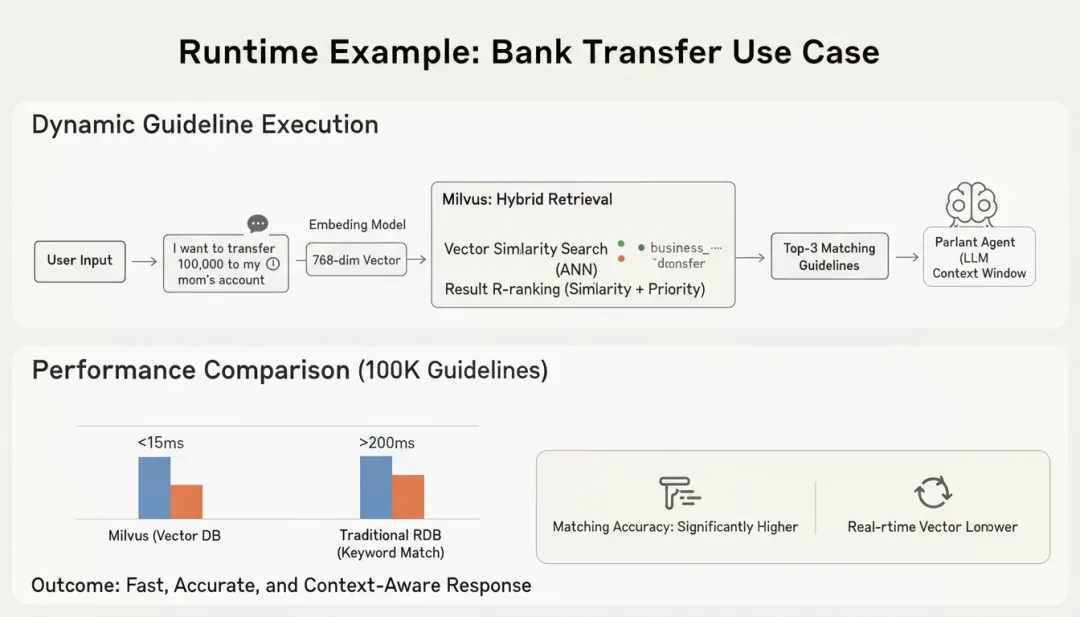
In this configuration, Milvus delivers P99 latency under 15 ms, even when the guideline library scales to 100,000 entries. By comparison, using a traditional relational database with keyword matching typically results in latency above 200 ms and significantly lower match accuracy.
How Milvus Enables Long-Term Memory and Personalization
Milvus does more than guideline matching. In scenarios where agents need long-term memory and personalized responses, Milvus can serve as the memory layer that stores and retrieves users’ past interactions as vector embeddings, helping the agent remember what was discussed before.
# store user’s past interactions
user_memory_fields = [
    FieldSchema(name="interaction_id", dtype=DataType.VARCHAR, max_length=100, is_primary=True),
    FieldSchema(name="user_id", dtype=DataType.VARCHAR, max_length=50),
    FieldSchema(name="interaction_vector", dtype=DataType.FLOAT_VECTOR, dim=768),
    FieldSchema(name="interaction_summary", dtype=DataType.VARCHAR, max_length=500),
    FieldSchema(name="timestamp", dtype=DataType.INT64)
]
memory_collection = Collection(name="user_memory", schema=CollectionSchema(user_memory_fields))
When the same user returns, the agent can retrieve the most relevant historical interactions from Milvus and use them to generate a more connected, human-like experience. For instance, if a user asked about an investment fund last week, the agent can recall that context and respond proactively: “Welcome back! Do you still have questions about the fund we discussed last time?”
How to Optimize Performance for Milvus-Powered Agent Systems
When deploying an agent system powered by Milvus in a production environment, performance tuning becomes critical. To achieve low latency and high throughput, several key parameters need attention:
1. Choosing the Right Index Type
It’s important to select the appropriate index structure. For example, HNSW (Hierarchical Navigable Small World) is ideal for high-recall scenarios such as finance or healthcare, where accuracy is critical. IVF_FLAT works better for large-scale applications like e-commerce recommendations, where slightly lower recall is acceptable in exchange for faster performance and reduced memory use.
2. Sharding Strategy
When the number of stored guidelines exceeds one million entries, it’s recommended to use Partition to divide the data by business domain or use case. Partitioning reduces the search space per query, improving retrieval speed and keeping latency stable even as the dataset grows.
3. Cache Configuration
For frequently accessed guidelines such as standard customer queries or high-traffic workflows, you can use the Milvus query result caching. This allows the system to reuse previous results, cutting latency down to under 5 milliseconds for repeated searches.
Hands-on Demo: How to Build a Smart Q&A System with Parlant and Milvus Lite
Milvus Lite is a lightweight version of Milvus — a Python library that can be easily embedded into your applications. It’s ideal for quick prototyping in environments like Jupyter Notebooks or for running on edge and smart devices with limited compute resources. Despite its small footprint, Milvus Lite supports the same APIs as other Milvus deployments. This means the client-side code you write for Milvus Lite can seamlessly connect to a full Milvus or Zilliz Cloud instance later — no refactoring required.
In this demo, we’ll use Milvus Lite in conjunction with Parlant to demonstrate how to build an intelligent Q&A system that delivers fast, context-aware answers with minimal setup.
Prerequisites:
1.Parlant GitHub: https://github.com/emcie-co/parlant
2.Parlant Documentation: https://parlant.io/docs
3.python3.10+
4.OpenAI_key
5.MlivusLite
Step 1: Install Dependencies
# Install required Python packages
pip install pymilvus parlant openai
# Or, if you’re using a Conda environment:
conda activate your_env_name
pip install pymilvus parlant openai
Step 2: Configure Environment Variables
# Set your OpenAI API key
export OPENAI_API_KEY="your_openai_api_key_here"
# Verify that the variable is set correctly
echo $OPENAI_API_KEY
Step 3: Implement the Core Code
- Create a custom OpenAI Embedder
class OpenAIEmbedder(p.Embedder):
    # Converts text into vector embeddings with built-in timeout and retry
    # Dimension: 1536 (text-embedding-3-small)
    # Timeout: 60 seconds; Retries: up to 2 times
- Initialize the knowledge base
1.Create a Milvus collection named kb_articles.
2.Insert sample data (e.g. refund policy, exchange policy, shipping time).
3.Build an HNSW index to accelerate retrieval.
- Build the vector search tool
@p.tool
async def vector_search(query: str, top_k: int = 5, min_score: float = 0.35):
    # 1. Convert user query into a vector
    # 2. Perform similarity search in Milvus
    # 3. Return results with relevance above threshold
- Configure the Parlant Agent
Guideline 1: For factual or policy-related questions, the agent must first perform a vector search.
Guideline 2: When evidence is found, the agent must reply using a structured template (summary + key points + sources).
# Guideline 1: Run vector search for factual or policy-related questions
await agent.create_guideline(
            condition="User asks a factual question about policy, refund, exchange, or shipping",
            action=(
                "Call vector_search with the user's query. "
                "If evidence is found, synthesize an answer by quoting key sentences and cite doc_id/title. "
                "If evidence is insufficient, ask a clarifying question before answering."
            ),
            tools=[vector_search],

# Guideline 2: Use a standardized, structured response when evidence is available
await agent.create_guideline(
            condition="Evidence is available",
            action=(
                "Answer with the following template:\\n"
                "Summary: provide a concise conclusion.\\n"
                "Key points: 2-3 bullets distilled from evidence.\\n"
                "Sources: list doc_id and title.\\n"
                "Note: if confidence is low, state limitations and ask for clarification."
            ),
            tools=[],
        )

    tools=[],
)
- Write the complete code
import os
import asyncio
import json
from typing import List, Dict, Any
import parlant.sdk as p
from pymilvus import MilvusClient, DataType
# 1) Environment variables: using OpenAI (as both the default generation model and embedding service)
# Make sure the OPENAI_API_KEY is set
OPENAI_API_KEY = os.environ.get("OPENAI_API_KEY")
if not OPENAI_API_KEY:
    raise RuntimeError("Please set OPENAI_API_KEY environment variable")
# 2) Initialize Milvus Lite (runs locally, no standalone service required)
# MilvusClient runs in Lite mode using a local file path (requires pymilvus >= 2.x)
client = MilvusClient("./milvus_demo.db")  # Lite mode uses a local file path
COLLECTION = "kb_articles"
# 3) Example data: three policy or FAQ entries (in practice, you can load and chunk data from files)
DOCS = [
    {"doc_id": "POLICY-001", "title": "Refund Policy", "chunk": "Refunds are available within 30 days of purchase if the product is unused."},
    {"doc_id": "POLICY-002", "title": "Exchange Policy", "chunk": "Exchanges are permitted within 15 days; original packaging required."},
    {"doc_id": "FAQ-101", "title": "Shipping Time", "chunk": "Standard shipping usually takes 3–5 business days within the country."},
]
# 4) Generate embeddings using OpenAI (you can replace this with another embedding service)
# Here we use Parlant’s built-in OpenAI embedder for simplicity, but you could also call the OpenAI SDK directly.
class OpenAIEmbedder(p.Embedder):
    async def embed(self, texts: List[str], hints: Dict[str, Any] = {}) -> p.EmbeddingResult:
        # Generate text embeddings using the OpenAI API, with timeout and retry handling
        import openai
        try:
            client = openai.AsyncOpenAI(
                api_key=OPENAI_API_KEY,
                timeout=60.0,  # 60-second timeout
                max_retries=2  # Retry up to 2 times
            )
            print(f"Generating embeddings for {len(texts)} texts...")
            response = await client.embeddings.create(
                model="text-embedding-3-small",
                input=texts
            )
            vectors = [data.embedding for data in response.data]
            print(f"Successfully generated {len(vectors)} embeddings.")
            return p.EmbeddingResult(vectors=vectors)
        except Exception as e:
            print(f"OpenAI API call failed: {e}")
            # Return mock vectors for testing Milvus connectivity
            print("Using mock vectors for testing...")
            import random
            vectors = [[random.random() for _ in range(1536)] for _ in texts]
            return p.EmbeddingResult(vectors=vectors)
    @property
    def id(self) -> str:
        return "text-embedding-3-small"
    @property
    def max_tokens(self) -> int:
        return 8192
    @property
    def tokenizer(self) -> p.EstimatingTokenizer:
        from parlant.core.nlp.tokenization import ZeroEstimatingTokenizer
        return ZeroEstimatingTokenizer()
    @property
    def dimensions(self) -> int:
        return 1536
embedder = OpenAIEmbedder()
async def ensure_collection_and_load():
    # Create the collection (schema: primary key, vector field, additional fields)
    if not client.has_collection(COLLECTION):
        client.create_collection(
            collection_name=COLLECTION,
            dimension=len((await embedder.embed(["dimension_probe"])).vectors[0]),
            # Default metric: COSINE (can be changed with metric_type="COSINE")
            auto_id=True,
        )
        # Create an index to speed up retrieval (HNSW used here as an example)
        client.create_index(
            collection_name=COLLECTION,
            field_name="vector",
            index_type="HNSW",
            metric_type="COSINE",
            params={"M": 32, "efConstruction": 200}
        )
    # Insert data (skip if already exists; simple idempotent logic for the demo)
    # Generate embeddings
    chunks = [d["chunk"] for d in DOCS]
    embedding_result = await embedder.embed(chunks)
    vectors = embedding_result.vectors
    # Check if the same doc_id already exists; this is for demo purposes only — real applications should use stricter deduplication
    # Here we insert directly. In production, use an upsert operation or an explicit primary key
    client.insert(
        COLLECTION,
        data=[
            {"vector": vectors[i], "doc_id": DOCS[i]["doc_id"], "title": DOCS[i]["title"], "chunk": DOCS[i]["chunk"]}
            for i in range(len(DOCS))
        ],
    )
    # Load into memory
    client.load_collection(COLLECTION)
# 5) Define the vector search tool (Parlant Tool)
@p.tool
async def vector_search(context: p.ToolContext, query: str, top_k: int = 5, min_score: float = 0.35) -> p.ToolResult:
    # 5.1 Generate the query vector
    embed_res = await embedder.embed([query])
    qvec = embed_res.vectors[0]
    # 5.2 Search Milvus
    results = client.search(
        collection_name=COLLECTION,
        data=[qvec],
        limit=top_k,
        output_fields=["doc_id", "title", "chunk"],
        search_params={"metric_type": "COSINE", "params": {"ef": 128}},
    )
    # 5.3 Assemble structured evidence and filter by score threshold
    hits = []
    for hit in results[0]:
        score = hit["distance"] if "distance" in hit else hit.get("score", 0.0)
        if score >= min_score:
            hits.append({
                "doc_id": hit["entity"]["doc_id"],
                "title": hit["entity"]["title"],
                "chunk": hit["entity"]["chunk"],
                "score": float(score),
            })
    return p.ToolResult({"evidence": hits})
# 6) Run Parlant Server and create the Agent + Guidelines
async def main():
    await ensure_collection_and_load()
    async with p.Server() as server:
        agent = await server.create_agent(
            name="Policy Assistant",
            description="Rule-controlled RAG assistant with Milvus Lite",
        )
        # Example variable: current time (can be used in templates or logs)
        @p.tool
        async def get_datetime(context: p.ToolContext) -> p.ToolResult:
            from datetime import datetime
            return p.ToolResult({"now": datetime.now().isoformat()})
        await agent.create_variable(name="current-datetime", tool=get_datetime)
        # Core Guideline 1: Run vector search for factual or policy-related questions
        await agent.create_guideline(
            condition="User asks a factual question about policy, refund, exchange, or shipping",
            action=(
                "Call vector_search with the user's query. "
                "If evidence is found, synthesize an answer by quoting key sentences and cite doc_id/title. "
                "If evidence is insufficient, ask a clarifying question before answering."
            ),
            tools=[vector_search],
        )
        # Core Guideline 2: Use a standardized, structured response when evidence is available
        await agent.create_guideline(
            condition="Evidence is available",
            action=(
                "Answer with the following template:\\n"
                "Summary: provide a concise conclusion.\\n"
                "Key points: 2-3 bullets distilled from evidence.\\n"
                "Sources: list doc_id and title.\\n"
                "Note: if confidence is low, state limitations and ask for clarification."
            ),
            tools=[],
        )
        # Hint: Local Playground URL
        print("Playground: <http://localhost:8800>")
if __name__ == "__main__":
    asyncio.run(main())
Step 4: Run the Code
# Run the main program
python main.py
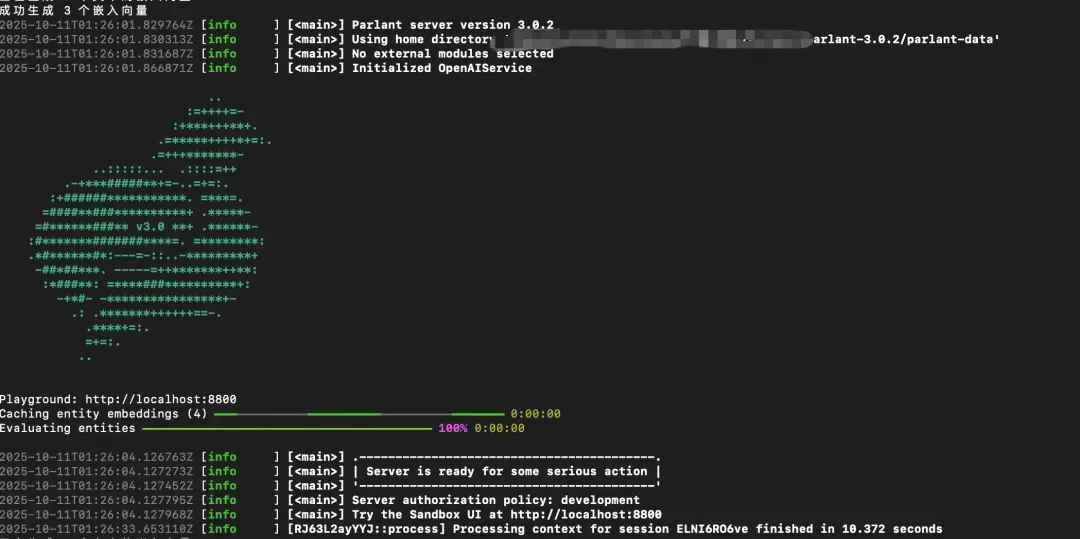
- Visit the Playground:
<http://localhost:8800>
You have now successfully built an intelligent Q&A system using Parlant and Milvus.
Parlant vs. LangChain/LlamaIndex: How They Differ and How They Work Together
Compared to existing agent frameworks like LangChain or LlamaIndex, how does Parlant differ?
LangChain and LlamaIndex are general-purpose frameworks. They provide a wide range of components and integrations, making them ideal for rapid prototyping and research experiments. However, when it comes to deploying in production, developers often need to build extra layers themselves—such as rule management, compliance checks, and reliability mechanisms—to keep agents consistent and trustworthy.
Parlant offers built-in Guideline Management, self-critique mechanisms, and explainability tools that help developers manage how an agent behaves, responds, and reasons. This makes Parlant especially suitable for high-stakes, customer-facing use cases where accuracy and accountability matter, such as finance, healthcare, and legal services.
In fact, these frameworks can work together:
Use LangChain to build complex data-processing pipelines or retrieval workflows.
Use Parlant to manage the final interaction layer, ensuring outputs follow business rules and remain interpretable.
Use Milvus as the vector database foundation to deliver real-time semantic search, memory, and knowledge retrieval across the system.
Conclusion
As LLM agents move from experimentation to production, the key question is no longer what they can do—but how reliably and safely they can do it. Parlant provides the structure and control for that reliability, while Milvus delivers the scalable vector infrastructure that keeps everything fast and context-aware.
Together, they allow developers to build AI agents that are not just capable, but trustworthy, explainable, and production-ready.
🚀 Check out Parlant on GitHub and integrate it with Milvus to build your own intelligent, rule-driven agent system.
Have questions or want a deep dive on any feature? Join our Discord channel or file issues on GitHub. You can also book a 20-minute one-on-one session to get insights, guidance, and answers to your questions through Milvus Office Hours.
- Why Traditional Agent Frameworks Fall Apart
- What is Parlant and How It Works
- Granular Guidelines: The Core of Alignment Modeling
- Supervising Mechanism for Accuracy and Consistency
- Conditional Transitions for Control and Safety
- How Milvus Powers Parlant
- How Milvus Supports Parlant’s Guideline Matching Process
- How Milvus Enables Long-Term Memory and Personalization
- How to Optimize Performance for Milvus-Powered Agent Systems
- Hands-on Demo: How to Build a Smart Q&A System with Parlant and Milvus Lite
- Prerequisites:
- Step 1: Install Dependencies
- Step 2: Configure Environment Variables
- Step 3: Implement the Core Code
- Step 4: Run the Code
- Parlant vs. LangChain/LlamaIndex: How They Differ and How They Work Together
- Conclusion
On This Page
Try Managed Milvus for Free
Zilliz Cloud is hassle-free, powered by Milvus and 10x faster.
Get StartedLike the article? Spread the word