Multimodal RAG Made Simple: RAG-Anything + Milvus Instead of 20 Separate Tools
Building a multimodal RAG system used to mean stitching together a dozen specialized tools—one for OCR, one for tables, one for math formulas, one for embeddings, one for search, and so on. Traditional RAG pipelines were designed for text, and once documents started including images, tables, equations, charts, and other structured content, the toolchain quickly became messy and unmanageable.
RAG-Anything, developed by HKU, changes that. Built on LightRAG, it provides an All-in-One platform that can parse diverse content types in parallel and map them into a unified knowledge graph. But unifying the pipeline is only half the story. To retrieve evidence across these varied modalities, you still need a fast, scalable vector search that can handle many embedding types at once. That’s where Milvus comes in. As an open-source, high-performance vector database, Milvus eliminates the need for multiple storage and search solutions. It supports large-scale ANN search, hybrid vector–keyword retrieval, metadata filtering, and flexible embedding management—all in one place.
In this post, we’ll break down how RAG-Anything and Milvus work together to replace a fragmented multimodal toolchain with a clean, unified stack—and we’ll show how you can build a practical multimodal RAG Q&A system with just a few steps.
What Is RAG-Anything and How It Works
RAG-Anything is a RAG framework designed to break the text-only barrier of traditional systems. Instead of relying on multiple specialized tools, it offers a single, unified environment that can parse, process, and retrieve information across mixed content types.
The framework supports documents containing text, diagrams, tables, and mathematical expressions, enabling users to query across all modalities through a single cohesive interface. This makes it particularly useful in fields such as academic research, financial reporting, and enterprise knowledge management, where multimodal materials are common.
At its core, RAG-Anything is built on a multi-stage multimodal pipeline: document parsing→content analysis→knowledge graph→intelligent retrieval. This architecture enables intelligent orchestration and cross-modal understanding, allowing the system to seamlessly handle diverse content modalities within a single integrated workflow.
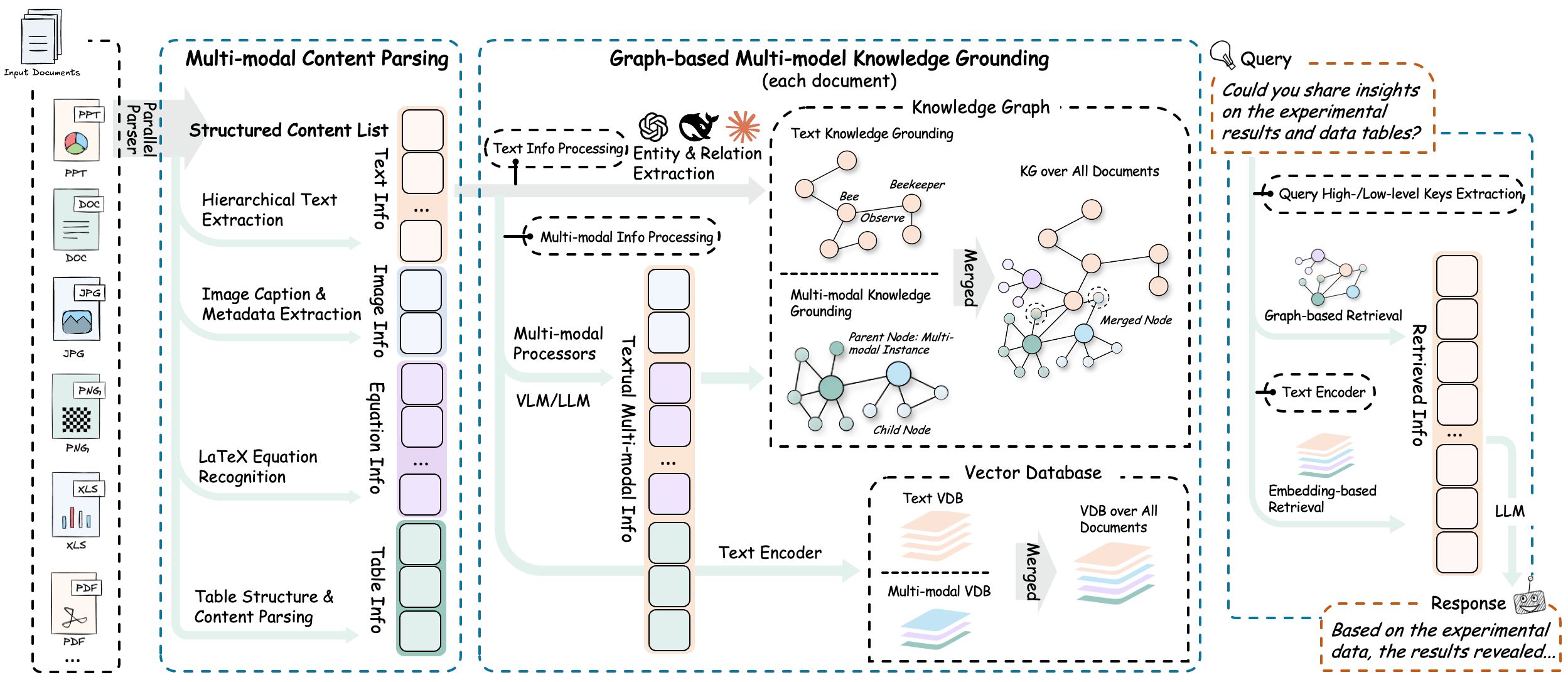
The “1 + 3 + N” Architecture
At the engineering level, RAG-Anything’s capabilities are realized through its “1 + 3 + N” architecture:
The Core Engine
At the center of RAG-Anything is a knowledge graph engine inspired by LightRAG. This core unit is responsible for multimodal entity extraction, cross-modal relationship mapping, and vectorized semantic storage. Unlike traditional text-only RAG systems, the engine understands entities from text, visual objects within images, and relational structures embedded in tables.
3 Modal Processors
RAG-Anything integrates three specialized modality processors designed for deep, modality-specific understanding. Together, they form the system’s multimodal analysis layer.
ImageModalProcessor interprets visual content and its contextual meaning.
TableModalProcessor parses table structures and decodes logical and numerical relationships within data.
EquationModalProcessor understands the semantics behind mathematical symbols and formulas.
N Parsers
To support the diverse structure of real-world documents, RAG-Anything provides an extensible parsing layer built on multiple extraction engines. Currently, it integrates both MinerU and Docling, automatically selecting the optimal parser based on document type and structural complexity.
Building on the “1 + 3 + N” architecture, RAG-Anything improves the traditional RAG pipeline by changing how different content types are handled. Instead of processing text, images, and tables one at a time, the system processes them all at once.
# The core configuration demonstrates the parallel processing design
config = RAGAnythingConfig(
    working_dir="./rag_storage",
    parser="mineru",
    parse_method="auto",  # Automatically selects the optimal parsing strategy
    enable_image_processing=True,
    enable_table_processing=True,
    enable_equation_processing=True,
    max_workers=8  # Supports multi-threaded parallel processing
)
This design greatly speeds up the handling of large technical documents. Benchmark tests show that when the system uses more CPU cores, it becomes noticeably faster, which sharply reduces the time needed to process each document.
Layered Storage and Retrieval Optimization
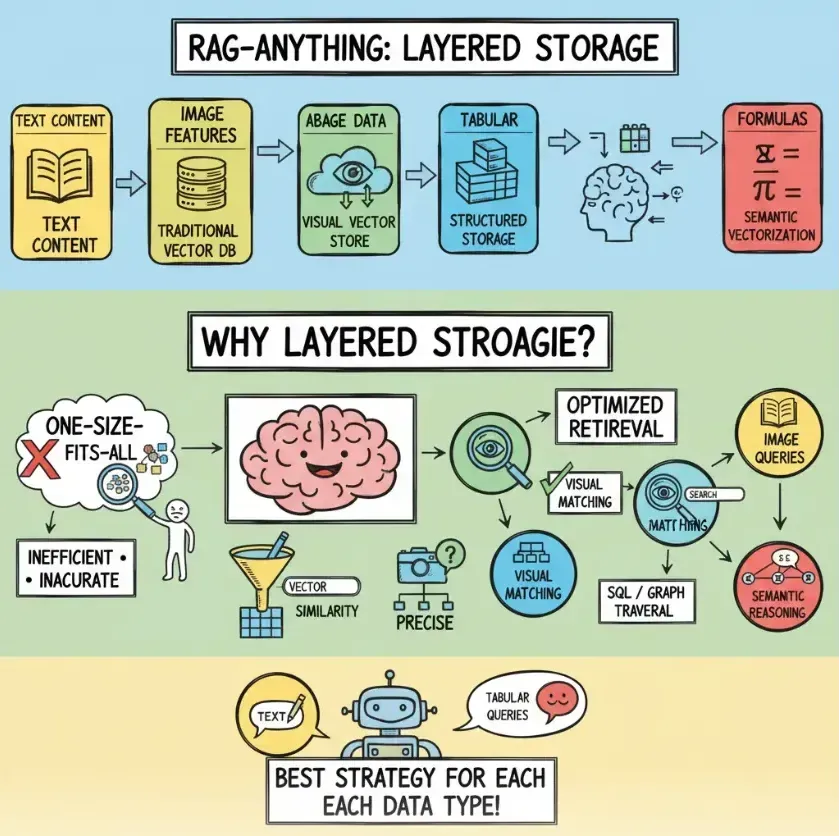
On top of its multimodal design, RAG-Anything also uses a layered storage and retrieval approach to make results more accurate and efficient.
Text is stored in a traditional vector database.
Image are managed in a separate visual feature store.
Tables are kept in structured data storage.
Mathematical formulas are are turned into semantic vectors.
By storing each content type in its own suitable format, the system can choose the best retrieval method for each modality instead of relying on a single, generic similarity search. This leads to faster and more reliable results across different kinds of content.
How Milvus Fits into RAG-Anything
RAG-Anything provides strong multimodal retrieval, but doing this well requires quick and scalable vector search across all kinds of embeddings. Milvus fills this role perfectly.
With its cloud-native architecture and compute-storage separation, Milvus delivers both high scalability and cost efficiency. It supports read–write separation and stream–batch unification, allowing the system to handle high-concurrency workloads while maintaining real-time query performance—new data becomes searchable immediately after insertion.
Milvus also ensures enterprise-grade reliability through its distributed, fault-tolerant design, which keeps the system stable even if individual nodes fail. This makes it a strong fit for production-level multimodal RAG deployments.

How to Build a Multimodal Q&A System with RAG-Anything and Milvus
This demo shows how to build a multimodal Q&A system using the RAG-Anything framework, the Milvus vector database, and TongYi embedding model. (This example focuses on the core implementation code and is not a full production setup.)
Hands-on Demo
Prerequisites:
Python: 3.10 or higher
Vector Database: Milvus service (Milvus Lite)
Cloud Service: Alibaba Cloud API key (for LLM and embedding services)
LLM Model:
qwen-vl-max(vision-enabled model)
Embedding Model: tongyi-embedding-vision-plus
- python -m venv .venv && source .venv/bin/activate  # For Windows users:  .venvScriptsactivate
- pip install -r requirements-min.txt
- cp .env.example .env #add DASHSCOPE_API_KEY
Execute the minimal working example:
python minimal_[main.py](<http://main.py>)
Expected Output:
Once the script runs successfully, the terminal should display:
The text-based Q&A result generated by the LLM.
The retrieved image description corresponding to the query.
Project Structure
.
├─ requirements-min.txt
├─ .env.example
├─ [config.py](<http://config.py>)
├─ milvus_[store.py](<http://store.py>)
├─ [adapters.py](<http://adapters.py>)
├─ minimal_[main.py](<http://main.py>)
└─ sample
   ├─ docs
   │  └─ faq_milvus.txt
   └─ images
      └─ milvus_arch.png
Project Dependencies
raganything
lightrag
pymilvus[lite]>=2.3.0
aiohttp>=3.8.0
orjson>=3.8.0
python-dotenv>=1.0.0
Pillow>=9.0.0
numpy>=1.21.0,<2.0.0
rich>=12.0.0
Environment Variables
# Alibaba Cloud DashScope
DASHSCOPE_API_KEY=your_api_key_here
# If the endpoint changes in future releases, please update it accordingly.
ALIYUN_LLM_URL=https://dashscope.aliyuncs.com/compatible-mode/v1/chat/completions
ALIYUN_VLM_URL=https://dashscope.aliyuncs.com/compatible-mode/v1/chat/completions
ALIYUN_EMBED_URL=https://dashscope.aliyuncs.com/api/v1/services/embeddings/text-embedding
# Model names (configure all models here for consistency)
LLM_TEXT_MODEL=qwen-max
LLM_VLM_MODEL=qwen-vl-max
EMBED_MODEL=tongyi-embedding-vision-plus
# Milvus Lite
MILVUS_URI=milvus_lite.db
MILVUS_COLLECTION=rag_multimodal_collection
EMBED_DIM=1152
Configuration
import os
from dotenv import load_dotenv
load_dotenv()
DASHSCOPE_API_KEY = os.getenv("DASHSCOPE_API_KEY", "")
LLM_TEXT_MODEL = os.getenv("LLM_TEXT_MODEL", "qwen-max")
LLM_VLM_MODEL = os.getenv("LLM_VLM_MODEL", "qwen-vl-max")
EMBED_MODEL = os.getenv("EMBED_MODEL", "tongyi-embedding-vision-plus")
ALIYUN_LLM_URL = os.getenv("ALIYUN_LLM_URL")
ALIYUN_VLM_URL = os.getenv("ALIYUN_VLM_URL")
ALIYUN_EMBED_URL = os.getenv("ALIYUN_EMBED_URL")
MILVUS_URI = os.getenv("MILVUS_URI", "milvus_lite.db")
MILVUS_COLLECTION = os.getenv("MILVUS_COLLECTION", "rag_multimodal_collection")
EMBED_DIM = int(os.getenv("EMBED_DIM", "1152"))
# Basic runtime parameters
TIMEOUT = 60
MAX_RETRIES = 2
Model Invocation
import os
import base64
import aiohttp
import asyncio
from typing import List, Dict, Any, Optional
from config import (
    DASHSCOPE_API_KEY, LLM_TEXT_MODEL, LLM_VLM_MODEL, EMBED_MODEL,
    ALIYUN_LLM_URL, ALIYUN_VLM_URL, ALIYUN_EMBED_URL, EMBED_DIM, TIMEOUT
)
HEADERS = {
    "Authorization": f"Bearer {DASHSCOPE_API_KEY}",
    "Content-Type": "application/json",
}
class AliyunLLMAdapter:
    def __init__(self):
        self.text_url = ALIYUN_LLM_URL
        self.vlm_url = ALIYUN_VLM_URL
        self.text_model = LLM_TEXT_MODEL
        self.vlm_model = LLM_VLM_MODEL
    async def chat(self, prompt: str) -> str:
        payload = {
            "model": self.text_model,
            "input": {"messages": [{"role": "user", "content": prompt}]},
            "parameters": {"max_tokens": 1024, "temperature": 0.5},
        }
        async with aiohttp.ClientSession(timeout=aiohttp.ClientTimeout(total=TIMEOUT)) as s:
            async with [s.post](<http://s.post>)(self.text_url, json=payload, headers=HEADERS) as r:
                r.raise_for_status()
                data = await r.json()
                return data["output"]["choices"][0]["message"]["content"]
    async def chat_vlm_with_image(self, prompt: str, image_path: str) -> str:
        with open(image_path, "rb") as f:
            image_b64 = base64.b64encode([f.read](<http://f.read>)()).decode("utf-8")
        payload = {
            "model": self.vlm_model,
            "input": {"messages": [{"role": "user", "content": [
                {"text": prompt},
                {"image": f"data:image/png;base64,{image_b64}"}
            ]}]},
            "parameters": {"max_tokens": 1024, "temperature": 0.2},
        }
        async with aiohttp.ClientSession(timeout=aiohttp.ClientTimeout(total=TIMEOUT)) as s:
            async with [s.post](<http://s.post>)(self.vlm_url, json=payload, headers=HEADERS) as r:
                r.raise_for_status()
                data = await r.json()
                return data["output"]["choices"][0]["message"]["content"]
class AliyunEmbeddingAdapter:
    def __init__(self):
        self.url = ALIYUN_EMBED_URL
        self.model = EMBED_MODEL
        self.dim = EMBED_DIM
    async def embed_text(self, text: str) -> List[float]:
        payload = {
            "model": self.model,
            "input": {"texts": [text]},
            "parameters": {"text_type": "query", "dimensions": self.dim},
        }
        async with aiohttp.ClientSession(timeout=aiohttp.ClientTimeout(total=TIMEOUT)) as s:
            async with [s.post](<http://s.post>)(self.url, json=payload, headers=HEADERS) as r:
                r.raise_for_status()
                data = await r.json()
                return data["output"]["embeddings"][0]["embedding"]
Milvus Lite Integration
import json
import time
from typing import List, Dict, Any, Optional
from pymilvus import connections, Collection, CollectionSchema, FieldSchema, DataType, utility
from config import MILVUS_URI, MILVUS_COLLECTION, EMBED_DIM
class MilvusVectorStore:
    def __init__(self, uri: str = MILVUS_URI, collection_name: str = MILVUS_COLLECTION, dim: int = EMBED_DIM):
        self.uri = uri
        self.collection_name = collection_name
        self.dim = dim
        self.collection: Optional[Collection] = None
        self._connect_and_prepare()
    def _connect_and_prepare(self):
        connections.connect("default", uri=self.uri)
        if utility.has_collection(self.collection_name):
            self.collection = Collection(self.collection_name)
        else:
            fields = [
                FieldSchema(name="id", dtype=DataType.VARCHAR, max_length=512, is_primary=True),
                FieldSchema(name="vector", dtype=DataType.FLOAT_VECTOR, dim=self.dim),
                FieldSchema(name="content", dtype=DataType.VARCHAR, max_length=65535),
                FieldSchema(name="content_type", dtype=DataType.VARCHAR, max_length=32),
                FieldSchema(name="source", dtype=DataType.VARCHAR, max_length=1024),
                FieldSchema(name="ts", dtype=[DataType.INT](<http://DataType.INT>)64),
            ]
            schema = CollectionSchema(fields, "Minimal multimodal collection")
            self.collection = Collection(self.collection_name, schema)
            self.collection.create_index("vector", {
                "metric_type": "COSINE",
                "index_type": "IVF_FLAT",
                "params": {"nlist": 1024}
            })
        self.collection.load()
    def upsert(self, ids: List[str], vectors: List[List[float]], contents: List[str],
               content_types: List[str], sources: List[str]) -> None:
        data = [
            ids,
            vectors,
            contents,
            content_types,
            sources,
            [int(time.time() * 1000)] * len(ids)
        ]
        self.collection.upsert(data)
        self.collection.flush()
    def search(self, query_vectors: List[List[float]], top_k: int = 5, content_type: Optional[str] = None):
        expr = f'content_type == "{content_type}"' if content_type else None
        params = {"metric_type": "COSINE", "params": {"nprobe": 16}}
        results = [self.collection.search](<http://self.collection.search>)(
            data=query_vectors,
            anns_field="vector",
            param=params,
            limit=top_k,
            expr=expr,
            output_fields=["id", "content", "content_type", "source", "ts"]
        )
        out = []
        for hits in results:
            out.append([{
                "id": h.entity.get("id"),
                "content": h.entity.get("content"),
                "content_type": h.entity.get("content_type"),
                "source": h.entity.get("source"),
                "score": h.score
            } for h in hits])
        return out
Main Entry Point
"""
Minimal Working Example:
- Insert a short text FAQ into LightRAG (text retrieval context)
- Insert an image description vector into Milvus (image retrieval context)
- Execute two example queries: one text QA and one image-based QA
"""
import asyncio
import uuid
from pathlib import Path
from rich import print
from lightrag import LightRAG, QueryParam
from lightrag.utils import EmbeddingFunc
from adapters import AliyunLLMAdapter, AliyunEmbeddingAdapter
from milvus_store import MilvusVectorStore
from config import EMBED_DIM
SAMPLE_DOC = Path("sample/docs/faq_milvus.txt")
SAMPLE_IMG = Path("sample/images/milvus_arch.png")
async def main():
    # 1) Initialize core components
    llm = AliyunLLMAdapter()
    emb = AliyunEmbeddingAdapter()
    store = MilvusVectorStore()
    # 2) Initialize LightRAG (for text-only retrieval)
    async def llm_complete(prompt: str, max_tokens: int = 1024) -> str:
        return await [llm.chat](<http://llm.chat>)(prompt)
    async def embed_func(text: str) -> list:
        return await emb.embed_text(text)
    rag = LightRAG(
        working_dir="rag_workdir_min",
        llm_model_func=llm_complete,
        embedding_func=EmbeddingFunc(
            embedding_dim=EMBED_DIM,
            max_token_size=8192,
            func=embed_func
        ),
    )
    # 3) Insert text data
    if SAMPLE_DOC.exists():
        text = SAMPLE_[DOC.read](<http://DOC.read>)_text(encoding="utf-8")
        await rag.ainsert(text)
        print("[green]Inserted FAQ text into LightRAG[/green]")
    else:
        print("[yellow] sample/docs/faq_milvus.txt not found[/yellow]")
    # 4) Insert image data (store description in Milvus)
    if SAMPLE_IMG.exists():
        # Use the VLM to generate a description as its semantic content
        desc = await [llm.chat](<http://llm.chat>)_vlm_with_image("Please briefly describe the key components of the Milvus architecture shown in the image.", str(SAMPLE_IMG))
        vec = await emb.embed_text(desc)  # Use text embeddings to maintain a consistent vector dimension, simplifying reuse
        store.upsert(
            ids=[str(uuid.uuid4())],
            vectors=[vec],
            contents=[desc],
            content_types=["image"],
            sources=[str(SAMPLE_IMG)]
        )
        print("[green]Inserted image description into Milvus(content_type=image)[/green]")
    else:
        print("[yellow] sample/images/milvus_arch.png not found[/yellow]")
    # 5) Query: Text-based QA (from LightRAG)
    q1 = "Does Milvus support simultaneous insertion and search? Give a short answer."
    ans1 = await rag.aquery(q1, param=QueryParam(mode="hybrid"))
    print("\\n[bold]Text QA[/bold]")
    print(ans1)
    # 6) Query: Image-related QA (from Milvus)
    q2 = "What are the key components of the Milvus architecture?"
    q2_vec = await emb.embed_text(q2)
    img_hits = [store.search](<http://store.search>)([q2_vec], top_k=3, content_type="image")
    print("\\n[bold]Image Retrieval (returns semantic image descriptions)[/bold]")
    print(img_hits[0] if img_hits else [])
if __name__ == "__main__":
    [asyncio.run](<http://asyncio.run>)(main())
Now, you can test your multimodal RAG system with your own dataset.
The Future for Multimodal RAG
As more real-world data moves beyond plain text, Retrieval-Augmented Generation (RAG) systems are beginning to evolve toward true multimodality. Solutions like RAG-Anything already demonstrate how text, images, tables, formulas, and other structured content can be processed in a unified way. Looking ahead, I think three major trends will shape the next phase of multimodal RAG:
Expanding to More Modalities
Current frameworks—such as RAG-Anything—can already handle text, images, tables, and mathematical expressions. The next frontier is supporting even richer content types, including video, audio, sensor data, and 3D models, enabling RAG systems to understand and retrieve information from the full spectrum of modern data.
Real-Time Data Updates
Most RAG pipelines today rely on relatively static data sources. As information changes more rapidly, future systems will require real-time document updates, streaming ingestion, and incremental indexing. This shift will make RAG more responsive, timely, and reliable in dynamic environments.
Moving RAG to Edge Devices
With lightweight vector tools such as Milvus Lite, multimodal RAG is no longer confined to the cloud. Deploying RAG on edge devices and IoT systems allows intelligent retrieval to happen closer to where data is generated—improving latency, privacy, and overall efficiency.
👉 Ready to explore multimodal RAG?
Try pairing your multimodal pipeline with Milvus and experience fast, scalable retrieval across text, images, and more.
Have questions or want a deep dive on any feature? Join our Discord channel or file issues on GitHub. You can also book a 20-minute one-on-one session to get insights, guidance, and answers to your questions through Milvus Office Hours.
- What Is RAG-Anything and How It Works
- The “1 + 3 + N” Architecture
- Layered Storage and Retrieval Optimization
- How Milvus Fits into RAG-Anything
- How to Build a Multimodal Q&A System with RAG-Anything and Milvus
- Hands-on Demo
- Project Structure
- The Future for Multimodal RAG
- Expanding to More Modalities
- Real-Time Data Updates
- Moving RAG to Edge Devices
On This Page
Try Managed Milvus for Free
Zilliz Cloud is hassle-free, powered by Milvus and 10x faster.
Get StartedLike the article? Spread the word