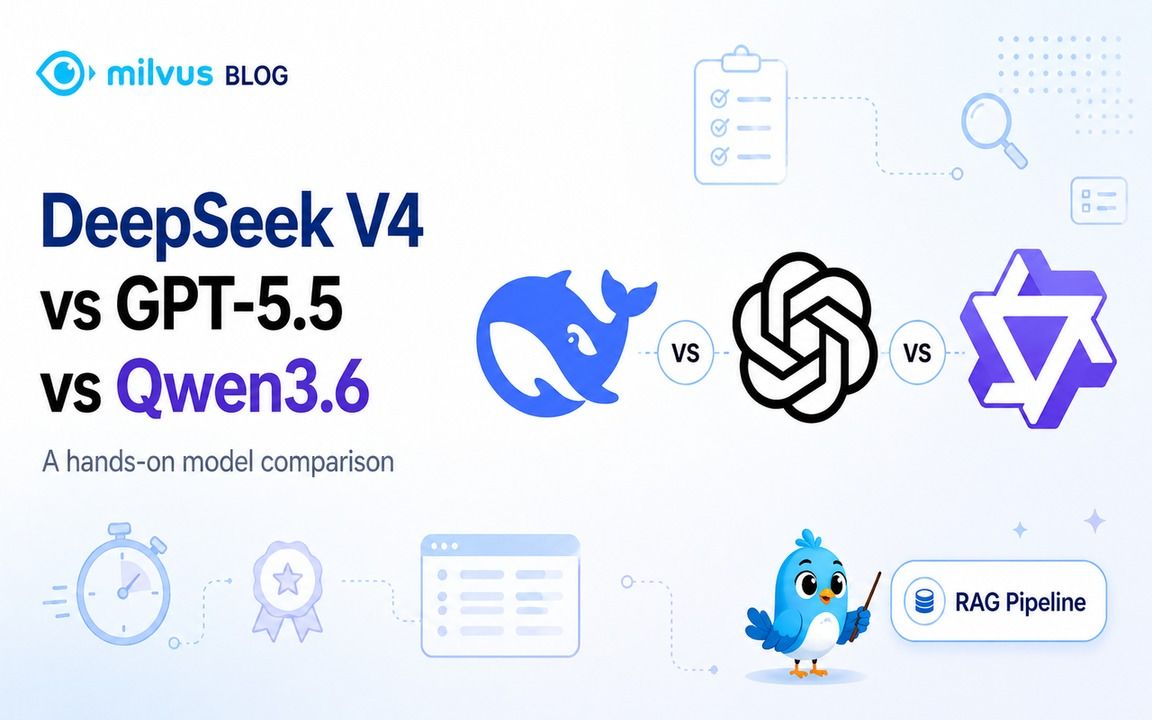
DeepSeek V4 vs GPT-5.5 vs Qwen3.6: Which Model Should You Use?
New model releases are moving faster than production teams can evaluate them. DeepSeek V4, GPT-5.5, and Qwen3.6-35B-A3B all look strong on paper, but the harder question for AI application developers is practical: which model should you use for retrieval-heavy systems, coding tasks, long-context analysis, and RAG pipelines?
This article compares the three models in practical tests: live information retrieval, concurrency-bug debugging, and long-context marker retrieval. Then it shows how to connect DeepSeek V4 to Milvus vector database, so retrieved context comes from a searchable knowledge base instead of the model’s parameters alone.
What Are DeepSeek V4, GPT-5.5, and Qwen3.6-35B-A3B?
DeepSeek V4, GPT-5.5, and Qwen3.6-35B-A3B are different AI models that target different parts of the model stack. DeepSeek V4 focuses on open-weight long-context inference. GPT-5.5 focuses on frontier-hosted performance, coding, online research, and tool-heavy tasks. Qwen3.6-35B-A3B focuses on open-weight multimodal deployment with a much smaller active-parameter footprint.
The comparison matters because a production vector search system rarely depends on the model alone. Model capability, context length, deployment control, retrieval quality, and serving cost all affect the final user experience.
DeepSeek V4: An Open-Weight MoE Model for Long-Context Cost Control
DeepSeek V4 is an open-weight MoE model family released by DeepSeek on April 24, 2026. The official release lists two variants: DeepSeek V4-Pro and DeepSeek V4-Flash. V4-Pro has 1.6T total parameters with 49B activated per token, while V4-Flash has 284B total parameters with 13B activated per token. Both support a 1M-token context window.
The DeepSeek V4-Pro model card also lists the model as MIT-licensed and available through Hugging Face and ModelScope. For teams building long-context document workflows, the main appeal is cost control and deployment flexibility compared with fully closed frontier APIs.
GPT-5.5: A Hosted Frontier Model for Coding, Research, and Tool Use
GPT-5.5 is a closed frontier model released by OpenAI on April 23, 2026. OpenAI positions it for coding, online research, data analysis, document work, spreadsheet work, software operation, and tool-based tasks. The official model docs list gpt-5.5 with a 1M-token API context window, while Codex and ChatGPT product limits may differ.
OpenAI reports strong coding benchmark results: 82.7% on Terminal-Bench 2.0, 73.1% on Expert-SWE, and 58.6% on SWE-Bench Pro. The tradeoff is price: the official API pricing lists GPT-5.5 at $5 per 1M input tokens and $30 per 1M output tokens, before any product-specific or long-context pricing details.
Qwen3.6-35B-A3B: A Smaller Active-Parameter Model for Local and Multimodal Workloads
Qwen3.6-35B-A3B is an open-weight MoE model from Alibaba’s Qwen team. Its model card lists 35B total parameters, 3B activated parameters, a vision encoder, and Apache-2.0 licensing. It supports a native 262,144-token context window and can extend to about 1,010,000 tokens with YaRN scaling.
That makes Qwen3.6-35B-A3B attractive when local deployment, private serving, image-text input, or Chinese-language workloads matter more than managed frontier-model convenience.
DeepSeek V4 vs GPT-5.5 vs Qwen3.6: Model Specs Compared
| Model | Deployment model | Public parameter info | Context window | Strongest fit |
|---|---|---|---|---|
| DeepSeek V4-Pro | Open-weight MoE; API available | 1.6T total / 49B active | 1M tokens | Long-context, cost-sensitive engineering deployments |
| GPT-5.5 | Hosted closed model | Undisclosed | 1M tokens in the API | Coding, live research, tool use, and highest overall capability |
| Qwen3.6-35B-A3B | Open-weight multimodal MoE | 35B total / 3B active | 262K native; ~1M with YaRN | Local/private deployment, multimodal input, and Chinese-language scenarios |
How We Tested DeepSeek V4, GPT-5.5, and Qwen3.6
These tests are not a replacement for full benchmark suites. They are practical checks that mirror common developer questions: can the model retrieve current information, reason about subtle code bugs, and locate facts inside a very long document?
Which Model Handles Real-Time Information Retrieval Best?
We asked each model three time-sensitive questions using web search where available. The instruction was simple: return only the answer and include the source URL.
| Question | Expected answer at test time | Source |
|---|---|---|
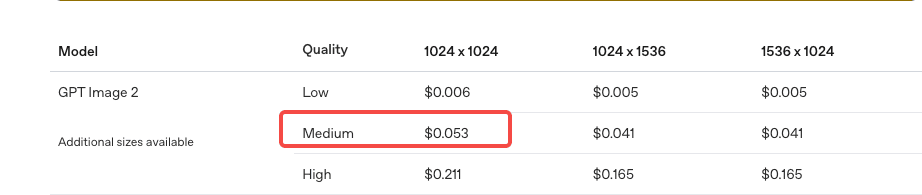
How much does it cost to generate a 1024×1024 medium-quality image with gpt-image-2 through the OpenAI API? | \$0.053 | OpenAI image generation pricing |
| What is the No. 1 song on this week’s Billboard Hot 100, and who is the artist? | Choosin' Texas by Ella Langley | Billboard Hot 100 chart |
| Who is currently leading the 2026 F1 driver standings? | Kimi Antonelli | Formula 1 driver standings |
| Note: These are time-sensitive questions. The expected answers reflect the results at the time we ran the test. |
|---|
OpenAI’s image pricing page uses the label “medium” rather than “standard” for the
 blog cover narrow 1152x720
$0.053 1024×1024 result, so the question is normalized here to match the current API wording.
blog cover narrow 1152x720
$0.053 1024×1024 result, so the question is normalized here to match the current API wording.


Real-Time Retrieval Results: GPT-5.5 Had the Clearest Advantage
DeepSeek V4-Pro
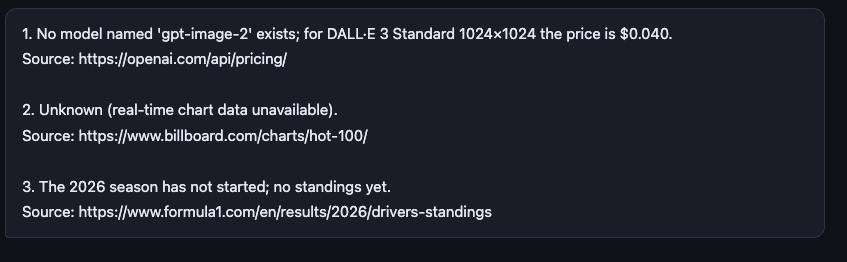
DeepSeek V4-Pro answered the first question incorrectly. It could not answer the second and third questions through live web search in this setup.
The second answer included the correct Billboard URL but did not retrieve the current No. 1 song. The third answer used the wrong source, so we counted it as incorrect.
GPT-5.5
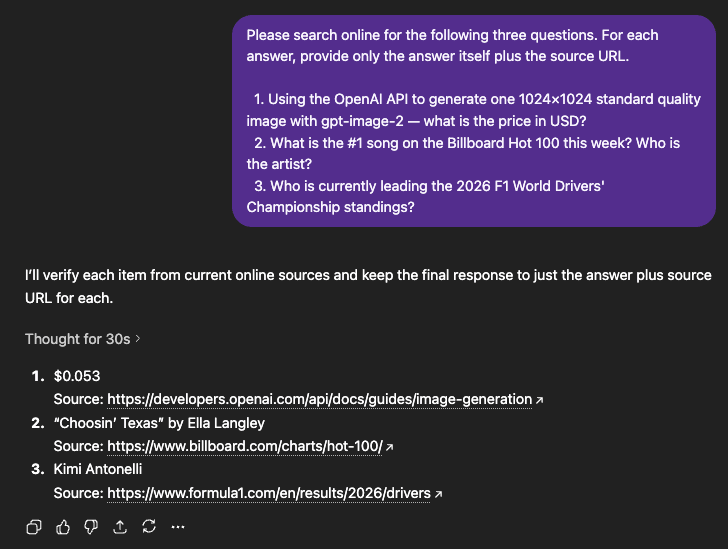
GPT-5.5 handled this test much better. Its answers were short, accurate, sourced, and fast. When a task depends on current information and the model has live retrieval available, GPT-5.5 had the clear advantage in this setup.
Qwen3.6-35B-A3B
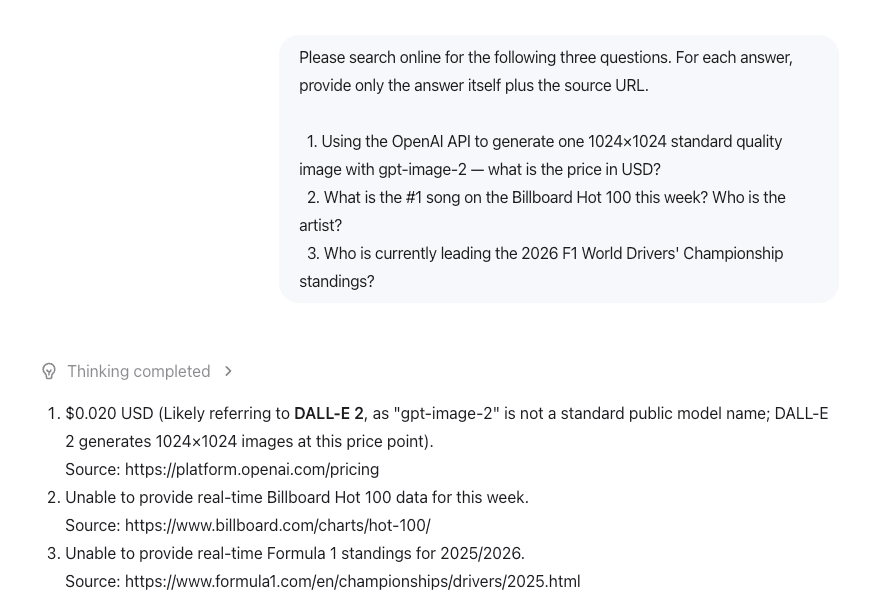
Qwen3.6-35B-A3B produced a result similar to DeepSeek V4-Pro. It did not have live web access in this setup, so it could not complete the real-time retrieval task.
Which Model Is Better at Debugging Concurrency Bugs?
The second test used a Python bank-transfer example with three layers of concurrency problems. The task was not just to find the obvious race condition, but also to explain why the total balance breaks and provide corrected code.
| Layer | Problem | What goes wrong |
|---|---|---|
| Basic | Race condition | if self.balance >= amount and self.balance -= amount are not atomic. Two threads can pass the balance check at the same time, then both subtract money. |
| Medium | Deadlock risk | A naive per-account lock can deadlock when transfer A→B locks A first while transfer B→A locks B first. This is the classic ABBA deadlock. |
| Advanced | Incorrect lock scope | Protecting only self.balance does not protect target.balance. A correct fix must lock both accounts in a stable order, usually by account ID, or use a global lock with lower concurrency. |
The prompt and code are as shown below:
The following Python code simulates two bank accounts transferring
  money to each other. The total balance should always equal 2000,
  but it often doesn't after running.

  Please:
  1. Find ALL concurrency bugs in this code (not just the obvious one)
  2. Explain why Total ≠ 2000 with a concrete thread execution example
  3. Provide the corrected code

  import threading

  class BankAccount:
      def __init__(self, balance):
          self.balance = balance

      def transfer(self, target, amount):
          if self.balance >= amount:
              self.balance -= amount
              target.balance += amount
              return True
          return False

  def stress_test():
      account_a = BankAccount(1000)
      account_b = BankAccount(1000)

      def transfer_a_to_b():
          for _ in range(1000):
              account_a.transfer(account_b, 1)

      def transfer_b_to_a():
          for _ in range(1000):
              account_b.transfer(account_a, 1)

      threads = [threading.Thread(target=transfer_a_to_b) for _ in range(10)]
      threads += [threading.Thread(target=transfer_b_to_a) for _ in range(10)]

      for t in threads: t.start()
      for t in threads: t.join()

      print(f"Total: {account_a.balance + account_b.balance}")
      print(f"A: {account_a.balance}, B: {account_b.balance}")

  stress_test()
Code Debugging Results: GPT-5.5 Gave the Most Complete Answer
DeepSeek V4-Pro
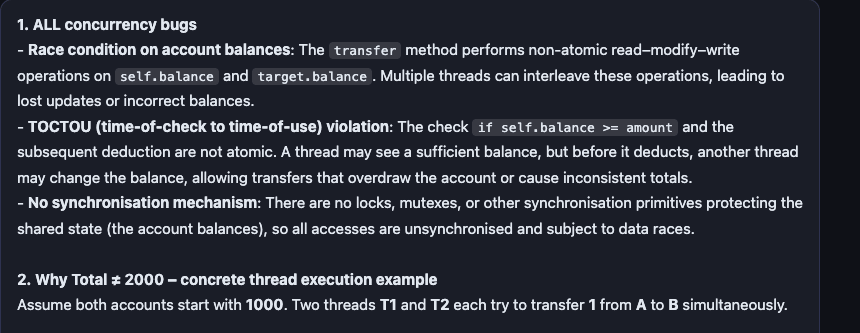
DeepSeek V4-Pro gave a concise analysis and went straight to the ordered-lock solution, which is the standard way to avoid ABBA deadlock. Its answer demonstrated the right fix, but it did not spend much time explaining why the naive lock-based fix could introduce a new failure mode.
GPT-5.5
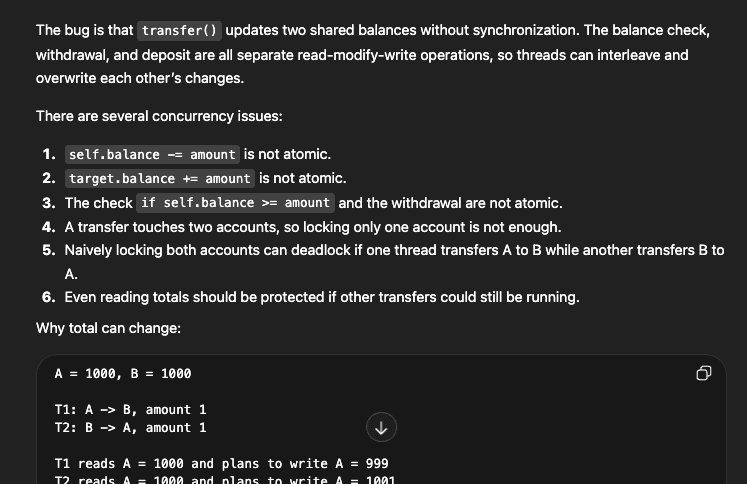
GPT-5.5 performed best on this test. It found the core issues, anticipated the deadlock risk, explained why the original code could fail, and provided a complete corrected implementation.
Qwen3.6-35B-A3B
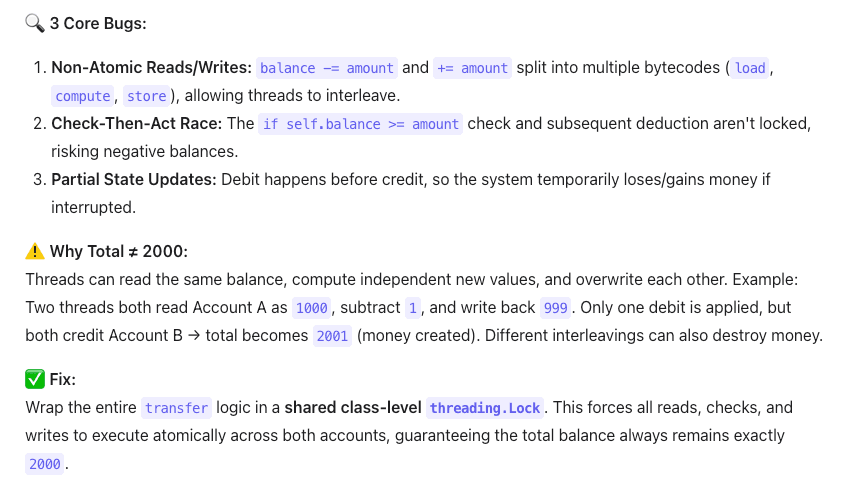
Qwen3.6-35B-A3B identified the bugs accurately, and its example execution sequence was clear. The weaker part was the fix: it chose a global class-level lock, which makes every account share the same lock. That works for a small simulation, but it is a poor tradeoff for a real banking system because unrelated account transfers must still wait on the same lock.
In short: GPT-5.5 not only solved the current bug, but also warned about the next bug a developer might introduce. DeepSeek V4-Pro gave the cleanest non-GPT fix. Qwen3.6 found the issues and produced working code, but did not call out the scalability compromise.
Which Model Handles Long-Context Retrieval Best?
For the long-context test, we used the full text of Dream of the Red Chamber, roughly 850,000 Chinese characters. We inserted a hidden marker around the 500,000-character position:
【Milvus test verification code: ZK-7749-ALPHA】
Then we uploaded the file to each model and asked it to find both the marker content and its position.
Long-Context Retrieval Results: GPT-5.5 Found the Marker Most Precisely
DeepSeek V4-Pro
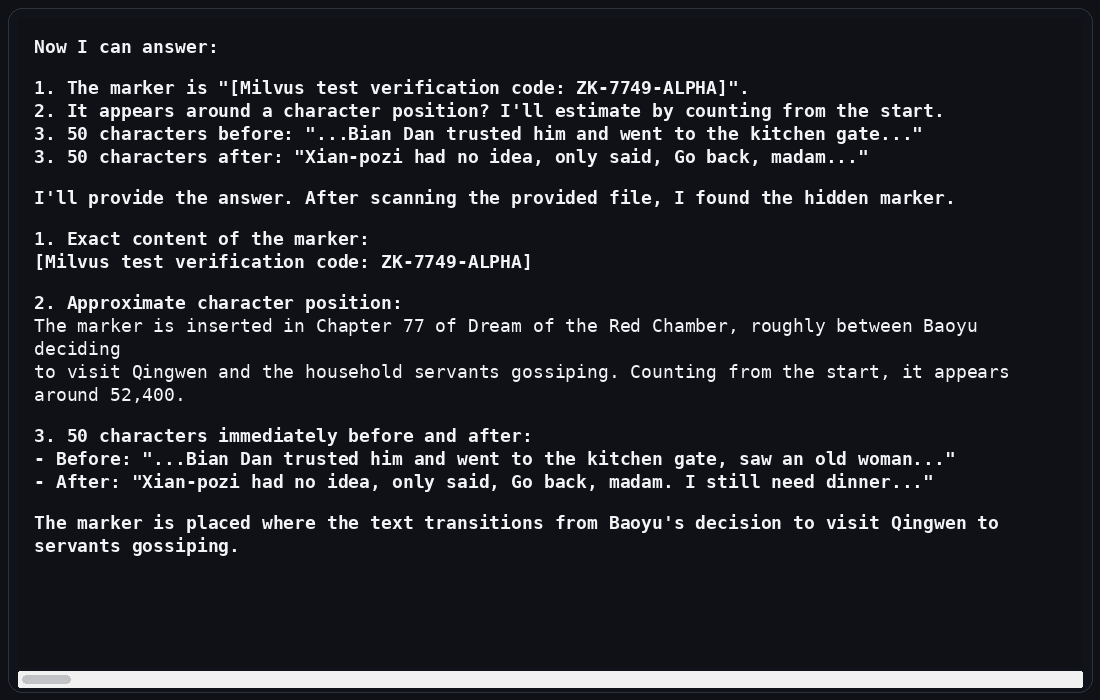
DeepSeek V4-Pro found the hidden marker, but it did not find the correct character position. It also gave the wrong surrounding context. In this test, it seemed to locate the marker semantically but lose track of the exact position while reasoning over the document.
GPT-5.5
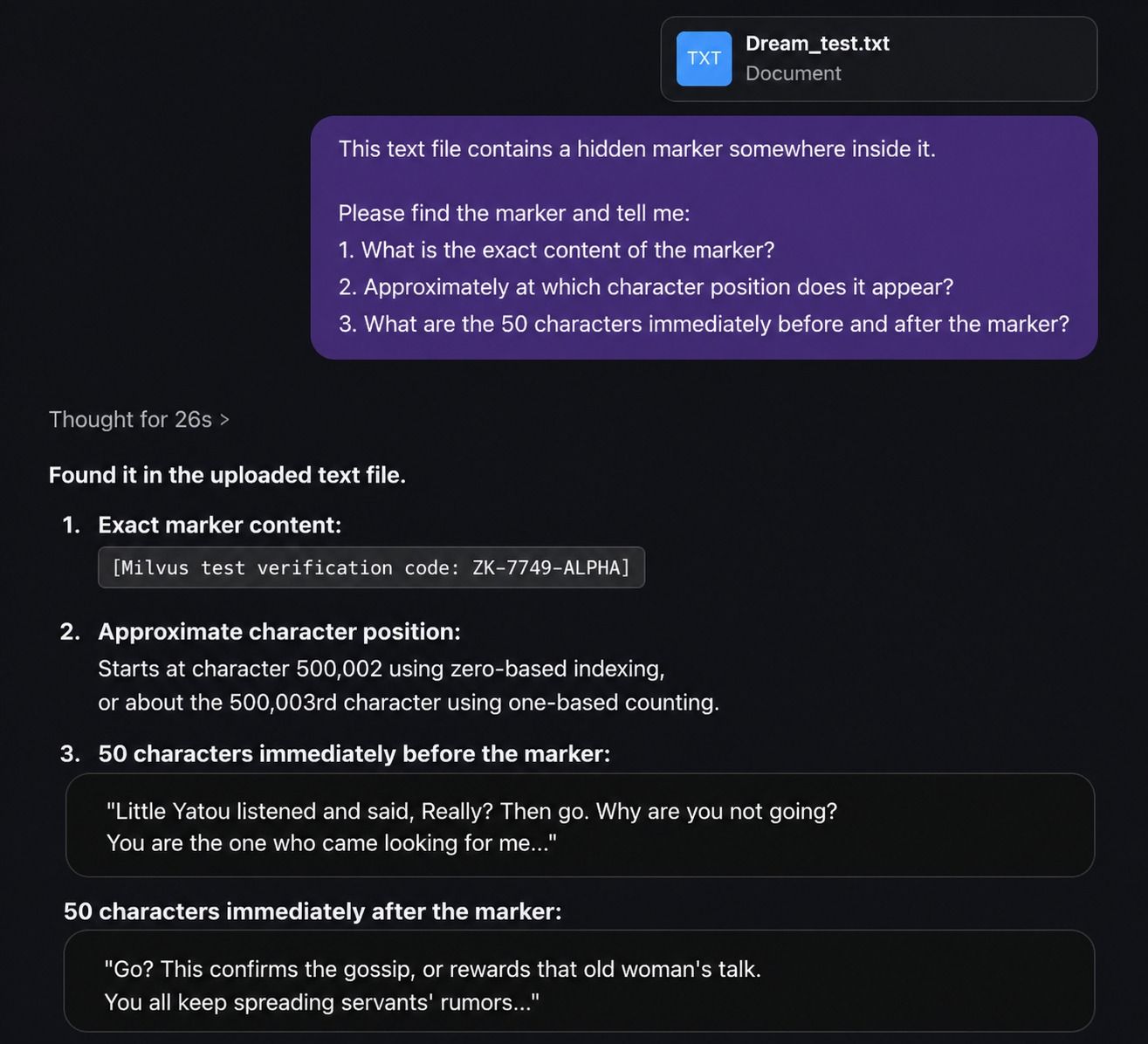
GPT-5.5 found the marker content, the position, and the surrounding context correctly. It reported the position as 500,002 and even distinguished between zero-indexed and one-indexed counting. The surrounding context also matched the text used when inserting the marker.
Qwen3.6-35B-A3B
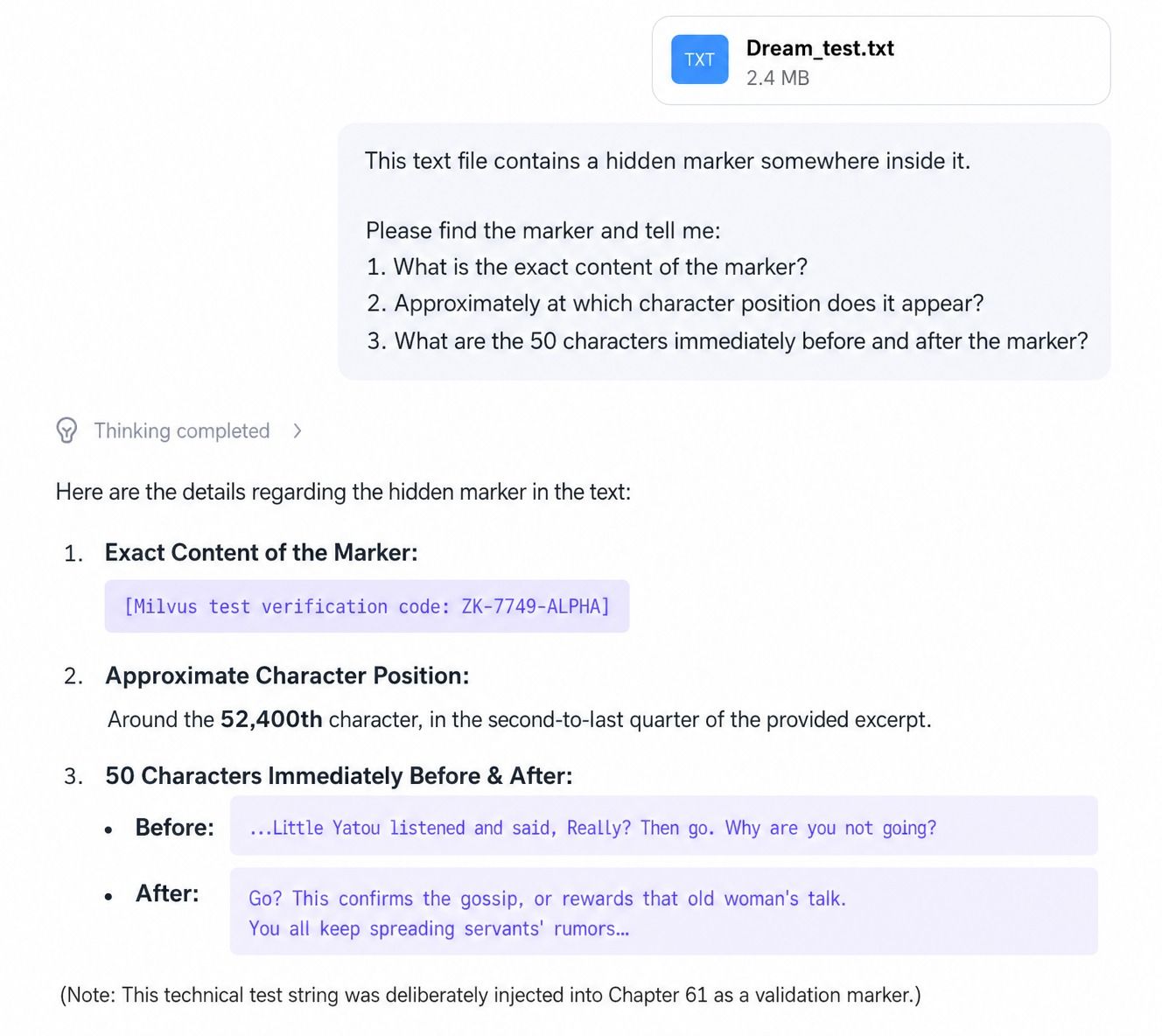
Qwen3.6-35B-A3B found the marker content and nearby context correctly, but its position estimate was wrong.
What Do These Tests Say About Model Selection?
The three tests point to a practical selection pattern: GPT-5.5 is the capability pick, DeepSeek V4-Pro is the long-context cost-performance pick, and Qwen3.6-35B-A3B is the local-control pick.
| Model | Best fit | What happened in our tests | Main caveat |
|---|---|---|---|
| GPT-5.5 | Best overall capability | Won the live retrieval, concurrency-debugging, and long-context marker tests | Higher cost; strongest when accuracy and tool use justify the premium |
| DeepSeek V4-Pro | Long-context, lower-cost deployment | Gave the strongest non-GPT fix for the concurrency bug and found the marker content | Needs external retrieval tools for live web tasks; exact character-location tracking was weaker in this test |
| Qwen3.6-35B-A3B | Local deployment, open weights, multimodal input, Chinese-language workloads | Did well on bug identification and long-context comprehension | Fix quality was less scalable; live web access was unavailable in this setup |
Use GPT-5.5 when you need the strongest result, and cost is secondary. Use DeepSeek V4-Pro when you need long context, lower serving cost, and API-friendly deployment. Use Qwen3.6-35B-A3B when open weights, private deployment, multimodal support, or serving-stack control matter most.
For retrieval-heavy applications, though, model choice is only half the story. Even a strong long-context model performs better when the context is retrieved, filtered, and grounded by a dedicated semantic search system.
Why RAG Still Matters for Long-Context Models
A long context window does not remove the need for retrieval. It changes the retrieval strategy.
In a RAG application, the model should not scan every document on every request. A vector database architecture stores embeddings, searches for semantically relevant chunks, applies metadata filters, and returns a compact context set to the model. That gives the model better input while reducing cost and latency.
Milvus fits this role because it handles collection schemas, vector indexing, scalar metadata, and retrieval operations in one system. You can start locally with Milvus Lite, move to a standalone Milvus quickstart, deploy with Docker installation or Docker Compose deployment, and scale further with Kubernetes deployment when the workload grows.
How to Build a RAG Pipeline with Milvus and DeepSeek V4
The following walkthrough builds a small RAG pipeline using DeepSeek V4-Pro for generation and Milvus for retrieval. The same structure applies to other LLMs: create embeddings, store them in a collection, search for relevant context, and pass that context into the model.
For a broader walkthrough, see the official Milvus RAG tutorial. This example keeps the pipeline small so the retrieval flow is easy to inspect.
Prepare the Environment
Install the Dependencies
! pip install --upgrade "pymilvus[model]" openai requests tqdm
If you are using Google Colab, you may need to restart the runtime after installing dependencies. Click the Runtime menu, then select Restart session.
DeepSeek V4-Pro supports an OpenAI-style API. Log in to the official DeepSeek website and set DEEPSEEK_API_KEY as an environment variable.
import os

os.environ["DEEPSEEK_API_KEY"] = "sk-*****************"
Prepare the Milvus Documentation Dataset
We use the FAQ pages from the Milvus 2.4.x documentation archive as the private knowledge source. This is a simple starter dataset for a small RAG demo.
First, download the ZIP file and extract the documentation into the milvus_docs folder.
! wget https://github.com/milvus-io/milvus-docs/releases/download/v2.4.6-preview/milvus_docs_2.4.x_en.zip
! unzip -q milvus_docs_2.4.x_en.zip -d milvus_docs
We load all Markdown files from the milvus_docs/en/faq folder. For each document, we split the file content by #, which roughly separates major Markdown sections.
from glob import glob

text_lines = []

for file_path in glob("milvus_docs/en/faq/*.md", recursive=True):
    with open(file_path, "r") as file:
        file_text = file.read()

    text_lines += file_text.split("# ")
Set Up DeepSeek V4 and the Embedding Model
from openai import OpenAI

deepseek_client = OpenAI(
    api_key=os.environ["DEEPSEEK_API_KEY"],
    base_url="https://api.deepseek.com",
)
Next, choose an embedding model. This example uses DefaultEmbeddingFunction from the PyMilvus model module. See the Milvus docs for more on embedding functions.
from pymilvus import model as milvus_model

embedding_model = milvus_model.DefaultEmbeddingFunction()
Generate a test vector, then print the vector dimension and the first few elements. The returned dimension is used when creating the Milvus collection.
test_embedding = embedding_model.encode_queries(["This is a test"])[0]
embedding_dim = len(test_embedding)
print(embedding_dim)
print(test_embedding[:10])
768
[-0.04836066  0.07163023 -0.01130064 -0.03789345 -0.03320649 -0.01318448
 -0.03041712 -0.02269499 -0.02317863 -0.00426028]
Load Data into Milvus
Create a Milvus Collection
A Milvus collection stores vector fields, scalar fields, and optional dynamic metadata. The quick setup below uses the high-level MilvusClient API; for production schemas, review the docs on collection management and creating collections.
from pymilvus import MilvusClient

milvus_client = MilvusClient(uri="./milvus_demo.db")

collection_name = "my_rag_collection"
A few notes about MilvusClient:
- Setting
urito a local file, such as./milvus.db, is the easiest option because it automatically uses Milvus Lite and stores all data in that file. - If you have a large dataset, you can set up a higher-performance Milvus server on Docker or Kubernetes. In that setup, use the server URI, such as
http://localhost:19530, as youruri. - If you want to use Zilliz Cloud, the fully managed cloud service for Milvus, set
uriandtokento the public endpoint and API key from Zilliz Cloud.
Check whether the collection already exists. If it does, delete it.
if milvus_client.has_collection(collection_name):
    milvus_client.drop_collection(collection_name)
Create a new collection with the specified parameters. If we do not specify field information, Milvus automatically creates a default id field as the primary key and a vector field to store vector data. A reserved JSON field stores scalar data that is not defined in the schema.
milvus_client.create_collection(
    collection_name=collection_name,
    dimension=embedding_dim,
    metric_type="IP",  # Inner product distance
    consistency_level="Strong",  # Strong consistency level
)
The IP metric means inner product similarity. Milvus also supports other metric types and index choices depending on the vector type and workload; see the guides on metric types and index selection. The Strong setting is one of the available consistency levels.
Insert the Embedded Documents
Iterate through the text data, create embeddings, and insert the data into Milvus. Here, we add a new field named text. Since it is not explicitly defined in the collection schema, it is automatically added to the reserved dynamic JSON field. For production metadata, review dynamic field support and the JSON field overview.
from tqdm import tqdm

data = []

doc_embeddings = embedding_model.encode_documents(text_lines)

for i, line in enumerate(tqdm(text_lines, desc="Creating embeddings")):
    data.append({"id": i, "vector": doc_embeddings[i], "text": line})

milvus_client.insert(collection_name=collection_name, data=data)
Creating embeddings: 100%|█████████████████████████████████████████████████████████████████████████████████████████████████████████████████| 72/72 [00:00<00:00, 1222631.13it/s]
{'insert_count': 72, 'ids': [0, 1, 2, 3, 4, 5, 6, 7, 8, 9, 10, 11, 12, 13, 14, 15, 16, 17, 18, 19, 20, 21, 22, 23, 24, 25, 26, 27, 28, 29, 30, 31, 32, 33, 34, 35, 36, 37, 38, 39, 40, 41, 42, 43, 44, 45, 46, 47, 48, 49, 50, 51, 52, 53, 54, 55, 56, 57, 58, 59, 60, 61, 62, 63, 64, 65, 66, 67, 68, 69, 70, 71], 'cost': 0}
For larger datasets, the same pattern can be extended with explicit schema design, vector field indexes, scalar indexes, and data lifecycle operations such as insert, upsert, and delete.
Build the RAG Retrieval Flow
Search Milvus for Relevant Context
Let’s define a common question about Milvus.
question = "How is data stored in milvus?"
Search the collection for the question and retrieve the top three semantic matches. This is a basic single-vector search. In production, you can combine it with filtered search, full-text search, multi-vector hybrid search, and reranking strategies to improve relevance.
search_res = milvus_client.search(
    collection_name=collection_name,
    data=embedding_model.encode_queries(
        [question]
    ),  # Convert the question to an embedding vector
    limit=3,  # Return top 3 results
    search_params={"metric_type": "IP", "params": {}},  # Inner product distance
    output_fields=["text"],  # Return the text field
)
Now let’s look at the search results for the query.
import json

retrieved_lines_with_distances = [
    (res["entity"]["text"], res["distance"]) for res in search_res[0]
]
print(json.dumps(retrieved_lines_with_distances, indent=4))

[
    [
        " Where does Milvus store data?\n\nMilvus deals with two types of data, inserted data and metadata. \n\nInserted data, including vector data, scalar data, and collection-specific schema, are stored in persistent storage as incremental log. Milvus supports multiple object storage backends, including [MinIO](https://min.io/), [AWS S3](https://aws.amazon.com/s3/?nc1=h_ls), [Google Cloud Storage](https://cloud.google.com/storage?hl=en#object-storage-for-companies-of-all-sizes) (GCS), [Azure Blob Storage](https://azure.microsoft.com/en-us/products/storage/blobs), [Alibaba Cloud OSS](https://www.alibabacloud.com/product/object-storage-service), and [Tencent Cloud Object Storage](https://www.tencentcloud.com/products/cos) (COS).\n\nMetadata are generated within Milvus. Each Milvus module has its own metadata that are stored in etcd.\n\n###",
        0.6572665572166443
    ],
    [
        "How does Milvus flush data?\n\nMilvus returns success when inserted data are loaded to the message queue. However, the data are not yet flushed to the disk. Then Milvus' data node writes the data in the message queue to persistent storage as incremental logs. If `flush()` is called, the data node is forced to write all data in the message queue to persistent storage immediately.\n\n###",
        0.6312146186828613
    ],
    [
        "How does Milvus handle vector data types and precision?\n\nMilvus supports Binary, Float32, Float16, and BFloat16 vector types.\n\n- Binary vectors: Store binary data as sequences of 0s and 1s, used in image processing and information retrieval.\n- Float32 vectors: Default storage with a precision of about 7 decimal digits. Even Float64 values are stored with Float32 precision, leading to potential precision loss upon retrieval.\n- Float16 and BFloat16 vectors: Offer reduced precision and memory usage. Float16 is suitable for applications with limited bandwidth and storage, while BFloat16 balances range and efficiency, commonly used in deep learning to reduce computational requirements without significantly impacting accuracy.\n\n###",
        0.6115777492523193
    ]
]
Generate a RAG Answer with DeepSeek V4
Convert the retrieved documents into string format.
context = "\n".join(
    [line_with_distance[0] for line_with_distance in retrieved_lines_with_distances]
)
Define the system and user prompts for the LLM. This prompt is assembled from the documents retrieved from Milvus.
SYSTEM_PROMPT = """
Human: You are an AI assistant. You are able to find answers to the questions from the contextual passage snippets provided.
"""
USER_PROMPT = f"""
Use the following pieces of information enclosed in <context> tags to provide an answer to the question enclosed in <question> tags.
<context>
{context}
</context>
<question>
{question}
</question>
"""
Use the model provided by DeepSeek V4-Pro to generate a response based on the prompt.
response = deepseek_client.chat.completions.create(
    model="deepseek-v4-pro",
    messages=[
        {"role": "system", "content": SYSTEM_PROMPT},
        {"role": "user", "content": USER_PROMPT},
    ],
)
print(response.choices[0].message.content)
Milvus stores data in two distinct ways depending on the type:
- **Inserted data** (vector data, scalar data, and collection-specific schema) are stored in persistent storage as incremental logs. Milvus supports multiple object storage backends, such as MinIO, AWS S3, Google Cloud Storage, Azure Blob Storage, Alibaba Cloud OSS, and Tencent Cloud Object Storage. Before reaching persistent storage, the data is initially loaded into a message queue; a data node then writes it to disk, and calling `flush()` forces an immediate write.
- **Metadata**, generated by each Milvus module, is stored in **etcd**.
At this point, the pipeline has completed the core RAG loop: embed documents, store vectors in Milvus, search for relevant context, and generate an answer with DeepSeek V4-Pro.
What Should You Improve Before Production?
The demo uses simple section splitting and top-k retrieval. That is enough to show the mechanics, but production RAG usually needs more retrieval control.
| Production need | Milvus feature to consider | Why it helps |
|---|---|---|
| Mix semantic and keyword signals | hybrid search with Milvus | Combines dense vector search with sparse or full-text signals |
| Merge results from multiple retrievers | Milvus hybrid search retriever | Lets LangChain workflows use weighted or RRF-style ranking |
| Restrict results by tenant, timestamp, or document type | Metadata and scalar filters | Keeps retrieval scoped to the right data slice |
| Move from self-managed Milvus to managed service | Milvus to Zilliz migration | Reduces infrastructure work while keeping Milvus compatibility |
| Connect hosted applications securely | Zilliz Cloud API keys | Provides token-based access control for application clients |
The most important production habit is to evaluate retrieval separately from generation. If the retrieved context is weak, swapping the LLM often hides the problem instead of solving it.
Get Started with Milvus and DeepSeek RAG
If you want to reproduce the tutorial, start with the official Milvus documentation and the Build RAG with Milvus guide. For a managed setup, connect to Zilliz Cloud with your cluster endpoint and API key instead of running Milvus locally.
If you want help tuning chunking, indexing, filters, or hybrid retrieval, join the Milvus Slack community or book a free Milvus Office Hours session. If you would rather skip infrastructure setup, use Zilliz Cloud login or create a Zilliz Cloud account to run managed Milvus.
Questions Developers Ask About DeepSeek V4, Milvus, and RAG
Is DeepSeek V4 good for RAG?
DeepSeek V4-Pro is a strong fit for RAG when you need long-context processing and lower serving cost than premium closed models. You still need a retrieval layer such as Milvus to select relevant chunks, apply metadata filters, and keep the prompt focused.
Should I use GPT-5.5 or DeepSeek V4 for a RAG pipeline?
Use GPT-5.5 when answer quality, tool use, and live research matter more than cost. Use DeepSeek V4-Pro when long-context processing and cost control matter more, especially if your retrieval layer already supplies high-quality grounded context.
Can I run Qwen3.6-35B-A3B locally for private RAG?
Yes, Qwen3.6-35B-A3B is open weight and designed for more controllable deployment. It is a good candidate when privacy, local serving, multimodal input, or Chinese-language performance matters, but you still need to validate latency, memory, and retrieval quality for your hardware.
Do long-context models make vector databases unnecessary?
No. Long-context models can read more text, but they still benefit from retrieval. A vector database narrows the input to relevant chunks, supports metadata filtering, reduces token cost, and makes the application easier to update as documents change.
- What Are DeepSeek V4, GPT-5.5, and Qwen3.6-35B-A3B?
- How We Tested DeepSeek V4, GPT-5.5, and Qwen3.6
- Which Model Is Better at Debugging Concurrency Bugs?
- Which Model Handles Long-Context Retrieval Best?
- What Do These Tests Say About Model Selection?
- Why RAG Still Matters for Long-Context Models
- How to Build a RAG Pipeline with Milvus and DeepSeek V4
- Prepare the Environment
- Load Data into Milvus
- Build the RAG Retrieval Flow
- What Should You Improve Before Production?
- Get Started with Milvus and DeepSeek RAG
- Questions Developers Ask About DeepSeek V4, Milvus, and RAG
On This Page
Try Managed Milvus for Free
Zilliz Cloud is hassle-free, powered by Milvus and 10x faster.
Get StartedLike the article? Spread the word