How to Fix Hermes Agent's Learning Loop with Milvus 2.6 Hybrid Search
Hermes Agent has been everywhere lately. Built by Nous Research, Hermes is a self-hosted personal AI agent that runs on your own hardware (a $5 VPS works) and talks to you through existing chat channels like Telegram.
Its biggest highlight is a built-in learning loop: the loop creates Skills from experience, improves them during use, and searches past conversations to find reusable patterns. Other agent frameworks hand-code Skills before deployment. Hermes’s Skills grow from use, and repeated workflows become reusable with zero code change.
The catch is that Hermes’s retrieval is keyword-only. It matches exact words, but not the meaning users are after. When users use different wording across different sessions, the loop can’t connect them, and no new Skill gets written. When there are only a few hundred documents, the gap is tolerable. Past that, the loop stops learning because it can’t find its own history.
The fix is Milvus 2.6. Its hybrid search covers both meaning and exact keywords in a single query, so the loop can finally connect rephrased information across sessions. It’s light enough to fit on a small cloud server (a $5/month VPS runs it). Swapping it in doesn’t require changing Hermes — Milvus slots behind the retrieval layer, so the Learning Loop stays intact. Hermes still picks which Skill to run, and Milvus handles what to retrieve.
But the deeper payoff goes beyond better recall: once retrieval works, the Learning Loop can store the retrieval strategy itself as a Skill – not just the content it retrieves. That’s how the agent’s knowledge work compounds across sessions.
Hermes Agent Architecture: How Four-Layer Memory Powers the Skill Learning Loop
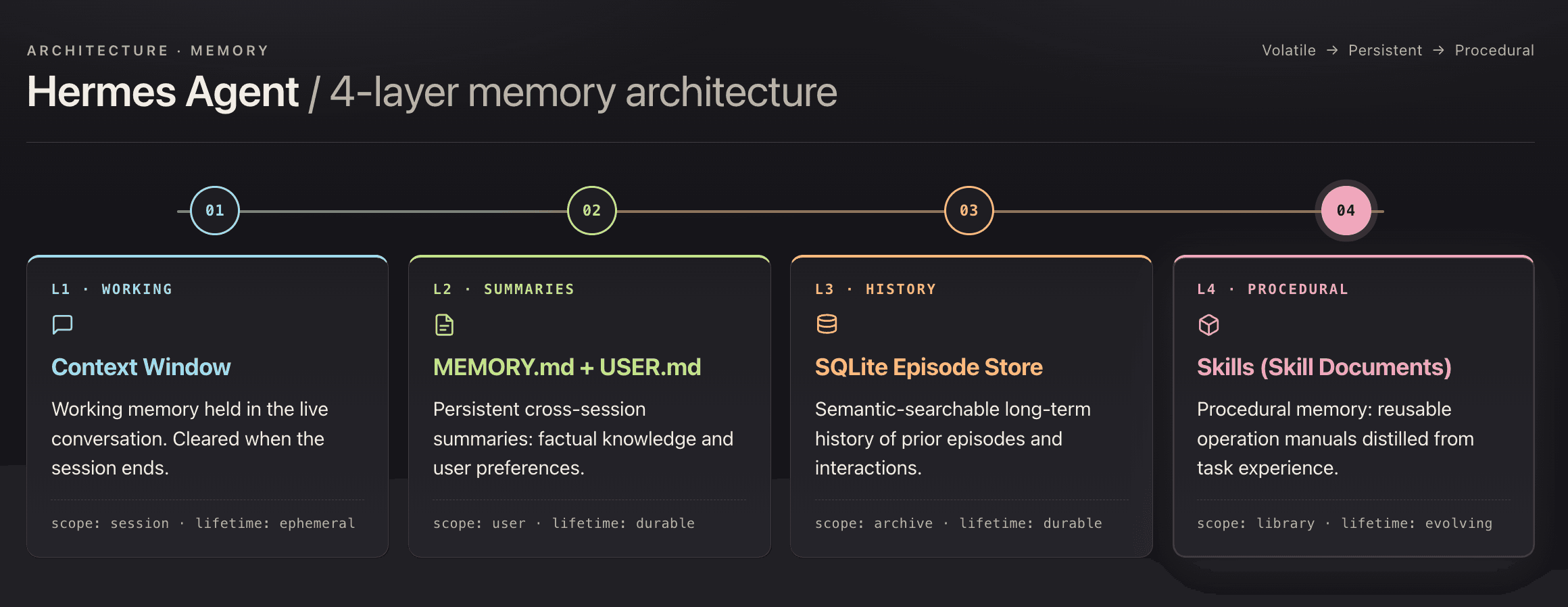
Hermes has four memory layers, and L4 Skills is the one that sets it apart.
- L1 — session context, cleared when the session closes
- L2 — persisted facts: project stack, team conventions, resolved decisions
- L3 — SQLite FTS5 keyword search over local files
- L4 — stores workflows as Markdown files. Unlike LangChain tools or AutoGPT plugins, which developers author in code before deployment, L4 Skills are self-written: they grow from what the agent actually runs, with zero developer authoring.
Why Hermes’s FTS5 Keyword Retrieval Breaks the Learning Loop
Hermes needs retrieval to trigger cross-session workflows in the first place. But its built-in L3 layer uses SQLite FTS5, which only matches literal tokens, not meaning.
When users phrase the same intent differently across sessions, FTS5 misses the match. The Learning Loop doesn’t fire. No new Skill gets written, and next time the intent comes around, the user is back to routing by hand.
Example: the knowledge base stores “asyncio event loop, async task scheduling, non-blocking I/O.” A user searches “Python concurrency.” FTS5 returns zero hits — no literal word overlap, and FTS5 has no way to see that they’re the same question.
Under a couple hundred documents, the gap is tolerable. Past that, documentation uses one vocabulary, and users ask in another, and FTS5 has no bridge between them. Unretrievable content might as well not be in the knowledge base, and the Learning Loop has nothing to learn from.
How Milvus 2.6 Fixes the Retrieval Gap with Hybrid Search and Tiered Storage
Milvus 2.6 brings two upgrades that fit Hermes’s failure points. Hybrid search unblocks the Learning Loop by covering both semantic and keyword retrieval in one call. Tiered storage keeps the whole retrieval backend small enough to run on the same $5/month VPS Hermes was built for.
What Hybrid Search Solves: Finding Relevant Information
Milvus 2.6 supports running both vector retrieval (semantic) and BM25 full-text search (keyword) in a single query, then merging the two ranked lists with Reciprocal Rank Fusion (RRF).
For example: ask "what is the principle of asyncio", and vector retrieval hits semantically related content. Ask "where is the find_similar_task function defined", and BM25 precisely matches the function name in code. For questions that involve a function inside a particular type of task, hybrid search returns the right result in one call, with no hand-written routing logic.
For Hermes, this is what unblocks the Learning Loop. When a second session rephrases the intent, vector retrieval catches the semantic match FTS5 missed. The loop fires, and a new Skill gets written.
What Tiered Storage Solves: Cost
A naive vector database would want the full embedding index in RAM, which pushes personal deployments toward bigger, more expensive infrastructure. Milvus 2.6 avoids that with three-tier storage, moving entries between tiers based on access frequency:
- Hot — in memory
- Warm — on SSD
- Cold — on object storage
Only hot data stays resident. A 500-document knowledge base fits under 2 GB of RAM. The whole retrieval stack runs on the same $5/month VPS Hermes targets, with no infrastructure upgrade needed.
Hermes + Milvus: System Architecture
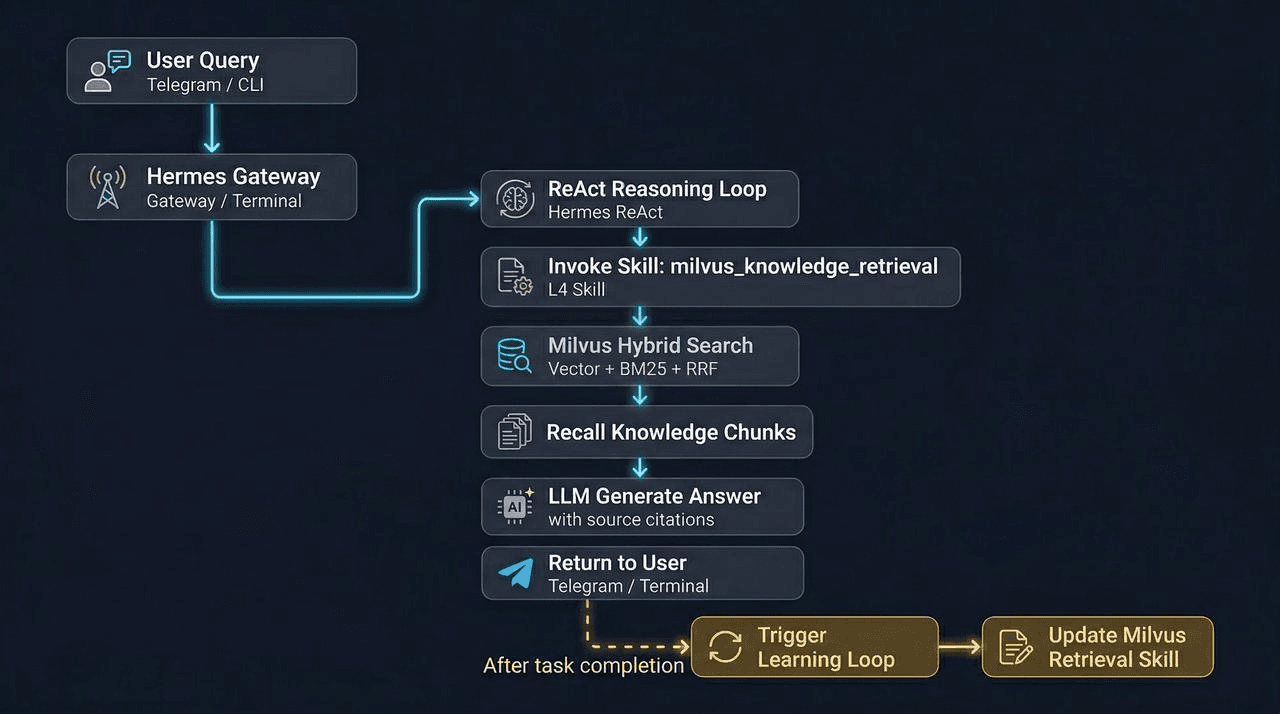
Hermes picks which Skill to run. Milvus handles what to retrieve. The two systems stay separate, and Hermes’s interface doesn’t change.
The flow:
- Hermes identifies the user’s intent and routes to a Skill.
- The Skill calls a retrieval script through the terminal tool.
- The script hits Milvus, runs hybrid search, and returns ranked chunks with source metadata.
- Hermes composes the answer. Memory records the workflow.
- When the same pattern repeats across sessions, the Learning Loop writes a new Skill.
How to Install Hermes and Milvus 2.6
Install Hermes and Milvus 2.6 Standalone, then create a collection with dense and BM25 fields. That’s the full setup before the Learning Loop can fire.
Install Hermes
curl -fsSL https://raw.githubusercontent.com/NousResearch/hermes-agent/main/scripts/install.sh | bash
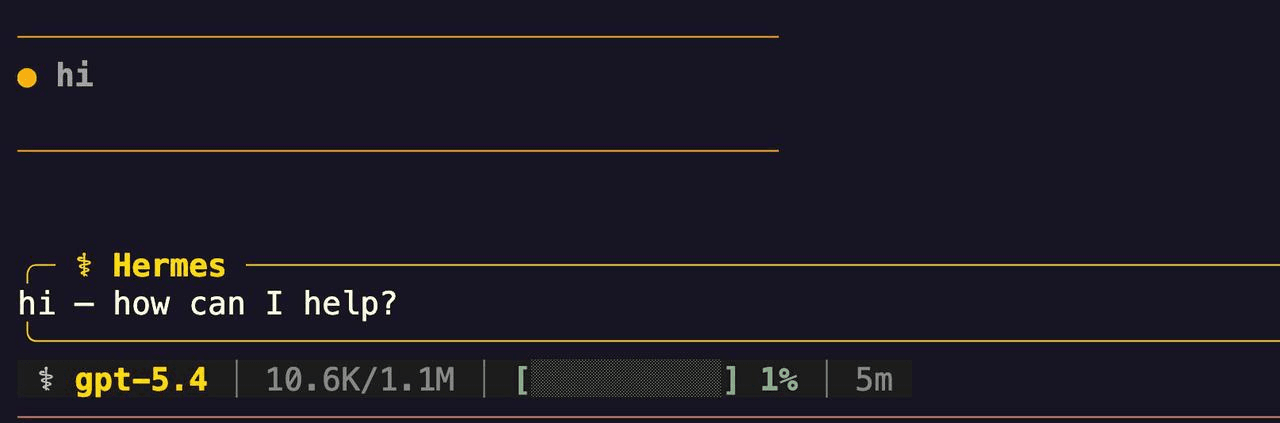
Run hermes to enter the interactive init wizard:
- LLM provider — OpenAI, Anthropic, OpenRouter (OpenRouter has free models)
- Channel — this walkthrough uses a FLark bot
Run Milvus 2.6 Standalone
Single-node standalone is enough for a personal agent:
curl -sfL https://raw.githubusercontent.com/milvus-io/milvus/master/scripts/standalone_embed.sh \
-o standalone_embed.sh
bash standalone_embed.sh start
# Verify service status
docker ps | grep milvus
Create the Collection
Schema design caps what retrieval can do. This schema runs dense vectors and BM25 sparse vectors side by side:
from pymilvus import MilvusClient, DataType, Function, FunctionType
client = MilvusClient(
    uri="http://192.168.x.x:19530",
)
schema = client.create_schema(auto_id=True, enable_dynamic_field=True)
schema.add_field("id", DataType.INT64, is_primary=True)
# Raw text (for BM25 full-text search)
schema.add_field(
    "text",
    DataType.VARCHAR,
    max_length=8192,
    enable_analyzer=True,
    enable_match=True
)
# Dense vector (semantic search)
schema.add_field("dense_vector", DataType.FLOAT_VECTOR, dim=1536)
# Sparse vector (BM25 auto-generated, Milvus 2.6 feature)
schema.add_field("sparse_vector", DataType.SPARSE_FLOAT_VECTOR)
schema.add_field("source", DataType.VARCHAR, max_length=512)
schema.add_field("chunk_index", DataType.INT32)
# Tell Milvus to auto-convert text to sparse_vector via BM25
bm25_function = Function(
    name="text_bm25",
    function_type=FunctionType.BM25,
    input_field_names=["text"],
    output_field_names=["sparse_vector"],
)
schema.add_function(bm25_function)
index_params = client.prepare_index_params()
# HNSW graph index (dense vector)
index_params.add_index(
    field_name="dense_vector",
    index_type="HNSW",
    metric_type="COSINE",
    params={"M": 16, "efConstruction": 256}
)
# BM25 inverted index (sparse vector)
index_params.add_index(
    field_name="sparse_vector",
    index_type="SPARSE_INVERTED_INDEX",
    metric_type="BM25"
)
client.create_collection(
    collection_name="hermes_milvus",
    schema=schema,
    index_params=index_params
)
Hybrid Search Script
import sys, json
from openai import OpenAI
from pymilvus import MilvusClient, AnnSearchRequest, RRFRanker

client = MilvusClient("http://192.168.x.x:19530")
oai    = OpenAI()
COLLECTION = "hermes_milvus"

def hybrid_search(query: str, top_k: int = 5) -> list[dict]:
    # 1. Vectorize query
    dense_vec = oai.embeddings.create(
        model="text-embedding-3-small",
        input=query
    ).data[0].embedding

    # 2. Dense vector retrieval (semantic relevance)
    dense_req = AnnSearchRequest(
        data=[dense_vec],
        anns_field="dense_vector",
        param={"metric_type": "COSINE", "params": {"ef": 128}},
        limit=top_k * 2       # Widen candidate set, let RRF do final ranking
    )

    # 3. BM25 sparse vector retrieval (exact term matching)
    bm25_req = AnnSearchRequest(
        data=[query],
        anns_field="sparse_vector",
        param={"metric_type": "BM25"},
        limit=top_k * 2
    )

    # 4. RRF fusion ranking
    results = client.hybrid_search(
        collection_name=COLLECTION,
        reqs=[dense_req, bm25_req],
        ranker=RRFRanker(k=60),
        limit=top_k,
        output_fields=["text", "source", "doc_type"]
    )

    return [
        {
            "text":     r.entity.get("text"),
            "source":   r.entity.get("source"),
            "doc_type": r.entity.get("doc_type"),
            "score":    round(r.distance, 4)
        }
        for r in results[0]
    ]

if __name__ == "__main__":
    query= sys.argv[1] if len(sys.argv) > 1 else ""
    top_k  = int(sys.argv[2]) if len(sys.argv) > 2 else 5
    output = hybrid_search(query, top_k)
    print(json.dumps(output, ensure_ascii=False, indent=2))
The dense request widens the candidate pool by 2× so RRF has enough to rank from. text-embedding-3-small is the cheapest OpenAI embedding that still holds retrieval quality; swap in text-embedding-3-large if the budget allows.
With the environment and knowledge base ready, the next section puts the Learning Loop to the test.
Hermes Skill Auto-Generation in Practice
Two sessions show the Learning Loop in action. In the first, the user names the script by hand. In the second, a new session asks the same question without naming the script. Hermes picks up the pattern and writes three Skills.
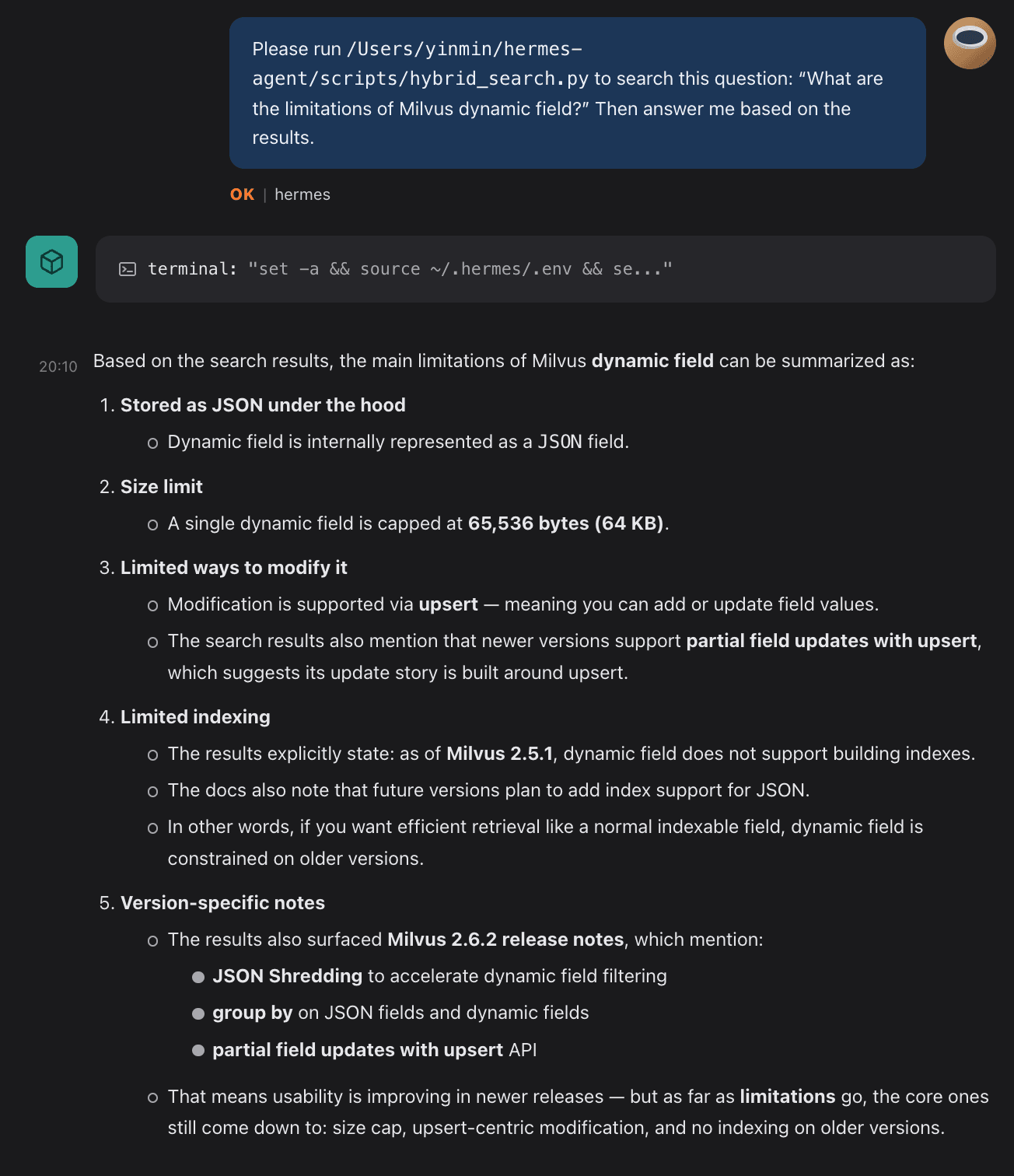
Session 1: Call the Script by Hand
Open Hermes in Lark. Give it the script path and the retrieval target. Hermes invokes the terminal tool, runs the script, and returns the answer with source attribution. No Skill exists yet. This is a plain tool call.
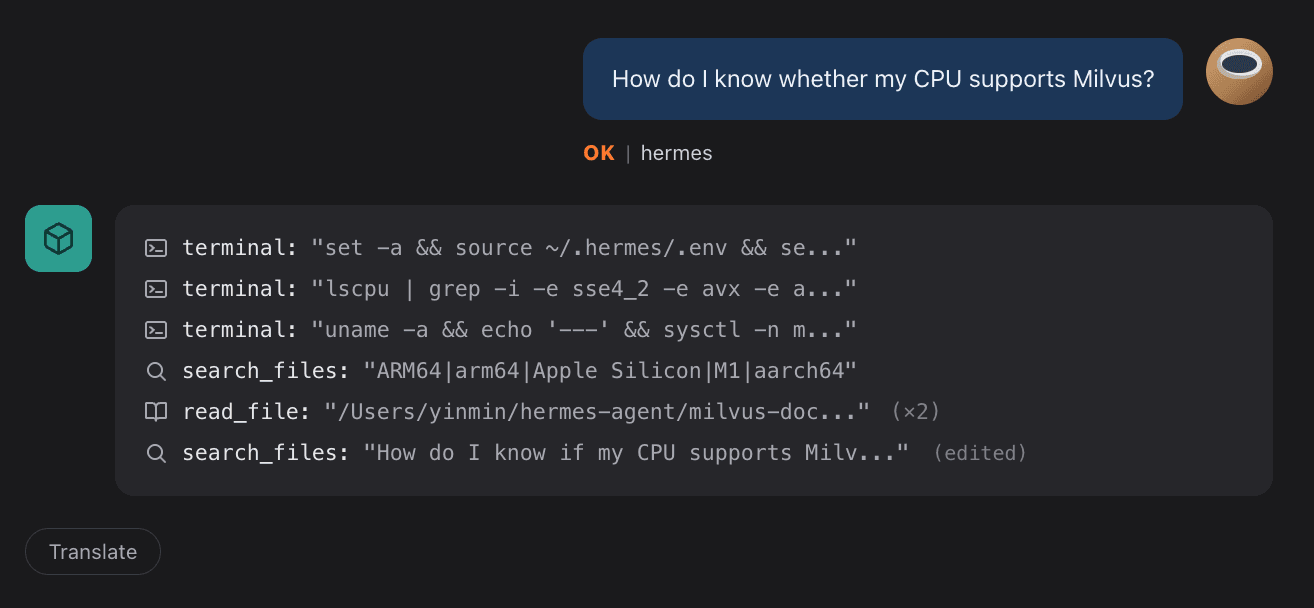
Session 2: Ask Without Naming the Script
Clear the conversation. Start fresh. Ask the same category of question without mentioning the script or path.
Memory Writes First, Skill Follows
The Learning Loop records the workflow (script, arguments, return shape) and returns the answer. Memory holds the trace; no Skill exists yet.
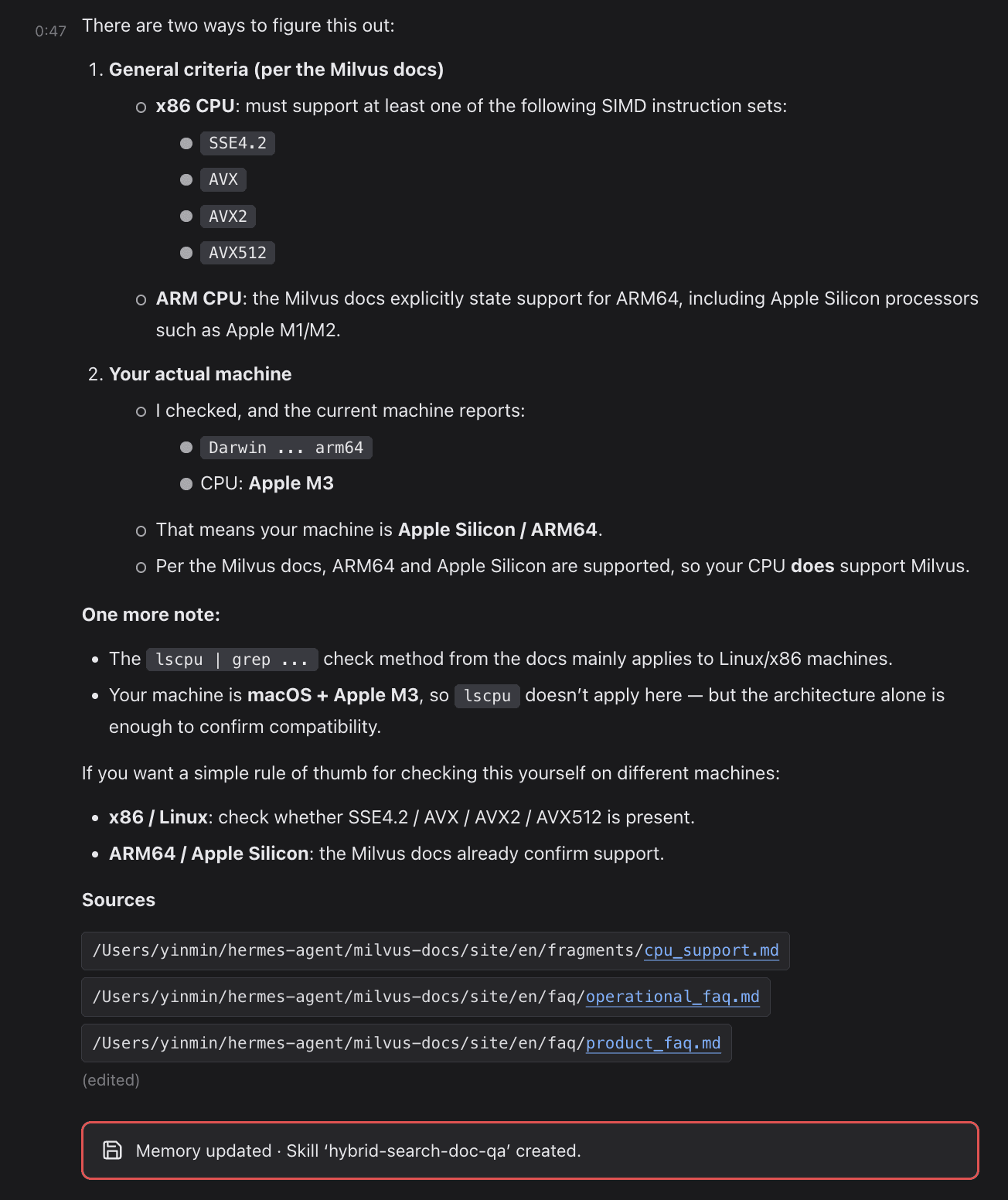
The second session’s match tells the loop the pattern is worth keeping. When it fires, three Skills get written:
| Skill | Role |
|---|---|
hybrid-search-doc-qa | Run hybrid semantic + keyword search over Memory and compose the answer |
milvus-docs-ingest-verification | Verify documents have been ingested into the knowledge base |
terminal | Run shell commands: scripts, environment setup, inspection |
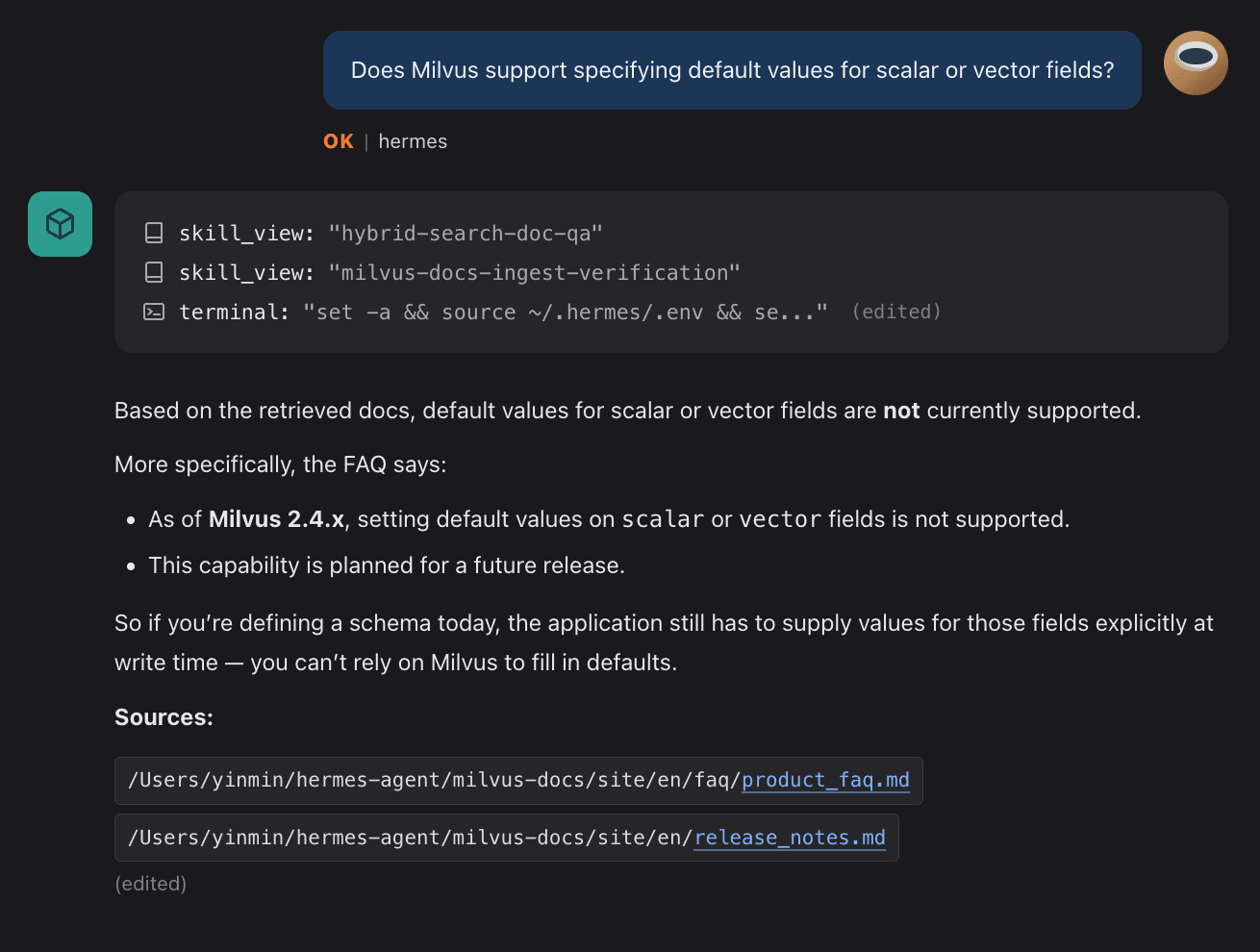
From this point on, users stop naming Skills. Hermes infers intent, routes to the Skill, pulls the relevant chunks from Memory, and writes the answer. There’s no Skill selector in the prompt.
Most RAG (retrieval-augmented generation) systems solve the storing-and-fetching problem, but the fetch logic itself is hard-coded in application code. Ask in a different way or in a new scenario, and retrieval breaks. Hermes stores the fetch strategy as a Skill, which means the fetch path becomes a document you can read, edit, and version. The line 💾 Memory updated · Skill 'hybrid-search-doc-qa' created isn’t a setup-complete marker. It’s the Agent committing a behavior pattern to long-term memory.
Hermes vs. OpenClaw: Accumulation vs. Orchestration
Hermes and OpenClaw answer different problems. Hermes is built for a single agent that accumulates memory and skills across sessions. OpenClaw is built for breaking a complex task into pieces and handing each piece to a specialized agent.
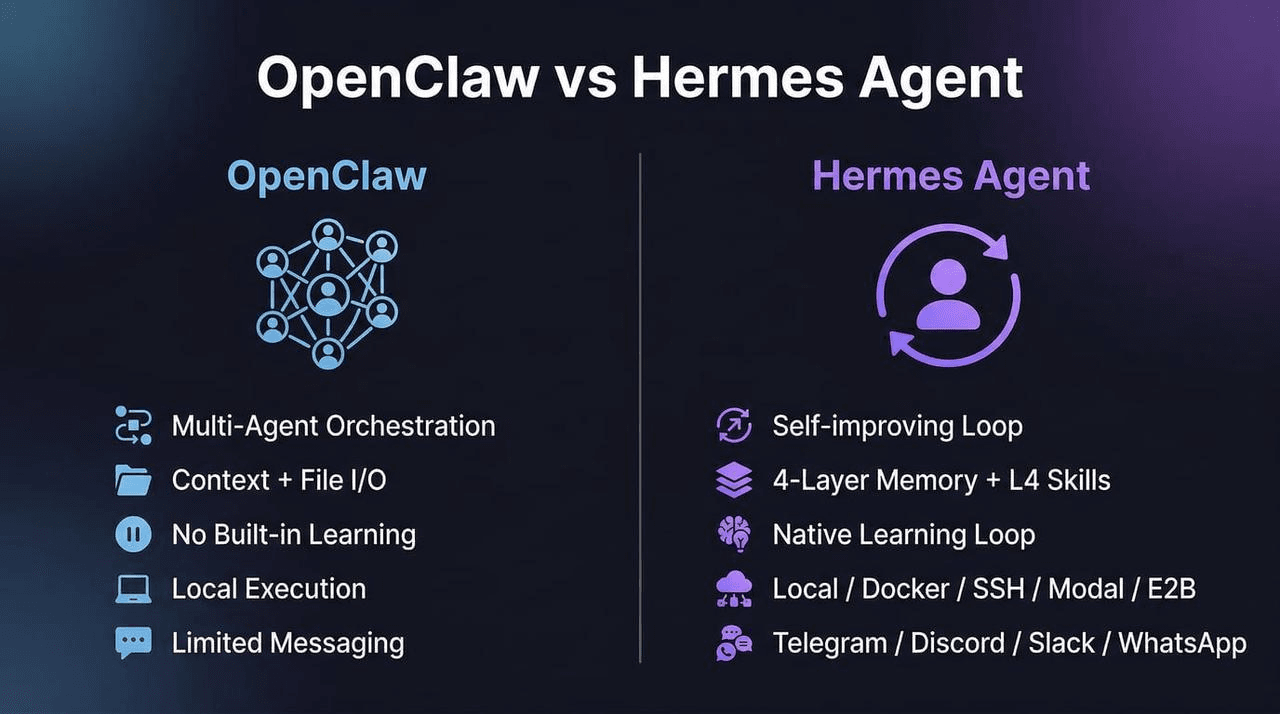
OpenClaw’s strength is orchestration. It optimizes for how much of a task gets done automatically. Hermes’s strength is accumulation: a single agent that remembers across sessions, with skills that grow from use. Hermes optimizes for long-term context and domain experience.
The two frameworks stack. Hermes ships a one-step migration path that pulls ~/.openclaw memory and skills into Hermes’s memory layers. An orchestration stack can sit on top, with an accumulation agent underneath.
For the OpenClaw side of the split, see What Is OpenClaw? Complete Guide to the Open-Source AI Agent on the Milvus blog.
Conclusion
Hermes’s Learning Loop turns repeated workflows into reusable Skills, but only if retrieval can connect them across sessions. FTS5 keyword search can’t. Milvus 2.6 hybrid search can: dense vectors handle meaning, BM25 handles exact keywords, RRF merges both, and tiered storage keeps the whole stack on a $5/month VPS.
The bigger point: once retrieval works, the agent doesn’t just store better answers: it stores better retrieval strategies as Skills. The fetch path becomes a versionable document that improves with use. That’s what separates an agent that accumulates domain expertise from one that starts fresh every session. For a comparison of how other agents handle (or fail to handle) this problem, see Claude Code’s Memory System Explained.
Get Started
Try the tools in this article:
- Hermes Agent on GitHub — install script, provider setup, and channel configuration used above.
- Milvus 2.6 Standalone Quickstart — single-node Docker deploy for the knowledge-base backend.
- Milvus Hybrid Search Tutorial — full dense + BM25 + RRF example matching the script in this post.
Got questions about Hermes + Milvus hybrid search?
- Join the Milvus Discord to ask about hybrid search, tiered storage, or Skill-routing patterns — other developers are building similar stacks.
- Book a Milvus Office Hours session to walk through your own agent + knowledge-base setup with the Milvus team.
Want to skip the self-host?
- Sign up or sign in to Zilliz Cloud — managed Milvus with hybrid search and tiered storage out of the box. New work-email accounts get $100 in free credits.
Further Reading
- Milvus 2.6 release notes — tiered storage, hybrid search, schema changes
- Zilliz Cloud & Milvus CLI + Official Skills — operational tooling for Milvus-native agents
- Why RAG-Style Knowledge Management Breaks for Agents — the case for agent-specific memory design
- Claude Code’s Memory System Is More Primitive Than You’d Expect — comparison piece on another agent’s memory stack
Frequently Asked Questions
How does Hermes Agent’s Skill Learning Loop actually work?
Hermes records every workflow it runs – the script called, arguments passed, and return shape – as a memory trace. When the same pattern appears across two or more sessions, the Learning Loop fires and writes a reusable Skill: a Markdown file that captures the workflow as a repeatable procedure. From that point on, Hermes routes to the Skill by intent alone, without the user naming it. The critical dependency is retrieval – the loop only fires if it can find the earlier session’s trace, which is why keyword-only search becomes a bottleneck at scale.
What’s the difference between hybrid search and vector-only search for agent memory?
Vector-only search handles meaning well but misses exact matches. If a developer pastes an error string like ConnectionResetError or a function name like find_similar_task, a pure vector search might return semantically related but wrong results. Hybrid search combines dense vectors (semantic) with BM25 (keyword) and merges the two result sets with Reciprocal Rank Fusion. For agent memory – where queries range from vague intent (“Python concurrency”) to exact symbols – hybrid search covers both ends in a single call without routing logic in your application layer.
Can I use Milvus hybrid search with AI agents other than Hermes?
Yes. The integration pattern is generic: the agent calls a retrieval script, the script queries Milvus, and results return as ranked chunks with source metadata. Any agent framework that supports tool calls or shell execution can use the same approach. Hermes happens to be a strong fit because its Learning Loop specifically depends on cross-session retrieval to fire, but the Milvus side is agent-agnostic – it doesn’t know or care which agent is calling it.
How much does a self-hosted Milvus + Hermes setup cost per month?
A single-node Milvus 2.6 Standalone on a 2-core / 4 GB VPS with tiered storage runs about $5/month. OpenAI text-embedding-3-small costs $0.02 per 1M tokens – a few cents per month for a personal knowledge base. LLM inference dominates total cost and scales with usage, not with the retrieval stack.
- Hermes Agent Architecture: How Four-Layer Memory Powers the Skill Learning Loop
- Why Hermes's FTS5 Keyword Retrieval Breaks the Learning Loop
- How Milvus 2.6 Fixes the Retrieval Gap with Hybrid Search and Tiered Storage
- Hermes + Milvus: System Architecture
- How to Install Hermes and Milvus 2.6
- Hermes Skill Auto-Generation in Practice
- Hermes vs. OpenClaw: Accumulation vs. Orchestration
- Conclusion
- Get Started
- Further Reading
- Frequently Asked Questions
On This Page
Try Managed Milvus for Free
Zilliz Cloud is hassle-free, powered by Milvus and 10x faster.
Get StartedLike the article? Spread the word