

Sharding splits data into disjoint pieces spread across nodes, so each node stores and searches only part of the corpus; it is how a system grows beyond one machine’s capacity and write throughput. Replication keeps additional copies of the same data on different nodes, so the system can survive a node failure and serve more concurrent reads. In short, sharding scales capacity and writes, replication scales availability and reads, and production vector databases use both at once.
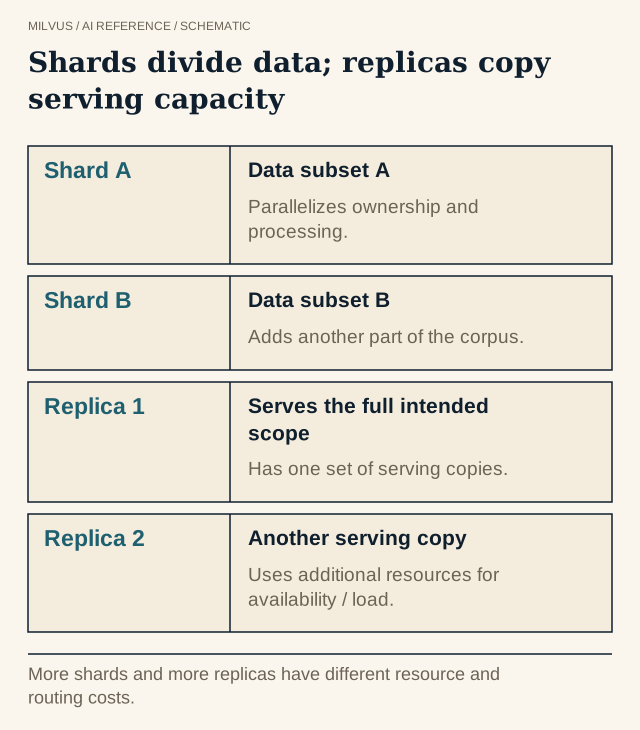 Shards divide data; replicas copy serving capacity. More shards and more replicas have different resource and routing costs.
Sharding vs replication at a glance
| Sharding | Replication | |
|---|---|---|
| What it does | Divides data; each shard holds a different subset | Copies data; each replica holds the same subset |
| Primary goal | Capacity, write throughput, parallel search | Fault tolerance, read throughput |
| Effect on memory | Total stays roughly constant, spread across nodes | Multiplies serving memory by the replica count |
| Query pattern | Fan out to every relevant shard, then merge top-k | Route each query to any one healthy replica |
| Main risks | Skew and hotspots, fan-out tail latency, rebalancing | Extra cost, replica lag, copying bad writes |
| Protects against data loss? | No | Not by itself (see backups below) |
The classic database rule still holds. If writes outgrow one server, adding replicas will not help; if reads outgrow one server, adding shards alone may not help either.
What changes for vector search?
In a relational database, a well-chosen shard key often sends a query to a single shard. Vector similarity has no natural shard key: a query’s nearest neighbors could live anywhere. So a vector search usually scatters to every shard, runs ANN search on each, and gathers the per-shard top-k into a global top-k. That has three consequences:
- Tail latency follows the slowest shard. One overloaded node, an expensive filter on one partition, or a garbage-collection pause sets the p99 for the whole query.
- Each shard must return enough candidates. The merge can only choose from what shards return, so per-shard recall matters.
- Fan-out cost grows with shard count. More shards add parallelism but also add per-query overhead, so more is not automatically faster.
Metadata can restore some locality. Partitioning by tenant or date and filtering on it lets the system prune whole partitions before searching, which is what Milvus partition keys do (see multi-tenancy design).
How does Milvus shard data?
Milvus separates write sharding from read distribution, which is worth understanding before you tune either.
Shards (write path). When you create a collection you set num_shards. Each shard corresponds to a WAL channel, and in current Milvus each shard is owned by a Streaming Node that consumes its log and holds the newest, still-growing data. More shards spread ingestion across more streaming nodes. The docs suggest roughly one shard per 200 million entities, or one per 100 GB of data you plan to insert, and recommend multiple shards when the instance runs multiple streaming nodes. The shard count is set at creation, so plan for growth.
Segments (read path). Data within a shard is written into segments. Once sealed and indexed, segments are stored in object storage and the Coordinator distributes them across Query Nodes. This is the real unit of read-side distribution: adding query nodes causes segments to rebalance, spreading search work without changing the shard count.
A search request flows like this: the Proxy sends it to the shard leader (delegator) for each shard; each delegator dispatches the query to the query nodes holding that shard’s sealed segments and includes growing data; partial results merge at the delegator, then at the Proxy, into the final top-k. How the Milvus architecture separates ingestion, storage, and search covers each component.
How does Milvus replicate data?
Durability and serving copies are separate concerns in Milvus.
- Durable copies live in the storage layer: the WAL (Woodpecker by default, or Pulsar or Kafka) and object storage such as S3 or MinIO. Their redundancy comes from that storage system, not from extra query nodes.
- In-memory replicas are serving copies. Load a collection with
replica_number=2and Milvus places two complete copies of its segments on different query nodes, in replica groups. If a node fails or is busy, the Proxy routes requests to another replica. You cannot have more replicas than query nodes, and each replica costs a full copy of the loaded data in memory.
client.load_collection(
    collection_name="docs",
    replica_number=2,
    resource_groups=["rg_a", "rg_b"],   # optional: spread replicas across node pools
)
Resource groups let you place replicas on specific sets of query nodes, for example one replica per availability zone or a dedicated pool for a critical collection.
Replication is not backup
A healthy replica faithfully reproduces a bad delete or a buggy upsert within seconds. Replicas protect against hardware failure, not against mistakes, corruption, or a dropped collection. You still need point-in-time backups to separate storage, and, for regional disasters, cross-cluster replication. See planning backup and recovery and Milvus CDC and migration.
Replication also interacts with freshness. What a reader sees right after a write depends on the consistency level you choose, not on replica count alone; eventual consistency in vector search explains the options.
How do you test a sharded, replicated setup?
Run capacity and failure tests separately:
- Distribution test. Load representative data and check segment counts and memory per query node. Look for skew, especially with partition keys and uneven tenants.
- Throughput test. Increase concurrency until p99 rises, then add a replica and confirm read QPS scales.
- Write test. Run sustained ingestion alongside queries and watch streaming node and data node load.
- Failure test. Kill a query node holding one replica. Measure error rate, latency during failover, and time to rebalance.
- Recovery test. Restore from backup into a fresh cluster and time it.
Steady-state QPS alone hides most of the interesting failure modes. Locating a bottleneck across Milvus components and what determines vector-database scalability help interpret the results.
Next steps
Read the Milvus in-memory replica guide, then try replica_number and resource groups on a test cluster with observability enabled. If you would rather not manage shard and replica placement yourself, Zilliz Cloud runs managed Milvus with replicas and scaling handled for you.


