

Plan vector-database recovery backwards from two numbers: how much recent data you can afford to lose (the recovery point objective, RPO) and how long search can be down (the recovery time objective, RTO). Then pick the mechanisms that meet them: point-in-time backups for mistakes and corruption, replication for node or zone failures, and change data capture when the RPO is measured in seconds. In Milvus, that usually means Milvus Backup for recoverable copies, in-memory replicas for availability, and Milvus CDC for a continuously synchronized standby.
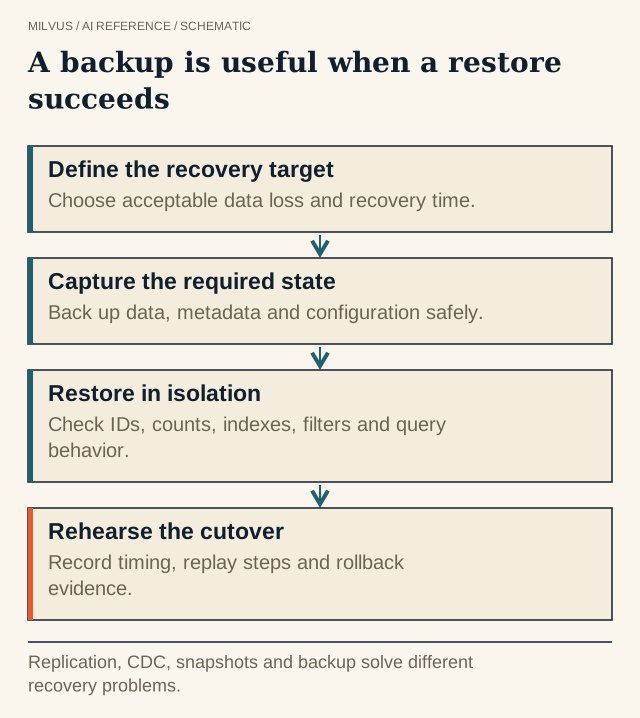 A backup is useful when a restore succeeds. Replication, CDC, snapshots and backup solve different recovery problems.
Why isn’t replication a backup?
Replication keeps several live copies of the same current state. That protects you when a machine dies, but it faithfully copies every bad write as well. If a pipeline bug overwrites a million embeddings with vectors from the wrong model, or someone drops a collection, every replica reflects the damage within seconds. A backup is a copy frozen at a point in time, stored somewhere the serving path cannot modify, so you can go back to the state before the mistake.
Milvus makes the distinction visible. In-memory replicas load the same segments on several query nodes so a search can be rerouted when one fails, without reloading data. The persisted data itself lives in object storage. Neither of these is a historical copy; Milvus Backup is.
| Mechanism | Protects against | Typical RPO | Typical RTO driver |
|---|---|---|---|
| In-memory replicas | Query-node failure | Zero (same data) | Rerouting, seconds |
| Scheduled backup | Bad writes, drops, corruption, ransomware, region loss if copied off-site | Time since last backup | Data copy plus index build plus load |
| CDC to a standby cluster | Cluster or region outage | Replication lag | Client endpoint switch |
Most production systems combine at least two rows. CDC alone is not enough for the same reason replicas are not: it replays a destructive operation on the standby too.
What exactly needs to be recovered?
A restored set of vectors is only useful if the application can search it the same way as before. Inventory these items:
- Collection data and schema: vectors, scalar fields, primary keys, partitions, and dynamic fields.
- Index definitions and parameters, such as index type, metric, and build parameters, so restored search behaves the same.
- Embedding model version. Query vectors must come from the same model and preprocessing as the stored ones, or restored data is silently incompatible.
- Source mapping: the IDs that link each record back to its document or row in the system of record.
- Access configuration: users, roles, and privileges, plus credentials for object storage.
There is always a fallback of re-embedding everything from source data, but at scale it is expensive and slow, and it only works if you still have the source, the exact model, and the chunking code. Treat it as the last resort, not the plan.
How does Milvus Backup work?
Milvus Backup reads collection metadata and segment information from a running Milvus instance and copies the underlying data files (binlogs) from the instance’s object-storage root path to a separate backup location. On restore it creates new collections in the target instance from the saved metadata and copies the data back. Because it copies files in object storage instead of exporting rows through the query path, running a backup does not normally affect the instance’s ability to serve traffic.
The tool runs as a CLI or as a REST server (milvus-backup server, port 8080 by default) and is configured through configs/backup.yaml. Backups go to object storage such as MinIO or S3; a local filesystem path is not supported. A typical cycle looks like this:
# Create a backup of selected collections
./milvus-backup create -n nightly_2026_10_20

# Inspect what exists
./milvus-backup list
./milvus-backup get -n nightly_2026_10_20

# Restore next to the live collection, with index definitions
./milvus-backup restore -n nightly_2026_10_20 -s _recover --restore_index
The -s suffix restores into a new collection name so you can verify it before switching traffic. Without a suffix you must drop the existing collection first (or pass --drop_exist_collection). --rename remaps collection names, and --filter limits a backup or restore to particular databases or collections. The CLI guide and the project README list the full option set for your version.
Check version compatibility before you depend on a backup for an upgrade path. According to the Milvus Backup overview, backups from 2.2.x or 2.3.x restore to 2.4.x or later, 2.5.x backups restore to 2.5.x or 2.6.x, and 2.6.x backups restore to 2.6.x.
What does backup cost in time and storage?
Storage overhead is roughly the size of the collection’s persisted data per full backup, multiplied by how many backups you keep. Time has two parts: copying files, and making the restored collection searchable, which includes index availability and loading segments into query nodes.
An illustrative calculation, with assumed numbers rather than measurements:
- A collection occupies 100 GB in object storage. Keeping seven daily full backups needs about 7 × 100 GB = 700 GB of backup storage, before any compression or deduplication the storage layer applies.
- Restoring 400 GB at a sustained 200 MB/s takes 400,000 MB ÷ 200 MB/s = 2,000 seconds, about 33 minutes, for the copy alone.
- If indexes have to be rebuilt, add the index build time you measured for that data volume, then the time to load the collection.
The copy is usually the predictable part. Index build time grows with collection size and index type, so measure it during a drill rather than guessing. Where RTO is tight, keep a warm standby fed by CDC instead of restoring from scratch.
How do you set RPO and RTO for a retrieval system?
Ask what the business loses, not what the database can do. A support-search index rebuilt nightly from a document store can tolerate a 24-hour RPO because the source can replay a day of changes. An agent memory store that holds the only copy of user conversations may need minutes. Then pick the cheapest combination that meets those numbers:
- RPO of a day, RTO of hours: scheduled Milvus Backup to a separate bucket, ideally in another account or region.
- RPO of minutes: backups plus CDC to a standby, or more frequent backups plus replay from the upstream pipeline.
- RTO of minutes: a standby cluster already loaded and indexed, with the client endpoint switch scripted.
If you would rather not operate the tooling, Zilliz Cloud runs managed Milvus with backup and restore included from the Standard plan up, and cross-region backup on the Business Critical plan; plan features and backup storage charges are listed on the pricing page.
How do you prove that recovery works?
A completed backup job is a checkpoint, not evidence. Run a restore drill on a schedule, and again after any upgrade or schema change:
- Restore into an isolated environment or with a suffix, never over production.
- Compare row counts per collection and partition, and sample primary keys and field values.
- Run a saved set of queries with known expected results, including metadata filters, and compare top-k overlap with production.
- Confirm the query encoder version matches the restored vectors.
- Record the real end-to-end restore time and compare it with the RTO.
Keep backup credentials separate from the application’s credentials, so a compromised application account cannot delete its own backups.
Related reading
- How do bulk migration, backup, and Milvus CDC differ?
- How do sharding and replication differ in a vector database?
- How do you choose and validate a Milvus version upgrade?
- How does the Milvus architecture separate ingestion, storage, and search?
- How do you make vector-search and training experiments reproducible?


