

The Spark-Milvus connector is an Apache Spark data source, registered as format "milvus", that lets a Spark job write a DataFrame into a Milvus collection and read a collection back as a DataFrame. It sits at the boundary between batch data engineering and online vector search: Spark does the heavy work of cleaning records, joining metadata, and generating embeddings across a cluster, and Milvus serves the resulting vectors to applications at low latency.
The usual pipeline looks like this: read raw documents, images, or events from a lake; compute embeddings with a model on Spark executors; write vectors plus filterable metadata into Milvus; and, later, read the collection back into Spark for analytics, deduplication, evaluation, or migration.
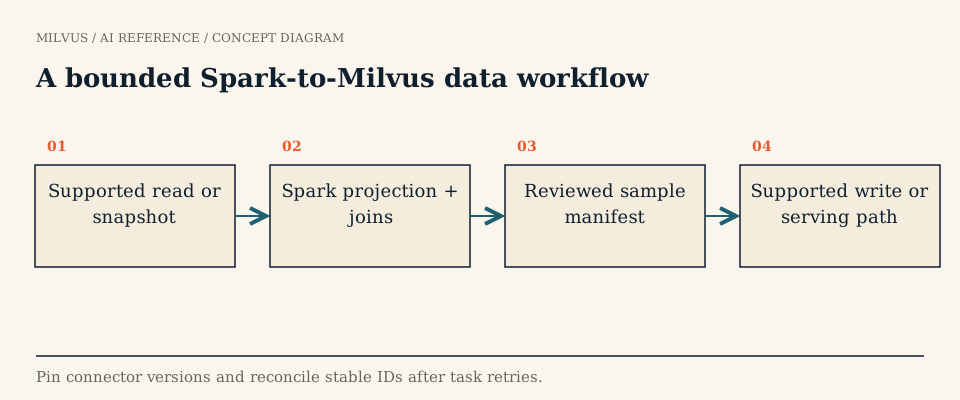 A bounded Spark-to-Milvus data workflow
Which version of the connector should you use?
There are two generations, and mixing their examples is the most common source of confusion:
Current connector (main branch) | Legacy connector | |
|---|---|---|
| Milvus version | 2.6 or later (Storage V2 and newer) | 2.5 and earlier |
| Spark / Scala / Java | Spark 4.0.1 on Scala 2.13, Java 21 | See the legacy branch |
| Package | com.zilliz:spark-connector_2.13 (SNAPSHOT builds are where development happens) | spark-milvus-1.0.0-SNAPSHOT.jar |
| Options | Constants on MilvusOption, connection by uri and token | String keys such as milvus.host, milvus.port, milvus.collection.vectorField |
| Reads | Reads segment data directly through the native milvus-storage library | milvusbinlog format and MilvusUtils.readMilvusCollection |
| Status | Actively developed | No longer maintained |
The tutorial on milvus.io and many blog posts still show the legacy option names. If you run Milvus 2.6 or 3.x, follow the connector’s README and parameter reference instead. Note also that the project is licensed under SSPLv1 and AGPLv3, which your legal team may want to review before redistributing it.
How do you write a Spark DataFrame to Milvus?
Create the target collection first with an explicit schema (primary key, vector field with the right dimension and type, and the scalar fields you will filter on), then write with the milvus format. With the current connector:
import com.zilliz.spark.connector.MilvusOption

df.write
  .format("milvus")
  .option(MilvusOption.MilvusUri, "http://localhost:19530")
  .option(MilvusOption.MilvusToken, "your-token")
  .option(MilvusOption.MilvusCollectionName, "your_collection")
  .option(MilvusOption.MilvusDatabaseName, "your_database")
  .option(MilvusOption.MilvusInsertMaxBatchSize, "1000")
  .option(MilvusOption.MilvusRetryCount, "5")
  .save()
Each executor sends its partition through the Milvus insert API in batches (5,000 rows by default) and retries failed batches (3 times by default, one second apart). DataFrame columns map to collection fields: scalar types (Bool, Int8 through Int64, Float, Double, VarChar, JSON), Array of scalars, and every vector type Milvus supports, including FloatVector, Float16Vector, BFloat16Vector, BinaryVector, Int8Vector, and SparseFloatVector.
For Zilliz Cloud, point MilvusUri at the cluster endpoint and pass an API key as the token. TLS and mutual TLS are configured with the certificate-path options in the parameter reference.
How do you read a Milvus collection into Spark?
Reading uses the same format, or the MilvusDataReader helper:
val df = spark.read
  .format("milvus")
  .option(MilvusOption.MilvusUri, "http://localhost:19530")
  .option(MilvusOption.MilvusToken, "your-token")
  .option(MilvusOption.MilvusCollectionName, "your_collection")
  .option(MilvusOption.ReaderFieldIDs, "1,2,100,101")  // only these fields
  .load()
Unlike a query loop, this path does not page rows through the query API. It reads segment files from object storage through the native milvus-storage (Loon) reader, applies deletes inside the storage layer, and returns user fields plus a $meta column for dynamic fields. That makes full-collection scans practical for jobs like near-duplicate detection, clustering, embedding-drift analysis, or building training sets. You may need to supply S3 or OSS credentials (S3Endpoint, S3BucketName, S3RootPath, and keys) so executors can reach the bucket. Projecting only the fields you need with ReaderFieldIDs avoids pulling large vector or text columns you will not use.
The connector can also read a binlog-format milvus-backup export from S3 without connecting to a running Milvus, which is useful for offline analysis of a frozen copy.
Insert API or bulk import?
Writing through the connector is simple and makes rows searchable quickly, but every row goes through the proxy and write-ahead log. For initial loads of hundreds of millions of rows, a common alternative is to have Spark write Parquet (or JSON) files to the object store that Milvus uses, then start a bulk import job (bulk_import() in PyMilvus, or POST /v2/vectordb/jobs/import/create). Each import file can be up to 16 GB and a single request can include up to 1,024 files. Import skips the per-row insert path, so it is usually the cheaper way to backfill, while the connector’s insert path suits incremental updates.
If the data already lives in a lake table and you only need to search it, consider whether you need to copy it at all: Milvus 3.0 external collections can index Parquet, Lance, or Iceberg data in place.
How do you make Spark writes safe to retry?
Spark retries failed tasks and can recompute partitions, so assume any partition may be written more than once. A few habits keep that from corrupting the collection:
- Use stable primary keys derived from the source record (not
autoID), so duplicates can be found and reconciled. A retried insert can write the same rows twice. - Record lineage columns such as source version, job ID, and embedding model revision, so you can tell which run produced a row and filter or delete by them.
- Validate before writing: check vector dimensions, nulls, and string lengths on a sample partition rather than discovering a schema mismatch halfway through a terabyte.
- Keep the embedding model fixed for the whole job; vectors from two models in the same field are not comparable.
- Measure stages separately: source read, embedding, transfer, and the time until the data is indexed and searchable. A slow job is often bottlenecked on the model, not on Milvus.
After the job, compare row counts by source partition, spot-check a few IDs with a filtered query, and run a small set of known searches. For read-heavy experiments, record exactly which collection state you read so results can be reproduced; see reproducible vector-search experiments.
Related reading
- How should you design a scalable embedding-generation pipeline?
- What does the milvus-storage project provide?
- How do Arrow and Parquet fit into vector data pipelines?
- What is Vector Lakebase, and how does it connect a lake to vector search?
- How can embeddings help with data deduplication?
To try it end to end, start a local instance with the Milvus Quickstart, create a small collection, and run the read and write snippets above against it. For pipeline patterns with Spark and Databricks, see the Spark integration guide.



