

全文搜尋
全文搜尋是一項功能,可從文字資料集中檢索包含特定術語或短語的文件,並根據相關性對結果進行排序。此功能克服了語義搜尋的局限性——語義搜尋可能會忽略精確的術語——確保您獲得最準確且符合上下文的搜尋結果。 此外,它透過接受原始文字輸入來簡化向量搜尋,能自動將您的文字資料轉換為稀疏嵌入向量,無需手動生成向量嵌入。
此功能採用 BM25 演算法進行相關性評分,在「檢索增強生成」(RAG)情境中尤為實用,能優先呈現與特定搜尋詞彙高度吻合的文件。
透過將全文搜尋與基於語義的密集向量搜尋整合,您可以提升搜尋結果的準確性與相關性。如需更多資訊,請參閱「混合搜尋」。
BM25 實作
Milvus 提供由 BM25 相關性演算法驅動的全文檢索功能,該演算法是資訊檢索系統中廣泛採用的評分函數;Milvus 將其整合至檢索工作流程中,以提供精準且按相關性排序的文字結果。
Milvus 中的全文搜尋遵循以下工作流程:
原始文字輸入:您可插入文字文件或以純文字形式提交查詢,無需任何嵌入模型。
文字分析:Milvus 會使用分析器將您的文字處理成具有意義的術語,以便進行索引和搜尋。
BM25 函數處理:內建函數會將這些術語轉換為針對 BM25 評分進行優化的稀疏向量表示。
集合儲存:Milvus 將生成的稀疏嵌入向量儲存於集合中,以便快速檢索與排序。
BM25 相關性評分:在搜尋時,Milvus 會套用 BM25 評分函式來計算文件相關性,並回傳最符合查詢詞彙的排序結果。
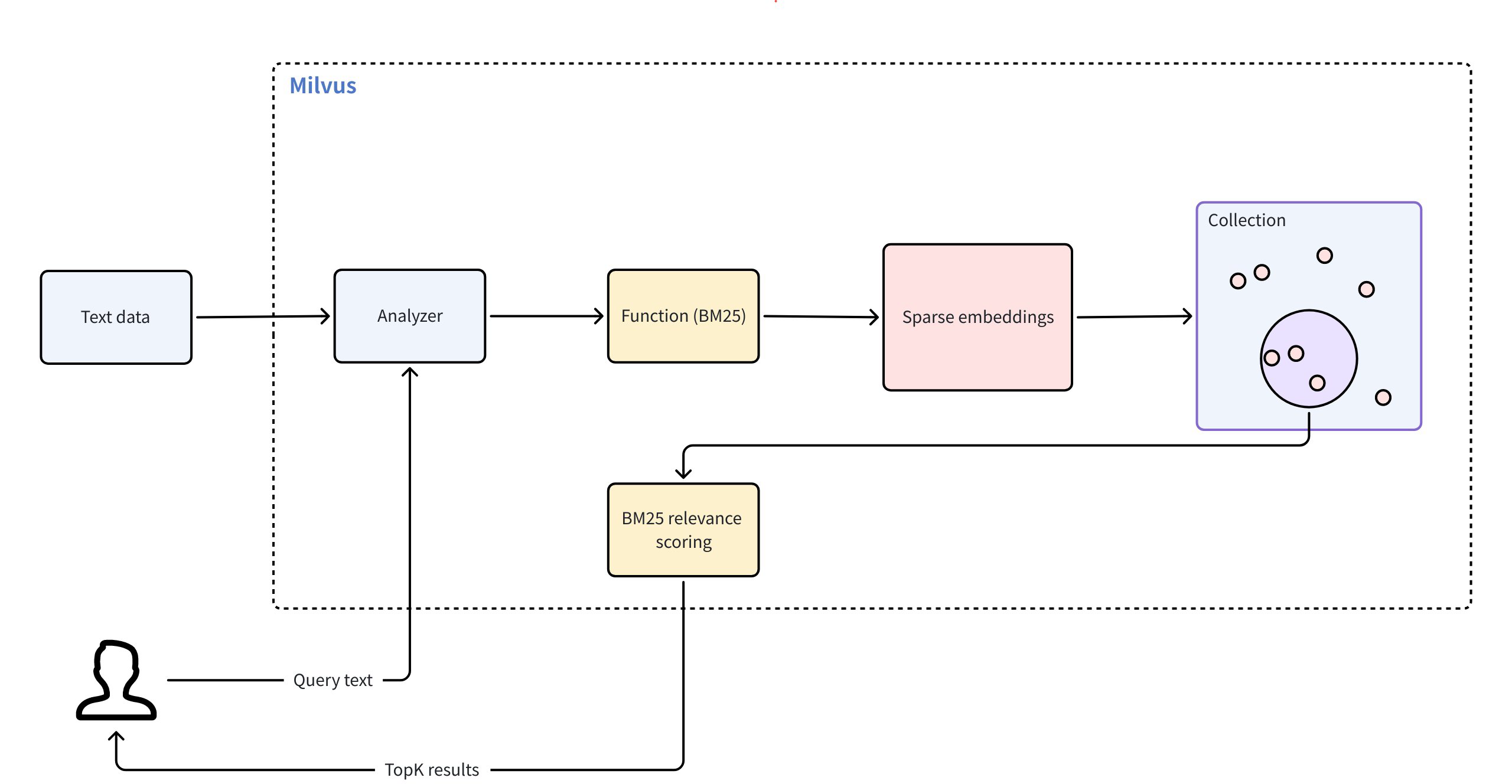 全文搜尋
全文搜尋
若要使用全文搜尋,請遵循以下主要步驟:
建立用於 BM25 全文搜尋的集合
若要啟用由 BM25 驅動的全文搜尋,您必須準備一個包含所需欄位的集合、定義一個用於產生稀疏向量的 BM25 函式、設定索引,然後建立該集合。
定義模式欄位
您的資料集架構必須包含至少三個必填欄位:
主要欄位:用於唯一識別集合中的每個實體。
字串欄位(
VARCHAR或TEXT):儲存原始文字文件。必須設定enable_analyzer=True,以便 Milvus 能處理該文字以進行 BM25 相關性排序。預設情況下,Milvus 會使用standard分析器進行文字分析。若要設定其他分析器,請參閱《分析器概覽》。本頁範例使用VARCHAR;若為長篇文字,可將輸入欄位定義為TEXT並省略max_length。完整範例請參閱《文字欄位》。稀疏向量欄位(
SPARSE_FLOAT_VECTOR):儲存由 BM25 函式自動生成的稀疏嵌入向量。
from pymilvus import MilvusClient, DataType, Function, FunctionType

client = MilvusClient(
    uri="http://localhost:19530",
    token="root:Milvus"
)

schema = client.create_schema()

schema.add_field(field_name="id", datatype=DataType.INT64, is_primary=True, auto_id=True) # Primary field
schema.add_field(field_name="text", datatype=DataType.VARCHAR, max_length=1000, enable_analyzer=True) # Text field
schema.add_field(field_name="sparse", datatype=DataType.SPARSE_FLOAT_VECTOR) # Sparse vector field; no dim required for sparse vectors
import io.milvus.v2.common.DataType;
import io.milvus.v2.service.collection.request.AddFieldReq;
import io.milvus.v2.service.collection.request.CreateCollectionReq;

CreateCollectionReq.CollectionSchema schema = CreateCollectionReq.CollectionSchema.builder()
        .build();
schema.addField(AddFieldReq.builder()
        .fieldName("id")
        .dataType(DataType.Int64)
        .isPrimaryKey(true)
        .autoID(true)
        .build());
schema.addField(AddFieldReq.builder()
        .fieldName("text")
        .dataType(DataType.VarChar)
        .maxLength(1000)
        .enableAnalyzer(true)
        .build());
schema.addField(AddFieldReq.builder()
        .fieldName("sparse")
        .dataType(DataType.SparseFloatVector)
        .build());
import (
    "context"
    "fmt"

    "github.com/milvus-io/milvus/client/v2/column"
    "github.com/milvus-io/milvus/client/v2/entity"
    "github.com/milvus-io/milvus/client/v2/index"
    "github.com/milvus-io/milvus/client/v2/milvusclient"
)

ctx, cancel := context.WithCancel(context.Background())
defer cancel()

milvusAddr := "localhost:19530"
client, err := milvusclient.New(ctx, &milvusclient.ClientConfig{
    Address: milvusAddr,
})
if err != nil {
    fmt.Println(err.Error())
    // handle error
}
defer client.Close(ctx)

schema := entity.NewSchema()
schema.WithField(entity.NewField().
    WithName("id").
    WithDataType(entity.FieldTypeInt64).
    WithIsPrimaryKey(true).
    WithIsAutoID(true),
).WithField(entity.NewField().
    WithName("text").
    WithDataType(entity.FieldTypeVarChar).
    WithEnableAnalyzer(true).
    WithMaxLength(1000),
).WithField(entity.NewField().
    WithName("sparse").
    WithDataType(entity.FieldTypeSparseVector),
)
import { MilvusClient, DataType } from "@zilliz/milvus2-sdk-node";

const address = "http://localhost:19530";
const token = "root:Milvus";
const client = new MilvusClient({address, token});
const schema = [
  {
    name: "id",
    data_type: DataType.Int64,
    is_primary_key: true,
  },
  {
    name: "text",
    data_type: "VarChar",
    enable_analyzer: true,
    enable_match: true,
    max_length: 1000,
  },
  {
    name: "sparse",
    data_type: DataType.SparseFloatVector,
  },
];

console.log(schema);
export schema='{
        "autoId": true,
        "enabledDynamicField": false,
        "fields": [
            {
                "fieldName": "id",
                "dataType": "Int64",
                "isPrimary": true
            },
            {
                "fieldName": "text",
                "dataType": "VarChar",
                "elementTypeParams": {
                    "max_length": 1000,
                    "enable_analyzer": true
                }
            },
            {
                "fieldName": "sparse",
                "dataType": "SparseFloatVector"
            }
        ]
    }'
#include "milvus/MilvusClientV2.h"

auto client = milvus::MilvusClientV2::Create();

milvus::ConnectParam connect_param{"http://localhost:19530", "root:Milvus"};
auto status = client->Connect(connect_param);
if (!status.IsOk()) {
    std::cout << status.Message() << std::endl;
}

milvus::CollectionSchemaPtr schema = std::make_shared<milvus::CollectionSchema>();
schema->AddField({"id", milvus::DataType::INT64, "", true, true});
schema->AddField(milvus::FieldSchema("text", milvus::DataType::VARCHAR).WithMaxLength(1000).EnableAnalyzer(true));
schema->AddField(milvus::FieldSchema("sparse", milvus::DataType::SPARSE_FLOAT_VECTOR));
在上述設定中,
id:作為主鍵,並透過auto_id=True自動產生。text:用於儲存您用於全文檢索操作的原始文字資料。該欄位可使用 `VARCHAR` 儲存有限長度的文字,或使用 `TEXT` 儲存長篇來源內容。sparse:一個向量欄位,專門用於儲存全文字搜尋操作所產生的內部稀疏嵌入向量。資料類型必須為SPARSE_FLOAT_VECTOR。
定義 BM25 函式
BM25 函式將分詞後的文字轉換為支援 BM25 評分演算法的稀疏向量。
定義該函式並將其新增至您的資料結構:
bm25_function = Function(
    name="text_bm25_emb", # Function name
    input_field_names=["text"], # Name of the VARCHAR or TEXT field containing raw text data
    output_field_names=["sparse"], # Name of the SPARSE_FLOAT_VECTOR field reserved to store generated embeddings
    function_type=FunctionType.BM25, # Set to `BM25`
)

schema.add_function(bm25_function)
import io.milvus.common.clientenum.FunctionType;
import io.milvus.v2.service.collection.request.CreateCollectionReq.Function;

import java.util.*;

schema.addFunction(Function.builder()
        .functionType(FunctionType.BM25)
        .name("text_bm25_emb")
        .inputFieldNames(Collections.singletonList("text"))
        .outputFieldNames(Collections.singletonList("sparse"))
        .build());
function := entity.NewFunction().
    WithName("text_bm25_emb").
    WithInputFields("text").
    WithOutputFields("sparse").
    WithType(entity.FunctionTypeBM25)
schema.WithFunction(function)
const functions = [
    {
      name: 'text_bm25_emb',
      description: 'bm25 function',
      type: FunctionType.BM25,
      input_field_names: ['text'],
      output_field_names: ['sparse'],
      params: {},
    },
];
export schema='{
        "autoId": true,
        "enabledDynamicField": false,
        "fields": [
            {
                "fieldName": "id",
                "dataType": "Int64",
                "isPrimary": true
            },
            {
                "fieldName": "text",
                "dataType": "VarChar",
                "elementTypeParams": {
                    "max_length": 1000,
                    "enable_analyzer": true
                }
            },
            {
                "fieldName": "sparse",
                "dataType": "SparseFloatVector"
            }
        ],
        "functions": [
            {
                "name": "text_bm25_emb",
                "type": "BM25",
                "inputFieldNames": ["text"],
                "outputFieldNames": ["sparse"],
                "params": {}
            }
        ]
    }'
milvus::FunctionPtr function = std::make_shared<milvus::Function>("text_bm25_emb", milvus::FunctionType::BM25);
function->AddInputFieldName("text");
function->AddOutputFieldName("sparse");
schema->AddFunction(function);
參數 |
說明 |
|---|---|
|
函式名稱。此函式會將您位於 ` |
|
需要進行「文字轉稀疏向量」轉換的 |
|
將用於儲存內部生成的稀疏向量的欄位名稱。對於 ` |
|
要使用的函式類型。必須為 |
若多個文字欄位需要進行 BM25 處理,請針對每個欄位定義一個 BM25 函式,且每個函式皆須具有唯一的名稱與輸出欄位。
設定索引
在定義包含必要欄位及內建函式的資料結構後,請為您的集合設定索引。
index_params = client.prepare_index_params()

index_params.add_index(
    field_name="sparse",

    index_type="SPARSE_INVERTED_INDEX",
    metric_type="BM25",
    params={
        "inverted_index_algo": "DAAT_MAXSCORE",
        "bm25_k1": 1.2,
        "bm25_b": 0.75
    }

)
import io.milvus.v2.common.IndexParam;

Map<String,Object> params = new HashMap<>();
params.put("inverted_index_algo", "DAAT_MAXSCORE");
params.put("bm25_k1", 1.2);
params.put("bm25_b", 0.75);

List<IndexParam> indexes = new ArrayList<>();
indexes.add(IndexParam.builder()
        .fieldName("sparse")
        .indexType(IndexParam.IndexType.AUTOINDEX)
        .metricType(IndexParam.MetricType.BM25)
        .extraParams(params)
        .build());
indexOption := milvusclient.NewCreateIndexOption("my_collection", "sparse",
    index.NewAutoIndex(entity.MetricType(entity.BM25)))
    .WithExtraParam("inverted_index_algo", "DAAT_MAXSCORE")
    .WithExtraParam("bm25_k1", 1.2)
    .WithExtraParam("bm25_b", 0.75)
const index_params = [
  {
    field_name: "sparse",
    metric_type: "BM25",
    index_type: "SPARSE_INVERTED_INDEX",
    params: {
        "inverted_index_algo": "DAAT_MAXSCORE",
        "bm25_k1": 1.2,
        "bm25_b": 0.75
    }
  },
];
export indexParams='[
        {
            "fieldName": "sparse",
            "metricType": "BM25",
            "indexType": "AUTOINDEX",
            "params":{
               "inverted_index_algo": "DAAT_MAXSCORE",
               "bm25_k1": 1.2,
               "bm25_b": 0.75
            }
        }
    ]'
auto index_params = milvus::IndexDesc("sparse", "", milvus::IndexType::SPARSE_INVERTED_INDEX, milvus::MetricType::BM25);
index_params.AddExtraParam("inverted_index_algo", "DAAT_MAXSCORE");
index_params.AddExtraParam("bm25_k1", "1.2");
index_params.AddExtraParam("bm25_b", "0.75");
參數 |
說明 |
|---|---|
|
要建立索引的向量欄位名稱。對於全文檢索,此欄位應為儲存所產生稀疏向量的欄位。在此範例中,請將值設定為 |
|
要建立的索引類型。若要在 Milvus 中進行 BM25 全文檢索,請將此值設定為 |
|
此參數的值必須明確設定為 |
|
專屬於此索引的附加參數字典。 |
|
用於建立和查詢 BM25 稀疏倒排索引的演算法。有效值:
|
|
控制詞頻飽和度。較高的數值會增加詞頻在文件排名中的權重。建議範圍:[1.2, 2.0]。預設值:1.2。 |
|
控制文件長度的正規化程度。通常使用 0 到 1 之間的數值,預設值為 0.75。數值 0 表示不進行長度正規化,而數值 1 則表示完全長度正規化。 |
建立文集
現在請使用已定義的模式和索引參數來建立集合。
client.create_collection(
    collection_name='my_collection',
    schema=schema,
    index_params=index_params
)
import io.milvus.v2.service.collection.request.CreateCollectionReq;

CreateCollectionReq requestCreate = CreateCollectionReq.builder()
        .collectionName("my_collection")
        .collectionSchema(schema)
        .indexParams(indexes)
        .build();
client.createCollection(requestCreate);
err = client.CreateCollection(ctx,
    milvusclient.NewCreateCollectionOption("my_collection", schema).
        WithIndexOptions(indexOption))
if err != nil {
    fmt.Println(err.Error())
    // handle error
}
await client.create_collection({
    collection_name: 'my_collection',
    schema: schema,
    index_params: index_params,
    functions: functions
});
export CLUSTER_ENDPOINT="http://localhost:19530"
export TOKEN="root:Milvus"

curl --request POST \
--url "${CLUSTER_ENDPOINT}/v2/vectordb/collections/create" \
--header "Authorization: Bearer ${TOKEN}" \
--header "Content-Type: application/json" \
--header "Request-Timeout: 10" \
-d "{
    \"collectionName\": \"my_collection\",
    \"schema\": $schema,
    \"indexParams\": $indexParams
}"
auto status = client->CreateCollection(milvus::CreateCollectionRequest()
                                    .WithCollectionName("my_collection")
                                    .WithCollectionSchema(schema)
                                    .AddIndex(std::move(index_params)));
if (!status.IsOk()) {
    std::cout << status.Message() << std::endl;
}
插入文字資料
設定完資料集與索引後,即可開始插入文字資料。在此過程中,您只需提供原始文字即可。我們先前定義的內建函式會自動為每筆文字條目產生對應的稀疏向量。
client.insert('my_collection', [
    {'text': 'information retrieval is a field of study.'},
    {'text': 'information retrieval focuses on finding relevant information in large datasets.'},
    {'text': 'data mining and information retrieval overlap in research.'},
])
import com.google.gson.Gson;
import com.google.gson.JsonObject;

import io.milvus.v2.service.vector.request.InsertReq;

Gson gson = new Gson();
List<JsonObject> rows = Arrays.asList(
        gson.fromJson("{\"text\": \"information retrieval is a field of study.\"}", JsonObject.class),
        gson.fromJson("{\"text\": \"information retrieval focuses on finding relevant information in large datasets.\"}", JsonObject.class),
        gson.fromJson("{\"text\": \"data mining and information retrieval overlap in research.\"}", JsonObject.class)
);

client.insert(InsertReq.builder()
        .collectionName("my_collection")
        .data(rows)
        .build());
_, err = client.Insert(ctx, milvusclient.NewColumnBasedInsertOption("my_collection").
    WithVarcharColumn("text", []string{
        "information retrieval is a field of study.",
        "information retrieval focuses on finding relevant information in large datasets.",
        "data mining and information retrieval overlap in research.",
    }),
)
if err != nil {
    fmt.Println(err.Error())
    // handle error
}
await client.insert({
    collection_name: 'my_collection',
    data: [
        {'text': 'information retrieval is a field of study.'},
        {'text': 'information retrieval focuses on finding relevant information in large datasets.'},
        {'text': 'data mining and information retrieval overlap in research.'},
    ],
});
curl --request POST \
--url "${CLUSTER_ENDPOINT}/v2/vectordb/entities/insert" \
--header "Authorization: Bearer ${TOKEN}" \
--header "Content-Type: application/json" \
--header "Request-Timeout: 10" \
-d '{
    "data": [
        {"text": "information retrieval is a field of study."},
        {"text": "information retrieval focuses on finding relevant information in large datasets."},
        {"text": "data mining and information retrieval overlap in research."}
    ],
    "collectionName": "my_collection"
}'
milvus::EntityRows data = {
    {{"text", "information retrieval is a field of study."}},
    {{"text", "information retrieval focuses on finding relevant information in large datasets."}},
    {{"text", "data mining and information retrieval overlap in research."}}
};

milvus::InsertResponse response;
auto status = client->Insert(milvus::InsertRequest()
                                .WithCollectionName("my_collection")
                                .WithRowsData(std::move(data))
                                , response);
if (!status.IsOk()) {
    std::cout << status.Message() << std::endl;
}
執行全文檢索
將資料插入集合後,即可使用原始文字查詢執行全文搜尋。Milvus 會自動將您的查詢轉換為稀疏向量,並使用 BM25 演算法對匹配的搜尋結果進行排序,最後返回前 K 項(limit )結果。
您可以透過配置文字高亮工具,在搜尋結果中標示出匹配的詞彙。詳情請參閱「文字高亮工具」。
res = client.search(
    collection_name='my_collection',
    data=['whats the focus of information retrieval?'],
    anns_field='sparse',
    output_fields=['text'], # Fields to return in search results; sparse field cannot be output
    limit=3,
)

print(res)
import io.milvus.v2.service.vector.request.SearchReq;
import io.milvus.v2.service.vector.request.data.EmbeddedText;
import io.milvus.v2.service.vector.response.SearchResp;

Map<String,Object> searchParams = new HashMap<>();

SearchResp searchResp = client.search(SearchReq.builder()
        .collectionName("my_collection")
        .data(Collections.singletonList(new EmbeddedText("whats the focus of information retrieval?")))
        .annsField("sparse")
        .topK(3)
        .searchParams(searchParams)
        .outputFields(Collections.singletonList("text"))
        .build());
annSearchParams := index.NewCustomAnnParam()
resultSets, err := client.Search(ctx, milvusclient.NewSearchOption(
    "my_collection", // collectionName
    3,               // limit
    []entity.Vector{entity.Text("whats the focus of information retrieval?")},
).WithConsistencyLevel(entity.ClStrong).
    WithANNSField("sparse").
    WithAnnParam(annSearchParams).
    WithOutputFields("text"))
if err != nil {
    fmt.Println(err.Error())
    // handle error
}

for _, resultSet := range resultSets {
    fmt.Println("IDs: ", resultSet.IDs.FieldData().GetScalars())
    fmt.Println("Scores: ", resultSet.Scores)
    fmt.Println("text: ", resultSet.GetColumn("text").FieldData().GetScalars())
}
await client.search({
    collection_name: 'my_collection',
    data: ['whats the focus of information retrieval?'],
    anns_field: 'sparse',
    output_fields: ['text'],
    limit: 3,
});
curl --request POST \
--url "${CLUSTER_ENDPOINT}/v2/vectordb/entities/search" \
--header "Authorization: Bearer ${TOKEN}" \
--header "Content-Type: application/json" \
--header "Request-Timeout: 10" \
--data-raw '{
    "collectionName": "my_collection",
    "data": [
        "whats the focus of information retrieval?"
    ],
    "annsField": "sparse",
    "limit": 3,
    "outputFields": [
        "text"
    ],
    "searchParams":{
        "params":{}
    }
}'
auto request = milvus::SearchRequest()
                       .WithCollectionName("my_collection")
                       .AddEmbeddedText("whats the focus of information retrieval?")
                       .WithLimit(3)
                       .WithAnnsField("sparse")
                       .AddOutputField("text");

milvus::SearchResponse response;
auto status = client->Search(request, response);
if (!status.IsOk()) {
    std::cout << status.Message() << std::endl;
}
參數 |
說明 |
|---|---|
|
包含搜尋參數的字典。 |
|
搜尋時應忽略的低重要性詞彙比例。數值必須介於 [0.0, 1.0) 範圍內。詳情請參閱「稀疏向量」。 |
|
以自然語言撰寫的原始查詢文字。Milvus 會使用 BM25 函式自動將您的文字查詢轉換為稀疏向量——請勿提供預先計算好的向量。 |
|
包含內部生成稀疏向量的欄位名稱。 |
|
搜尋結果中要回傳的欄位名稱清單。支援所有欄位,但包含由 BM25 產生嵌入向量的稀疏向量欄位除外。常見的輸出欄位包括主鍵欄位(例如: |
|
要回傳的前幾項最符合結果的最大數量。 |
常見問題
我可以在全文搜尋中輸出或存取由 BM25 函式生成的稀疏向量嗎?
不可以,在全文搜尋中無法直接存取或輸出由 BM25 函式所產生的稀疏向量。詳細說明如下:
BM25 函式會在內部產生稀疏向量,用於排序與檢索
這些向量雖儲存於稀疏欄位中,但無法包含在
output_fields您只能輸出原始文字欄位和元資料(例如
id、text)
範例:
# ❌ This throws an error - you cannot output the sparse field
client.search(
    collection_name='my_collection',
    data=['query text'],
    anns_field='sparse',
    output_fields=['text', 'sparse'],  # 'sparse' causes an error
    limit=3,
    search_params=search_params
)

# ✅ This works - output text fields only
client.search(
    collection_name='my_collection',
    data=['query text'],
    anns_field='sparse',
    output_fields=['text'],
    limit=3,
    search_params=search_params
)
// Searching with the sparse field in outputFields throws an error.
// Only output the original text and metadata fields.
SearchResp searchResp = client.search(SearchReq.builder()
        .collectionName("my_collection")
        .data(Collections.singletonList(new EmbeddedText("query text")))
        .annsField("sparse")
        .topK(3)
        .outputFields(Collections.singletonList("text"))
        .build());
// Searching with the sparse field in output_fields throws an error.
// Only output the original text and metadata fields.
resultSets, err := client.Search(ctx, milvusclient.NewSearchOption(
    "my_collection",
    3,
    []entity.Vector{entity.Text("query text")},
).WithConsistencyLevel(entity.ClStrong).
    WithANNSField("sparse").
    WithAnnParam(index.NewCustomAnnParam()).
    WithOutputFields("text"))
// Searching with the sparse field in output_fields throws an error.
// Only output the original text and metadata fields.
await client.search({
    collection_name: 'my_collection',
    data: ['query text'],
    anns_field: 'sparse',
    output_fields: ['text'],
    limit: 3,
});
curl --request POST \
--url "${CLUSTER_ENDPOINT}/v2/vectordb/entities/search" \
--header "Authorization: Bearer ${TOKEN}" \
--header "Content-Type: application/json" \
--header "Request-Timeout: 10" \
--data-raw '{
    "collectionName": "my_collection",
    "data": ["query text"],
    "annsField": "sparse",
    "limit": 3,
    "outputFields": ["text"]
}'
// Searching with the sparse field in output_fields throws an error.
// Only output the original text and metadata fields.
milvus::SearchRequest request = milvus::SearchRequest()
    .WithCollectionName("my_collection")
    .AddEmbeddedText("query text")
    .WithLimit(3)
    .WithAnnsField("sparse")
    .AddOutputField("text");
既然無法存取稀疏向量欄位,為何還需要定義它?
稀疏向量欄位用作內部搜尋索引,類似於使用者不會直接互動的資料庫索引。
設計理念:
關注點分離:您負責處理文字(輸入/輸出),Milvus 則負責處理向量(內部處理)
效能:預先計算的稀疏向量可讓查詢過程中的 BM25 排序更為快速
使用者體驗:透過簡單的文字介面,將複雜的向量運算抽象化
若需存取向量:
請使用手動稀疏向量操作,而非全文搜尋
為自訂稀疏向量工作流程建立獨立的集合
詳情請參閱《稀疏向量》。
