

パーティションキーの使用
パーティションキーは、パーティションに基づく検索最適化ソリューションです。特定のスカラーフィールドをパーティションキーとして指定し、検索時にそのパーティションキーに基づくフィルタリング条件を指定することで、検索範囲をいくつかのパーティションに絞り込み、検索効率を向上させることができます。本記事では、パーティションキーの使用方法と関連する考慮事項について紹介します。
概要
Milvusでは、パーティションを使用してデータの分離を実現し、検索範囲を特定のパーティションに限定することで、検索パフォーマンスを向上させることができます。 パーティションを手動で管理する場合、1つのコレクション内に最大1,024個のパーティションを作成でき、特定のルールに基づいてエンティティをこれらのパーティションに挿入することで、特定の数のパーティション内に検索を制限し、検索範囲を絞り込むことができます。
Milvusでは、コレクション内で作成できるパーティション数の制限を克服し、データ分離においてパーティションを再利用できるようにするために、パーティションキーが導入されています。コレクションを作成する際、スカラーフィールドをパーティションキーとして指定できます。コレクションの準備が整うと、Milvusはそのコレクション内に指定された数のパーティションを作成します。 エンティティの挿入を受け取ると、Milvusはそのエンティティのパーティションキー値を使用してハッシュ値を計算し、そのハッシュ値とコレクションのpartitions_num プロパティに基づいて剰余演算を実行して対象のパーティションIDを取得し、そのパーティションにエンティティを格納します。
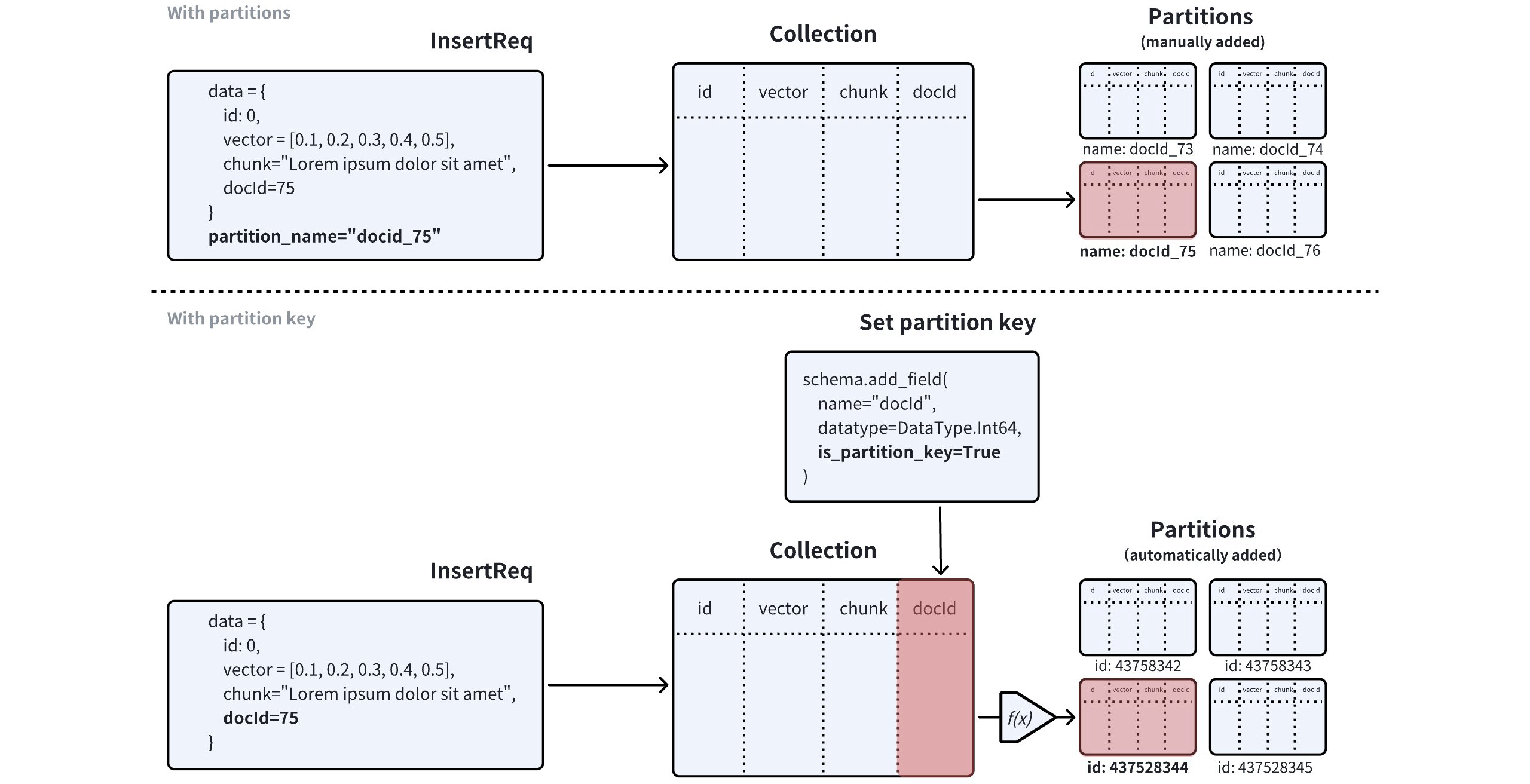 パーティションとパーティションキー
次の図は、パーティションキー機能が有効な場合と無効な場合で、Milvusがコレクション内の検索リクエストをどのように処理するかを示しています。
パーティションキーが無効になっている場合、Milvus はコレクション内でクエリベクトルに最も類似したエンティティを検索します。どのパーティションに最も関連性の高い結果が含まれているかを知っている場合は、検索範囲を絞り込むことができます。
パーティションキーが有効になっている場合、Milvus は検索フィルターで指定されたパーティションキーの値に基づいて検索範囲を決定し、一致するパーティション内のエンティティのみをスキャンします。
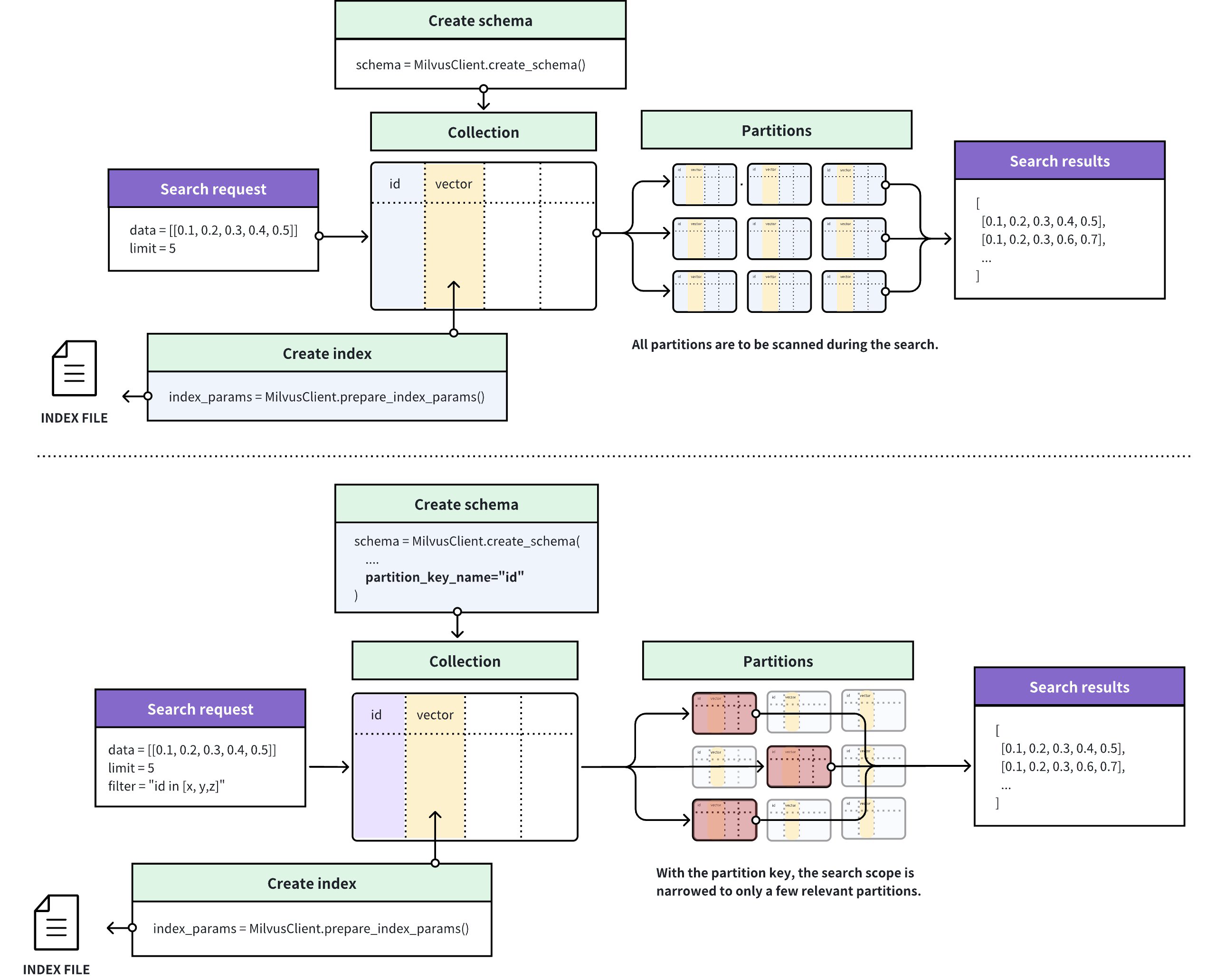 パーティションキーの有効/無効時
パーティションキーの使用
パーティションキーを使用するには、以下の操作が必要です。
パーティションキーの設定
スカラーフィールドをパーティションキーとして指定するには、そのスカラーフィールドを追加する際に、is_partition_key 属性をtrue に設定する必要があります。
スカラーフィールドをパーティションキーとして設定する場合、そのフィールドの値は空またはnullであってはなりません。
from pymilvus import (
    MilvusClient, DataType
)

client = MilvusClient(
    uri="http://localhost:19530",
    token="root:Milvus"
)

schema = client.create_schema()

schema.add_field(field_name="id",
    datatype=DataType.INT64,
    is_primary=True)

schema.add_field(field_name="vector",
    datatype=DataType.FLOAT_VECTOR,
    dim=5)

# Add the partition key
schema.add_field(
    field_name="my_varchar",
    datatype=DataType.VARCHAR,
    max_length=512,
    is_partition_key=True,
)
import io.milvus.v2.client.ConnectConfig;
import io.milvus.v2.client.MilvusClientV2;
import io.milvus.v2.common.DataType;
import io.milvus.v2.service.collection.request.AddFieldReq;
import io.milvus.v2.service.collection.request.CreateCollectionReq;

MilvusClientV2 client = new MilvusClientV2(ConnectConfig.builder()
        .uri("http://localhost:19530")
        .token("root:Milvus")
        .build());

// Create schema
CreateCollectionReq.CollectionSchema schema = client.createSchema();

schema.addField(AddFieldReq.builder()
        .fieldName("id")
        .dataType(DataType.Int64)
        .isPrimaryKey(true)
        .build());

schema.addField(AddFieldReq.builder()
        .fieldName("vector")
        .dataType(DataType.FloatVector)
        .dimension(5)
        .build());

// Add the partition key
schema.addField(AddFieldReq.builder()
        .fieldName("my_varchar")
        .dataType(DataType.VarChar)
        .maxLength(512)
        .isPartitionKey(true)
        .build());
import (
    "context"
    "fmt"

    "github.com/milvus-io/milvus/client/v3/entity"
    "github.com/milvus-io/milvus/client/v3/milvusclient"
)

ctx, cancel := context.WithCancel(context.Background())
defer cancel()

milvusAddr := "http://localhost:19530"
client, err := milvusclient.New(ctx, &milvusclient.ClientConfig{
    Address: milvusAddr,
    APIKey:  "root:Milvus",
})
if err != nil {
    fmt.Println(err.Error())
    // handle error
}
defer client.Close(ctx)

schema := entity.NewSchema().WithDynamicFieldEnabled(false)
schema.WithField(entity.NewField().
    WithName("id").
    WithDataType(entity.FieldTypeInt64).
    WithIsPrimaryKey(true),
).WithField(entity.NewField().
    WithName("my_varchar").
    WithDataType(entity.FieldTypeVarChar).
    WithIsPartitionKey(true).
    WithMaxLength(512),
).WithField(entity.NewField().
    WithName("vector").
    WithDataType(entity.FieldTypeFloatVector).
    WithDim(5),
)
use milvus::v2::prelude::*;

let config = ConnectConfig::new()
    .uri("http://localhost:19530")
    .token("root:Milvus");
let client = ClientV2::new(&config).await?;

let schema = CollectionSchema::new()
    .add_field(
        FieldSchema::new()
            .name("id")
            .data_type(DataType::Int64)
            .primary_key(true),
    )
    .add_field(
        FieldSchema::new()
            .name("vector")
            .data_type(DataType::FloatVector)
            .dimension(5),
    )
    .add_field(
        FieldSchema::new()
            .name("my_varchar")
            .data_type(DataType::VarChar)
            .max_length(512)
            .partition_key(true), // Add the partition key
    );
#include "milvus/MilvusClientV2.h"

auto client = milvus::MilvusClientV2::Create();

milvus::ConnectParam connect_param{"http://localhost:19530", "root:Milvus"};
auto status = client->Connect(connect_param);
if (!status.IsOk()) {
    std::cout << status.Message() << std::endl;
}

milvus::CollectionSchemaPtr schema = std::make_shared<milvus::CollectionSchema>();
schema->AddField({"id", milvus::DataType::INT64, "", true, false});
schema->AddField(milvus::FieldSchema("vector", milvus::DataType::FLOAT_VECTOR).WithDimension(5));
schema->AddField(milvus::FieldSchema("my_varchar", milvus::DataType::VARCHAR).WithPartitionKey(true).WithMaxLength(512));
import { MilvusClient, DataType } from "@zilliz/milvus2-sdk-node";

const address = "http://localhost:19530";
const token = "root:Milvus";
const client = new MilvusClient({address, token});

// Define fields
const fields = [
  {
    name: 'id',
    data_type: DataType.Int64,
    is_primary_key: true,
  },
  {
    name: 'vector',
    data_type: DataType.FloatVector,
    dim: 5,
  },
  {
    name: 'my_varchar',
    data_type: DataType.VarChar,
    max_length: 512,
    is_partition_key: true,
  },
];
using Milvus.Client.V2;
using Milvus.Client.V2.Types;

var config = new ConnectConfig
{
    Uri = "http://localhost:19530",
    ApiKey = "root:Milvus"
};
using var client = new MilvusClientV2(config);
await client.ConnectAsync();

var schema = new CollectionSchema
{
    Fields =
    {
        new FieldSchema("id", DataType.Int64, isPrimaryKey: true),
        FieldSchema.CreateFloatVector("vector", dimension: 5),
        // Add the partition key
        FieldSchema.CreateVarchar("my_varchar", maxLength: 512, isPartitionKey: true)
    }
};
export schema='{
        "autoId": true,
        "enabledDynamicField": false,
        "fields": [
            {
                "fieldName": "id",
                "dataType": "Int64",
                "isPrimary": true
            },
            {
                "fieldName": "vector",
                "dataType": "FloatVector",
                "elementTypeParams": {
                    "dim": "5"
                }
            },
            {
                "fieldName": "my_varchar",
                "dataType": "VarChar",
                "isPartitionKey": true,
                "elementTypeParams": {
                    "max_length": 512
                }
            }
        ]
    }'
パーティション数の設定
コレクション内のスカラーフィールドをパーティションキーとして指定すると、Milvus はそのコレクション内に自動的に 16 のパーティションを作成します。エンティティを受信すると、Milvus はそのエンティティのパーティションキー値に基づいてパーティションを選択し、そのパーティションにエンティティを格納します。その結果、一部のパーティションまたはすべてのパーティションに、異なるパーティションキー値を持つエンティティが格納されることになります。
また、コレクションの作成時に作成するパーティション数を指定することも可能です。これは、スカラーフィールドがパーティションキーとして指定されている場合にのみ有効です。
client.create_collection(
    collection_name="my_collection",
    schema=schema,
    num_partitions=128
)
import io.milvus.v2.service.collection.request.CreateCollectionReq;

CreateCollectionReq createCollectionReq = CreateCollectionReq.builder()
                .collectionName("my_collection")
                .collectionSchema(schema)
                .numPartitions(128)
                .build();
        client.createCollection(createCollectionReq);
err = client.CreateCollection(ctx,
    milvusclient.NewCreateCollectionOption("my_collection", schema).
        WithNumPartitions(128))
if err != nil {
    fmt.Println(err.Error())
    // handle error
}
use milvus::v2::prelude::*;

client.create_collection(
    CreateCollectionRequest::builder()
        .collection_name("my_collection")
        .schema(schema)
        .num_partitions(128)
        .build()?,
)
.await?;
#include <iostream>
#include "milvus/MilvusClientV2.h"

status = client->CreateCollection(milvus::CreateCollectionRequest()
                                      .WithCollectionName("my_collection")
                                      .WithCollectionSchema(schema)
                                      .WithNumPartitions(128));
if (!status.IsOk()) {
    std::cout << status.Message() << std::endl;
}
await client.create_collection({
    collection_name: "my_collection",
    fields: fields,
    num_partitions: 128
})
using Milvus.Client.V2.Requests.Collection;

await client.CreateCollectionAsync(new CreateCollectionReq
{
    CollectionName = "my_collection",
    Schema = schema,
    NumPartitions = 128
});
export params='{
    "partitionsNum": 128
}'

export CLUSTER_ENDPOINT="http://localhost:19530"
export TOKEN="root:Milvus"

curl --request POST \
--url "${CLUSTER_ENDPOINT}/v2/vectordb/collections/create" \
--header "Authorization: Bearer ${TOKEN}" \
--header "Content-Type: application/json" \
--header "Request-Timeout: 10" \
-d "{
    \"collectionName\": \"my_collection\",
    \"schema\": $schema,
    \"params\": $params
}"
フィルタリング条件の作成
パーティションキー機能が有効になっているコレクションで ANN 検索を実行する場合、検索リクエストにパーティションキーを含むフィルタリング式を含める必要があります。フィルタリング式では、パーティションキーの値を特定の範囲に制限することで、Milvus が対応するパーティション内に検索範囲を限定するようにできます。
削除操作を実行する際は、より効率的な削除を実現するために、単一のパーティションキーを指定するフィルタ式を含めることをお勧めします。このアプローチにより、削除操作が特定のパーティションに限定されるため、コンパクション時の書き込み増幅が低減され、コンパクションおよびインデックス作成のためのリソースを節約できます。
以下の例は、特定のパーティションキー値およびパーティションキー値のセットに基づく、パーティションキーベースのフィルタリングを示しています。
# Filter based on a single partition key value, or
filter='partition_key == "x" && <other conditions>'

# Filter based on multiple partition key values
filter='partition_key in ["x", "y", "z"] && <other conditions>'
// Filter based on a single partition key value, or
String filter = "partition_key == 'x' && <other conditions>";

// Filter based on multiple partition key values
filter = "partition_key in ['x', 'y', 'z'] && <other conditions>";
// Filter based on a single partition key value, or
filter := "partition_key == 'x' && <other conditions>"

// Filter based on multiple partition key values
filter = "partition_key in ['x', 'y', 'z'] && <other conditions>"
// Filter based on a single partition key value, or
let filter = "partition_key == 'x' && <other conditions>";

// Filter based on multiple partition key values
let filter = "partition_key in ['x', 'y', 'z'] && <other conditions>";
// Filter based on a single partition key value, or
std::string filter = R"(partition_key == 'x' && <other conditions>)";

// Filter based on multiple partition key values
filter = R"(partition_key in ['x', 'y', 'z'] && <other conditions>)";
// Filter based on a single partition key value, or
const filter = 'partition_key == "x" && <other conditions>'

// Filter based on multiple partition key values
filter = 'partition_key in ["x", "y", "z"] && <other conditions>'
// Filter based on a single partition key value, or
string filter = "partition_key == 'x' && <other conditions>";

// Filter based on multiple partition key values
filter = "partition_key in ['x', 'y', 'z'] && <other conditions>";
# Filter based on a single partition key value, or
export filter='partition_key == "x" && <other conditions>'

# Filter based on multiple partition key values
export filter='partition_key in ["x", "y", "z"] && <other conditions>'
partition_key を、パーティションキーとして指定されているフィールド名に置き換える必要があります。
インデックス パーティションキー
パーティションキーフィールドに対してスカラーインデックスを作成することを推奨します。
パーティションキーは、一致するパーティションキー値を含む可能性のあるパーティションに検索範囲を絞り込みます。ただし、各パーティションには通常、多くの異なるパーティションキー値を持つエンティティが含まれているため、Milvusは検索対象のパーティション内のすべてのエンティティに対して、パーティションキーに基づくフィルタ評価を依然として実行します。 そのフィールドにスカラーインデックスがない場合、その評価はフィールド値のフルスキャンとなり、大規模なコレクションでは検索レイテンシの大部分を占める可能性があります。スカラーインデックスがあれば、Milvusは代わりにインデックス内から一致するエンティティを検索します。
この評価は、ベクトルインデックスのタイプに関係なく行われます。Milvusは、パーティションキーの値をHNSW系ベクトルインデックスに埋め込むことができるため、パーティションキーでフィルタリングされた検索では関連するサブインデックスのみを走査しますが、この最適化はベクトルの走査範囲を絞り込むだけであり、フィルタの評価そのものを排除するものではありません。 スカラーフィールドのみでフィルタリングを行う検索には、これと同等のショートカットは存在しません。いずれの場合も、パーティションキーフィールドに対するスカラーインデックスが存在することで、評価が高速に実行されます。
パーティションキーフィールドに基づいてインデックスタイプを選択してください:
INVERTEDは、パーティションキーに基づくフィルタが
==およびin条件を使用するため、ほとんどのパーティションキーフィールドに適しています。BITMAPは、固有値が少ないフィールドに適しています。一般的な指針として、フィールドの固有値が500未満の場合にのみ使用してください。
STL_SORTは、数値型および
VARCHAR型のフィールドに対する代替手段となります。
以下の例では、ベクトルフィールドのインデックスに加え、パーティションキーフィールドにINVERTED インデックスをコレクションのインデックスパラメータに追加しています。
index_params = client.prepare_index_params()

index_params.add_index(
    field_name="vector",
    index_type="AUTOINDEX",
    metric_type="COSINE"
)

# Index the partition key
index_params.add_index(
    field_name="my_varchar",
    index_type="INVERTED"
)

client.create_index(
    collection_name="my_collection",
    index_params=index_params
)
import io.milvus.v2.common.IndexParam;
import io.milvus.v2.service.index.request.CreateIndexReq;
import java.util.*;

List<IndexParam> indexParams = new ArrayList<>();
indexParams.add(IndexParam.builder()
        .fieldName("vector")
        .indexType(IndexParam.IndexType.AUTOINDEX)
        .metricType(IndexParam.MetricType.COSINE)
        .build());

// Index the partition key
indexParams.add(IndexParam.builder()
        .fieldName("my_varchar")
        .indexType(IndexParam.IndexType.INVERTED)
        .build());

client.createIndex(CreateIndexReq.builder()
        .collectionName("my_collection")
        .indexParams(indexParams)
        .build());
indexOptions := []milvusclient.CreateIndexOption{
    milvusclient.NewCreateIndexOption("my_collection", "vector",
        index.NewAutoIndex(entity.COSINE)),
    // Index the partition key
    milvusclient.NewCreateIndexOption("my_collection", "my_varchar",
        index.NewInvertedIndex()),
}

for _, opt := range indexOptions {
    indexTask, err := client.CreateIndex(ctx, opt)
    if err != nil {
        fmt.Println(err.Error())
        // handle error
    }
    err = indexTask.Await(ctx)
}
const index_params = [{
    collection_name: "my_collection",
    field_name: "vector",
    index_type: "AUTOINDEX",
    metric_type: "COSINE"
},{
    collection_name: "my_collection",
    // Index the partition key
    field_name: "my_varchar",
    index_type: "INVERTED"
}]

await client.createIndex(index_params)
export CLUSTER_ENDPOINT="http://localhost:19530"
export TOKEN="root:Milvus"

export indexParams='[
        {
            "fieldName": "vector",
            "metricType": "COSINE",
            "indexName": "vector",
            "indexType": "AUTOINDEX"
        },
        {
            "fieldName": "my_varchar",
            "indexName": "my_varchar",
            "indexType": "INVERTED"
        }
    ]'

curl --request POST \
--url "${CLUSTER_ENDPOINT}/v2/vectordb/indexes/create" \
--header "Authorization: Bearer ${TOKEN}" \
--header "Content-Type: application/json" \
--header "Request-Timeout: 10" \
-d "{
    \"collectionName\": \"my_collection\",
    \"indexParams\": $indexParams
}"
コレクションを作成する際にこれらのインデックスパラメータを渡すか、既存のコレクションに対してインデックスを作成してください。詳細については、「コレクションの作成」を参照してください。
パーティションキーの分離の利用
マルチテナント環境では、テナント ID に関連するスカラーフィールドをパーティションキーとして指定し、このスカラーフィールドの特定の値に基づいてフィルターを作成できます。同様のシナリオにおける検索パフォーマンスをさらに向上させるため、Milvus では「パーティションキーの分離」機能を導入しています。
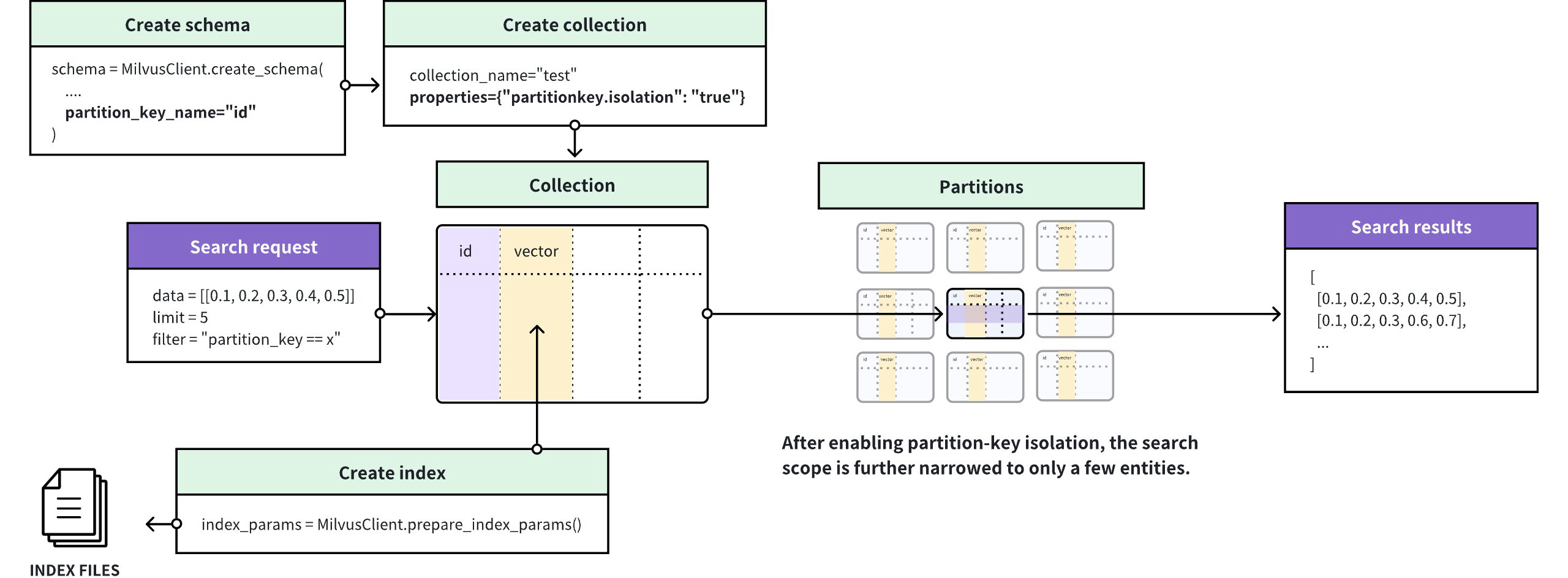 パーティションキーの分離
上の図に示すように、Milvus はパーティションキーの値に基づいてエンティティをグループ化し、これらのグループごとに個別のインデックスを作成します。 検索リクエストを受信すると、Milvusはフィルタリング条件で指定されたパーティションキーの値に基づいてインデックスを特定し、検索範囲をそのインデックスに含まれるエンティティ内に限定します。これにより、検索中に無関係なエンティティをスキャンすることを回避し、検索パフォーマンスを大幅に向上させます。
パーティションキー分離を有効にした場合は、Milvus が一致するインデックスに含まれるエンティティの範囲内に検索範囲を制限できるように、パーティションキーベースのフィルタには 1 つの特定の値のみを含める必要があります。
現在、パーティションキー分離機能は、インデックスタイプが HNSW に設定されている検索にのみ適用されます。
パーティションキー分離は、パーティションキーフィールドのスカラーインデックスに取って代わるものではありません。フィルタ内のパーティションキー値は、一致するサブインデックスを特定しますが、Milvus は依然としてフィルタ自体を評価して一致するエンティティを特定するため、パーティションキーもインデックスに登録することをお勧めします。
パーティションキー分離の有効化
以下のコード例は、パーティションキー分離を有効にする方法を示しています。
client.create_collection(
    collection_name="my_collection",
    schema=schema,
    properties={"partitionkey.isolation": True}
)
import io.milvus.v2.service.collection.request.CreateCollectionReq;

Map<String, String> properties = new HashMap<>();
properties.put("partitionkey.isolation", "true");

CreateCollectionReq createCollectionReq = CreateCollectionReq.builder()
        .collectionName("my_collection")
        .collectionSchema(schema)
        .properties(properties)
        .build();
client.createCollection(createCollectionReq);
err = client.CreateCollection(ctx,
    milvusclient.NewCreateCollectionOption("my_collection", schema).
        WithProperty("partitionkey.isolation", true))
if err != nil {
    fmt.Println(err.Error())
    // handle error
}
use milvus::v2::prelude::*;
use std::collections::HashMap;

client.create_collection(
    CreateCollectionRequest::builder()
        .collection_name("my_collection")
        .schema(schema)
        .properties(HashMap::from([(
            "partitionkey.isolation".to_string(),
            "true".to_string(),
        )]))
        .build()?,
)
.await?;
#include <iostream>
#include "milvus/MilvusClientV2.h"

status = client->CreateCollection(milvus::CreateCollectionRequest()
                                      .WithCollectionName("my_collection")
                                      .WithCollectionSchema(schema)
                                      .AddProperty("partitionkey.isolation", "true"));
if (!status.IsOk()) {
    std::cout << status.Message() << std::endl;
}
await client.alterCollectionProperties({
    collection_name: "my_collection",
    properties: {
        "partitionkey.isolation": true
    }
})
using Milvus.Client.V2.Requests.Collection;

await client.CreateCollectionAsync(new CreateCollectionReq
{
    CollectionName = "my_collection",
    Schema = schema,
    Properties = { ["partitionkey.isolation"] = "true" }
});
export params='{
    "partitionKeyIsolation": true
}'

export CLUSTER_ENDPOINT="http://localhost:19530"
export TOKEN="root:Milvus"

curl --request POST \
--url "${CLUSTER_ENDPOINT}/v2/vectordb/collections/create" \
--header "Authorization: Bearer ${TOKEN}" \
--header "Content-Type: application/json" \
--header "Request-Timeout: 10" \
-d "{
    \"collectionName\": \"my_collection\",
    \"schema\": $schema,
    \"params\": $params
}"
パーティションキーの分離を有効にした後も、「パーティション数の設定」で説明されているように、パーティションキーとパーティション数を設定することは可能です。ただし、パーティションキーに基づくフィルターには、特定のパーティションキー値のみを含める必要がある点に注意してください。
