
AISAQCompatible with Milvus 2.6.4+
AISAQ is a disk-based vector index that extends DISKANN to handle billion-scale datasets with a minimal DRAM footprint.
Unlike DISKANN, which keeps compressed vectors in memory, AISAQ is designed with a “Near-Zero DRAM Architecture” which means holding all data structures on SSD.
AISAQ enables running ultra-high scale databases using standard servers while offering operation modes to balance performance and storage costs.
How AISAQ works
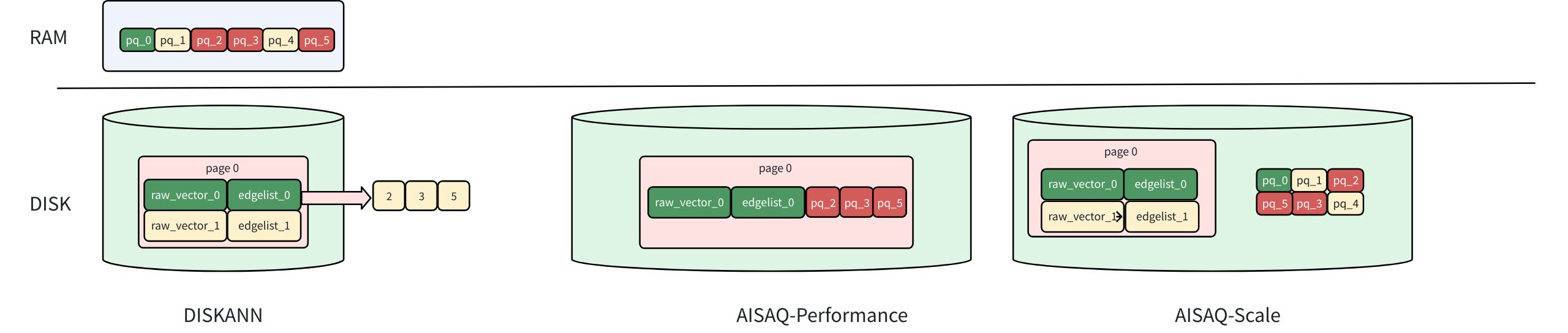
The diagram above compares the storage layouts of DISKANN, AISAQ-Performance, and AISAQ-Scale, showing how data (raw vectors, edge lists, and PQ codes) is distributed between RAM and disk.
Aisaq Vs Diskann
Foundation: DISKANN recap
In DISKANN, the raw vectors and edge lists are stored on disk, while PQ-compressed vectors are kept in memory (DRAM).
When DISKANN traverses to a node (e.g., vector 0):
It loads the raw vector (raw_vector_0) and its edge list (edgelist_0) from disk.
The edge list indicates which neighbors to visit next (nodes 2, 3, and 5 in this example).
The raw vector is used to calculate the exact distance to the query vector for ranking.
The PQ data in memory is used for approximate distance filtering to guide the next traversal.
Because the PQ data is already cached in DRAM, each node visit requires only one disk I/O, achieving high query speed with moderate memory usage.
For a detailed explanation of these components and parameters, refer to DISKANN.
AISAQ Operation Modes
AISAQ offers two modes of operation to address two distinct use cases:
Performance mode: optimized for applications that require low latency and high throughput at scale, such as online semantic search.
Scale mode: optimized for applications with more relaxed latency constraints, such as RAG and offline semantic search, while enabling cost-efficient expansion of datasets to ultra-high scale.
AISAQ-performance mode
AISAQ-performance achieves “Near-Zero DRAM footprint” by moving PQ data from memory to disk while maintaining low IOPS through data colocation and redundancy.
Each node’s raw vector, edge list, and its neighbors’ PQ data are stored together on disk.
This layout ensures that visiting a node (e.g., vector 0) still requires only a single disk I/O.
Since PQ data is redundantly stored near multiple nodes, the index file size increases significantly, consuming more disk space.
AISAQ-scale mode
AISAQ-scale focuses on reducing disk space usage while meeting the performance requirements of its target applications.
In this mode:
PQ data is stored separately on disk, without redundancy.
This design minimizes index size but leads to more I/O operations during graph traversal.
To mitigate the IOPS overhead, AISAQ introduces two optimizations:
A rearrange algorithm that sorts PQ vectors by priority to improve data locality.
A PQ cache in DRAM (pq_read_page_cache_size) that caches frequently accessed PQ data.
Example configuration
# milvus.yaml
knowhere:
AISAQ:
build:
max_degree: 56 # Controls the maximum number of connections (edges) each data point can have in the Vamana graph
search_list_size: 100 # During index construction, this parameter defines the size of the candidate pool used when searching for the nearest neighbors for each node. For every node being added to the graph, the algorithm maintains a list of the search_list_size best candidates found so far. The search for neighbors stops when this list can no longer be improved. From this final candidate pool, the top max_degree nodes are selected to form the final edges
inline_pq: -1 # Number of PQ vectors stored inline per Index node (read when node is accessed, to reduce IO)
rearrange: true # Re-arrange the PQ vectors data structure to improve data locality and reduce disk accesses during search (ignored in performance mode)
num_entry_points: 100 # Number of candidate entry points to optimize search entry-point selection
pq_code_budget_gb_ratio: 0.125 # Controls the size of the PQ codes (compressed representations of data points) compared to the size of the uncompressed data
disk_pq_code_budget_gb_ratio: 0.25 # Controls the size of the PQ codes of the high precision vectors stored in the index (used for re-ranking), compared to the size of the uncompressed data
pq_cache_size: 0 # PQ vectors cache size in DRAM (bytes). The PQ vectors cache is loaded during Index load and used during search to reduce IOs (ignored in performance mode)
search_cache_budget_gb_ratio: 0 # Controls the amount of DRAM to be used for caching frequently accessed index nodes. This cache is loaded during index load and used during search to reduce IOs
search:
search_list: 16 # During a search operation, this parameter determines the size of the candidate pool that the algorithm maintains as it traverses the graph. A larger value increases the chances of finding the true nearest neighbors (higher recall) but also increases search latency
beamwidth: 8 # Controls the degree of parallelism during search by determining the maximum number of parallel disk I/O requests to read the index nodes
vectors_beamwidth: 1 # Controls the degree of parallelism during search by determining the maximum number of parallel disk I/O requests to read groups of neighboring PQ vectors (ignored in performance mode)
pq_read_page_cache_size: 5242880 (5MiB) # PQ read cache size in DRAM per search thread (bytes). It caches frequently accessed data pages containing PQ vectors (ignored in performance mode and applicable only when rearrange is true). The PQ read cache memory is reused across all AISAQ segments
AISAQ parameters
AISAQ inherits some parameters from DISKANN - max_degree, search_list_size, and pq_code_budget_gb_ratio.
Index-building params
These parameters influence how the AISAQ index is constructed. Adjusting them can affect the index size, build time, and search quality.
Parameter |
Description |
Value Range |
Tuning Suggestion |
|---|---|---|---|
|
Controls the maximum number of connections (edges) each data point can have in the Vamana graph. |
Type: Integer Range: [1, 512] Default value: |
Higher values create denser graphs, potentially increasing recall (finding more relevant results) but also increasing memory usage and build time. In most cases, we recommend you set a value within this range: [10, 100]. |
|
During index construction, this parameter defines the size of the candidate pool used when searching for the nearest neighbors for each node. For every node being added to the graph, the algorithm maintains a list of the search_list_size best candidates found so far. The search for neighbors stops when this list can no longer be improved. From this final candidate pool, the top max_degree nodes are selected to form the final edges. |
Type: Integer Range: [1, 512] Default value: |
A larger search_list_size increases the likelihood of finding the true nearest neighbors for each node, which can lead to a higher-quality graph and better search performance (recall). However, this comes at the cost of a significantly longer index build time. It should always be set to a value greater than or equal to max_degree. |
|
Number of PQ vectors stored inline per Index node (read when node is accessed, to reduce IO) |
Type: Integer Range: [0, max_degree] Default value: |
Higher values of Set Set Set
|
|
Re-arrange the PQ vectors data structure to improve data locality and reduce disk accesses during search (ignored in performance mode). |
Type: Boolean Range: [true, false] Default value: |
When true, reduces IOs during search with only minor increase in memory and in index build time. |
|
Number of candidate entry points to optimize search entry-point selection. |
Type: Integer Range: [0, 1000] Default value: |
High values may reduce the search time by starting the search from a closer entry point. Set higher values for large segments (e.g. for 10M vectors and above use value of 1000). |
|
Controls the size of the PQ codes (compressed representations of data points) compared to the size of the uncompressed data. |
Type: Float Range: (0.0, 0.25] Default value: |
A higher ratio leads to more accurate search results, effectively storing more information about the original vectors but increases computational complexity during search. In most cases, we recommend you set a value within this range: (0.0417, 0.25]. |
|
Controls the size of the PQ codes of the high precision vectors stored in the index (used for re-ranking), compared to the size of the uncompressed data. |
Type: Float Range: [0, 0.25] Default value: |
With the default value of 0.25, vectors will be quantized to 25% of their original size (4× compression), reducing disk footprint with relatively minimal accuracy impact. Set value of 0 to store full precision vectors in disk index for re-ranking. A larger value offers a higher recall rate but increases disk usage. |
|
PQ vectors cache size in DRAM (bytes). The PQ vectors cache is loaded during Index load and used during search to reduce IOs (ignored in performance mode). |
Type: Integer Range: [0, 1073741824] Default value: |
Larger cache improves query performance but increases DRAM usage. |
|
Controls the amount of DRAM to be used for caching frequently accessed index nodes This cache is loaded during index load and used during search to reduce IOs. |
Type: Float Range: [0.0, 0.3) Default value: |
A higher value allocates more memory for caching, reducing disk IOs but consuming more system memory. A lower value uses less memory for caching, potentially increasing the need for disk access. |
Index-search params
These parameters influence how AISAQ performs searches. Adjusting them can impact search speed, latency, and resource usage.
Parameter |
Description |
Value Range |
Tuning Suggestion |
|---|---|---|---|
|
During a search operation, this parameter determines the size of the candidate pool that the algorithm maintains as it traverses the graph. A larger value increases the chances of finding the true nearest neighbors (higher recall) but also increases search latency. |
Type: Integer Range: [topk, int32_max] Default value: |
For a good balance between performance and accuracy, it is recommended to set this value to be equal to or slightly larger than the number of results you want to retrieve (top_k). |
|
Controls the degree of parallelism during search by determining the maximum number of parallel disk I/O requests to read the index nodes. |
Type: Integer Range: [1, 16] Default value: |
Higher values increase parallelism, which can speed up search on systems with powerful CPUs and SSDs. However, setting it too high might lead to excessive resource contention. In most cases, we recommend you set a value of 2. |
|
Controls the degree of parallelism during search by determining the maximum number of parallel disk I/O requests to read groups of neighboring PQ vectors (ignored in performance mode). |
Type: Integer Range: [1, 4] must be <= beamwidth Default value: |
Higher values increase parallelism, which can speed up search on systems with powerful CPUs and SSDs. However, setting it too high might lead to excessive resource contention, as each neighboring PQ vector group may contain up to max_degree vectors. In most cases, we recommend you set a value of 1. |
|
PQ read cache size in DRAM per search thread (bytes). It caches frequently accessed data pages containing PQ vectors (ignored in performance mode and applicable only when rearrange is true). The PQ read cache memory is reused across all AISAQ segments. |
Type: Integer Range: [0, 33554432] Default value: |
Larger cache improves query performance but increases DRAM usage. Recommended values range from 2 MiB for small segments (1 M vectors), 5 MiB for medium segments (50 M vectors) and 10 MiB for large segments (250 M vectors). |