We Read Claude Code's Leaked Source. Here's How Its Memory Actually Works
Claude Code’s source code was shipped publicly by accident. Version 2.1.88 included a 59.8 MB source map file that should have been stripped from the build. That one file contained the full, readable TypeScript codebase — 512,000 lines, now mirrored across GitHub.
The memory system caught our attention. Claude Code is the most popular AI coding agent on the market, and memory is the part most users interact with without understanding how it works under the hood. So we dug in.
The short version: Claude Code’s memory is more basic than you’d think. It caps out at 200 lines of notes. It can only find memories by exact keyword match — if you ask about “port conflicts,” but the note says “docker-compose mapping,” you get nothing. And none of it leaves Claude Code. Switch to a different agent and you start from zero.
Here are the four layers:
- CLAUDE.md — a file you write yourself with rules for Claude to follow. Manual, static, and limited by how much you think to write down in advance.
- Auto Memory — Claude takes its own notes during sessions. Useful, but capped at a 200-line index with no search-by-meaning.
- Auto Dream — a background cleanup process that consolidates messy memories while you’re idle. Helps with days-old clutter, can’t bridge months.
- KAIROS — an unreleased always-on daemon mode found in the leaked code. Not in any public build yet.
Below, we unpack each layer, then cover where the architecture breaks down and what we built to address the gaps.
How Does CLAUDE.md Work?
CLAUDE.md is a Markdown file you create and place in your project folder. You fill it with whatever you want Claude to remember: code style rules, project structure, test commands, deploy steps. Claude loads it at the start of every session.
Three scopes exist: project-level (in the repo root), personal (~/.claude/CLAUDE.md), and organizational (enterprise config). Shorter files get followed more reliably.
The limit is obvious: CLAUDE.md only holds things you wrote down in advance. Debugging decisions, preferences you mentioned mid-conversation, edge cases you discovered together — none of that gets captured unless you stop and manually add it. Most people don’t.
How Does Auto Memory Work?
Auto Memory captures what surfaces during work. Claude decides what’s worth keeping and writes it to a memory folder on your machine, organized into four categories: user (role and preferences), feedback (your corrections), project (decisions and context), and reference (where things live).
Each note is a separate Markdown file. The entry point is MEMORY.md — an index where each line is a short label (under 150 characters) pointing to a detailed file. Claude reads the index, then pulls specific files when they seem relevant.
~/.claude/projects/-Users-me-myproject/memory/
├── MEMORY.md                  ← index file, one pointer per line
├── user_role.md               ← "Backend engineer, fluent in Go, new to React"
├── feedback_testing.md        ← "Integration tests must use real DB, no mocking"
├── project_auth_rewrite.md    ← "Auth rewrite driven by compliance, not tech debt"
└── reference_linear.md        ← "Pipeline bugs tracked in Linear INGEST project"

MEMORY.md sample (each line ≤150 chars):
- [User role](user_role.md) — Backend engineer, strong Go, new to React
- [Testing rule](feedback_testing.md) — No mocking the database in integration tests
- [Auth rewrite](project_auth_rewrite.md) — Compliance-driven, not tech debt
- [Bug tracker](reference_linear.md) — Pipeline bugs → Linear INGEST
The first 200 lines of MEMORY.md get loaded into every session. Anything beyond that is invisible.
One smart design choice: the leaked system prompt tells Claude to treat its own memory as a hint, not a fact. It verifies against real code before acting on anything remembered, which helps reduce hallucinations — a pattern that other AI agent frameworks are starting to adopt.
How Does Auto Dream Consolidate Stale Memories?
Auto Memory captures notes, but after weeks of use those notes go stale. An entry saying “yesterday’s deploy bug” becomes meaningless a week later. A note says you use PostgreSQL; a newer one says you migrated to MySQL. Deleted files still have memory entries. The index fills with contradictions and outdated references.
Auto Dream is the cleanup process. It runs in the background and:
- Replaces vague time references with exact dates. “Yesterday’s deploy issue” → “2026-03-28 deploy issue.”
- Resolves contradictions. PostgreSQL note + MySQL note → keeps the current truth.
- Deletes stale entries. Notes referencing deleted files or completed tasks get removed.
- Keeps
MEMORY.mdunder 200 lines.

Trigger conditions: more than 24 hours since last cleanup AND at least 5 new sessions accumulated. You can also type “dream” to run it manually. The process runs in a background sub-agent — like actual sleep, it won’t interrupt your active work.
The dream agent’s system prompt starts with: “You are performing a dream — a reflective pass over your memory files.”
What Is KAIROS? Claude Code’s Unreleased Always-On Mode
The first three layers are live or rolling out. The leaked code also contains something that hasn’t shipped: KAIROS.
KAIROS — apparently named after the Greek word for “the right moment” — appears over 150 times in the source. It would turn Claude Code from a tool you actively use into a background assistant that watches your project continuously.
Based on the leaked code, KAIROS:
- Keeps a running log of observations, decisions, and actions throughout the day.
- Checks in on a timer. At regular intervals, it receives a signal and decides: act, or stay quiet.
- Stays out of your way. Any action that would block you for more than 15 seconds gets deferred.
- Runs dream cleanup internally, plus a full observe-think-act loop in the background.
- Has exclusive tools that regular Claude Code doesn’t: pushing files to you, sending notifications, monitoring your GitHub pull requests.
KAIROS is behind a compile-time feature flag. It’s not in any public build. Think of it as Anthropic exploring what happens when agent memory stops being session-by-session and becomes always-on.
Where Does Claude Code’s Memory Architecture Break Down?
Claude Code’s memory does real work. But five structural limitations constrain what it can handle as projects grow.
| Limitation | What happens |
|---|---|
| 200-line index cap | MEMORY.md holds ~25 KB. Run a project for months, and old entries get pushed out by new ones. “What Redis config did we settle on last week?” — gone. |
| Grep-only retrieval | Memory search uses literal keyword matching. You remember “deploy-time port conflicts,” but the note says “docker-compose port mapping.” Grep can’t bridge that gap. |
| Summaries only, no reasoning | Auto Memory saves high-level notes, not the debugging steps or reasoning that got you there. The how is lost. |
| Complexity stacks without fixing the foundation | CLAUDE.md → Auto Memory → Auto Dream → KAIROS. Each layer exists because the last one wasn’t enough. But no amount of layering changes what’s underneath: one tool, local files, session-by-session capture. |
| Memory is locked inside Claude Code | Switch to OpenCode, Codex CLI, or any other agent and you start from zero. No export, no shared format, no portability. |
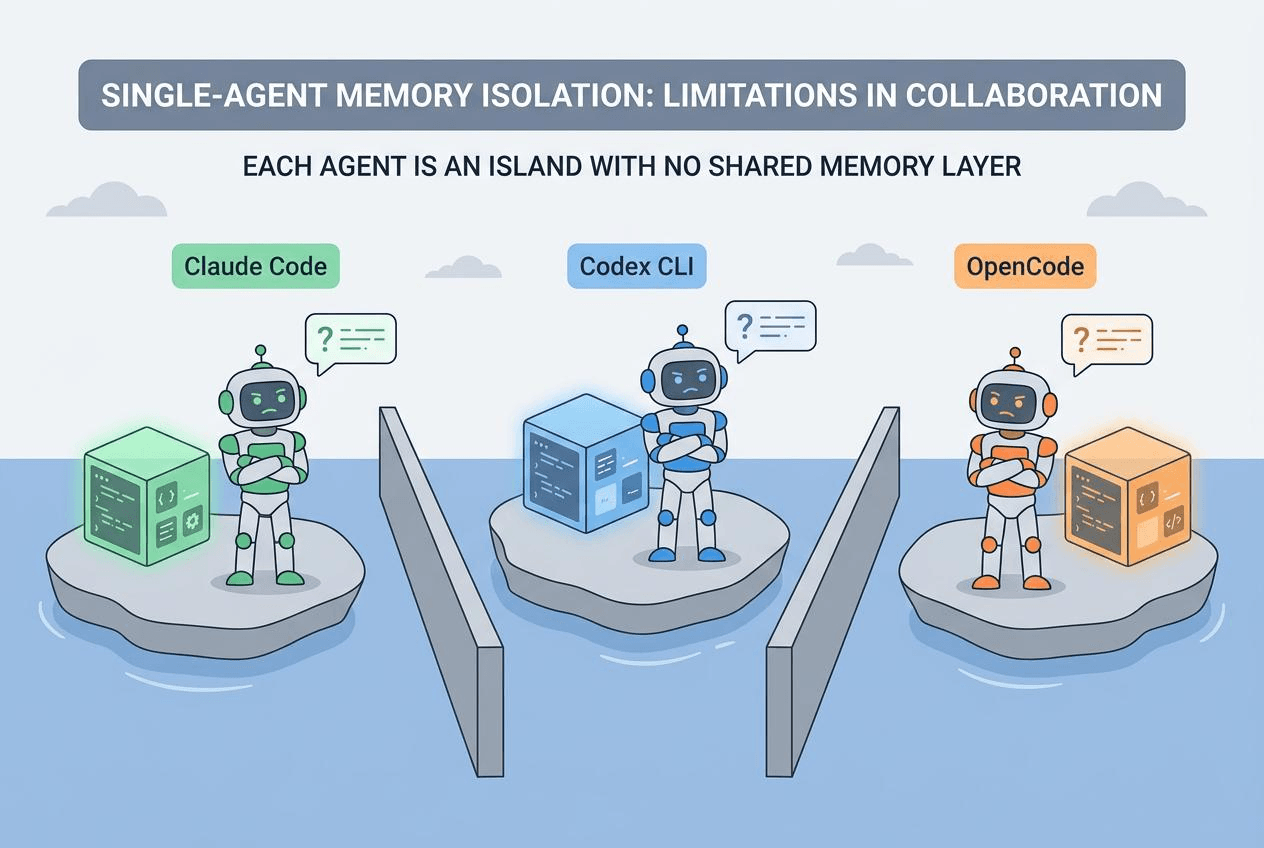
These aren’t bugs. They’re the natural limits of single-tool, local-file architecture. New agents ship every month, workflows shift, but the knowledge you’ve built up in a project shouldn’t disappear with them. That’s why we built memsearch.
What Is memsearch? Persistent Memory for Any AI Coding Agent
memsearch pulls memory out of the agent and into its own layer. Agents come and go. Memory stays.
How to Install memsearch
Claude Code users install from the marketplace:
/plugin marketplace add zilliztech/memsearch
/plugin install memsearch
Done. No configuration needed.
Other platforms are just as simple. OpenClaw: openclaw plugins install clawhub:memsearch. Python API via uv or pip:
uv tool install "memsearch[onnx]"
What Does memsearch Capture?
Once installed, memsearch hooks into the agent’s lifecycle. Every conversation gets summarized and indexed automatically. When you ask a question that needs history, recall triggers on its own.
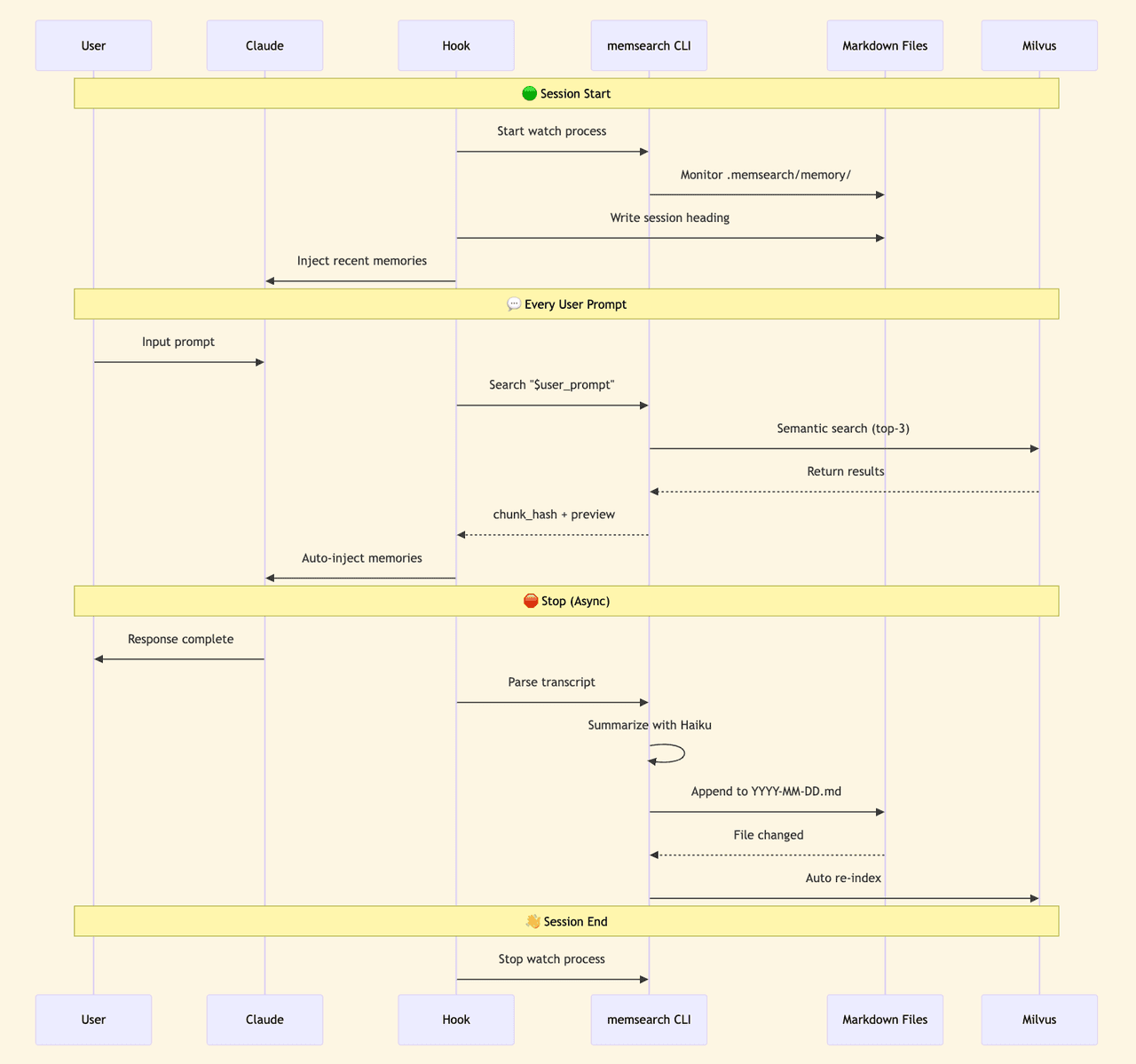
Memory files are stored as dated Markdown — one file per day:
.memsearch/
└── memory/
    ├── 2026-03-28.md    ← one file per day
    ├── 2026-03-29.md
    ├── 2026-03-30.md
    └── 2026-04-01.md
You can open, read, and edit memory files in any text editor. If you want to migrate, you copy the folder. If you want version control, git works natively.
The vector index stored in Milvus is a cache layer — if it’s ever lost, you rebuild it from the Markdown files. Your data lives in the files, not the index.
How Does memsearch Find Memories? Semantic Search vs. Grep
Claude Code’s memory retrieval uses grep — literal keyword matching. That works when you have a few dozen notes, but it breaks down after months of history when you can’t remember the exact wording.
memsearch uses hybrid search instead. Semantic vectors find content related to your query even when the wording is different, while BM25 matches exact keywords. RRF (Reciprocal Rank Fusion) merges and ranks both result sets together.
Say you ask “How did we fix that Redis timeout last week?” — semantic search understands the intent and finds it. Say you ask "search for handleTimeout" — BM25 hits the exact function name. The two paths cover each other’s blind spots.
When recall triggers, the sub-agent searches in three stages, going deeper only when needed:
L1: Semantic Search — Short Previews
The sub-agent runs memsearch search against the Milvus index and pulls the most relevant results:
┌─ L1 search results ────────────────────────────┐
│                                                 │
│  #a3f8c1 [score: 0.85] memory/2026-03-28.md    │
│  > Redis port conflict during deploy, default   │
│    6379 occupied, switched to 6380, updated     │
│    docker-compose...                            │
│                                                 │
│  #b7e2d4 [score: 0.72] memory/2026-03-25.md    │
│  > Auth module rewrite complete, JWT replaced   │
│    with session tokens, mobile token refresh    │
│    was unreliable...                            │
│                                                 │
│  #c9f1a6 [score: 0.68] memory/2026-03-20.md    │
│  > DB index optimization, added composite       │
│    index on users table, query time dropped     │
│    from 800ms to 50ms...                        │
│                                                 │
└─────────────────────────────────────────────────┘
Each result shows a relevance score, source file, and a 200-character preview. Most queries stop here.
L2: Full Context — Expand a Specific Result
If L1’s preview isn’t enough, the sub-agent runs memsearch expand a3f8c1 to pull the complete entry:
┌─ L2 expanded result ───────────────────────────┐
│                                                 │
│  ## 2026-03-28 Deploy troubleshooting           │
│                                                 │
│  Redis port conflict resolution:                │
│  1. docker-compose up → Redis container failed  │
│  2. Host port 6379 occupied by another instance │
│  3. Changed docker-compose.yml: "6380:6379"     │
│  4. Updated .env: REDIS_PORT=6380               │
│  5. Updated config/database.py connection       │
│                                                 │
│  Note: Only affects local dev. Prod unaffected. │
│                                                 │
│  [source: memory/2026-03-28.md  lines: 42-55]  │
└─────────────────────────────────────────────────┘
L3: Raw Conversation Transcript
In rare cases where you need to see exactly what was said, the sub-agent pulls the original exchange:
┌─ L3 raw transcript ───────────────────────────┐
│                                                │
│  [user] docker-compose up won't start, Redis   │
│         port conflict — can you take a look?   │
│                                                │
│  [agent] Checking host port usage...           │
│          Running lsof -i :6379...              │
│          Suggest remapping to port 6380...     │
│          (tool_call: Bash "lsof -i :6379")     │
│          (tool_call: Edit "docker-compose.yml")│
│                                                │
│  [user] Done. Anything else to update?         │
│                                                │
│  [agent] Also need to update .env and          │
│          database.py...                        │
│                                                │
└────────────────────────────────────────────────┘
The transcript preserves everything: your exact words, the agent’s exact response, and every tool call. The three stages go from light to heavy — the sub-agent decides how deep to drill, then returns organized results to your main session.
How Does memsearch Share Memory Across AI Coding Agents?
This is the most fundamental gap between memsearch and Claude Code’s memory.
Claude Code’s memory is locked inside one tool. Use OpenCode, OpenClaw, or Codex CLI, and you start from scratch. MEMORY.md is local, bound to one user and one agent.
memsearch supports four coding agents: Claude Code, OpenClaw, OpenCode, and Codex CLI. They share the same Markdown memory format and the same Milvus collection. Memories written from any agent are searchable from every other agent.
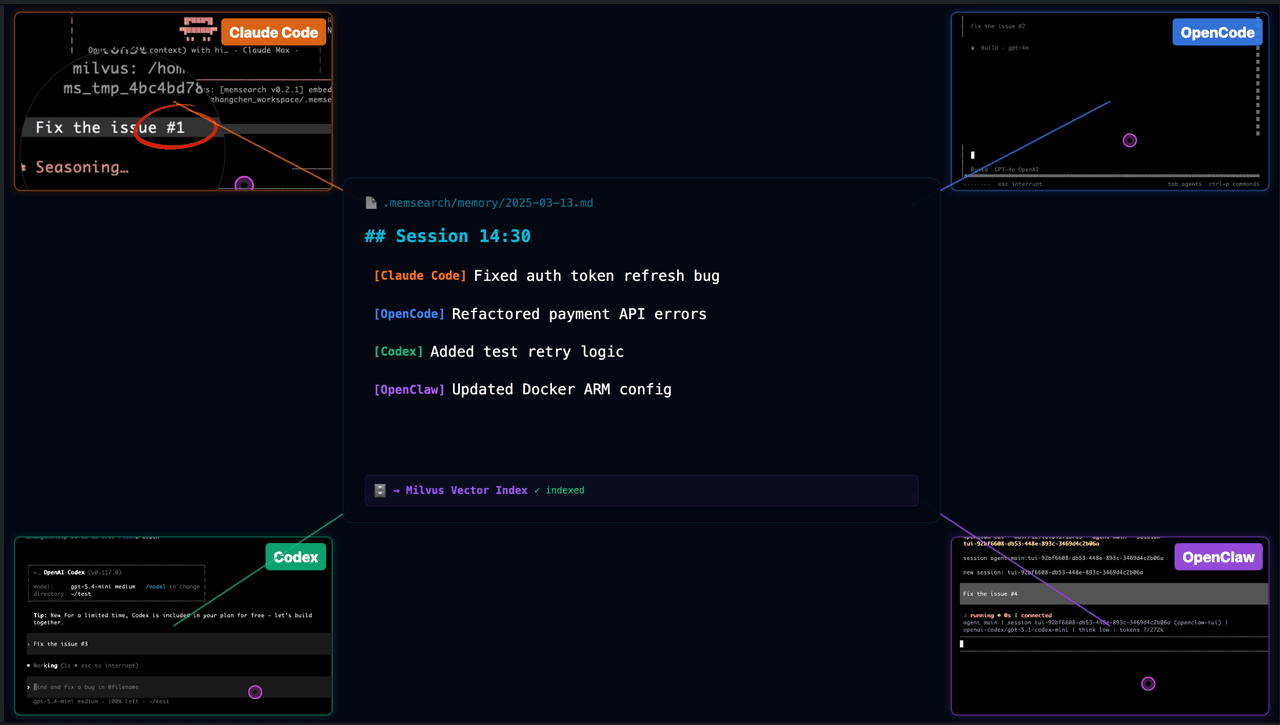
Two real scenarios:
Switching tools. You spend an afternoon in Claude Code figuring out the deploy pipeline, hitting several snags. Conversations get auto-summarized and indexed. The next day you switch to OpenCode and ask “how did we resolve that port conflict yesterday?” OpenCode searches memsearch, finds yesterday’s Claude Code memories, and gives you the right answer.
Team collaboration. Point the Milvus backend at Zilliz Cloud and multiple developers on different machines, using different agents, read and write the same project memory. A new team member joins and doesn’t need to dig through months of Slack and docs — the agent already knows.
Developer API
If you’re building your own agent tooling, memsearch provides a CLI and Python API.
CLI:
# Index markdown files
memsearch index ./memory

# Search memories
memsearch search "Redis port conflict"

# Expand a specific memory's full content
memsearch expand a3f8c1

# Watch for file changes, auto-index
memsearch watch ./memory

# Compact old memories
memsearch compact
Python API:
from memsearch import MemSearch

mem = MemSearch(paths=["./memory"])
await mem.index()                          # index markdown
results = await mem.search("Redis config") # hybrid search
await mem.compact()                        # compact old memories
await mem.watch()                          # auto-index on file change
Under the hood, Milvus handles vector search. Run locally with Milvus Lite (zero config), collaborate via Zilliz Cloud (free tier available), or self-host with Docker. Embeddings default to ONNX — runs on CPU, no GPU needed. Swap in OpenAI or Ollama any time.
Claude Code Memory vs. memsearch: Full Comparison
| Feature | Claude Code memory | memsearch |
|---|---|---|
| What gets saved | What Claude considers important | Every conversation, auto-summarized |
| Storage limit | ~200-line index (~25 KB) | Unlimited (daily files + vector index) |
| Finding old memories | Grep keyword matching | Meaning-based + keyword hybrid search (Milvus) |
| Can you read them? | Check memory folder manually | Open any .md file |
| Can you edit them? | Edit files by hand | Same — auto re-indexes on save |
| Version control | Not designed for it | git works natively |
| Cross-tool support | Claude Code only | 4 agents, shared memory |
| Long-term recall | Degrades after weeks | Persistent across months |
Get Started with memsearch
Claude Code’s memory has real strengths — the self-skeptical design, the dream consolidation concept, and the 15-second blocking budget in KAIROS. Anthropic is thinking hard about this problem.
But single-tool memory has a ceiling. Once your workflow spans multiple agents, multiple people, or more than a few weeks of history, you need memory that exists on its own.
- Try memsearch — open source, MIT licensed. Install in Claude Code with two commands.
- Read how memsearch works under the hood or the Claude Code plugin guide.
- Got questions? Join the Milvus Discord community or book a free Office Hours session to walk through your use case.
Frequently Asked Questions
How does Claude Code’s memory system work under the hood?
Claude Code uses a four-layer memory architecture, all stored as local Markdown files. CLAUDE.md is a static rules file you write manually. Auto Memory lets Claude save its own notes during sessions, organized into four categories — user preferences, feedback, project context, and reference pointers. Auto Dream consolidates stale memories in the background. KAIROS is an unreleased always-on daemon found in the leaked source code. The entire system is capped at a 200-line index and searchable only by exact keyword matching — no semantic search or meaning-based recall.
Can AI coding agents share memory across different tools?
Not natively. Claude Code’s memory is locked to Claude Code — there’s no export format or cross-agent protocol. If you switch to OpenCode, Codex CLI, or OpenClaw, you start from scratch. memsearch solves this by storing memories as dated Markdown files indexed in a vector database (Milvus). All four supported agents read and write the same memory store, so context transfers automatically when you switch tools.
What is the difference between keyword search and semantic search for agent memory?
Keyword search (grep) matches exact strings — if your memory says “docker-compose port mapping” but you search “port conflicts,” it returns nothing. Semantic search converts text into vector embeddings that capture meaning, so related concepts match even with different wording. memsearch combines both approaches with hybrid search, giving you meaning-based recall and exact keyword precision in a single query.
What was leaked in the Claude Code source code incident?
Version 2.1.88 of Claude Code shipped with a 59.8 MB source map file that should have been stripped from the production build. The file contained the complete, readable TypeScript codebase — roughly 512,000 lines — including the full memory system implementation, the Auto Dream consolidation process, and references to KAIROS, an unreleased always-on agent mode. The code was quickly mirrored across GitHub before it could be taken down.
- How Does CLAUDE.md Work?
- How Does Auto Memory Work?
- How Does Auto Dream Consolidate Stale Memories?
- What Is KAIROS? Claude Code's Unreleased Always-On Mode
- Where Does Claude Code's Memory Architecture Break Down?
- What Is memsearch? Persistent Memory for Any AI Coding Agent
- How Does memsearch Find Memories? Semantic Search vs. Grep
- How Does memsearch Share Memory Across AI Coding Agents?
- Developer API
- Claude Code Memory vs. memsearch: Full Comparison
- Get Started with memsearch
- Frequently Asked Questions
On This Page
Try Managed Milvus for Free
Zilliz Cloud is hassle-free, powered by Milvus and 10x faster.
Get StartedLike the article? Spread the word