We Extracted OpenClaw’s Memory System and Open-Sourced It (memsearch)
OpenClaw (previously clawdbot and moltbot) is going viral — 189k+ GitHub stars in under two weeks. That’s insane. Most of the buzz is around its autonomous, agentic capabilities across everyday chat channels, including iMessages, WhatsApp, Slack, Telegram, and more.
But as engineers working on a vector database system, what really caught our attention was OpenClaw’s approach to long-term memory. Unlike most memory systems out there, OpenClaw has its AI automatically write daily logs as Markdown files. Those files are the source of truth, and the model only “remembers” what gets written to disk. Human developers can open those markdown files, edit them directly, distill long-term principles, and see exactly what the AI remembers at any point. No black boxes. Honestly, it’s one of the cleanest and most developer-friendly memory architectures we’ve seen.
So naturally, we had a question: why should this only work inside OpenClaw? What if any agent could have memory like this? We took the exact memory architecture from OpenClaw and built memsearch — a standalone, plug-and-play long-term memory library that gives any agent persistent, transparent, human-editable memory. No dependency on the rest of OpenClaw. Just drop it in, and your agent gets durable memory with search powered by Milvus/Zilliz Cloud, plus Markdown logs as the canonical source of truth.
GitHub Repo: github.com/zilliztech/memsearch (open-source, MIT license)
Documentation: https://zilliztech.github.io/memsearch/
Claude code plugin: https://zilliztech.github.io/memsearch/claude-plugin/
What Makes OpenClaw’s Memory Different
Before diving into the OpenClaw memory architecture, let’s get two concepts straight: context and memory. They sound similar but work very differently in practice.
Context is everything the agent sees in a single request — system prompts, project-level guidance files like
AGENTS.mdandSOUL.md, conversation history (messages, tool calls, compressed summaries), and the user’s current message. It’s scoped to one session and relatively compact.Memory is what persists across sessions. It lives on your local disk — the full history of past conversations, files the agent has worked with, and user preferences. Not summarized. Not compressed. The raw stuff.
Now here’s the design decision that makes OpenClaw’s approach special: all memory is stored as plain Markdown files on the local filesystem. After each session, the AI writes updates to those Markdown logs automatically. You—and any developer—can open them, edit them, reorganize them, delete them, or refine them. Meanwhile, the vector database sits alongside this system, creating and maintaining an index for retrieval. Whenever a Markdown file changes, the system detects the change and re-indexes it automatically.
If you’ve used tools like Mem0 or Zep, you’ll notice the difference immediately. Those systems store memories as embeddings — that’s the only copy. You can’t read what your agent remembers. You can’t fix a bad memory by editing a row. OpenClaw’s approach gives you both: the transparency of plain files and the retrieval power of vector search using a vector database. You can read it, git diff it, grep it — it’s just files.
The only downside? Right now this Markdown-first memory system is tightly intertwined with the full OpenClaw ecosystem—the Gateway process, platform connectors, workspace configuration, and messaging infrastructure. If you only want the memory model, that’s a lot of machinery to drag in.
Which is exactly why we built memsearch: the same philosophy—Markdown as source of truth, automatic vector indexing, fully human-editable—but delivered as a lightweight, standalone library you can drop into any agentic architecture.
How Memsearch Works
As mentioned earlier, memsearch is a fully independent long-term memory library that implements the same memory architecture used in OpenClaw—without bringing along the rest of the OpenClaw stack. You can plug it into any agent framework (Claude, GPT, Llama, custom agents, workflow engines) and instantly give your system persistent, transparent, human-editable memory.
All agent memory in memsearch is stored as plain-text Markdown in a local directory. The structure is intentionally simple so developers can understand it at a glance:
~/your-project/
└── memory/
    ├── MEMORY.md              # Hand-written long-term memory
    ├── 2026-02-09.md          # Today's work log
    ├── 2026-02-08.md
    └── 2026-02-07.md
Memsearch uses Milvus as the vector database to index these Markdown files for fast semantic retrieval. But crucially, the vector index is not the source of truth—the files are. If you delete the Milvus index entirely, you lose nothing. Memsearch simply re-embeds and re-indexes the Markdown files, rebuilding the full retrieval layer in a few minutes. This means your agent’s memory is transparent, durable, and fully reconstructable.
Here are the core capabilities of memsearch:
Readable Markdown Makes Debugging as Simple as Editing a File
Debugging AI memory is usually painful. When an agent produces a wrong answer, most memory systems give you no clear way to see what it actually stored. The typical workflow is writing custom code to query a memory API, then sifting through opaque embeddings or verbose JSON blobs—neither of which tell you much about the AI’s real internal state.
memsearch eliminates that entire class of problems. All memory lives in the memory/ folder as plain Markdown:
## Morning
- Fixed N+1 query issue — switched to selectinload()
- Query count dropped from 152 to 3
If the AI gets something wrong, fixing it is as simple as editing the file. Update the entry, save, and memsearch automatically re-indexes the change. Five seconds. No API calls. No tooling. No mystery. You debug AI memory the same way you debug documentation—by editing a file.
Git-Backed Memory Means Teams Can Track, Review, and Roll Back Changes
AI memory that lives in a database is hard to collaborate on. Figuring out who changed what and when means digging through audit logs, and many solutions do not even provide those. Changes happen silently, and disagreements about what the AI should remember have no clear resolution path. Teams end up relying on Slack messages and assumptions.
Memsearch fixes this problem by making memory just Markdown files—which means Git handles versioning automatically. A single command shows the entire history:
git log memory/MEMORY.md
git diff HEAD~1 memory/2026-02-09.md
Now AI memory participates in the same workflow as code. Architecture decisions, configuration updates, and preference changes all appear in diffs that anyone can comment on, approve, or revert:
+ ## Architecture Decision
+ - Use Kafka for event bus instead of RabbitMQ
+ - Reason: better horizontal scaling
Plaintext Memory Makes Migration Nearly Effortless
Migration is one of the biggest hidden costs of memory frameworks. Moving from one tool to another usually means exporting data, converting formats, re-importing, and hoping the fields are compatible. That kind of work can easily eat half a day, and the result is never guaranteed.
memsearch avoids the problem entirely because memory is plaintext Markdown. There is no proprietary format, no schema to translate, nothing to migrate:
Switch machines:
rsyncthe memory folder. Done.Switch embedding models: Re-run the index command. It’ll take five minutes, and markdown files stay untouched.
Switch vector database deployment: Change one config value. For example, going from Milvus Lite in development to Zilliz Cloud in production:
# Development
ms = MemSearch(milvus_uri="~/.memsearch/milvus.db")

# Production (change only this line)
ms = MemSearch(milvus_uri="https://xxx.zillizcloud.com")
Your memory files stay exactly the same. The infrastructure around them can evolve freely. The result is long-term portability—a rare property in AI systems.
Shared Markdown Files Let Humans and Agents Co-Author Memory
In most memory solutions, editing what the AI remembers requires writing code against an API. That means only developers can maintain AI memory, and even for them, it is cumbersome.
Memsearch enables a more natural division of responsibility:
AI handles: Automatic daily logs (
YYYY-MM-DD.md) with execution details like “deployed v2.3.1, 12% performance improvement.”Humans handle: Long-term principles in
MEMORY.md, like “Team stack: Python + FastAPI + PostgreSQL.”
Both sides edit the same Markdown files with whatever tools they already use. No API calls, no special tooling, no gatekeeper. When memory is locked inside a database, this kind of shared authorship is not possible. memsearch makes it the default.
Under the Hood: memsearch Runs on Four Workflows That Keep Memory Fast, Fresh, and Lean
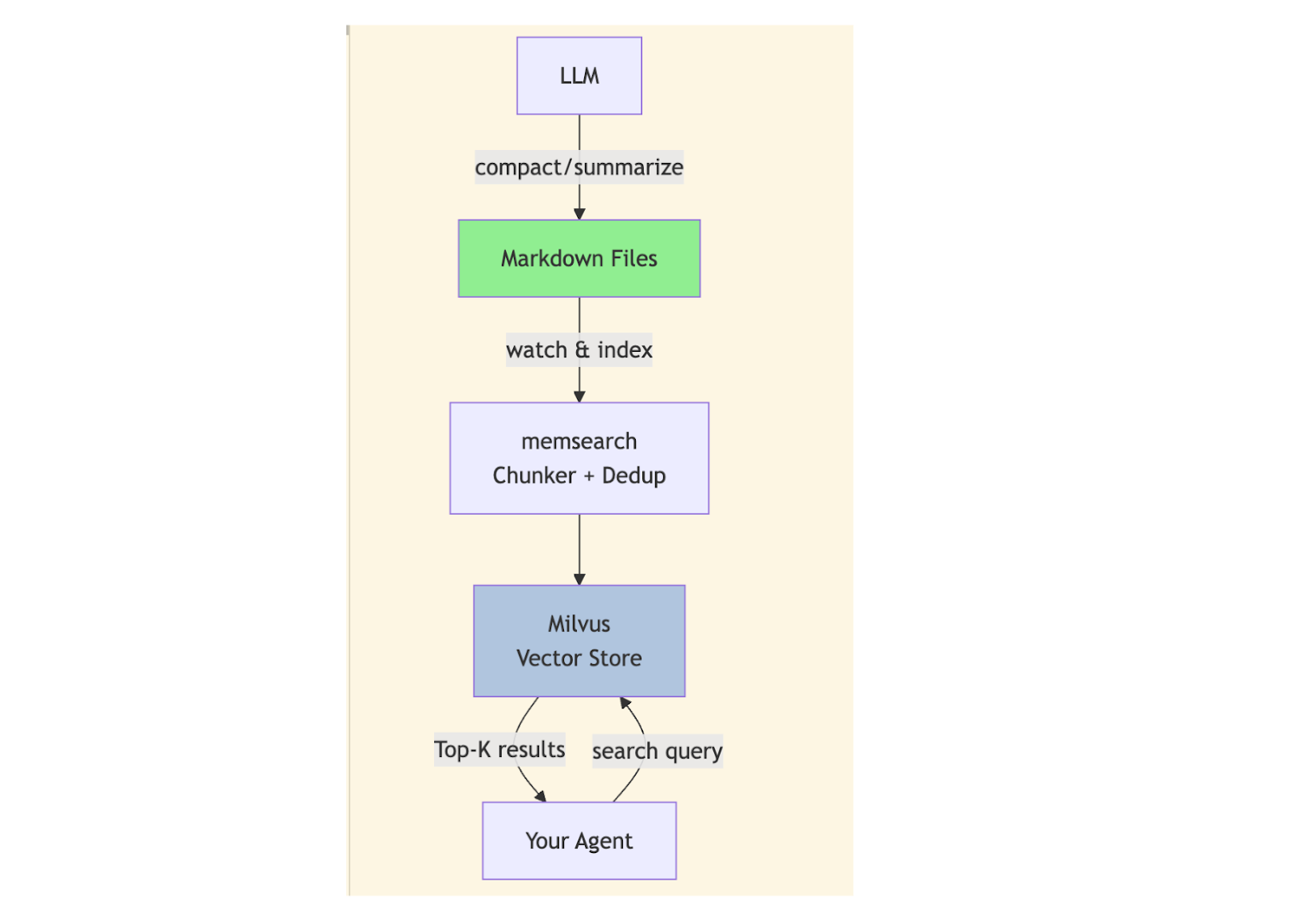
memsearch has four core workflows: Watch (monitor) → Index (chunk and embed) → Search (retrieve) → Compact (summarize). Here is what each one does.
1. Watch: Automatically Re-Index on Every File Save
The Watch workflow monitors all Markdown files in the memory/ directory and triggers a re-index whenever a file is modified and saved. A 1500ms debounce ensures updates are detected without wasting compute: if multiple saves occur in quick succession, the timer resets and fires only when edits have stabilized.
That delay is empirically tuned:
100ms → too sensitive; fires on every keystroke, burning embedding calls
10s → too slow; developers notice lag
1500ms → ideal balance of responsiveness and resource efficiency
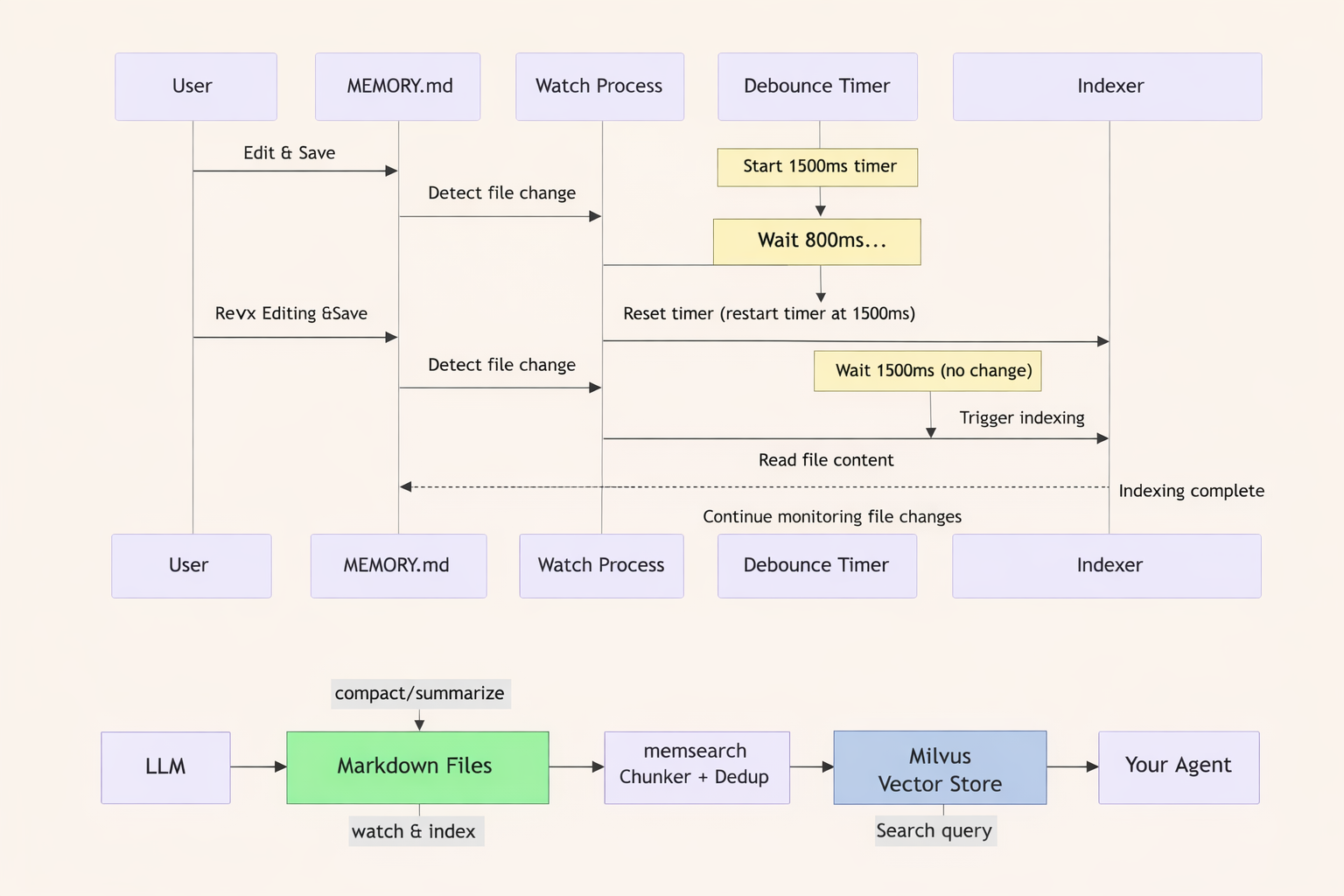
In practice, this means a developer can write code in one window and edit MEMORY.md in another, adding an API docs URL or correcting an outdated entry. Save the file, and the next AI query picks up the new memory. No restart, no manual re-index.
2. Index: Smart Chunking, Deduplication, and Version-Aware Embeddings
Index is the performance-critical workflow. It handles three things: chunking, deduplication, and versioned chunk IDs.
Chunking splits text along semantic boundaries—headings and their bodies—so related content stays together. This avoids cases where a phrase like “Redis configuration” gets split across chunks.
For example, this Markdown:
## Redis Caching
We use Redis for L1 cache with 5min TTL.
The connection pool is configured with max 100 connections.

## Database
PostgreSQL 16 is the primary database.
Becomes two chunks:
Chunk 1:
## Redis Caching\nWe use Redis for L1 cache...Chunk 2:
## Database\nPostgreSQL 16 is the primary database.
Deduplication uses a SHA-256 hash of each chunk to avoid embedding the same text twice. If multiple files mention “PostgreSQL 16,” the embedding API is called once, not once per file. For ~500KB of text, this saves around $0.15/month. At scale, that adds up to hundreds of dollars.
Chunk ID design encodes everything needed to know whether a chunk is stale. The format is hash(source_path:start_line:end_line:content_hash:model_version). The model_version field is the important part: when an embedding model is upgraded from text-embedding-3-small to text-embedding-3-large, the old embeddings become invalid. Because the model version is baked into the ID, the system automatically identifies which chunks need re-embedding. No manual cleanup required.
3. Search: Hybrid Vector + BM25 Retrieval for Maximum Accuracy
Retrieval uses a hybrid search approach: vector search weighted at 70% and BM25 keyword search weighted at 30%. This balances two different needs that arise frequently in practice.
Vector search handles semantic matching. A query for “Redis cache config” returns a chunk containing “Redis L1 cache with 5min TTL” even though the wording is different. This is useful when the developer remembers the concept but not the exact phrasing.
BM25 handles exact matching. A query for “PostgreSQL 16” does not return results about “PostgreSQL 15.” This matters for error codes, function names, and version-specific behavior, where close is not good enough.
The default 70/30 split works well for most use cases. For workflows that lean heavily toward exact matches, raising the BM25 weight to 50% is a one-line configuration change.
Results are returned as top-K chunks (default 3), each truncated to 200 characters. When the full content is needed, memsearch expand <chunk_hash> loads it. This progressive disclosure keeps LLM context window usage lean without sacrificing access to detail.
4. Compact: Summarize Historical Memory to Keep Context Clean
Accumulated memory eventually becomes a problem. Old entries fill the context window, increase token costs, and add noise that degrades answer quality. Compact addresses this by calling an LLM to summarize historical memory into a condensed form, then deleting or archiving the originals. It can be triggered manually or scheduled to run on a regular interval.
How to get started with memsearch
Memsearch provides both a Python API and a CLI, so you can use it inside agent frameworks or as a standalone debugging tool. Setup is minimal, and the system is designed so your local development environment and production deployment look almost identical.
Memsearch supports three Milvus-compatible backends, all exposed through the same API:
Milvus Lite (default): Local
.dbfile, zero configuration, suited for individual use.Milvus Standalone / Cluster: Self-hosted, supports multiple agents sharing data, suited for team environments.
Zilliz Cloud: Fully managed, with auto-scaling, backups, high availability, and isolation. Ideal for production workloads.
Switching from local development to production is typically a one-line config change. Your code stays the same.
Install
pip install memsearch
memsearch also supports multiple embedding providers, including OpenAI, Google, Voyage, Ollama, and local models. This ensures your memory architecture stays portable and vendor-agnostic.
Option 1: Python API (integrated into your agent framework)
Here is a minimal example of a full agent loop using memsearch. You can copy/paste and modify as needed:
from openai import OpenAI
from memsearch import MemSearch

llm = OpenAI()
ms = MemSearch(paths=["./memory/"])

async def agent_chat(user_input: str) -> str:
    # 1. Recall — search relevant memories
    memories = await ms.search(user_input, top_k=3)
    context = "\n".join(f"- {m['content'][:200]}" for m in memories)

    # 2. Think — call LLM
    resp = llm.chat.completions.create(
        model="gpt-4o-mini",
        messages=[
            {"role": "system", "content": f"Memories:\n{context}"},
            {"role": "user", "content": user_input},
        ],
    )

    # 3. Remember — write to markdown, update index
    save_memory(f"## {user_input}\n{resp.choices[0].message.content}")
    await ms.index()
    return resp.choices[0].message.content
This shows the core loop:
Recall: memsearch performs hybrid vector + BM25 retrieval
Think: your LLM processes the user input + retrieved memory
Remember: the agent writes new memory to Markdown, and memsearch updates its index
This pattern fits naturally into any agent system—LangChain, AutoGPT, semantic routers, LangGraph, or custom agent loops. It’s framework-agnostic by design.
Option 2: CLI (quick operations, good for debugging)
The CLI is ideal for standalone workflows, quick checks, or inspecting memory during development:
memsearch index ./docs/              # Index files
memsearch search "Redis caching"     # Search
memsearch watch ./docs/              # Watch for file changes
memsearch compact                    # Compact old memory
The CLI mirrors the Python API’s capabilities but works without writing any code—great for debugging, inspections, migrations, or validating your memory folder structure.
How memsearch Compares to Other Memory Solutions
The most common question developers ask is why they would use memsearch when established options already exist. The short answer: memsearch trades advanced features like temporal knowledge graphs for transparency, portability, and simplicity. For most agent memory use cases, that is the right tradeoff.
| Solution | Strengths | Limitations | Best For |
|---|---|---|---|
| memsearch | Transparent plaintext memory, human-AI co-authoring, zero migration friction, easy debugging, Git-native | No built-in temporal graphs or complex multi-agent memory structures | Teams that value control, simplicity, and portability in long-term memory |
| Mem0 | Fully managed, no infrastructure to run or maintain | Opaque—cannot inspect or manually edit memory; embeddings are the only representation | Teams that want a hands-off managed service and are okay with less visibility |
| Zep | Rich feature set: temporal memory, multi-persona modeling, complex knowledge graphs | Heavy architecture; more moving pieces; harder to learn and operate | Agents that truly need advanced memory structures or time-aware reasoning |
| LangMem / Letta | Deep, seamless integration inside their own ecosystems | Framework lock-in; hard to port to other agent stacks | Teams already committed to those specific frameworks |
Try memsearch and let us know your feedback
Memsearch is fully open source under the MIT license, and the repository is ready for production experiments today.
If you are building an agent that needs to remember things across sessions and want full control over what it remembers, memsearch is worth a look. The library installs with a single pip install, works with any agent framework, and stores everything as Markdown that you can read, edit, and version with Git.
We are actively developing memsearch and would love input from the community.
Open an issue if something breaks.
Submit a PR if you want to extend the library.
Star the repo if the Markdown-as-source-of-truth philosophy resonates with you.
OpenClaw’s memory system is no longer locked inside OpenClaw. Now, anyone can use it.
Keep Reading
- What Makes OpenClaw's Memory Different
- How Memsearch Works
- Readable Markdown Makes Debugging as Simple as Editing a File
- Git-Backed Memory Means Teams Can Track, Review, and Roll Back Changes
- Plaintext Memory Makes Migration Nearly Effortless
- Shared Markdown Files Let Humans and Agents Co-Author Memory
- Under the Hood: memsearch Runs on Four Workflows That Keep Memory Fast, Fresh, and Lean
- 1. Watch: Automatically Re-Index on Every File Save
- 2. Index: Smart Chunking, Deduplication, and Version-Aware Embeddings
- 3. Search: Hybrid Vector + BM25 Retrieval for Maximum Accuracy
- 4. Compact: Summarize Historical Memory to Keep Context Clean
- How to get started with memsearch
- Install
- Option 1: Python API (integrated into your agent framework)
- Option 2: CLI (quick operations, good for debugging)
- How memsearch Compares to Other Memory Solutions
- Try memsearch and let us know your feedback
- Keep Reading
On This Page
Try Managed Milvus for Free
Zilliz Cloud is hassle-free, powered by Milvus and 10x faster.
Get StartedLike the article? Spread the word