How to Build Production-Ready Multi-Agent Systems with Agno and Milvus
If you’ve been building AI agents, you’ve probably hit this wall: your demo works great, but getting it into production is a whole different story.
We’ve covered agent memory management and reranking in earlier posts. Now let’s tackle the bigger challenge—building agents that actually hold up in production.
Here’s the reality: production environments are messy. A single agent rarely cuts it, which is why multi-agent systems are everywhere. But the frameworks available today tend to fall into two camps: lightweight ones that demo well but break under real load, or powerful ones that take forever to learn and build with.
I’ve been experimenting with Agno recently, and it seems to strike a reasonable middle ground—focused on production readiness without excessive complexity. The project has gained over 37,000 GitHub stars in a few months, suggesting other developers find it useful as well.
In this post, I’ll share what I learned while building a multi-agent system using Agno with Milvus as the memory layer. We’ll look at how Agno compares to alternatives such as LangGraph and walk through a complete implementation you can try yourself.
What Is Agno?
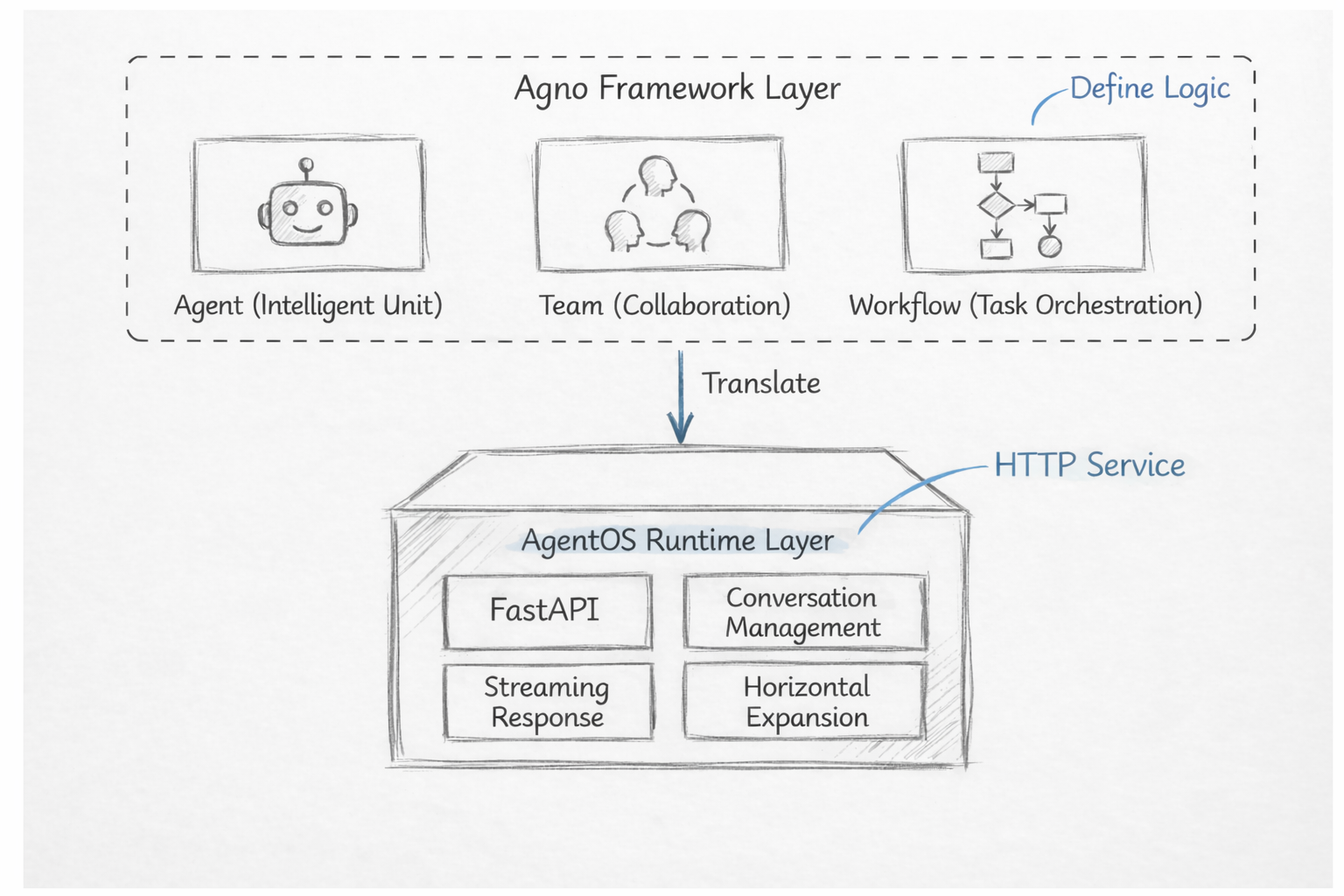
Agno is a multi-agent framework built specifically for production use. It has two distinct layers:
Agno framework layer: Where you define your agent logic
AgentOS runtime layer: Turns that logic into HTTP services you can actually deploy
Think of it this way: the framework layer defines what your agents should do, while AgentOS handles how that work gets executed and served.
The Framework Layer
This is what you work with directly. It introduces three core concepts:
Agent: Handles a specific type of task
Team: Coordinates multiple agents to solve complex problems
Workflow: Defines execution order and structure
One thing I appreciated: you don’t need to learn a new DSL or draw flowcharts. Agent behavior is defined using standard Python function calls. The framework handles LLM invocation, tool execution, and memory management.
The AgentOS Runtime Layer
AgentOS is designed for high request volumes through async execution, and its stateless architecture makes scaling straightforward.
Key features include:
Built-in FastAPI integration for exposing agents as HTTP endpoints
Session management and streaming responses
Monitoring endpoints
Horizontal scaling support
In practice, AgentOS handles most of the infrastructure work, which lets you focus on the agent logic itself.
A high-level view of Agno’s architecture is shown below.
Agno vs. LangGraph
To understand where Agno fits, let’s compare it with LangGraph—one of the most widely used multi-agent frameworks.
LangGraph uses a graph-based state machine. You model your entire agent workflow as a graph: steps are nodes, execution paths are edges. This works well when your process is fixed and strictly ordered. But for open-ended or conversational scenarios, it can feel restrictive. As interactions get more dynamic, maintaining a clean graph gets harder.
Agno takes a different approach. Instead of being a pure orchestration layer, it’s an end-to-end system. Define your agent behavior, and AgentOS automatically exposes it as a production-ready HTTP service—with monitoring, scalability, and multi-turn conversation support built in. No separate API gateway, no custom session management, no extra operational tooling.
Here’s a quick comparison:
| Dimension | LangGraph | Agno |
|---|---|---|
| Orchestration model | Explicit graph definition using nodes and edges | Declarative workflows defined in Python |
| State management | Custom state classes defined and managed by developers | Built-in memory system |
| Debugging & observability | LangSmith (paid) | AgentOS UI (open source) |
| Runtime model | Integrated into an existing runtime | Standalone FastAPI-based service |
| Deployment complexity | Requires additional setup via LangServe | Works out of the box |
LangGraph gives you more flexibility and fine-grained control. Agno optimizes for faster time-to-production. The right choice depends on your project stage, existing infrastructure, and the level of customization you need. If you’re unsure, running a small proof of concept with both is probably the most reliable way to decide.
Choosing Milvus for the Agent Memory Layer
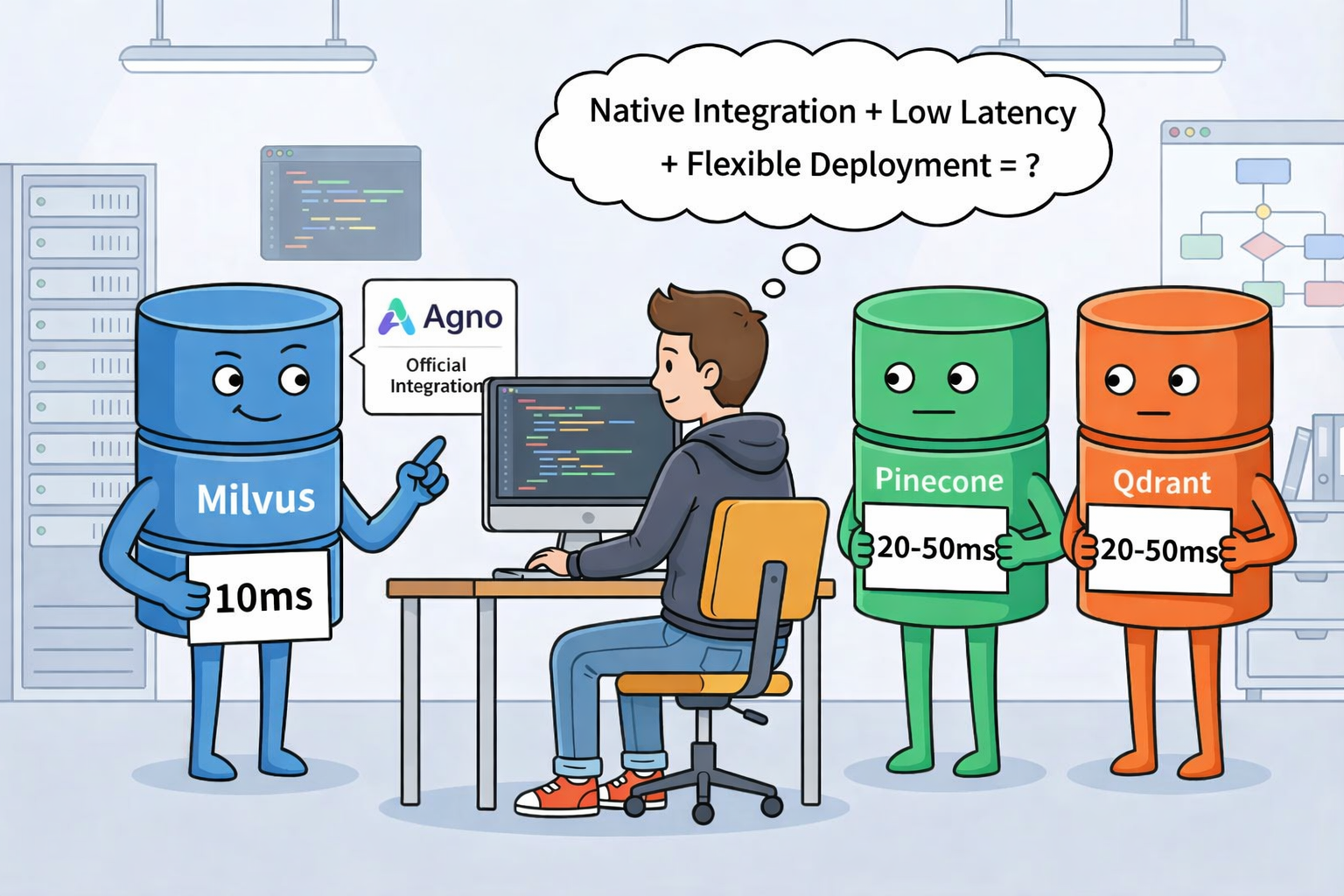
Once you’ve chosen a framework, the next decision is how to store memory and knowledge. We use Milvus for this. Milvus is the most popular open-source vector database built for AI workloads with more than 42,000+ GitHub stars.
Agno has native Milvus support. The agno.vectordb.milvus module wraps production features like connection management, automatic retries, batch writes, and embedding generation. You don’t need to build connection pools or handle network failures yourself—a few lines of Python give you a working vector memory layer.
Milvus scales with your needs. It supports three deployment modes:
Milvus Lite: Lightweight, file-based—great for local development and testing
Standalone: Single-server deployment for production workloads
Distributed: Full cluster for high-scale scenarios
You can start with Milvus Lite to validate your agent memory locally, then move to standalone or distributed as traffic grows—without changing your application code. This flexibility is especially useful when you’re iterating quickly in early stages but need a clear path to scale later.
Step-by-Step: Building a Production-Ready Agno Agent with Milvus
Let’s build a production-ready agent from scratch.
We’ll start with a simple single-agent example to show the full workflow. Then we’ll expand it into a multi-agent system. AgentOS will automatically package everything as a callable HTTP service.
1. Deploying Milvus Standalone with Docker
(1) Download the Deployment Files
**wget** **
<https://github.com/Milvus-io/Milvus/releases/download/v2.****5****.****12****/Milvus-standalone-docker-compose.yml> -O docker-compose.yml**
(2) Start the Milvus Service
docker-compose up -d
docker-compose ps -a

2. Core Implementation
import os
from pathlib import Path
from agno.os import AgentOS
from agno.agent import Agent
from agno.models.openai import OpenAIChat
from agno.knowledge.knowledge import Knowledge
from agno.vectordb.milvus import Milvus
from agno.knowledge.embedder.openai import OpenAIEmbedder
from agno.db.sqlite import SqliteDb
os.environ\["OPENAI_API_KEY"\] = "you-key-here"
data_dir = Path("./data")
data_dir.mkdir(exist_ok=True)
knowledge_base = Knowledge(
    contents_db=SqliteDb(
        db_file=str(data_dir / "knowledge_contents.db"),
        knowledge_table="knowledge_contents",
    ),
    vector_db=Milvus(
        collection="agno_knowledge",
        uri="http://192.168.x.x:19530",
        embedder=OpenAIEmbedder(id="text-embedding-3-small"),
    ),
)
*# Create Agent*
agent = Agent(
    name="Knowledge Assistant",
    model=OpenAIChat(id="gpt-4o"),
    instructions=\[
        "You are a knowledge base assistant that helps users query and manage knowledge base content.",
        "Answer questions in English.",
        "Always search the knowledge base before answering questions.",
        "If the knowledge base is empty, kindly prompt the user to upload documents."
    \],
    knowledge=knowledge_base,
    search_knowledge=True,
    db=SqliteDb(
        db_file=str(data_dir / "agent.db"),
        session_table="agent_sessions",
    ),
    add_history_to_context=True,
    markdown=True,
)
agent_os = AgentOS(agents=\[agent\])
app = agent_os.get_app()
if __name__ == "__main__":
    print("\n🚀 Starting service...")
    print("📍 http://localhost:7777")
    print("💡 Please upload documents to the knowledge base in the UI\n")
    agent_os.serve(app="knowledge_agent:app", port=7777, reload=False)
(1) Running the Agent
**python** **knowledge_agent.py**
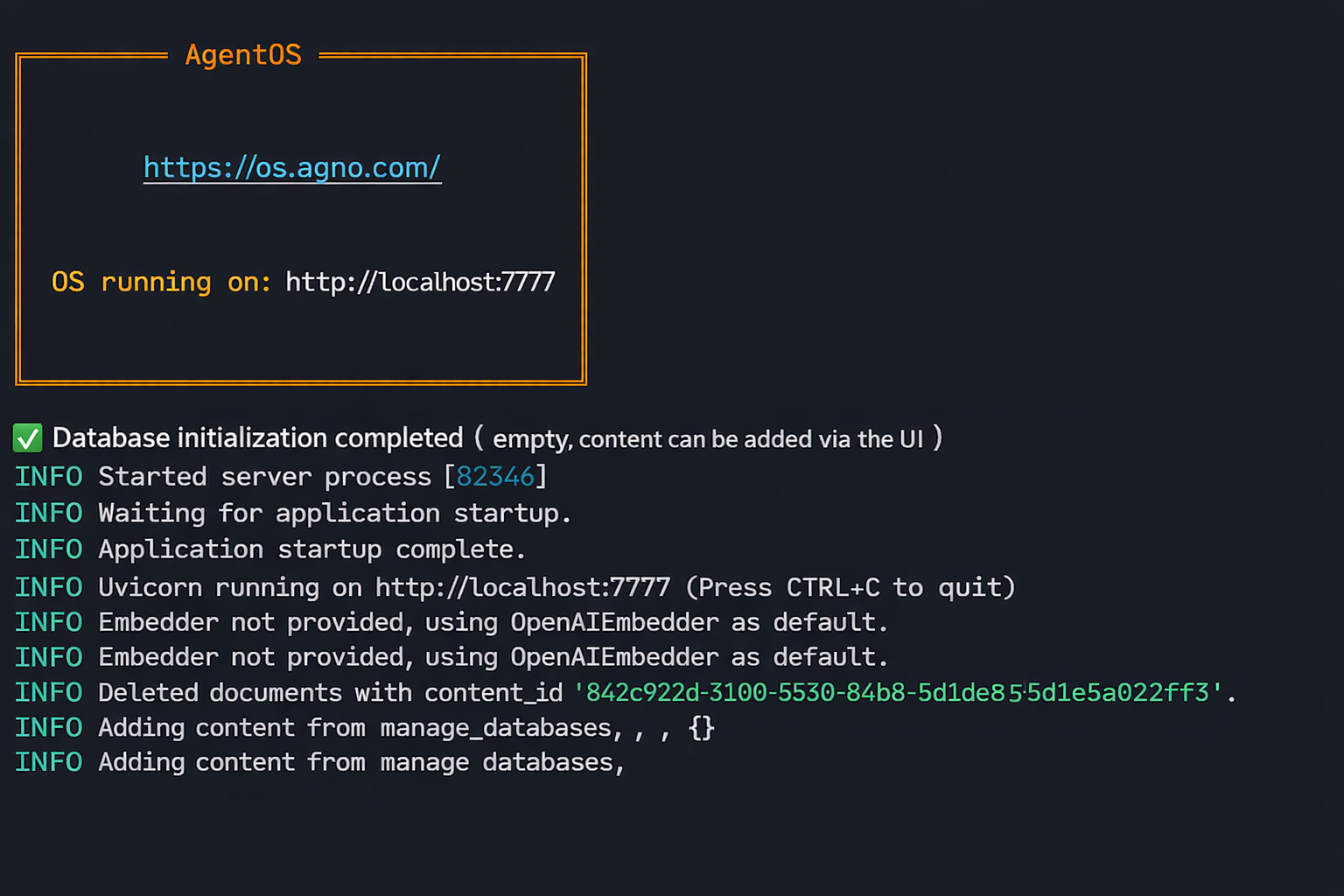
3. Connecting to the AgentOS Console
https://os.agno.com/
(1) Create an Account and Sign In
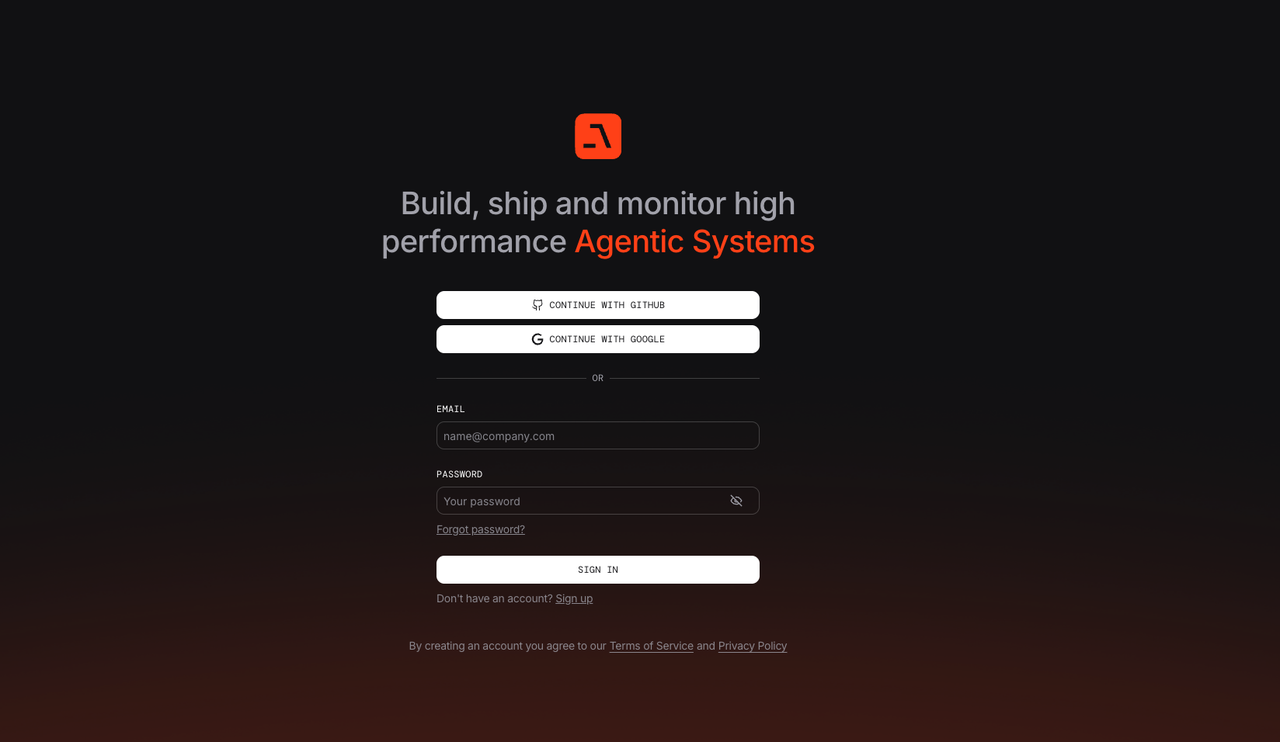
(2) Connect Your Agent to AgentOS
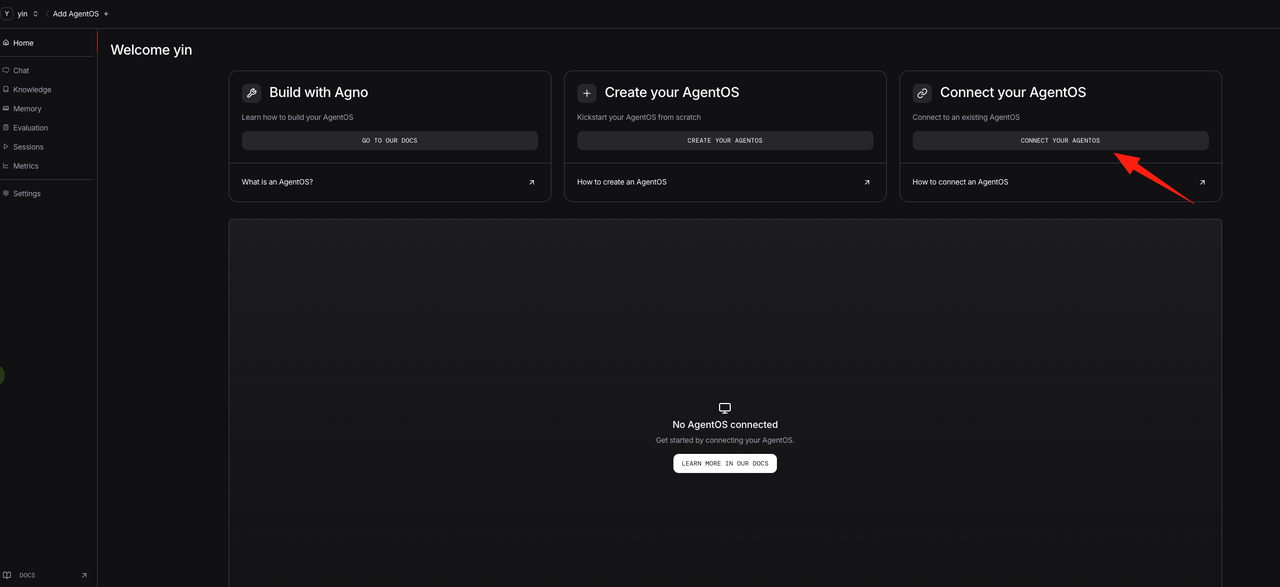
(3) Configure the Exposed Port and Agent Name
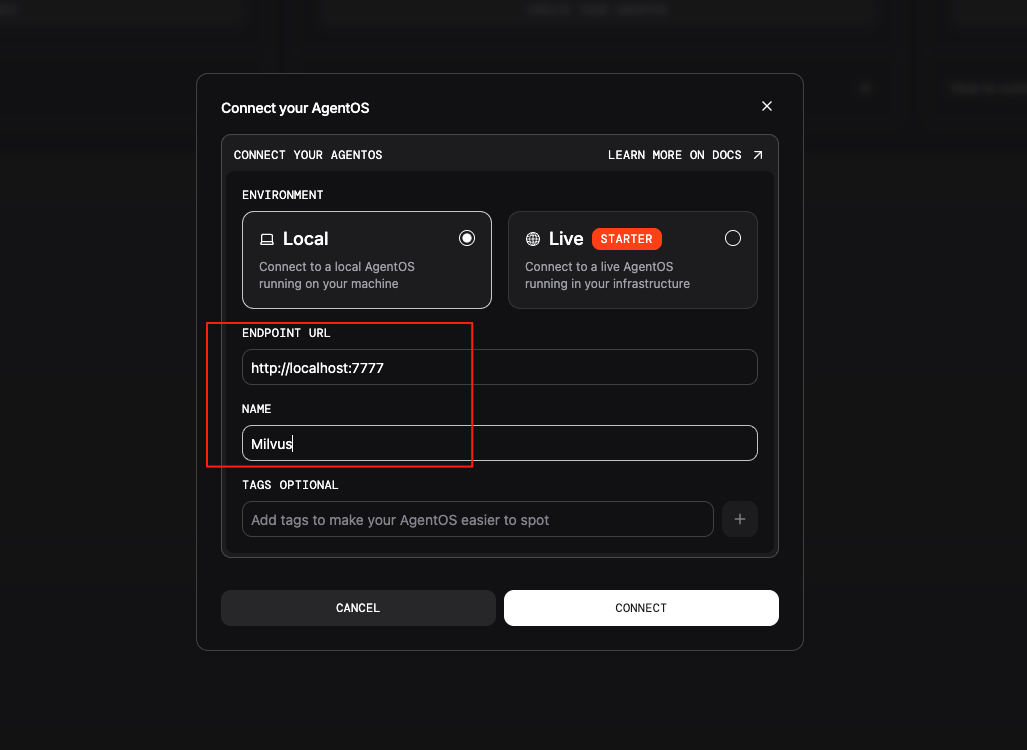
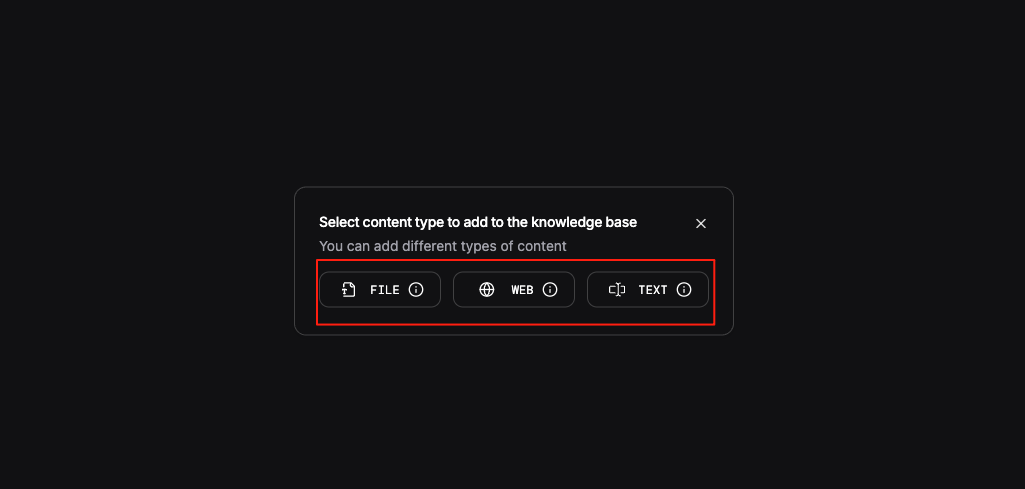
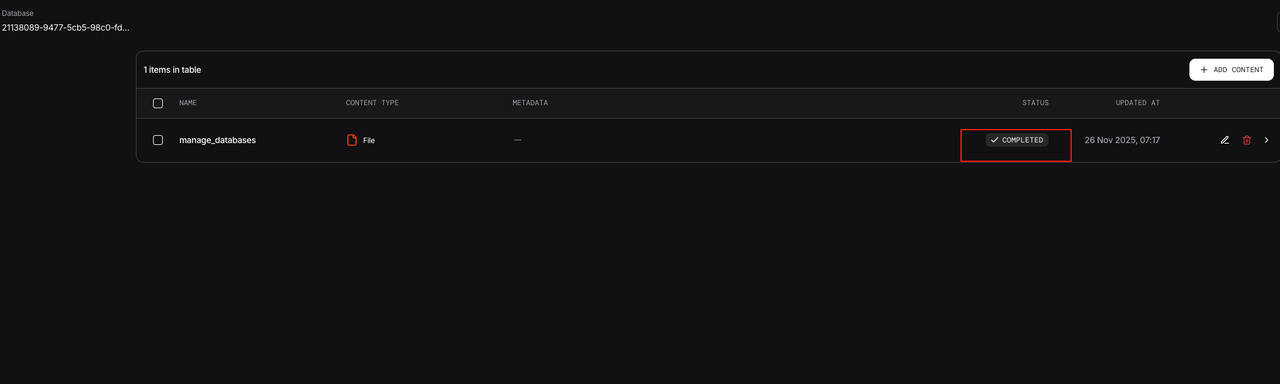
(4) Add Documents and Index Them in Milvus
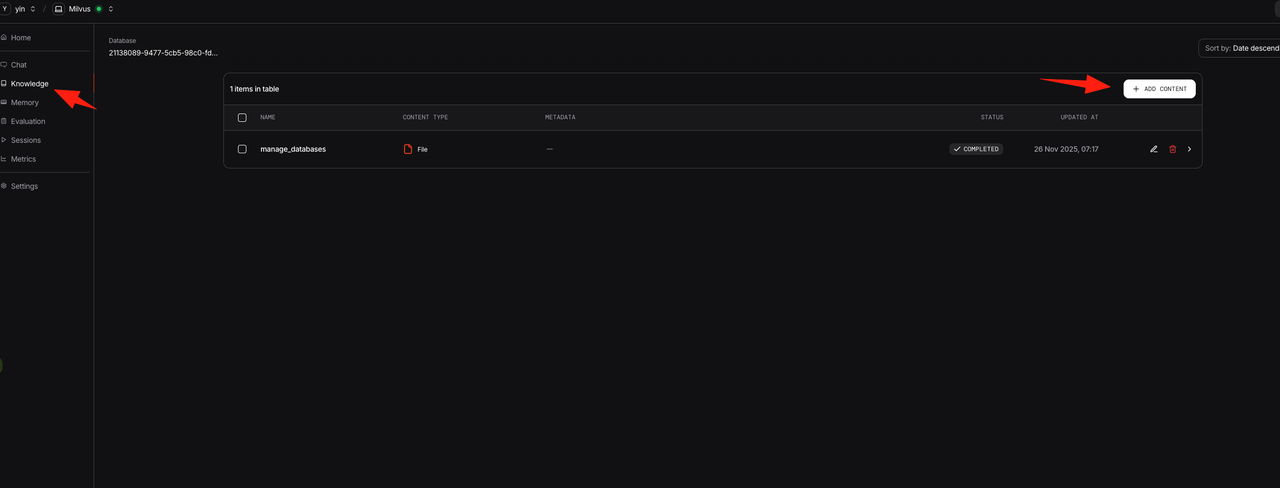
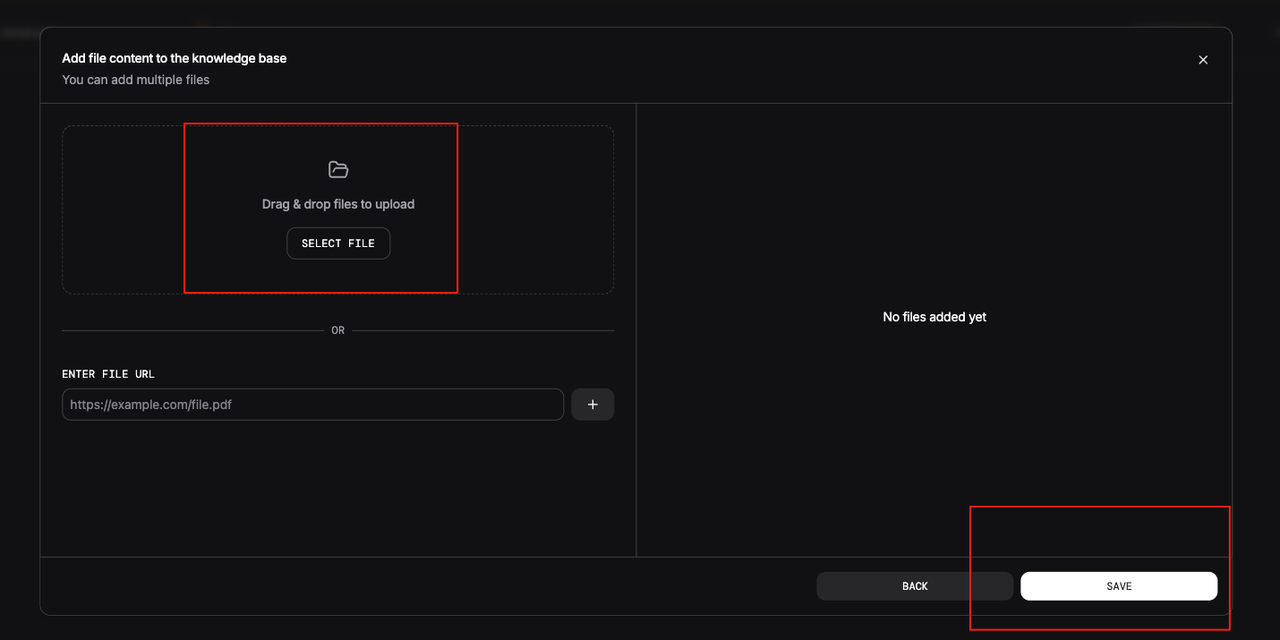
(5) Test the Agent End to End
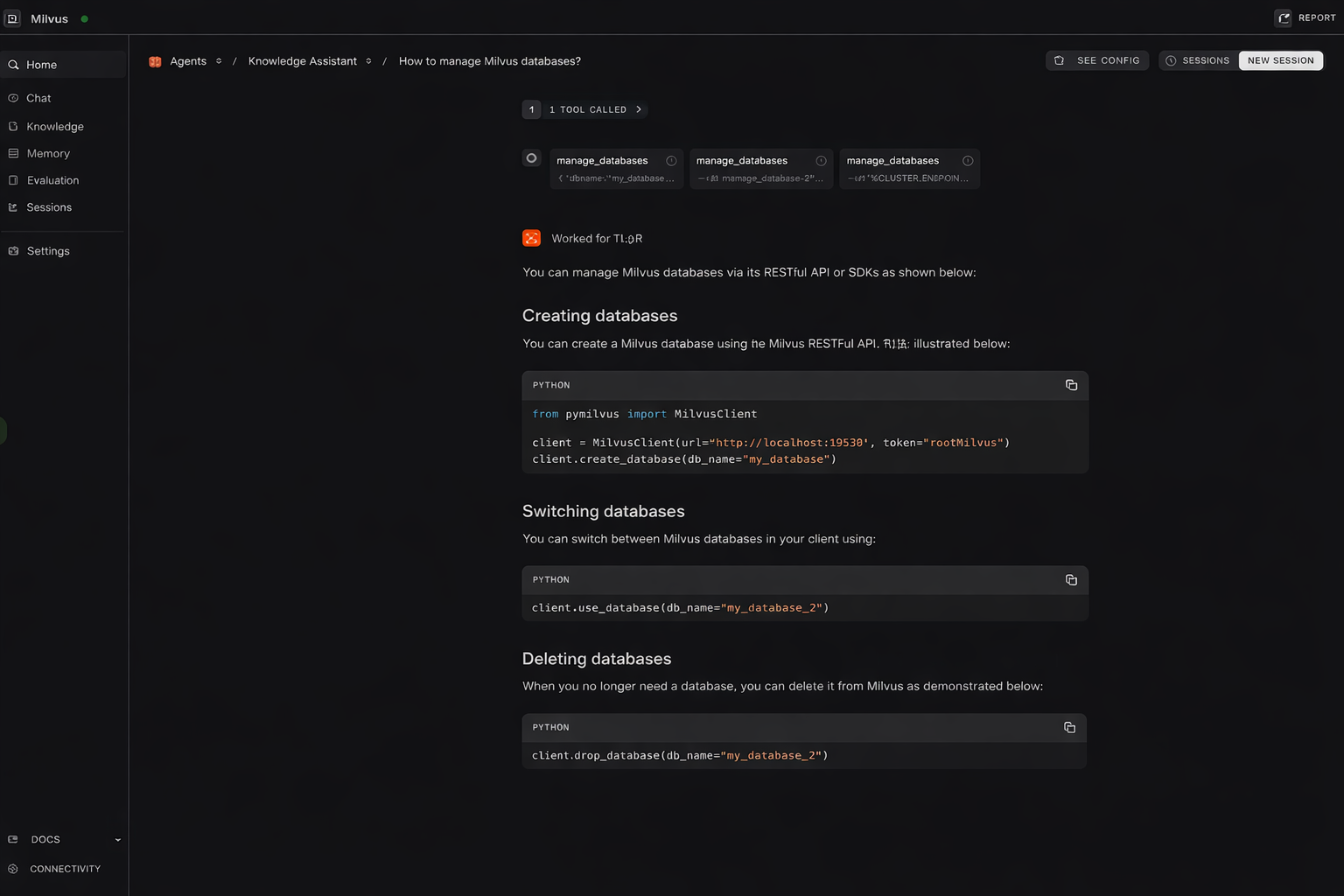
In this setup, Milvus handles high-performance semantic retrieval. When the knowledge-base assistant receives a technical question, it invokes the search_knowledge tool to embed the query, retrieves the most relevant document chunks from Milvus, and uses those results as the basis for its response.
Milvus offers three deployment options, allowing you to choose an architecture that fits your operational requirements while keeping the application-level APIs consistent across all deployment modes.
The demo above shows the core retrieval and generation flow. To move this design into a production environment, however, several architectural aspects need to be discussed in more detail.
How Retrieval Results Are Shared Across Agents
Agno’s Team mode has a share_member_interactions=True option that allows later agents to inherit the full interaction history of earlier agents. In practice, this means that when the first agent retrieves information from Milvus, subsequent agents can reuse those results instead of running the same search again.
The upside: Retrieval costs are amortized across the team. One vector search supports multiple agents, reducing redundant queries.
The downside: Retrieval quality gets amplified. If the initial search returns incomplete or inaccurate results, that error propagates to every agent that depends on it.
This is why retrieval accuracy matters even more in multi-agent systems. A bad retrieval doesn’t just degrade one agent’s response—it affects the entire team.
Here’s an example Team setup:
from agno.team import Team
analyst = Agent(
    name="Data Analyst",
    model=OpenAIChat(id="gpt-4o"),
    knowledge=knowledge_base,
    search_knowledge=True,
    instructions=\["Analyze data and extract key metrics"\]
)
writer = Agent(
    name="Report Writer",
    model=OpenAIChat(id="gpt-4o"),
    knowledge=knowledge_base,
    search_knowledge=True,
    instructions=\["Write reports based on the analysis results"\]
)
team = Team(
    agents=\[analyst, writer\],
    share_member_interactions=True,  *# Share knowledge retrieval results*
)
Why Agno and Milvus Are Layered Separately
In this architecture, Agno sits at the conversation and orchestration layer. It is responsible for managing dialogue flow, coordinating agents, and maintaining conversational state, with session history persisted in a relational database. The system’s actual domain knowledge—such as product documentation and technical reports—is handled separately and stored as vector embeddings in Milvus. This clear division keeps conversational logic and knowledge storage fully decoupled.
Why this matters operationally:
Independent scaling: As Agno demand grows, add more Agno instances. As query volume grows, expand Milvus by adding query nodes. Each layer scales in isolation.
Different hardware needs: Agno is CPU- and memory-bound (LLM inference, workflow execution). Milvus is optimized for high-throughput vector retrieval (disk I/O, sometimes GPU acceleration). Separating them prevents resource contention.
Cost optimization: You can tune and allocate resources for each layer independently.
This layered approach gives you a more efficient, resilient, and production-ready architecture.
What to Monitor When Using Agno with Milvus
Agno has built-in evaluation capabilities, but adding Milvus expands what you should watch. Based on our experience, focus on three areas:
Retrieval quality: Are the documents Milvus returns actually relevant to the query, or just superficially similar at the vector level?
Answer faithfulness: Is the final response grounded in the retrieved content, or is the LLM generating unsupported claims?
End-to-end latency breakdown: Don’t just track total response time. Break it down by stage—embedding generation, vector search, context assembly, LLM inference—so you can identify where slowdowns occur.
A practical example: When your Milvus collection grows from 1 million to 10 million vectors, you might notice retrieval latency creeping up. That’s usually a signal to tune index parameters (like nlist and nprobe) or consider moving from standalone to a distributed deployment.
Conclusion
Building production-ready agent systems takes more than wiring together LLM calls and retrieval demos. You need clear architectural boundaries, infrastructure that scales independently, and observability to catch issues early.
In this post, I walked through how Agno and Milvus can work together: Agno for multi-agent orchestration, Milvus for scalable memory and semantic retrieval. By keeping these layers separate, you can move from prototype to production without rewriting core logic—and scale each component as needed.
If you’re experimenting with similar setups, I’d be curious to hear what’s working for you.
Questions about Milvus? Join our Slack channel or book a 20-minute Milvus Office Hours session.
- What Is Agno?
- The Framework Layer
- The AgentOS Runtime Layer
- Agno vs. LangGraph
- Choosing Milvus for the Agent Memory Layer
- Step-by-Step: Building a Production-Ready Agno Agent with Milvus
- 1. Deploying Milvus Standalone with Docker
- 2. Core Implementation
- 3. Connecting to the AgentOS Console
- How Retrieval Results Are Shared Across Agents
- Why Agno and Milvus Are Layered Separately
- What to Monitor When Using Agno with Milvus
- Conclusion
On This Page
Try Managed Milvus for Free
Zilliz Cloud is hassle-free, powered by Milvus and 10x faster.
Get StartedLike the article? Spread the word