Is MCP Dead? What We Learned Building with MCP, CLI, and Agent Skills
When Perplexity’s CTO Denis Yarats said at ASK 2026 that the company was deprioritizing MCP internally, it set off the usual cycle. YC CEO Garry Tan piled on — MCP eats too much context window, auth is broken, he built a CLI replacement in 30 minutes. Hacker News ran strongly anti-MCP.
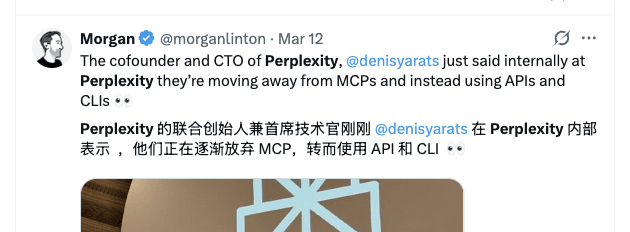
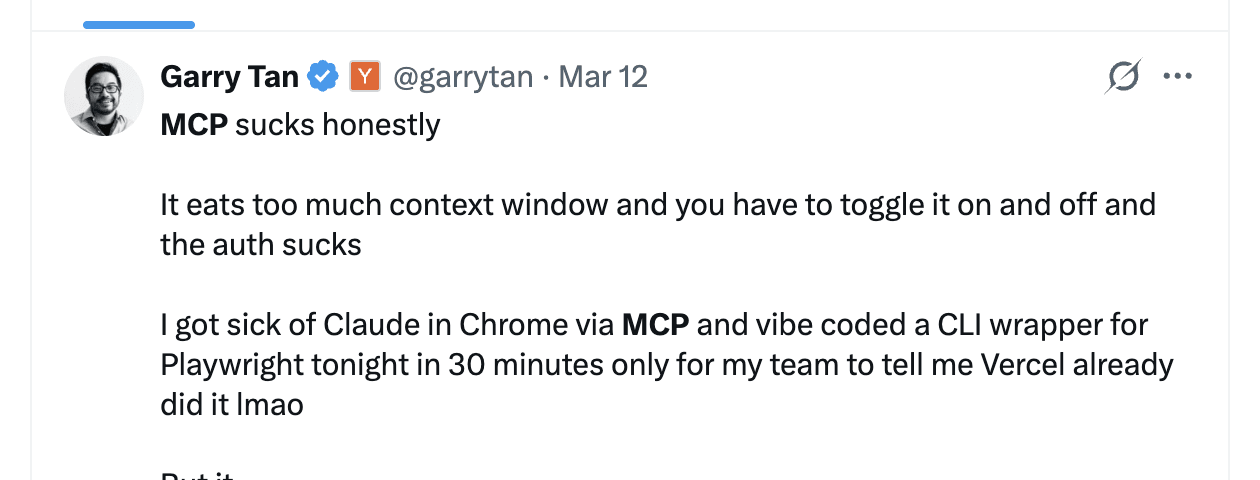
A year ago, this level of public skepticism would have been unusual. Model Context Protocol (MCP) was positioned as the definitive standard for AI agent tool integration. Server counts were doubling weekly. The pattern since then has followed a familiar arc: rapid hype, broad adoption, then production disillusionment.
The industry is responding fast. Bytedance’s Lark/Feishu open-sourced their official CLI — 200+ commands across 11 business domains with 19 built-in Agent Skills. Google shipped gws for Google Workspace. The CLI + Skills pattern is quickly becoming the default for enterprise agent tooling, not a niche alternative.
At Zilliz, we’ve released Zilliz CLI, which lets you operate and manage Milvus and Zilliz Cloud (fully managed Milvus) directly from your terminal without leaving your coding environment. On top of that, we built Milvus Skills and Zilliz Skills so that AI coding agents like Claude Code and Codex can manage your vector database through natural language.
We also built an MCP server for Milvus and Zilliz Cloud one year ago. That experience taught us exactly where MCP breaks down — and where it still fits. Three architectural limitations pushed us toward CLI and Skills: context window bloat, passive tool design, and the inability to reuse the agent’s own LLM.
In this post, we’ll walk through each problem, show what we’re building instead, and lay out a practical framework for choosing between MCP, CLI, and Agent Skills.
MCP Eats 72% of Your Context Window at Startup
A standard MCP setup can consume around 72% of your available context window before the agent takes a single action. Connect three servers — GitHub, Playwright, and an IDE integration — on a 200K-token model, and tool definitions alone occupy roughly 143K tokens. The agent hasn’t done anything yet. It’s already three-quarters full.
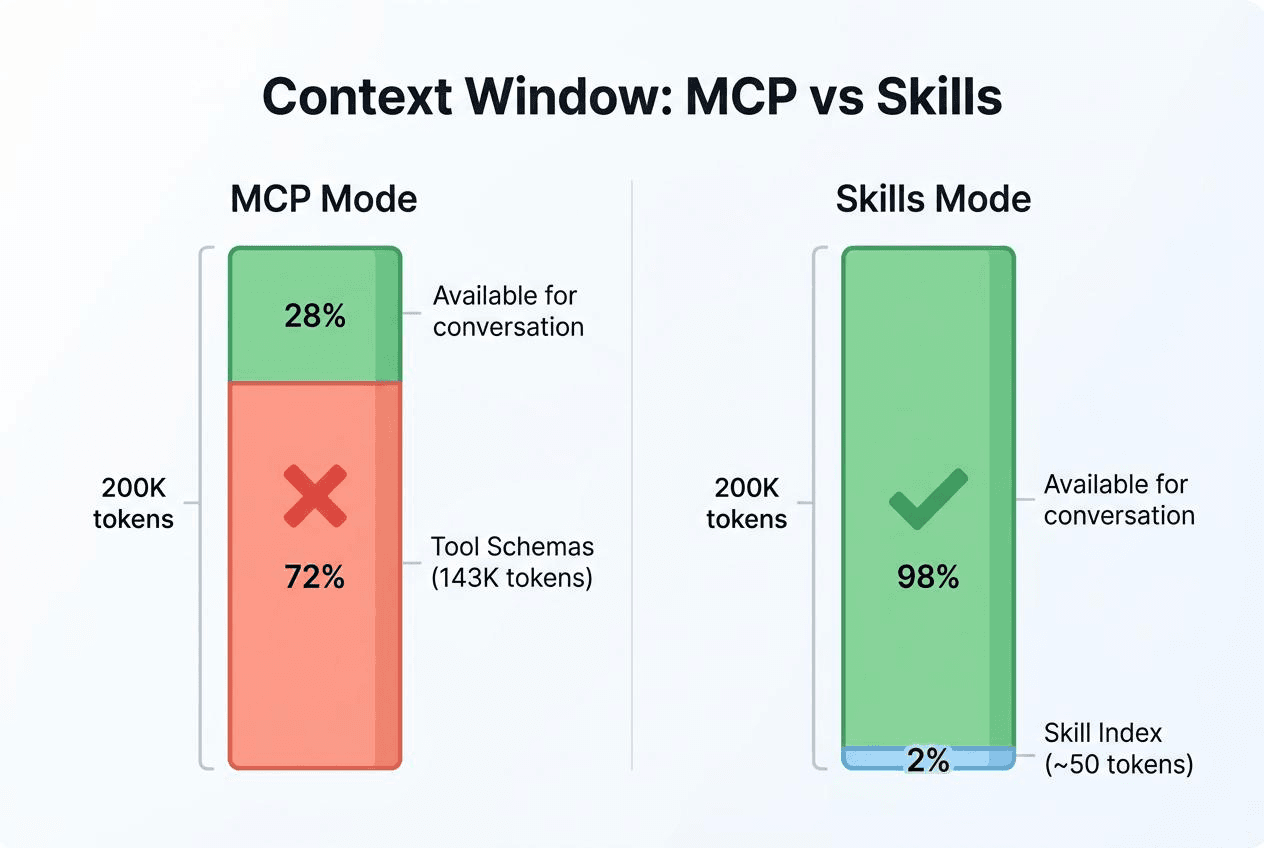
The cost isn’t just tokens. The more unrelated content packed into context, the weaker the model’s focus on what actually matters. A hundred tool schemas sitting in context means the agent wades through all of them on every decision. Researchers have documented what they call context rot — degraded reasoning quality from context overload. In measured tests, tool selection accuracy dropped from 43% to below 14% as tool count increased. More tools, paradoxically, means worse tool use.
The root cause is architectural. MCP loads all tool descriptions in full at session start, regardless of whether the current conversation will ever use them. That’s a protocol-level design choice, not a bug — but the cost scales with every tool you add.
Agent skills take a different approach: progressive disclosure. At session start, an agent reads only each Skill’s metadata — name, one-line description, trigger condition. A few dozen tokens total. The full Skill content loads only when the agent determines it’s relevant. Think of it this way: MCP lines up every tool at the door and makes you choose; Skills gives you an index first, full content on demand.
CLI tools offer a similar advantage. An agent runs git --help or docker --help to discover capabilities on demand, without preloading every parameter definition. Context cost is pay-as-you-go, not upfront.
At a small scale, the difference is negligible. At production scale, it’s the difference between an agent that works and one that drowns in its own tool definitions.
MCP’s Passive Architecture Limits Agent Workflows
MCP is a tool-calling protocol: how to discover tools, call them, and receive results. Clean design for simple use cases. But that cleanness is also a constraint.
Flat Tool Space with No Hierarchy
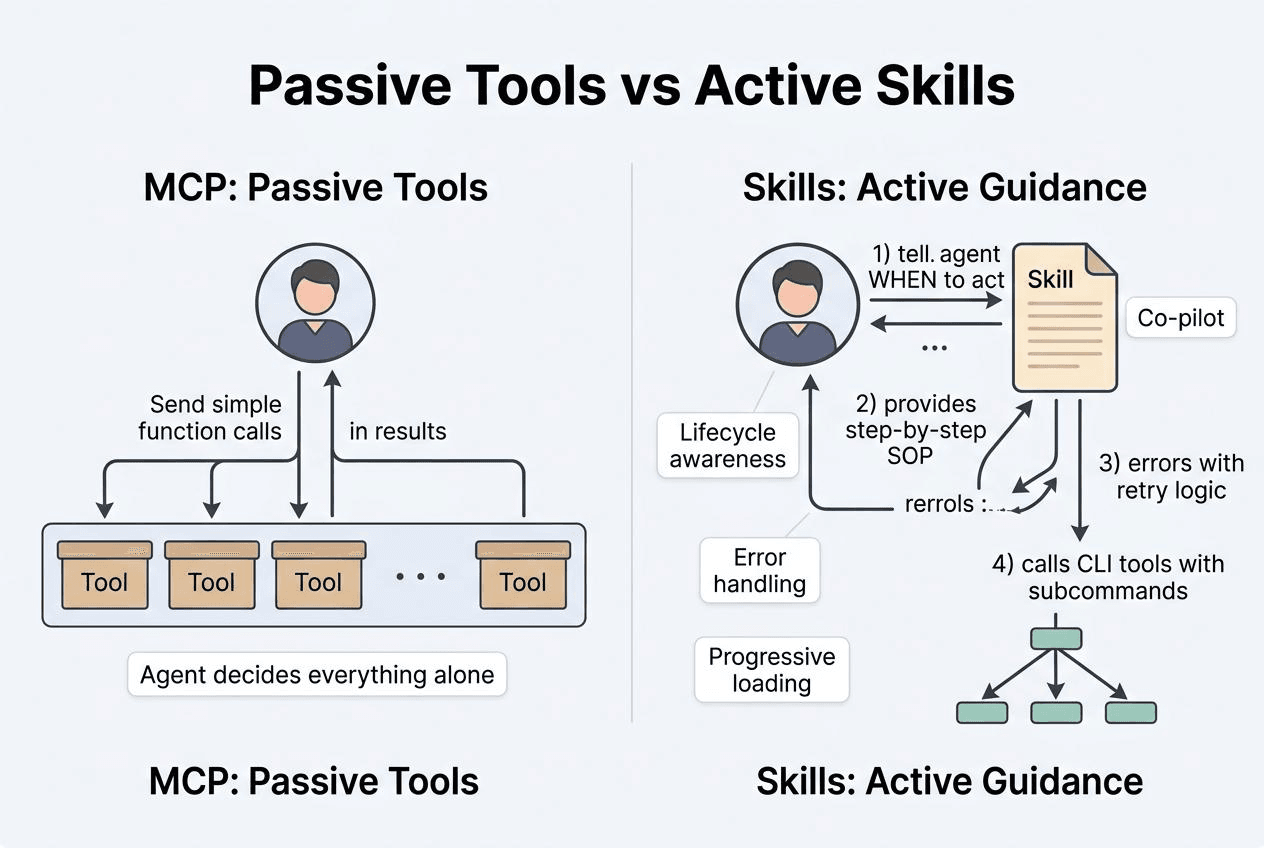
An MCP tool is a flat function signature. No subcommands, no awareness of session lifecycle, no sense of where the agent is in a multi-step workflow. It waits to be called. That’s all it does.
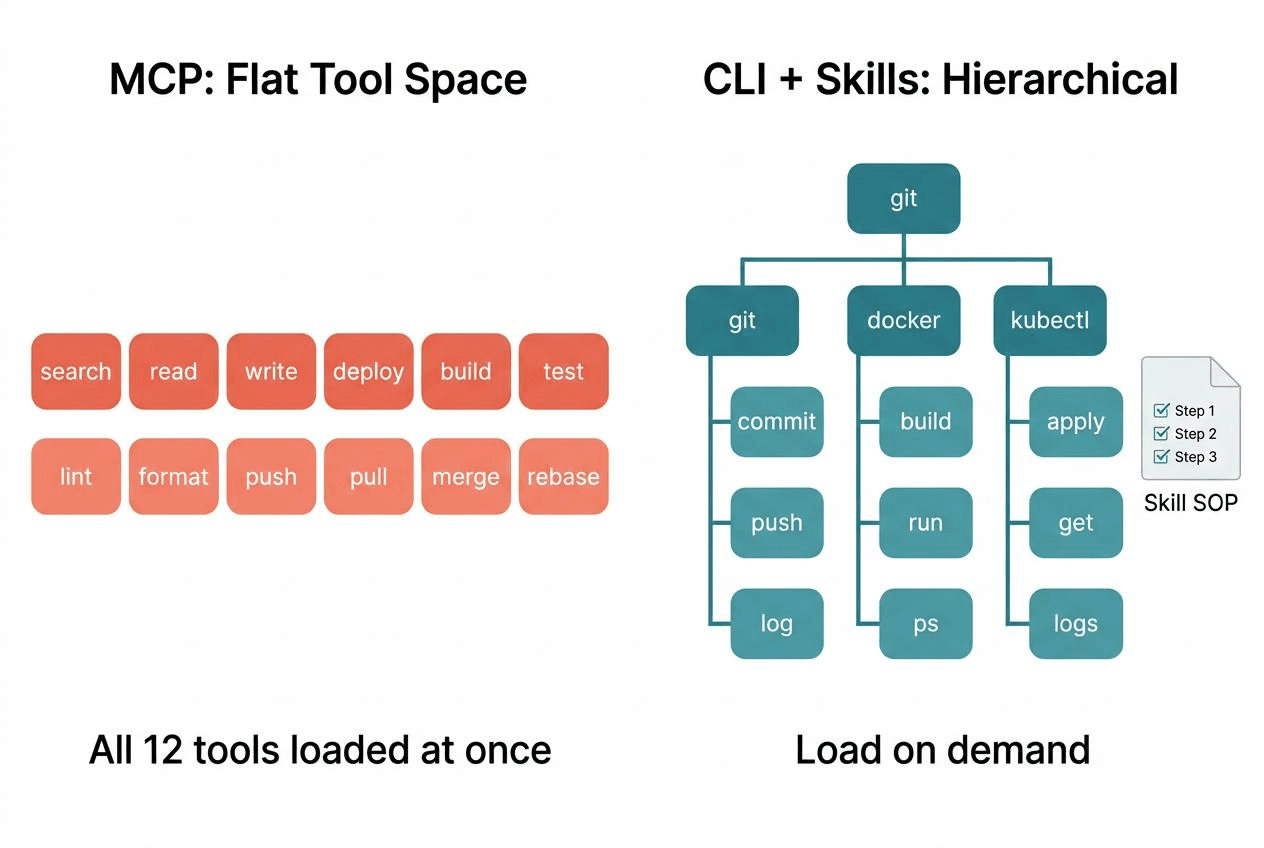
A CLI works differently. git commit, git push, and git log are completely different execution paths sharing a single interface. An agent runs --help, explores the available surface incrementally, and expands only what it needs — without front-loading all the parameter documentation into context.
Skills Encode Workflow Logic — MCP Can’t
An Agent Skill is a Markdown file containing a standard operating procedure: what to do first, what to do next, how to handle failures, and when to surface something to the user. The agent receives not just a tool but an entire workflow. Skills actively shape how an agent behaves during a conversation — what triggers them, what they prepare in advance, and how they recover from errors. MCP tools can only wait.
MCP Can’t Access the Agent’s LLM
This is the limitation that actually stopped us.
When we built claude-context — an MCP plugin that adds semantic search to Claude Code and other AI coding agents, giving them deep context from an entire codebase — we wanted to retrieve relevant historical conversation snippets from Milvus and surface them as context. The vector search retrieval worked. The problem was what to do with the results.
Retrieve the top 10 results, and maybe 3 are useful. The other 7 are noise. Hand all 10 to the outer agent, and the noise interferes with the answer. In testing, we saw responses get distracted by irrelevant historical records. We needed to filter before passing results up.
We tried several approaches. Adding a reranking step inside the MCP server using a small model: not accurate enough, and the relevance threshold needed per-use-case tuning. Using a large model for reranking: technically sound, but an MCP server runs as a separate process with no access to the outer agent’s LLM. We’d have to configure a separate LLM client, manage a separate API key, and handle a separate call path.
What we wanted was simple: let the outer agent’s LLM participate directly in the filtering decision. Retrieve the top 10, let the agent itself judge what’s worth keeping, and return only the relevant results. No second model. No extra API keys.
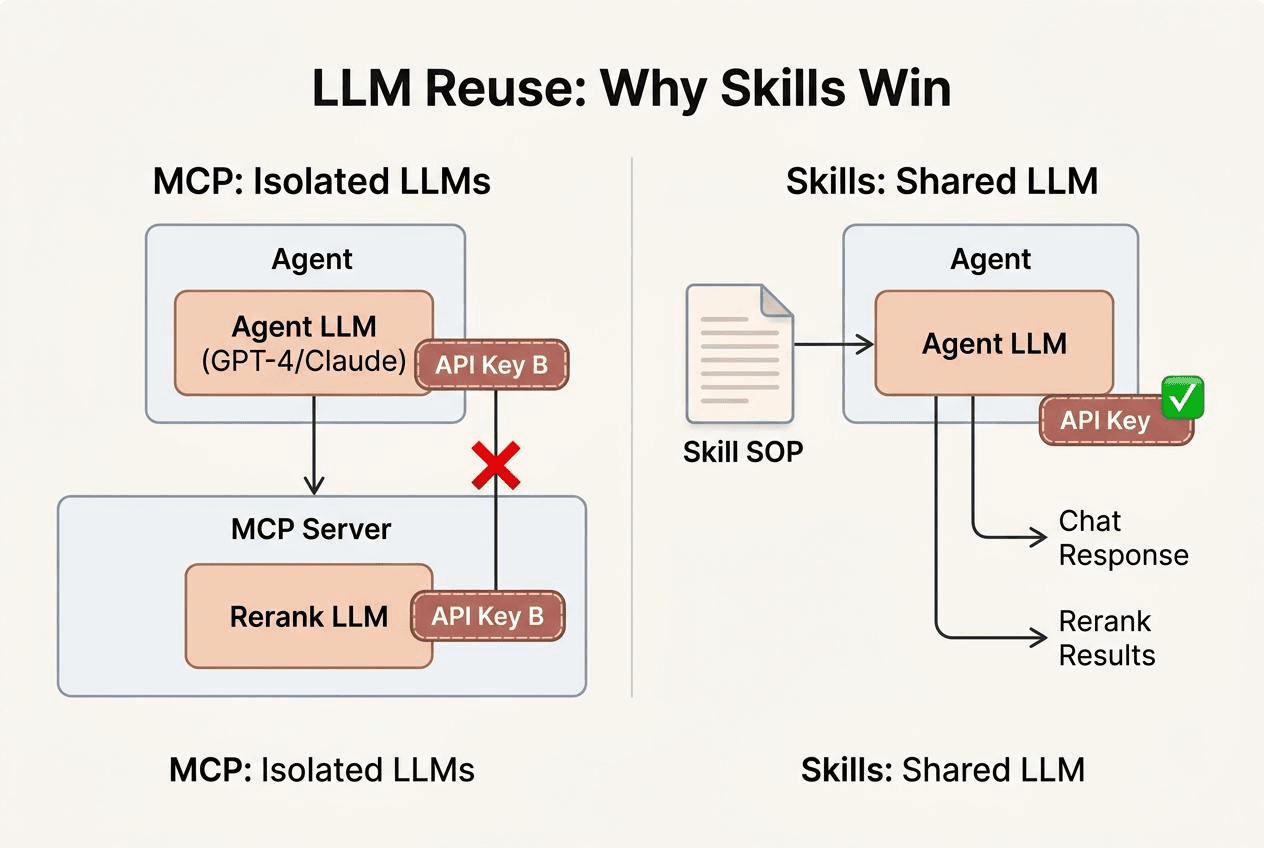
MCP can’t do this. The process boundary between server and agent is also an intelligence boundary. The server can’t use the agent’s LLM; the agent can’t govern what happens inside the server. Fine for simple CRUD tools. The moment a tool needs to make a judgment call, that isolation becomes a real constraint.
An Agent Skill solves this directly. A retrieval Skill can call vector search for the top 10, have the agent’s own LLM assess relevance, and return only what passes. No additional model. The agent does the filtering itself.
What We Built Instead with CLI and Skills
We see CLI + Skills as the direction for agent-tool interaction — not just for memory retrieval, but across the stack. This conviction drives everything we’re building.
memsearch: A Skills-Based Memory Layer for AI Agents
We built memsearch, an open-source memory layer for Claude Code and other AI agents. The Skill runs inside a subagent with three stages: Milvus handles the initial vector search for broad discovery, the agent’s own LLM evaluates relevance and expands context for promising hits, and a final drill-down accesses original conversations only when needed. Noise gets discarded at each stage — intermediate retrieval junk never reaches the primary context window.
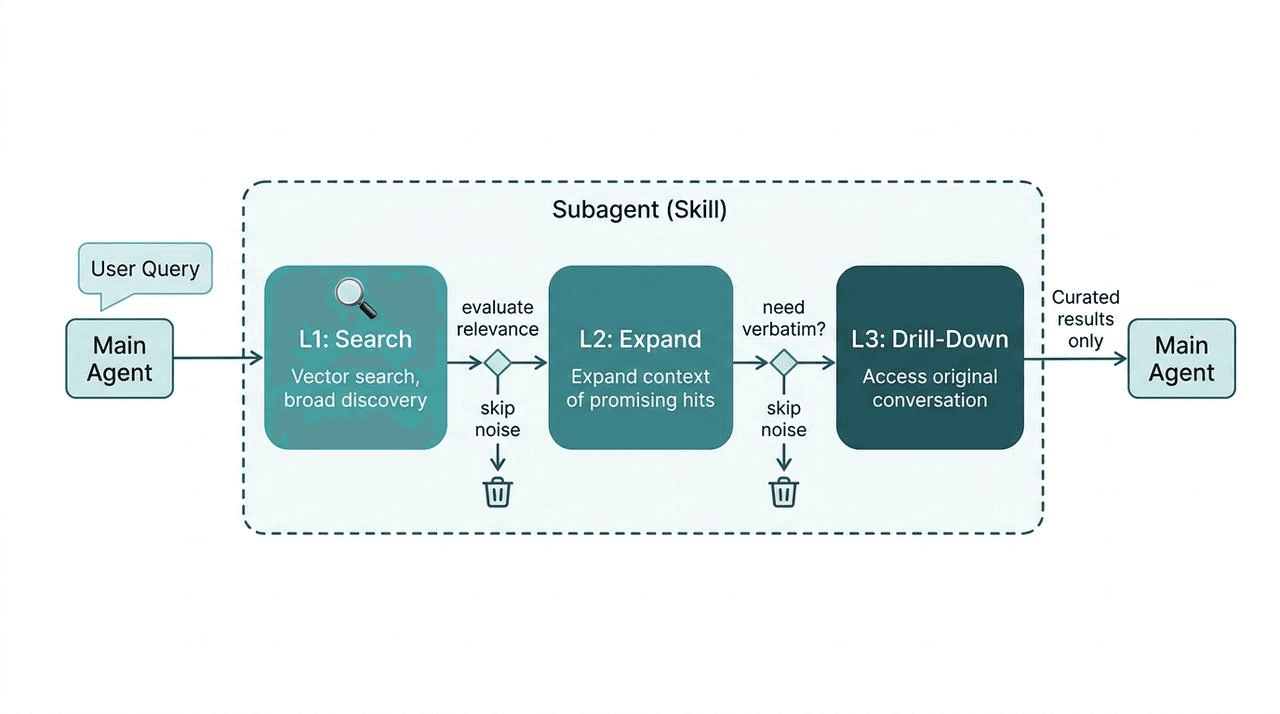
The key insight: the agent’s intelligence is part of the tool’s execution. The LLM already in the loop does the filtering — no second model, no extra API key, no brittle threshold tuning. This is a specific use case — conversation-context retrieval for coding agents — but the architecture generalizes to any scenario where a tool needs judgment, not just execution.
Zilliz CLI, Skills, and Plugin for Vector Database Operations
Milvus is the world’s most widely adopted open-source vector database with 43K+ stars on GitHub. Zilliz Cloud is the fully managed service of Milvus with advanced enterprise features and is much faster than Milvus.
The same layered architecture mentioned above drives our developer tools:
- Zilliz CLI is the infrastructure layer. Cluster management, collection operations, vector search, RBAC, backups, billing — everything you’d do in the Zilliz Cloud console, available from the terminal. Humans and agents use the same commands. Zilliz CLI also serves as the foundation for Milvus Skills and Zilliz Skills.
- Milvus Skill is the knowledge layer for open-source Milvus. It teaches AI coding agents (Claude Code, Cursor, Codex, GitHub Copilot) to operate any Milvus deployment — Milvus Lite, Standalone, or Distributed — through pymilvus Python code: connections, schema design, CRUD, hybrid search, full-text search, RAG pipelines.
- Zilliz Skill does the same for Zilliz Cloud, teaching agents to manage cloud infrastructure through Zilliz CLI.
- Zilliz Plugin is the developer experience layer for Claude Code — wraps CLI + Skill into a guided experience with slash commands like /zilliz:quickstart and /zilliz:status.
CLI handles execution, Skills encode knowledge and workflow logic, Plugin delivers the UX. No MCP server in the loop.
For more details, check out these resources:
- Introducing Zilliz CLI and Agent Skills for Zilliz Cloud
- Zilliz Cloud Just Landed in Claude Code
- AI Prompts — Zilliz Cloud Developer Hub
- Zilliz CLI Reference — Zilliz Cloud Developer Hub
- Zilliz Skill — Zilliz Cloud Developer Hub
- Milvus for AI Agents — Milvus Documentation
Is MCP Actually Dying?
A lot of developers and companies including us here at Zilliz are turning to CLI and Skills. But is MCP really dying?
The short answer: no — but its scope is narrowing to where it actually fits.
MCP has been donated to the Linux Foundation. Active servers number over 10,000. SDK monthly downloads sit at 97 million. An ecosystem that size doesn’t disappear because of a conference comment.
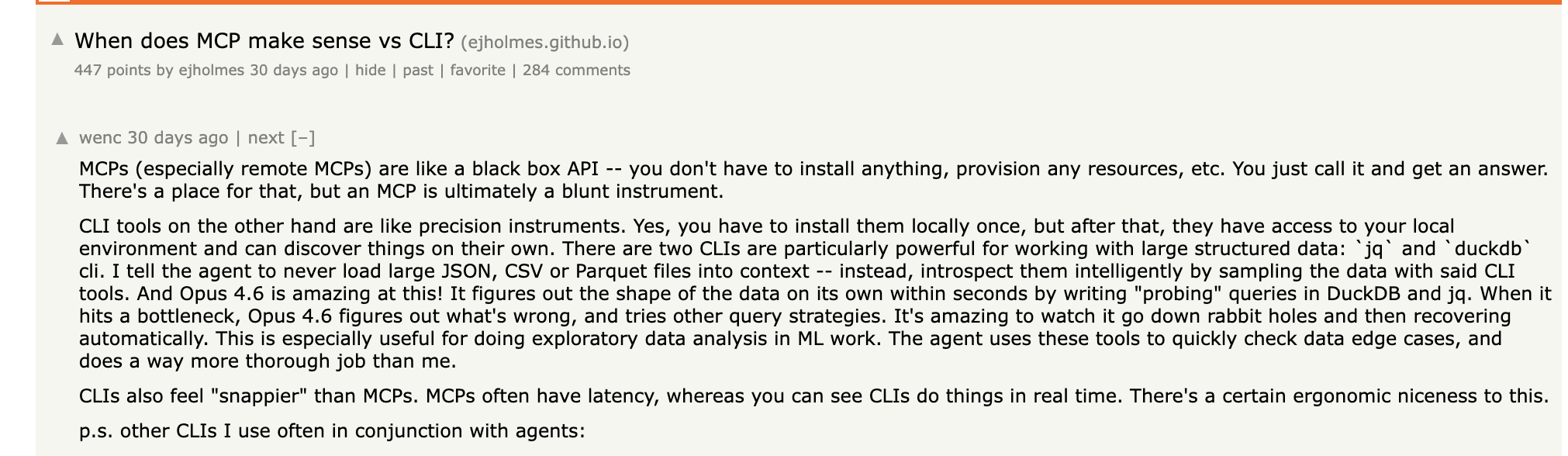
A Hacker News thread — “When does MCP make sense vs CLI?” — drew responses that mostly favored CLI: “CLI tools are like precision instruments,” “CLIs also feel snappier than MCPs.” Some developers hold a more balanced view: Skills are a detailed recipe that helps you solve a problem better; MCP is the tool that helps you solve the problem. Both have their place.
That’s fair — but it raises a practical question. If the recipe itself can direct the agent on which tools to use and how, is a separate tool-distribution protocol still necessary?
It depends on the use case.
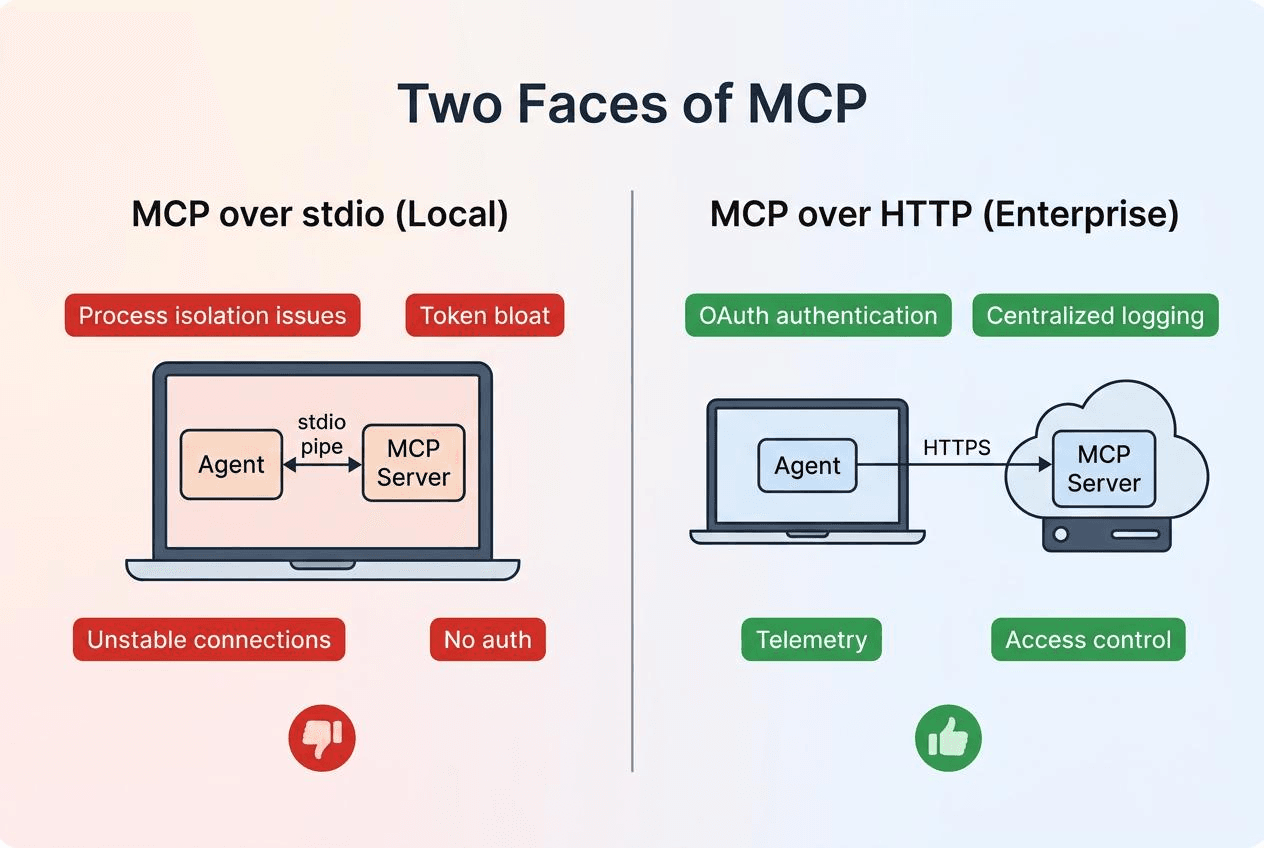
MCP over stdio — the version most developers run locally — is where the problems accumulate: unstable inter-process communication, messy environment isolation, high token overhead. In that context, better alternatives exist for almost every use case.
MCP over HTTP is a different story. Enterprise internal tooling platforms need centralized permission management, unified OAuth, standardized telemetry and logging. Fragmented CLI tools genuinely struggle to provide these. MCP’s centralized architecture has real value in that context.
What Perplexity actually dropped was primarily the stdio use case. Denis Yarats specified “internally” and didn’t call for industry-wide adoption of that choice. That nuance got lost in transmission — “Perplexity abandons MCP” spreads considerably faster than “Perplexity deprioritizes MCP over stdio for internal tool integration.”
MCP emerged because it solved a real problem: before it, every AI application wrote its own tool-calling logic, with no shared standard. MCP provided a unified interface at the right moment, and the ecosystem built quickly. Production experience then surfaced the limitations. That’s a normal arc for infrastructure tooling — not a death sentence.
When to Use MCP, CLI, or Skills
| MCP over stdio (Local) | MCP over HTTP (Enterprise) | |
|---|---|---|
| Authentication | None | OAuth, centralized |
| Connection stability | Process isolation issues | Stable HTTPS |
| Logging | No standard mechanism | Centralized telemetry |
| Access control | None | Role-based permissions |
| Our take | Replace with CLI + Skills | Keep for enterprise tooling |
For teams choosing their agentic AI tooling stack, here’s how the layers fit:
| Layer | What It Does | Best For | Examples |
|---|---|---|---|
| CLI | Operational tasks, infra management | Commands that agents and humans both run | git, docker, zilliz-cli |
| Skills | Agent workflow logic, encoded knowledge | Tasks needing LLM judgment, multi-step SOPs | milvus-skill, zilliz-skill, memsearch |
| REST APIs | External integrations | Connecting to third-party services | GitHub API, Slack API |
| MCP HTTP | Enterprise tool platforms | Centralized auth, audit logging | Internal tool gateways |
Get Started
Everything we’ve discussed in this article is available today:
- memsearch — the Skills-based memory layer for AI agents. Drop it into Claude Code or any agent that supports Skills.
- Zilliz CLI — manage Milvus and Zilliz Cloud from your terminal. Install it and explore the subcommands your agents can use.
- Milvus Skill and Zilliz Skill — give your AI coding agent native Milvus and Zilliz Cloud knowledge.
Have questions about vector search, agent architecture, or building with CLI and Skills? Join the Milvus Discord community or book a free Office Hours session to talk through your use case.
Ready to build? Sign up for Zilliz Cloud — new accounts with a work email get $100 in free credits. Already have an account? Sign in here.
Frequently Asked Questions
What is wrong with MCP for AI agents?
MCP has three main architectural limitations in production. First, it loads all tool schemas into the context window at session start — connecting just three MCP servers on a 200K-token model can consume over 70% of available context before the agent does anything. Second, MCP tools are passive: they wait to be called and can’t encode multi-step workflows, error-handling logic, or standard operating procedures. Third, MCP servers run as separate processes with no access to the agent’s LLM, so any tool that needs judgment (like filtering search results for relevance) requires configuring a separate model with its own API key. These problems are most acute with MCP over stdio; MCP over HTTP mitigates some of them.
What is the difference between MCP and Agent Skills?
MCP is a tool-calling protocol that defines how an agent discovers and invokes external tools. An Agent Skill is a Markdown file containing a full standard operating procedure — triggers, step-by-step instructions, error handling, and escalation rules. The key architectural difference: Skills run inside the agent’s process, so they can leverage the agent’s own LLM for judgment calls like relevance filtering or result reranking. MCP tools run in a separate process and can’t access the agent’s intelligence. Skills also use progressive disclosure — only lightweight metadata loads at startup, with full content loading on demand — keeping context window usage minimal compared to MCP’s upfront schema loading.
When should I still use MCP instead of CLI or Skills?
MCP over HTTP still makes sense for enterprise tooling platforms where you need centralized OAuth, role-based access control, standardized telemetry, and audit logging across many internal tools. Fragmented CLI tools struggle to provide these enterprise requirements consistently. For local development workflows — where agents interact with tools on your machine — CLI + Skills typically offers better performance, lower context overhead, and more flexible workflow logic than MCP over stdio.
How do CLI tools and Agent Skills work together?
CLI provides the execution layer (the actual commands), while Skills provide the knowledge layer (when to run which commands, in what order, and how to handle failures). For example, Zilliz CLI handles infrastructure operations like cluster management, collection CRUD, and vector search. Milvus Skill teaches the agent the right pymilvus patterns for schema design, hybrid search, and RAG pipelines. The CLI does the work; the Skill knows the workflow. This layered pattern — CLI for execution, Skills for knowledge, a plugin for UX — is how we’ve structured all of our developer tooling at Zilliz.
MCP vs Skills vs CLI: when should I use each?
CLI tools like git, docker, or zilliz-cli are best for operational tasks — they expose hierarchical subcommands and load on demand. Skills like milvus-skill are best for agent workflow logic — they carry operating procedures, error recovery, and can access the agent’s LLM. MCP over HTTP still fits enterprise tool platforms needing centralized OAuth, permissions, and audit logging. MCP over stdio — the local version — is being replaced by CLI + Skills in most production setups.
- MCP Eats 72% of Your Context Window at Startup
- MCP's Passive Architecture Limits Agent Workflows
- What We Built Instead with CLI and Skills
- Is MCP Actually Dying?
- When to Use MCP, CLI, or Skills
- Get Started
- Frequently Asked Questions
On This Page
Try Managed Milvus for Free
Zilliz Cloud is hassle-free, powered by Milvus and 10x faster.
Get StartedLike the article? Spread the word