How to Build Production-Ready AI Agents with Long-Term Memory Using Google ADK and Milvus
When building intelligent agents, one of the hardest problems is memory management: deciding what the agent should remember and what it should forget.
Not all memory is meant to last. Some data is only needed for the current conversation and should be cleared when it ends. Other data, like user preferences, must persist across conversations. When these are mixed, temporary data piles up, and important information is lost.
The real problem is architectural. Most frameworks do not enforce a clear separation between short-term and long-term memory, leaving developers to handle it manually.
Google’s open-source Agent Development Kit (ADK), released in 2025, tackles this at the framework level by making memory management a first-class concern. It enforces a default separation between short-term session memory and long-term memory.
In this article, we’ll look at how this separation works in practice. Using Milvus as the vector database, we’ll build a production-ready agent with real long-term memory from scratch.
ADK’s Core Design Principles
ADK is designed to take memory management off the developer’s plate. The framework automatically separates short-term session data from long-term memory and handles each appropriately. It does this through four core design choices.
Built-in Interfaces for Short- and Long-Term Memory
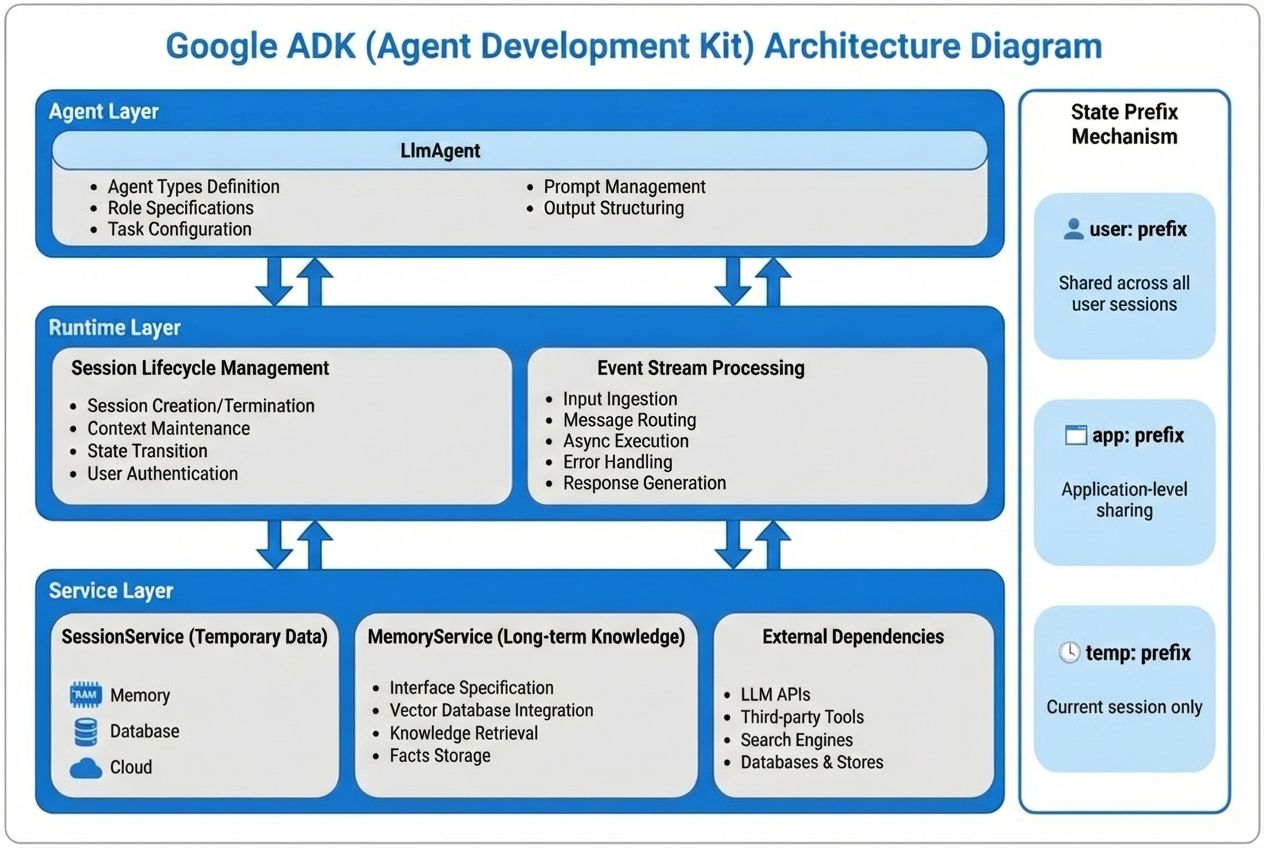
Every ADK agent comes with two built-in interfaces for managing memory:
SessionService (temporary data)
- What it stores: current conversation content and intermediate results from tool calls
- When it’s cleared: automatically cleared when the session ends
- Where it’s stored: in memory (fastest), a database, or a cloud service
MemoryService (long-term memory)
- What it stores: information that should be remembered, such as user preferences or past records
- When it’s cleared: not cleared automatically; must be deleted manually
- Where it’s stored: ADK defines only the interface; the storage backend is up to you (for example, Milvus)
A Three-Layer Architecture
ADK splits the system into three layers, each with a single responsibility:
- Agent layer: where business logic lives, such as “retrieve relevant memory before answering the user.”
- Runtime layer: managed by the framework, responsible for creating and destroying sessions and tracking each step of execution.
- Service layer: integrates with external systems, such as vector databases like Milvus or large model APIs.
This structure keeps concerns separate: business logic lives in the agent, while storage lives elsewhere. You can update one without breaking the other.
Everything Is Recorded as Events
Every action an agent takes—calling a memory recall tool, invoking a model, generating a response—is recorded as an event.
This has two practical benefits. First, when something goes wrong, developers can replay the entire interaction step by step to find the exact failure point. Second, for auditing and compliance, the system provides a complete execution trace of each user interaction.
Prefix-Based Data Scoping
ADK controls data visibility using simple key prefixes:
- temp:xxx — visible only within the current session and automatically removed when it ends
- user:xxx — shared across all sessions for the same user, enabling persistent user preferences
- app:xxx — shared globally across all users, suitable for application-wide knowledge such as product documentation
By using prefixes, developers can control data scope without writing extra access logic. The framework handles visibility and lifetime automatically.
Milvus as the Memory Backend for ADK
In ADK, MemoryService is just an interface. It defines how long-term memory is used, but not how it is stored. Choosing the database is up to the developer. So what kind of database works well as an agent’s memory backend?
What an Agent Memory System Needs — and How Milvus Delivers
- Semantic Retrieval
The need:
Users rarely ask the same question in the same way. “It doesn’t connect” and “connection timeout” mean the same thing. The memory system must understand meaning, not just match keywords.
How Milvus meets it:
Milvus supports many vector index types, such as HNSW and DiskANN, allowing developers to choose what fits their workload. Even with tens of millions of vectors, query latency can stay under 10 ms, which is fast enough for agent use.
- Hybrid Queries
The need:
Memory recall requires more than semantic search. The system must also filter by structured fields like user_id so that only the current user’s data is returned.
How Milvus meets it:
Milvus natively supports hybrid queries that combine vector search with scalar filtering. For example, it can retrieve semantically similar records while applying a filter such as user_id = ‘xxx’ in the same query, without hurting performance or recall quality.
- Scalability
The need:
As the number of users and stored memories grows, the system must scale smoothly. Performance should remain stable as data increases, without sudden slowdowns or failures.
How Milvus meets it:
Milvus uses a compute–storage separation architecture. Query capacity can be scaled horizontally by adding Query Nodes as needed. Even the standalone version, running on a single machine, can handle tens of millions of vectors, making it suitable for early-stage deployments.
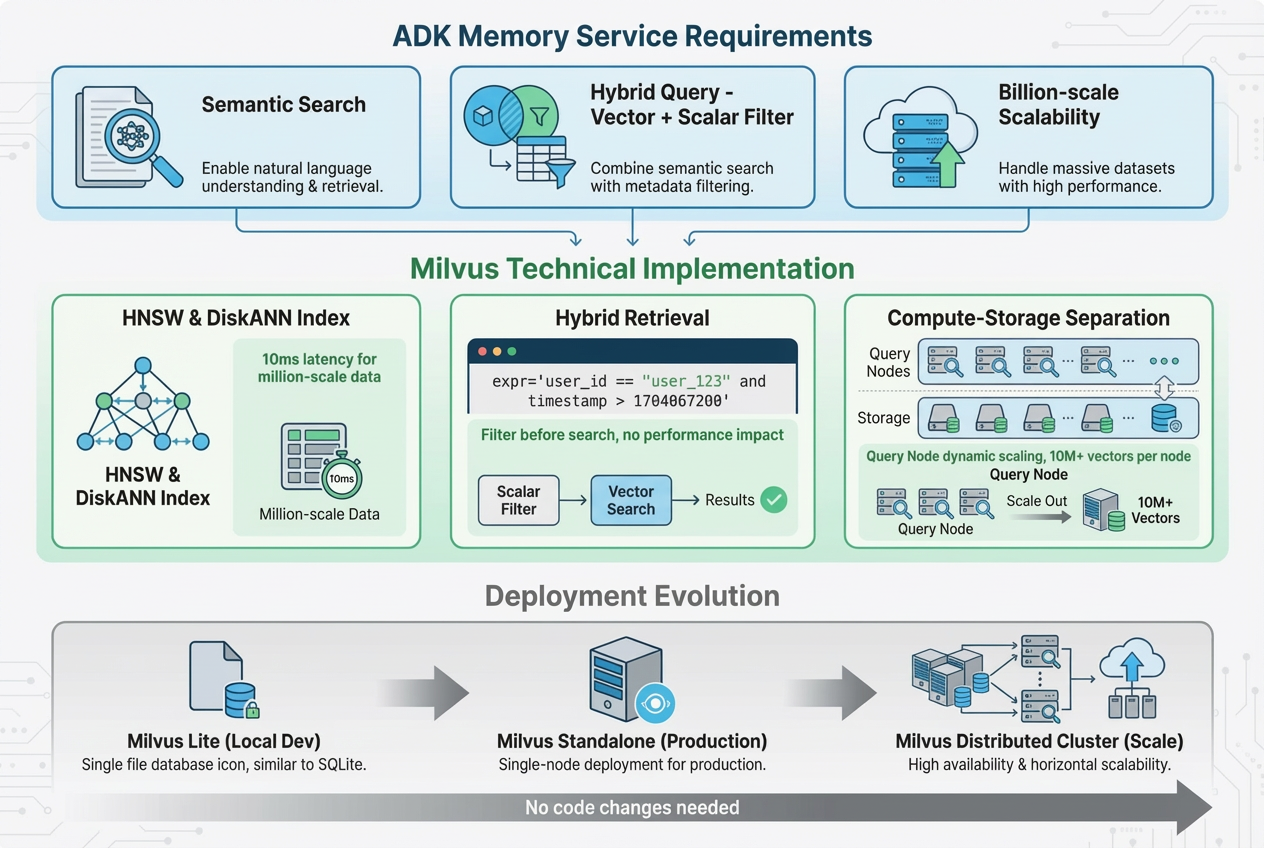
Note: For local development and testing, the examples in this article use Milvus Lite or Milvus Standalone.
Building an Agent with Long-TermMemory Powered by Milvus
In this section, we build a simple technical support agent. When a user asks a question, the agent looks up similar past support tickets to answer, rather than repeating the same work.
This example is useful because it shows three common problems that real agent memory systems must handle.
- Long-term memory across sessions
A question asked today may relate to a ticket created weeks ago. The agent must remember information across conversations, not just within the current session. This is why long-term memory, managed through MemoryService, is needed.
- User isolation
Each user’s support history must stay private. Data from one user must never appear in another user’s results. This requires filtering on fields like user_id, which Milvus supports via hybrid queries.
- Semantic matching
Users describe the same problem in different ways, such as “can’t connect” or “timeout.” Keyword matching is not enough. The agent needs a semantic search, which is provided by vector retrieval.
Environment setup
- Python 3.11+
- Docker and Docker Compose
- Gemini API key
This section covers the basic setup to make sure the program can run correctly.
pip install google-adk pymilvus google-generativeai
"""
ADK + Milvus + Gemini Long-term Memory Agent
Demonstrates how to implement a cross-session memory recall system
"""
import os
import asyncio
import time
from pymilvus import connections, Collection, FieldSchema, CollectionSchema, DataType, utility
import google.generativeai as genai
from google.adk.agents import Agent
from google.adk.tools import FunctionTool
from google.adk.runners import Runner
from google.adk.sessions import InMemorySessionService
from google.genai import types
Step 1: Deploy Milvus Standalone (Docker)
(1) Download the deployment files
wget <https://github.com/Milvus-io/Milvus/releases/download/v2.5.12/Milvus-standalone-docker-compose.yml> -O docker-compose.yml
(2) Start the Milvus service
docker-compose up -d
docker-compose ps -a

Step 2 Model and Connection Configuration
Configure the Gemini API and Milvus connection settings.
# ==================== Configuration ====================
# 1. Gemini API configuration
GOOGLE_API_KEY = os.getenv("GOOGLE_API_KEY")
if not GOOGLE_API_KEY:
   raise ValueError("Please set the GOOGLE_API_KEY environment variable")
genai.configure(api_key=GOOGLE_API_KEY)
# 2. Milvus connection configuration
MILVUS_HOST = os.getenv("MILVUS_HOST", "localhost")
MILVUS_PORT = os.getenv("MILVUS_PORT", "19530")
# 3. Model selection (best combination within the free tier limits)
LLM_MODEL = "gemini-2.5-flash-lite"  # LLM model: 1000 RPD
EMBEDDING_MODEL = "models/text-embedding-004"  # Embedding model: 1000 RPD
EMBEDDING_DIM = 768  # Vector dimension
# 4. Application configuration
APP_NAME = "tech_support"
USER_ID = "user_123"
print(f"✓ Using model configuration:")
print(f"  LLM: {LLM_MODEL}")
print(f"  Embedding: {EMBEDDING_MODEL} (dimension: {EMBEDDING_DIM})")
Step 3 Milvus Database Initialization
Create a vector database collection (similar to a table in a relational database)
# ==================== Initialize Milvus ====================
def init_milvus():
   """Initialize Milvus connection and collection"""
   # Step 1: Establish connection
   Try:
       connections.connect(
           alias="default",
           host=MILVUS_HOST,
           port=MILVUS_PORT
       )
       print(f"✓ Connected to Milvus: {MILVUS_HOST}:{MILVUS_PORT}")
   except Exception as e:
       print(f"✗ Failed to connect to Milvus: {e}")
       print("Hint: make sure Milvus is running")
       Raise
   # Step 2: Define data schema
   fields = [
       FieldSchema(name="id", dtype=DataType.INT64, is_primary=True, auto_id=True),
       FieldSchema(name="user_id", dtype=DataType.VARCHAR, max_length=100),
       FieldSchema(name="session_id", dtype=DataType.VARCHAR, max_length=100),
       FieldSchema(name="question", dtype=DataType.VARCHAR, max_length=2000),
       FieldSchema(name="solution", dtype=DataType.VARCHAR, max_length=5000),
       FieldSchema(name="embedding", dtype=DataType.FLOAT_VECTOR, dim=EMBEDDING_DIM),
       FieldSchema(name="timestamp", dtype=DataType.INT64)
   ]
   schema = CollectionSchema(fields, description="Tech support memory")
   collection_name = "support_memory"
   # Step 3: Create or load the collection
   if utility.has_collection(collection_name):
       memory_collection = Collection(name=collection_name)
       print(f"✓ Collection '{collection_name}' already exists")
   Else:
       memory_collection = Collection(name=collection_name, schema=schema)
   # Step 4: Create vector index
   index_params = {
       "index_type": "IVF_FLAT",
       "metric_type": "COSINE",
       "params": {"nlist": 128}
   }
   memory_collection.create_index(field_name="embedding", index_params=index_params)
   print(f"✓ Created collection '{collection_name}' and index")
   return memory_collection
# Run initialization
memory_collection = init_milvus()
Step 4 Memory Operation Functions
Encapsulate storage and retrieval logic as tools for the agent.
(1) Store memory function
# ==================== Memory Operation Functions ====================
def store_memory(question: str, solution: str) -> str:
   """
   Store a solution record into the memory store
   Args:
       question: the user's question
       solution: the solution
   Returns:
       str: result message
   """
   Try:
       print(f"\\n[Tool Call] store_memory")
       print(f" - question: {question[:50]}...")
       print(f" - solution: {solution[:50]}...")
       # Use global USER_ID (in production, this should come from ToolContext)
       user_id = USER_ID
       session_id = f"session_{int(time.time())}"
       # Key step 1: convert the question into a 768-dimensional vector
       embedding_result = genai.embed_content(
           model=EMBEDDING_MODEL,
           content=question,
           task_type="retrieval_document",  # specify document indexing task
           output_dimensionality=EMBEDDING_DIM
       )
       embedding = embedding_result["embedding"]
       # Key step 2: insert into Milvus
       memory_collection.insert([{
           "user_id": user_id,
           "session_id": session_id,
           "question": question,
           "solution": solution,
           "embedding": embedding,
           "timestamp": int(time.time())
       }])
       # Key step 3: flush to disk (ensure data persistence)
       memory_collection.flush()
       result = "✓ Successfully stored in memory"
       print(f"[Tool Result] {result}")
       return result
   except Exception as e:
       error_msg = f"✗ Storage failed: {str(e)}"
       print(f"[Tool Error] {error_msg}")
       return error_msg
(2) Retrieve memory function
def recall_memory(query: str, top_k: int = 3) -> str:
   """
   Retrieve relevant historical cases from the memory store
   Args:
       query: query question
       top_k: number of most similar results to return
   Returns:
       str: retrieval result
   """
   Try:
       print(f"\\n[Tool Call] recall_memory")
       print(f" - query: {query}")
       print(f" - top_k: {top_k}")
       user_id = USER_ID
       # Key step 1: convert the query into a vector
       embedding_result = genai.embed_content(
           model=EMBEDDING_MODEL,
           content=query,
           task_type="retrieval_query",  # specify query task (different from indexing)
           output_dimensionality=EMBEDDING_DIM
       )
       query_embedding = embedding_result["embedding"]
       # Key step 2: load the collection into memory (required for the first query)
       memory_collection.load()
       # Key step 3: hybrid search (vector similarity + scalar filtering)
       results = memory_collection.search(
           data=[query_embedding],
           anns_field="embedding",
           param={"metric_type": "COSINE", "params": {"nprobe": 10}},
           limit=top_k,
           expr=f'user_id == "{user_id}"',  # 🔑 key to user isolation
           output_fields=["question", "solution", "timestamp"]
       )
       # Key step 4: format results
       if not results[0]:
           result = "No relevant historical cases found"
           print(f"[Tool Result] {result}")
           return result
       result_text = f"Found {len(results[0])} relevant cases:\\n\\n"
       for i, hit in enumerate(results[0]):
           result_text += f"Case {i+1} (similarity: {hit.score:.2f}):\\n"
           result_text += f"Question: {hit.entity.get('question')}\\n"
           result_text += f"Solution: {hit.entity.get('solution')}\\n\\n"
       print(f"[Tool Result] Found {len(results[0])} cases")
       return result_text
   except Exception as e:
       error_msg = f"Retrieval failed: {str(e)}"
       print(f"[Tool Error] {error_msg}")
       return error_msg
(3) Register as an ADK Tool
# Usage
# Wrap functions with FunctionTool
store_memory_tool = FunctionTool(func=store_memory)
recall_memory_tool = FunctionTool(func=recall_memory)
memory_tools = [store_memory_tool, recall_memory_tool]
Step 5 Agent Definition
Core idea: define the agent’s behavior logic.
# ==================== Create Agent ====================
support_agent = Agent(
   model=LLM_MODEL,
   name="support_agent",
   description="Technical support expert agent that can remember and recall historical cases",
   # Key: the instruction defines the agent’s behavior
   instruction="""
You are a technical support expert. Strictly follow the process below:
<b>When the user asks a technical question:</b>
1. Immediately call the recall_memory tool to search for historical cases
  - Parameter query: use the user’s question text directly
  - Do not ask for any additional information; call the tool directly
2. Answer based on the retrieval result:
  - If relevant cases are found: explain that similar historical cases were found and answer by referencing their solutions
  - If no cases are found: explain that this is a new issue and answer based on your own knowledge
3. After answering, ask: “Did this solution resolve your issue?”
<b>When the user confirms the issue is resolved:</b>
- Immediately call the store_memory tool to save this Q&A
- Parameter question: the user’s original question
- Parameter solution: the complete solution you provided
<b>Important rules:</b>
- You must call a tool before answering
- Do not ask for user_id or any other parameters
- Only store memory when you see confirmation phrases such as “resolved”, “it works”, or “thanks”
""",
   tools=memory_tools
)
Step 6 Main Program and Execution Flow
Demonstrates the complete process of cross-session memory retrieval.
# ==================== Main Program ====================
async def main():
   """Demonstrate cross-session memory recall"""
   # Create Session service and Runner
   session_service = InMemorySessionService()
   runner = Runner(
       agent=support_agent,
       app_name=APP_NAME,
       session_service=session_service
   )
   # ========== First round: build memory ==========
   print("\\n" + "=" \* 60)
   print("First conversation: user asks a question and the solution is stored")
   print("=" \* 60)
   session1 = await session_service.create_session(
       app_name=APP_NAME,
       user_id=USER_ID,
       session_id="session_001"
   )
   # User asks the first question
   print("\\n[User]: What should I do if Milvus connection times out?")
   content1 = types.Content(
       role='user',
       parts=[types.Part(text="What should I do if Milvus connection times out?")]
   )
   async for event in runner.run_async(
       user_id=USER_ID,
       session_id=[session1.id](http://session1.id),
       new_message=content1
   ):
       if event.content and event.content.parts:
           for part in event.content.parts:
               if hasattr(part, 'text') and part.text:
                   print(f"[Agent]: {part.text}")
   # User confirms the issue is resolved
   print("\\n[User]: The issue is resolved, thanks!")
   content2 = types.Content(
       role='user',
       parts=[types.Part(text="The issue is resolved, thanks!")]
   )
   async for event in runner.run_async(
       user_id=USER_ID,
       session_id=[session1.id](http://session1.id),
       new_message=content2
   ):
       if event.content and event.content.parts:
           for part in event.content.parts:
               if hasattr(part, 'text') and part.text:
                   print(f"[Agent]: {part.text}")
   # ========== Second round: recall memory ==========
   print("\\n" + "=" \* 60)
   print("Second conversation: new session with memory recall")
   print("=" \* 60)
   session2 = await session_service.create_session(
       app_name=APP_NAME,
       user_id=USER_ID,
       session_id="session_002"
   )
   # User asks a similar question in a new session
   print("\\n[User]: Milvus can't connect")
   content3 = types.Content(
       role='user',
       parts=[types.Part(text="Milvus can't connect")]
   )
   async for event in runner.run_async(
       user_id=USER_ID,
       session_id=[session2.id](http://session2.id),
       new_message=content3
   ):
       if event.content and event.content.parts:
           for part in event.content.parts:
               if hasattr(part, 'text') and part.text:
                   print(f"[Agent]: {part.text}")


# Program entry point
if __name__ == "__main__":
   Try:
       asyncio.run(main())
   except KeyboardInterrupt:
       print("\\n\\nProgram exited")
   except Exception as e:
       print(f"\\n\\nProgram error: {e}")
       import traceback
       traceback.print_exc()
   Finally:
       Try:
           connections.disconnect(alias="default")
           print("\\n✓ Disconnected from Milvus")
       Except:
           pass
Step 7 Run and Test
(1) Set environment variables
export GOOGLE_API_KEY="your-gemini-api-key"
python milvus_agent.py
Expected Output
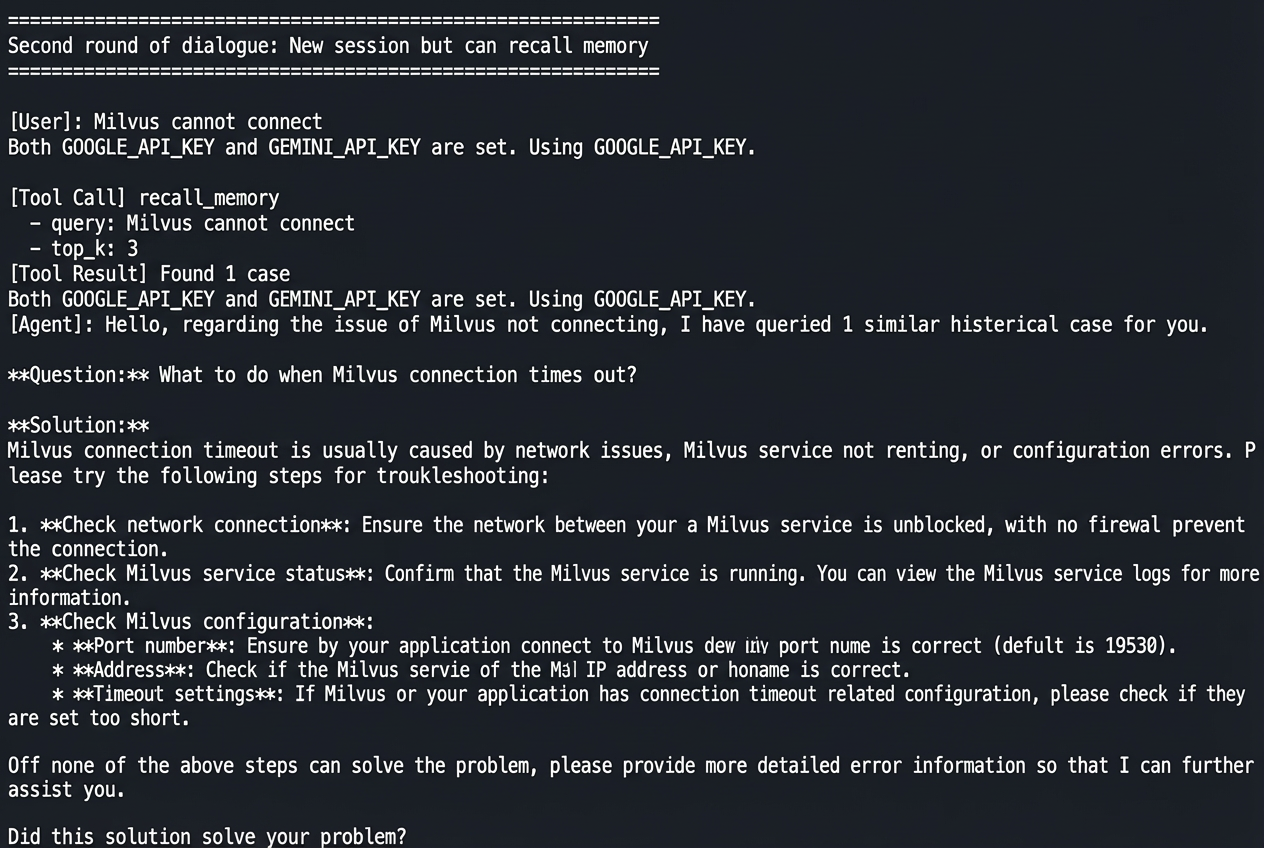
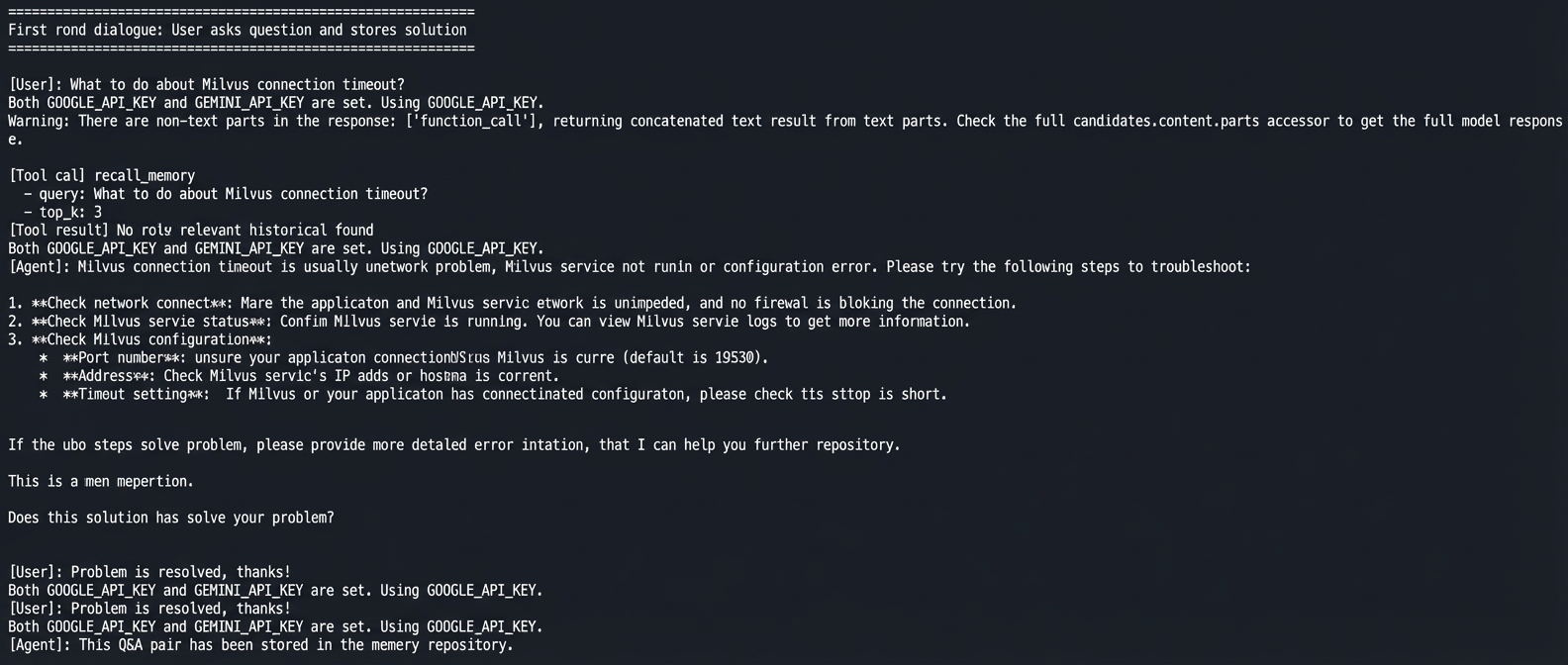
The output shows how the memory system works in real use.
In the first conversation, the user asks how to handle a Milvus connection timeout. The agent gives a solution. After the user confirms the problem is solved, the agent saves this question and answer to memory.
In the second conversation, a new session starts. The user asks the same question using different words: “Milvus can’t connect.” The agent automatically retrieves a similar case from memory and gives the same solution.
No manual steps are needed. The agent decides when to retrieve past cases and when to store new ones, showing three key abilities: cross-session memory, semantic matching, and user isolation.
Conclusion
ADK separates short-term context and long-term memory at the framework level using SessionService and MemoryService. Milvus handles semantic search and user-level filtering through vector-based retrieval.
When choosing a framework, the goal matters. If you need strong state isolation, auditability, and production stability, ADK is a better fit. If you are prototyping or experimenting, LangChain (a popular Python framework for quickly building LLM-based applications and agents) offers more flexibility.
For agent memory, the key piece is the database. Semantic memory depends on vector databases, no matter which framework you use. Milvus works well because it is open source, runs locally, supports handling billions of vectors on a single machine, and supports hybrid vector, scalar, and full-text search. These features cover both early testing and production use.
We hope this article helps you better understand agent memory design and choose the right tools for your projects.
If you’re building AI agents that need real memory—not just bigger context windows—we’d love to hear how you’re approaching it.
Have questions about ADK, agent memory design, or using Milvus as a memory backend? Join our Slack channel or book a 20-minute Milvus Office Hours session to talk through your use case.
- ADK’s Core Design Principles
- Built-in Interfaces for Short- and Long-Term Memory
- A Three-Layer Architecture
- Everything Is Recorded as Events
- Prefix-Based Data Scoping
- Milvus as the Memory Backend for ADK
- What an Agent Memory System Needs — and How Milvus Delivers
- Building an Agent with Long-TermMemory Powered by Milvus
- Environment setup
- Step 1: Deploy Milvus Standalone (Docker)
- Step 2 Model and Connection Configuration
- Step 3 Milvus Database Initialization
- Step 4 Memory Operation Functions
- Step 5 Agent Definition
- Step 6 Main Program and Execution Flow
- Step 7 Run and Test
- Expected Output
- Conclusion
On This Page
Try Managed Milvus for Free
Zilliz Cloud is hassle-free, powered by Milvus and 10x faster.
Get StartedLike the article? Spread the word