I Built a Stock Monitoring Agent with OpenClaw, Exa, and Milvus for $20/Month
I trade U.S. stocks on the side, which is a polite way of saying I lose money as a hobby. My coworkers joke that my strategy is “buy high on excitement, sell low on fear, repeat weekly.”
The repeat part is what kills me. Every time I stare at the market, I end up making a trade I didn’t plan on. Oil spikes, I panic-sell. That one tech stock pops 4%, I chase it. A week later, I’m looking at my trade history going, didn’t I do this exact thing last quarter?
So I built an agent with OpenClaw that watches the market instead of me and stops me from making the same mistakes. It doesn’t trade or touch my money; it keeps me from doing something I’ve already regretted once.
This agent consists of three parts and costs about $20/month:
- OpenClaw for running it all on autopilot. OpenClaw runs the agent on a 30-minute heartbeat and only pings me when something actually matters, which relieves the FOMO that used to keep me glued to the screen. Before, the more I watched prices, the more I reacted on impulse.
- Exa for accurate, real-time searches. Exa browses and summarizes hand-picked information sources on a schedule, so I get a clean briefing every morning. Before, I was spending an hour a day sifting through SEO spam and speculation to find reliable news — and it couldn’t be automated because finance sites update daily to fight scrapers.
- Milvus for personal history and preferences. Milvus stores my trading history, and the agent searches it before I make a decision — if I’m about to repeat something I’ve regretted, it tells me. Before, reviewing past trades was tedious enough that I just didn’t, so the same mistakes kept happening with different tickers. Zilliz Cloud is the fully managed version of Milvus. If you’d like a hassle-free experience, Zilliz Cloud is a great option (free tier available.)
Here’s how I set it up, step by step.
Step 1: Get Real-Time Market Intelligence with Exa
Before, I’d tried browsing financial apps, writing scrapers, and looking into professional data terminals. Apps buried the signal under noise, scrapers broke constantly, and professional APIs are priced for institutional traders. Exa is a search API built for AI agents that solves the issues above.

Exa is a web search API that returns structured, AI-ready data. It is powered by Zilliz Cloud (the fully managed service of Milvus). If Perplexity is a search engine used by humans, Exa is used by AI. The agent sends a query, and Exa returns article text, key sentences, and summaries as JSON — structured output the agent can parse and act on directly, no scraping required.
Exa also uses semantic search under the hood, so the agent can query in natural language. A query like “Why did NVIDIA stock drop despite strong Q4 2026 earnings” returns analyst breakdowns from Reuters and Bloomberg, not a page of SEO clickbait.
Exa has a free tier — 1,000 searches per month, which is more than enough to get started. To follow along, install the SDK and swap in your own API key:
pip install exa-py
Here’s the core call:
from exa_py import Exa

exa = Exa(api_key="your-api-key")

# Semantic search — describe what you want in plain language
result = exa.search(
    "Why did NVIDIA stock drop despite strong Q4 2026 earnings",
    type="neural",          # semantic search, not keyword
    num_results=10,
    start_published_date="2026-02-25",   # only search for latest information
    contents={
        "text": {"max_characters": 3000},       # get full article text
        "highlights": {"num_sentences": 3},     # key sentences
        "summary": {"query": "What caused the stock drop?"}  # AI summary
    }
)

for r in result.results:
    print(f"[{r.published_date}] {r.title}")
    print(f"  Summary: {r.summary}")
    print(f"  URL: {r.url}\n")
The contents parameter does most of the heavy lifting here — text pulls the full article, highlights extracts key sentences, and summary generates a focused summary based on a question you provide. One API call replaces twenty minutes of tab-hopping.
That basic pattern covers a lot, but I ended up building four variations to handle different situations I run into regularly:
- Filtering by source credibility. For earnings analysis, I only want Reuters, Bloomberg, or the Wall Street Journal — not content farms rewriting their reporting twelve hours later.
# Only financial reports from trusted sources
earnings = exa.search(
    "NVIDIA Q4 2026 earnings analysis",
    category="financial report",
    num_results=5,
    include_domains=["reuters.com", "bloomberg.com", "wsj.com"],
    contents={"highlights": True}
)
- Finding similar analysis. When I read one good article, I want more perspectives on the same topic without manually searching for them.
# "Show me more analysis like this one"
similar = exa.find_similar(
    url="https://fortune.com/2026/02/25/nvidia-nvda-earnings-q4-results",
    num_results=10,
    start_published_date="2026-02-20",
    contents={"text": {"max_characters": 2000}}
)
- Deep search for complex questions. Some questions can’t be answered by a single article — like how Middle East tensions affect semiconductor supply chains. Deep search synthesizes across multiple sources and returns structured summaries.
# Complex question — needs multi-source synthesis
deep_result = exa.search(
    "How will Middle East tensions affect global tech supply chain and semiconductor stocks",
    type="deep",
    num_results=8,
    contents={
        "summary": {
            "query": "Extract: 1) supply chain risk 2) stock impact 3) timeline"
        }
    }
)
- Real-time news monitoring. During market hours, I need breaking news filtered to the current day only.
# Breaking news only — today' iss date 2026-03-05
breaking = exa.search(
    "US stock market breaking news today",
    category="news",
    num_results=20,
    start_published_date="2026-03-05",
    contents={"highlights": {"num_sentences": 2}}
)
I wrote about a dozen templates using these patterns, covering Fed policy, tech earnings, oil prices, and macro indicators. They run automatically every morning and push results to my phone. What used to take an hour of browsing now takes five minutes of reading summaries over coffee.
Step 2: Store Trading History in Milvus for Smarter Decisions
Exa fixed my information problem. But I was still repeating the same trades — panic-selling during dips that recovered within days, chasing momentum into stocks that were already overpriced. I’d act on emotion, regret it, and forget the lesson by the time a similar situation came around.
I needed a personal knowledge base: my past trades, my reasoning, my screw-ups. Not something I’d have to review manually (I’d tried that and never kept it up), but something the agent could search on its own whenever a similar situation came up. If I’m about to repeat a mistake, I want the agent to tell me before I hit the button. Matching “current situation” to “past experience” is a similarity search problem that vector databases solve, so all my data had to be stored in one.
I used Milvus Lite, a lightweight version of Milvus that runs locally with no server setup. It is perfect for prototyping and experimenting. I split my data into three collections. The embedding dimension is 1536 to match OpenAI’s text-embedding-3-small model, which can be used directly:
from pymilvus import MilvusClient, DataType
from openai import OpenAI

milvus = MilvusClient("./my_investment_brain.db")
llm = OpenAI()

def embed(text: str) -> list[float]:
    return llm.embeddings.create(
        input=text, model="text-embedding-3-small"
    ).data[0].embedding

# Collection 1: past decisions and lessons
# Every trade I make, I write a short review afterward
milvus.create_collection(
    "decisions",
    dimension=1536,
    auto_id=True
)

# Collection 2: my preferences and biases
# Things like "I tend to hold tech stocks too long"
milvus.create_collection(
    "preferences",
    dimension=1536,
    auto_id=True
)

# Collection 3: market patterns I've observed
# "When VIX > 30 and Fed is dovish, buy the dip usually works"
milvus.create_collection(
    "patterns",
    dimension=1536,
    auto_id=True
)
The three collections map to three types of personal data, each with a different retrieval strategy:
| Type | What it stores | How the agent uses it |
|---|---|---|
| Preferences | Biases, risk tolerance, investing philosophy (“I tend to hold tech stocks too long”) | Loaded into the agent’s context on every run |
| Decisions & Patterns | Specific past trades, lessons learned, market observations | Retrieved via similarity search only when a relevant situation comes up |
| External knowledge | Research reports, SEC filings, public data | Not stored in Milvus — searchable through Exa |
Mixing these into one collection would mean either bloating every prompt with irrelevant trade history or losing core biases when they don’t match the current query closely enough.
Once the collections exist, the agent needs to populate them automatically. I don’t want to write notes after every conversation, so I built a memory extractor that runs at the end of each chat session.
It does two things: extract and deduplicate. The extractor asks the LLM to pull structured insights from the conversation — decisions, preferences, patterns, lessons — and routes each one to the right collection. Before storing anything, it checks similarity against what’s already there. If a new insight is more than 92% similar to an existing entry, it gets skipped.
import json

def extract_and_store_memories(conversation: list[dict]) -> int:
    """
    After each chat session, extract personal insights
    and store them in Milvus automatically.
    """
    # Ask LLM to extract structured memories from conversation
    extraction_prompt = """
    Analyze this conversation and extract any personal investment insights.
    Look for:
    1. DECISIONS: specific buy/sell actions and reasoning
    2. PREFERENCES: risk tolerance, sector biases, holding patterns
    3. PATTERNS: market observations, correlations the user noticed
    4. LESSONS: things the user learned or mistakes they reflected on

    Return a JSON array. Each item has:
    - "type": one of "decision", "preference", "pattern", "lesson"
    - "content": the insight in 2-3 sentences
    - "confidence": how explicitly the user stated this (high/medium/low)

    Only extract what the user clearly expressed. Do not infer or guess.
    If nothing relevant, return an empty array.
    """

    response = llm.chat.completions.create(
        model="gpt-4o",
        messages=[
            {"role": "system", "content": extraction_prompt},
            *conversation
        ],
        response_format={"type": "json_object"}
    )

    memories = json.loads(response.choices[0].message.content)
    stored = 0

    for mem in memories.get("items", []):
        if mem["confidence"] == "low":
            continue    # skip uncertain inferences

        collection = {
            "decision": "decisions",
            "lesson": "decisions",
            "preference": "preferences",
            "pattern": "patterns"
        }.get(mem["type"], "decisions")

        # Check for duplicates — don't store the same insight twice
        existing = milvus.search(
            collection,
            data=[embed(mem["content"])],
            limit=1,
            output_fields=["text"]
        )

        if existing[0] and existing[0][0]["distance"] > 0.92:
            continue    # too similar to existing memory, skip

        milvus.insert(collection, [{
            "vector": embed(mem["content"]),
            "text": mem["content"],
            "type": mem["type"],
            "source": "chat_extraction",
            "date": "2026-03-05"
        }])
        stored += 1

    return stored
When I’m facing a new market situation and the urge to trade kicks in, the agent runs a recall function. I describe what’s happening, and it searches all three collections for relevant history:
def recall_my_experience(situation: str) -> dict:
    """
    Given a current market situation, retrieve my relevant
    past experiences, preferences, and observed patterns.
    """
    query_vec = embed(situation)

    # Search all three collections in parallel
    past_decisions = milvus.search(
        "decisions", data=[query_vec], limit=3,
        output_fields=["text", "date", "tag"]
    )
    my_preferences = milvus.search(
        "preferences", data=[query_vec], limit=2,
        output_fields=["text", "type"]
    )
    my_patterns = milvus.search(
        "patterns", data=[query_vec], limit=2,
        output_fields=["text"]
    )

    return {
        "past_decisions": [h["entity"] for h in past_decisions[0]],
        "preferences": [h["entity"] for h in my_preferences[0]],
        "patterns": [h["entity"] for h in my_patterns[0]]
    }

# When Agent analyzes current tech selloff:
context = recall_my_experience(
    "tech stocks dropping 3-4% due to Middle East tensions, March 2026"
)

# context now contains:
# - My 2024-10 lesson about not panic-selling during ME crisis
# - My preference: "I tend to overweight geopolitical risk"
# - My pattern: "tech selloffs from geopolitics recover in 1-3 weeks"
For example, when tech stocks dropped 3-4% on Middle East tensions in early March, the agent pulled up three things: a lesson from October 2024 about not panic-selling during a geopolitical dip, a preference note that I tend to overweight geopolitical risk, and a pattern I’d recorded that tech selloffs driven by geopolitics typically recover in one to three weeks.
My coworker called this “reinforcement learning for retail investors” where I’m the model being trained on my own loss function. Fair enough. At least now there’s a feedback loop between what I did and what I’m about to do.
Step 3: Teach Your Agent to Analyze with OpenClaw Skills
At this point the agent has good information (Exa) and personal memory (Milvus). But if you hand both to an LLM and say “analyze this,” you get a generic, hedge-everything response. It mentions every possible angle and concludes with “investors should weigh the risks,” in other words, nothing.
The fix is to write your own analytical framework and give it to the agent as explicit instructions. Which indicators you care about, which situations you consider dangerous, when to be conservative versus aggressive. These rules are different for every investor, so you have to define them yourself.
OpenClaw does this through Skills — markdown files in a skills/ directory. When the agent encounters a relevant situation, it loads the matching Skill and follows your framework instead of freewheeling.
Here’s one I wrote for evaluating stocks after an earnings report:
---
name: post-earnings-eval
description: >
  Evaluate whether to buy, hold, or sell after an earnings report.
  Trigger when discussing any stock's post-earnings price action,
  or when a watchlist stock reports earnings.
---

## Post-Earnings Evaluation Framework

When analyzing a stock after earnings release:

### Step 1: Get the facts
Use Exa to search for:
- Actual vs expected: revenue, EPS, forward guidance
- Analyst reactions from top-tier sources
- Options market implied move vs actual move

### Step 2: Check my history
Use Milvus recall to find:
- Have I traded this stock after earnings before?
- What did I get right or wrong last time?
- Do I have a known bias about this sector?

### Step 3: Apply my rules
- If revenue beat > 5% AND guidance raised → lean BUY
- If stock drops > 5% on a beat → likely sentiment/macro driven
  - Check: is the drop about THIS company or the whole market?
  - Check my history: did I overreact to similar drops before?
- If P/E > 2x sector average after beat → caution, priced for perfection

### Step 4: Output format
Signal: BUY / HOLD / SELL / WAIT
Confidence: High / Medium / Low
Reasoning: 3 bullets max
Past mistake reminder: what I got wrong in similar situations

IMPORTANT: Always surface my past mistakes. I have a tendency to
let fear override data. If my Milvus history shows I regretted
selling after a dip, say so explicitly.
The last line is the most important: “Always surface my past mistakes. I have a tendency to let fear override data. If my Milvus history shows I regretted selling after a dip, say so explicitly.” That’s a correction mechanism built specifically for my psychology. Your version would encode your own tendencies.
I wrote similar Skills for sentiment analysis, macro indicators, and sector rotation signals. I also wrote Skills that simulate how investors I admire would evaluate the same situation — Buffett’s value framework, Bridgewater’s macro approach. These aren’t decision-makers; they’re additional perspectives.
A warning: don’t let LLMs calculate technical indicators like RSI or MACD. They hallucinate numbers confidently. Compute those yourself or call a dedicated API, and feed the results into the Skill as inputs.
Step 4: Start Your Agent with OpenClaw Heartbeat
Everything above still requires you to trigger it manually. If you have to open a terminal every time you want an update, you’re back to square one — probably doomscrolling your brokerage app during meetings again.
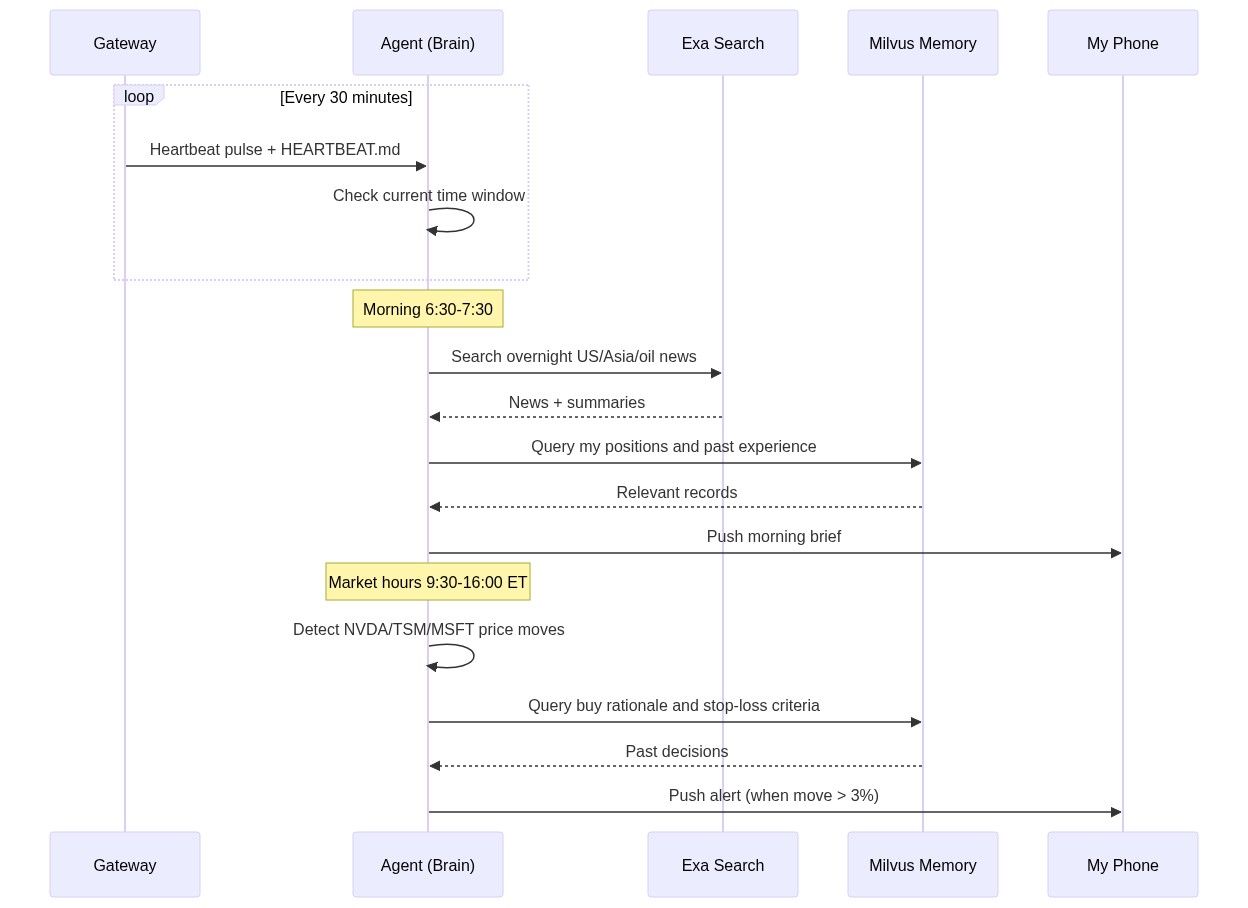
OpenClaw’s Heartbeat mechanism fixes this. A gateway pings the agent every 30 minutes (configurable), and the agent checks a HEARTBEAT.md file to decide what to do at that moment. It’s a markdown file with time-based rules:
# HEARTBEAT.md — runs every 30 minutes automatically

## Morning brief (6:30-7:30 AM only)
- Use Exa to search overnight US market news, Asian markets, oil prices
- Search Milvus for my current positions and relevant past experiences
- Generate a personalized morning brief (under 500 words)
- Flag anything related to my past mistakes or current holdings
- End with 1-3 action items
- Send the brief to my phone

## Price alerts (during US market hours 9:30 AM - 4:00 PM ET)
- Check price changes for: NVDA, TSM, MSFT, AAPL, GOOGL
- If any stock moved more than 3% since last check:
  - Search Milvus for: why I hold this stock, my exit criteria
  - Generate alert with context and recommendation
  - Send alert to my phone

## End of day summary (after 4:30 PM ET on weekdays)
- Summarize today's market action for my watchlist
- Compare actual moves with my morning expectations
- Note any new patterns worth remembering
Results: Less Screen Time, Fewer Impulsive Trades
Here’s what the system actually produces day to day:
- Morning brief (7:00 AM). The agent runs Exa overnight, pulls my positions and relevant history from Milvus, and pushes a personalized summary to my phone — under 500 words. What happened overnight, how it relates to my holdings, and one to three action items. I read it while brushing my teeth.
- Intraday alerts (9:30 AM–4:00 PM ET). Every 30 minutes, the agent checks my watchlist. If any stock moved more than 3%, I get a notification with context: why I bought it, where my stop-loss is, and whether I’ve been in a similar situation before.
- Weekly review (weekends). The agent compiles the full week — market moves, how they compared to my morning expectations, and patterns worth remembering. I spend 30 minutes reading it on Saturday. The rest of the week, I deliberately stay away from the screen.
That last point is the biggest change. The agent doesn’t only save time, it also frees me from watching the market. You can’t panic-sell if you’re not looking at prices.
Before this system, I was spending 10–15 hours a week on information gathering, market monitoring, and trade review, scattered across meetings, commute time, and late-night scrolling. Now it’s about two hours: five minutes on the morning brief each day, plus 30 minutes on the weekend review.
The information quality is also better. I’m reading summaries from Reuters and Bloomberg instead of whatever went viral on Twitter. And with the agent pulling up my past mistakes every time I’m tempted to act, I’ve cut my impulsive trades significantly. I can’t prove this has made me a better investor yet, but it’s made me a less reckless one.
The total cost: 10/month for Exa, and a bit of electricity to keep Milvus Lite running.
Conclusion
I kept making the same impulsive trades because my information was bad, I seldom reviewed my own history, and staring at the market all day made it worse. So I built an AI agent that solves those problems by doing three things:
- Gathers reliable market news automatically using Exa, so I start each morning with a clean briefing instead of an hour of doomscrolling.
- Remembers my past trades with Milvus and warns me when I’m about to repeat a mistake, using Milvus as a personal vector database.
- Runs on OpenClaw autopilot and only pings me when it matters, using OpenClaw Skills and Heartbeat — no cron jobs, no glue code.
Total cost: $20/month. The agent doesn’t trade or touch my money.
The biggest change wasn’t the data or the alerts. It was that I stopped watching the market. I forgot about it entirely last Wednesday, which has never happened in my years of trading. I still lose money sometimes, but way less often, and I actually enjoy my weekends again. My coworkers haven’t updated the joke yet, but give it time.
The agent also took just two weekends to build. A year ago, the same setup would have meant writing schedulers, notification pipelines, and memory management from scratch. With OpenClaw, most of that time went into clarifying my own trading rules, not writing infrastructure.
And once you’ve built it for one use case, the architecture is portable. Swap the Exa search templates and the OpenClaw Skills, and you have an agent that monitors research papers, tracks competitors, watches regulatory changes, or follows supply chain disruptions.
If you want to try it:
- Milvus quickstart — get a vector database running locally in under five minutes
- OpenClaw docs — set up your first agent with Skills and Heartbeat
- Exa API — 1,000 free searches per month to start
Got questions, want help debugging, or just want to show off what you’ve built? Join the Milvus Slack channel— it’s the fastest way to get help from both the community and the team. And if you’d rather talk through your setup one-on-one, book a 20-minute Milvus office hour.
Keep Reading
- OpenClaw (Formerly Clawdbot & Moltbot) Explained: A Complete Guide to the Autonomous AI Agent
- Step-by-Step Guide to Setting Up OpenClaw (Previously Clawdbot/Moltbot) with Slack
- Why AI Agents like OpenClaw Burn Through Tokens and How to Cut Costs
- We Extracted OpenClaw’s Memory System and Open-Sourced It (memsearch)
- Step 1: Get Real-Time Market Intelligence with Exa
- Step 2: Store Trading History in Milvus for Smarter Decisions
- Step 3: Teach Your Agent to Analyze with OpenClaw Skills
- Step 4: Start Your Agent with OpenClaw Heartbeat
- Results: Less Screen Time, Fewer Impulsive Trades
- Conclusion
- Keep Reading
On This Page
Try Managed Milvus for Free
Zilliz Cloud is hassle-free, powered by Milvus and 10x faster.
Get StartedLike the article? Spread the word