Why AI Agents like OpenClaw Burn Through Tokens and How to Cut Costs
If you’ve spent any time with OpenClaw (formerly Clawdbot and Moltbot), you already know how good this AI Agent is. It’s fast, local, flexible, and capable of pulling off surprisingly complex workflows across Slack, Discord, your codebase, and practically anything else you hook it into. But once you start using it seriously, one pattern quickly emerges: your token usage starts to climb.
This isn’t OpenClaw’s fault specifically — it’s how most AI agents behave today. They trigger an LLM call for almost everything: looking up a file, planning a task, writing a note, executing a tool, or asking a follow-up question. And because tokens are the universal currency of these calls, every action has a cost.
To understand where that cost comes from, we need to look under the hood at two big contributors:
- Search: Badly constructed searches pull in sprawling context payloads — entire files, logs, messages, and code regions that the model didn’t actually need.
- Memory: Storing unimportant information forces the agent to reread and reprocess it on future calls, compounding token usage over time.
Both issues silently increase operational costs without improving capability.
How AI Agents Like OpenClaw Actually Perform Searches — and Why That Burns Tokens
When an agent needs information from your codebase or document library, it typically does the equivalent of a project-wide Ctrl+F. Every matching line is returned — unranked, unfiltered, and unprioritized. Claude Code implements this through a dedicated Grep tool built on ripgrep. OpenClaw doesn’t have a built-in codebase search tool, but its exec tool lets the underlying model run any command, and loaded skills can guide the agent to use tools like rg. In both cases, codebase search returns keyword matches unranked and unfiltered.
This brute-force approach works fine in small projects. But as repositories grow, so does the price. Irrelevant matches pile into the LLM’s context window, forcing the model to read and process thousands of tokens it didn’t actually need. A single unscoped search might drag in full files, huge comment blocks, or logs that share a keyword but not the underlying intent. Repeat that pattern across a long debugging or research session, and the bloat adds up quickly.
Both OpenClaw and Claude Code try to manage this growth. OpenClaw prunes oversized tool outputs and compacts long conversation histories, while Claude Code limits file-read output and supports context compaction. These mitigations work — but only after the bloated query has already been executed. The unranked search results still consumed tokens, and you still paid for them. Context management helps future turns, not the original call that generated the waste.
How AI Agent Memory Works and Why It Also Costs Tokens
Search isn’t the only source of token overhead. Every piece of context an agent recalls from memory must also be loaded into the LLM’s context window, and that costs tokens as well.
The LLM APIs that most agents rely on today are stateless: Anthropic’s Messages API requires the full conversation history with every request, and OpenAI’s Chat Completions API works the same way. Even OpenAI’s newer stateful Responses API, which manages conversation state server-side, still bills for the full context window on every call. Memory loaded into context costs tokens regardless of how it gets there.
To work around this, agent frameworks write notes to files on disk and load relevant notes back into the context window when the agent needs them. For instance, OpenClaw stores curated notes in MEMORY.md and appends daily logs to timestamped Markdown files, then indexes them with hybrid BM25 and vector search so the agent can recall relevant context on demand.
OpenClaw’s memory design works well, but it requires the full OpenClaw ecosystem: the Gateway process, messaging platform connections, and the rest of the stack. The same is true of Claude Code’s memory, which is tied to its CLI. If you’re building a custom agent outside these platforms, you need a standalone solution. The next section covers the tools available for both problems.
How to Stop OpenClaw From Burning Through Tokens
If you want to reduce how many tokens OpenClaw consumes, there are two levers you can pull.
- The first is better retrieval — replacing grep-style keyword dumps with ranked, relevance-driven search tools so the model only sees the information that actually matters.
- The second is better memory — moving from opaque, framework-dependent storage to something you can understand, inspect, and control.
Replacing grep with Better Retrieval: index1, QMD, and Milvus
Many AI coding agents search codebases with grep or ripgrep. Claude Code has a dedicated Grep tool built on ripgrep. OpenClaw doesn’t have a built-in codebase search tool, but its exec tool lets the underlying model run any command, and skills like ripgrep or QMD can be loaded to guide how the agent searches. Without a retrieval-focused skill, the agent falls back on whatever approach the underlying model chooses. The core problem is the same across agents: without ranked retrieval, keyword matches enter the context window unfiltered.
This works when a project is small enough that every match fits comfortably in the context window. The problem starts when a codebase or document library grows to the point where a keyword returns dozens or hundreds of hits and the agent has to load all of them into the prompt. At that scale, you need results ranked by relevance, not just filtered by match.
The standard fix is hybrid search, which combines two complementary ranking methods:
- BM25 scores each result by how often and how uniquely a term appears in a given document. A focused file that mentions “authentication” 15 times ranks higher than a sprawling file that mentions it once.
- Vector search converts text into numerical representations of meaning, so “authentication” can match “login flow” or “session management” even when they share no keywords.
Neither method alone is sufficient: BM25 misses paraphrased terms, and vector search misses exact terms like error codes. Combining both and merging the ranked lists through a fusion algorithm covers both gaps.
The tools below implement this pattern at different scales. Grep is the baseline everyone starts with. index1, QMD, and Milvus each add hybrid search with increasing capacity.
index1: fast hybrid search on a single machine
index1 is a CLI tool that packages hybrid search into a single SQLite database file. FTS5 handles BM25, sqlite-vec handles vector similarity, and RRF fuses the ranked lists. Embeddings are generated locally by Ollama, so nothing leaves your machine.
index1 chunks code by structure, not by line count: Markdown files split by headings, Python files by AST, JavaScript and TypeScript by regex patterns. This means search results return coherent units like a full function or a complete documentation section, not arbitrary line ranges that cut off mid-block. Response time is 40 to 180ms for hybrid queries. Without Ollama, it falls back to BM25-only, which still ranks results rather than dumping every match into the context window.
index1 also includes an episodic memory module for storing lessons learned, bug root causes, and architectural decisions. These memories live inside the same SQLite database as the code index rather than as standalone files.
Note: index1 is an early-stage project (0 stars, 4 commits as of February 2026). Evaluate it against your own codebase before committing.
- Best for: solo developers or small teams with a codebase that fits on one machine, looking for a fast improvement over grep.
- Outgrow it when: you need multi-user access to the same index, or your data exceeds what a single SQLite file handles comfortably.
QMD: higher accuracy through local LLM re-ranking
QMD (Query Markup Documents), built by Shopify founder Tobi Lütke, adds a third stage: LLM re-ranking. After BM25 and vector search each return candidates, a local language model re-reads the top results and reorders them by actual relevance to your query. This catches cases where both keyword and semantic matches return plausible but wrong results.
QMD runs entirely on your machine using three GGUF models totaling about 2 GB: an embedding model (embeddinggemma-300M), a cross-encoder reranker (Qwen3-Reranker-0.6B), and a query expansion model (qmd-query-expansion-1.7B). All three download automatically on first run. No cloud API calls, no API keys.
The tradeoff is cold-start time: loading three models from disk takes roughly 15 to 16 seconds. QMD supports a persistent server mode (qmd mcp) that keeps models in memory between requests, eliminating the cold-start penalty for repeated queries.
- Best for: privacy-critical environments where no data can leave your machine, and where retrieval accuracy matters more than response time.
- Outgrow it when: you need sub-second responses, shared team access, or your dataset exceeds single-machine capacity.
Milvus: hybrid search at team and enterprise scale
The single-machine tools above work well for individual developers, but they hit limits when multiple people or agents need access to the same knowledge base.
Milvus is an open-source vector database built for that next stage: distributed, multi-user, and capable of handling billions of vectors.
Its key feature for this use case is built-in Sparse-BM25, available since Milvus 2.5 and significantly faster in 2.6. You provide raw text, and Milvus tokenizes it internally using an analyzer built on tantivy, then converts the result to sparse vectors that are pre-computed and stored at index time.
Because the BM25 representation is already stored, retrieval doesn’t need to recalculate scores on the fly. These sparse vectors live alongside dense vectors (semantic embeddings) in the same Collection. At query time, you fuse both signals with a ranker such as RRFRanker, which Milvus provides out of the box. Same hybrid search pattern as index1 and QMD, but running on infrastructure that scales horizontally.
Milvus also provides capabilities that single-machine tools cannot: multi-tenant isolation (separate databases or collections per team), data replication with automatic failover, and hot/cold data tiering for cost-efficient storage. For agents, this means multiple developers or multiple agent instances can query the same knowledge base concurrently without stepping on each other’s data.
- Best for: multiple developers or agents sharing a knowledge base, large or fast-growing document sets, or production environments that need replication, failover, and access control.
To sum up:
| Tool | Stage | Deployment | Migration signal |
|---|---|---|---|
| Claude Native Grep | Prototyping | Built-in, zero setup | Bills climb or queries slow down |
| index1 | Single-machine (speed) | Local SQLite + Ollama | Need multi-user access or data outgrows one machine |
| QMD | Single-machine (accuracy) | Three local GGUF models | Need team-shared indexes |
| Milvus | Team or Production | Distributed cluster | Large document sets or multi-tenant requirements |
Reducing AI Agent Token Costs by Giving Them Persistent, Editable Memory with memsearch
Search optimization reduces token waste per query, but it doesn’t help with what the agent retains between sessions.
Every piece of context an agent recalls from memory has to be loaded into the prompt, and that costs tokens too. The question isn’t whether to store memory, but how. The storage method determines whether you can see what the agent remembers, fix it when it’s wrong, and take it with you if you switch tools.
Most frameworks fail on all three counts. Mem0 and Zep store everything in a vector database, which works for retrieval, but makes memory:
- Opaque. You can’t see what the agent remembers without querying an API.
- Hard to edit. Correcting or removing a memory means API calls, not opening a file.
- Locked in. Switching frameworks means exporting, converting, and reimporting your data.
OpenClaw takes a different approach. All memory lives in plain Markdown files on disk. The agent writes daily logs automatically, and humans can open and edit any memory file directly. This solves all three problems: the memory is readable, editable, and portable by design.
The trade-off is deployment overhead. Running OpenClaw’s memory means running the full OpenClaw ecosystem: the Gateway process, messaging platform connections, and the rest of the stack. For teams already using OpenClaw, that’s fine. For everyone else, the barrier is too high. memsearch was built to close this gap: it extracts OpenClaw’s Markdown-first memory pattern into a standalone library that works with any agent.
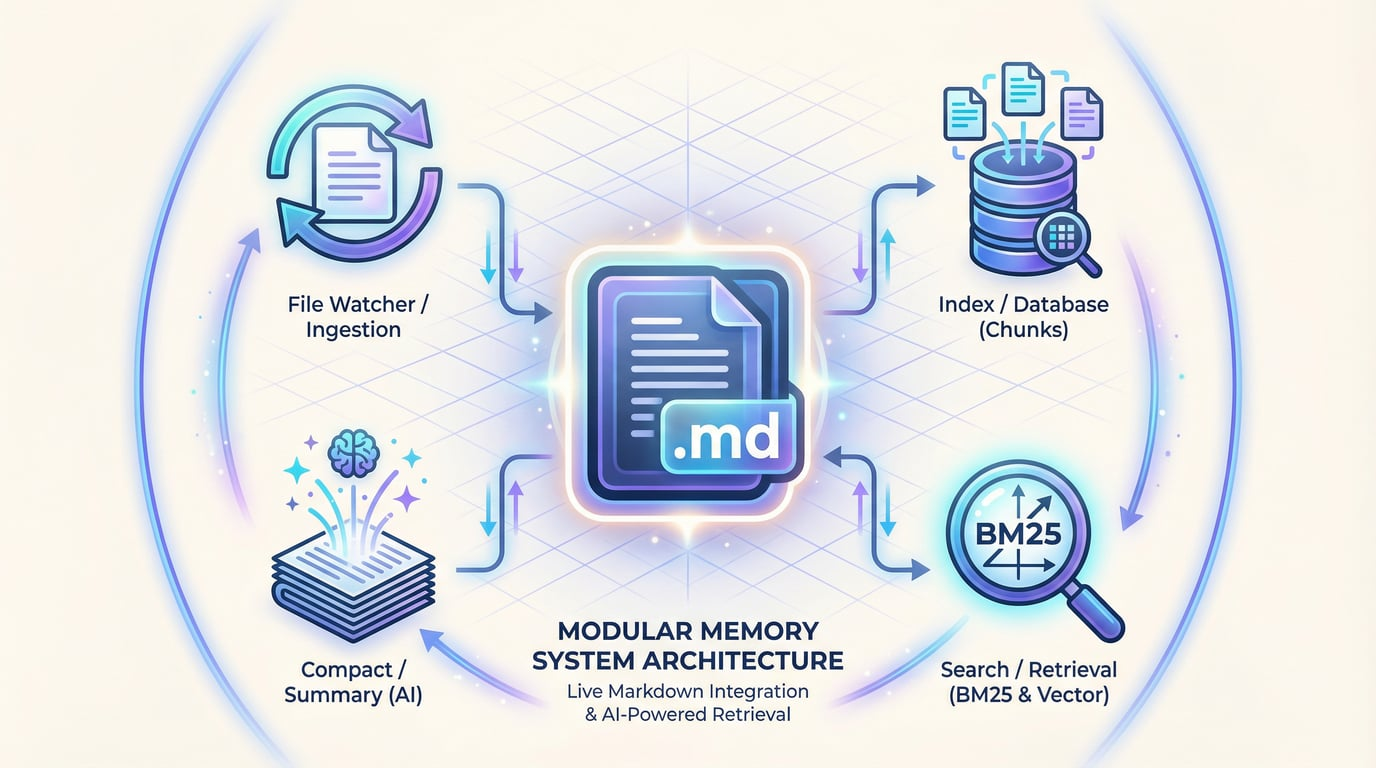
memsearch, built by Zilliz (the team behind Milvus), treats Markdown files as the single source of truth. A MEMORY.md holds long-term facts and decisions you write by hand. Daily logs (2026-02-26.md) are generated automatically from session summaries. The vector index, stored in Milvus, is a derived layer that can be rebuilt from the Markdown at any time.
In practice, this means you can open any memory file in a text editor, read exactly what the agent knows, and change it. Save the file, and memsearch’s file watcher detects the change and re-indexes automatically. You can manage memories with Git, review AI-generated memories through pull requests, or move to a new machine by copying a folder. If the Milvus index is lost, you rebuild it from the files. The files are never at risk.
Under the hood, memsearch uses the same hybrid search pattern described above: chunks split by heading structure and paragraph boundaries, BM25 + vector retrieval, and an LLM-powered compact command that summarizes old memories when logs grow large.
Best for: teams that want full visibility into what the agent remembers, need version control over memory, or want a memory system that isn’t locked to any single agent framework.
To sum up:
| Capability | Mem0 / Zep | memsearch |
|---|---|---|
| Source of truth | Vector database (sole data source) | Markdown files (primary) + Milvus (index) |
| Transparency | Black box, requires API to inspect | Open any .md file to read |
| Editability | Modify via API calls | Edit directly in any text editor, auto re-indexed |
| Version control | Requires separate audit logging | Git works natively |
| Migration cost | Export → convert format → re-import | Copy the Markdown folder |
| Human-AI collaboration | AI writes, humans observe | Humans can edit, supplement, and review |
Which setup fits your scale
| Scenario | Search | Memory | When to move on |
|---|---|---|---|
| Early prototype | Grep (built-in) | — | Bills climb or queries slow down |
| Single developer, search only | index1 (speed) or QMD (accuracy) | — | Need multi-user access or data outgrows one machine |
| Single developer, both | index1 | memsearch | Need multi-user access or data outgrows one machine |
| Team or production, both | Milvus | memsearch | — |
| Quick integration, memory only | — | Mem0 or Zep | Need to inspect, edit, or migrate memories |
Conclusion
The token costs that come with always-on AI agents aren’t inevitable. This guide covered two areas where better tooling can cut the waste: search and memory.
Grep works at small scale, but as codebases grow, unranked keyword matches flood the context window with content the model never needed. index1 and QMD solve this on a single machine by combining BM25 keyword scoring with vector search and returning only the most relevant results. For teams, multi-agent setups, or production workloads, Milvus provides the same hybrid search pattern on infrastructure that scales horizontally.
For memory, most frameworks store everything in a vector database: opaque, hard to edit by hand, and locked to the framework that created it. memsearch takes a different approach. Memory lives in plain Markdown files you can read, edit, and version-control with Git. Milvus serves as a derived index that can be rebuilt from those files at any time. You stay in control of what the agent knows.
Both memsearch and Milvus are open source. We’re actively developing memsearch and would love feedback from anyone running it in production. Open an issue, submit a PR, or just tell us what’s working and what isn’t.
Projects mentioned in this guide:
- memsearch: Markdown-first memory for AI agents, backed by Milvus.
- Milvus: Open-source vector database for scalable hybrid search.
- index1: BM25 + vector hybrid search for AI coding agents.
- QMD: Local hybrid search with LLM re-ranking.
Keep Reading
- How AI Agents Like OpenClaw Actually Perform Searches — and Why That Burns Tokens
- How AI Agent Memory Works and Why It Also Costs Tokens
- How to Stop OpenClaw From Burning Through Tokens
- Replacing grep with Better Retrieval: index1, QMD, and Milvus
- Reducing AI Agent Token Costs by Giving Them Persistent, Editable Memory with memsearch
- Which setup fits your scale
- Conclusion
- Keep Reading
On This Page
Try Managed Milvus for Free
Zilliz Cloud is hassle-free, powered by Milvus and 10x faster.
Get StartedLike the article? Spread the word