Milvus + RustFS+ Vibe Coding: Build a Lightweight RAG Chatbot from Scratch
This blog is contributed by Jinghe Ma, a Milvus community contributor, and is published here with permission.
I wanted a chatbot that could answer questions from my own documentation, and I wanted full control over the stack behind it—from object storage to the chat interface. That led me to build a lightweight RAG chatbot with Milvus and RustFS at the core.
Milvus is the most widely adopted open-source vector database for building RAG applications. It separates compute from storage, keeping hot data in memory or on SSD for fast search while relying on object storage underneath for scalable, cost-efficient data management. Because it works with S3-compatible storage, it was a natural fit for this project.
For the storage layer, I chose RustFS, an open-source S3-compatible object storage system written in Rust. It can be deployed via binary, Docker, or Helm chart. Although it is still in alpha and not recommended for production workloads, it was stable enough for this build.
Once the infrastructure was in place, I needed a knowledge base to query. The RustFS documentation—about 80 Markdown files—was a convenient starting point. I chunked the docs, generated embeddings, stored them in Milvus, and vibe-coded the rest: FastAPI for the backend and Next.js for the chat interface.
In this post, I’ll cover the full system end-to-end. The code is available at https://github.com/majinghe/chatbot. It is a working prototype rather than a production-ready system, but the goal is to provide a clear, extensible build that you can adapt for your own use. Each section below walks through one layer, from infrastructure to frontend.
Installing Milvus and RustFS with Docker Compose
Let’s start by installing Milvus and RustFS.
Milvus can work with any S3-compatible object storage, although MinIO is the default backend in the standard setup. Since MinIO is no longer accepting community contributions, we’ll replace it with RustFS in this example.
To make that change, update the object storage configuration in configs/milvus.yaml inside the Milvus repository. The relevant section looks like this:
minio:
  address: localhost:9000
  port: 9000
  accessKeyID: rustfsadmin
  secretAccessKey: rustfsadmin
  useSSL: false
  bucketName: "rustfs-bucket"
There are two ways to apply this change:
- Mount a local config file. Copy configs/milvus.yaml locally, update the MinIO fields to point at RustFS, then mount it into the container via a Docker volume.
- Patch at startup with yq****. Modify the container’s command to run yq against /milvus/configs/milvus.yaml before the Milvus process starts.
This build uses the first approach. The Milvus service in docker-compose.yml gets one extra volume entry:
- ${DOCKER_VOLUME_DIRECTORY:-.}/volumes/milvus/milvus.yaml:/milvus/configs/milvus.yaml:ro
The Docker Compose Setup
The full docker-compose.yml runs four services.
etcd — Milvus depends on etcd for metadata storage:
etcd:
    container_name: milvus-etcd
    image: quay.io/coreos/etcd:v3.5.18
    environment:
      - ETCD_AUTO_COMPACTION_MODE=revision
      - ETCD_AUTO_COMPACTION_RETENTION=1000
      - ETCD_QUOTA_BACKEND_BYTES=4294967296
      - ETCD_SNAPSHOT_COUNT=50000
    volumes:
      - ${DOCKER_VOLUME_DIRECTORY:-.}/volumes/etcd:/etcd
    command: etcd -advertise-client-urls=http://etcd:2379 -listen-client-urls http://0.0.0.0:2379 --data-dir /etcd
    healthcheck:
      test: ["CMD", "etcdctl", "endpoint", "health"]
      interval: 30s
      timeout: 20s
      retries: 3
Attu — a visual UI for Milvus, developed and open-sourced by Zilliz (note: versions after 2.6 are closed-source):
  attu:
    container_name: milvus-attu
    image: zilliz/attu:v2.6
    environment:
      - MILVUS_URL=milvus-standalone:19530
    ports:
      - "8000:3000"
    restart: unless-stopped
RustFS — the object storage backend:
rustfs:
    container_name: milvus-rustfs
    image: rustfs/rustfs:1.0.0-alpha.58
    environment:
      - RUSTFS_VOLUMES=/data/rustfs0,/data/rustfs1,/data/rustfs2,/data/rustfs3
      - RUSTFS_ADDRESS=0.0.0.0:9000
      - RUSTFS_CONSOLE_ADDRESS=0.0.0.0:9001
      - RUSTFS_CONSOLE_ENABLE=true
      - RUSTFS_EXTERNAL_ADDRESS=:9000  # Same as internal since no port mapping
      - RUSTFS_CORS_ALLOWED_ORIGINS=*
      - RUSTFS_CONSOLE_CORS_ALLOWED_ORIGINS=*
      - RUSTFS_ACCESS_KEY=rustfsadmin
      - RUSTFS_SECRET_KEY=rustfsadmin
    ports:
      - "9000:9000"# S3 API port
      - "9001:9001"# Console port
    volumes:
      - rustfs_data_0:/data/rustfs0
      - rustfs_data_1:/data/rustfs1
      - rustfs_data_2:/data/rustfs2
      - rustfs_data_3:/data/rustfs3
      - logs_data:/app/logs
    restart: unless-stopped
    healthcheck:
      test:
        [
          "CMD",
          "sh", "-c",
          "curl -f http://localhost:9000/health && curl -f http://localhost:9001/health"
        ]
      interval: 30s
      timeout: 10s
      retries: 3
      start_period: 40s
Milvus — running in standalone mode:
  standalone:
    container_name: milvus-standalone
    image: milvusdb/milvus:v2.6.0
    command: ["milvus", "run", "standalone"]
    security_opt:
    - seccomp:unconfined
    environment:
      ETCD_ENDPOINTS: etcd:2379
      MINIO_ADDRESS: rustfs:9000
      MQ_TYPE: woodpecker
    volumes:
      - ${DOCKER_VOLUME_DIRECTORY:-.}/volumes/milvus:/var/lib/milvus
      - ${DOCKER_VOLUME_DIRECTORY:-.}/volumes/milvus/milvus.yaml:/milvus/configs/milvus.yaml:ro
    healthcheck:
      test: ["CMD", "curl", "-f", "http://localhost:9091/healthz"]
      interval: 30s
      start_period: 90s
      timeout: 20s
      retries: 3
    ports:
      - "19530:19530"
      - "9091:9091"
    depends_on:
      - "etcd"
      - "rustfs"
Starting Everything
Once the config is in place, bring up all four services:
docker compose -f docker-compose.yml up -d
You can verify everything is running with:
docker ps
CONTAINER ID   IMAGE                                             COMMAND                  CREATED          STATUS                      PORTS                                                                                      NAMES
4404b5cc6f7e   milvusdb/milvus:v2.6.0                            "/tini -- milvus run…"   53 minutes ago   Up 53 minutes (healthy)     0.0.0.0:9091->9091/tcp, :::9091->9091/tcp, 0.0.0.0:19530->19530/tcp, :::19530->19530/tcp   milvus-standalone
40ddc8ed08bb   zilliz/attu:v2.6                                  "docker-entrypoint.s…"   53 minutes ago   Up 53 minutes               0.0.0.0:8000->3000/tcp, :::8000->3000/tcp                                                  milvus-attu
3d2c8d80a8ce   quay.io/coreos/etcd:v3.5.18                       "etcd -advertise-cli…"   53 minutes ago   Up 53 minutes (healthy)     2379-2380/tcp                                                                              milvus-etcd
d760f6690ea7   rustfs/rustfs:1.0.0-alpha.58                      "/entrypoint.sh rust…"   53 minutes ago   Up 53 minutes (unhealthy)   0.0.0.0:9000-9001->9000-9001/tcp, :::9000-9001->9000-9001/tcp                              milvus-rustfs
With all four containers up, your services are available at:
- Milvus:
:19530 - RustFS:
:9000 - Attu:
:8000
Vectorizing the RustFS Docs and Storing Embeddings in Milvus
With Milvus and RustFS running, the next step is to build the knowledge base. The source material is the RustFS Chinese documentation: 80 Markdown files that you’ll chunk, embed, and store in Milvus.
Reading and Chunking the Docs
The script recursively reads every .md file in the docs folder, then splits each file’s content into chunks by newline:
# 3. Read Markdown files
def load_markdown_files(folder):
    files = glob.glob(os.path.join(folder, "**", "*.md"), recursive=True)
    docs = []
    for f in files:
        with open(f, "r", encoding="utf-8") as fp:
            docs.append(fp.read())
    return docs

# 4. Split documents (simple paragraph-based splitting)
def split_into_chunks(text, max_len=500):
    chunks, current = [], []
    for line in text.split("\n"):
        if len(" ".join(current)) + len(line) < max_len:
            current.append(line)
        else:
            chunks.append(" ".join(current))
            current = [line]
    if current:
        chunks.append(" ".join(current))
    return chunks
This chunking strategy is intentionally simple. If you want tighter control — splitting on headers, preserving code blocks, or overlapping chunks for better retrieval — this is the place to iterate.
Embedding the Chunks
With the chunks ready, you embed them using OpenAI’s text-embedding-3-large model, which outputs 3072-dimensional vectors:
def embed_texts(texts):
    response = client.embeddings.create(
        model="text-embedding-3-large",
        input=texts
    )
    return [d.embedding for d in response.data]
Storing Embeddings in Milvus
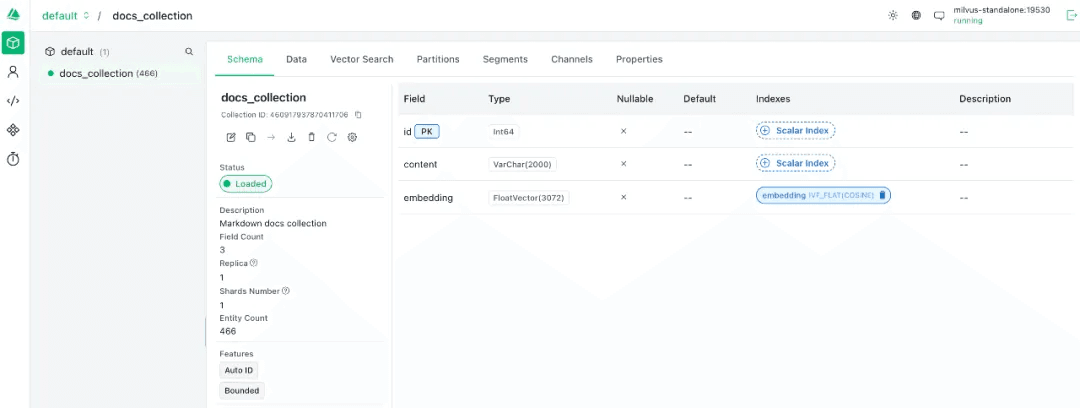
Milvus organizes data into collections, each defined by a schema. Here, each record stores the raw text chunk alongside its embedding vector:
# Connect to Milvus
connections.connect("default", host="ip", port="19530")

# Define the schema
fields = [
    FieldSchema(name="id", dtype=DataType.INT64, is_primary=True, auto_id=True),
    FieldSchema(name="content", dtype=DataType.VARCHAR, max_length=2000),
    FieldSchema(name="embedding", dtype=DataType.FLOAT_VECTOR, dim=3072),
]
schema = CollectionSchema(fields, description="Markdown docs collection")

# Create the collection
if utility.has_collection("docs_collection"):
    utility.drop_collection("docs_collection")

collection = Collection(name="docs_collection", schema=schema)

# Insert data
collection.insert([all_chunks, embeddings])
collection.flush()
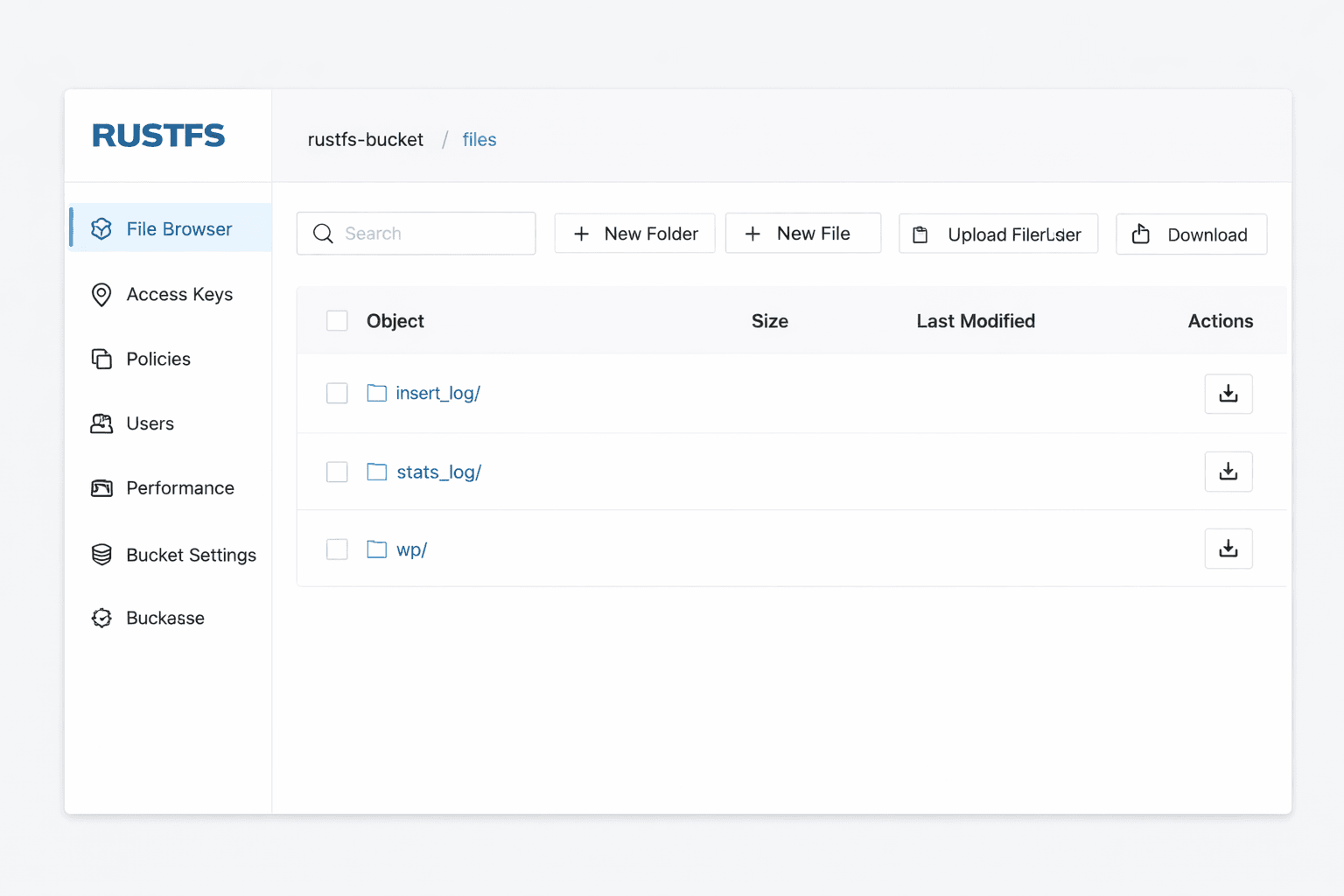
Once the insert completes, you can verify the collection in Attu at
You can also check RustFS at
Building a RAG Pipeline with Milvus and OpenAI’s GPT-5
With embeddings stored in Milvus, you have everything you need to build the RAG pipeline. The flow is: embed the user’s query, retrieve the most semantically similar chunks from Milvus, assemble a prompt, and call the GPT-5.The build here uses OpenAI’s GPT-5, but any chat-capable model works here — the retrieval layer is what matters, and Milvus handles that regardless of which LLM generates the final answer.
# 1. Embed the query
query_embedding = embed_texts(query)

# 2. Retrieve similar documents from Milvus
    search_params = {"metric_type": "COSINE", "params": {"nprobe": 10}}
    results = collection.search(
        data=[query_embedding],
        anns_field="embedding",
        param=search_params,
        limit=3,
        output_fields=["content"]
    )

docs = [hit.entity.get("text") for hit in results[0]]

# 3. Assemble the RAG prompt
prompt = f"You are a RustFS expert. Answer the question based on the following documents:\n\n{docs}\n\nUser question: {query}"

# 4. Call the LLM
    response = client.chat.completions.create(
        model="gpt-5", # swap to any OpenAI model, or replace this call with another LLM provider
        messages=[{"role": "user", "content": prompt}],
        # max_tokens=16384,
        # temperature=1.0,
        # top_p=1.0,
    )

    answer = response.choices[0].message.content

    return {"answer": answer, "sources": docs}
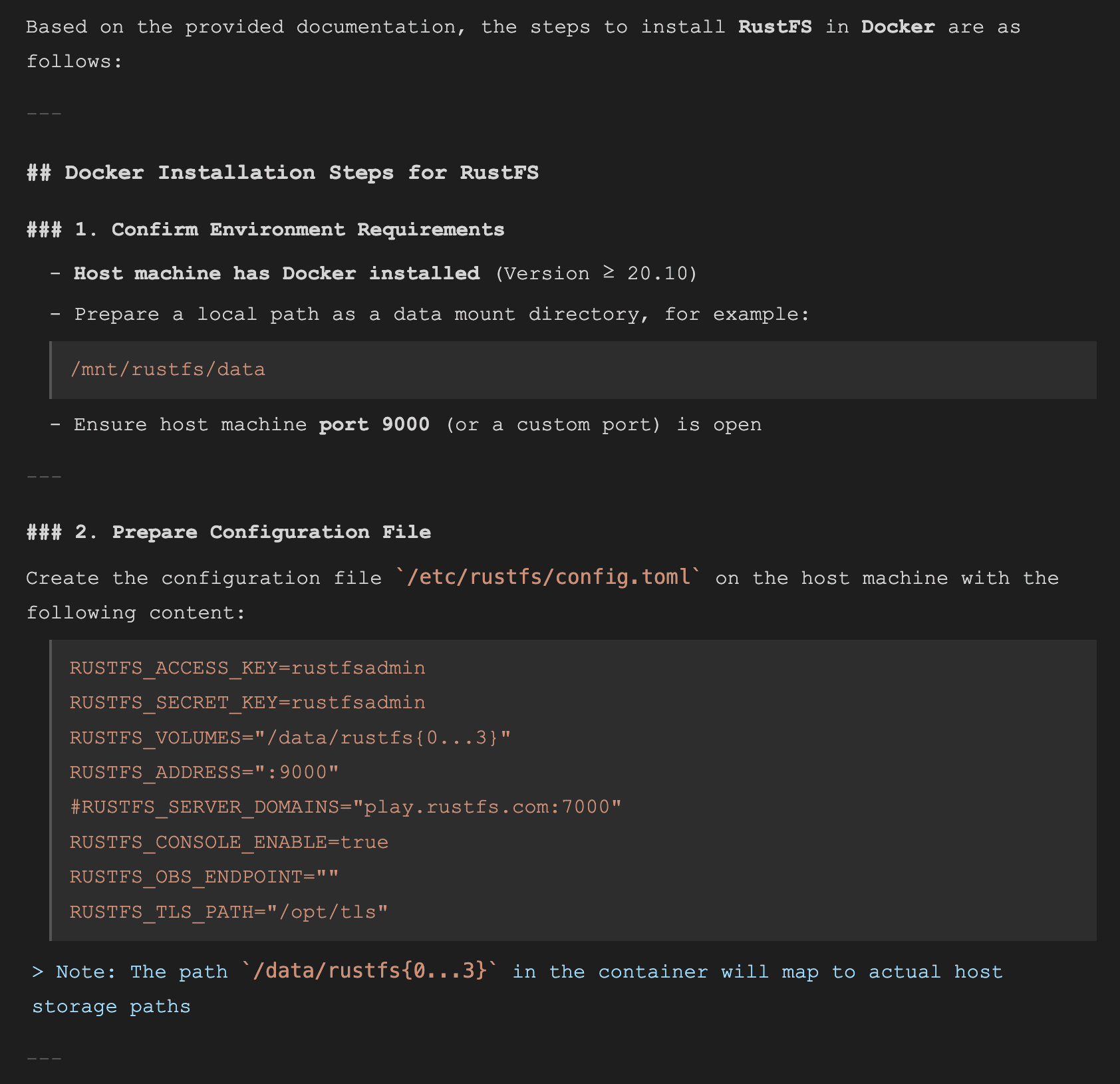
To test it, run a query:
How do I install RustFS in Docker?
Query results:

Wrapping Everything in a FastAPI + Next.js Chatbot
The RAG pipeline is working, but running a Python script every time you want to ask a question defeats the purpose. So I asked AI for a stack suggestion. The answer: FastAPI for the backend — the RAG code is already Python, so wrapping it in a FastAPI endpoint is the natural fit — and Next.js for the frontend. FastAPI exposes the RAG logic as an HTTP endpoint; Next.js calls it and renders the response in a chat window.
FastAPI Backend
FastAPI wraps the RAG logic in a single POST endpoint. Any client can now query your knowledge base with a JSON request:
app = FastAPI()

@app.post("/chat")
def chat(req: ChatRequest):
    query = req.query

......
Start the server with:
uvicorn main:app --reload --host 0.0.0.0 --port 9999
INFO:     Will watch for changes in these directories: ['/home/xiaomage/milvus/chatbot/.venv']
INFO:     Uvicorn running on http://0.0.0.0:9999 (Press CTRL+C to quit)
INFO:     Started reloader process [2071374] using WatchFiles
INFO:     Started server process [2071376]
INFO:     Waiting for application startup.
INFO:     Application startup complete.
Next.js Frontend
The frontend sends the user’s query to the FastAPI endpoint and renders the response. The core fetch logic:
javascript
   try {
      const res = await fetch('http://localhost:9999/chat', {
        method: 'POST',
        headers: { 'Content-Type': 'application/json' },
        body: JSON.stringify({ query: input }),
      });

      const data = await res.json();
      const botMessage: Message = { role: 'bot', content: data.answer || 'No response' };
      setMessages(prev => [...prev, userMessage, botMessage]);
    } catch (error) {
      console.error(error);
      const botMessage: Message = { role: 'bot', content: 'Error connecting to server.' };
      setMessages(prev => [...prev, botMessage]);
    } finally {
      setLoading(false);
    }
Start the frontend with:
pnpm run dev -H 0.0.0.0 -p 3000

> rag-chatbot@0.1.0 dev /home/xiaomage/milvus/chatbot-web/rag-chatbot
> next dev --turbopack -H 0.0.0.0 -p 3000

   ▲ Next.js 15.5.3 (Turbopack)
   - Local:        http://localhost:3000
   - Network:      http://0.0.0.0:3000

 ✓ Starting...
 ✓ Ready in 1288ms
Open http://<ip>:3000/chat in your browser.
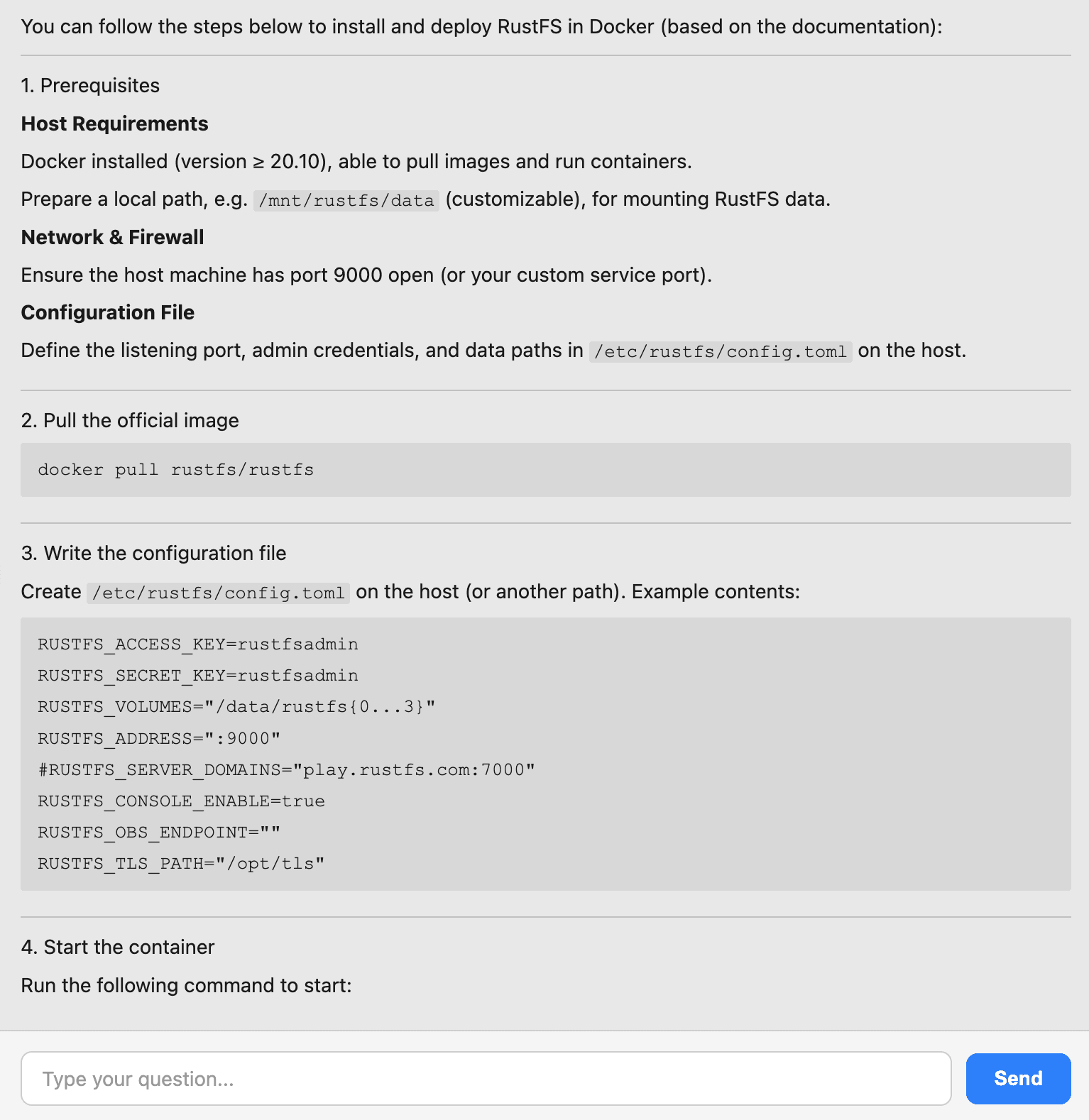
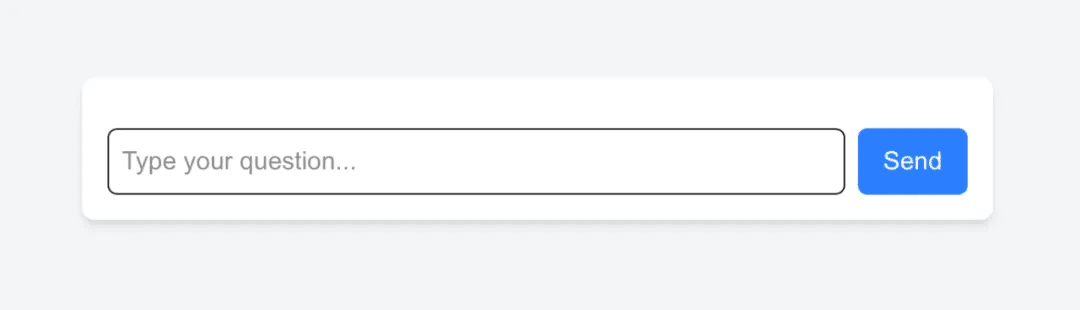 Type a question:
How do I install RustFS in Docker?
Chat interface response::
And that’s the chatbot done.
Conclusion
What started as curiosity about Milvus’s storage backend turned into a full working RAG chatbot — and the path from one to the other was shorter than expected. Here’s what the build covers, end to end:
- Milvus + RustFS with Docker Compose. Milvus runs in standalone mode with RustFS as its object storage backend, replacing the default MinIO. Four services total: etcd, Milvus, RustFS, and Attu.
- Vectorizing the knowledge base. The RustFS documentation — 80 Markdown files — gets chunked, embedded with text-embedding-3-large, and stored in Milvus as 466 vectors.
- The RAG pipeline. At query time, the user’s question gets embedded the same way, Milvus retrieves the three most semantically similar chunks, and GPT-5 generates an answer grounded in those docs.
- The chatbot UI. FastAPI wraps the pipeline in a single POST endpoint; Next.js puts a chat window in front of it. No more dropping into a terminal to ask a question.
A few of my takeaways from the process:
- Milvus’s documentation is great. Especially the deployment sections — clear, complete, easy to follow.
- RustFS is a pleasure to work with as an object storage backend. Dropping it in for MinIO took less effort than expected.
- Vibe coding is fast, right up until scope takes over. One thing kept leading to another — Milvus to RAG to chatbot to “maybe I should Dockerize the whole thing.” Requirements don’t converge on their own.
- Debugging teaches more than reading. Every failure in this build made the next section click faster than any documentation would have.
All the code from this build is at github.com/majinghe/chatbot. If you want to try Milvus yourself, the quickstart is a good place to start. If you want to talk through what you’re building or run into something unexpected, come and find us in the Milvus Slack. If you’d rather have a dedicated conversation, you can also book a slot at office hours.
- Installing Milvus and RustFS with Docker Compose
- The Docker Compose Setup
- Starting Everything
- Vectorizing the RustFS Docs and Storing Embeddings in Milvus
- Reading and Chunking the Docs
- Embedding the Chunks
- Storing Embeddings in Milvus
- Building a RAG Pipeline with Milvus and OpenAI’s GPT\-5
- FastAPI Backend
- Next.js Frontend
- Conclusion
On This Page
Try Managed Milvus for Free
Zilliz Cloud is hassle-free, powered by Milvus and 10x faster.
Get StartedLike the article? Spread the word