

A semantic cache stores LLM responses keyed by the meaning of the request rather than its exact text. When a new prompt arrives, the cache embeds it, runs a nearest-neighbor search over previously answered prompts, and returns the stored response if the closest match is similar enough; otherwise the request goes to the model and the new answer is written back. It is useful when many users ask the same thing in different words, and it saves the most when model calls are slow or expensive. The risks are false hits (similar wording, different correct answer) and stale hits (the answer was right yesterday), so a production cache needs scoped keys, a calibrated threshold, and invalidation.
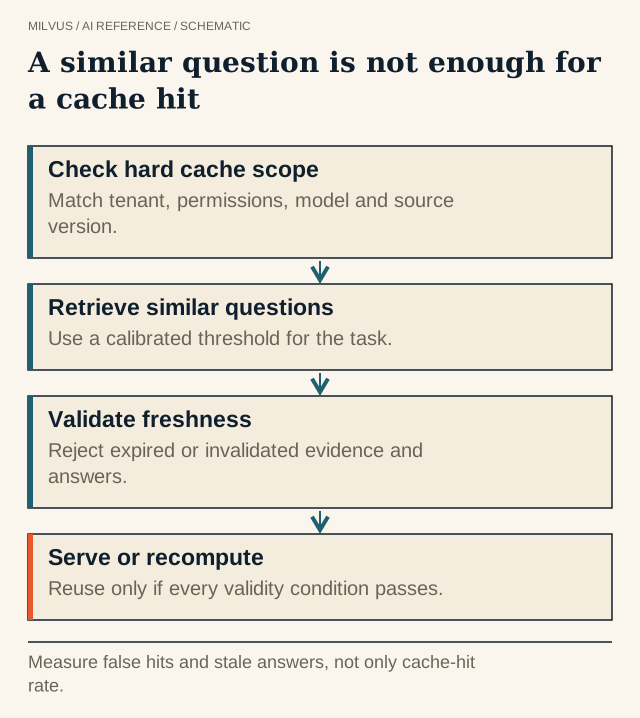 A similar question is not enough for a cache hit. Measure false hits and stale answers, not only cache-hit rate.
How does a semantic cache work?
- Normalize and embed the incoming prompt (often only the user’s question, not the full system prompt).
- Scope the lookup with exact filters: tenant, model, prompt-template version, locale, and anything else that changes the right answer.
- Search the cache collection for the nearest stored prompt within that scope.
- Accept or miss. If similarity clears the threshold and the entry has not expired, return the cached response, typically in single-digit to tens of milliseconds. Otherwise call the LLM.
- Write back the new prompt embedding, the response, and its dependencies (source document versions, model, timestamps).
- Evict and invalidate by TTL, by size policy (LRU, LFU), or by event when the underlying data changes.
The open-source GPTCache library implements exactly these modules (embedding generator, cache storage, vector store, cache manager with LRU/FIFO eviction, and a pluggable similarity evaluator) and supports Milvus and Zilliz Cloud as the vector store.
Exact-match cache vs semantic cache vs prompt caching
| Exact-match cache | Semantic cache | Provider prompt / KV caching | |
|---|---|---|---|
| Key | Hash of the exact prompt | Embedding of the prompt | A repeated prompt prefix |
| Hits on paraphrases | No | Yes | No |
| Skips the LLM call | Yes | Yes | No; it makes the call cheaper and faster |
| Risk of wrong answer | None (same input) | False and stale hits | None |
| Typical use | Repeated identical API calls, tests | FAQ-style assistants, support bots, search answers | Long shared system prompts or documents |
They stack: an exact-match lookup first (cheapest), then semantic lookup, then a model call that benefits from prompt caching.
When is a semantic cache worth it?
It pays off when traffic is repetitive in meaning and the answer does not depend on who asks or when. Good fits are customer-support and product FAQ assistants, internal help desks, documentation Q&A, and classification or extraction prompts run over similar inputs. It fits poorly for personalized answers, questions about live data (balances, inventory, order status), long multi-turn conversations where earlier turns change the meaning, and creative tasks where users expect variety.
A quick check before building: sample a week of prompts, embed them, and see what fraction has a near neighbor that a reviewer would accept as "same question, same answer". That fraction is roughly your ceiling hit rate.
Savings, worked out
Suppose an assistant handles 1,000,000 requests a month, an LLM call costs $0.004 and takes 1.5 s, and a cache lookup costs $0.0001 (embedding plus search) and 20 ms. At a 30% accepted hit rate:
- Without cache: 1,000,000 × $0.004 = $4,000
- With cache: 1,000,000 × $0.0001 + 700,000 × $0.004 = $100 + $2,800 = $2,900, a 27.5% saving
- Average latency falls from 1.5 s to about 0.3 × 0.02 + 0.7 × 1.52 ≈ 1.07 s, while cache hits return about 75 times faster than misses.
The numbers are illustrative; plug in your own. Note that every miss now pays the lookup too, so a cache with a very low hit rate can cost more than it saves.
How do you choose the similarity threshold?
The threshold is the main quality dial. With cosine similarity on modern sentence-embedding models, useful thresholds commonly sit somewhere around 0.85-0.95, but the right value depends on the model and domain, so calibrate it:
- Collect a few hundred pairs of real prompts and label each pair “same answer” or "different answer". Include hard negatives that differ only in a number, a negation, a product name, a version, or a date (“refund window for EU orders” vs “for US orders”).
- For each candidate threshold, compute the false-hit rate (different-answer pairs accepted) and the hit rate (same-answer pairs accepted).
- Pick the lowest threshold whose false-hit rate is acceptable for the domain. For support FAQs, a small error rate may be tolerable; for medical, legal, or financial answers, aim near zero and accept fewer hits.
A second-stage check helps when the threshold alone is too blunt: verify candidate hits with a cross-encoder or a small LLM judge, or require exact match on extracted entities (product, version, region) before accepting.
What should be part of the cache key?
Similarity tells you the questions look alike. The key tells you the answers are allowed to be shared. Store these as exact-match fields and filter on them:
- Tenant or user scope, so one customer never receives another’s answer
- Permission or role level, when answers draw on access-controlled data
- Model and prompt-template version, because changing either changes the output
- Locale and language
- Source-data version, such as a policy revision or knowledge-base snapshot ID, for RAG answers
- Tool or API state when the answer came from a tool call
How do you prevent stale answers?
Imagine a support bot that cached “What’s your refund window?” in the morning, and the policy changed from 30 to 14 days at noon. In the afternoon, “How long do I have to return something?” is a close paraphrase, so a similarity-only cache confidently serves the old 30-day answer. Four mechanisms prevent this:
- Version keys. Include the policy or knowledge-base version in the key. When the version changes, old entries stop matching immediately, with no deletion required.
- Event-driven invalidation. When a source document changes, delete cache entries that depend on it. Store
source_doc_idson each entry so this is a single filtered delete. - TTL. Give every entry a maximum age matched to how fast the domain changes: minutes for prices, days for documentation.
- Do not cache volatile answers. Skip the cache for prompts that call live-data tools.
Also consider caching a lower-level artifact. If final answers are too personalized, cache retrieved candidate sets or embeddings, whose correctness rules are simpler.
Building a semantic cache on Milvus
A cache collection needs an ID, the prompt embedding, the response, and the scope fields:
from pymilvus import MilvusClient, DataType

client = MilvusClient(uri="http://localhost:19530")
schema = client.create_schema()
schema.add_field("id", DataType.INT64, is_primary=True, auto_id=True)
schema.add_field("tenant", DataType.VARCHAR, max_length=64, is_partition_key=True)
schema.add_field("model_ver", DataType.VARCHAR, max_length=64)
schema.add_field("kb_ver", DataType.VARCHAR, max_length=64)
schema.add_field("source_doc_ids", DataType.ARRAY, element_type=DataType.VARCHAR,
                 max_capacity=32, max_length=64)
schema.add_field("prompt", DataType.VARCHAR, max_length=4096)
schema.add_field("response", DataType.VARCHAR, max_length=16384)
schema.add_field("embedding", DataType.FLOAT_VECTOR, dim=768)

index = client.prepare_index_params()
index.add_index("embedding", index_type="HNSW", metric_type="COSINE")
client.create_collection("llm_cache", schema=schema, index_params=index,
                         properties={"collection.ttl.seconds": 86400})  # 1-day TTL
Lookup uses a scoped filter plus a range search, so only neighbors above the threshold come back at all. For COSINE, Milvus returns results where radius < score <= range_filter:
hits = client.search(
    "llm_cache", data=[embed(question)], limit=1,
    filter=f'tenant == "{tenant}" and model_ver == "{model_ver}" and kb_ver == "{kb_ver}"',
    search_params={"params": {"radius": 0.92, "range_filter": 1.0}},
    output_fields=["response"],
)[0]
answer = hits[0]["entity"]["response"] if hits else None
Invalidation is a filtered delete, for example client.delete("llm_cache", filter='array_contains(source_doc_ids, "refund-policy")'). Notes from the docs worth knowing:
collection.ttl.secondshides expired entities from search and query immediately and removes them physically during compaction.- Milvus 3.0 also supports entity-level TTL: point the
ttl_fieldcollection property at aTIMESTAMPTZfield and each entry expires at its own time. It cannot be combined with collection-level TTL. - A partition key on
tenantkeeps each tenant’s lookups to its own partitions.
How do you measure a semantic cache?
Track accepted hit rate, false-hit rate from periodic human or LLM review of sampled hits, stale-hit incidents, cost and latency saved, and lookup overhead on misses. A more conservative cache that serves fewer but correct answers is better than a high raw hit rate. Log, for each hit, the matched entry ID, similarity, and versions, so any wrong answer can be traced and invalidated.
To prototype quickly, try GPTCache with Milvus as the vector store, or build the collection above against a local Milvus from the Quickstart. For production traffic, Zilliz Cloud runs the same API as a managed service.
Related reading
- When should you use range search instead of only top-k?
- What is retrieval-augmented generation (RAG)?
- How should you structure agent memory in Milvus?
- How should an agent memory system handle corrections, expiry, and deletion?
- Implement a scoped memory prototype with Milvus and inspect a source-backed memory implementation (memsearch), useful patterns for scoping and invalidating cached context
- How should you design multi-tenancy for vector search?



