

Data quality sets the ceiling on vector retrieval quality. A vector database can only return the chunks it was given, ranked by how similar their embeddings are to the query, so garbled extraction, duplicated content, stale versions, missing metadata, and inconsistent embeddings all flow straight into results. Similarity scores make this worse, not better: a cleanly written but outdated document can score higher than the correct one, and nothing in the score says it is outdated. Improving quality means checking data before it is embedded, validating vectors and metadata when they are loaded, and measuring retrieval on known queries afterward.
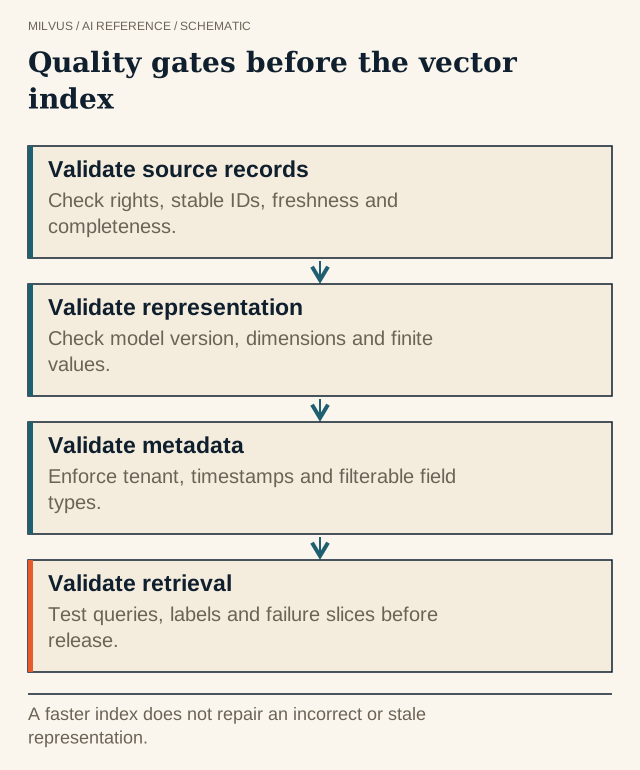 Quality gates before the vector index. A faster index does not repair an incorrect or stale representation.
How does bad data show up in vector search results?
Each class of data problem has a recognizable symptom at query time.
| Data problem | What happens to the vectors | What users see |
|---|---|---|
| Boilerplate (headers, nav menus, legal footers) in every chunk | Unrelated chunks become similar to each other | Irrelevant results that “look” on-topic |
| Broken extraction (scrambled tables, OCR noise, encoding errors) | Vectors encode noise; numbers and names are lost | Correct document exists but never ranks |
| Duplicates and near-duplicates | Several near-identical vectors crowd the top k | Same passage repeated; less coverage |
| Stale versions left indexed | Old and new versions embed almost identically | Outdated answers cited confidently |
| Missing or wrong metadata | Filters exclude the right chunk or admit wrong ones | “No results,” or results from the wrong tenant or product |
| Mixed embedding models or settings | Vectors live in incompatible spaces | Erratic ranking that no tuning fixes |
| Bad chunk boundaries | Answers split across chunks, or chunks too broad | Partial answers, low precision |
The pattern across all of them: the index works correctly on bad input. Raising ef or nprobe, switching to a bigger model, or adding a reranker cannot recover a passage that was never extracted, was filtered out by a wrong tag, or is outranked by its own stale copy.
Quality dimensions that matter for retrieval
The classic data-quality dimensions map directly onto a vector pipeline:
- Accuracy. The text in the chunk is what the source actually says. Check extraction, especially tables, scanned pages, and formulas.
- Completeness. Every source that should be searchable is indexed, and every row has the metadata queries depend on.
- Consistency. All vectors in a field come from the same model revision with the same pre-processing and normalization.
- Uniqueness. One authoritative copy per piece of content, or deliberate grouping when copies are kept.
- Timeliness. The indexed version matches the current source, within an agreed lag.
- Validity. Values fit the schema: correct vector dimension, finite numbers, allowed enum values.
Fix quality before the embedding step
Cleaning is cheapest before you pay for inference. In the transform stage of your vector ETL pipeline:
- Strip repeated chrome. Detect lines or blocks that appear across many documents and remove them before chunking.
- Check extraction output, not just success codes. Flag pages with very low text density, a high ratio of non-printable characters, or tables that lost their row structure. Route them to a better parser or OCR rather than embedding them.
- Drop empty and tiny chunks. A 12-token chunk of “Click here to continue” becomes a vector that matches many short queries.
- Deduplicate. Exact duplicates by hash, near-duplicates by MinHash or embedding similarity, as described in embedding-based deduplication.
- Chunk on structure. Split on headings and paragraphs, keep tables intact, and add the document title or section path to each chunk so it carries context. See choosing chunk size.
Enforce quality at load time with the Milvus schema
The collection schema is your data contract, and Milvus enforces it on every insert, upsert, and import.
- Vector dimension. A
FLOAT_VECTORfield declaresdim; rows with the wrong length are rejected, which catches model mix-ups that change dimension. - Typed scalar fields. Declare
source_id,version,doc_type,language,tenant_id, andupdated_atas typed fields rather than leaving them in free-form JSON, so wrong types fail fast and filters can use scalar indexes. - Nullable and default values. Mark truly optional fields
nullable=True, and give fields likestatusadefault_value, so missing data is explicit rather than an empty string that a filter quietly mismatches. - Model provenance. Store
embedding_modelon every row. Dimension checks will not catch two models that happen to share a dimension; a filter likeembedding_model != "bge-m3@v1"will find the strays. - Primary keys you control. Use deterministic IDs and
upsertso retries do not create duplicates; plaininsertdoes not check for existing keys.
Before a bulk import, validate a sample of the files against the schema: row counts, unique keys, dimensions, no NaN or infinite values. The Milvus source-data guide describes the file format the importer expects.
Use vector search itself to find quality problems
Milvus is also a good tool for auditing the data in it:
- Near-duplicate sweep. Range search with a high similarity floor (for example
radius0.95,range_filter1.0 underCOSINE) lists clusters of near-identical chunks. - Boilerplate detector. A chunk that appears in the top results for a large share of unrelated test queries is usually boilerplate or a degenerate vector.
- Stale-version check.
query(filter='source_id == "policy-17"', output_fields=["version"])shows whether more than one version is still live. - Metadata coverage. If
doc_typehasdefault_value="unknown", thenquery(filter='doc_type == "unknown"')lists records whose metadata was never populated and that type filters will never match. - One result per source. Grouping search on
source_idkeeps a single document from filling every slot while you fix duplicates upstream.
How do you measure whether data quality is good enough?
Keep a small, fixed set of real queries with known correct chunks and track recall@k and MRR on it after every pipeline change. When a query fails, trace it backward through ranking, filtering, embedding, chunking, and extraction until you find the stage that lost the answer, and fix that stage. Alongside retrieval metrics, monitor operational signals: extraction failure rate, rejected rows at import, chunks per document, duplicate rate, ingestion lag, and the count of stale versions still indexed. Methods are covered in how to evaluate retrieval quality.
For upstream data issues, tools such as DataHub can help trace data lineage.
Next step
Define the schema with typed metadata and model provenance, load a sample corpus with the Milvus Quickstart, and run the duplicate and stale-version checks above on it. The RAG tutorial shows the full data flow these checks plug into, and data curation with vector search covers turning the findings into reviewable decisions.


