Vector Database High Availability: How to Build a Milvus Standby Cluster with CDC
Every production database needs a plan for when things go wrong. Relational databases have had WAL shipping, binlog replication, and automated failover for decades. But vector databases — despite becoming core infrastructure for AI applications — are still catching up on this front. Most offer node-level redundancy at best. If a full cluster goes down, you’re restoring from backups and rebuilding vector indexes from scratch — a process that can take hours and cost thousands in compute, because regenerating embeddings through your ML pipeline is not cheap.
Milvus takes a different approach. It offers layered high availability: node-level replicas for fast failover within a cluster, CDC-based replication for cluster-level and cross-region protection, and backup for safety-net recovery. This layered model is standard practice in traditional databases — Milvus is the first major vector database to bring it to vector workloads.
This guide covers two things: the high-availability strategies available for vector databases (so you can evaluate what “production-ready” actually means), and a hands-on tutorial for setting up Milvus CDC primary-standby replication from scratch.
This is Part 1 of a series:
- Part 1 (this article): Setting up primary-standby replication on new clusters
- Part 2: Adding CDC to an existing cluster that already has data, using Milvus Backup
- Part 3: Managing failover — promoting the standby when the primary goes down
Why Does High Availability Matter More for Vector Databases?
When a traditional SQL database goes down, you lose access to structured records — but the data itself can usually be re-imported from upstream sources. When a vector database goes down, recovery is fundamentally harder.
Vector databases store embeddings — dense numerical representations generated by ML models. Rebuilding them means re-running your entire dataset through the embedding pipeline: loading raw documents, chunking them, calling an embedding model, and re-indexing everything. For a dataset with hundreds of millions of vectors, this can take days and cost thousands of dollars in GPU compute.
Meanwhile, the systems that depend on vector search are often in the critical path:
- RAG pipelines that power customer-facing chatbots and search — if the vector database is down, retrieval stops and the AI returns generic or hallucinated answers.
- Recommendation engines that serve product or content suggestions in real time — downtime means missed revenue.
- Fraud detection and anomaly monitoring systems that rely on similarity search to flag suspicious activity — a gap in coverage creates a window of vulnerability.
- Autonomous agent systems that use vector stores for memory and tool retrieval — agents fail or loop without their knowledge base.
If you’re evaluating vector databases for any of these use cases, high availability isn’t a nice-to-have feature to check later. It should be one of the first things you look at.
What Does Production-Grade HA Look Like for a Vector Database?
Not all high availability is equal. A vector database that only handles node failures within a single cluster is not “highly available” in the way a production system requires. Real HA needs to cover three layers:
| Layer | What It Protects Against | How It Works | Recovery Time | Data Loss |
|---|---|---|---|---|
| Node-level (multi-replica) | A single node crash, hardware failure, OOM kill, AZ failure | Copies the same data segments across multiple nodes; other nodes absorb the load | Instant | Zero |
| Cluster-level (CDC replication) | Entire cluster goes down — bad K8s rollout, namespace deletion, storage corruption | Streams every write to a standby cluster via the Write-Ahead Log; standby is always seconds behind | Minutes | Seconds |
| Safety net (periodic backup) | Catastrophic data corruption, ransomware, human error that propagates through replication | Takes periodic snapshots and stores them in a separate location | Hours | Hours (since last backup) |
These layers are complementary, not alternatives. A production deployment should stack them:
- Multi-replica first — handles the most common failure (node crashes, AZ failures) with zero downtime and zero data loss.
- CDC next — protects against failures that multi-replica can’t: cluster-wide outages, catastrophic human error. The standby cluster is in a different failure domain.
- Periodic backups always — your safety net of last resort. Even CDC can’t save you if corrupted data replicates to the standby before you catch it.
When evaluating vector databases, ask: which of these three layers does the product actually support? Most vector databases today only offer the first. Milvus supports all three, with CDC as a built-in feature — not a third-party add-on.
What Is Milvus CDC and How Does It Work?
Milvus CDC (Change Data Capture) is a built-in replication feature that reads the primary cluster’s Write-Ahead Log (WAL) and streams each entry to a separate standby cluster. The standby replays the entries and ends up with the same data, typically seconds behind.
The pattern is well-established in the database world. MySQL has binlog replication. PostgreSQL has WAL shipping. MongoDB has oplog-based replication. These are proven techniques that have kept relational and document databases running in production for decades. Milvus brings the same approach to vector workloads — it’s the first major vector database to offer WAL-based replication as a built-in feature.
Three properties make CDC a good fit for disaster recovery:
- Low-latency sync. CDC streams operations as they happen, not in scheduled batches. The standby stays seconds behind the primary under normal conditions.
- Ordered replay. Operations arrive at the standby in the same order they were written. Data stays consistent without reconciliation.
- Checkpoint recovery. If the CDC process crashes or the network drops, it resumes from where it left off. No data is skipped or duplicated.
How Does the CDC Architecture Work?
A CDC deployment has three components:
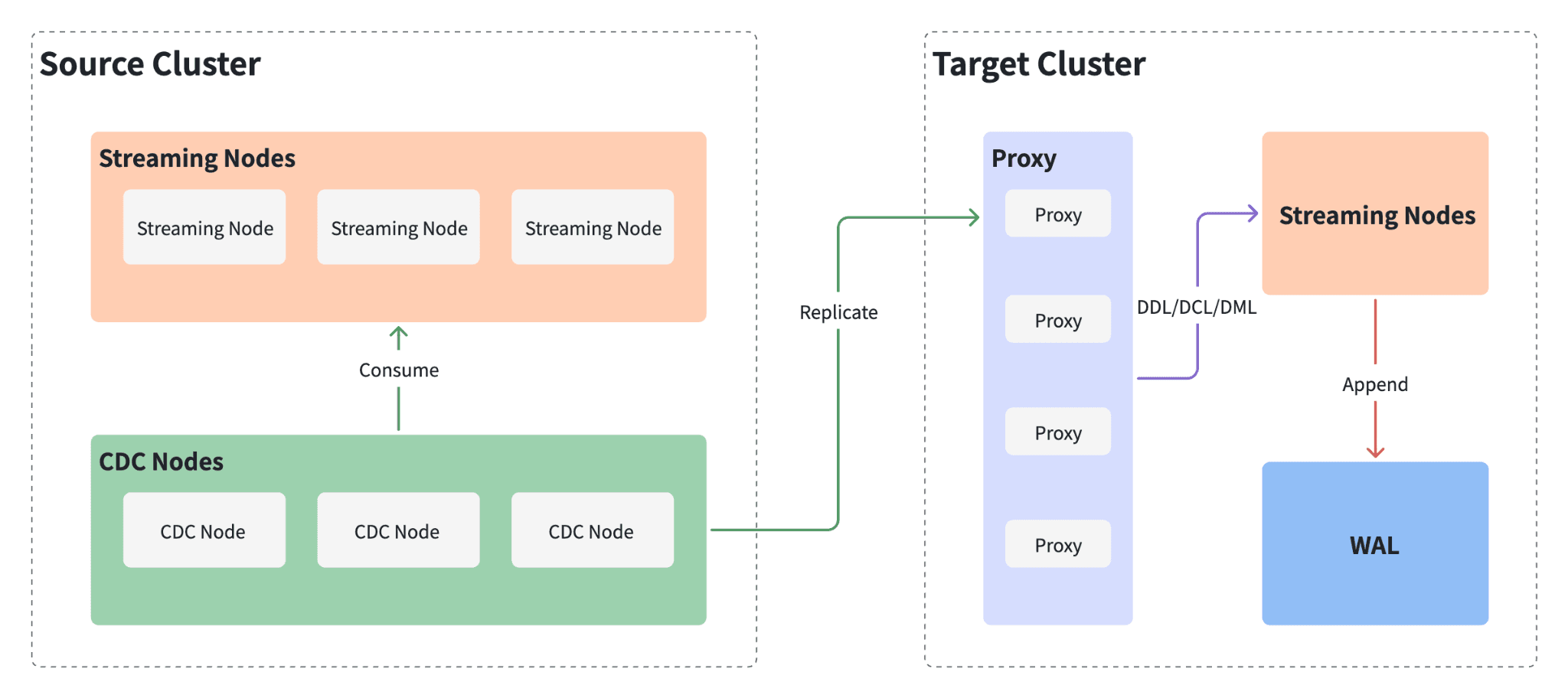 CDC architecture showing Source Cluster with Streaming Nodes and CDC Nodes consuming the WAL, replicating data to the Target Cluster's Proxy layer, which forwards DDL/DCL/DML operations to Streaming Nodes and appends to WAL
| Component | Role |
|---|---|
| Primary cluster | The production Milvus instance. All reads and writes go here. Every write is recorded in the WAL. |
| CDC Node | A background process alongside the primary. Reads WAL entries and forwards them to the standby. Runs independently from the read/write path — no impact on query or insert performance. |
| Standby cluster | A separate Milvus instance that replays forwarded WAL entries. Holds the same data as the primary, seconds behind. Can serve read queries but does not accept writes. |
The flow: writes hit the primary → the CDC Node copies them to the standby → the standby replays them. Nothing else talks to the standby’s write path. If the primary goes down, the standby already has nearly all the data and can be promoted.
Tutorial: Setting Up a Milvus CDC Standby Cluster
The rest of this article is a hands-on walkthrough. By the end, you’ll have two Milvus clusters running with real-time replication between them.
Prerequisites
Before starting:
- Milvus v2.6.6 or later. CDC requires this version. Latest 2.6.x patch recommended.
- Milvus Operator v1.3.4 or later. This guide uses the Operator for cluster management on Kubernetes.
- A running Kubernetes cluster with
kubectlandhelmconfigured. - Python with pymilvus for the replication configuration step.
Two limitations in the current release:
| Limitation | Details |
|---|---|
| Single CDC replica | One CDC replica per cluster. Distributed CDC is planned for a future release. |
| No BulkInsert | BulkInsert is not supported while CDC is enabled. Also planned for a future release. |
Step 1: Upgrade the Milvus Operator
Upgrade the Milvus Operator to v1.3.4 or later:
helm repo add zilliztech-milvus-operator https://zilliztech.github.io/milvus-operator/
# "zilliztech-milvus-operator" has been added to your repositories

helm repo update zilliztech-milvus-operator
# Hang tight while we grab the latest from your chart repositories...
# ...Successfully got an update from the "zilliztech-milvus-operator" chart repository
# Update Complete. ⎈Happy Helming!⎈

helm -n milvus-operator upgrade milvus-operator zilliztech-milvus-operator/milvus-operator
# Release "milvus-operator" has been upgraded. Happy Helming!
# NAME: milvus-operator
# LAST DEPLOYED: Wed Dec  3 17:25:28 2025
# NAMESPACE: milvus-operator
# STATUS: deployed
# REVISION: 30
# TEST SUITE: None
# NOTES:
# Milvus Operator Is Starting, use `kubectl get -n milvus-operator deploy/milvus-operator` to check if its successfully installed
# Full Installation doc can be found in https://github.com/zilliztech/milvus-operator/blob/main/docs/installation/installation.md
# Quick start with `kubectl apply -f https://raw.githubusercontent.com/zilliztech/milvus-operator/main/config/samples/milvus_minimum.yaml`
# More samples can be found in https://github.com/zilliztech/milvus-operator/tree/main/config/samples
# CRD Documentation can be found in https://github.com/zilliztech/milvus-operator/tree/main/docs/CRD
# Administration Documentation can be found in https://github.com/zilliztech/milvus-operator/tree/main/docs/administration
Verify the operator pod is running:
kubectl get pods -n milvus-operator
# NAME                             READY   STATUS    RESTARTS   AGE
# milvus-operator-9fc99f88-h2hwz   1/1     Running   0          54s
Step 2: Deploy the Primary Cluster
Create a YAML file for the primary (source) cluster. The cdc section under components tells the Operator to deploy a CDC Node alongside the cluster:
# This is a sample to deploy a milvus cluster with cdc.
apiVersion: milvus.io/v1beta1
kind: Milvus
metadata:
  name: source-cluster
  namespace: milvus
  labels:
    app: milvus
spec:
  mode: cluster
  components:
    image: milvusdb/milvus:v2.6.6 # Use version 2.6.6 or above, as CDC is available from 2.6.6 onwards
    cdc:
      replicas: 1  # Currently, CDC only supports 1 replica
  dependencies:
    msgStreamType: woodpecker
The msgStreamType: woodpecker setting uses Milvus’s built-in Woodpecker WAL instead of an external message queue like Kafka or Pulsar. Woodpecker is a cloud-native write-ahead log introduced in Milvus 2.6 that removes the need for external messaging infrastructure.
Apply the configuration:
kubectl create namespace milvus
# namespace/milvus created
kubectl apply -f milvus_source_cluster.yaml
# milvus.milvus.io/source-cluster created
Wait for all pods to reach Running status. Confirm the CDC pod is up:
kubectl get pods -n milvus
# Look for source-cluster-milvus-cdc-xxx in Running state
# NAME                                                READY   STATUS    RESTARTS   AGE
# source-cluster-milvus-cdc-66d64747bd-sckxj          1/1     Running   0          2m42s
# source-cluster-milvus-datanode-85f9f56fd-qgbzq       1/1     Running   0          2m42s
# ...
Step 3: Deploy the Standby Cluster
The standby (target) cluster uses the same Milvus version but does not include a CDC component — it only receives replicated data:
# This is a sample to deploy a milvus cluster with cdc.
apiVersion: milvus.io/v1beta1
kind: Milvus
metadata:
  name: target-cluster
  namespace: milvus
  labels:
    app: milvus
spec:
  mode: cluster
  components:
    image: milvusdb/milvus:v2.6.6 # Use version 2.6.6 or above, as CDC is available from 2.6.6 onwards
  dependencies:
    msgStreamType: woodpecker
Apply:
kubectl apply -f milvus_target_cluster.yaml
# milvus.milvus.io/target-cluster created
Verify all pods are running:
kubectl get pods -n milvus
# NAME                                                   READY   STATUS    RESTARTS   AGE
# ...
# target-cluster-milvus-datanode-7ffc8cdb6b-xhzcd        1/1     Running   0          104m
# target-cluster-milvus-mixcoord-8649b87c98-btk7m        1/1     Running   0          104m
# ...
Step 4: Configure the Replication Relationship
With both clusters running, configure the replication topology using Python with pymilvus.
Define the cluster connection details and physical channel (pchannel) names:
source_cluster_addr = "http://10.98.124.90:19530" # example address — replace with your actual Milvus server address
target_cluster_addr = "http://10.109.234.172:19530"
source_cluster_token = "root:Milvus"
target_cluster_token = "root:Milvus"
source_cluster_id = "source-cluster"
target_cluster_id = "target-cluster"
pchannel_num = 16

source_cluster_pchannels = []
target_cluster_pchannels = []
for i in range(pchannel_num):
    source_cluster_pchannels.append(f"{source_cluster_id}-rootcoord-dml_{i}")
    target_cluster_pchannels.append(f"{target_cluster_id}-rootcoord-dml_{i}")
Build the replication configuration:
config = {
    "clusters": [
        {
            "cluster_id": source_cluster_id,
            "connection_param": {
                "uri": source_cluster_addr,
                "token": source_cluster_token
            },
            "pchannels": source_cluster_pchannels
        },
        {
            "cluster_id": target_cluster_id,
            "connection_param": {
                "uri": target_cluster_addr,
                "token": target_cluster_token
            },
            "pchannels": target_cluster_pchannels
        }
    ],
    "cross_cluster_topology": [
        {
            "source_cluster_id": source_cluster_id,
            "target_cluster_id": target_cluster_id
        }
    ]
}
Apply to both clusters:
from pymilvus import MilvusClient

source_client = MilvusClient(uri=source_cluster_addr, token=source_cluster_token)
source_client.update_replicate_configuration(**config)
source_client.close()

target_client = MilvusClient(uri=target_cluster_addr, token=target_cluster_token)
target_client.update_replicate_configuration(**config)
target_client.close()
Once this succeeds, incremental changes on the primary start replicating to the standby automatically.
Step 5: Verify That Replication Works
- Connect to the primary and create a collection, insert some vectors, and load it
- Run a search on the primary to confirm the data is there
- Connect to the standby and run the same search
- If the standby returns the same results, replication is working
The Milvus Quickstart covers collection creation, insertion, and search if you need a reference.
Running CDC in Production
Setting up CDC is the straightforward part. Keeping it reliable over time requires attention to a few operational areas.
Monitor Replication Lag
The standby is always slightly behind the primary — that’s inherent to asynchronous replication. Under normal load, the lag is a few seconds. But write spikes, network congestion, or resource pressure on the standby can cause it to grow.
Track lag as a metric and alert on it. A lag that grows without recovering usually means the CDC Node can’t keep up with write throughput. Check network bandwidth between clusters first, then consider whether the standby needs more resources.
Use the Standby for Read Scaling
The standby isn’t just a cold backup sitting idle until disaster strikes. It accepts search and query requests while replication is active — only writes are blocked. This opens up practical uses:
- Route batch similarity search or analytics workloads to the standby
- Split read traffic during peak hours to reduce pressure on the primary
- Run expensive queries (large top-K, filtered searches across big collections) without affecting production write latency
This turns your DR infrastructure into a performance asset. The standby earns its keep even when nothing is broken.
Size the Standby Correctly
The standby replays every write from the primary, so it needs similar compute and memory resources. If you’re also routing reads to it, account for that additional load. Storage requirements are identical — it holds the same data.
Test Failover Before You Need It
Don’t wait for a real outage to find out your failover process doesn’t work. Run periodic drills:
- Stop writes to the primary
- Wait for the standby to catch up (lag → 0)
- Promote the standby
- Verify queries return expected results
- Reverse the process
Measure how long each step takes and document it. The goal is to make failover a routine procedure with known timing — not a stressful improvisation at 3 AM. Part 3 of this series covers the failover process in detail.
Don’t Want to Manage CDC Yourself? Zilliz Cloud Handles It
Setting up and operating CDC replication of Milvus is powerful, but it comes with operational overhead: you manage two clusters, monitor replication health, handle failover runbooks, and maintain the infrastructure across regions. For teams that want production-grade HA without the operational burden, Zilliz Cloud (managed Milvus) provides this out of the box.
Global Cluster is the headline feature of Zilliz Cloud. It lets you run a Milvus deployment spanning multiple regions — North America, Europe, Asia-Pacific, and more— as a single logical cluster. Under the hood, it uses the same CDC/WAL replication technology described in this article, but fully managed:
| Capability | Self-Managed CDC (this article) | Zilliz Cloud Global Cluster |
|---|---|---|
| Replication | You configure and monitor | Automated, async CDC pipeline |
| Failover | Manual runbook | Automated — no code changes, no connection string updates |
| Self-healing | You re-provision the failed cluster | Automatic: detects stale state, resets, and rebuilds as a fresh secondary |
| Cross-region | You deploy and manage both clusters | Built-in multi-region with local read access |
| RPO | Seconds (depends on your monitoring) | Seconds (unplanned) / Zero (planned switchover) |
| RTO | Minutes (depends on your runbook) | Minutes (automated) |
Beyond Global Cluster, the Business Critical plan includes additional DR features:
- Point-in-Time Recovery (PITR) — roll back a collection to any moment within the retention window, useful for recovering from accidental deletes or data corruption that replicates to the standby.
- Cross-region backup — automated, ongoing backup replication to a destination region. Restoration to new clusters takes minutes.
- 99.99% uptime SLA — backed by multi-AZ deployment with multiple replicas.
If you’re running vector search in production and DR is a requirement, it’s worth evaluating Zilliz Cloud alongside the self-managed Milvus approach. Contact the Zilliz team for details.
What’s Next
This article covered the HA landscape for vector databases and walked through building a primary-standby pair from scratch. Coming next:
- Part 2: Adding CDC to an existing Milvus cluster that already has data, using Milvus Backup to seed the standby before enabling replication
- Part 3: Managing failover — promoting the standby, redirecting traffic, and recovering the original primary
Stay tuned.
If you’re running Milvus in production and thinking about disaster recovery, we’d love to help:
- Join the Milvus Slack community to ask questions, share your HA architecture, and learn from other teams running Milvus at scale.
- Book a free 20-minute Milvus Office Hours session to walk through your DR setup — whether it’s CDC configuration, failover planning, or multi-region deployment.
- If you’d rather skip the infrastructure setup and jump straight to production-ready HA, Zilliz Cloud (managed Milvus) offers cross-region high availability through its Global Cluster feature — no manual CDC setup needed.
A few questions that come up when teams start setting up vector database high availability:
Q: Does CDC slow down the primary cluster?
No. The CDC Node reads WAL logs asynchronously, independent from the read/write path. It doesn’t compete with queries or inserts for resources on the primary. You won’t see a performance difference with CDC enabled.
Q: Can CDC replicate data that existed before it was enabled?
No — CDC only captures changes from the point it’s enabled. To bring existing data into the standby, use Milvus Backup to seed the standby first, then enable CDC for ongoing replication. Part 2 of this series covers this workflow.
Q: Do I still need CDC if I already have multi-replica enabled?
They protect against different failure modes. Multi-replica keeps copies of the same segments across nodes within one cluster — great for node failures, useless when the entire cluster is gone (bad deployment, AZ outage, namespace deletion). CDC keeps a separate cluster in a different failure domain with near-real-time data. For anything beyond a dev environment, you want both.
Q: How does Milvus CDC compare to replication in other vector databases?
Most vector databases today offer node-level redundancy (equivalent to multi-replica) but lack cluster-level replication. Milvus is currently the only major vector database with built-in WAL-based CDC replication — the same proven pattern that relational databases like PostgreSQL and MySQL have used for decades. If cross-cluster or cross-region failover is a requirement, this is a meaningful differentiator to evaluate.
- Why Does High Availability Matter More for Vector Databases?
- What Does Production-Grade HA Look Like for a Vector Database?
- What Is Milvus CDC and How Does It Work?
- How Does the CDC Architecture Work?
- Tutorial: Setting Up a Milvus CDC Standby Cluster
- Prerequisites
- Step 1: Upgrade the Milvus Operator
- Step 2: Deploy the Primary Cluster
- Step 3: Deploy the Standby Cluster
- Step 4: Configure the Replication Relationship
- Step 5: Verify That Replication Works
- Running CDC in Production
- Monitor Replication Lag
- Use the Standby for Read Scaling
- Size the Standby Correctly
- Test Failover Before You Need It
- Don't Want to Manage CDC Yourself? Zilliz Cloud Handles It
- What's Next
On This Page
Try Managed Milvus for Free
Zilliz Cloud is hassle-free, powered by Milvus and 10x faster.
Get StartedLike the article? Spread the word