How to Run 25 Million Image Vectors on Under 1GB of Memory in Milvus
A Milvus user recently came to us with a very practical image search problem.
“We need to do image-to-image search on 25 million images, encoded as 1280-dimensional vectors. A single machine will serve the workload. It has 64GB of RAM, and at most 32GB can go to the vector database. But the Milvus Sizing Tool says we need 139GB. Are we cooked?”
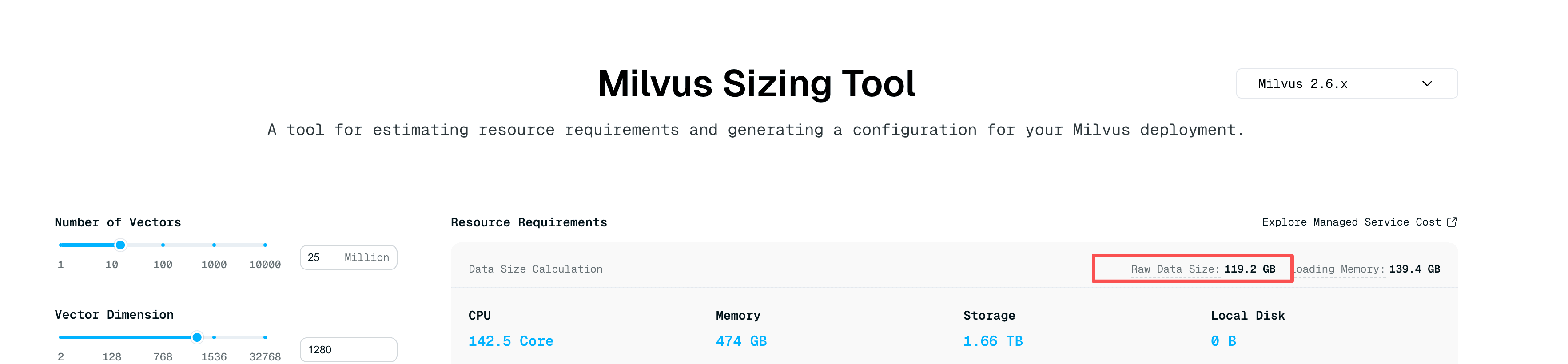
Sizing Tool estimation results: 25M × 1280-dimensional vectors, Raw Data Size 119.2 GB, Loading Memory 139.4 GB
Not quite.
At first, the obvious answer seemed to be a more advanced index. If the dataset is large and memory is tight, surely a smarter ANN index should help. In this case, it did not. The index that finally worked was Milvus’s simplest option: FLAT.
The result was better than expected: steady-state memory stayed under 1GB, the container’s resident memory was around 600MB, and warm-query latency stayed under 100ms. Startup briefly peaked at about 12.5GB, and the first query took about 30 seconds while the system warmed up.
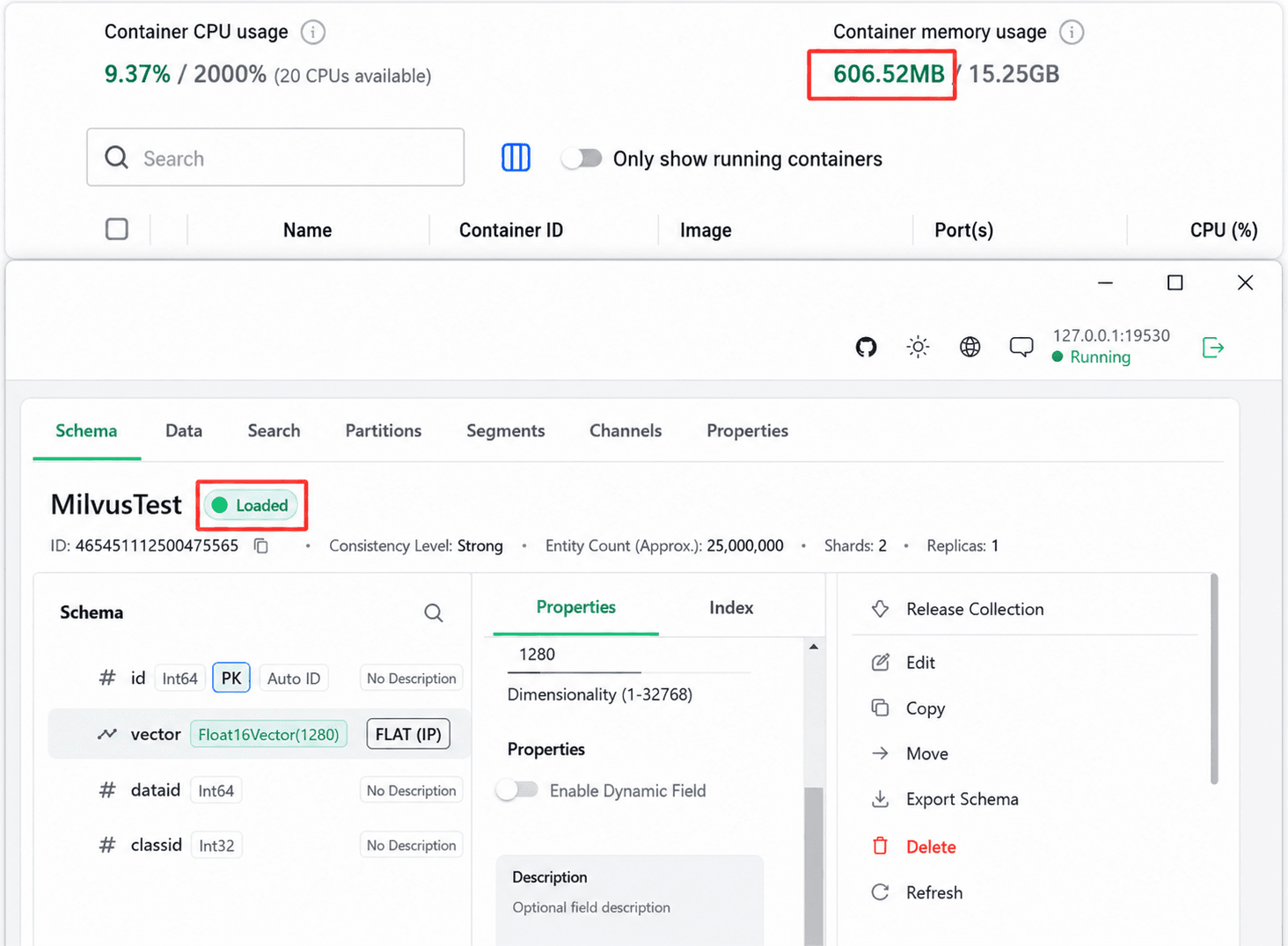
The important part is not that FLAT magically made 25 million brute-force comparisons cheap. It did not. The important part is that this workload almost never searched all 25 million vectors. Scalar filters narrowed each query first, and FLAT only compared vectors inside that much smaller candidate set.
This post walks through what failed, why FLAT worked, and when the same pattern is worth trying in your own workload.
Why AISAQ and IVF_FLAT Did Not Work Here
Before FLAT, the user tried two indexes that looked more natural for a constrained machine.
First attempt: AISAQ. AISAQ is a disk-oriented index designed to keep memory usage low. The catch in this workload was the build and load path. In an earlier test with 55 million vectors, one collection load wrote 249GB of temporary data to disk and took too long to be practical.
Second attempt: IVF_FLAT. IVF_FLAT also looked reasonable because it is a standard ANN index. The index built successfully, but the collection load stalled at 14% and never recovered.
After those two dead ends, the user tried the boring option: FLAT. It loaded cleanly. It also gave the best runtime behavior for this specific query pattern.
| Index | Why it looked promising | What happened in this workload |
|---|---|---|
| AISAQ | Disk-oriented index with low memory usage in theory | The build/load path generated large temporary files. In a 55M-vector test, one collection load wrote 249GB of temporary data and was slow. |
| IVF_FLAT | Standard ANN index with lower search cost than a full scan | The index built, but collection load stalled at 14% and did not recover. |
| FLAT | No extra ANN structure and no index build complexity | Steady-state memory stayed under 1GB. Container resident memory was around 600MB. Startup peaked near 12.5GB. First query took about 30s, then warm queries stayed under 100ms. |
The lesson is simple: an index that is efficient in theory may still be the wrong fit for a specific machine, data shape, and query pattern.
Why FLAT Worked
FLAT is the simplest index Milvus supports. No graph. No tree. No clustering. It compares the query vector directly with candidate vectors.
That sounds like the wrong tool for 25 million vectors. It would be the wrong tool if every query searched the whole collection.
But this workload had a strong filter in front of vector search. Every query first narrowed the search space with scalar fields such as dataid and classid. Only then did Milvus run vector similarity search. That changed the problem from “search 25 million vectors” to “search a few hundred to tens of thousands of vectors after filtering.”
Three pieces made the setup work: FP16 vector storage, mmap for raw vector data, and scalar filtering before the FLAT pass.
Optimization 1: FP16 Cuts Vector Data in Half
The vectors had 1280 dimensions. Stored as FP32, each vector needs 5120 bytes:
1280 dimensions x 4 bytes = 5120 bytes
Across 25 million vectors, that is about 119.2GB of raw vector data. FP16 cuts each dimension from 4 bytes to 2 bytes:
1280 dimensions x 2 bytes = 2560 bytes
So the raw vector data drops to about 59.6GB.
This still does not fit neatly into the available RAM, but it halves the amount of vector data Milvus and the operating system need to handle. In many image retrieval workloads, FP16 has a small recall impact, but it is not a free rule. Test recall with your own embeddings, metric, and quality bar before making it the default.
Optimization 2: mmap Keeps Raw Vectors Off the Process Heap
Even after FP16, about 60GB of vectors is still too much for the memory budget. That is where mmap becomes useful.
With mmap, Milvus can access vector data through memory-mapped files instead of loading the entire raw vector field into process memory. The operating system pages data in as queries touch it and can keep hot pages in its page cache.
In this user’s Milvus 2.6.14 environment, the cluster-level mmap configuration already covered raw vector data, so the user did not need to set mmap manually.
One detail caused confusion during debugging: Attu shows the schema-level mmap setting, not the cluster-level default. So Attu may show mmap as disabled even when the cluster-level configuration is effectively enabling mmap for the data path.
The trade-off is straightforward. mmap saves RAM, but it uses disk and the OS page cache more heavily. You still need SSD capacity for the vector files, and the first query can be slower while relevant pages are read from disk.
Optimization 3: Scalar Filtering Is the Real Performance Multiplier
FP16 and mmap explain the memory number. Scalar filtering explains the latency number.
Every query in this workload included a filter expression like this:
dataid in [123] AND classid in [0, 2, 3]
That filter ran before the vector comparison step. Instead of comparing against 25 million vectors, FLAT compared against the filtered candidate set, which ranged from a few hundred to tens of thousands of vectors.
That is why warm queries stayed under 100ms. Tens of thousands of vector comparisons are practical on a modern CPU. Twenty-five million comparisons per query would be a very different story.
This also explains why IVF_FLAT and HNSW were not useful here. Once scalar filtering has reduced the candidate set enough, an extra ANN structure can become dead weight. It adds memory, build time, and load complexity, but it may not improve latency much.
There is one caveat. The filters in this workload were simple. If your filters use large IN lists, LIKE patterns, range predicates, or nested JSON conditions, add scalar indexes on the relevant fields and measure the filter stage directly.
| Optimization | What it does | Why it mattered here | Trade-off |
|---|---|---|---|
| FP16 vector storage | Stores each vector dimension with 2 bytes instead of 4 bytes | Reduced raw vector data from about 119.2GB to about 59.6GB | Recall impact depends on your embeddings and metric. Test it. |
| mmap on raw vectors | Maps vector files from disk instead of loading the full raw vector field into process memory | Kept process memory low while letting the OS page in data as needed | Requires SSD capacity and can make cold queries slower. |
| Scalar filtering first | Filters by scalar fields before vector comparison | Reduced each query from 25M candidates to hundreds or tens of thousands | Complex filters may need scalar indexes. |
Where This Pattern Applies
The image search case worked because the real search space was much smaller than the total collection. That same shape appears in many production workloads.
- Multi-tenant RAG: Filter by
tenant_id,workspace_id, orproject_idfirst. Each tenant may only have thousands or tens of thousands of chunks. - E-commerce product search: Filter by category, brand, seller, region, or availability before vector search.
- Log and document retrieval: Filter by time range, source, service, or document type before semantic search.
- Image or media search with labels: Filter by dataset, class, customer, or asset group before comparing embeddings.
These are good candidates for FLAT + FP16 + mmap because the full collection can be large while each query still touches a small subset.
The pattern does not apply when every query searches the whole collection. If each query really needs to scan all 25 million vectors, FLAT will not give you the same latency. In that case, use an ANN index such as HNSW, IVF, or a disk-oriented index, and plan for the memory, disk, and build-time trade-offs.
How to Read the Sizing Tool Estimate
The Milvus Sizing Tool is a starting point, not a final verdict on your hardware.
In this case, the 139.4GB loading memory estimate served as a conservative baseline for 25 million 1280-dimensional FP32 vectors. The real workload changed several assumptions:
- FP16 cut raw vector size roughly in half.
- mmap avoided loading the full raw vector field into process memory.
- FLAT avoided extra ANN index structures.
- Scalar filters made each query search a much smaller candidate set.
That is why real workload testing matters. Before rejecting a hardware setup based only on a sizing estimate, test with your actual vector precision, index type, mmap configuration, scalar filters, cold-query behavior, and warm-query behavior.
Get Started
If you want to try the same recipe, start with the query pattern, not the index name.
- Check whether every query has selective scalar filters.
- Estimate how many vectors remain after filtering.
- Store vectors as FP16 if recall testing looks good.
- Use FLAT when the filtered candidate set is small enough for brute-force comparison.
- Verify mmap behavior for raw vector data. Check both schema-level settings and cluster-level configuration.
- Measure startup memory, first-query latency, warm-query latency, and disk I/O.
- Add scalar indexes if filter evaluation becomes the bottleneck.
For local testing, start with the Milvus quickstart or the Milvus GitHub repository. Use Attu to inspect collections, but remember that Attu may not show cluster-level mmap defaults.
If you do not want to run the infrastructure yourself, Zilliz Cloud is the managed Milvus service. You get the same Milvus core with managed operations, scaling, and a free tier for testing. Sign up for $100 free credits with a work email, or sign in if you already have an account.
- Why AISAQ and IVF_FLAT Did Not Work Here
- Why FLAT Worked
- Optimization 1: FP16 Cuts Vector Data in Half
- Optimization 2: mmap Keeps Raw Vectors Off the Process Heap
- Optimization 3: Scalar Filtering Is the Real Performance Multiplier
- Where This Pattern Applies
- How to Read the Sizing Tool Estimate
- Get Started
On This Page
Try Managed Milvus for Free
Zilliz Cloud is hassle-free, powered by Milvus and 10x faster.
Get Started




Like the article? Spread the word