

FAISSCompatible with Milvus 3.0.0+
The FAISS index type is an expert-level passthrough available in Milvus 3.0.0 and later. It lets you supply a Faiss index-factory string instead of selecting a fixed Milvus index type.
Use FAISS when you already have a tested Faiss recipe and need direct control over its composition. For common recipes with a dedicated Milvus index type, prefer the dedicated type because it has a stable, documented parameter contract.
A factory string accepted by upstream Faiss is not automatically supported by Milvus. Compatibility depends on the vector field type, metric, dimension, Faiss modules compiled into the Milvus image, and whether the resulting index supports the operations that Milvus requires.
Limits
FAISSsupportsFLOAT_VECTORandBINARY_VECTORfields. It does not supportFLOAT16_VECTOR,BFLOAT16_VECTOR,INT8_VECTOR, orSPARSE_FLOAT_VECTORfields.The generic
FAISSadapter runs on CPU. It is not a Faiss GPU index type.The
faiss_index_namebuild parameter is required. Milvus passes its value to Faiss without converting the recipe to a dedicated Milvus index type.Build and search parameters are factory-specific. A parameter supported by one factory can be rejected by another.
Scalar filtering requires the underlying Faiss index to support an ID selector. Milvus 3.0.0 tests cover filtered search with the float factories
Flat,IVF64,Flat, andHNSW16,Flat. Do not assume that every factory supports filters or that binaryFAISSindexes support scalar filtering.Search iterators are not supported.
The adapter does not provide raw-vector retrieval.
Range-search support depends on the factory. Float
Flathas release coverage. Do not use range search with binaryFAISSindexes.A factory can build successfully but still reject some Milvus search operations. For example, standalone
PQ8x4rejects the selector used by scalar-filtered search. Validate unfiltered use separately.In Milvus 3.0.0, validate
COSINEscores and range-search thresholds after an index reload. Knowhere v3.0.6 does not restore theFAISSadapter’s cosine-normalization state during deserialization.
How it works
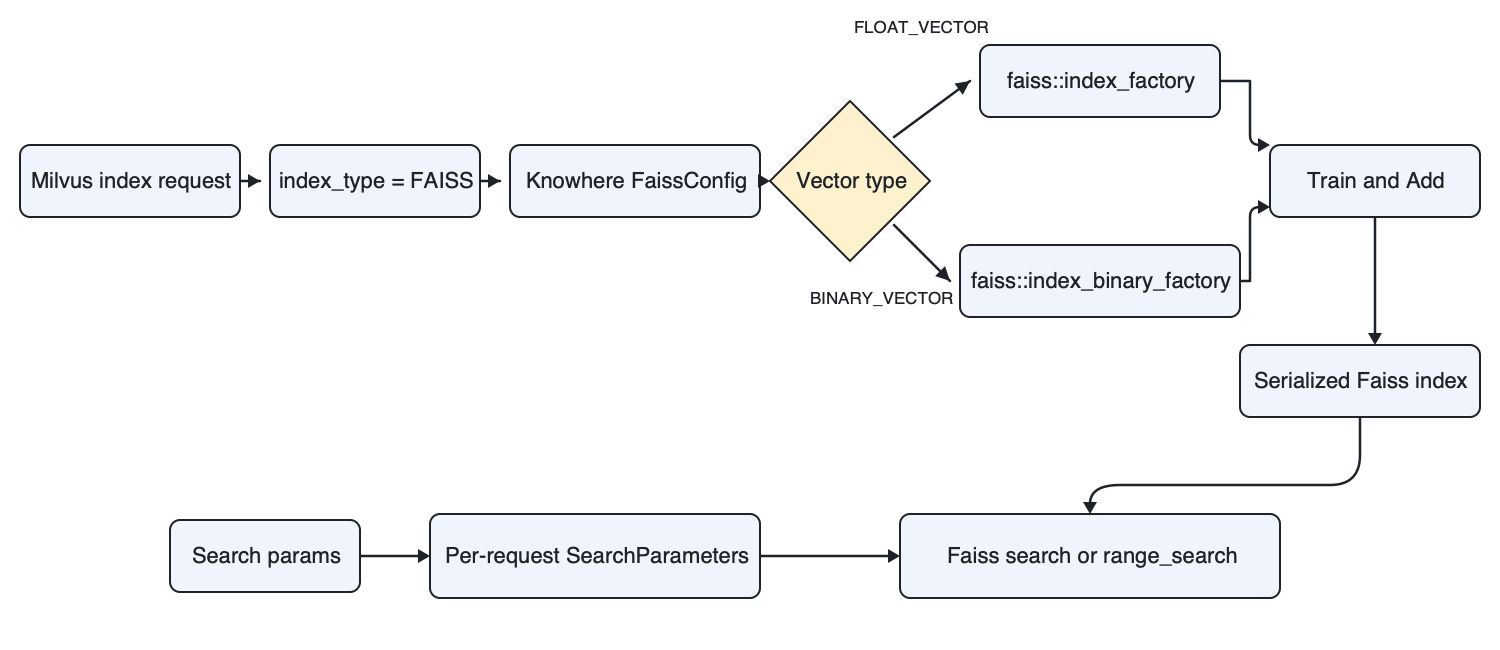 FAISS index passthrough workflow
For index building, Milvus forwards faiss_index_name, the vector field type, the metric, and other build parameters to the Knowhere FAISS adapter. The adapter calls faiss::index_factory() for FLOAT_VECTOR fields or faiss::index_binary_factory() for BINARY_VECTOR fields. The resulting object is a native Faiss index managed through the normal Milvus index lifecycle.
For search, the adapter converts the supplied factory-specific parameters into the matching Faiss SearchParameters object. For supported float factories, it also passes the Milvus filter bitset as a Faiss selector. Selector support is factory-specific, and the released tests do not establish scalar filtering for binary FAISS indexes. This is why a recipe can be valid in standalone Faiss but reject an operation required by the Milvus search path.
Prerequisites
- Milvus 3.0.0 or later
- PyMilvus 3.0.0 or later
- Familiarity with Faiss index-factory syntax and the training requirements of the selected factory
For installation instructions, see Install PyMilvus.
Choose a factory string
A factory string describes a Faiss index as a sequence of components. The following examples have Milvus 3.0.0 release-test coverage. This list is not exhaustive.
| Factory string | Field type | Metrics exercised in release tests | Search parameters | Notes |
|---|---|---|---|---|
Flat | FLOAT_VECTOR | L2, IP, COSINE | None | Exact search. |
IVF64,Flat | FLOAT_VECTOR | L2, IP, COSINE | nprobe | IVF with 64 inverted lists and uncompressed vectors. |
HNSW16,Flat | FLOAT_VECTOR | L2, IP, COSINE | efSearch | HNSW graph with flat vector storage. |
OPQ16,IVF64,PQ16x4 | FLOAT_VECTOR | L2 | Factory-specific | Combines OPQ, IVF, and PQ. Validate training size and recall with your data. |
IVF64,PQ8x4,RFlat | FLOAT_VECTOR | L2 | nprobe, k_factor | Uses a flat refiner after PQ candidate retrieval. |
PQ8x4 | FLOAT_VECTOR | L2 | None | Builds in release tests. Scalar-filtered search fails because the index rejects the selector; validate unfiltered use separately. |
BFlat | BINARY_VECTOR | HAMMING | None | Exact search for binary vectors. |
The COSINE entries indicate build and search smoke coverage. For Milvus 3.0.0, they do not establish score or range-search correctness after an index reload. See Limits.
Build and search a float index
The following example creates 3,000 128-dimensional vectors. This provides enough training data for the IVF64,Flat recipe used in the example. Expand the setup block and run it before building and searching the index.
import random

from pymilvus import DataType, MilvusClient

client = MilvusClient(uri="http://localhost:19530")
collection_name = "faiss_float_example"

if client.has_collection(collection_name):
    client.drop_collection(collection_name)

rng = random.Random(42)
vectors = [[rng.random() for _ in range(128)] for _ in range(3000)]

schema = client.create_schema(auto_id=False, enable_dynamic_field=False)
schema.add_field("id", DataType.INT64, is_primary=True)
schema.add_field("category", DataType.VARCHAR, max_length=32)
schema.add_field("vector", DataType.FLOAT_VECTOR, dim=128)

client.create_collection(collection_name=collection_name, schema=schema)

rows = [
    {
        "id": i,
        "category": "reference" if i % 2 == 0 else "query",
        "vector": vector,
    }
    for i, vector in enumerate(vectors)
]

client.insert(collection_name=collection_name, data=rows)
client.flush(collection_name=collection_name)
Build the index
Set index_type to FAISS, and use faiss_index_name to select the native Faiss factory recipe.
index_params = client.prepare_index_params()
index_params.add_index(
    field_name="vector",
    index_name="faiss_ivf_flat",
    index_type="FAISS",
    metric_type="L2",
    params={"faiss_index_name": "IVF64,Flat"},
)

client.create_index(collection_name=collection_name, index_params=index_params)
client.load_collection(collection_name=collection_name)
The factory string IVF64,Flat creates an IVF index with 64 inverted lists and stores uncompressed vectors in each list.
Search the index
Set factory-specific search parameters inside search_params.params. For an IVF factory, nprobe controls how many inverted lists Faiss searches.
search_params = {
    "params": {"nprobe": 8},
}

results = client.search(
    collection_name=collection_name,
    data=[vectors[0]],
    anns_field="vector",
    filter='category == "reference"',
    search_params=search_params,
    limit=5,
    output_fields=["category"],
)

for hits in results:
    for hit in hits:
        print(hit)
The query uses nprobe=8, so Faiss searches 8 of the 64 inverted lists. The filter restricts results to entities whose category value is reference.
Build and search a binary index
For BINARY_VECTOR fields, use a binary factory string such as BFlat and a compatible binary metric. Expand the setup block and run it before building and searching the index.
import random

from pymilvus import DataType, MilvusClient

client = MilvusClient(uri="http://localhost:19530")
collection_name = "faiss_binary_example"

if client.has_collection(collection_name):
    client.drop_collection(collection_name)

rng = random.Random(7)
vectors = [bytes(rng.getrandbits(8) for _ in range(16)) for _ in range(300)]

schema = client.create_schema(auto_id=False, enable_dynamic_field=False)
schema.add_field("id", DataType.INT64, is_primary=True)
schema.add_field("binary_vector", DataType.BINARY_VECTOR, dim=128)

client.create_collection(collection_name=collection_name, schema=schema)
client.insert(
    collection_name=collection_name,
    data=[{"id": i, "binary_vector": vector} for i, vector in enumerate(vectors)],
)
client.flush(collection_name=collection_name)
Build the index
Use BFlat as the factory string and HAMMING as the metric for this binary-vector example.
index_params = client.prepare_index_params()
index_params.add_index(
    field_name="binary_vector",
    index_name="faiss_binary_flat",
    index_type="FAISS",
    metric_type="HAMMING",
    params={"faiss_index_name": "BFlat"},
)

client.create_index(collection_name=collection_name, index_params=index_params)
client.load_collection(collection_name=collection_name)
Search the index
BFlat has no family-specific search parameter. Pass an empty params mapping when constructing the search request.
search_params = {"params": {}}

results = client.search(
    collection_name=collection_name,
    data=[vectors[0]],
    anns_field="binary_vector",
    search_params=search_params,
    limit=5,
)

for hits in results:
    for hit in hits:
        print(hit)
Each 128-dimensional binary vector is represented by 16 bytes. For more information, see Binary Vector.
Configure build and search parameters
The FAISS index type has one required passthrough build parameter.
| Parameter | Location | Description |
|---|---|---|
faiss_index_name | params in add_index() | The Faiss index-factory string. For example, IVF64,Flat. |
Set factory-specific search parameters inside search_params.params. The following table lists common examples and is not exhaustive.
| Parameter | Example factory | Description |
|---|---|---|
nprobe | IVF64,Flat | Number of inverted lists to search. |
efSearch | HNSW16,Flat | Size of the HNSW search candidate list. |
k_factor | IVF64,PQ8x4,RFlat | Number of candidates supplied to the refiner relative to the requested top-K. |
Milvus forwards only adapter-recognized additional parameters. Unknown build keys and search keys that the concrete factory family does not support are rejected. Milvus does not maintain a universal parameter schema for every possible factory. Check the Faiss documentation for the selected factory, then validate the complete build and search flow against the exact Milvus version and image that you plan to deploy.
Handle errors and unsupported operations
If the factory string is invalid or unavailable in the Milvus build, index building fails. Check the index state and failure reason before loading the collection.
If a parameter has the wrong type, search fails. For example,
nprobe="invalid"is rejected becausenprobemust be numeric.If a parameter does not apply to the built factory, the adapter rejects it as unsupported.
If a factory does not support the Milvus selector, filtered search can fail even when the same factory can search in standalone Faiss.
Do not use
search_iterator()with aFAISSindex.
What’s next
- Learn how Milvus indexes are organized in Index Explained.
- Compare the dedicated IVF_FLAT and HNSW index types.
- Review Metric Types before choosing a metric for the factory.