

RAG متعدد الوسائط باستخدام Milvus


إذا كنت ترغب في تجربة النتيجة النهائية لهذا البرنامج التعليمي، يمكنك الانتقال مباشرةً إلى العرض التوضيحي عبر الإنترنت.
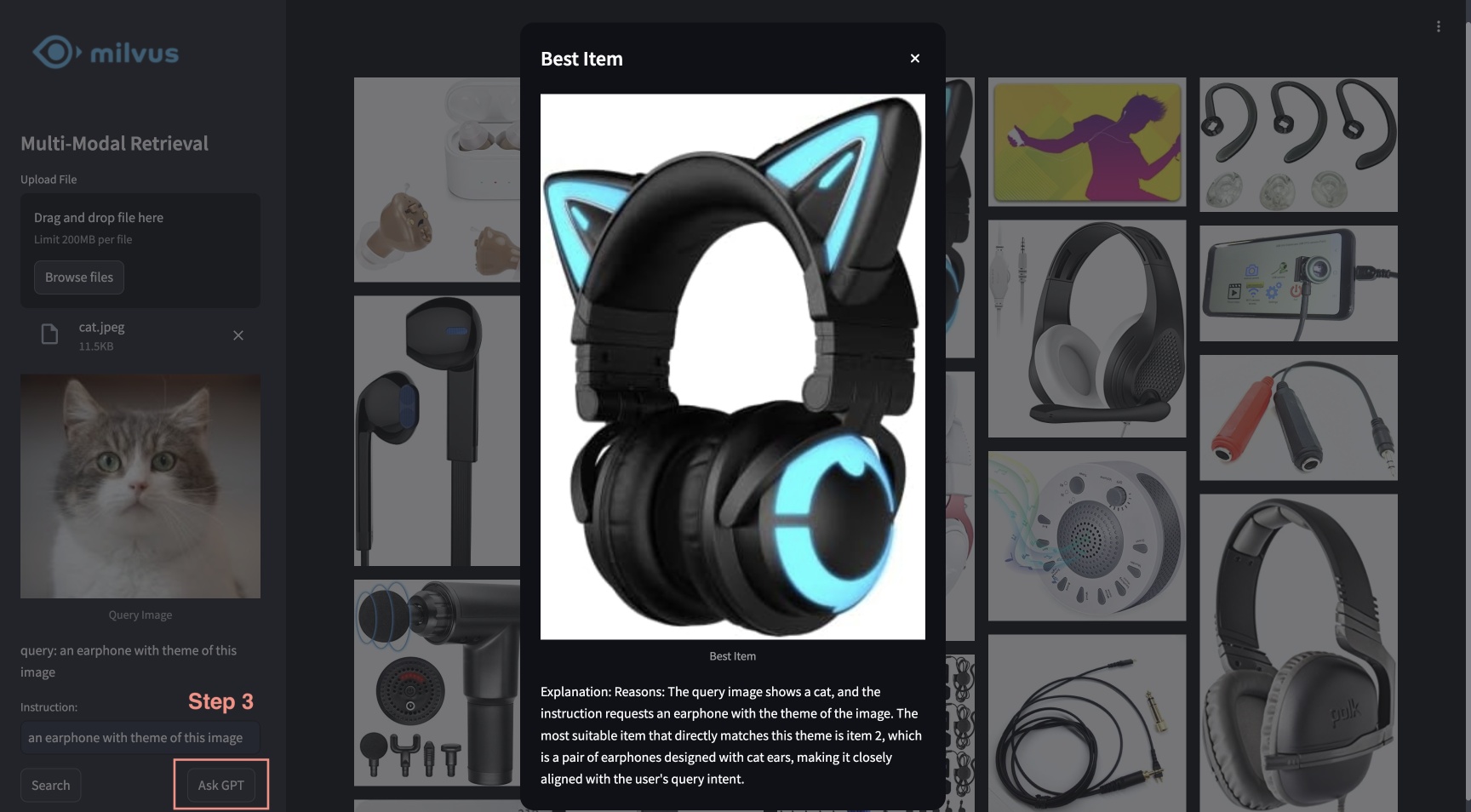
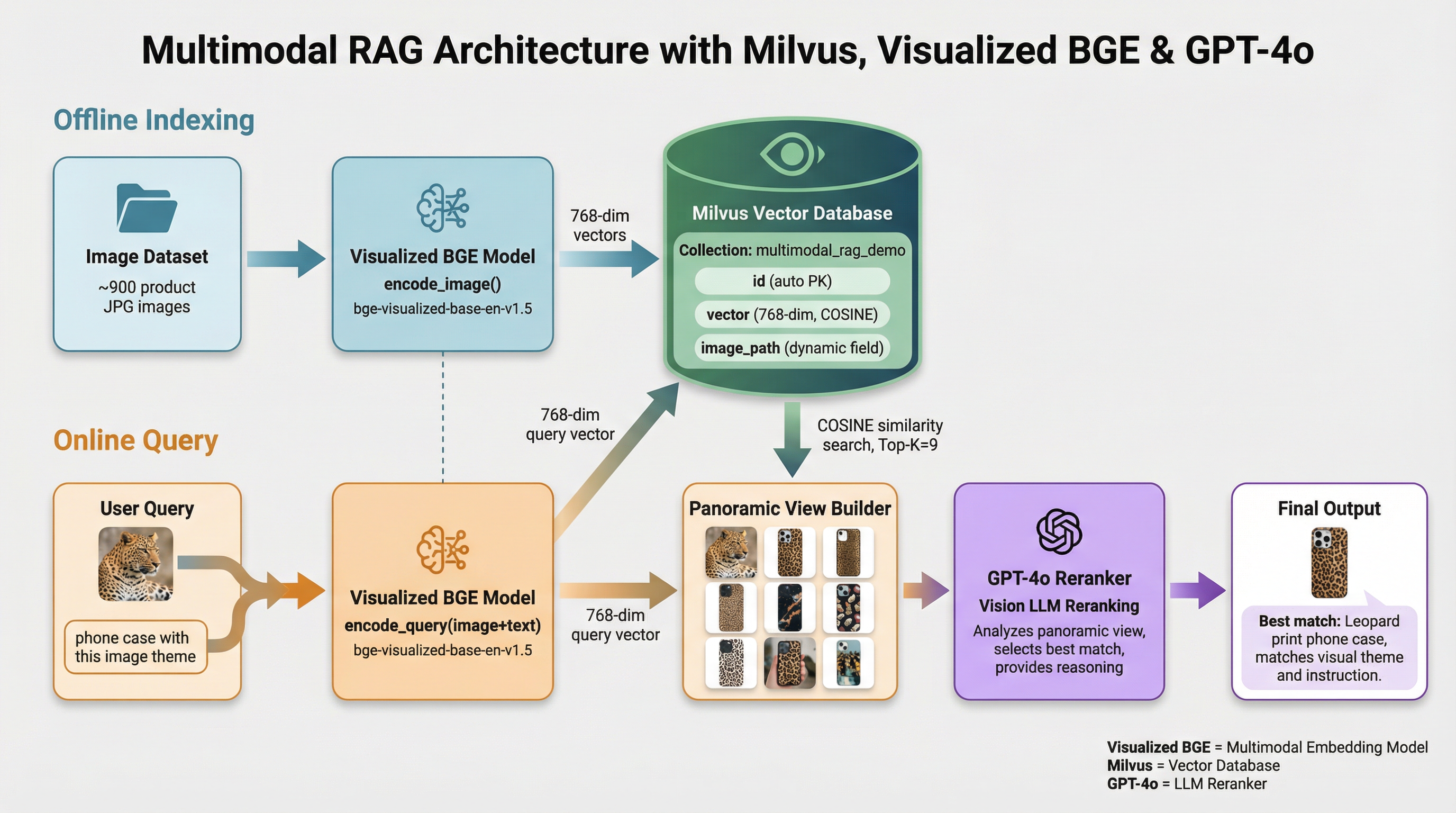
يعرض هذا البرنامج التعليمي نظام RAG متعدد الوسائط المدعوم بـ Milvus ونموذج BGE المرئي و GPT-4o. باستخدام هذا النظام، يمكن للمستخدمين تحميل صورة وتحرير تعليمات نصية، والتي تتم معالجتها بواسطة نموذج الاسترجاع المركب من BGE للبحث عن الصور المرشحة. ثم يعمل GPT-4o كأداة إعادة ترتيب، حيث يختار الصورة الأنسب ويقدم الأسباب المنطقية وراء هذا الاختيار. تتيح هذه المجموعة القوية تجربة بحث عن الصور سلسة وبديهية، مستفيدة من Milvus للاسترجاع الفعال، ونموذج BGE للمعالجة والمطابقة الدقيقة للصور، وGPT-4o لإعادة الترتيب المتقدمة.
التحضير
تثبيت التبعيات
$ pip install --upgrade pymilvus openai datasets opencv-python timm einops ftfy peft tqdm
$ git clone https://github.com/FlagOpen/FlagEmbedding.git
$ pip install -e FlagEmbedding
إذا كنت تستخدم Google Colab، فلتفعيل التبعيات التي تم تثبيتها للتو، قد تحتاج إلى إعادة تشغيل بيئة التشغيل (انقر على قائمة «Runtime» في أعلى الشاشة، واختر «Restart session» من القائمة المنسدلة).
تنزيل البيانات
سيؤدي الأمر التالي إلى تنزيل البيانات النموذجية واستخراجها إلى مجلد محلي «./images_folder» يتضمن:
- الصور: مجموعة فرعية من Amazon Reviews 2023 تحتوي على حوالي 900 صورة من الفئات "Appliance" و"Cell_Phones_and_Accessories" و"Electronics".
- leopard.jpg: صورة استعلام نموذجية.
$ wget https://github.com/milvus-io/bootcamp/releases/download/data/amazon_reviews_2023_subset.tar.gz
$ tar -xzf amazon_reviews_2023_subset.tar.gz
تحميل نموذج التضمين
سنستخدم نموذج Visualized BGE «bge-visualized-base-en-v1.5» لتوليد التضمينات لكل من الصور والنصوص.
1. تنزيل الأوزان
$ wget https://huggingface.co/BAAI/bge-visualized/resolve/main/Visualized_base_en_v1.5.pth
2. إنشاء المشفر
import torch
from visual_bge.modeling import Visualized_BGE


class Encoder:
    def __init__(self, model_name: str, model_path: str):
        self.model = Visualized_BGE(model_name_bge=model_name, model_weight=model_path)
        self.model.eval()

    def encode_query(self, image_path: str, text: str) -> list[float]:
        with torch.no_grad():
            query_emb = self.model.encode(image=image_path, text=text)
        return query_emb.tolist()[0]

    def encode_image(self, image_path: str) -> list[float]:
        with torch.no_grad():
            query_emb = self.model.encode(image=image_path)
        return query_emb.tolist()[0]


model_name = "BAAI/bge-base-en-v1.5"
model_path = "./Visualized_base_en_v1.5.pth"  # Change to your own value if using a different model path
encoder = Encoder(model_name, model_path)
تحميل البيانات
سيتم في هذا القسم تحميل صور أمثلة إلى قاعدة البيانات مع التضمينات المقابلة.
إنشاء التضمينات
تحميل جميع الصور بتنسيق jpeg من دليل البيانات وتطبيق المُشفر لتحويل الصور إلى التضمينات.
import os
from tqdm import tqdm
from glob import glob


# Generate embeddings for the image dataset
data_dir = (
    "./images_folder"  # Change to your own value if using a different data directory
)
image_list = glob(
    os.path.join(data_dir, "images", "*.jpg")
)  # We will only use images ending with ".jpg"
image_dict = {}
for image_path in tqdm(image_list, desc="Generating image embeddings: "):
    try:
        image_dict[image_path] = encoder.encode_image(image_path)
    except Exception as e:
        print(f"Failed to generate embedding for {image_path}. Skipped.")
        continue
print("Number of encoded images:", len(image_dict))
Generating image embeddings: 100%|██████████| 900/900 [00:20<00:00, 44.08it/s]

Number of encoded images: 900
الإدراج في Milvus
إدراج الصور مع المسارات والتضمينات المقابلة في مجموعة Milvus.
بالنسبة لحجة MilvusClient:
- يعد تعيين
uriكملف محلي، على سبيل المثال./milvus_demo.db، الطريقة الأكثر ملاءمة، حيث إنه يستخدم Milvus Lite تلقائيًا لتخزين جميع البيانات في هذا الملف. - إذا كانت لديك كمية كبيرة من البيانات، فيمكنك إعداد خادم Milvus أكثر كفاءة على Docker أو Kubernetes. في هذا الإعداد، يرجى استخدام عنوان URI للخادم، على سبيل المثال
http://localhost:19530، كـuri. - إذا كنت ترغب في استخدام Zilliz Cloud، وهي الخدمة السحابية المُدارة بالكامل لـ Milvus، فقم بتعديل
uriوtoken، اللذين يتوافقان مع نقطة النهاية العامة (Public Endpoint) ومفتاح واجهة برمجة التطبيقات (API key) في Zilliz Cloud.
from pymilvus import MilvusClient


dim = len(list(image_dict.values())[0])
collection_name = "multimodal_rag_demo"

# Connect to Milvus client given URI
milvus_client = MilvusClient(uri="./milvus_demo.db")

# Create Milvus Collection
# By default, vector field name is "vector"
milvus_client.create_collection(
    collection_name=collection_name,
    auto_id=True,
    dimension=dim,
    enable_dynamic_field=True,
)

# Insert data into collection
milvus_client.insert(
    collection_name=collection_name,
    data=[{"image_path": k, "vector": v} for k, v in image_dict.items()],
)
DEBUG:pymilvus.milvus_client.milvus_client:Created new connection using: 7f33daeed99a4d8e8a5e28d47673ecc8
DEBUG:pymilvus.milvus_client.milvus_client:Successfully created collection: multimodal_rag_demo
DEBUG:pymilvus.milvus_client.milvus_client:Successfully created an index on collection: multimodal_rag_demo


{'insert_count': 900,
 'ids': [451537887696781312, 451537887696781313, ..., 451537887696782211],
 'cost': 0}
البحث متعدد الوسائط باستخدام أداة إعادة الترتيب التوليدية
في هذا القسم، سنقوم أولاً بالبحث عن الصور ذات الصلة باستخدام استعلام متعدد الوسائط، ثم نستخدم خدمة LLM لإعادة ترتيب النتائج والعثور على أفضلها مع توضيح.
تشغيل البحث
نحن الآن جاهزون لإجراء البحث المتقدم عن الصور باستخدام بيانات استعلام تتألف من كل من الصورة والتعليمات النصية.
query_image = os.path.join(
    data_dir, "leopard.jpg"
)  # Change to your own query image path
query_text = "phone case with this image theme"

# Generate query embedding given image and text instructions
query_vec = encoder.encode_query(image_path=query_image, text=query_text)

search_results = milvus_client.search(
    collection_name=collection_name,
    data=[query_vec],
    output_fields=["image_path"],
    limit=9,  # Max number of search results to return
    search_params={"metric_type": "COSINE", "params": {}},  # Search parameters
)[0]

retrieved_images = [hit.get("entity").get("image_path") for hit in search_results]
print(retrieved_images)
['./images_folder/images/518Gj1WQ-RL._AC_.jpg', './images_folder/images/41n00AOfWhL._AC_.jpg', './images_folder/images/51Wqge9HySL._AC_.jpg', './images_folder/images/51R2SZiywnL._AC_.jpg', './images_folder/images/516PebbMAcL._AC_.jpg', './images_folder/images/51RrgfYKUfL._AC_.jpg', './images_folder/images/515DzQVKKwL._AC_.jpg', './images_folder/images/51BsgVw6RhL._AC_.jpg', './images_folder/images/51INtcXu9FL._AC_.jpg']
إعادة الترتيب باستخدام GPT-4o
سنستخدم نموذج اللغة الكبير (LLM) لترتيب الصور وإنشاء تفسير لأفضل نتيجة بناءً على استعلام المستخدم والنتائج المسترجعة.
1. إنشاء عرض بانورامي
import numpy as np
import cv2

img_height = 300
img_width = 300
row_count = 3


def create_panoramic_view(query_image_path: str, retrieved_images: list) -> np.ndarray:
    """
    creates a 5x5 panoramic view image from a list of images

    args:
        images: list of images to be combined

    returns:
        np.ndarray: the panoramic view image
    """
    panoramic_width = img_width * row_count
    panoramic_height = img_height * row_count
    panoramic_image = np.full(
        (panoramic_height, panoramic_width, 3), 255, dtype=np.uint8
    )

    # create and resize the query image with a blue border
    query_image_null = np.full((panoramic_height, img_width, 3), 255, dtype=np.uint8)
    query_image = Image.open(query_image_path).convert("RGB")
    query_array = np.array(query_image)[:, :, ::-1]
    resized_image = cv2.resize(query_array, (img_width, img_height))

    border_size = 10
    blue = (255, 0, 0)  # blue color in BGR
    bordered_query_image = cv2.copyMakeBorder(
        resized_image,
        border_size,
        border_size,
        border_size,
        border_size,
        cv2.BORDER_CONSTANT,
        value=blue,
    )

    query_image_null[img_height * 2 : img_height * 3, 0:img_width] = cv2.resize(
        bordered_query_image, (img_width, img_height)
    )

    # add text "query" below the query image
    text = "query"
    font_scale = 1
    font_thickness = 2
    text_org = (10, img_height * 3 + 30)
    cv2.putText(
        query_image_null,
        text,
        text_org,
        cv2.FONT_HERSHEY_SIMPLEX,
        font_scale,
        blue,
        font_thickness,
        cv2.LINE_AA,
    )

    # combine the rest of the images into the panoramic view
    retrieved_imgs = [
        np.array(Image.open(img).convert("RGB"))[:, :, ::-1] for img in retrieved_images
    ]
    for i, image in enumerate(retrieved_imgs):
        image = cv2.resize(image, (img_width - 4, img_height - 4))
        row = i // row_count
        col = i % row_count
        start_row = row * img_height
        start_col = col * img_width

        border_size = 2
        bordered_image = cv2.copyMakeBorder(
            image,
            border_size,
            border_size,
            border_size,
            border_size,
            cv2.BORDER_CONSTANT,
            value=(0, 0, 0),
        )
        panoramic_image[
            start_row : start_row + img_height, start_col : start_col + img_width
        ] = bordered_image

        # add red index numbers to each image
        text = str(i)
        org = (start_col + 50, start_row + 30)
        (font_width, font_height), baseline = cv2.getTextSize(
            text, cv2.FONT_HERSHEY_SIMPLEX, 1, 2
        )

        top_left = (org[0] - 48, start_row + 2)
        bottom_right = (org[0] - 48 + font_width + 5, org[1] + baseline + 5)

        cv2.rectangle(
            panoramic_image, top_left, bottom_right, (255, 255, 255), cv2.FILLED
        )
        cv2.putText(
            panoramic_image,
            text,
            (start_col + 10, start_row + 30),
            cv2.FONT_HERSHEY_SIMPLEX,
            1,
            (0, 0, 255),
            2,
            cv2.LINE_AA,
        )

    # combine the query image with the panoramic view
    panoramic_image = np.hstack([query_image_null, panoramic_image])
    return panoramic_image
دمج صورة الاستعلام والصور المسترجعة مع الفهارس في عرض بانورامي.
from PIL import Image

combined_image_path = os.path.join(data_dir, "combined_image.jpg")
panoramic_image = create_panoramic_view(query_image, retrieved_images)
cv2.imwrite(combined_image_path, panoramic_image)

combined_image = Image.open(combined_image_path)
show_combined_image = combined_image.resize((300, 300))
show_combined_image.show()
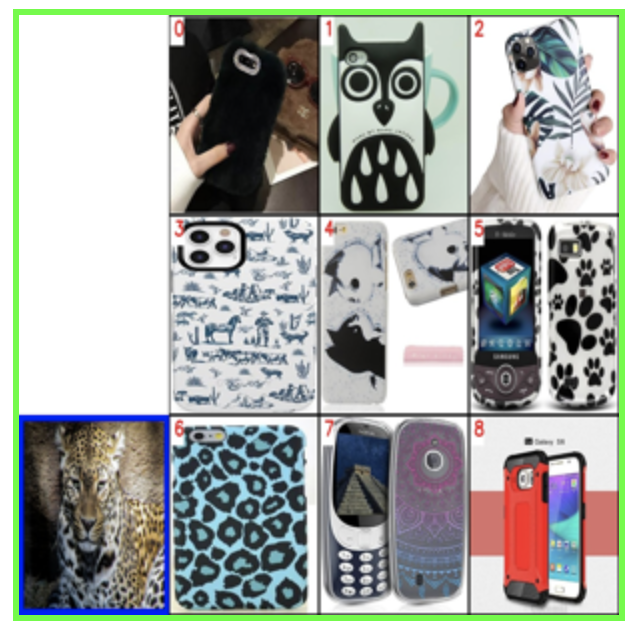 إنشاء عرض بانورامي
2. إعادة الترتيب وتقديم التفسير
سنرسل الصورة المدمجة إلى خدمة نموذج اللغة الكبير متعدد الوسائط (LLM) مع توجيهات مناسبة لترتيب النتائج المسترجعة مع تفسيرها. لتمكين GPT-4o كنموذج لغة كبير (LLM)، تحتاج إلى إعداد مفتاح واجهة برمجة تطبيقات OpenAI الخاص بك.
import requests
import base64

openai_api_key = "sk-***"  # Change to your OpenAI API Key


def generate_ranking_explanation(
    combined_image_path: str, caption: str, infos: dict = None
) -> tuple[list[int], str]:
    with open(combined_image_path, "rb") as image_file:
        base64_image = base64.b64encode(image_file.read()).decode("utf-8")

    information = (
        "You are responsible for ranking results for a Composed Image Retrieval. "
        "The user retrieves an image with an 'instruction' indicating their retrieval intent. "
        "For example, if the user queries a red car with the instruction 'change this car to blue,' a similar type of car in blue would be ranked higher in the results. "
        "Now you would receive instruction and query image with blue border. Every item has its red index number in its top left. Do not misunderstand it. "
        f"User instruction: {caption} \n\n"
    )

    # add additional information for each image
    if infos:
        for i, info in enumerate(infos["product"]):
            information += f"{i}. {info}\n"

    information += (
        "Provide a new ranked list of indices from most suitable to least suitable, followed by an explanation for the top 1 most suitable item only. "
        "The format of the response has to be 'Ranked list: []' with the indices in brackets as integers, followed by 'Reasons:' plus the explanation why this most fit user's query intent."
    )

    headers = {
        "Content-Type": "application/json",
        "Authorization": f"Bearer {openai_api_key}",
    }

    payload = {
        "model": "gpt-4o",
        "messages": [
            {
                "role": "user",
                "content": [
                    {"type": "text", "text": information},
                    {
                        "type": "image_url",
                        "image_url": {"url": f"data:image/jpeg;base64,{base64_image}"},
                    },
                ],
            }
        ],
        "max_tokens": 300,
    }

    response = requests.post(
        "https://api.openai.com/v1/chat/completions", headers=headers, json=payload
    )
    result = response.json()["choices"][0]["message"]["content"]

    # parse the ranked indices from the response
    start_idx = result.find("[")
    end_idx = result.find("]")
    ranked_indices_str = result[start_idx + 1 : end_idx].split(",")
    ranked_indices = [int(index.strip()) for index in ranked_indices_str]

    # extract explanation
    explanation = result[end_idx + 1 :].strip()

    return ranked_indices, explanation
احصل على مؤشرات الصور بعد الترتيب وسبب اختيار أفضل نتيجة:
ranked_indices, explanation = generate_ranking_explanation(
    combined_image_path, query_text
)
3. عرض أفضل نتيجة مع تفسيرها
print(explanation)

best_index = ranked_indices[0]
best_img = Image.open(retrieved_images[best_index])
best_img = best_img.resize((150, 150))
best_img.show()
Reasons: The most suitable item for the user's query intent is index 6 because the instruction specifies a phone case with the theme of the image, which is a leopard. The phone case with index 6 has a thematic design resembling the leopard pattern, making it the closest match to the user's request for a phone case with the image theme.
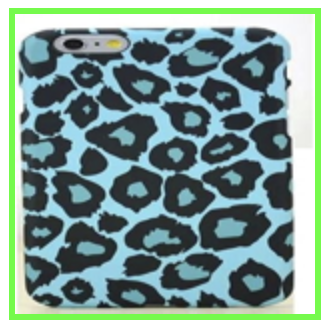 أفضل نتيجة
النشر السريع
لمعرفة كيفية بدء عرض توضيحي عبر الإنترنت باستخدام هذا البرنامج التعليمي، يرجى الرجوع إلى التطبيق النموذجي.
