Milvus Snapshots: Point-in-Time Collection Views Without Copying Data
A production database collection doesn’t stop taking writes because you need a stable version of it. Listings change, prices update, new documents land, agents write back. Meanwhile, the work that happens around that collection — evaluating a new embedding model, validating a backfill, standing up a load-test cluster, running a nightly batch job — needs data that holds still.
Currently, the way to get data that holds still is to copy it. That works, and for long-term retention it’s the right answer. But it prices every stable version at a full pass over the collection’s bytes, and prices every recovery at a full re-import plus a full index rebuild. At that price, you take recovery points before quarterly migrations, not before every model push.
Snapshots lower that price. A Milvus snapshot is a named, read-only version of a collection that records references to existing data, index, and metadata files rather than copying the dataset. Take one before a risky change, and you can roll back to it, clone it into a second cluster, and feed it to a batch job — three tasks that would otherwise mean three copies of the data.
Why do AI teams need Milvus snapshots?
Milvus Backup already covers disaster recovery and long-term retention, and for that job it remains the right tool. What changed is that stable versions of a collection are now needed far more often than a backup schedule assumes, and for reasons that have nothing to do with data loss.
| What the AI team is doing | Common approach | Where it hurts |
|---|---|---|
| Keeping a recovery point before a model or data change | Run a full backup on a schedule | Create time and I/O grow with total data size, so checkpoints stay infrequent |
| Rolling back a model or data version | Re-import the old data and rebuild indexes | Long recovery path, and index-build compute is spent a second time |
| Preparing a test, staging, or load-test environment | Export, transfer, and import production data | Every environment needs its own data-preparation pipeline |
| Running a long batch job over production data | Copy the online data offline first | Production keeps writing, so the job’s input drifts away from what’s live |
Four different tasks, one shared requirement: a version of the Milvus collection that is stable, addressable, and readable by something other than the cluster that produced it. All four tasks previously satisfied it by copying, because copying was the only way to make a version stop moving.
Take an e-commerce search team, for example. Their products collection in Milvus holds each item’s attributes plus an embedding, and a vector search compares the shopper’s query embedding against those product embeddings; listings and prices change all day. Now they want to move to a better embedding model, which means re-embedding the entire catalog and replacing every vector in the live collection. Before doing something that’s hard to undo, they want a version to roll back to, the same catalog in an isolated cluster to load-test against, and a fixed product set so Spark can score the old and new models on identical rows.
Before we roll out snapshots, the solution is three copies and three pipelines.
What a Milvus snapshot records
The snapshot design rests on a property Milvus storage already has: its files are write-once. Sealed segments, index files, and delete logs are written and never modified in place. Compaction doesn’t edit files — it produces new ones and retires old ones.
That makes a point-in-time version expressible without copying anything. If no file is ever mutated, then the state of a collection at a given moment is fully described by the set of file references that were live at that moment. Preserving the state means recording which files those were and preventing them from being deleted.
CreateSnapshot records exactly that: the data boundary for the operation, the file references, and the collection metadata — schema, partitions, properties, and index information. Each segment gets an Apache Avro manifest, and the snapshot’s own metadata is stored as JSON. No vector data is duplicated.
What you can do with Milvus snapshots
In Milvus 3.0, we introduced four snapshot capabilities that sit on top of that one read-only version:
| Capability | Mechanism | What it changes | Availability |
|---|---|---|---|
| Lightweight snapshots | Records data, index, and metadata references instead of copying data files | Recovery points cheap enough to take every risky change before | Available now |
| Fast restore | Copies the data and index files the snapshot references | No full re-import, no index rebuild | Available now |
| Cross-cluster movement | A second cluster restores straight from the snapshot metadata URI; export only when it can’t reach the storage | One version reusable for migration, load testing, and isolated environments | Coming soon. |
| Stable views | External Collection and the Spark connector read the frozen version in place | Batch jobs get a fixed input while production keeps taking writes | Available now |
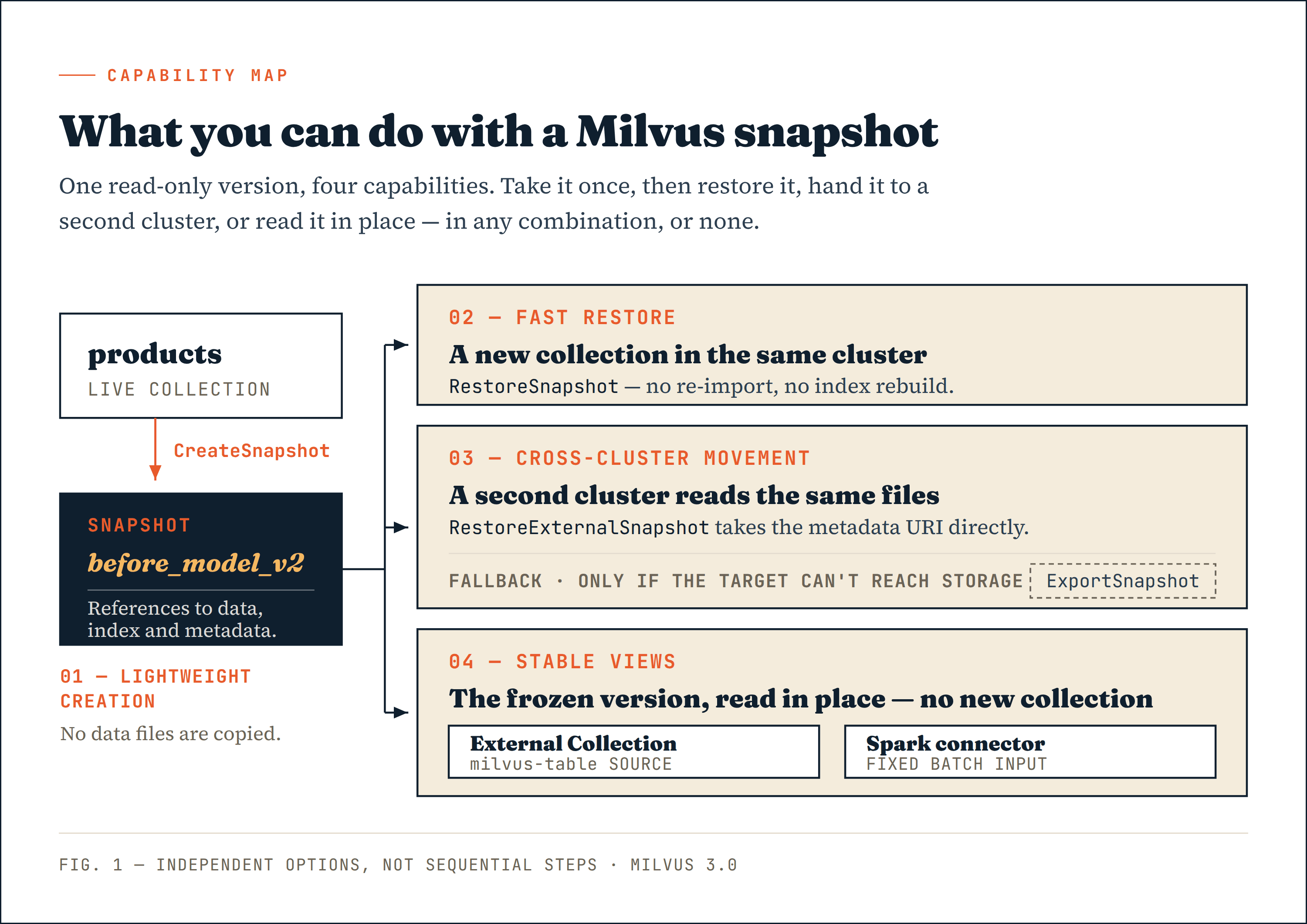
The four capabilities are options, not a sequence. Once a snapshot exists, you can restore it where it came from, hand it to a different cluster, or point External Collection and Spark at it — in any combination, or none. Every consumer resolves the same file references, so nobody has to prepare a separate input copy.
 Milvus snapshot
Figure 1. A single snapshot supports multiple consumption paths. They are independent options, not sequential steps.
Lightweight snapshot: cost tracks file counts, not data size
A full backup has to move the collection’s data bytes. Snapshot creation processes metadata and file references instead, so its cost is driven by the number of segments, index files, and manifest entries, and by object-storage request latency. It does not grow with the collection’s total size.
CreateSnapshot typically lands in the millisecond range, but that number depends on your segment count and your object store’s request latency, not something to plan capacity against.
Growing data is outside the snapshot unless you flush
CreateSnapshot does not flush. The reason follows from the same mechanism: growing segments aren’t file-resident yet, so there are no file references for a manifest to record. Whatever is still in growing state when you create a snapshot falls outside its boundary.
If the writes you just made need to be inside the version you’re freezing, run Flush and await completion first. If they don’t — a scheduled checkpoint, for instance — skipping the flush is a legitimate choice. What matters is knowing where the boundary landed.
flushTask, err := client.Flush(ctx,
    milvusclient.NewFlushOption("products"))
if err != nil {
    return err
}
if err := flushTask.Await(ctx); err != nil {
    return err
}

err = client.CreateSnapshot(ctx,
    milvusclient.NewCreateSnapshotOption(
        "before_model_v2",
        "products",
    ).WithDescription("Recovery point before model v2"))
For the product search team in our previous example, before_model_v2 now names a fixed set of files: the catalog exactly as it stood before anyone touched the embeddings. That one snapshot serves the rollback point, the isolated load-test cluster, and the Spark evaluation.
Cheap to create is not free to keep
Creating snapshots does not mean zero storage cost.
Milvus reclaims segment and index files once nothing references them. A snapshot is a reference, so every file it names becomes exempt from garbage collection. Meanwhile, the live collection keeps flushing new segments, compacting old ones into new ones, and applying deletes — each of those operations produces files the snapshot doesn’t reference and retires files it does. The snapshot’s file set and the live collection’s file set diverge over time, and that divergence is what you pay for.
Held long enough on a collection with enough churn, a snapshot approaches the cost of a second full copy. In certain cases, a single snapshot can double object storage cost. So the operational work this feature introduces isn’t creation but retention: give snapshots names that say what they were for (before_model_v2 rather than snapshot_3), and use ListSnapshots and DropSnapshot to retire them once they stop earning their storage.
Fast restore: reusing index files that are already built
A conventional restore has two expensive stages: importing the data and rebuilding the indexes. For a large collection with a costly index, both stages hold CPU, network, and object-storage I/O for a long time.
RestoreSnapshot copies the data and index files the snapshot references and rebuilds the collection metadata around them. The index files come from a build that already completed, so nothing is recomputed.
jobID, err := client.RestoreSnapshot(ctx,
    milvusclient.NewRestoreSnapshotOption(
        "before_model_v2",
        "products",
        "products_rollback",
    ))
RestoreSnapshot is asynchronous and non-destructive. It returns a job ID and runs in the background, so application code polls GetRestoreSnapshotState for progress rather than blocking, then loads the new collection when it completes.
RestoreSnapshot also restores into a new collection — products_rollback, not products. The original is never overwritten. The team can validate the restored collection, compare it against what’s live, and only then decide whether to move traffic. A rollback you can inspect before committing to is a different operation from one that begins by destroying the current state.
Cross-cluster data movement: an access problem, not a transfer problem
Because a snapshot is a set of references plus metadata rather than a payload, getting a version to a second cluster is a question of access, not transfer. The target doesn’t need the data shipped to it; it needs permission and a network path to read where the data already sits.
RestoreExternalSnapshot accepts the snapshot metadata URI directly. If the target cluster can read that metadata and the data and index files it references, it can create the collection. No export step is required.
snapshot, err := sourceClient.DescribeSnapshot(ctx,
    milvusclient.NewDescribeSnapshotOption(
        "before_model_v2",
        "products",
    ))
if err != nil {
    return err
}

jobID, err := targetClient.RestoreExternalSnapshot(ctx,
    milvusclient.NewRestoreExternalSnapshotOption(
        "products_staging",
        snapshot.GetS3Location(),
    ))
When the target can already reach the source snapshot storage, that’s the complete path.
Snapshot export is the fallback, not a prerequisite
ExportSnapshot exists for the case where the target genuinely cannot reach the source storage — separate buckets, incompatible root paths, or permission boundaries between environments. Then you export a self-contained bundle to a location the target can read. Treating export as a required first step adds a bulk data movement to a path that often doesn’t need one.
Export relies on server-side copy within the storage service, which is what keeps the data from routing through the Milvus cluster. Where server-side copy isn’t available — across different object-storage services, or between endpoints that can’t address each other — export stops rather than relaying the entire dataset through Milvus. In that case, you need to replicate the objects across the region or provider with your own storage tooling, then restore from the copied location.
Inside that boundary, one snapshot can be consumed by several target clusters at once while the source collection keeps serving normally. Production-to-test cloning, multi-cluster distribution, migration rehearsals, and isolated verification environments no longer need a dedicated pipeline each.
Stable views: reading a snapshot without restoring it
The paths we discussed so far all end with a new collection. For read-only work that’s more than the job needs — a snapshot already describes a file set sitting in object storage, and a consumer that can read the description can read those files directly. Production keeps taking writes throughout.
| Consumer | How it reads the snapshot | Typical work |
|---|---|---|
| Milvus External Collection | A StorageV3 internal-table snapshot as a milvus-table external source | Querying a historical version, regression verification, audit analysis |
| Spark connector | The snapshot metadata URI and its referenced files, as a fixed batch input | A/B evaluation, deduplication, clustering, quality checks, field backfill |
External Collection over a snapshot
Creating an External Collection in Milvus from a snapshot takes three pieces of information: external_source points at the snapshot metadata URI, external_spec declares the milvus-table format along with storage access configuration, and each field maps to a field in the source snapshot through external_field. Once the collection exists, run a refresh, then create indexes and load it according to what you plan to query.
Spark batch on a fixed input
A Spark job started against a snapshot does not follow the production collection forward. It reads the fixed set of data the snapshot describes, from start to finish, regardless of how many writes land in products while it runs.
Snapshot metadata URI
    -> Spark connector
    -> DataFrame / batch job
    -> A/B evaluation, deduplication, or quality checks
    -> data lake, reports, or optional Milvus backfill
Back to the model upgrade example: with before_model_v2 in place, the batch job reads product IDs, titles, categories, and old-model embeddings for exactly the products that existed at that boundary, generates new embeddings for the same products, and emits A/B evaluation results, duplicate groupings, and anomaly records. Run it again next week, and it reads the same products. Two models compared on inputs that shifted underneath them were never really compared.
Results can stay in the data lake or a reporting system. Updating Milvus fields is a separate, explicit backfill through the backfill interface — reading a snapshot never modifies the source collection.
Three constraints apply to this path:
- A snapshot-backed External Collection is a read-only source, so high-frequency online inserts and deletes belong on a normal collection.
milvus-tablecurrently supports StorageV3 (loon) internal-table snapshots as external sources. A snapshot of an external table can’t be chained as a newmilvus-tablesource.- Long-running jobs should hold
PinSnapshotDataso the retention policy can’t reclaim referenced files mid-run, releasing the pin when the job finishes.
What changes with a Milvus snapshot
The gain comes from a change in execution path rather than a fixed performance figure:
| Stage | Traditional copy-based path | With a snapshot | What you still pay with a snapshot |
|---|---|---|---|
| Creating a recovery point | Copy the collection’s data | Write metadata, manifests, and file references | Object-storage requests, metadata handling, retained old files |
| Restoring a collection | Import data and rebuild indexes | Copy existing data and index files | A second data copy, object-storage copy |
| Running a batch job | Copy online data, then start compute | Read a fixed metadata and file set directly | Data scan and Spark compute |
Actual elapsed time still depends on segment count, index size, object-storage performance, network conditions, and job concurrency. We’re not publishing fixed timings or improvement multiples until unified testing is complete.
Where snapshots fit, and where they don’t
Snapshots are useful in cases like this:
- Creating a recovery point before a model or data version ships, when you need fast validation and rollback.
- Copying production data into test, load-test, canary, or isolated clusters.
- Providing a fixed input to Spark, an evaluation platform, or a data-governance job.
- Querying a historical version through an External Collection for regression or audit work.
Milvus Snapshots vs. Milvus backups
A snapshot references files owned by the live collection — same bucket, same credentials, same storage service, same garbage-collection authority. It is a view of production data, not an independent instance of it. If the storage is lost, every snapshot in it is lost alongside the collection it describes. That gives a clean division between snapshots and backups:
- Snapshots address logical failure: the model that regressed, the backfill that wrote bad data, the migration that half-applied.
- Backups address physical failure: independent copies in a separate failure domain, for long-term retention, compliance, and total storage loss. Milvus Backup or an equivalent independent solution remains the answer there.
Snapshots also aren’t continuous version history. A snapshot exists only where someone created one, and it’s immutable once created. Freezing a version is an explicit act — which is exactly why making it cheap matters.
Current limits
- Snapshot creation doesn’t flush, so growing data is outside the snapshot by default.
- Direct cross-cluster restore requires the target to reach the snapshot metadata URI and its referenced files, including storage credentials and network path.
ExportSnapshotwon’t relay data through Milvus, so crossing regions or cloud providers is an ordinary object copy at the storage layer — run it with your own storage tooling, then restore from the copied location.milvus-tablesupports StorageV3 (Loon) internal-table snapshots as external sources; external-table snapshots can’t be chained.- Long-running jobs should pin snapshot data and release the pin afterward, with
DropSnapshotgoverned by a real retention policy.
Try Milvus Snapshots — and the rest of Milvus 3.0
Snapshot creation, same-cluster restore, and stable views are available in Milvus 3.0 today. Take a snapshot before your next model push and see what it costs on your own collection — that number is the one that matters, and it’s cheap to find out. Cross-cluster restore and export are landing soon. Stay tuned.
Snapshots are one piece of a much larger release. Our latest release of Milvus 3.0 also ships External Collection, the Spark connector, and the rebuilt StorageV3 storage layer they all sit on — worth a look if any of the workloads in this post sound like yours.
Dig into snapshots
- Snapshots overview for the concepts, Manage Snapshots for the API surface, and Snapshot Use Cases for worked scenarios.
- Milvus 3.0 release notes and launch blog for everything else in this release.
Come talk to us
- Join the Milvus Discord community — the fastest way to get an answer from the people who built this.
- Book a 20-minute Milvus office hour if you want to walk through your own collection with an engineer.
- Tell us how you’re using snapshots, or where you hit a boundary we should move, on the milvus-io/milvus repo. That’s what shapes what ships next.
- Why do AI teams need Milvus snapshots?
- What a Milvus snapshot records
- What you can do with Milvus snapshots
- Lightweight snapshot: cost tracks file counts, not data size
- Growing data is outside the snapshot unless you flush
- Cheap to create is not free to keep
- Fast restore: reusing index files that are already built
- Cross-cluster data movement: an access problem, not a transfer problem
- Snapshot export is the fallback, not a prerequisite
- Stable views: reading a snapshot without restoring it
- External Collection over a snapshot
- Spark batch on a fixed input
- What changes with a Milvus snapshot
- Where snapshots fit, and where they don't
- Milvus Snapshots vs. Milvus backups
- Current limits
- Try Milvus Snapshots — and the rest of Milvus 3.0
- Dig into snapshots
- Come talk to us
On This Page
Try Managed Milvus for Free
Zilliz Cloud is hassle-free, powered by Milvus and 10x faster.
Get Started




Like the article? Spread the word