How to Recover Milvus Data After etcd Corruption Without a Backup
We recently helped a user through a tricky recovery. The user’s Milvus instance had suffered etcd data corruption. The user no longer had the original source data and had not created a backup with Milvus Backup. For a database operator, this is close to the worst-case scenario. One thing was still intact: the object data directory in MinIO.
When etcd is corrupted and no Milvus Backup exists, Milvus data can sometimes be salvaged from the insert-log binlogs still present in MinIO: start a clean Milvus instance, recreate the collection schema, and import candidate segments with the Java SDK’s bulkInsert in backup mode, validating each segment before it enters the final collection. Concretely, we:
- Started a clean Milvus instance.
- Recreated the collection schema.
- Copied the old MinIO binlogs into an isolated recovery prefix.
- Used the Java SDK’s bulkInsert API to import candidate segments.
- Validated the imported data before selecting the segments for the final recovered collection.
We recovered the data, though not before hitting a problem: two readable segments that represented the same logical rows. To document the exact commands, we reproduced the failure in a lab environment rather than operating further on the user’s data; every command, ID, and screenshot below comes from that reproduction.
Important: This is not a standard backup or recovery procedure. It is a last-resort salvage path for cases where etcd is unavailable, the original data is gone, and no Milvus Backup exists.MinIO is not the source of truth for Milvus metadata. It can show that object files exist, but it cannot reliably tell you which segments are still live. A recovery process must therefore validate candidate segments rather than importing every readable directory, in particular to avoid re-importing historical or pre-compaction segments as duplicates.
The Incident: etcd Was Lost and the Collection Disappeared
The user was running Milvus Standalone with three core services: Milvus, etcd, and MinIO. etcd stored the Milvus metadata. MinIO stored object data such as insert logs, statistics logs, and index files.
In our lab reproduction, the original deployment was initially healthy:
cd /home/zilliz/mnt/lcl/260milvus
docker compose ps
Example output:
NAME                IMAGE                                         SERVICE      STATUS
milvus-etcd         quay.io/coreos/etcd:v3.5.18                   etcd         Up
milvus-minio        minio/minio:RELEASE.2024-12-18T13-15-44Z      minio        Up
milvus-standalone   milvusdb/milvus:v2.6.17                       standalone   Up
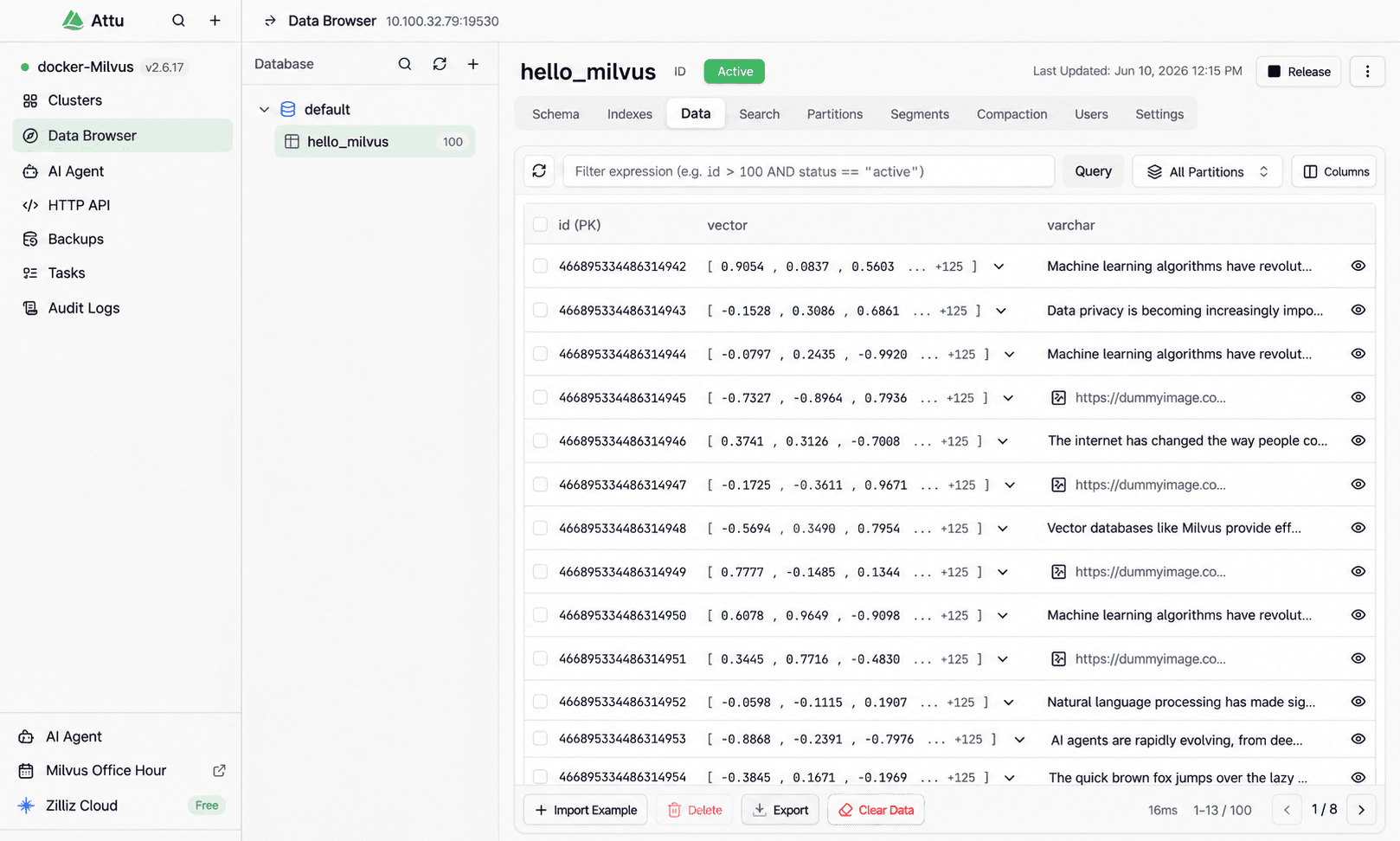
The deployment’s volumes directory contained three sets of persistent data:
etcd/
milvus/
minio/
To reproduce complete metadata loss in the lab, we moved the etcd data directory out of the deployment:
cd /home/zilliz/mnt/lcl/260milvus/volumes
mv etcd ../etcd_old
This does not reproduce every possible form of etcd corruption. It simulates the condition this recovery depends on: Milvus can no longer read the original metadata.
After the directory was removed, the original collection no longer appeared in Attu.
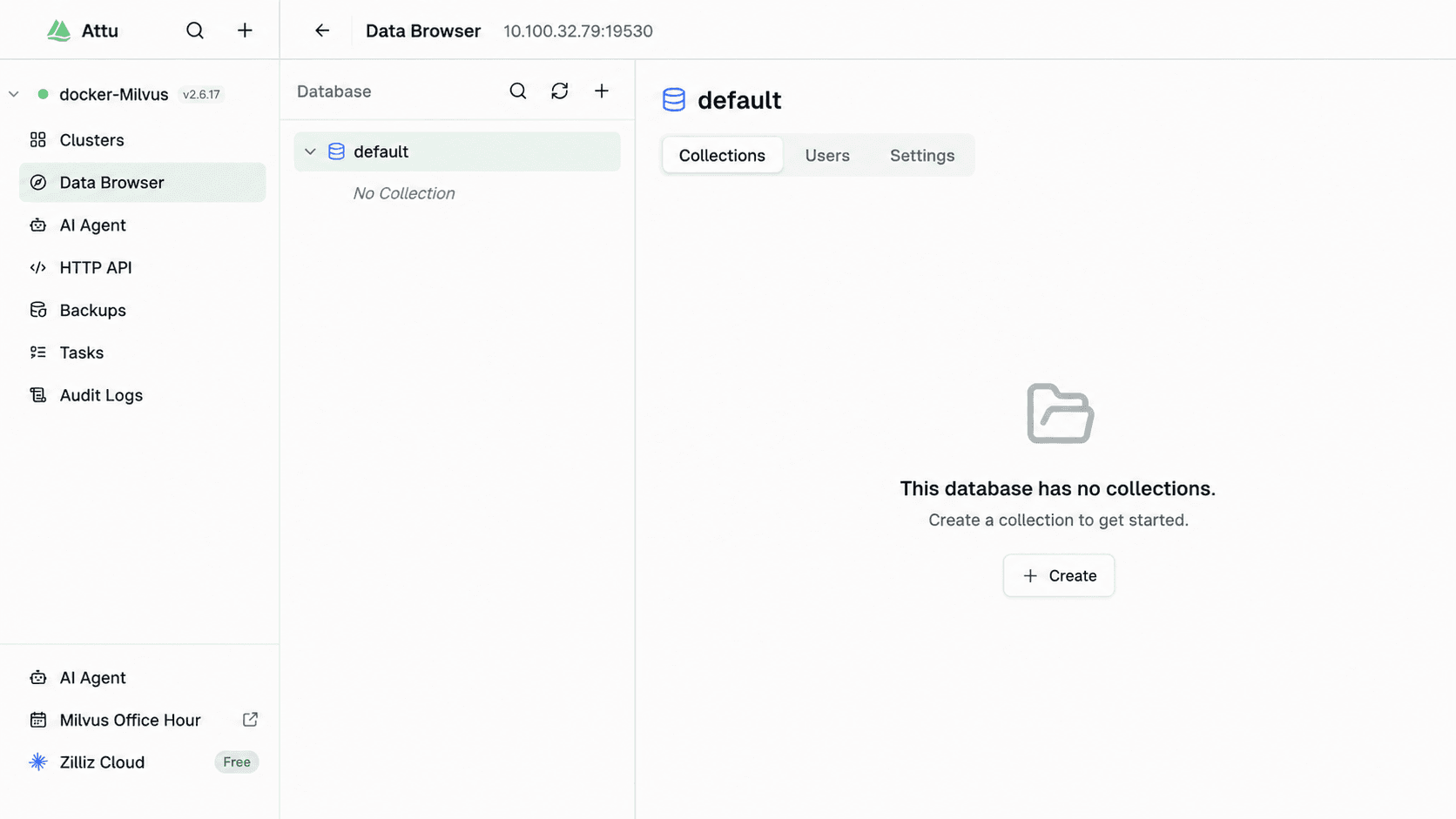
The underlying object files had not necessarily disappeared. Milvus had lost the information it needed to interpret them.
Why Can’t MinIO Alone Rebuild a Milvus Collection?
MinIO cannot rebuild the collection on its own because it stores only data files. The metadata that says which files form the current collection (schemas, segment states, compaction history) lives in etcd. The two services serve different roles in Milvus:
| What etcd stores (metadata) | What MinIO stores (object data) |
|---|---|
| Databases, collections, partitions | insert_log |
| Schemas | stats_log |
| Segment IDs and segment states | delta_log |
| Index metadata | Index files |
| Pre-/post-compaction segment relationships | Write-ahead log (WAL) files |
During normal operation, Milvus first reads metadata from etcd to determine which collections exist, how their schemas are defined, and which segments are currently valid. It then reads the corresponding files from MinIO.
When etcd is completely unavailable, MinIO can provide files but cannot answer several critical questions:
- Which collection name corresponds to this collection ID?
- Is this segment live or dropped?
- Has this segment been replaced by a compacted segment?
- Is this data part of the current deployment or an older experiment?
- Can you still trust the mapping between field IDs and the application’s fields?
Having the object files is necessary for this recovery, but not sufficient.
Recovery Strategy: Build a New Instance Instead of Repairing in Place
The old etcd was unreadable, so we stopped trying to read it. The old MinIO still had insert_log and stats_log files that could serve as data sources. A new Milvus instance would create fresh metadata and new segments.
We did not try to restart or repair the old deployment. If its state was already unreliable, continuing to operate on it risked further corruption. The safer approach was to isolate the old data and start clean.
The diagram below shows the overall recovery flow: skip the old etcd entirely, use the old MinIO insert_log and stats_log as the data source, and let the new Milvus instance create fresh metadata and segments.
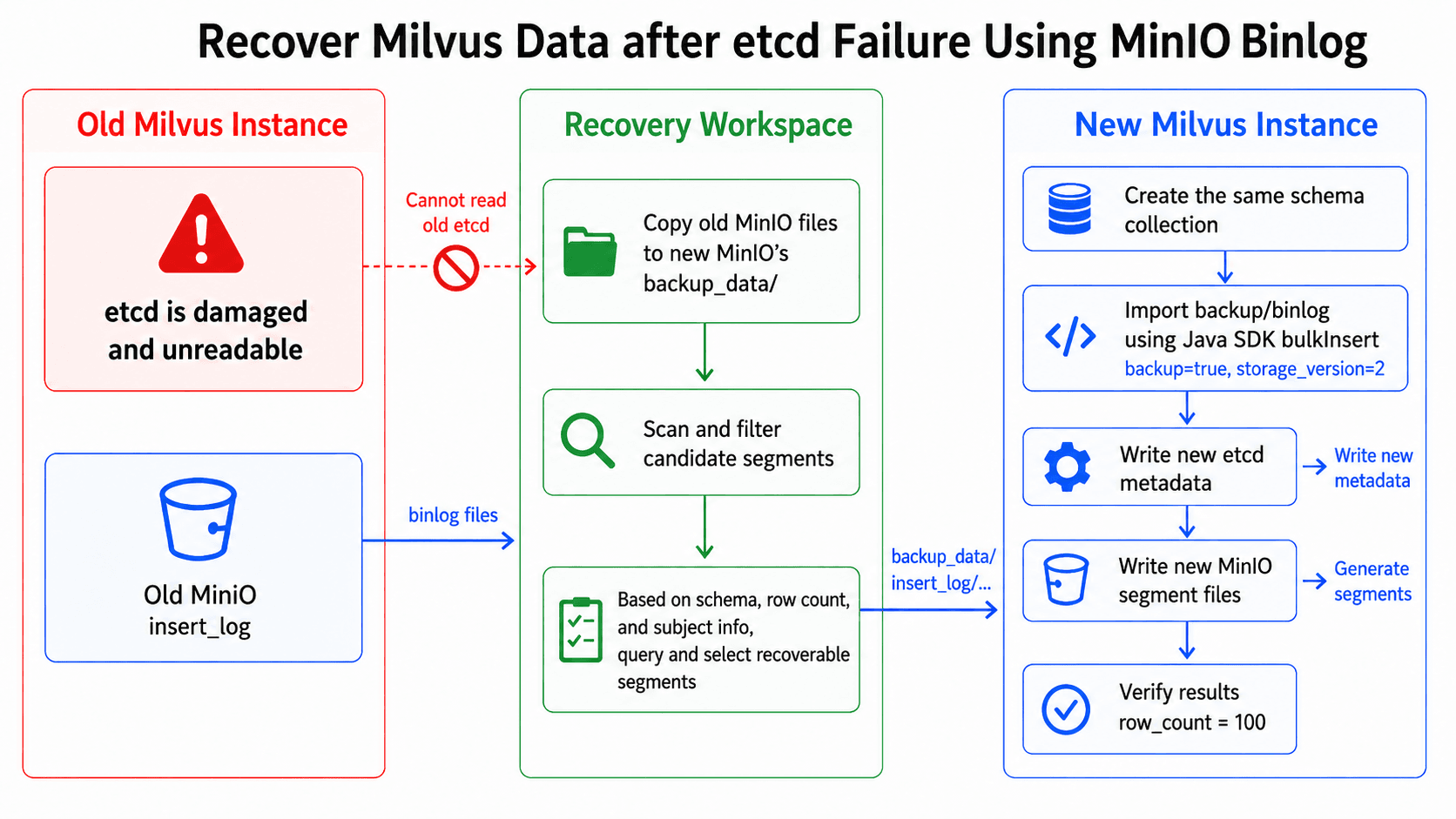
We followed these steps:
- Preserve the old MinIO directory.
- Do not modify or depend on the old etcd directory.
- Start an empty Milvus Standalone deployment in a new path.
- Recreate a schema-compatible collection.
- Copy the old insert_log and stats_log directories into a separate
backup_data/prefix in the new MinIO storage. - Scan for candidate segment directories.
- Import each candidate through the Java SDK.
- Validate row counts, primary keys, sampled fields, and search behavior.
- Import only confirmed segments into the final recovery collection.
Start the clean Milvus instance
cd /home/zilliz/mnt/lcl/260milvus/new
docker compose up -d
Example output:
[+] Running 3/3
 Container milvus-etcd        Started ✔
 Container milvus-minio       Started ✔
 Container milvus-standalone  Started ✔
Define the old and new MinIO paths
OLD_BUCKET=/home/zilliz/mnt/lcl/260milvus/volumes/minio/a-bucket/files
NEW_BUCKET=/home/zilliz/mnt/lcl/260milvus/new/volumes/minio/a-bucket/files
Copy the old binlogs into an isolated prefix
mkdir -p "$NEW_BUCKET/backup_data"
rsync -a "$OLD_BUCKET/insert_log" "$NEW_BUCKET/backup_data/"
rsync -a "$OLD_BUCKET/stats_log" "$NEW_BUCKET/backup_data/"
After the copy, the new Milvus instance can access the old files through paths such as:
backup_data/insert_log/<old_collection_id>/<old_partition_id>/<old_segment_id>
backup_data/stats_log/<old_collection_id>/<old_partition_id>/<old_segment_id>
Do not mix the copied files into the directories used by the new instance’s own collections. Keeping them under backup_data/ makes scanning, importing, and rollback easier to reason about.
Recreate a Schema-Compatible Collection
Because the original etcd metadata is unavailable, the new Milvus instance cannot recover the collection schema automatically. The schema must come from another source; in practice, that is usually the application code that created the collection.
In this reproduction, the original collection was named hello_milvus and had the following fields:
{
  "collection_name": "hello_milvus",
  "fields": [
    {
      "name": "id",
      "data_type": 5,
      "is_primary_key": true,
      "autoID": true
    },
    {
      "name": "vector",
      "data_type": 101,
      "dim": 128,
      "indexes": [
        {
          "index_name": "vector",
          "index_type": "AUTOINDEX",
          "metric_type": "COSINE"
        }
      ]
    },
    {
      "name": "varchar",
      "data_type": 21,
      "max_length": 256
    }
  ],
  "enable_dynamic_field": false,
  "consistency_level": "Bounded",
  "shards_num": 1
}
We created a compatible collection in the new Milvus deployment:
from pymilvus import MilvusClient, DataType

client = MilvusClient(uri="http://localhost:19530", db_name="default")

collection_name = "hello_milvus_recover"

if client.has_collection(collection_name):
    client.drop_collection(collection_name)

schema = MilvusClient.create_schema(
    auto_id=True,
    enable_dynamic_field=False,
)

schema.add_field("id", DataType.INT64, is_primary=True, auto_id=True)
schema.add_field("vector", DataType.FLOAT_VECTOR, dim=128)
schema.add_field("varchar", DataType.VARCHAR, max_length=256)

index_params = MilvusClient.prepare_index_params()
index_params.add_index(
    field_name="vector",
    index_type="AUTOINDEX",
    metric_type="COSINE",
)

client.create_collection(
    collection_name=collection_name,
    schema=schema,
    index_params=index_params,
)
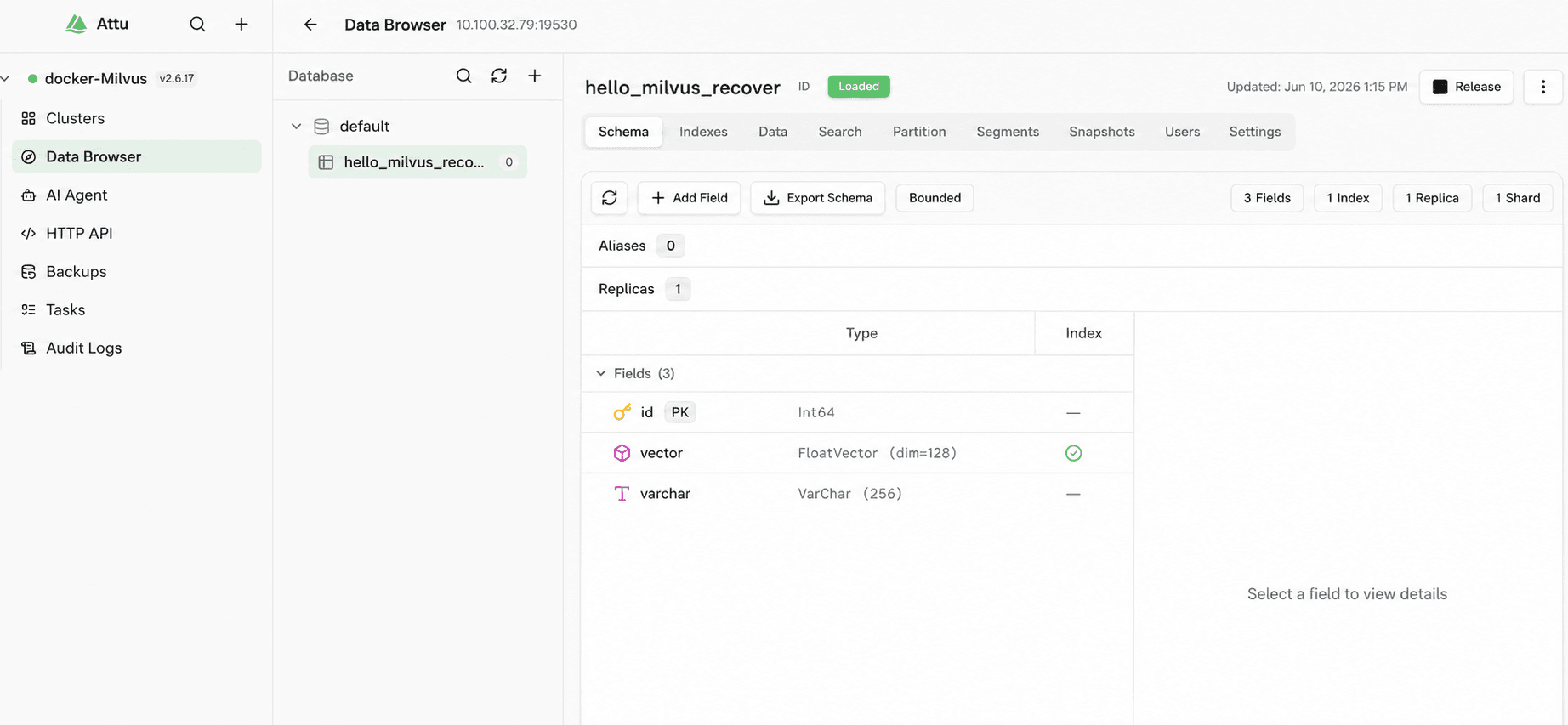
The new schema must be compatible with the old binlogs. Relevant settings include:
- Field types
- Vector dimensions
- Primary-key configuration
- Auto-ID behavior
- Dynamic-field configuration
- Field mappings
A clear mismatch can cause the import to fail. A subtler mismatch is more dangerous: the import may complete while the data is interpreted incorrectly.
Scan MinIO for Candidate Segments
We then scanned the copied insert_log directory:
NEW_BUCKET=/home/zilliz/mnt/lcl/260milvus/new/volumes/minio/a-bucket/files
find "$NEW_BUCKET/backup_data/insert_log" \
    -mindepth 3 -maxdepth 3 -type d \
    | sed "s#${NEW_BUCKET}/##" \
    | sort
The scan found two candidate segment directories:
backup_data/insert_log/466895334486314780/466895334486314781/466895334486514943
backup_data/insert_log/466895334486314780/466895334486314781/466895334486515954
The path format is:
backup_data/insert_log/<old_collection_id>/<old_partition_id>/<old_segment_id>
For this reproduction:
old collection id: 466895334486314780
old partition id: 466895334486314781
candidate segment 1: 466895334486514943
candidate segment 2: 466895334486515954
At this point, we knew only that two segment directories existed — not whether they contained different data. This matters because bulkInsert will accept both: it checks the path, the binlog, and the schema, not whether a segment is still live. If both segments contain the same rows, importing both gives you 200 rows from 100 rows of actual data.
Import a Candidate Segment with the Java SDK
This reproduction used MilvusServiceClient.bulkInsert from the Java SDK with the binlog backup import mode.
The relevant options were:
backup=true
storage_version=2  # Milvus 2.6+ uses storage v2; earlier versions use v1
files=["backup_data/insert_log/.../<segment_id>"]  # pass the insert_log segment path
These settings are coupled to the versions used in this reproduction. Before using the procedure elsewhere, verify the required storage version and import behavior against the exact Milvus and SDK versions in the recovery environment.
The core Java call was:
R<ImportResponse> importResp = client.bulkInsert(
    BulkInsertParam.newBuilder()
        .withDatabaseName(dbName)
        .withCollectionName(collectionName)
        .withPartitionName("_default")
        .withOption("backup", "true")
        .withOption("storage_version", storageVersion)
        .withFiles(Collections.singletonList(segmentPath))
        .build()
);
The import task was polled until it completed:
while (true) {
    R<GetImportStateResponse> stateResp = client.getBulkInsertState(
        GetBulkInsertStateParam.newBuilder()
            .withTask(taskID)
            .build()
    );
    ImportState state = stateResp.getData().getState();
    System.out.println("Import state: " + state);
    if (state == ImportState.ImportCompleted) {
        break;
    }
    if (state == ImportState.ImportFailed ||
        state == ImportState.ImportFailedAndCleaned) {
        throw new RuntimeException("import failed: " + stateResp.getData());
    }
    Thread.sleep(1000);
}
The Maven dependency was:
<dependency>
    <groupId>io.milvus</groupId>
    <artifactId>milvus-sdk-java</artifactId>
    <version>3.0.1</version>
</dependency>
Import the first segment
cat > /tmp/import_paths.txt <<'EOF'
backup_data/insert_log/466895334486314780/466895334486314781/466895334486514943
EOF
Run the import:
cd /home/zilliz/mnt/lcl/260milvus/etcd_recovery/restore-java
DB_NAME=default \
COLLECTION_NAME="hello_milvus_recover" \
IMPORT_PATHS_FILE=/tmp/import_paths.txt \
STORAGE_VERSION=2 \
mvn -q exec:java \
    -Dexec.mainClass=io.milvus.recovery.ImportIntoExistingCollection
Example output:
Target collection: default.hello_milvus_recover
Segment paths: 1
Importing segment:
backup_data/insert_log/466895334486314780/466895334486314781/466895334486514943
Import task ID: 466896649728034340
Import state: ImportPending
Import state: ImportStarted
Import state: ImportStarted
Import state: ImportStarted
Import state: ImportCompleted
collection statistics: [key: "row_count"
value: "100"
]
The first result looked correct. The original collection contained 100 rows, and the recovered collection now reported 100 rows. The problem appeared after importing the second candidate.
Import the second segment
cat > /tmp/import_paths.txt <<'EOF'
backup_data/insert_log/466895334486314780/466895334486314781/466895334486515954
EOF
Import it into the same collection:
DB_NAME=default \
COLLECTION_NAME="hello_milvus_recover" \
IMPORT_PATHS_FILE=/tmp/import_paths.txt \
STORAGE_VERSION=2 \
mvn -q exec:java \
    -Dexec.mainClass=io.milvus.recovery.ImportIntoExistingCollection
Example output:
Target collection: default.hello_milvus_recover
Segment paths: 1
Importing segment:
backup_data/insert_log/466895334486314780/466895334486314781/466895334486515954
Import task ID: 466896649728083097
Import state: ImportPending
Import state: ImportStarted
Import state: ImportStarted
Import state: ImportCompleted
collection statistics: [key: "row_count"
value: "200"
]
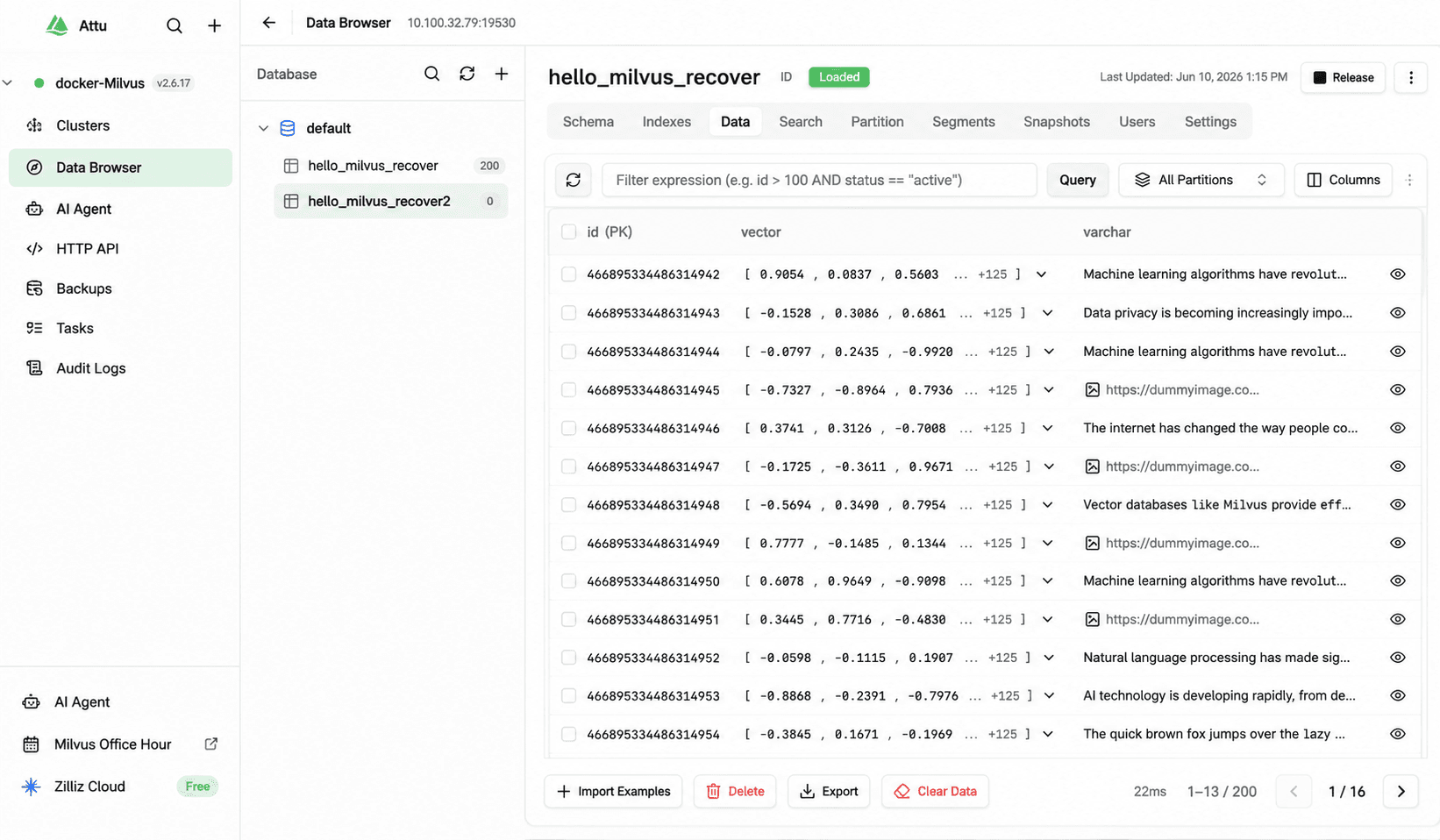
Both imports succeeded, and that was exactly the problem: the recovery collection now reported 200 rows for an original dataset of 100. The physical state of the recovered collection was wrong even though every import call returned success.
A Readable Segment Is Not Necessarily a Live Segment
The two candidate directories were both:
- Present in MinIO
- Readable
- Compatible with the reconstructed schema
- Accepted by bulkInsert
That does not mean they represented two different batches of application data. This is not a bug in bulkInsert.
bulkInsert imports whatever segment you point it at. As long as the path is valid, the binlog is readable, and the schema is compatible, the import succeeds. It does not judge whether that segment is current data or a pre-compaction historical copy.
In particular, bulkInsert cannot tell whether the segment was:
- Live at the time of failure
- Dropped
- Replaced by compaction
- A previous physical form of the same rows
- Left over from an earlier operation
We inspected the files in both segment directories:
for s in 466895334486514943 466895334486515954; do
    echo "SEGMENT=$s"
    find \
        /home/zilliz/mnt/lcl/260milvus/volumes/minio/a-bucket/files/insert_log/\
466895334486314780/466895334486314781/$s \
        -type f -printf '%TY-%Tm-%Td %TH:%TM:%TS %s %p\n' | sort
done
The relevant output was:
SEGMENT=466895334486514943
2026-06-10 12:15:36 1621  .../514943/0/.../part.1
2026-06-10 12:15:36 2960  .../514943/1/.../part.1
2026-06-10 12:15:36 47724 .../514943/101/.../part.1

SEGMENT=466895334486515954
2026-06-10 12:15:39 1621  .../515954/0/.../part.1
2026-06-10 12:15:39 2960  .../515954/1/.../part.1
2026-06-10 12:15:39 47724 .../515954/101/.../part.1
The segments had several matching characteristics:
- The same field directories: 0, 1, and 101
- The same file sizes: 1621, 2960, and 47724
- Timestamps approximately three seconds apart
These similarities strongly suggested that the two directories contained the same logical rows in two physical forms. They were not sufficient proof by themselves. We still needed to import and compare the data.
The core problem was no longer “which segment is readable?” Both were readable.
The problem was “which segment, or set of segments, represents the intended final dataset?”
Without etcd metadata, you answer that question by importing candidates separately and comparing the data.
Validate Candidates in Separate Temporary Collections
Instead of importing all candidates into the final collection, import each candidate into a separate temporary collection. For example:
hello_milvus_recover_candidate_1hello_milvus_recover_candidate_2
Then compare them across several dimensions:
- Physical row count
- Number of distinct primary keys
- Minimum and maximum primary keys
- Sampled scalar-field values
- Vector-search results
- Duplicate primary keys
- Known records from the application side
In this lab run, the comparison used hello_milvus_recover (both candidate segments imported) against hello_milvus_recover2, a clean collection holding only the newer candidate; hello_milvus_recover2 becomes the final recovery collection in the next section. In a real recovery with more candidates, name the temporary collections explicitly, as above.
The following PyMilvus code checks collection statistics and primary-key ranges:
from pymilvus import MilvusClient
client = MilvusClient(uri="http://localhost:19530", db_name="default")
for name in ["hello_milvus_recover", "hello_milvus_recover2"]:
    print(name, client.get_collection_stats(name))
    rows = client.query(
        collection_name=name,
        filter="id >= 0",
        output_fields=["id", "varchar"],
        limit=10000,
    )
    ids = [r["id"] for r in rows]
    print(
        "query_rows", len(rows),
        "distinct_ids", len(set(ids)),
        "min", min(ids),
        "max", max(ids)
    )
The result was:
hello_milvus_recover {'row_count': 200}
query_rows 100 distinct_ids 100 min 466895334486314942 max 466895334486315041

hello_milvus_recover2 {'row_count': 100}
query_rows 100 distinct_ids 100 min 466895334486314942 max 466895334486315041
Together with the file-level evidence and sampled data, this confirmed that the two imported segments represented the same logical primary-key range rather than two independent sets of 100 records.
Attu can also be used for this comparison by importing candidates into separate temporary collections and comparing their rows, primary-key ranges, and sampled values.
Directory structure alone is not enough. Segment selection requires data-level validation.
Build the Final Recovery Collection from Confirmed Candidates
In this reproduction, the two candidates were found to be logically equivalent. After comparing their file characteristics, separate imports, primary-key ranges, and sampled records, we selected the newer candidate:
backup_data/insert_log/466895334486314780/466895334486314781/466895334486515954
Recency alone should not be used as proof in a real recovery. Here it was one signal considered after the two candidates had already been shown to contain equivalent logical data.
hello_milvus_recover2, the single-segment collection from the comparison above, became the final recovery collection.
hello_milvus_recover2
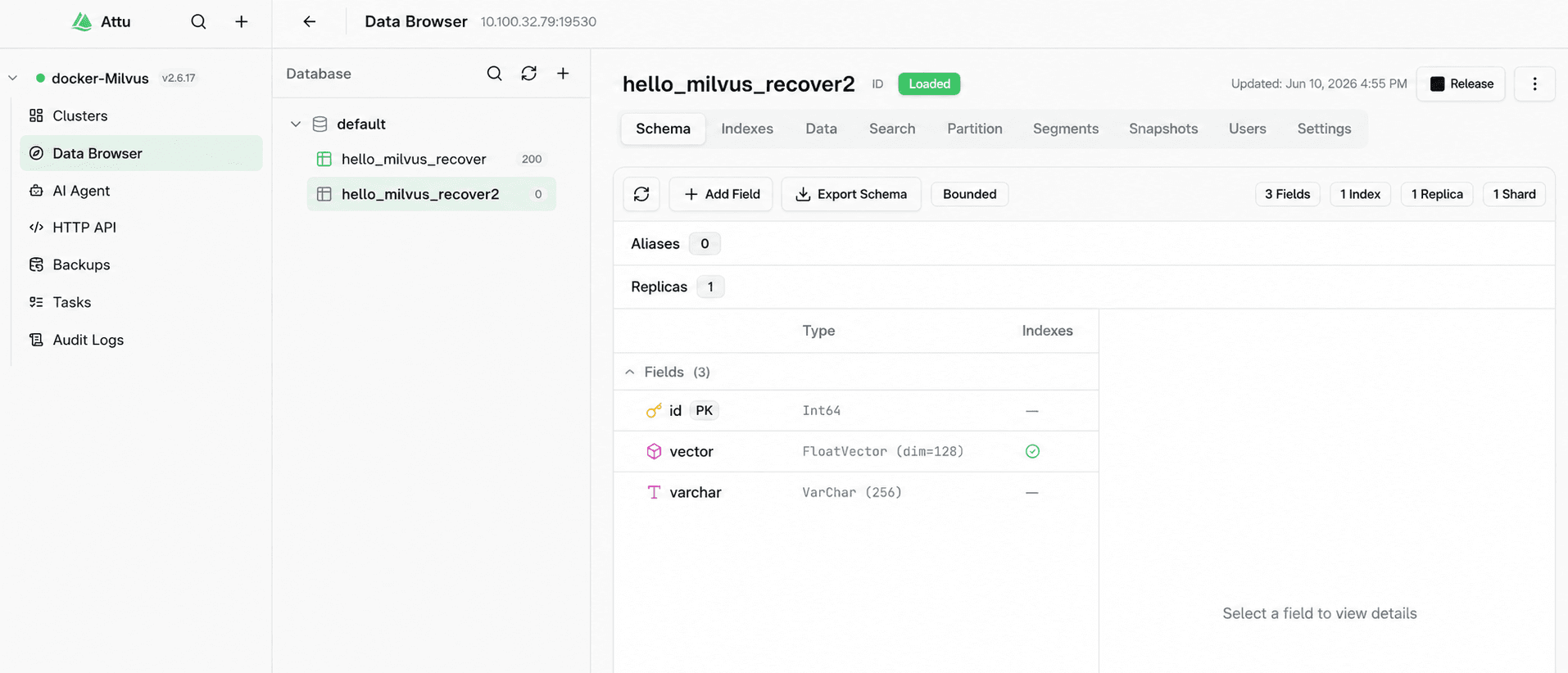
Then imported only the selected segment:
cat > /tmp/import_paths.txt <<'EOF'
backup_data/insert_log/466895334486314780/466895334486314781/466895334486515954
EOF

cd /home/zilliz/mnt/lcl/260milvus/etcd_recovery/restore-java
DB_NAME=default \
COLLECTION_NAME="hello_milvus_recover2" \
IMPORT_PATHS_FILE=/tmp/import_paths.txt \
STORAGE_VERSION=2 \
mvn -q exec:java \
    -Dexec.mainClass=io.milvus.recovery.ImportIntoExistingCollection
Example output:
Target collection: default.hello_milvus_recover2
Segment paths: 1
Importing segment:
backup_data/insert_log/466895334486314780/466895334486314781/466895334486515954
Import task ID: 466896649729193732
Import state: ImportPending
Import state: ImportStarted
Import state: ImportStarted
Import state: ImportCompleted
collection statistics: [key: "row_count"
value: "100"
]
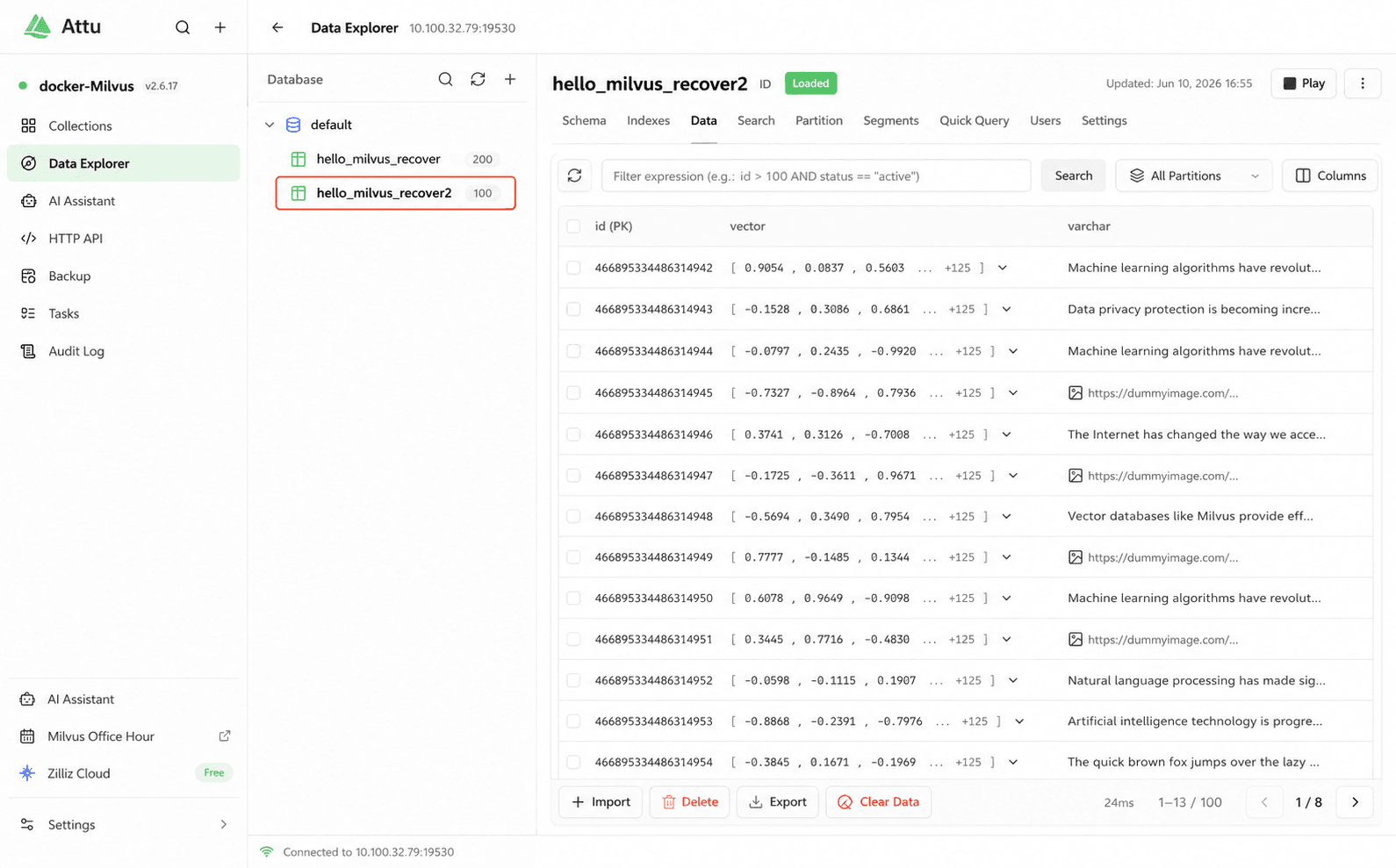
The final recovered collection contained the expected 100 rows.
We did not import every readable segment into the final collection. We validated each candidate separately and imported only the one we had confirmed.
Limitations of This Recovery Method
This reproduction succeeded, but it does not establish that MinIO alone can always recover a collection after etcd failure. The method has several hard limitations.
MinIO does not identify live segments. Object storage contains files, not the complete Milvus segment lifecycle. Without etcd metadata, MinIO cannot reliably indicate whether a segment is live, dropped, superseded, or an intermediate result of compaction.
Duplicate imports are possible. The increase from 100 to 200 physical rows demonstrates the risk. If pre-compaction and post-compaction segments are both imported, the new Milvus instance registers both as live segments in the reconstructed collection, and the physical row count goes up.
The original schema must be known. Recovery becomes significantly harder if the schema is completely lost. Field types, vector dimensions, primary-key configuration, auto-ID behavior, dynamic-field settings, and field ID mappings can all affect whether the import succeeds and whether the data is interpreted correctly.
Deletes make recovery more complicated. If the original collection contained deletes, importing only insert_log data may restore rows that were no longer visible before the failure. Reconstructing the correct state may require handling delta_log data. The exact procedure depends on the Milvus version and the state of the available files. This reproduction did not establish a general delta-log recovery process.
Multiple collections and partitions increase the ambiguity. The lab environment contained one small collection, making it possible to compare row counts, primary-key ranges, and samples manually. A production deployment may have far more collections, partitions, and databases, and many more segments, than this lab setup; at that scale, manual inspection becomes expensive and error-prone.
This technique should therefore be treated as data salvage, not as a normal disaster-recovery design.
Backups Are Cheaper Than Data Salvage
When etcd is unavailable, the original source data is gone, and no Milvus Backup exists, readable MinIO binlogs may provide one final recovery path. But the process is costly and uncertain. You may need to:
- Reconstruct schemas manually.
- Discover candidate segments.
- Import them one at a time.
- Compare physical and logical row counts.
- Detect duplicate primary keys.
- Account for compaction history.
- Determine whether deletes must be reconstructed.
- Validate the result against application-side records.
The safer approach is to avoid reaching this state.
Back up etcd regularly. etcd is the metadata authority for collections, schemas, partitions, and segment state. Losing it while retaining only object data leaves the physical files without the metadata required to interpret them reliably.
Use Milvus Backup for production recovery. Milvus Backup provides a structured backup and restore path. It is a better fit for repeatable, automated recovery than manually inferring segment state from object-storage directories. Backups should also be tested: run an actual restore drill.
Back up the complete volume set for Standalone deployments. For Docker Compose or other Standalone environments, preserve the complete volume directory:
Plaintext
volumes/
├── etcd/
├── milvus/
└── minio/
Do not back up only MinIO. Do not back up only etcd. A complete recovery depends on both metadata and object data.
If you run Milvus yourself, treat backup and recovery as part of the deployment. If you would rather not own that operational work, Zilliz Cloud, a fully managed Vector Lakebase platform built by the same team behind Milvus. It handles backups, metadata, and recovery for you.
Readable MinIO files gave this user one last chance to get the data back. A tested backup would have made the whole exercise unnecessary.
Get Started
- Set up Milvus Backup before you need it — the docs cover install and restore drills.
- Attu makes collection inspection and validation easier.
- Hit a recovery scenario like this one? Ask in the Milvus Discord or book a Milvus Office Hours session.
- The Incident: etcd Was Lost and the Collection Disappeared
- Why Can't MinIO Alone Rebuild a Milvus Collection?
- Recovery Strategy: Build a New Instance Instead of Repairing in Place
- Recreate a Schema-Compatible Collection
- Scan MinIO for Candidate Segments
- Import a Candidate Segment with the Java SDK
- A Readable Segment Is Not Necessarily a Live Segment
- Validate Candidates in Separate Temporary Collections
- Build the Final Recovery Collection from Confirmed Candidates
- Limitations of This Recovery Method
- Backups Are Cheaper Than Data Salvage
- Get Started
On This Page
Try Managed Milvus for Free
Zilliz Cloud is hassle-free, powered by Milvus and 10x faster.
Get Started




Like the article? Spread the word