How Force Merge Compaction Nearly Doubled Milvus Search QPS
Force Merge Compaction is a Milvus compaction option that consolidates a collection’s small sealed segments into fewer, larger ones. Under the right conditions — a collection that has become static and read-heavy, with many small, sealed segments — it can meaningfully increase search QPS.
The reason is fan-out. Every query has to search each sealed segment’s index and merge the partial results, so the more segments a collection holds, the more redundant search, scheduling, and merging each query pays for, even when the total data is unchanged.
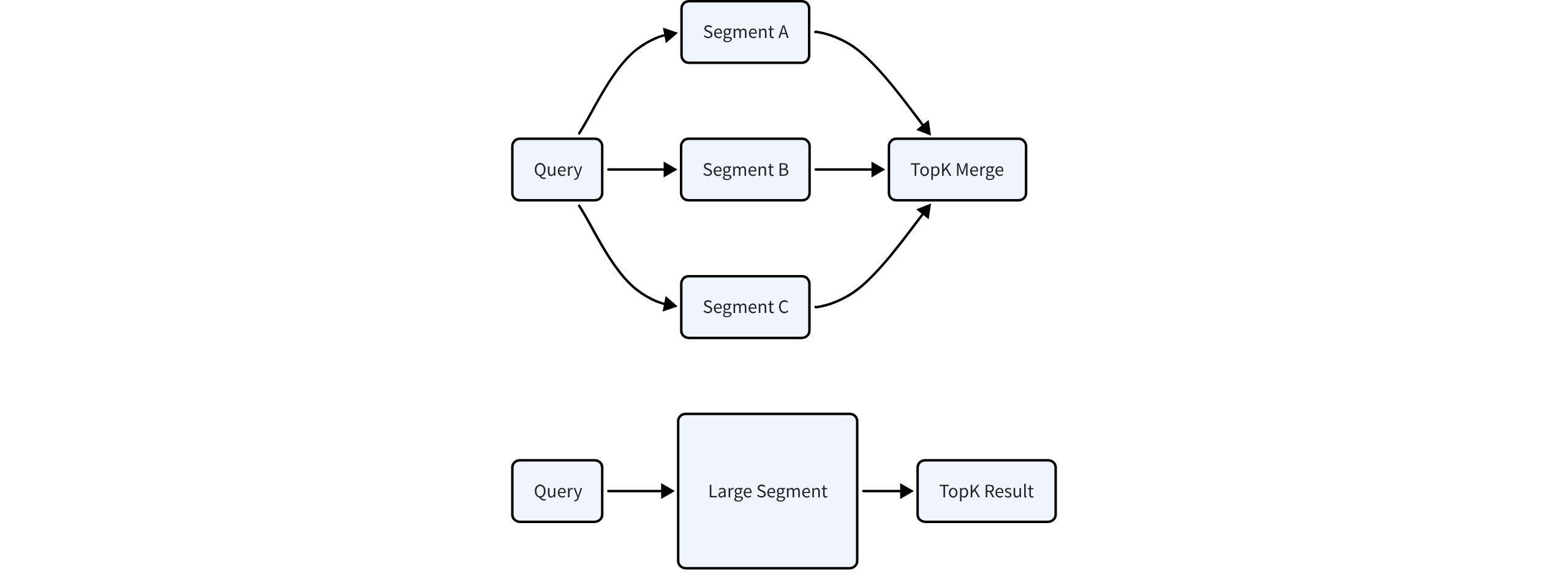
We built a controlled experiment to measure it. Once a collection’s data has gone relatively static, how much does search throughput improve if you use Force Merge to consolidate its segments? On 1 million 768-dimensional vectors with an HNSW graph index, on the same hardware, consolidating the collection with Force Merge raised search QPS from about 3,000 to about 5,600–6,000 (a 76% to 87% gain across concurrency levels), with p99 latency down about a third.
The rest of this blog covers why Milvus leaves you with many small segments, how Force Merge consolidates them, what the experiment showed run by run, and when the operation is worth its cost.
Why Small Segments Accumulate
Those small segments cost you at query time, so why does Milvus leave them around in the first place? It can’t tell when your writes are finished. Merging isn’t free (it spends I/O, memory, and CPU and forces a fresh index build), so consolidating a collection that might still be taking writes would waste that work and risk write throughput and stability. The safe default is to leave sealed segments alone.
So they accumulate. Continuous writes, incremental updates, deletes, and flushes each leave sealed segments behind, and for Milvus, that’s a valid layout, even if it isn’t the fastest one for serving queries.
What Milvus can’t know, the operator can: that the data has settled. A bulk import just finished, a knowledge-base refresh wrapped up, or the collection has shifted to mostly serving queries. Force Merge is how the operator passes that signal, trading a one-time reorganization for the lower fan-out that follows.
How Force Merge Compaction Works
Force Merge consolidates many small, scattered segments into fewer, larger ones, at a target size you choose. You trigger it through Milvus’s existing compact() API by passing a target_size.
Two capabilities let it flatten a layout that routine compaction can’t:
- It merges many-to-many, regrouping segments into near-target outputs instead of nibbling one fragment at a time.
- It can aim past the per-segment cap (
dataCoord.segment.maxSize), so even near-full segments can be combined.
It’s also:
- Backward-compatible, so existing
compact()calls withouttarget_sizeare unaffected and - Asynchronous, which means the merge runs in the background without blocking search or query, though it spends I/O and memory while it works.
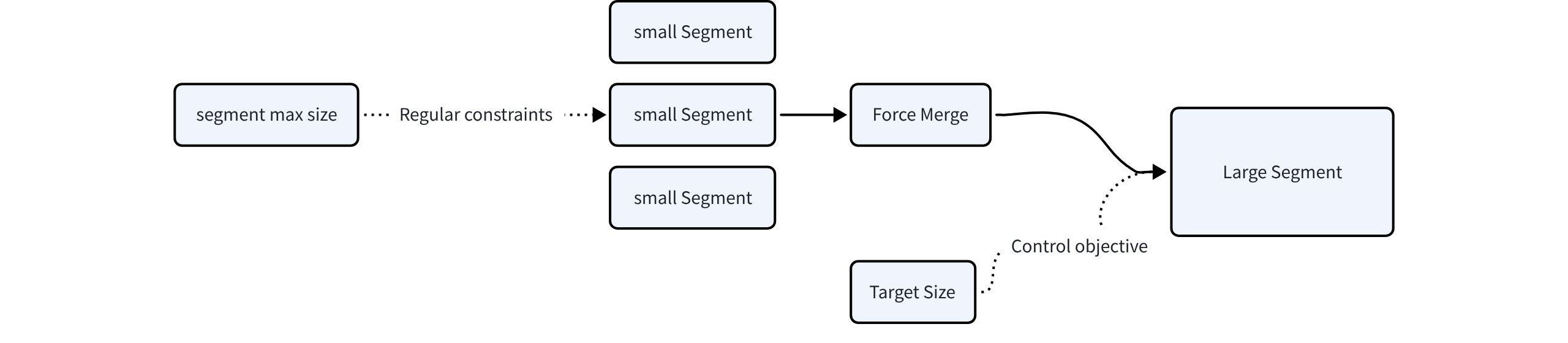
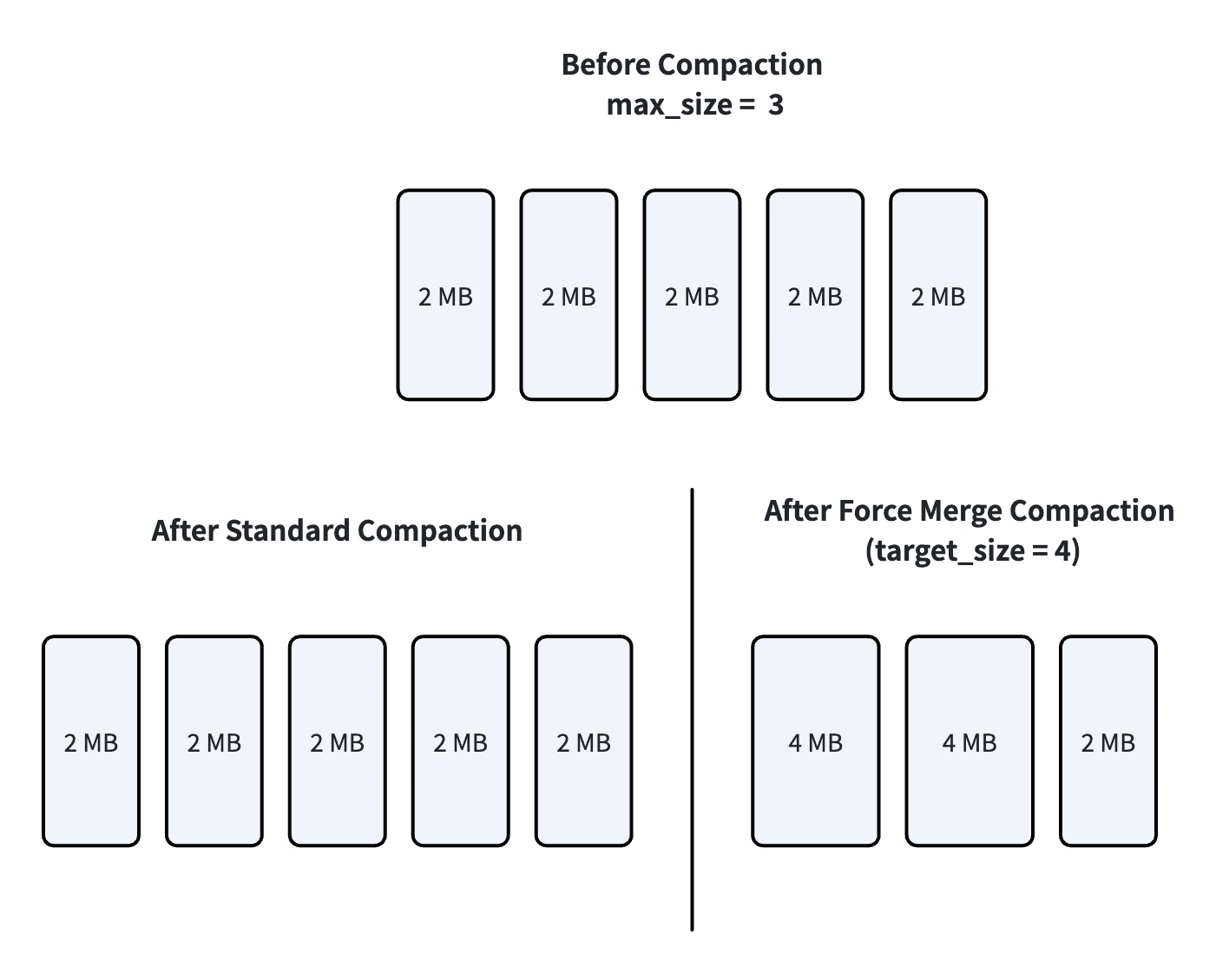
Standard compaction can’t do either of those, which is the whole reason Force Merge exists. It merges many-to-one and keeps every output under dataCoord.segment.maxSize. Once segments are big enough that combining two would cross that cap, it leaves them alone and the segment count stops dropping.
The documents give a clean example: with five 2 MB segments and a 3 MB cap, merging any two would make a 4 MB segment, over the limit, so the count can’t drop at all. Force Merge isn’t bound by the cap, so a target_size of 4 MB collapses those five into fewer, larger segments.
Consolidating helps because of how graph indexes behave: for HNSW, making one segment larger doesn’t raise its search cost proportionally, so fewer segments means less fan-out overhead without a matching rise in per-segment work. That’s why going from three segments to one is a net win, not just moving the cost around.
The deeper difference is who decides, and why. Standard compaction asks whether the system can tidy up within its own rules. Force Merge is the operator saying the data is stable and the segments should be reshaped for the queries that follow: collection-wide consolidation for faster search, with tighter storage along the way.
How far it goes depends on the **target_size** you pass, which has three modes:
- Omitted or
**0**: behaves like standard compaction, using the configuredmaxSize. - An explicit size in MB: segments merge toward it. It must be at least
maxSize; a smaller value is rejected with an error. **max_int64**: Milvus sizes the target itself, from the current segment layout and each node’s memory, so the merged segments stay small enough for QueryNodes to load. This auto mode is the recommended default unless you have a specific size in mind.
| Note: This feature is in public preview. Do not use in production environments. |
|---|
Experiment Setup: Isolating Segment Shape
Fewer segments should mean less fan-out, and less fan-out should mean higher QPS. But “should” and “does” are different things, and the size of the gain is an open question. To measure it, we ran a controlled experiment.
The experiment isolates one variable: whether Force Merge runs. Dataset, index type, query load, and the concurrency ladder are identical across both runs, so any difference in search performance traces back to segment shape and nothing else.

The environment:
| Item | Configuration |
|---|---|
| Milvus deployment | Docker Compose, single-node setup |
| Milvus version | 2.6.17 |
| Milvus server | 16-core / 64 GB virtual machine |
| Load generator | 32-core / 32 GB virtual machine |
| Benchmark tool | VDBBench |
| Dataset | VDBBench Cohere 1M vector dataset |
| Vector dimension | 768 |
| Data size | About 3 GB |
| Index type | HNSW graph index |
| Concurrency levels | 80, 120, 160, 200, 240 |
| Monitoring | Grafana / Prometheus |
| Metrics window | 30 seconds |
| Segment configuration | Segment max size around 1024 MB; seal proportion set to 1.0 |
Baseline: Three Sealed Segments, ~3,000 QPS
The first run skips Force Merge. After 1 million rows are written, Attu shows three sealed segments, each holding 300,000-plus rows. Once HNSW finishes building, the concurrency sweep begins.
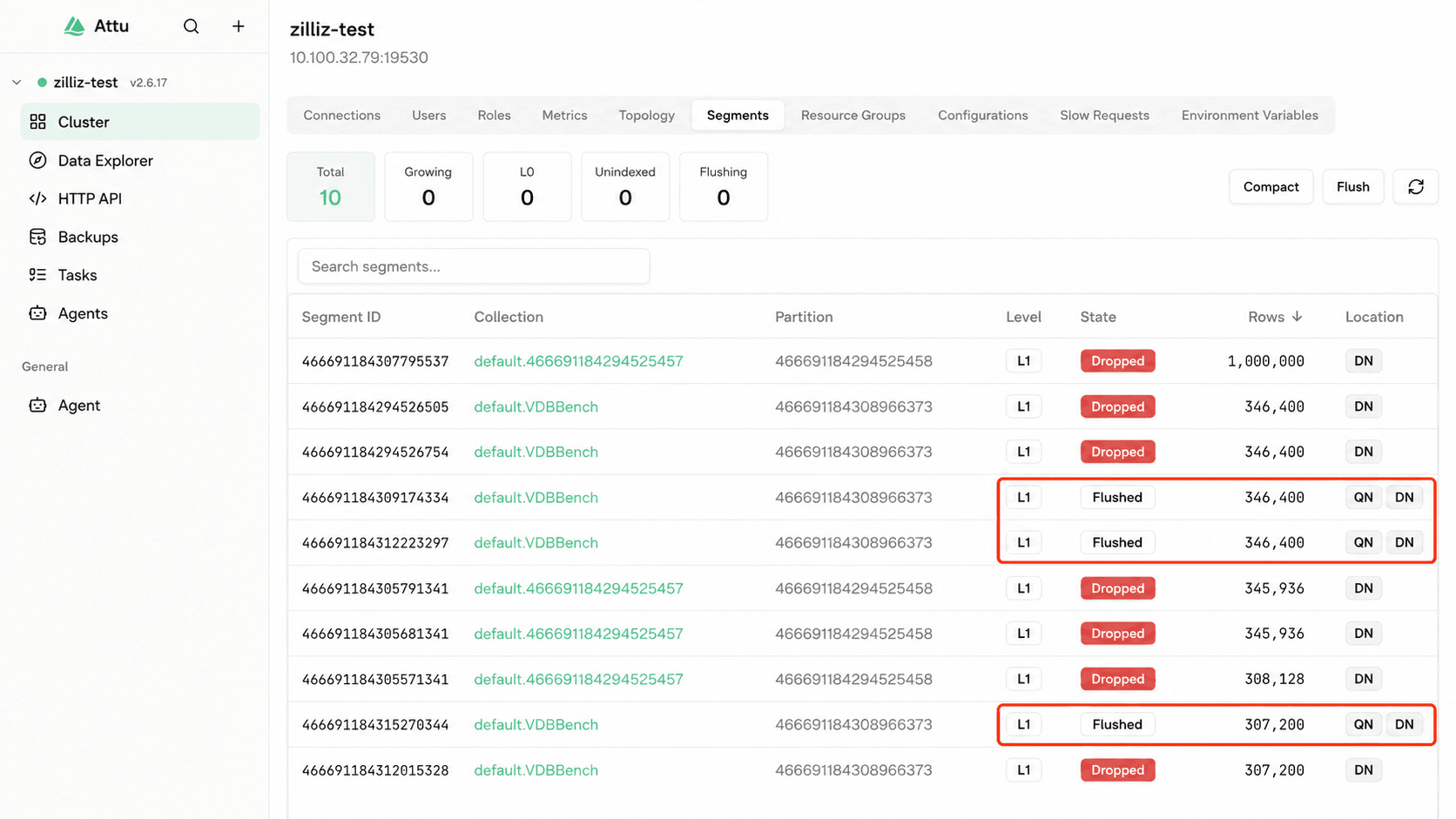
Image: three sealed segments visible in Attu, each ~300k+ rows
QPS plateaus around 3,000 and stays there. It’s already past 3,000 at 80 concurrency, and pushing concurrency higher doesn’t lift the peak. Server-side monitoring shows why: Milvus pins its CPU during the query phase, and at the higher concurrency steps the load generator starts to bottleneck too.
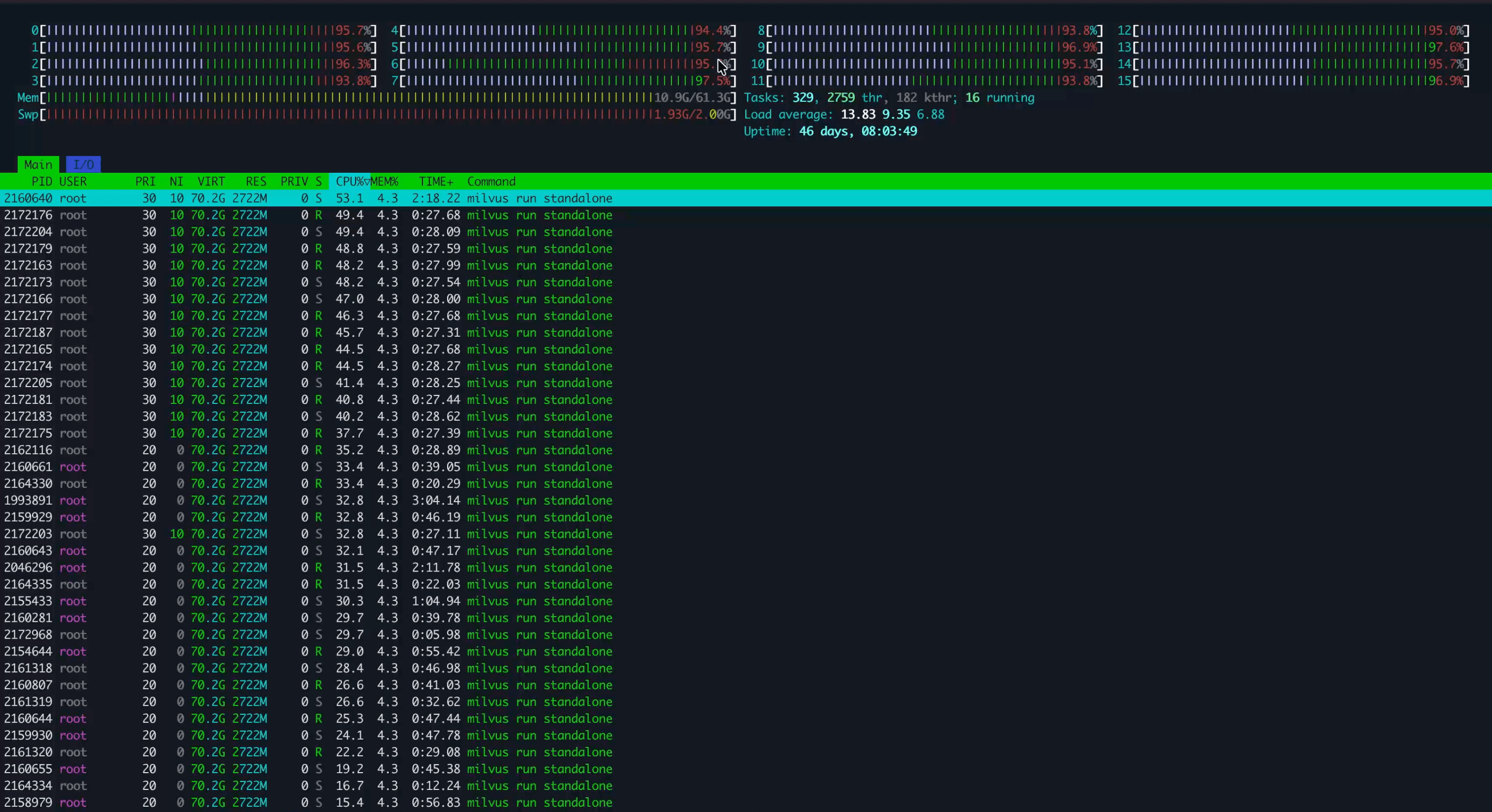
Image: Grafana CPU utilization during baseline run
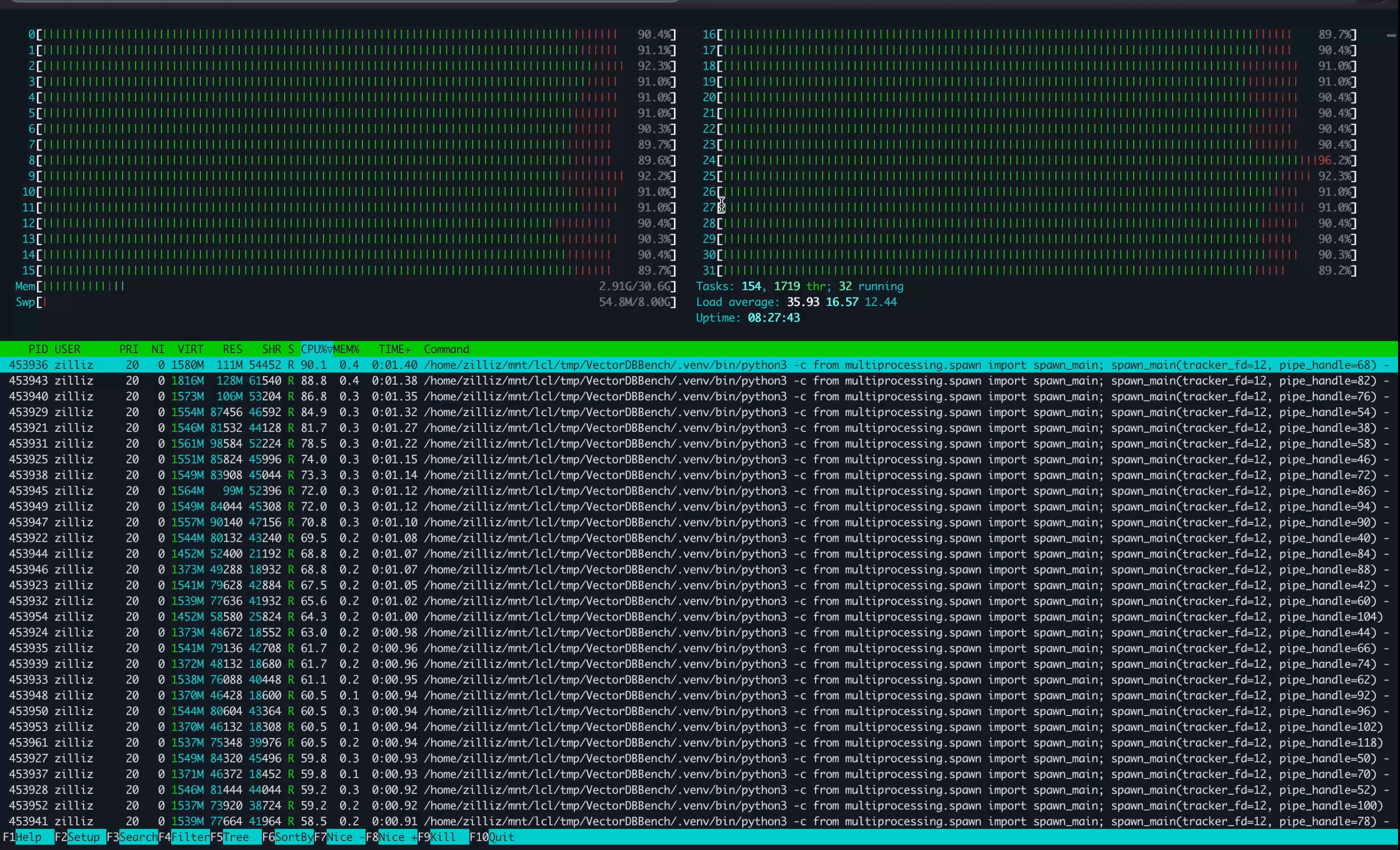
Image: Grafana QPS panel during baseline run
The takeaway: the ceiling sits in the search execution path and the resources it uses, not anywhere else. That sets up the real question: can cutting the segment count claw back some of that headroom?
After Force Merge: One Segment, ~5,600–6,000 QPS
The second run turns Force Merge on. A single compact() call with a target_size starts the merge, which Milvus runs asynchronously in the background.
When it finishes, the three 300,000-row segments have become one segment of 1 million rows, and Milvus rebuilds the index for it. Monitoring showed the 16 cores pinned during that rebuild, which is the trade in plain sight: Force Merge spends its cost up front, in the merge and the index rebuild, and pays it back later, in the query phase.
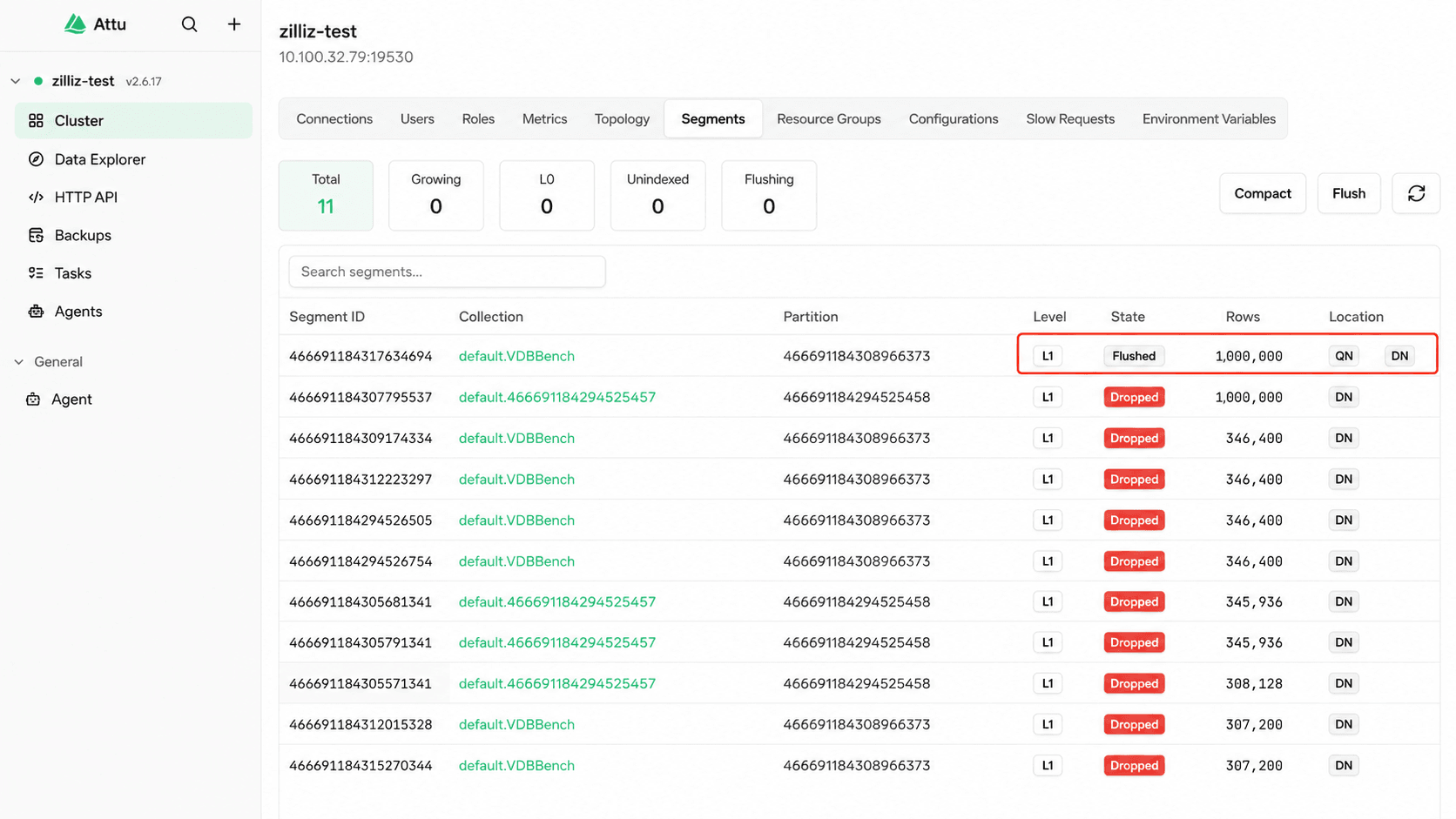
Image: single 1M-row sealed segment after Force Merge, in Attu
On a cluster, you can keep that cost out of the way: separate DataNode and QueryNode resources, or build the index on GPU where that’s an option. On a single node like this one, the rebuild has nowhere to hide and competes with everything else for CPU and I/O.
Test results: search QPS from ~3,000 to ~6,000
| Concurrency | Baseline QPS | Force Merge QPS | Improvement | Baseline p99 | Force Merge p99 |
|---|---|---|---|---|---|
| 80 | 3079.1 | 5434.4 | +76.5% | 48.2 ms | 32.8 ms |
| 120 | 3123.5 | 5650.5 | +80.9% | 70.4 ms | 44.9 ms |
| 160 | 3099.0 | 5780.5 | +86.5% | 89.2 ms | 56.9 ms |
| 200 | 3150.1 | 5770.8 | +83.2% | 114.5 ms | 70.6 ms |
| 240 | 2303.7 | 4310.6 | +87.1% | 65.6 ms | 40.8 ms |
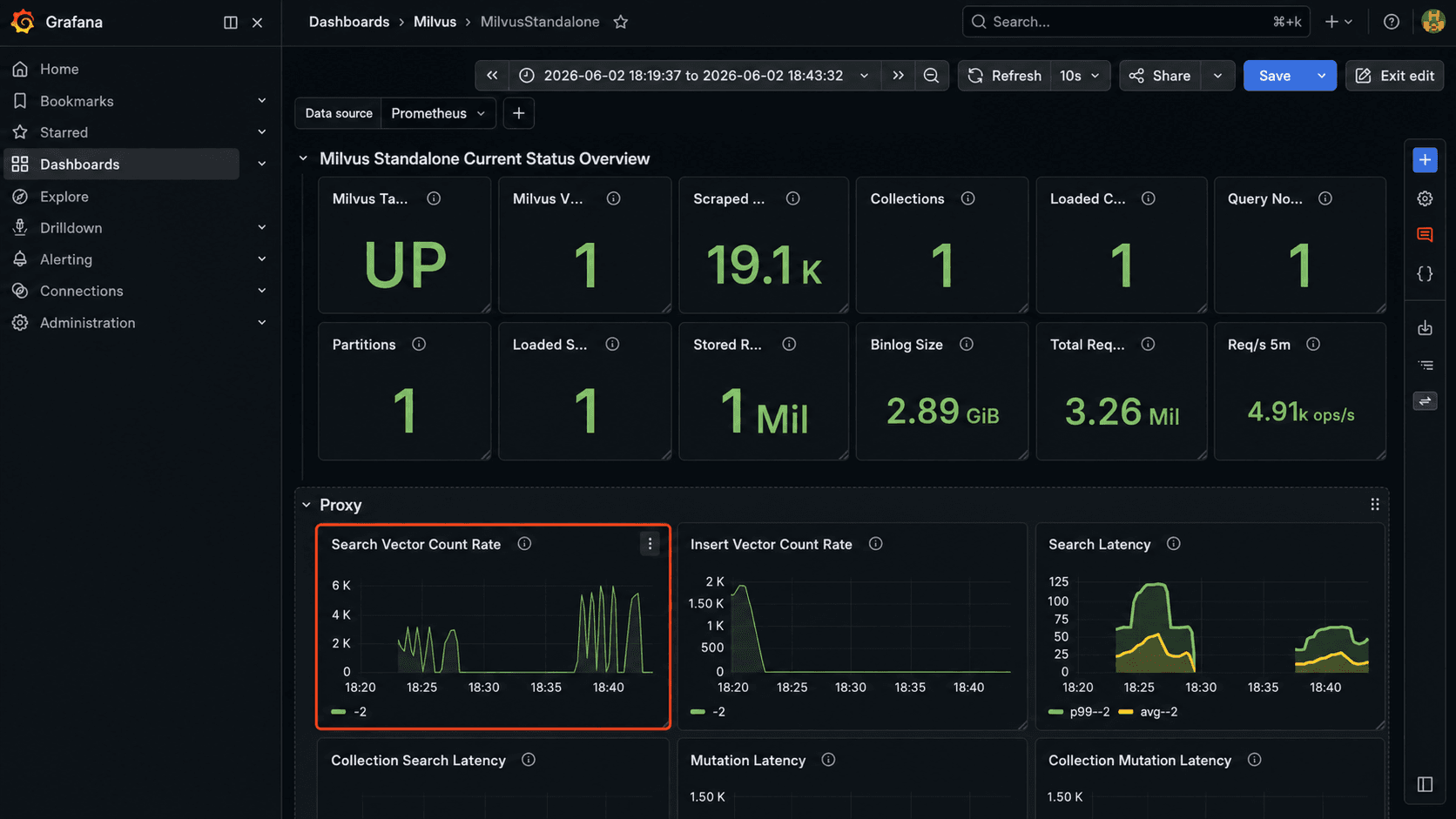
Image: comparative QPS chart, baseline vs Force Merge across concurrency steps
Once the new segment is indexed, the same sweep tells a clear story. Baseline sits near 3,000 QPS; after Force Merge it runs at roughly 5,600 to 6,000. At 120 concurrency it’s about 5,600; at 160 and 200 it’s close to 5,700–5,800. Grafana and the VDBBench summary agree, and the post-merge throughput curve sits well above baseline.
That gap is the fan-out tax made visible. With one segment instead of three, each query stops paying for the duplicate searches, the scheduling, and the merge, and the CPU that was going to that overhead now serves more queries instead.
The 240-concurrency row is the one to read carefully: both numbers fall there (baseline to 2,303, Force Merge to 4,311) because the 32-core load generator, not Milvus, has become the bottleneck. The gap between them, +87%, still holds.
When to Use Force Merge (and When Not To)
Force Merge isn’t for every collection. It pays off in some situations and backfires in others; the table sorts the common cases so you can place your own.
| ✅ When Force Merge fits | ⚠️ When to be cautious or avoid | |
|---|---|---|
| Workload | Data loaded once and rarely changing, reads dominate, and search throughput is already your bottleneck | The collection still takes steady writes, updates, or deletes |
| Deployment | A cluster where write and query resources are isolated, so the rebuild won’t starve queries | A single node, or CPU, memory, and disk I/O already running tight |
| Timing | You can run it in a quiet window, like overnight or before a release | No maintenance window available, or currently in peak traffic |
Conclusion
The idea behind Force Merge is simple. Once the operator knows the data has settled, Force Merge consolidates many small segments into a few large ones, which cuts the per-segment overhead every later search would otherwise pay.
In this experiment (1 million 768-dimensional vectors on an HNSW graph index, single-node Docker Compose), that one merge took QPS from about 3,000 to roughly 5,600–6,000. It isn’t a reason to run Force Merge everywhere, but for static, read-heavy collections with scattered segments, segment shape is a performance variable worth measuring rather than assuming.
However, please note: Force Merge runs asynchronously and won’t block queries, but it spends I/O and memory while it works and can raise query latency, so run it during a quiet window and watch the segment count before and after.
Treat it as a maintenance action you can observe, roll back, and re-run: prove the gain on your own data and workload first, then decide whether it earns a place in your routine.
Get Started
- Try it yourself. The Force Merge Compaction docs cover the
compact()parameters and the threetarget_sizemodes. - Have questions? Ask about segment layout, compaction, or tuning in the Milvus Discord, or bring them to Milvus Office Hours.
- Prefer a managed option? Zilliz Cloud runs Milvus as a fully managed service, so you can skip the self-host (sign up, or sign in if you already have an account). New work-email signups get $100 in free credits.
- Why Small Segments Accumulate
- How Force Merge Compaction Works
- Experiment Setup: Isolating Segment Shape
- Baseline: Three Sealed Segments, ~3,000 QPS
- After Force Merge: One Segment, ~5,600–6,000 QPS
- When to Use Force Merge (and When Not To)
- Conclusion
- Get Started
On This Page
Try Managed Milvus for Free
Zilliz Cloud is hassle-free, powered by Milvus and 10x faster.
Get Started




Like the article? Spread the word