

Benchmark vector search by measuring throughput and tail latency at a fixed recall target, on data and queries that look like your production workload. Because approximate search can always go faster by searching less, a QPS number means nothing without the recall it was measured at. The standard tools are ANN-Benchmarks for comparing index algorithms and VectorDBBench for comparing complete database systems, including filtering, concurrency, and streaming ingestion.
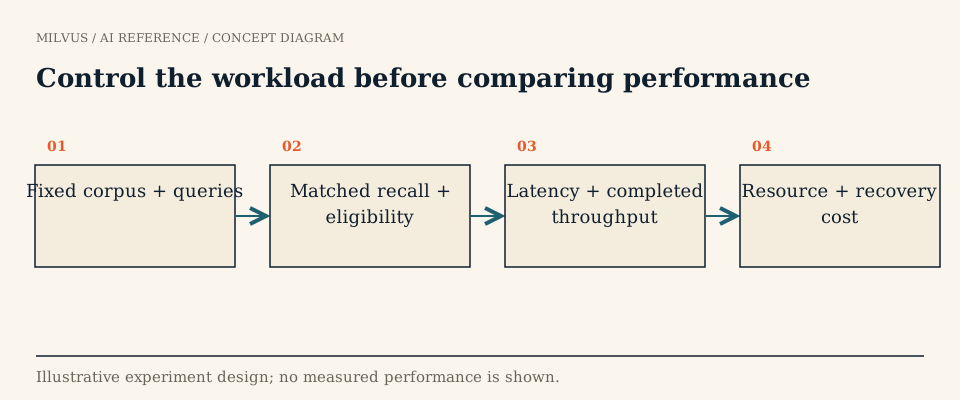 Control the workload before comparing performance
Which metrics matter?
| Metric | What it tells you | Common mistake |
|---|---|---|
| Recall@k | Fraction of the true k nearest neighbors returned, against an exact baseline | Reporting the average only, which hides queries that fail badly |
| QPS | Successful queries per second at a given concurrency | Quoting peak QPS from a run with a lower recall than the competitor’s |
| Latency p50 / p95 / p99 | What a typical and an unlucky user waits | Averaging latency, which hides queueing |
| Load / build time | How long ingesting and indexing the corpus takes | Ignoring it, then discovering a rebuild takes a day |
| Memory and disk | Resources needed to hold the index | Measuring the client process instead of the database |
| Cost per query | Infrastructure spend per unit of throughput | Comparing different hardware without normalizing |
Recall and speed always come as a pair. ANN-Benchmarks plots each algorithm as a curve of recall against QPS, and that is the right mental model for any comparison: two systems are compared at the same point on the recall axis, not at their individual best numbers.
Average recall can also mislead. A 2025 study, Towards Robustness: A Critique of Current Vector Database Assessments, shows that two systems with the same mean recall can differ widely on hard queries, and proposes reporting the fraction of queries that clear a recall threshold. If your product cannot tolerate occasional empty or wrong results, look at the per-query recall distribution, not just its mean.
How do you run a fair vector search benchmark?
- Fix the dataset. Use your own embeddings when possible: same model, dimension, metric, and data distribution as production. Public sets such as SIFT (128-dim), GIST (960-dim), or OpenAI and Cohere embedding sets are fine for screening, but their distributions differ from yours.
- Fix the query set. Hold out real queries, not vectors sampled from the corpus, which are artificially easy because each one has an exact match.
- Build the ground truth. Compute exact top-k neighbors with brute-force search. In Milvus a FLAT index gives you that baseline with the same metric and filters. When you benchmark filtered search, recompute ground truth with the filter applied.
- Sweep the search parameter. For HNSW sweep
ef, for IVF sweepnprobe, for DISKANN sweepsearch_list. Each value gives one recall/QPS point; together they form the curve. - Pick the target and read off the numbers. Choose the recall your application needs, for example 0.95 at k=10, and report QPS and p99 latency at that recall for each candidate.
- Ramp concurrency. Measure serially (one query at a time) for best-case latency, then increase concurrent clients until throughput stops rising. The interesting result is the highest throughput that still meets your p99 target. The latency and throughput guide explains why.
- Add the hard parts of your workload. Run filtered searches at your real filter selectivity, searches during continuous inserts, and a cold start after a restart.
- Repeat and keep the raw data. Run each configuration several times, report variance, and keep the exact versions, configs, and hardware so someone else can reproduce it.
What tools should you use?
ANN-Benchmarks evaluates in-process index libraries on standard datasets and distance metrics. It is the reference for algorithm comparisons, but it does not exercise a database’s network layer, concurrency, filtering, or ingestion.
VectorDBBench is an open-source tool for benchmarking full vector database deployments. It reports index build and load duration, recall, serial p99 latency, and maximum QPS across concurrency levels, with test cases for capacity, search performance on datasets from 100K to 100M vectors, filtered search, full-text search, and streaming search under a constant insert load. You can also load your own data from Parquet files. Getting started takes two commands:
pip install vectordb-bench
init_bench   # launches the web UI; or use the vectordbbench CLI
Your own harness is still worth building for the final decision. A small script that replays production queries through your real client code catches what generic tools miss: payload size from output_fields, embedding latency, reranking, and network hops.
Milvus-specific things to control
- Index type and parameters. Record
index_type,metric_type, and build parameters such asMandefConstructionfor HNSW ornlistfor IVF. The index guide summarizes their trade-offs; for example, graph indexes usually lead on throughput, IVF variants can win when top-k is very large, and very selective filters shift the balance toward IVF or FLAT. - Index completion and load state. Benchmark after indexes have finished building and the collection is loaded. Searching while segments are still unindexed measures brute-force fallback, not your index.
- Consistency level. Under concurrent writes, Strong reads wait for data to catch up, so latency differs from the default Bounded level. Record the level, and see eventual consistency in Milvus.
- Replicas and resources. In-memory replicas add read throughput but each holds a full copy of the segments. Note replica count, query node size, and whether mmap or tiered storage is enabled.
- Top-k and output fields. Returning large scalar fields can dominate latency. Benchmark with the fields the application actually requests.
Common ways benchmarks mislead
- Comparing one system’s maximum-throughput run with another’s maximum-recall run.
- Tuning one system carefully and running the other on defaults.
- Different hardware, or a load generator on an undersized machine that becomes the bottleneck.
- Warm-cache results presented as typical when production traffic hits cold data.
- Reporting completed requests only, while errors and timeouts pile up at high concurrency.
Published results are useful for shortlisting, not for deciding. The Milvus team’s write-up on why vector database benchmarks need real workloads covers these pitfalls and the streaming and filtering cases added to VectorDBBench.
Related reading
- Why use a FLAT baseline when tuning an ANN index?
- How do you choose a vector index for your workload?
- What is HNSW, and how should you tune it?
- How do you evaluate retrieval quality?
- How do you estimate memory for vector search?
To benchmark your own data, stand up a cluster from the Milvus Quickstart and point VectorDBBench at it. To compare against managed Milvus, run the same test against Zilliz Cloud, using the pricing page to normalize results to cost per query.



