

Hybrid search runs more than one retrieval method on the same query and merges their results into a single ranked list. The most common form pairs dense vector search, which matches meaning, with keyword search such as BM25, which matches exact terms. The two fail on different queries, so the combination usually finds relevant documents that either one alone would miss. Use it when your users mix natural-language questions with exact identifiers, names, or jargon, which describes most RAG, support, e-commerce, and enterprise search workloads.
Hybrid search is not limited to dense plus BM25. The same pattern can combine two embedding models, a text and an image embedding, or a learned sparse model with a dense one. In Milvus, each signal is a vector field in the same collection, and a single hybrid_search call queries them all and fuses the results.
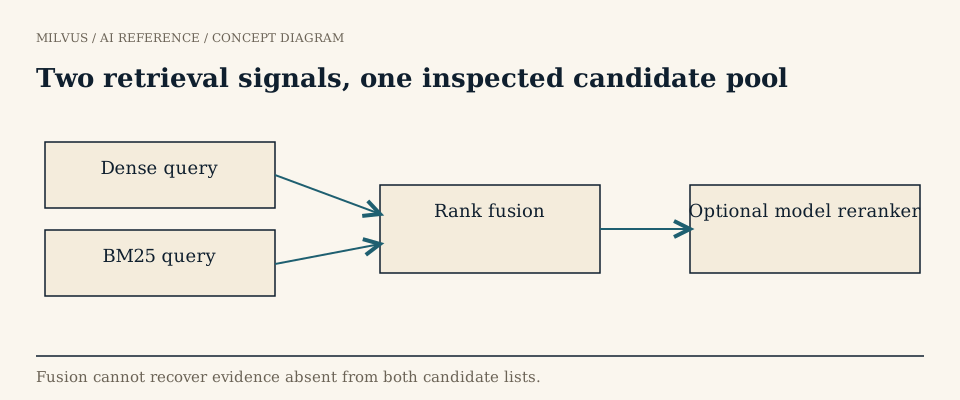 Two retrieval signals, one inspected candidate pool
Why isn’t vector search alone enough?
Dense embeddings compress a passage into a few hundred numbers that capture its overall meaning. That is excellent for paraphrase: “how do I cancel my plan” finds a page titled "Ending your subscription". But the same compression blurs rare, exact strings. An error code like ERR_4032, a part number, a function name, or a newly coined product name may barely shift the embedding, so a dense search returns pages about errors in general rather than that error.
BM25 full-text search has the opposite profile. It matches ERR_4032 exactly and gives it high weight because it is rare, but it cannot connect “cancel my plan” with “ending your subscription” since they share no terms.
| Query | Dense search | BM25 | Hybrid |
|---|---|---|---|
| “how do I cancel my plan” | Finds paraphrased answers | Misses unless the words match | Finds them through the dense path |
| “ERR_4032 at checkout” | Often returns generic error pages | Finds the exact code | Finds the code and ranks pages that also discuss checkout higher |
| “reset password on mobile app” | Good | Good | Best: documents strong on both rise to the top |
The general idea is covered in how semantic search differs from keyword search. Hybrid search is the practical answer to that difference.
How does hybrid search work?
- Run each retriever. The query is sent to every retrieval path, usually in parallel. Each returns its own top candidates, for example the top 50 by cosine similarity and the top 50 by BM25.
- Fuse the lists. A fusion function merges the candidates into one ranking, combining duplicates that appear in more than one list.
- Return or rerank. The fused top
kis returned directly or passed to a reranking model for a final, more precise ordering.
Each retriever’s candidate depth matters as much as the final k. Fusion can only reorder documents some retriever actually returned, so if the right document is at position 80 in the BM25 list and you only fetch 20, no fusion method will recover it.
Which fusion method should you use: RRF or weighted scores?
The raw scores cannot simply be added. A BM25 score can be 14.2 for one query and 3.1 for another, while cosine similarity sits between -1 and 1. Two families of fusion deal with this.
Reciprocal Rank Fusion (RRF) ignores scores entirely and uses positions. Each document gets:
RRF(d) = Σ 1 / (k + rank_i(d))
summed over every list i in which the document appears, where rank starts at 1. With k = 60, a document ranked 1st in both lists scores 2/61 ≈ 0.0328, while one ranked 1st in only one list scores 1/61 ≈ 0.0164. Agreement between retrievers is rewarded, and no tuning or labeled data is needed. A larger k flattens the curve so lower-ranked items count more; a smaller k concentrates weight on each list’s top results. RRF was introduced by Cormack, Clarke, and Büttcher at SIGIR 2009.
Weighted score fusion normalizes each retriever’s scores to a common range and takes a weighted sum, for example 0.7 × dense + 0.3 × BM25. It uses more information than RRF, since a large score gap is not reduced to a one-place rank difference, and lets you favor the signal that matters most for your data. The cost is that you need labeled queries to choose the weights, and the weights may need revisiting when the corpus or models change.
Start with RRF. Move to weighted fusion when you have an evaluation set and evidence that one signal deserves more weight.
How do you run hybrid search in Milvus?
Store a dense vector field and a BM25 sparse field in the same collection. The BM25 field is filled automatically by a BM25 function on a text field, as shown in the full-text search guide. Then build one AnnSearchRequest per field and call hybrid_search with a ranker, following the Milvus hybrid search guide:
from pymilvus import MilvusClient, AnnSearchRequest, Function, FunctionType

client = MilvusClient(uri="http://localhost:19530")
query = "ERR_4032 at checkout"

dense_req = AnnSearchRequest(
    data=[embed(query)],          # your embedding model
    anns_field="dense",
    param={"ef": 64},
    limit=50,
)
sparse_req = AnnSearchRequest(
    data=[query],                 # raw text; Milvus applies BM25
    anns_field="sparse",
    param={"drop_ratio_search": 0.2},
    limit=50,
)

ranker = Function(
    name="rrf",
    input_field_names=[],         # must be empty for rankers
    function_type=FunctionType.RERANK,
    params={"reranker": "rrf", "k": 60},
)

res = client.hybrid_search(
    collection_name="docs",
    reqs=[dense_req, sparse_req],
    ranker=ranker,
    limit=10,
    output_fields=["text"],
)
For weighted fusion, swap the ranker:
ranker = Function(
    name="weighted",
    input_field_names=[],
    function_type=FunctionType.RERANK,
    params={"reranker": "weighted", "weights": [0.7, 0.3], "norm_score": True},
)
Key Milvus details:
| Setting | Values | Notes |
|---|---|---|
RRF k | (0, 16384), default 60 | Docs recommend 10 to 100 |
Weighted weights | Each in [0, 1] | One weight per search request, in request order |
Weighted norm_score | True / False | Normalizes each path’s scores to [0, 1] with an arctan function before weighting |
| Vector fields per collection | Configurable via proxy.maxVectorFieldNum | Raise it if you combine many fields |
The function-based ranker API shown here is documented for Milvus 2.6 and later; earlier releases used the RRFRanker and WeightedRanker classes. See the RRF ranker and weighted ranker pages for your version.
Apply the same eligibility filter to every request. If a tenant or permission filter is set on the dense request but not on the sparse one, excluded documents can come back through the keyword path. The metadata filtering guide covers how filters interact with each search.
When should you use hybrid search, and when not?
Hybrid search pays off when:
- Queries contain identifiers, codes, names, or domain terms that embeddings handle poorly.
- The corpus mixes prose with structured or technical text, such as support tickets, API docs, legal citations, and product catalogs.
- You are building RAG and a missed passage means a wrong answer. Hybrid retrieval raises recall, and a reranker can then restore precision.
It adds less when queries are purely conversational and the embedding model is strong in your domain, or when everything is short, uniform text with no rare terms. It also costs something: two searches per query, a second index to store, and an extra parameter set to tune. If neither retriever finds the right passage, fusion will not either; fix chunking, the embedding model, or the analyzer first.
How do you evaluate a hybrid setup?
Build a query set with labeled relevant documents that deliberately includes three groups: exact-term queries, paraphrase queries, and queries needing both. Measure Recall@k and nDCG for dense-only, BM25-only, and hybrid on the same corpus and filters. Report the groups separately, because averages hide the trade. A good hybrid setup matches dense on paraphrase queries, matches BM25 on exact-term queries, and beats both on mixed ones. Keep the per-path candidate lists during evaluation so you can tell whether a miss came from retrieval or from fusion. The retrieval evaluation guide describes the metrics.
To build one end to end, start with the Milvus Quickstart, then try the hybrid semantic and full-text search demo in the Milvus Bootcamp. For product search with images as well as text, see hybrid and multimodal product search.



