How to Cut Vector Database Costs by Up to 80%: A Practical Milvus Optimization Guide
Your RAG prototype worked great. Then it went to production, traffic grew, and now your vector database bill has gone from $500 to $5,000 a month. Sound familiar?
This is one of the most common scaling problems in AI applications right now. You’ve built something that creates real value, but the infrastructure costs are growing faster than your user base is growing. And when you look at the bill, the vector database is often the biggest surprise — in the deployments we’ve seen, it can account for roughly 40-50% of total application cost, second only to LLM API calls.
In this guide, I’ll walk through where the money actually goes and the specific things you can do to bring it down — in many cases by 60-80%. I’ll use Milvus, the most popular open-source vector database, as the primary example since that’s what I know best, but the principles apply to most vector databases.
To be clear: Milvus itself is free and open source — you never pay for the software. The cost comes entirely from the infrastructure you run it on: cloud instances, memory, storage, and network. The good news is that most of that infrastructure cost is reducible.
Where Does the Money Actually Go When Using a VectorDB?
Let’s start with a concrete example. Say you have 100 million vectors, 768 dimensions, stored as float32 — a pretty typical RAG setup. Here’s roughly what that costs on AWS per month:
| Cost Component | Share | ~Monthly Cost | Notes |
|---|---|---|---|
| Compute (CPU + memory) | 85-90% | $2,800 | The big one — mostly driven by memory |
| Network | 5-10% | $250 | Cross-AZ traffic, large result payloads |
| Storage | 2-5% | $100 | Cheap — object storage (S3/MinIO) is ~$0.03/GB |
The takeaway is simple: memory is where 85-90% of your money goes. Network and storage matter at the margins, but if you want to cut costs meaningfully, memory is the lever. Everything in this guide focuses on that.
Quick note on network and storage: You can reduce network costs by only returning the fields you need (ID, score, key metadata) and avoiding cross-region queries. For storage, Milvus already separates storage from compute — your vectors sit in cheap object storage like S3, so even at 100M vectors, storage is usually under $50/month. Neither of these will move the needle like memory optimization will.
Why Memory Is So Expensive for Vector Search
If you’re coming from traditional databases, the memory requirements for vector search can be surprising. A relational database can leverage disk-based B-tree indexes and the OS page cache. Vector search is different — it involves massive floating-point computation, and indexes like HNSW or IVF need to stay loaded in memory to deliver millisecond-level latency.
Here’s a quick formula to estimate your memory needs:
Memory required = (vectors × dimensions × 4 bytes) × index multiplier
For our 100M × 768 × float32 example with HNSW (multiplier ~1.8x):
- Raw data: 100M × 768 × 4 bytes ≈ 307 GB
- With HNSW index: 307 GB × 1.8 ≈ 553 GB
- With OS overhead, cache, and headroom: ~768 GB total
- On AWS: 3× r6i.8xlarge (256 GB each) ≈ $2,800/month
That’s the baseline. Now let’s look at how to bring it down.
1. Pick the Right Index to Get 4x Less Memory Usage
This is the single highest-impact change you can make. For the same 100M-vector dataset, memory usage can vary by 4-6x depending on your index choice.
- FLAT / IVF_FLAT: almost no compression, so memory usage stays close to the raw data size, around 300 GB
- HNSW: stores an extra graph structure, so memory usage is usually 1.5x to 2.0x the raw data size, or about 450 to 600 GB
- IVF_SQ8: compresses float32 values into uint8, giving about 4x compression, so memory use can drop to around 75 to 100 GB
- IVF_PQ / DiskANN: use stronger compression or a disk-based index, so memory can drop further to about 30 to 60 GB
Many teams start with HNSW because it has the best query speed, but they end up paying 3-5x more than they need to.
Here’s how the main index types compare:
| Index | Memory Multiplier | Query Speed | Recall | Best For |
|---|---|---|---|---|
| FLAT | ~1.0x | Slow | 100% | Small datasets (<1M), testing |
| IVF_FLAT | ~1.05x | Medium | 95-99% | General use |
| IVF_SQ8 | ~0.30x | Medium | 93-97% | Cost-sensitive production (recommended) |
| IVF_PQ | ~0.12x | Fast | 70-80% | Very large datasets, coarse retrieval |
| HNSW | ~1.8x | Very fast | 98-99% | Only when latency matters more than cost |
| DiskANN | ~0.08x | Medium | 95-98% | Very large scale with NVMe SSDs |
The bottom line: Switching from HNSW or IVF_FLAT to IVF_SQ8 typically drops recall by only 2-3% (e.g., from 97% to 94-95%) while cutting memory cost by about 70%. For most RAG workloads, that tradeoff is absolutely worth it. If you’re doing coarse retrieval or your accuracy bar is lower, IVF_PQ or IVF_RABITQ can further boost savings.
My recommendation: If you’re running HNSW in production and cost is a concern, try IVF_SQ8 on a test collection first. Measure recall on your actual queries. Most teams are surprised by how small the accuracy drop is.
2. Stop Loading Everything into Memory for 60%-80% Cost Reduction
Even after picking a more efficient index, you might still have more data in memory than necessary. Milvus offers two ways to fix this: MMap (available since 2.3) and tiered storage (available since 2.6). Both can reduce memory usage by 60-80%.
The core idea behind both is the same: not all your data needs to live in memory at all times. The difference is how they handle the data that’s not in memory.
MMap (Memory-Mapped Files)
MMap maps your data files from local disk into the process address space. The full dataset remains on the node’s local disk, and the OS loads pages into memory on demand—only when they’re accessed. Before using MMap, all data gets downloaded from object storage (S3/MinIO) to the QueryNode’s local disk.
- Memory usage drops to ~10-30% of full-load mode
- Latency stays stable and predictable (data is on local disk, no network fetch)
- Tradeoff: local disk must be large enough to hold the full dataset
Tiered Storage
Tiered storage takes it a step further. Instead of downloading everything to the local disk, it uses the local disk as a cache for hot data and keeps object storage as the primary layer. Data is fetched from object storage only when needed.
- Memory usage drops to <10% of full-load mode
- Local disk usage also drops — only hot data is cached (usually 10-30% of total)
- Tradeoff: cache misses add 50-200ms latency (fetching from object storage)
Data flow and resource usage
| Mode | Data Flow | Memory Usage | Local Disk Usage | Latency |
|---|---|---|---|---|
| Traditional full load | Object storage → memory (100%) | Very high (100%) | Low (temporary only) | Very low and stable |
| MMap | Object storage → local disk (100%) → memory (on demand) | Low (10-30%) | High (100%) | Low and stable |
| Tiered storage | Object storage ↔ local cache (hot data) → memory (on demand) | Very low (<10%) | Low (hot data only) | Low on cache hit, higher on cache miss |
Hardware recommendation: both methods depend heavily on local disk I/O, so NVMe SSDs are strongly recommended, ideally with IOPS above 10,000.
MMap vs. Tiered Storage: Which One Should You Use?
| Your Situation | Use This | Why |
|---|---|---|
| Latency-sensitive (P99 < 20ms) | MMap | Data is already on local disk — no network fetch, stable latency |
| Uniform access (no clear hot/cold split) | MMap | Tiered storage needs hot/cold skew to be effective; without it, cache hit rate is low |
| Cost is the priority (occasional latency spikes OK) | Tiered storage | Saves on both memory and local disk (70-90% less disk) |
| Clear hot/cold pattern (80/20 rule) | Tiered storage | Hot data stays cached, cold data stays cheap in object storage |
| Very large scale (>500M vectors) | Tiered storage | One node’s local disk often can’t hold the full dataset at this scale |
Note: MMap requires Milvus 2.3+. Tiered storage requires Milvus 2.6+. Both work best with NVMe SSDs (10,000+ IOPS recommended).
How to Configure MMap
Option 1: YAML configuration (recommended for new deployments)
Edit the Milvus configuration file milvus.yaml and add the following settings under the queryNode section:
queryNode:
  mmap:
    vectorField: true      # vector data
    vectorIndex: true      # vector index (largest source of savings!)
    scalarField: true      # scalar data (recommended for RAG workloads)
    scalarIndex: true      # scalar index
    growingMmapEnabled: false  # incremental data stays in memory
Option 2: Python SDK configuration (for existing collections)
from pymilvus import MilvusClient

client = MilvusClient(uri="http://localhost:19530")

# You must release the collection before changing the mmap setting
client.release_collection("my_collection")

# Enable MMap
client.alter_collection_properties(
    collection_name="my_collection",
    properties={"mmap.enabled": True}
)

# Load the collection again to apply the MMap setting
client.load_collection("my_collection")

# Verify that the setting has taken effect
print(client.describe_collection("my_collection")["properties"])
# Output: {'mmap.enabled': 'True'}
How to Configure Tiered Storage (Milvus 2.6+)
Edit the Milvus configuration file milvus.yaml and add the following settings under the queryNode section:
queryNode:
  segcore:
    tieredStorage:
      warmup:
          # Options: sync, async, disable
          # Specifies when tiered storage cache warm-up happens.
          # - "sync": data is loaded into the cache before the segment is considered fully loaded.
          # - "disable": data is not proactively loaded into the cache, and is loaded only when needed by Search/Query tasks.
          # The default is "sync", but vector fields default to "disable".
          scalarField: sync
          scalarIndex: sync
          vectorField: disable # Cache warm-up for raw vector field data is disabled by default.
          vectorIndex: sync
      memoryHighWatermarkRatio: 0.85   # Start eviction when memory usage exceeds 85%
      memoryLowWatermarkRatio: 0.70    # Stop eviction when memory usage drops to 70%
      diskHighWatermarkRatio: 0.80     # High watermark for disk eviction
      diskLowWatermarkRatio: 0.75      # Low watermark for disk eviction
      evictionEnabled: true            # Must be enabled!
      backgroundEvictionEnabled: true  # Background eviction thread
      cacheTtl: 3600                   # Automatically evict if not accessed for 1 hour
Use Lower-Dimensional Embeddings
This one is easy to overlook, but the dimension directly scales your cost. Memory, storage, and compute all grow linearly with dimension count. A 1536-dim model costs roughly 4x more infrastructure than a 384-dim model for the same data.
Query cost scales the same way — cosine similarity is O(D), so 768-dim vectors take about twice the compute of 384-dim vectors per query. In high-QPS workloads, that difference translates directly into fewer nodes needed.
Here’s how common embedding models compare (using 384-dim as the 1.0x baseline):
| Model | Dimensions | Relative Cost | Recall | Best For |
|---|---|---|---|---|
| text-embedding-3-large | 3072 | 8.0x | 98%+ | When accuracy is non-negotiable (research, healthcare) |
| text-embedding-3-small | 1536 | 4.0x | 95-97% | General RAG workloads |
| DistilBERT | 768 | 2.0x | 92-95% | Good cost-performance balance |
| all-MiniLM-L6-v2 | 384 | 1.0x | 88-92% | Cost-sensitive workloads |
Practical advice: Don’t assume you need the biggest model. Test on a representative sample of your actual queries (1M vectors is usually enough) and find the lowest-dimension model that meets your accuracy bar. Many teams discover that 768 dimensions works just as well as 1536 for their use case.
Already committed to a high-dimensional model? You can reduce dimensions after the fact. PCA (Principal Component Analysis) can strip out redundant features, and Matryoshka embeddings let you truncate to the first N dimensions while retaining most of the quality. Both are worth trying before re-embedding your entire dataset.
Manage Data Lifecycle with Compaction and TTL
This one is less glamorous but still matters, especially for long-running production systems. Milvus uses an append-only storage model: when you delete data, it’s marked as deleted but not removed immediately. Over time, this dead data accumulates, wastes storage space, and causes queries to scan more rows than they need to.
Compaction: Reclaim Storage from Deleted Data
Compaction is Milvus’s background process for cleaning up. It merges small segments, physically removes deleted data, and rewrites compacted files. You’ll want this if:
- You have frequent writes and deletes (product catalogs, content updates, real-time logs)
- Your segment count keeps growing (this increases per-query overhead)
- Storage usage is growing much faster than your actual valid data
Heads up: Compaction is I/O-intensive. Schedule it during low-traffic periods (e.g., nightly) or tune the triggers carefully so it doesn’t compete with production queries.
TTL(Time to Live): Automatically Expire Old Vector Data
For data that naturally expires, TTL is cleaner than manual deletion. Set a lifetime on your data, and Milvus automatically marks it for deletion when it expires. Compaction handles the actual cleanup.
This is useful for:
- Logs and session data — keep only the last 7 or 30 days
- Time-sensitive RAG — prefer recent knowledge, let old documents expire
- Real-time recommendations — only retrieve from recent user behavior
Together, compaction and TTL keep your system from silently accumulating waste. It’s not the biggest cost lever, but it prevents the kind of slow storage creep that catches teams off guard.
One More Option: Zilliz Cloud (Fully Managed Milvus)
Full disclosure: Zilliz Cloud is built by the same team behind Milvus, so take this with the appropriate grain of salt.
That said, here’s the counterintuitive part: even though Milvus is free and open source, a managed service can actually cost less than self-hosting. The reason is simple — the software is free, but the cloud infrastructure to run it isn’t, and you need engineers to operate and maintain it. If a managed service can do the same work with fewer machines and fewer engineer hours, your total bill goes down even after paying for the service itself.
Zilliz Cloud is a fully managed service built on Milvus and API-compatible with it. Two things are relevant to cost:
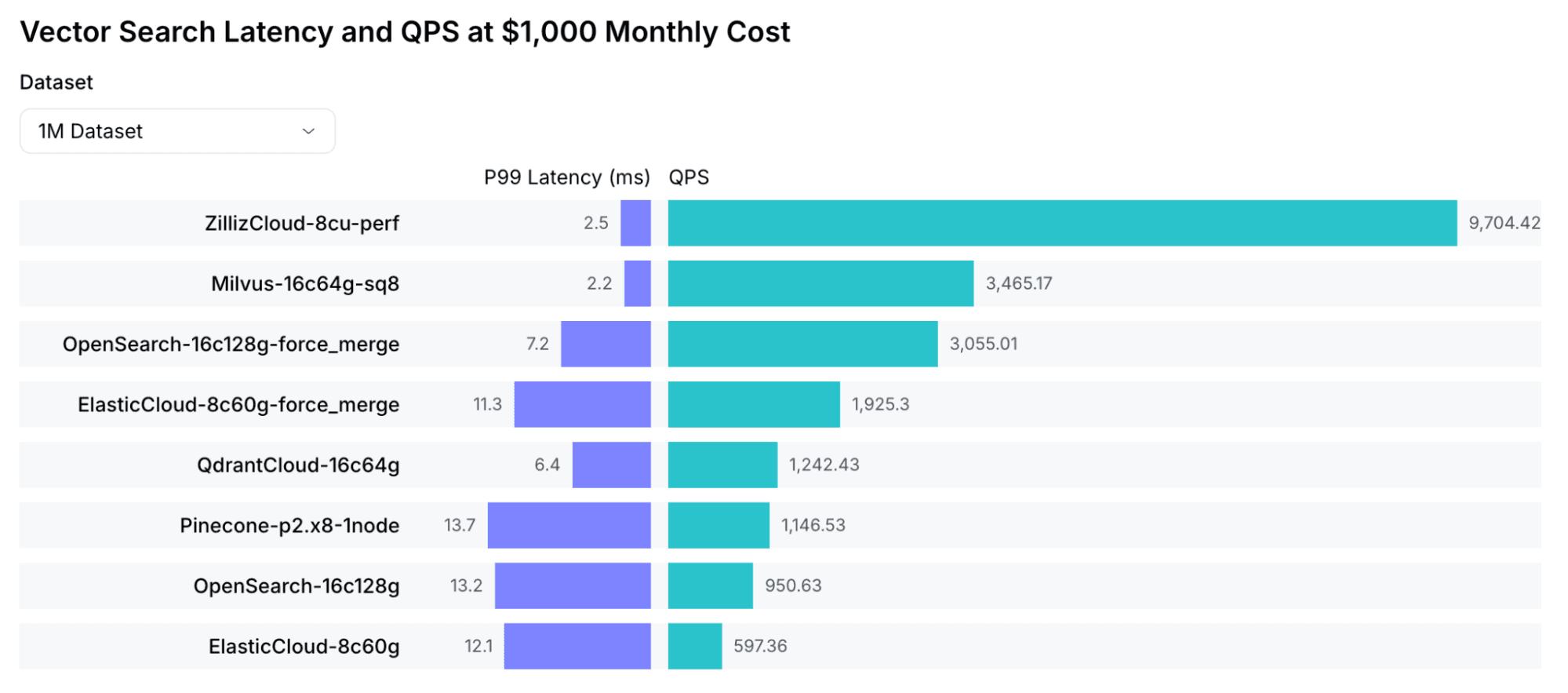
- Better performance per node. Zilliz Cloud runs on Cardinal, our optimized search engine. Based on VectorDBBench results, it delivers 3-5x higher throughput than open-source Milvus and is 10x faster. In practice, that means you need roughly one-third to one-fifth as many compute nodes for the same workload.
- Built-in optimizations. The features covered in this guide — MMap, tiered storage, and index quantization — are built in and automatically tuned. Auto-scaling adjusts capacity based on actual load, so you’re not paying for headroom you don’t need.
Migration is straightforward since the APIs and data formats are compatible. Zilliz also provides migration tooling to help. For a detailed comparison, see: Zilliz Cloud vs. Milvus
Summary: A Step-by-Step Plan to Cut Vector Database Costs
If you only do one thing, do this: check your index type.
If you’re running HNSW on a cost-sensitive workload, switch to IVF_SQ8. That alone can cut memory cost by ~70% with minimal recall loss.
If you want to go further, here’s the priority order:
- Switch your index — HNSW → IVF_SQ8 for most workloads. Biggest bang for zero architectural change.
- Enable MMap or tiered storage — Stop keeping everything in memory. This is a config change, not a redesign.
- Evaluate your embedding dimensions — Test whether a smaller model meets your accuracy needs. This requires re-embedding but the savings compound.
- Set up compaction and TTL — Prevent silent data bloat, especially if you have frequent writes/deletes.
Combined, these strategies can reduce your vector database bill by 60-80%. Not every team needs all four — start with the index change, measure the impact, and work your way down the list.
For teams looking to reduce operational work and improve cost efficiency, Zilliz Cloud (managed Milvus) is another option.
If you’re working through any of these optimizations and want to compare notes, the Milvus community Slack is a good place to ask questions. You can also join Milvus Office Hours for a quick chat with the engineering team about your specific setup.
- Where Does the Money Actually Go When Using a VectorDB?
- Why Memory Is So Expensive for Vector Search
- 1. Pick the Right Index to Get 4x Less Memory Usage
- 2. Stop Loading Everything into Memory for 60%-80% Cost Reduction
- MMap (Memory-Mapped Files)
- Tiered Storage
- Data flow and resource usage
- MMap vs. Tiered Storage: Which One Should You Use?
- How to Configure MMap
- How to Configure Tiered Storage (Milvus 2.6+)
- Use Lower-Dimensional Embeddings
- Manage Data Lifecycle with Compaction and TTL
- Compaction: Reclaim Storage from Deleted Data
- TTL(Time to Live): Automatically Expire Old Vector Data
- One More Option: Zilliz Cloud (Fully Managed Milvus)
- Summary: A Step-by-Step Plan to Cut Vector Database Costs
On This Page
Try Managed Milvus for Free
Zilliz Cloud is hassle-free, powered by Milvus and 10x faster.
Get StartedLike the article? Spread the word