We Built Graph RAG Without the Graph Database
TL;DR: Do you actually need a graph database for Graph RAG? No. Put entities, relations, and passages into Milvus. Use subgraph expansion instead of graph traversal, and one LLM rerank instead of multi-round agent loops. That’s Vector Graph RAG, and it’s what we built. This approach hits 87.8% average Recall@5 on three multi-hop QA benchmarks and beats HippoRAG 2 on a single Milvus instance.
Multi-hop questions are the wall that most RAG pipelines hit eventually. The answer is in your corpus, but it spans multiple passages connected by entities the question never names. The common fix is to add a graph database, which means running two systems instead of one.
We kept hitting this wall ourselves and didn’t want to run two databases just to handle it. So we built and open-sourced Vector Graph RAG, a Python library that brings multi-hop reasoning to RAG using only Milvus, the most widely adopted open-source vector database. It provides the same multi-hop capability with one database instead of two.
Why Multi-Hop Questions Break Standard RAG
Multi-hop questions break standard RAG because the answer depends on entity relationships that vector search can’t see. The bridge entity connecting the question to the answer often isn’t in the question itself.
Simple questions work fine. You chunk documents, embed them, retrieve the closest matches, and feed them to an LLM. “What indexes does Milvus support?” lives in one passage, and vector search finds it.
Multi-hop questions don’t fit that pattern. Take a question like “What side effects should I watch for with first-line diabetes drugs?” in a medical knowledge base.
Answering it takes two reasoning steps. First, the system has to know that metformin is the first-line drug for diabetes. Only then can it look up metformin’s side effects: kidney function monitoring, GI discomfort, vitamin B12 deficiency.
“Metformin” is the bridge entity. It connects the question to the answer, but the question never mentions it.
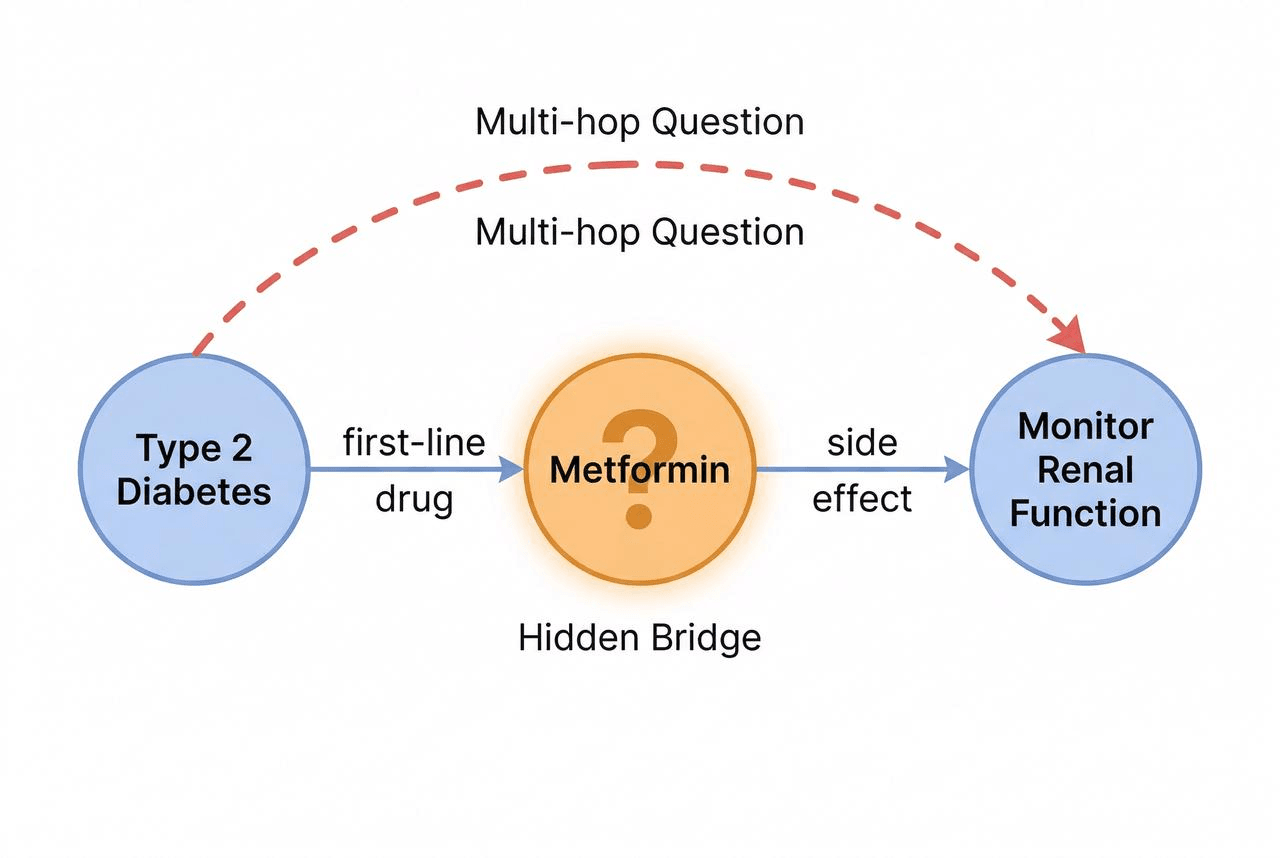
That’s where Vector similarity search stops. It retrieves passages that look like the question, diabetes treatment guides and drug side effect lists, but it can’t follow the entity relationships that link those passages together. Facts like “metformin is the first-line drug for diabetes” live in those relationships, not in the text of any single passage.
Why Graph Databases and Agentic RAG Aren’t the Answer
The standard ways to solve multi-hop RAG are graph databases and iterative agent loops. Both work. Both cost more than most teams want to pay for a single feature.
Take the graph-database route first. You extract triples from your documents, store them in a graph database, and traverse edges to find multi-hop connections. That means running a second system alongside your vector database, learning Cypher or Gremlin, and keeping the graph and vector stores in sync.
Iterative agent loops are the other approach. The LLM retrieves a batch, reasons over it, decides whether it has enough context, and retrieves again if not. IRCoT (Trivedi et al., 2023) makes 3-5 LLM calls per query. Agentic RAG can exceed 10 because the agent decides when to stop. Cost per query becomes unpredictable, and P99 latency spikes whenever the agent runs extra rounds.
Neither fits teams that want multi-hop reasoning without rebuilding their stack. So we tried something else.
What is Vector Graph RAG, a Graph Structure Inside a Vector Database
Vector Graph RAG is an open-source Python library that brings multi-hop reasoning to RAG using only Milvus. It stores graph structure as ID references across three Milvus collections. Traversal becomes a chain of primary-key lookups in Milvus instead of Cypher queries against a graph database. One Milvus does both jobs.
It works because relationships in a knowledge graph are just text. The triple (which is metformin, is the first-line drug for type 2 diabetes) is a directed edge in a graph database. It’s also a sentence: “Metformin is the first-line drug for type 2 diabetes.” You can embed that sentence as a vector and store it in Milvus, the same as any other text.
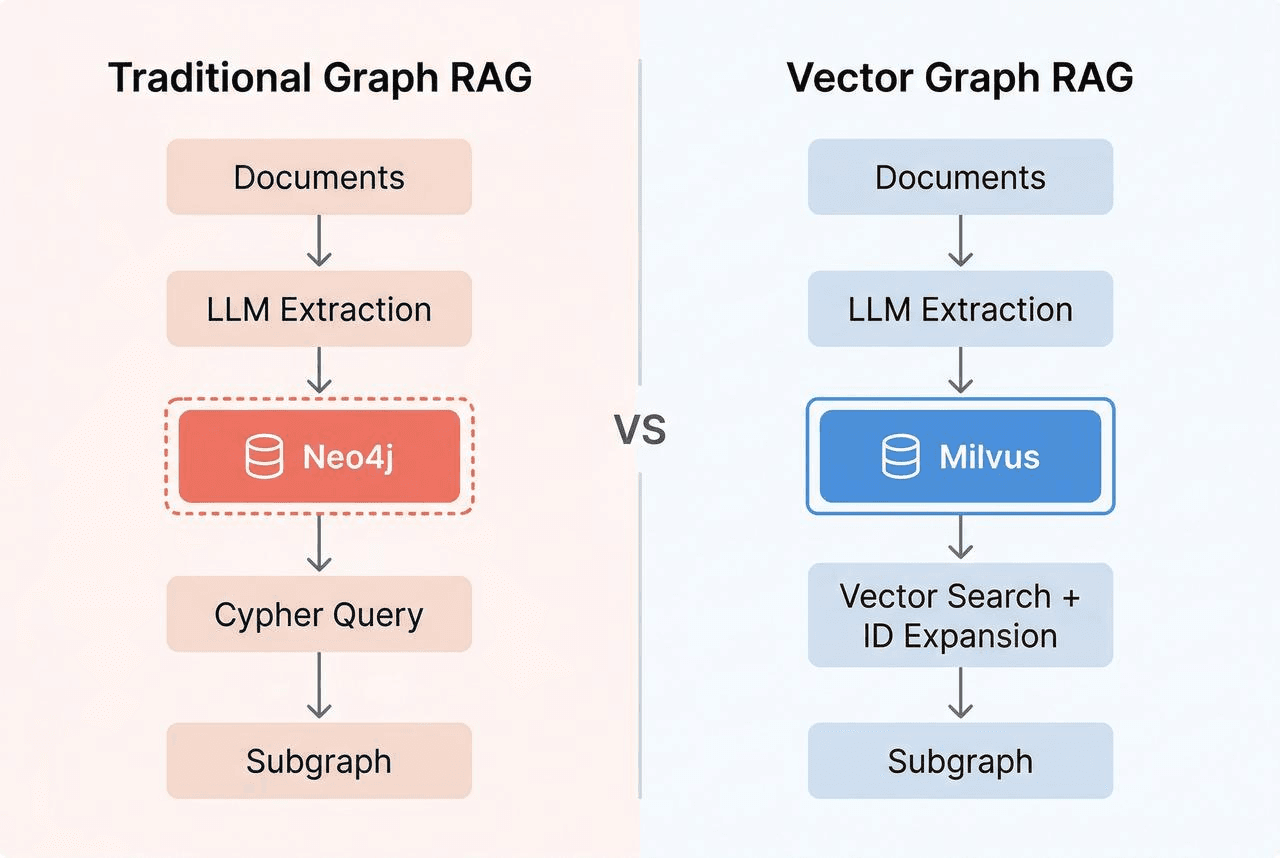
Answering a multi-hop query means following connections from what the query mentions (like “diabetes”) to what it doesn’t (like “metformin”). That only works if the storage preserves those connections: which entity connects to which through which relation. Plain text is searchable, but not followable.
To keep connections followable in Milvus, we give each entity and each relation a unique ID, then store them in separate collections that reference each other by ID. Three collections in total: entities (the nodes), relations (the edges), and passages (the source text, which the LLM needs for answer generation). Every row has a vector embedding, so we can semantic-search any of the three.
Entities store deduplicated entities. Each has a unique ID, a vector embedding for semantic search, and a list of relation IDs it participates in.
| id | name | embedding | relation_ids |
|---|---|---|---|
| e01 | metformin | [0.12, …] | [r01, r02, r03] |
| e02 | type 2 diabetes | [0.34, …] | [r01, r04] |
| e03 | kidney function | [0.56, …] | [r02] |
Relations store knowledge triples. Each records its subject and object entity IDs, the passage IDs it came from, and an embedding of the full relationship text.
| id | subject_id | object_id | text | embedding | passage_ids |
|---|---|---|---|---|---|
| r01 | e01 | e02 | Metformin is the first-line drug for type 2 diabetes | [0.78, …] | [p01] |
| r02 | e01 | e03 | Patients on metformin should have kidney function monitored | [0.91, …] | [p02] |
Passages store original document chunks, with references to the entities and relations extracted from them.
The three collections point at each other through ID fields: entities carry the IDs of their relations, relations carry the IDs of their subject and object entities and source passages, and passages carry the IDs of everything extracted from them. That network of ID references is the graph.
Traversal is just a chain of ID lookups. You fetch entity e01 to get its relation_ids, fetch relations r01 and r02 by those IDs, read r01’s object_id to discover entity e02, and keep going. Each hop is a standard Milvus primary-key query. No Cypher required.
You might wonder whether the extra round trips to Milvus add up. They don’t. Subgraph expansion costs 2-3 ID-based queries totaling 20-30ms. The LLM call takes 1-3 seconds, which makes the ID lookups invisible next to it.
How Vector Graph RAG Answers a Multi-Hop Query
The retrieval flow takes a multi-hop query to a grounded answer in four steps: seed retrieval → subgraph expansion → LLM rerank → answer generation.
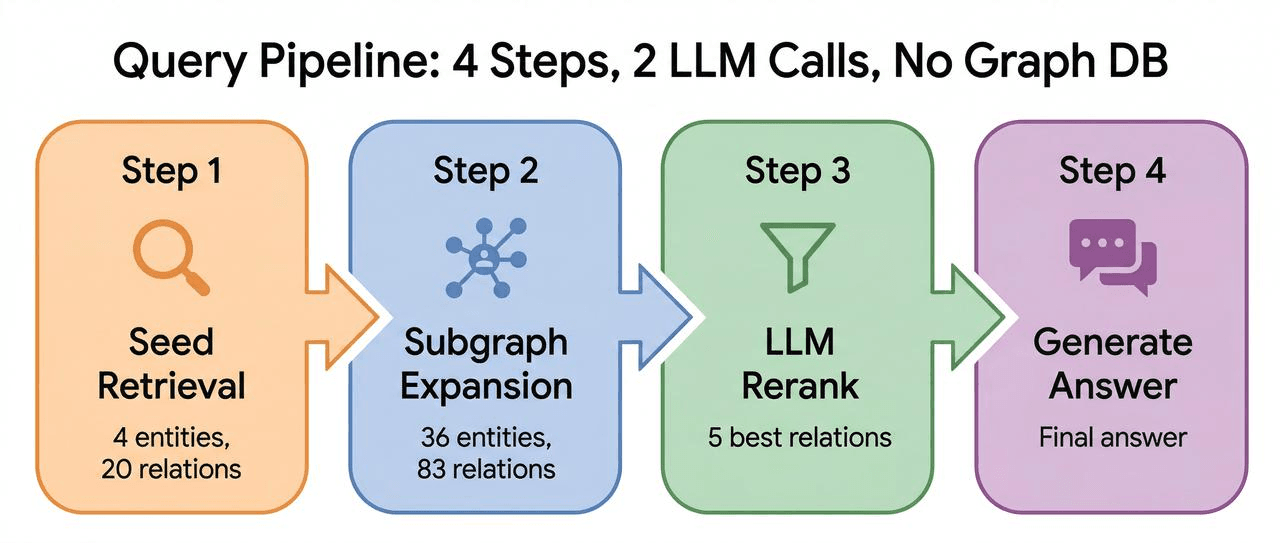
We’ll walk through the diabetes question: “What side effects should I watch for with first-line diabetes drugs?”
Step 1: Seed Retrieval
An LLM extracts key entities from the question: “diabetes,” “side effects,” “first-line drug.” Vector search in Milvus finds the most relevant entities and relations directly.
But metformin isn’t among them. The question doesn’t mention it, so vector search can’t find it.
Step 2: Subgraph Expansion
This is where Vector Graph RAG diverges from standard RAG.
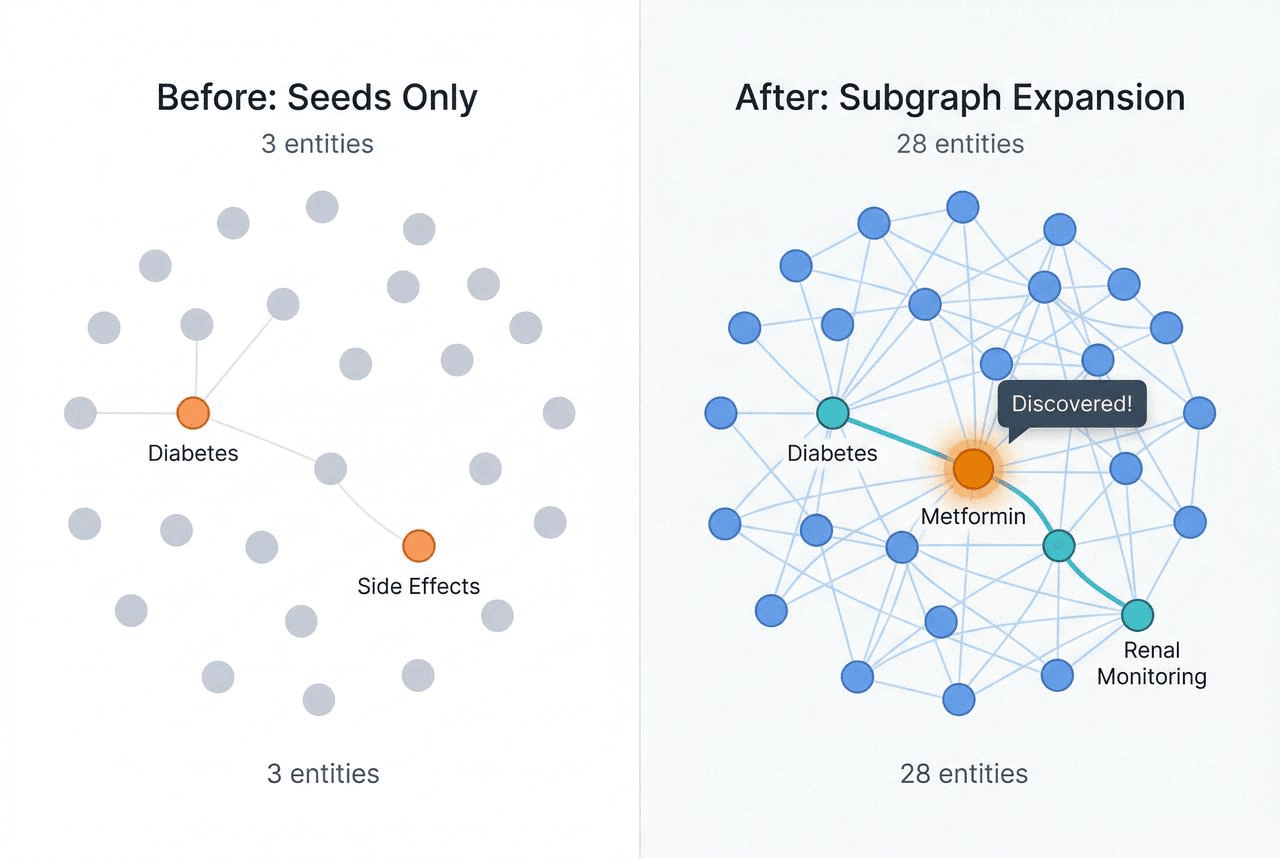
The system follows ID references from the seed entities one hop out. It gets the seed entity IDs, finds all relations containing those IDs, and pulls the new entity IDs into the subgraph. Default: one hop.
Metformin, the bridge entity, enters the subgraph.
“Diabetes” has a relation: “Metformin is the first-line drug for type 2 diabetes.” Following that edge brings metformin in. Once metformin is in the subgraph, its own relations come with it: “Patients on metformin should have kidney function monitored,” “Metformin may cause gastrointestinal discomfort,” “Long-term metformin use may lead to vitamin B12 deficiency.”
Two facts that lived in separate passages are now connected through one hop of graph expansion. The bridge entity the question never mentioned is now discoverable.
Step 3: LLM Rerank
Expansion leaves you with dozens of candidate relations. Most are noise.
Expanded candidate pool (example):
r01: Metformin is the first-line drug for type 2 diabetes          ← Key
r02: Patients on metformin should have kidney function monitored   ← Key
r03: Metformin may cause gastrointestinal discomfort               ← Key
r04: Type 2 diabetes patients should have regular eye exams        ✗ Noise
r05: Insulin injection sites should be rotated                     ✗ Noise
r06: Diabetes is linked to cardiovascular disease risk             ✗ Noise
r07: Metformin is contraindicated in severe liver dysfunction      ✗ Noise (contraindication, not side effect)
r08: HbA1c is a monitoring indicator for diabetes                  ✗ Noise
r09: Sulfonylureas are second-line treatment for type 2 diabetes   ✗ Noise (second-line, not first-line)
r10: Long-term metformin use may lead to vitamin B12 deficiency    ← Key
...(more)
The system sends these candidates and the original question to an LLM: “Which relate to side effects of first-line diabetes drugs?” It’s one call with no iteration.
After LLM filtering:
✓ r01: Metformin is the first-line drug for type 2 diabetes          → Establishes the bridge: first-line drug = metformin
✓ r02: Patients on metformin should have kidney function monitored   → Side effect: kidney impact
✓ r03: Metformin may cause gastrointestinal discomfort               → Side effect: GI issues
✓ r10: Long-term metformin use may lead to vitamin B12 deficiency    → Side effect: nutrient deficiency
The selected relations cover the full chain: diabetes → metformin → kidney monitoring / GI discomfort / B12 deficiency.
Step 4: Answer Generation
The system retrieves the original passages for the selected relations and sends them to the LLM.
The LLM generates from full passage text, not the trimmed triples. Triples are compressed summaries. They lack the context, caveats, and specifics the LLM needs to produce a grounded answer.
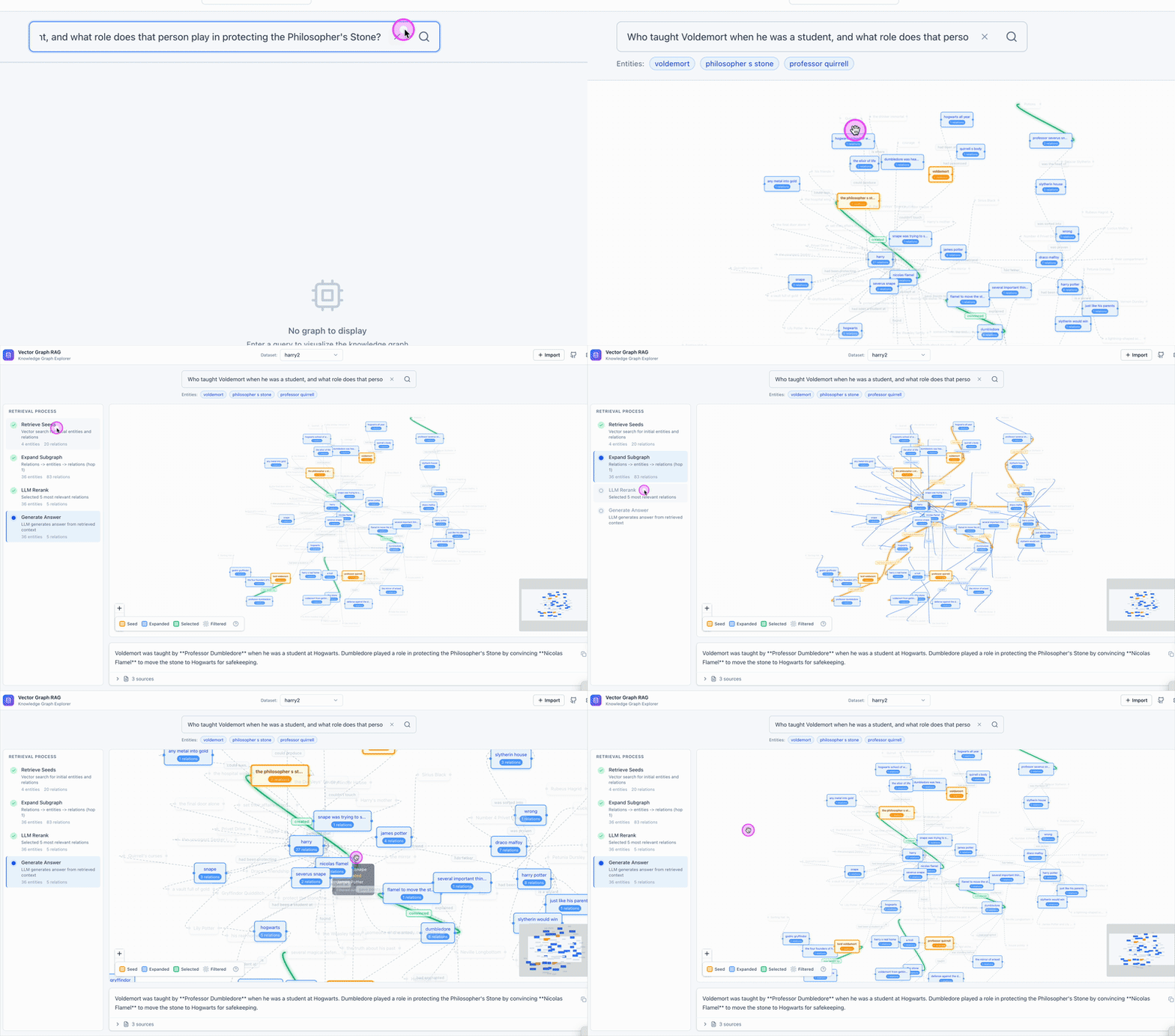
See Vector Graph RAG in action
We also built an interactive frontend that visualizes each step. Click through the steps panel on the left and the graph updates in real time: orange for seed nodes, blue for expanded nodes, green for selected relations. It makes the retrieval flow concrete instead of abstract.
Why One Rerank Beats Multiple Iterations
Our pipeline makes two LLM calls per query: one for rerank, one for generation. Iterative systems like IRCoT and Agentic RAG run 3 to 10+ calls because they loop: retrieve, reason, retrieve again. We skip the loop because vector search and subgraph expansion cover both semantic similarity and structural connections in one pass, giving the LLM enough candidates to finish in one rerank.
| Approach | LLM calls per query | Latency profile | Relative API cost |
|---|---|---|---|
| Vector Graph RAG | 2 (rerank + generate) | Fixed, predictable | 1x |
| IRCoT | 3-5 | Variable | ~2-3x |
| Agentic RAG | 5-10+ | Unpredictable | ~3-5x |
In production, that’s roughly 60% lower API cost, 2-3x faster responses, and predictable latency. No surprise spikes when an agent decides to run extra rounds.
Benchmark Results
Vector Graph RAG averages 87.8% Recall@5 across three standard multi-hop QA benchmarks, matching or exceeding every method we tested, including HippoRAG 2, with just Milvus and 2 LLM calls.
We evaluated on MuSiQue (2-4 hop, the hardest), HotpotQA (2 hop, the most widely used), and 2WikiMultiHopQA (2 hop, cross-document reasoning). The metric is Recall@5: whether the correct supporting passages appear in the top 5 retrieved results.
We used the exact same pre-extracted triples from the HippoRAG repository for a fair comparison. No re-extraction, no custom preprocessing. The comparison isolates the retrieval algorithm itself.
Vector Graph RAG vs Standard (Naive) RAG
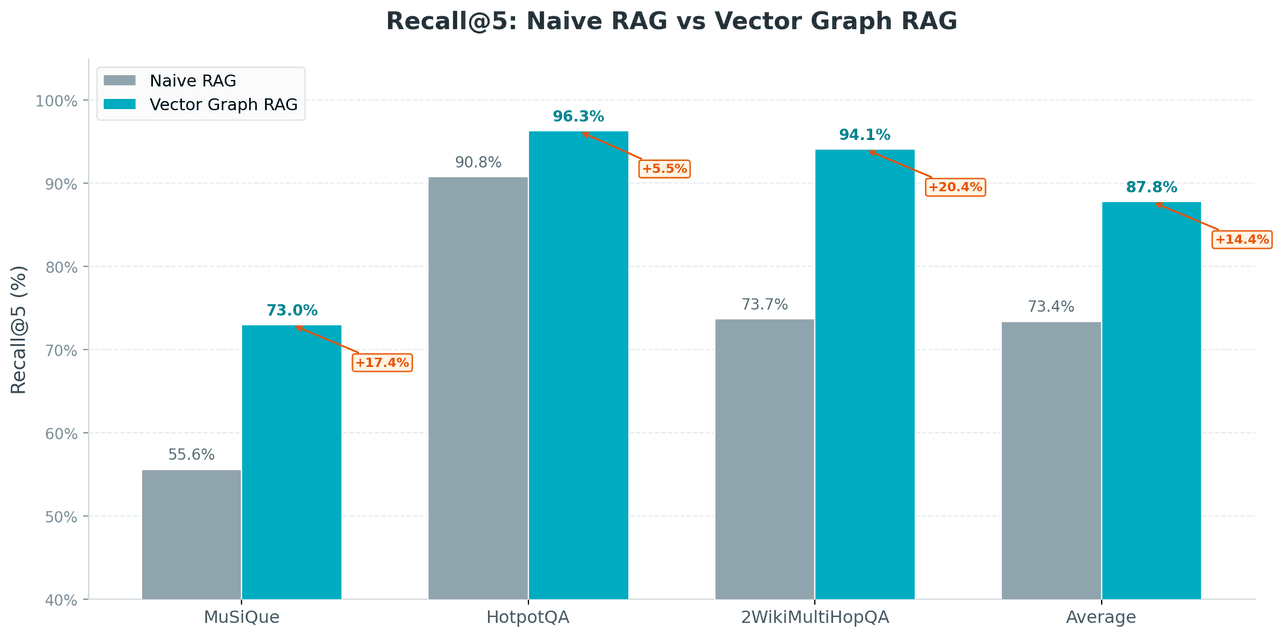
Vector Graph RAG lifts average Recall@5 from 73.4% to 87.8%, an improvement of 19.6 percentage points.
- MuSiQue: largest gain (+31.4 pp). 3-4 hop benchmark, the hardest multi-hop questions, and exactly where subgraph expansion has the biggest impact.
- 2WikiMultiHopQA: sharp improvement (+27.7 pp). Cross-document reasoning, another sweet spot for subgraph expansion.
- HotpotQA: smaller gain (+6.1 pp), but standard RAG already scores 90.8% on this dataset. The ceiling is low.
Vector Graph RAG vs State-of-the-Art Methods (SOTA)
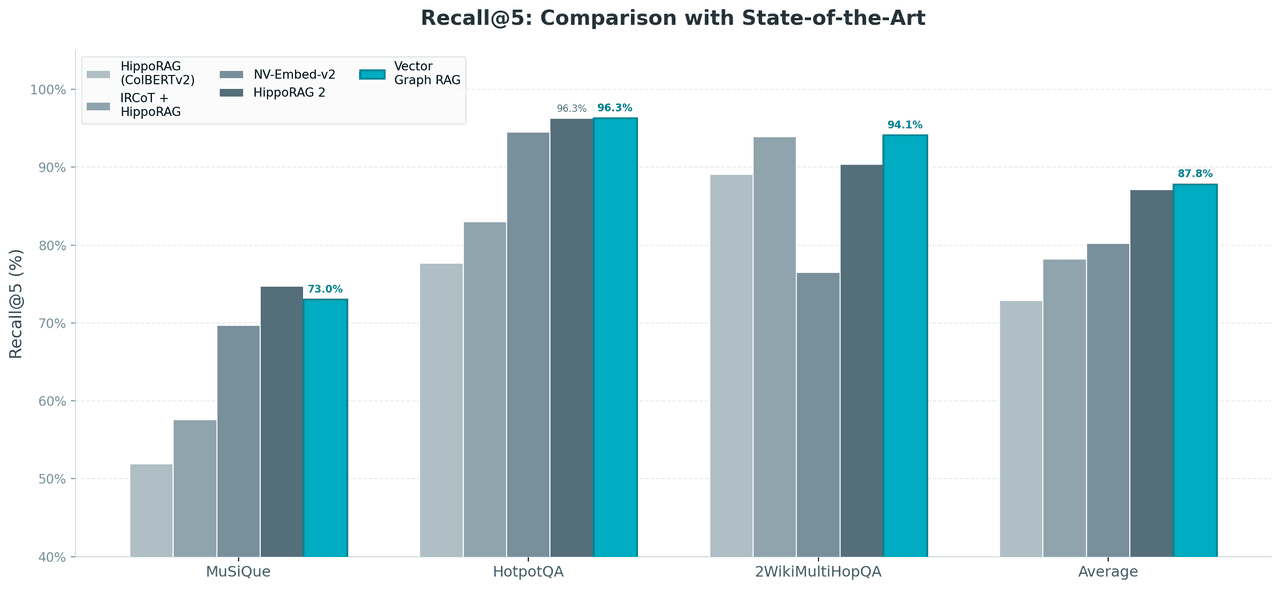
Vector Graph RAG takes the highest average score at 87.8% against HippoRAG 2, IRCoT, and NV-Embed-v2.
Benchmark by benchmark:
- HotpotQA: ties HippoRAG 2 (both 96.3%)
- 2WikiMultiHopQA: leads by 3.7 points (94.1% vs 90.4%)
- MuSiQue (the hardest): trails by 1.7 points (73.0% vs 74.7%)
Vector Graph RAG achieves these numbers with only 2 LLM calls per query, no graph database, and no ColBERTv2. It runs on the simplest infrastructure in the comparison and still takes the highest average.
How Vector Graph RAG Compares to Other Graph RAG Approaches
Different Graph RAG approaches optimize for different problems. Vector Graph RAG is built for production multi-hop QA with predictable cost and simple infrastructure.
| Microsoft GraphRAG | HippoRAG 2 | IRCoT / Agentic RAG | Vector Graph RAG | |
|---|---|---|---|---|
| Infrastructure | Graph DB + vector DB | ColBERTv2 + in-memory graph | Vector DB + multi-round agents | Milvus only |
| LLM calls per query | Varies | Moderate | 3-10+ | 2 |
| Best for | Global corpus summarization | Fine-grained academic retrieval | Complex open-ended exploration | Production multi-hop QA |
| Scaling concern | Expensive LLM indexing | Full graph in memory | Unpredictable latency and cost | Scales with Milvus |
| Setup complexity | High | Medium-High | Medium | Low (pip install) |
Microsoft GraphRAG uses hierarchical community clustering to answer global summarization questions like ‘what are the main themes across this corpus?’ That’s a different problem than multi-hop QA."
HippoRAG 2 (Gutierrez et al., 2025) uses cognitive-inspired retrieval with ColBERTv2 token-level matching. Loading the full graph into memory limits scalability.
Iterative approaches like IRCoT trade infrastructure simplicity for LLM cost and unpredictable latency.
Vector Graph RAG targets production multi-hop QA: teams that want predictable cost and latency without adding a graph database.
When to Use Vector Graph RAG and Key Use Cases
Vector Graph RAG is built for four kinds of workloads:
| Scenario | Why it fits |
|---|---|
| Knowledge-dense documents | Legal codes with cross-references, biomedical literature with drug-gene-disease chains, financial filings with company-person-event links, technical docs with API dependency graphs |
| 2-4 hop questions | One-hop questions work fine with standard RAG. Five or more hops may need iterative methods. The 2-4 hop range is subgraph expansion’s sweet spot. |
| Simple deployment | One database, one pip install, no graph infrastructure to learn |
| Cost and latency sensitivity | Two LLM calls per query, fixed and predictable. At thousands of daily queries, the difference adds up. |
Get Started with Vector Graph RAG
pip install vector-graph-rag

from vector_graph_rag import VectorGraphRAG

rag = VectorGraphRAG()  # defaults to Milvus Lite, no server needed

rag.add_texts([
    "Metformin is the first-line drug for type 2 diabetes.",
    "Patients taking metformin should have their kidney function monitored regularly.",
])

result = rag.query("What side effects should I watch for with first-line diabetes drugs?")
print(result.answer)
VectorGraphRAG() with no arguments defaults to Milvus Lite. It creates a local .db file, like SQLite. No server to start, nothing to configure.
add_texts() calls an LLM to extract triples from your text, vectorizes them, and stores everything in Milvus. query() runs the full four-step retrieval flow: seed, expand, rerank, generate.
For production, swap one URI parameter. The rest of the code stays the same:
# Local development
rag = VectorGraphRAG()

# Self-hosted Milvus
rag = VectorGraphRAG(uri="http://your-milvus-server:19530")

# Zilliz Cloud (managed Milvus, free tier available)
rag = VectorGraphRAG(uri="your-zilliz-endpoint", token="your-api-key")
To import PDFs, web pages, or Word files:
from vector_graph_rag.loaders import DocumentImporter

importer = DocumentImporter(chunk_size=1000, chunk_overlap=200)
result = importer.import_sources([
    "https://en.wikipedia.org/wiki/Metformin",
    "/path/to/clinical-guidelines.pdf",
])
rag.add_documents(result.documents, extract_triplets=True)
Conclusion
Graph RAG doesn’t need a graph database. Vector Graph RAG stores graph structure as ID references across three Milvus collections, which turns graph traversal into primary-key lookups and keeps every multi-hop query at a fixed two LLM calls.
At a glance:
- Open-source Python library. Multi-hop reasoning on Milvus alone.
- Three collections linked by ID. Entities (nodes), relations (edges), passages (source text). Subgraph expansion follows the IDs to discover bridge entities the query doesn’t mention.
- Two LLM calls per query. One rerank, one generation. No iteration.
- 87.8% average Recall@5 across MuSiQue, HotpotQA, and 2WikiMultiHopQA, matching or beating HippoRAG 2 on two of three.
Try it:
- GitHub: zilliztech/vector-graph-rag for the code
- Docs for the full API and examples
- Join the Milvus community on Discord to ask questions and share feedback
- Book a Milvus Office Hours session to walk through your use case
- Zilliz Cloud offers a free tier with managed Milvus if you’d rather skip infrastructure setup
FAQ
Can I do Graph RAG with just a vector database?
Yes. Vector Graph RAG stores knowledge graph structure (entities, relations, and their connections) inside three Milvus collections linked by ID cross-references. Instead of traversing edges in a graph database, it chains primary-key lookups in Milvus to expand a subgraph around seed entities. This achieves 87.8% average Recall@5 on three standard multi-hop benchmarks without any graph database infrastructure.
How does Vector Graph RAG compare to Microsoft GraphRAG?
They solve different problems. Microsoft GraphRAG uses hierarchical community clustering for global corpus summarization (“What are the main themes across these documents?”). Vector Graph RAG focuses on multi-hop question answering, where the goal is to chain specific facts across passages. Vector Graph RAG needs only Milvus and two LLM calls per query. Microsoft GraphRAG requires a graph database and carries higher indexing costs.
What types of questions benefit from multi-hop RAG?
Multi-hop RAG helps with questions where the answer depends on connecting information scattered across multiple passages, especially when a key entity never appears in the question. Examples include “What side effects does the first-line diabetes drug have?” (requires discovering metformin as the bridge), cross-reference lookups in legal or regulatory text, and dependency chain tracing in technical documentation. Standard RAG handles single-fact lookups well. Multi-hop RAG adds value when the reasoning path is two to four steps long.
Do I need to extract knowledge graph triples manually?
No. add_texts() and add_documents() automatically call an LLM to extract entities and relationships, vectorize them, and store them in Milvus. You can import documents from URLs, PDFs, and DOCX files using the built-in DocumentImporter. For benchmarking or migration, the library supports importing pre-extracted triples from other frameworks like HippoRAG.
- Why Multi-Hop Questions Break Standard RAG
- Why Graph Databases and Agentic RAG Aren't the Answer
- What is Vector Graph RAG, a Graph Structure Inside a Vector Database
- How Vector Graph RAG Answers a Multi-Hop Query
- Why One Rerank Beats Multiple Iterations
- Benchmark Results
- How [Vector Graph RAG](https://github.com/zilliztech/vector-graph-rag) Compares to Other Graph RAG Approaches
- When to Use Vector Graph RAG and Key Use Cases
- Get Started with Vector Graph RAG
- Conclusion
- FAQ
On This Page
Try Managed Milvus for Free
Zilliz Cloud is hassle-free, powered by Milvus and 10x faster.
Get StartedLike the article? Spread the word