Claude Context: Reduce Claude Code Token Usage with Milvus-Powered Code Retrieval
Large context windows make AI coding agents feel limitless, right up until they start reading half your repository to answer one question. For many Claude Code users, the expensive part is not just model reasoning. It is the retrieval loop: search a keyword, read a file, search again, read more files, and keep paying for irrelevant context.
Claude Context is an open-source code retrieval MCP server that gives Claude Code and other AI coding agents a better way to find relevant code. It indexes your repository, stores searchable code chunks in a vector database, and uses hybrid retrieval so the agent can pull in the code it actually needs instead of flooding the prompt with grep results.
In our benchmarks, Claude Context reduced token consumption by 39.4% on average and cut tool calls by 36.1% while preserving retrieval quality. This post explains why grep-style retrieval wastes context, how Claude Context works under the hood, and how it compares with a baseline workflow on real debugging tasks.
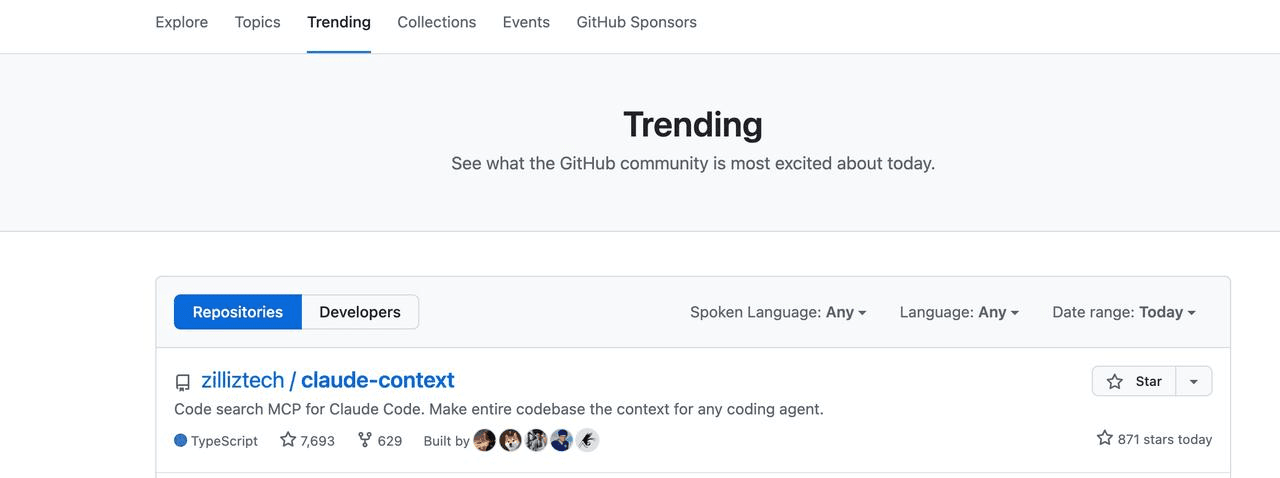 Claude Context GitHub repository trending and passing 10,000 stars
Why grep-style code retrieval burns tokens in AI coding agents
An AI coding agent can only write useful code if it understands the codebase around the task: function call paths, naming conventions, related tests, data models, and historical implementation patterns. A large context window helps, but it does not solve the retrieval problem. If the wrong files enter the context, the model still wastes tokens and may reason from irrelevant code.
Code retrieval usually falls into two broad patterns:
| Retrieval pattern | How it works | Where it breaks down |
|---|---|---|
| Grep-style retrieval | Search literal strings, then read matching files or line ranges. | Misses semantically related code, returns noisy matches, and often requires repeated search/read cycles. |
| RAG-style retrieval | Index code in advance, then retrieve relevant chunks with semantic, lexical, or hybrid search. | Requires chunking, embeddings, indexing, and update logic that most coding tools do not want to own directly. |
This is the same distinction developers see in RAG application design: literal matching is useful, but it is rarely enough when meaning matters. A function named compute_final_cost() may be relevant to a query about calculate_total_price() even if the exact words do not match. That is where semantic search helps.
In one debugging run, Claude Code repeatedly searched and read files before locating the right area. After several minutes, only a small fraction of the code it had consumed was relevant.
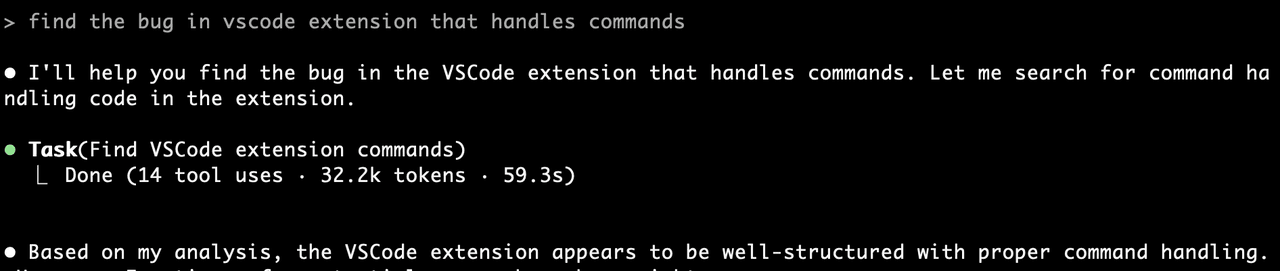 Claude Code grep-style search spending time on irrelevant file reads
That pattern is common enough that developers complain about it publicly: the agent can be smart, but the context retrieval loop still feels expensive and imprecise.
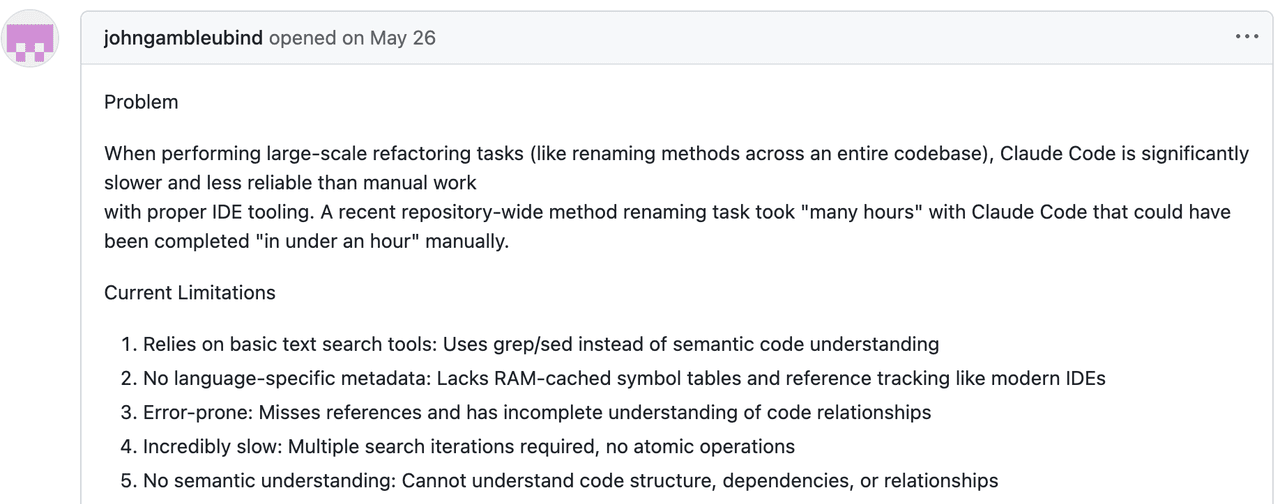 Developer comment about Claude Code context and token usage
Grep-style retrieval fails in three predictable ways:
- Information overload: large repositories produce many literal matches, and most are not useful for the current task.
- Semantic blindness: grep matches strings, not intent, behavior, or equivalent implementation patterns.
- Context loss: line-level matches do not automatically include the surrounding class, dependencies, tests, or call graph.
A better code retrieval layer needs to combine keyword precision with semantic understanding, then return complete enough chunks for the model to reason about the code.
What is Claude Context?
Claude Context is an open-source Model Context Protocol server for code retrieval. It connects AI coding tools to a Milvus-backed code index, so an agent can search a repository by meaning instead of relying only on literal text search.
The goal is simple: when the agent asks for context, return the smallest useful set of code chunks. Claude Context does this by parsing the codebase, generating embeddings, storing chunks in the Milvus vector database, and exposing retrieval through MCP-compatible tools.
| Grep problem | Claude Context approach |
|---|---|
| Too many irrelevant matches | Rank code chunks by vector similarity and keyword relevance. |
| No semantic understanding | Use an embedding model so related implementations can match even when names differ. |
| Missing surrounding context | Return complete code chunks with enough structure for the model to reason about behavior. |
| Repeated file reads | Search the index first, then read or edit only the files that matter. |
Because Claude Context is exposed through MCP, it can work with Claude Code, Gemini CLI, Cursor-style MCP hosts, and other MCP-compatible environments. The same core retrieval layer can support multiple agent interfaces.
How Claude Context works under the hood
Claude Context has two main layers: a reusable core module and integration modules. The core handles parsing, chunking, indexing, search, and incremental sync. The upper layer exposes those capabilities through MCP and editor integrations.
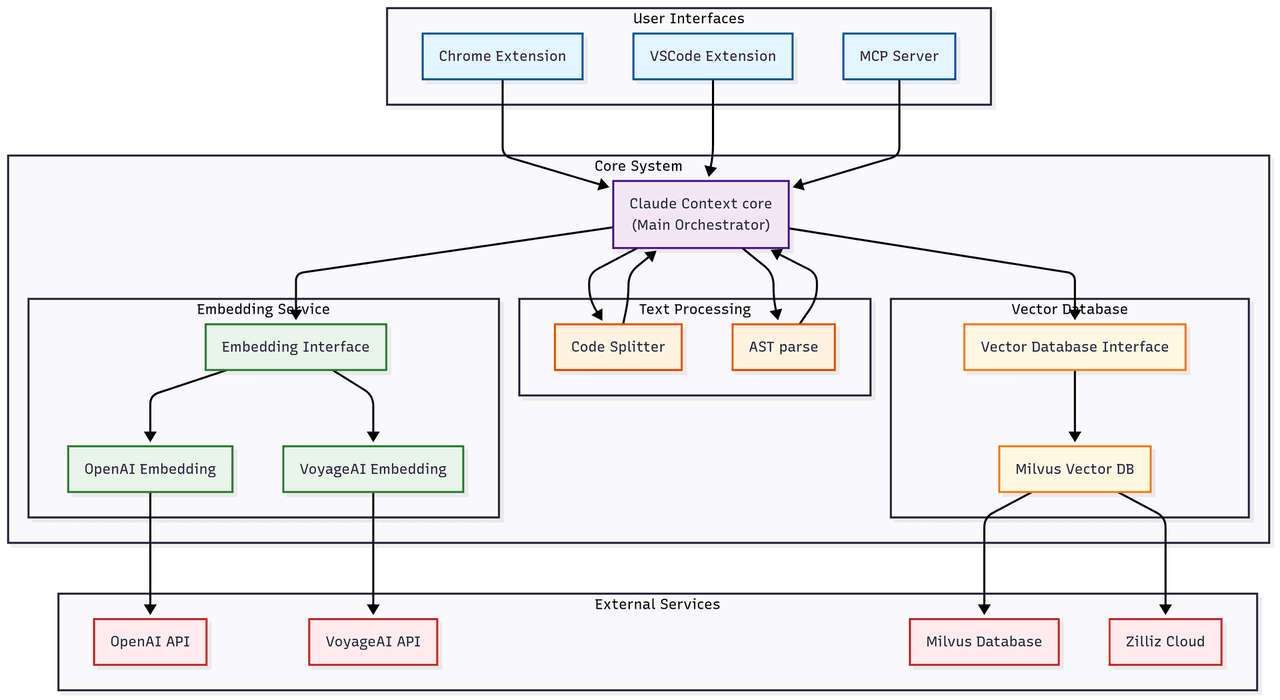 Claude Context architecture showing MCP integrations, core module, embedding provider, and vector database
How does MCP connect Claude Context to coding agents?
MCP provides the interface between the LLM host and external tools. By exposing Claude Context as an MCP server, the retrieval layer stays independent from any one IDE or coding assistant. The agent calls a search tool; Claude Context handles the code index and returns relevant chunks.
If you want to understand the broader pattern, the MCP + Milvus guide shows how MCP can connect AI tools to vector database operations.
Why use Milvus for code retrieval?
Code retrieval needs fast vector search, metadata filtering, and enough scale to handle large repositories. Milvus is designed for high-performance vector search and can support dense vectors, sparse vectors, and reranking workflows. For teams building retrieval-heavy agent systems, the multi-vector hybrid search docs and PyMilvus hybrid_search API show the same underlying retrieval pattern used in production systems.
Claude Context can use Zilliz Cloud as the managed Milvus backend, which avoids running and scaling the vector database yourself. The same architecture can also be adapted to self-managed Milvus deployments.
Which embedding providers does Claude Context support?
Claude Context supports multiple embedding options:
| Provider | Best fit |
|---|---|
| OpenAI embeddings | General-purpose hosted embeddings with broad ecosystem support. |
| Voyage AI embeddings | Code-oriented retrieval, especially when search quality matters. |
| Ollama | Local embedding workflows for privacy-sensitive environments. |
For related Milvus workflows, see the Milvus embedding overview, OpenAI embedding integration, Voyage embedding integration, and examples of running Ollama with Milvus.
Why is the core library written in TypeScript?
Claude Context is written in TypeScript because many coding-agent integrations, editor plugins, and MCP hosts are already TypeScript-heavy. Keeping the retrieval core in TypeScript makes it easier to integrate with application-layer tooling while still exposing a clean API.
The core module abstracts the vector database and embedding provider into a composable Context object:
import { Context, MilvusVectorDatabase, OpenAIEmbedding } from '@zilliz/claude-context-core';
// Initialize embedding provider
const embedding = new OpenAIEmbedding(...);
// Initialize vector database
const vectorDatabase = new MilvusVectorDatabase(...);
// Create context instance
const context = new Context({embedding, vectorDatabase});
// Index your codebase with progress tracking
const stats = await context.indexCodebase('./your-project');
// Perform semantic search
const results = await context.semanticSearch('./your-project', 'vector database operations');
How Claude Context chunks code and keeps indexes fresh
Chunking and incremental updates determine whether a code retrieval system is usable in practice. If chunks are too small, the model loses context. If chunks are too large, the retrieval system returns noise. If indexing is too slow, developers stop using it.
Claude Context handles this with AST-based chunking, a fallback text splitter, and Merkle tree-based change detection.
How does AST-based code chunking preserve context?
AST chunking is the primary strategy. Instead of splitting files by line count or character count, Claude Context parses code structure and chunks around semantic units such as functions, classes, and methods.
That gives each chunk three useful properties:
| Property | Why it matters |
|---|---|
| Syntactic completeness | Functions and classes are not split in the middle. |
| Logical coherence | Related logic stays together, so retrieved chunks are easier for the model to use. |
| Multi-language support | Different tree-sitter parsers can handle JavaScript, Python, Java, Go, and other languages. |
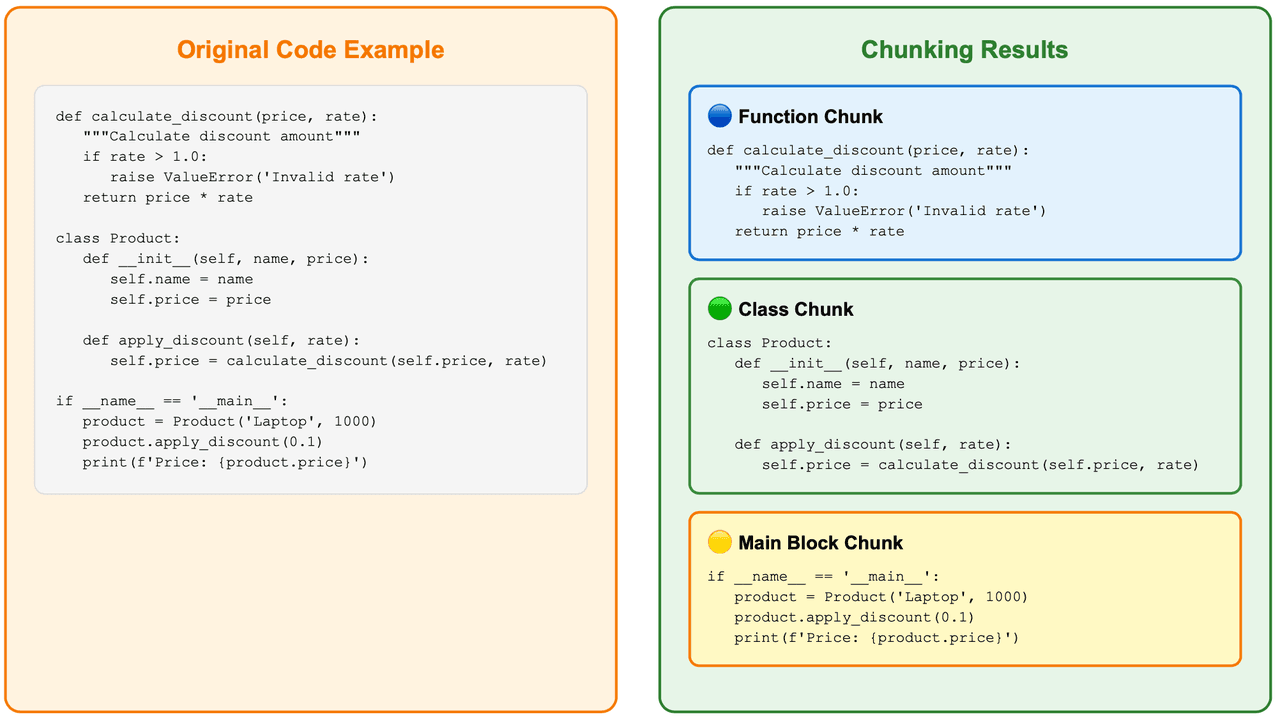 AST-based code chunking preserving complete syntactic units and chunking results
What happens when AST parsing fails?
For languages or files that AST parsing cannot handle, Claude Context falls back to LangChain’s RecursiveCharacterTextSplitter. It is less precise than AST chunking, but it prevents indexing from failing on unsupported input.
// Use recursive character splitting to preserve code structure
const splitter = RecursiveCharacterTextSplitter.fromLanguage(language, {
    chunkSize: 1000,
    chunkOverlap: 200,
});
How does Claude Context avoid re-indexing the whole repository?
Re-indexing an entire repository after every change is too expensive. Claude Context uses a Merkle tree to detect exactly what changed.
A Merkle tree assigns each file a hash, derives each directory hash from its children, and rolls the whole repository into a root hash. If the root hash is unchanged, Claude Context can skip indexing. If the root changes, it walks down the tree to find the changed files and re-embeds only those files.
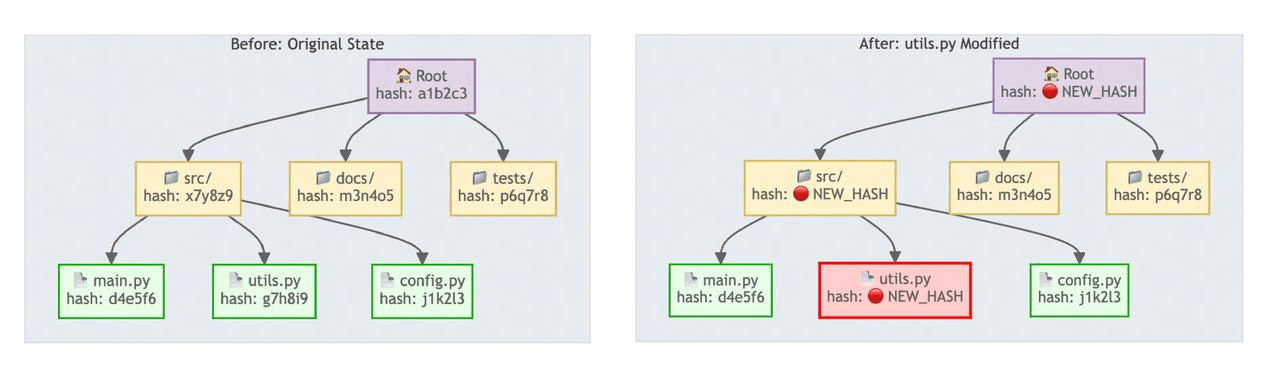 Merkle tree change detection comparing unchanged and changed file hashes
Sync runs in three stages:
| Stage | What happens | Why it is efficient |
|---|---|---|
| Quick check | Compare the current Merkle root with the last snapshot. | If nothing changed, the check finishes quickly. |
| Precise diff | Walk the tree to identify added, deleted, and modified files. | Only changed paths move forward. |
| Incremental update | Recompute embeddings for changed files and update Milvus. | The vector index stays fresh without a full rebuild. |
Local sync state is stored under ~/.context/merkle/, so Claude Context can restore the file hash table and serialized Merkle tree after a restart.
What happens when Claude Code uses Claude Context?
Setup is a single command before launching Claude Code:
claude mcp add claude-context -e OPENAI_API_KEY=your-openai-api-key -e MILVUS_TOKEN=your-zilliz-cloud-api-key -- npx @zilliz/claude-context-mcp@latest
After indexing the repository, Claude Code can call Claude Context when it needs codebase context. In the same bug-finding scenario that previously burned time on grep and file reads, Claude Context found the exact file and line number with a full explanation.
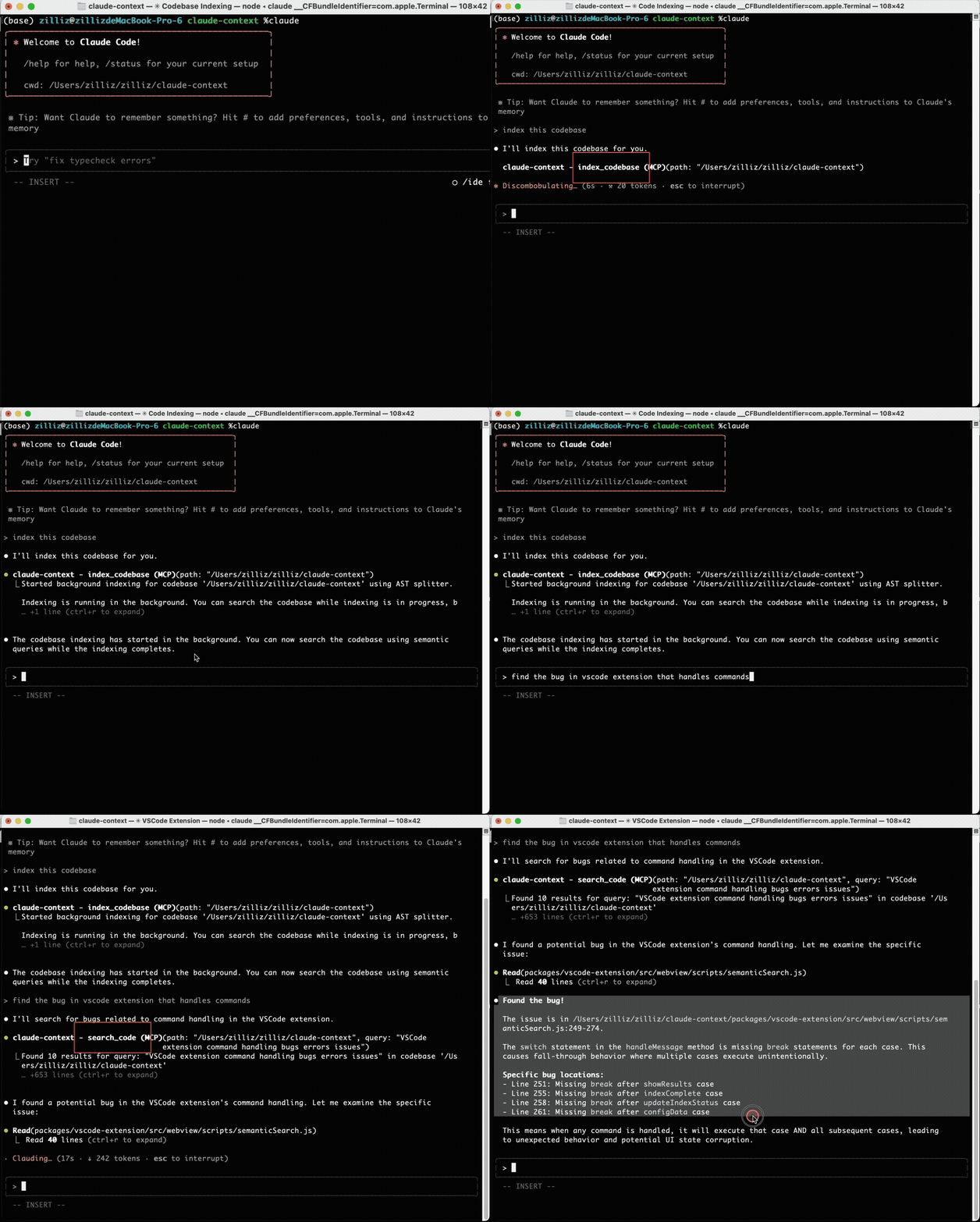 Claude Context demo showing Claude Code finding the relevant bug location
The tool is not limited to bug hunting. It also helps with refactoring, duplicate code detection, issue resolution, test generation, and any task where the agent needs accurate repository context.
At equivalent recall, Claude Context reduced token consumption by 39.4% and reduced tool calls by 36.1% in our benchmark. That matters because tool calls and irrelevant file reads often dominate the cost of coding-agent workflows.
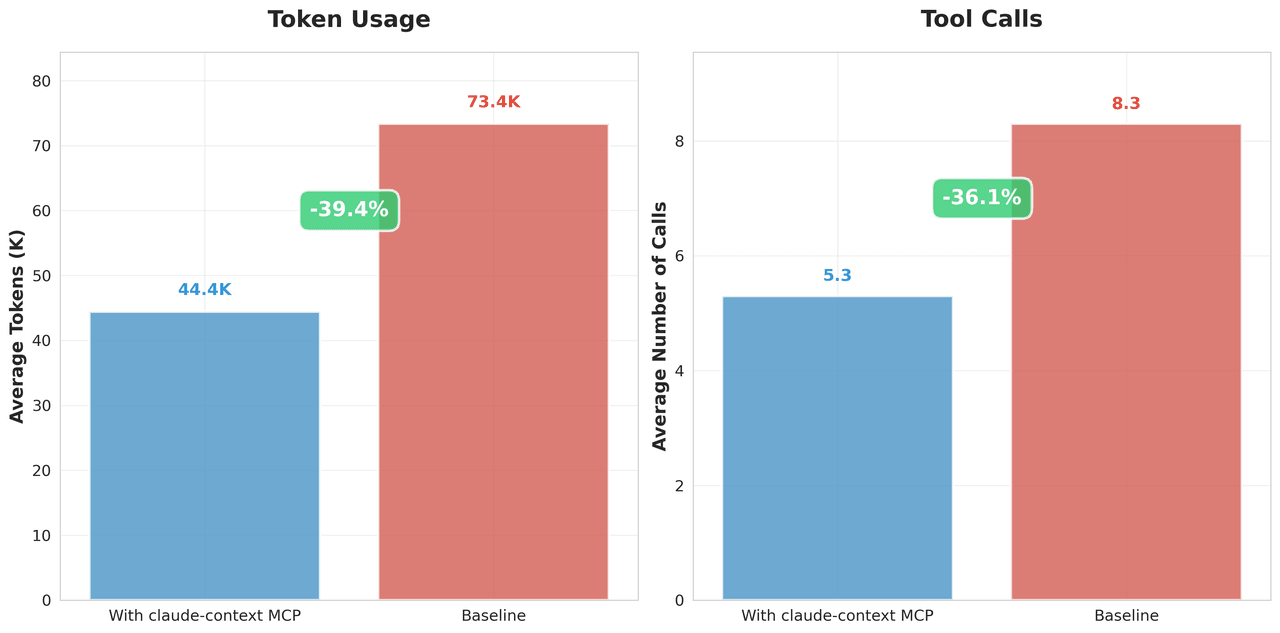 Benchmark chart showing Claude Context reducing token usage and tool calls versus baseline
The project now has more than 10,000 GitHub stars, and the repository includes the full benchmark details and package links.
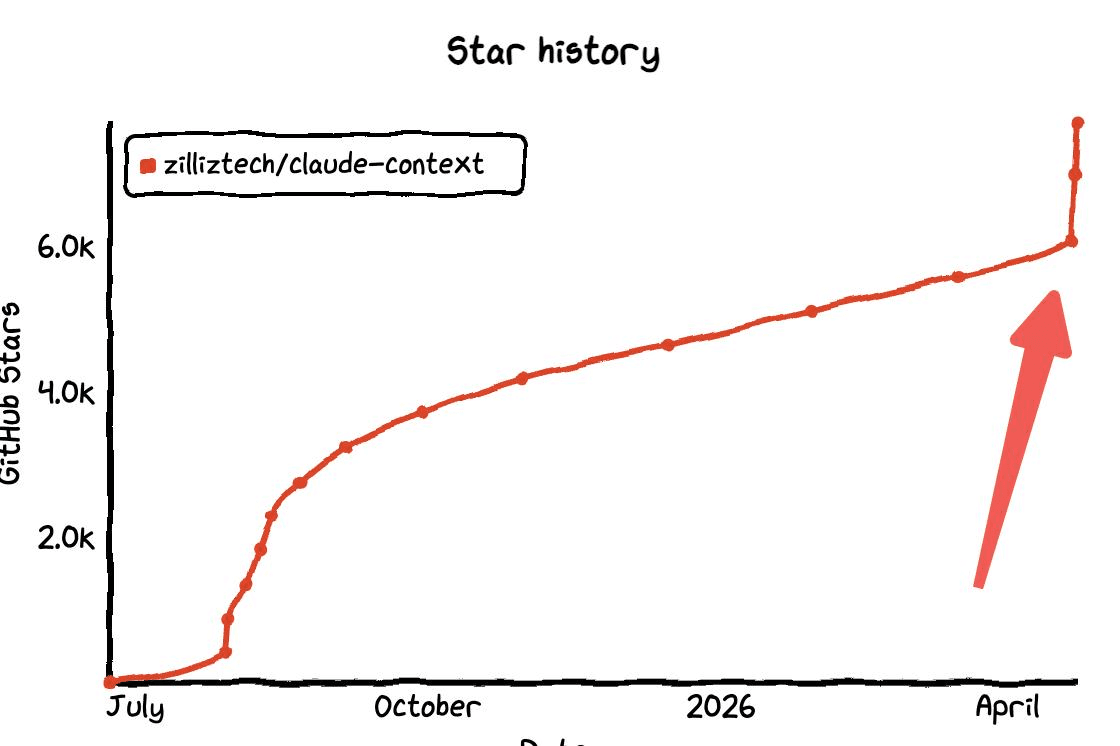 Claude Context GitHub star history showing rapid growth
How does Claude Context compare with grep on real bugs?
The benchmark compares pure text search with Milvus-backed code retrieval on real debugging tasks. The difference is not just fewer tokens. Claude Context changes the agent’s search path: it starts closer to the implementation that needs to change.
| Case | Baseline behavior | Claude Context behavior | Token reduction |
|---|---|---|---|
Django YearLookup bug | Searched for the wrong related symbol and edited registration logic. | Found the YearLookup optimization logic directly. | 93% fewer tokens |
Xarray swap_dims() bug | Read scattered files around mentions of swap_dims. | Found the implementation and related tests more directly. | 62% fewer tokens |
Case 1: Django YearLookup bug
Problem description: In the Django framework, the YearLookup query optimization breaks __iso_year filtering. When using the __iso_year filter, the YearLookup class incorrectly applies the standard BETWEEN optimization — valid for calendar years, but not for ISO week-numbering years.
# This should use EXTRACT('isoyear' FROM ...) but incorrectly uses BETWEEN
DTModel.objects.filter(start_date__iso_year=2020)

# Generated: WHERE "start_date" BETWEEN 2020-01-01 AND 2020-12-31
# Should be: WHERE EXTRACT('isoyear' FROM "start_date") = 2020
Baseline (grep):
🔧 directory_tree()
⚙️ Result: Retrieved 3000+ lines of directory structure (~50k tokens)
   Problem: Massive information overload, no direct relevance
🔧 search_text('ExtractIsoYear')
⚙️ Result: Found 21 matches across multiple files:
   - django/db/models/functions/__init__.py:5 (import statement)
   - django/db/models/functions/__init__.py:31 (export list)
   - django/db/models/functions/datetime.py:93 (ExtractIsoYear class)
   Problem: Most are unrelated imports and registrations
🔧 edit_file('django/db/models/functions/datetime.py')
⚙️ Modified multiple registration statements, but this is the wrong direction for a fix
The text search focused on ExtractIsoYear registration instead of the optimization logic in YearLookup.
Claude Context:
🔧 search_code('YearLookup')
⚙️ Found 10 results for query: "YearLookup" across the codebase
   1. Code snippet (python) [repo__django__django]
      Location: django/db/models/lookups.py:568-577
      Context: YearExact class and get_bound_params method
   2. Code snippet (python) [repo__django__django]
      Location: django/db/models/lookups.py:538-569
      Context: YearLookup base class and year_lookup_bounds method
🔧 edit_file(django/db/models/lookups.py)
⚙️ Successfully modified the core optimization logic, adding ISO year handling
Semantic search understood YearLookup as the core concept and went straight to the right class.
 Django YearLookup benchmark table showing 93 percent fewer tokens with Claude Context
Result: 93% fewer tokens.
Case 2: Xarray swap_dims bug
Problem description: The Xarray library’s .swap_dims() method unexpectedly mutates the original object, violating the expectation of immutability.
import numpy as np
import xarray as xr
nz = 11
ds = xr.Dataset({
    "y": ("z", np.random.rand(nz)),
    "lev": ("z", np.arange(nz) * 10),
})

# This shouldn't modify ds, but it does
ds2 = ds.swap_dims(z="lev").rename_dims(lev="z").reset_index("lev").reset_coords()
ds2.swap_dims(z='lev')  # this unexpectedly modifies ds2['lev']
# ds2['lev'] now has dimension 'lev' instead of 'z'
Baseline (grep):
🔧 list_directory('repo__pydata__xarray')
⚙️ Result: Retrieved directory structure across multiple subdirectories
   Problem: Basic directory navigation, no targeted search
🔧 search_text('swap_dims')
⚙️ Result: Found 21 matches across core files:
   - xarray/core/common.py:600 (Dataset.swap_dims reference)
   - xarray/core/dataarray.py:753 (".rename() or .swap_dims() instead.")
   - xarray/core/dataarray.py:2026 (DataArray.swap_dims reference)
   - xarray/core/dataarray.py:2044 (def swap_dims method)
   Problem: Many matches scattered across different contexts
🔧 read_file('xarray/core/dataarray.py', offset=2000, limit=40)
⚙️ Result: Read lines 2001-2040 showing rename method documentation

🔧 read_file('xarray/core/dataset.py', offset=3600, limit=40)
⚙️ Result: Read lines 3601-3640 showing rename_dims method
The baseline spent time navigating directories and reading nearby code before locating the actual implementation path.
Claude Context:
🔧 search_code('.swap_dims()')
⚙️ Found 10 results for query: ".swap_dims()" across the codebase
   1. Code snippet (python) [repo__pydata__xarray]
      Location: xarray/tests/test_formatting_html.py:67-76
   2. Code snippet (python) [repo__pydata__xarray]
      Location: xarray/tests/test_dataset.py:2926-2979
🔧 edit_file('xarray/core/dataset.py')
⚙️ Successfully modified the file, added dimension handling logic
🔧 edit_file('xarray/core/dataarray.py')
⚙️ Successfully modified the file, ensuring the original DataArray is not mutated
Semantic search located the relevant swap_dims() implementation and related context faster.
 Xarray swap_dims benchmark table showing 62 percent fewer tokens with Claude Context
Result: 62% fewer tokens.
Get started with Claude Context
If you want to try the exact tool from this post, start with the Claude Context GitHub repository and the Claude Context MCP package. The repository includes setup instructions, benchmarks, and the core TypeScript packages.
If you want to understand or customize the retrieval layer, these resources are useful next steps:
- Learn the vector database basics with the Milvus Quickstart.
- Explore Milvus full text search and the LangChain full-text search tutorial if you want to combine BM25-style search with dense vectors.
- Review open-source vector search engines if you are comparing infrastructure options.
- Try the Zilliz Cloud Plugin for Claude Code if you want vector database operations directly inside the Claude Code workflow.
For help with Milvus or code retrieval architecture, join the Milvus community or book Milvus Office Hours for one-on-one guidance. If you would rather skip infrastructure setup, sign up for Zilliz Cloud or sign in to Zilliz Cloud and use managed Milvus as the backend.
Frequently Asked Questions
Why does Claude Code use so many tokens on some coding tasks?
Claude Code can use many tokens when a task requires repeated search and file-reading loops across a large repository. If the agent searches by keyword, reads irrelevant files, and then searches again, every file read adds tokens even when the code is not useful for the task.
How does Claude Context reduce Claude Code token usage?
Claude Context reduces token usage by searching a Milvus-backed code index before the agent reads files. It retrieves relevant code chunks with hybrid search, so Claude Code can inspect fewer files and spend more of its context window on code that actually matters.
Is Claude Context only for Claude Code?
No. Claude Context is exposed as an MCP server, so it can work with any coding tool that supports MCP. Claude Code is the main example in this post, but the same retrieval layer can support other MCP-compatible IDEs and agent workflows.
Do I need Zilliz Cloud to use Claude Context?
Claude Context can use Zilliz Cloud as a managed Milvus backend, which is the easiest path if you do not want to operate vector database infrastructure. The same retrieval architecture is based on Milvus concepts, so teams can also adapt it to self-managed Milvus deployments.
- Why grep-style code retrieval burns tokens in AI coding agents
- What is Claude Context?
- How Claude Context works under the hood
- How Claude Context chunks code and keeps indexes fresh
- What happens when Claude Code uses Claude Context?
- How does Claude Context compare with grep on real bugs?
- Get started with Claude Context
- Frequently Asked Questions
On This Page
Try Managed Milvus for Free
Zilliz Cloud is hassle-free, powered by Milvus and 10x faster.
Get StartedLike the article? Spread the word